
Think of disaster recovery services as your business's lifeline in a crisis. They're a pre-planned, structured way to get your IT systems and crucial data back online after an unexpected disaster hits. This could be anything from a cyberattack or a critical server failure to a fire or flood at your premises. The goal is to get you back up and running, fast, minimising financial loss and damage to your reputation.
What Are Disaster Recovery Services and Why Do They Matter?
Let’s be honest, nobody likes to think about the worst-case scenario. But what if your entire operation suddenly stopped? A ransomware attack locks up every file, a key piece of hardware gives up the ghost, or even a simple power cut takes your office offline for an extended period. Without a solid plan, every minute you're down is costing you money, frustrating customers, and piling on the stress. This is exactly where disaster recovery services prove their worth.
This isn't just about having a backup of your data somewhere. It's a fully managed strategy for bringing your entire operation back to life. A good IT partner will design, build, and manage a plan to protect your servers, essential software, and data, making sure it can all be restored within a timeframe you've agreed on beforehand. It’s about turning a potential catastrophe into a manageable, albeit stressful, incident.

The Heart of Business Continuity
For small and mid-sized businesses, especially here in the East Midlands, the fallout from a major IT failure can be catastrophic. A proper disaster recovery plan provides a crucial safety net, bringing some clear, tangible benefits to the table.
- Slash Downtime: The number one priority is getting you back in business as quickly as humanly possible, stemming the tide of lost revenue and productivity.
- Protect Your Data: It ensures your data isn't just copied, but that the copies are secure, uncorrupted, and ready to be restored the moment you need them.
- Build Resilience: Having a proven plan means your business can weather the storm, protecting the reputation you've worked so hard to build with customers and suppliers.
A solid disaster recovery plan isn't just for big corporations anymore. For any modern business that depends on technology, it’s a fundamental necessity. It can genuinely be the difference between a temporary hiccup and having to close your doors for good.
To give you a clearer picture, here’s a quick breakdown of what these services cover and why each part is so important.
Quick Overview of Disaster Recovery Services
| Service Aspect | What It Means for Your Business | Key Benefit | Typical Timeframe |
|---|---|---|---|
| Data Backup | Regular, automated copies of your critical files and databases. | Prevents permanent data loss from corruption or deletion. | Minutes to hours |
| Server Replication | A live, mirrored copy of your servers in a separate location. | Allows for near-instant switchover if your main servers fail. | Seconds to minutes |
| Failover Plan | The documented procedure for switching to your backup systems. | Removes guesswork during a crisis, ensuring a smooth transition. | Defined by RTO* |
| Regular Testing | Scheduled drills to ensure the recovery plan actually works. | Confidence that your systems will recover as expected. | Annually/Quarterly |
*RTO, or Recovery Time Objective, is a key metric we'll explore in more detail later on.
Ultimately, this is about investing in the future of your business. It gives you the confidence and peace of mind that comes from knowing you have a tested, reliable process in place to handle a crisis, letting you get on with what you do best: running your company.
Laying the Groundwork for Business Resilience
Before we dive into the nuts and bolts of disaster recovery, it’s vital to get the language right. These terms might sound a bit technical, but the ideas behind them are straightforward and absolutely critical for any business owner.
Think of it like this: your business continuity plan is the big-picture strategy. It’s the master plan for keeping the entire organisation afloat during a crisis, covering everything from how you’ll communicate with staff to where you’ll work if the office is out of action.
A disaster recovery plan is a crucial piece within that larger strategy. It's the highly detailed, technical playbook focused squarely on one thing: getting your IT systems—the servers, software, and data that power your business—back up and running after something goes wrong. One is the overall game plan; the other is the specific mission for your IT response.
You might be surprised how many businesses are caught off guard. Recent research reveals that only 45% of UK businesses have a formal business continuity plan. That leaves more than half completely exposed. For businesses here in the East Midlands, this is a stark reminder that solid disaster recovery isn't a luxury; it's a fundamental necessity.
The Two Metrics That Matter Most
When you start talking about disaster recovery, two acronyms will pop up again and again: RTO and RPO. Getting your head around these is the key to building a plan that actually works for your business without costing the earth. They essentially answer two simple questions: "how fast?" and "how much?"
Let's break them down.
-
Recovery Time Objective (RTO): Picture a stopwatch. The moment a disaster hits, the clock starts ticking. Your RTO is the maximum amount of time your business can tolerate a specific system being down. An RTO of one hour means that system absolutely must be back online and working within 60 minutes. No excuses.
-
Recovery Point Objective (RPO): Now, think about data. Your RPO determines how much data you can afford to lose. It sets the maximum age of the files that must be recoverable from backup storage for business operations to resume. An RPO of 15 minutes means that if you have to restore from a backup, the data will be no more than 15 minutes out of date.
Simply put, these two metrics are the bedrock of your disaster recovery strategy. They will directly shape the technology you need, the processes you follow, and, crucially, how much it all costs.
How RTO and RPO Shape Your Strategy
Defining your RTO and RPO isn't just a tech-for-tech's-sake exercise; it’s one of the most important business decisions you'll make in this process.
For example, a customer-facing e-commerce website might need an RTO of mere minutes, which demands expensive, high-end technology like real-time server replication. On the other hand, an internal HR system might be fine with an RTO of 24 hours, which can be achieved with a much more budget-friendly solution.
The same logic applies to RPO. A low RPO is non-negotiable for systems with constant changes, like your accounting software or customer database. Losing even an hour's worth of transactions could be disastrous. To build genuine business resilience, it's also vital to guard against modern threats like the rising threat of infostealer malware.
By working with an IT partner to map out every part of your operation, you can set realistic goals for each system. This lets you strike the right balance between robust protection and sensible costs, making sure your most critical functions get the priority they deserve when disaster strikes.
Choosing Your Disaster Recovery Service Model
Once you’ve got a handle on the ‘what’ and ‘why’ of disaster recovery, the next step is the ‘how’. Picking the right service model is a critical decision that directly shapes your budget, your team's workload, and just how fast you can get back on your feet after a disaster. There’s no single right answer here; the best fit depends entirely on your business’s unique needs, your appetite for risk, and the resources you have available.
The choice really comes down to three main flavours: keeping everything in-house (on-premises), using a fully managed cloud solution (DRaaS), or blending the two (hybrid). Each offers a different mix of control, cost, and convenience.
The Traditional Route: On-Premises Recovery
The on-premises model is exactly what it sounds like: you own, manage, and maintain every piece of your disaster recovery infrastructure yourself. This usually means setting up a secondary physical site—maybe another office or rented space in a data centre—and filling it with duplicate servers, storage, and networking gear.
The big appeal here is total control. Your own IT team is in the driver's seat for everything, from choosing the hardware to setting the security rules. But that level of control comes with a hefty price tag. The initial cost for a second site can be eye-watering, and that's before you factor in ongoing maintenance, software licences, and the staff needed to run it all.
The Flexible Alternative: Disaster Recovery as a Service (DRaaS)
On the other side of the coin, you have Disaster Recovery as a Service (DRaaS). In this model, you partner with a third-party provider, like us at F1 Group, who handles the entire recovery process. Your systems are continuously copied over to the provider’s secure cloud, ready to be switched on the moment you need them.
DRaaS flips the financial model from a massive upfront capital spend to a predictable operating expense, usually a monthly or annual subscription. This makes it a much more accessible option for small and mid-sized businesses. It's an approach that's rapidly gaining popularity, and for good reason. The UK DRaaS market is expected to grow at an incredible 25.30% compound annual growth rate, a trend largely driven by SMEs in regions like the East Midlands looking for reliable, scalable protection. You can explore more data on this market trend to see just how quickly it's growing.
This decision-making process is really guided by those two key metrics we talked about earlier: RTO and RPO.
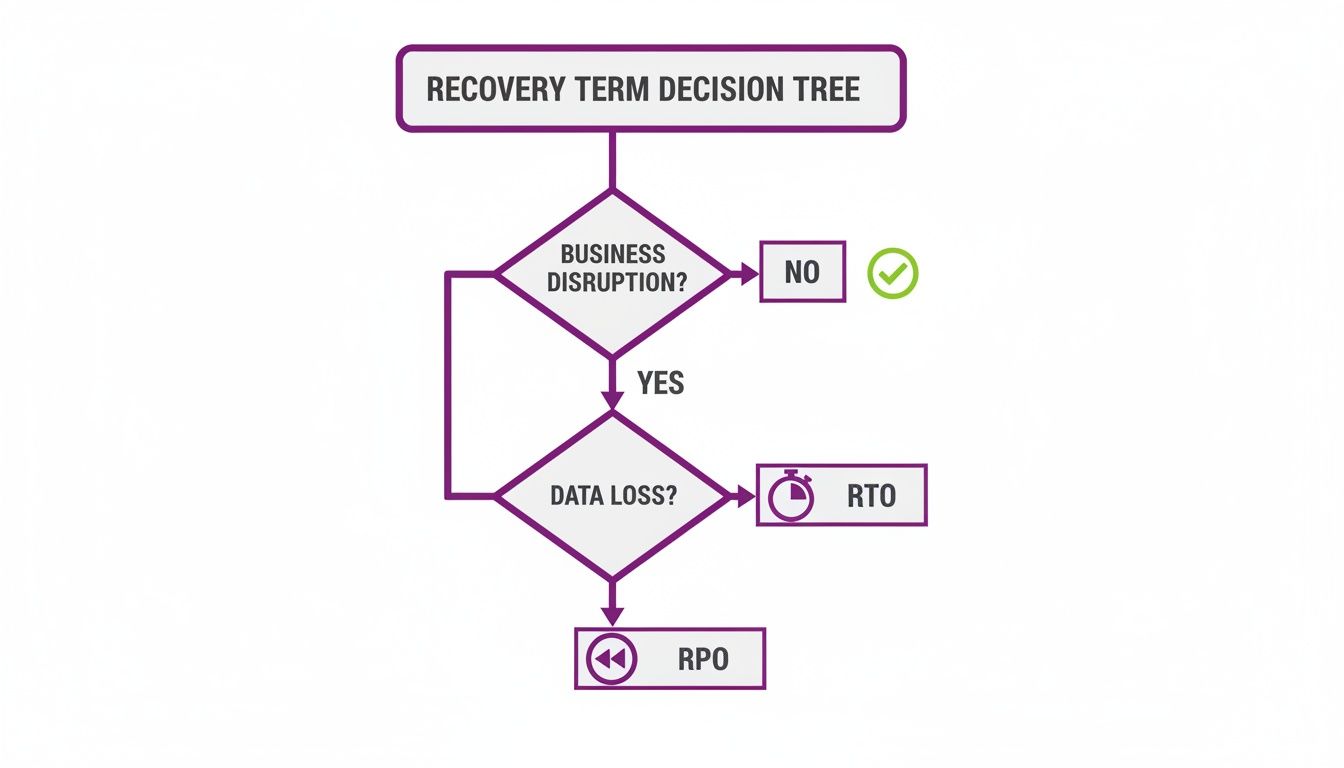
As the flowchart shows, how quickly you need to recover (RTO) and how much data you can afford to lose (RPO) are the cornerstones that will shape your entire strategy and, ultimately, your choice of service model.
Finding the Middle Ground: Hybrid Disaster Recovery
For many, the best solution isn't at either extreme but somewhere in the middle. A hybrid model cherry-picks the best of both worlds, combining on-premises and DRaaS solutions.
For example, you might keep local backups of your most business-critical data for lightning-fast, on-site recovery. At the same time, you could replicate less urgent systems to a cloud provider for more cost-effective, long-term protection. This gives you fantastic flexibility, letting you protect your crown jewels in-house while using the scale and efficiency of the cloud for everything else.
To make the comparison clearer, here’s a quick breakdown of the three models side-by-side.
Comparing Disaster Recovery Service Models
| Model | Deployment & Management | Typical Recovery Time | Cost Structure |
|---|---|---|---|
| On-Premises | Fully managed by your in-house IT team at a secondary physical location. | Can be fast, but depends heavily on internal resources and hardware readiness. | High upfront capital expenditure (CapEx) for hardware, plus ongoing operational costs. |
| Hybrid | A mix of in-house management for critical systems and third-party management for others. | Varies by system; fast for local recovery, slower for cloud-based recovery. | A blend of CapEx for on-site gear and operational expenses (OpEx) for cloud services. |
| DRaaS | Fully managed by a third-party provider in their cloud infrastructure. | Very fast; often automated failover measured in minutes. | Primarily an operational expense (OpEx) with predictable subscription fees. |
Ultimately, the model you choose directly influences how well you can weather a storm. DRaaS offers speed and simplicity, on-premises provides ultimate control, and a hybrid approach delivers a tailored balance between the two.
Unsure which disaster recovery services are right for your East Midlands business? Phone 0845 855 0000 today or Send us a message to speak with one of our experts.
Using Microsoft Azure and M365 For Your Recovery Plan
If your business is already invested in the Microsoft ecosystem, you’re sitting on a goldmine of powerful disaster recovery tools. Microsoft Azure and Microsoft 365 offer integrated solutions that can be the foundation of a seriously resilient continuity plan, helping you turn a potential catastrophe into a manageable hiccup.
The old way involved building a second physical site from the ground up – a massive expense. Now, you can tap into the colossal, secure infrastructure of the cloud. This doesn't just make life simpler; it puts top-tier recovery capabilities within reach for businesses of all shapes and sizes, from a small firm in Newark to a larger company in Nottingham. The trick is knowing how to use these tools properly.
Azure Site Recovery: Your Digital Lifeline
Think of Azure Site Recovery (ASR) as your business’s emergency generator. It’s a service built to keep your applications and workloads humming along during an outage by replicating them from your primary location to a secondary one in the cloud. If your main site goes down, you simply "fail over" to the secondary location and carry on with minimal disruption.
How does it work? ASR constantly copies your virtual or physical servers to Azure. This isn't just a periodic backup; it's a live, mirrored version of your critical systems, poised to take over at a moment's notice.

The real beauty of using ASR lies in its practical benefits:
- Barely any downtime: Automated recovery plans can slash your Recovery Time Objective (RTO) down to mere minutes.
- It's cost-effective: You completely sidestep the huge capital investment of building and maintaining a second data centre. You only pay for the heavy-duty computing resources when you actually need them during a failover.
- Testing is simple: ASR lets you run disaster recovery drills without affecting your live systems. This means you can be certain your plan works before you ever need it for real.
A key part of ASR's power is orchestration. It lets you create 'Recovery Plans' that dictate the exact order your servers should start up. This is vital for complex applications with multiple tiers, ensuring everything comes back online correctly and without chaos.
Don't Forget to Protect Your Microsoft 365 Data
While Microsoft does a fantastic job of keeping its own infrastructure for services like Exchange Online, SharePoint, and OneDrive running, they operate on what’s called a shared responsibility model.
In simple terms, Microsoft protects you from their hardware failing. But you are still responsible for protecting your own data from things like accidental deletion, data corruption, or a ransomware attack.
This is where a dedicated backup strategy is absolutely non-negotiable. Native M365 tools like retention policies are useful, but they are not a true backup. A proper M365 backup solution creates separate, unchangeable copies of your data that are completely independent of Microsoft’s platform. For a full breakdown, you can learn more about our dedicated backup for Office 365 and see how it closes these critical security gaps.
Having solid, isolated backups is a game-changer when cyber threats come knocking. When UK organisations were hit by cyber attacks, only 17% paid the ransom, largely because they had robust backup systems. That single statistic shows the immense value of a recovery strategy that makes paying criminals unnecessary.
By combining the powerful infrastructure replication of Azure Site Recovery with dedicated Microsoft 365 backups, you build a layered defence that protects your most important digital assets from a whole host of disasters.
How to Plan and Test Your Recovery Strategy
A disaster recovery plan gathering dust in a folder is about as useful as a fire extinguisher with no pin. The real test isn't whether you have a plan, but whether it actually works when things go wrong. Moving from theory to a battle-tested reality is what separates a resilient business from one that’s just hoping for the best.
The first step is figuring out what truly matters. This is where a Business Impact Analysis (BIA) comes in. It’s a structured way to identify your most critical business functions and the IT systems they rely on. By mapping out what you can't afford to lose, you can set realistic goals for how quickly you need to be back online (Recovery Time Objectives or RTOs) and how much data you can stand to lose (Recovery Point Objectives or RPOs).

This analysis helps you spend your money wisely. For instance, your e-commerce site might need to be back up in minutes, but an internal archiving server could probably wait a day. Without a BIA, you’re just guessing – and you risk either overspending on non-essentials or, far worse, leaving your most valuable assets exposed. Our IT disaster recovery plan template can give you a great head start on this process.
Putting Your Plan to the Test
With your plan documented, the real work begins: testing. Regular testing isn't just about ticking a box; it validates that your technology works as expected and, just as importantly, drills your team on what to do under pressure. The goal is to build muscle memory, so the response is automatic, not panicked.
Thankfully, you don't have to bring your whole business to a halt to run a good test. There are a few different approaches you can take.
- Tabletop Exercises: This is the easiest place to start. Get the key people in a room, present a disaster scenario, and talk through the plan step-by-step. It's a fantastic, low-impact way to spot gaps in communication or logic before they become real problems.
- Walk-through Tests: This takes things a step further. Team members actually perform their recovery tasks, like checking a backup file or verifying the configuration on a standby server. It’s still a simulation, but it adds a practical layer to the exercise.
- Failover Drills: This is the ultimate test of readiness. Here, you simulate a complete outage by switching your live operations over to your backup environment. It requires careful planning to avoid business disruption, but it’s the only way to be 100% certain your strategy will hold up when it really matters.
Regular, scheduled testing isn't an optional extra; it is the absolute foundation of a credible disaster recovery strategy. It uncovers the hidden flaws, builds your team's confidence, and ensures everyone knows their role when a crisis hits.
Of course, a core part of any strategy is having reliable backups in the first place. For example, knowing how to backup your WordPress site is a vital safety net. But remember, a backup you haven't tested is just a hope, not a plan.
By creating a cycle of planning, testing, and refining, you turn your DR strategy from a static document into a living, proven capability that will genuinely protect your business.
Is your recovery plan truly ready for a crisis? Phone 0845 855 0000 today or Send us a message to arrange a review with our experts.
Juggling Compliance and Cost
Setting up a solid disaster recovery plan isn't just a tech project; it's a careful balancing act between meeting legal rules and managing your budget. For any UK business, getting these two things right is non-negotiable for staying afloat long-term.
The world of regulation can feel like a minefield, but it’s there to protect you and your customers. Getting it wrong can lead to hefty fines, which is why compliance needs to be baked into your recovery strategy from day one.
Staying on the Right Side of UK Regulations
Here in the UK, the big one is the General Data Protection Regulation (GDPR). We often think of GDPR in terms of data privacy, but it also has a lot to say about data availability and security – the very heart of disaster recovery.
Put simply, GDPR legally requires you to be able to get personal data back online promptly after an incident. This isn’t just good practice; it’s the law.
- Data Sovereignty: You absolutely must know where your backup data lives. If you're using a cloud service, you need to be certain their data centres are in the UK or an approved territory, keeping you compliant with data residency rules.
- Audit Trails: Your DR plan can't just be an idea; it needs to be written down, and every test you run must be recorded. This paper trail is your proof that you’re actively protecting data, which can be a lifesaver if the regulators come knocking.
Think of your disaster recovery plan as a key piece of evidence for GDPR. It demonstrates to the Information Commissioner's Office (ICO) that you have the right processes in place to protect personal data and restore your services when things go wrong.
Breaking Down Disaster Recovery Costs
While nobody questions the need for it, the cost of disaster recovery can be a real worry, especially for smaller businesses. The first step to building a sensible budget is to understand what actually drives the cost.
Thankfully, modern DRaaS (Disaster Recovery as a Service) solutions have made top-tier protection much more affordable. The old model of buying tons of expensive kit upfront has been replaced by a more manageable, pay-as-you-go operational cost. Still, a few key things will shape your monthly bill.
Here’s what typically influences the price:
- How much data you have: The more data you need to protect, the more it will cost to store. Most providers offer different tiers of storage, where faster, high-performance options cost more than slower ones used for archiving.
- The computers you need (when you need them): With DRaaS, your backup servers sit quietly in the cloud, costing very little. You might pay a provider around £40 to £80 per month for a replicated virtual machine that's just waiting. The main cost kicks in when you declare a disaster and "failover"—that’s when you start paying for the computing power to actually run those servers.
- Data traffic: Your systems are constantly sending data updates to the DR provider. This ongoing replication uses internet bandwidth, and some providers charge for the amount of data transferred, particularly during a full-scale recovery.
- How much help you want: The level of support you choose makes a difference. A fully managed service, where the provider handles absolutely everything from testing to failover, will naturally cost more than a self-service option where your own team manages the process.
By thinking carefully about your RTOs and RPOs, you can make smart choices that give you the protection you need without breaking the bank.
For a clear, no-obligation quote tailored to your business, get in touch with our experts. Phone 0845 855 0000 today or Send us a message.
Finding the Right IT Partner in the East Midlands
Choosing who to trust with your disaster recovery is a massive decision for any business. This isn't just another supplier contract; the right partner becomes a genuine extension of your team, bringing not just the tech but the calm expertise you'll need in a crisis. For businesses here in the East Midlands, having a local expert who gets the regional picture is a huge advantage.
When you start talking to potential IT partners, you need to go in armed with the right questions. This is less about ticking boxes and more about finding out if you can build a long-term relationship built on solid trust and proven ability. You need to be confident they have both the technical chops and the local presence to be there when things go sideways.
Key Questions for Your Shortlist
To help you sort the contenders from the pretenders, use this checklist as a starting point. The answers you get will tell you everything you need to know.
- How deep does your experience with Azure Site Recovery and M365 backups run? You're looking for more than just a passing familiarity. Ask for evidence of deep, certified expertise in the Microsoft world, since these platforms will likely be the heart of your DR plan.
- What response times do you guarantee in your Service Level Agreement (SLA)? A vague promise of "we'll be there" just doesn't cut it. You need firm, contractually binding times for how quickly they'll acknowledge an alert and how fast they'll fix the problem.
- Are your engineers actually based here in the East Midlands? If the worst happens and you need someone on-site, having a team nearby in places like Lincoln, Nottingham, or Leicester is non-negotiable for a fast response.
- What industry accreditations do your people hold? Look for certifications from Microsoft, alongside recognised cybersecurity bodies. It shows they're serious about maintaining professional standards and keeping their skills sharp.
Picking an IT partner goes way beyond the technical specs on a proposal. You're looking for a team that's as invested in your company's survival as you are—one with a proven track record of guiding businesses through a crisis with a steady hand.
Once you have these answers, you'll be in a far better position to choose a partner who can provide the rock-solid protection you need. To see how this fits into your overall defence strategy, take a look at our guide on managed IT security services.
The next step is to have a proper chat about your business—your specific needs, your tolerance for risk, and your budget. A good provider will want to work alongside you, carrying out a full assessment to build a plan that makes your business resilient for whatever comes next.
Your business deserves a disaster recovery plan you can truly count on. The team at F1Group is ready to build that confidence with you. Phone 0845 855 0000 today or Send us a message for a no-obligation consultation.