
Think of Business Continuity (BC) and Disaster Recovery (DR) as two halves of the same whole. They work together to keep your business alive through a crisis. BC is the big-picture strategy for keeping the entire business afloat, while DR is the detailed, technical game plan for getting your IT and data back online after something goes wrong.
Why Your Business Needs More Than Just a Backup
Picture this: a burst pipe floods your server room overnight. Or worse, a ransomware attack locks up every file on your network. How do you keep taking orders, talking to customers, or even paying your staff?
Simply having a data backup isn't enough. That's just one piece of the puzzle. This is exactly why a proper, integrated business continuity and disaster recovery plan is essential for any modern UK business.
Without a plan, a small hiccup can quickly spiral into a catastrophe. The cost of downtime isn't just about lost revenue; it’s about your reputation, the trust your customers have in you, and even potential regulatory fines. A solid plan means you're not just reacting in a panic—you're managing the crisis.
The Real Cost of Unpreparedness
A common mistake is thinking that standard IT support or a simple data backup has you covered. The reality is, those services only solve a tiny fraction of the problems you'd face in a real disaster. A true resilience strategy has to look at everything.
For example, a data backup can restore your files, but it won't:
- Tell your team where to work if the office is suddenly off-limits.
- Guide you on how to communicate with worried customers and suppliers.
- Give your finance team a way to process payroll when the system is down.
- Outline what to do if a critical third-party service you rely on goes offline.
This is the gap that a robust Business Continuity plan is designed to fill. It provides the framework for the entire business to carry on.
Integrating Technology and Operations
Your Disaster Recovery plan is the engine room of your continuity strategy. It’s all about the tech—the nuts and bolts of restoring your IT infrastructure. It provides clear answers to tough questions like, "How fast can we get our core systems running again?" and, "What's the maximum amount of data we can stand to lose?"
The best way to think about it is this: Business Continuity and Disaster Recovery are two essential parts of a single resilience engine. The BC plan steers the business, while the DR plan powers the technical recovery. One simply can't work without the other.
When you bring them together, you create a powerful, unified strategy that protects your entire business. And don't forget, this applies to cloud services too. For instance, knowing why you need a separate cloud backup system for Microsoft 365 is a critical piece of any modern DR plan. This guide will walk you through building that unified strategy, ensuring your business can handle whatever comes its way and come out stronger on the other side.
Untangling Business Continuity from Disaster Recovery
People often use the terms Business Continuity Plan and Disaster Recovery Plan interchangeably, but they are fundamentally different. Confusing the two can leave your business dangerously exposed during a crisis. While they are distinct, they are deeply connected, working together to form your company's 'resilience engine'.
Let’s try a simple analogy. Think of Business Continuity (BC) as your company’s grand strategy for survival. It's the big picture, a wide-angle view focused on keeping the lights on and the core parts of the business running, no matter what gets thrown at you. This covers everything from customer support and communications to supply chain logistics and staff welfare.
Disaster Recovery (DR), on the other hand, is a specialist function within that larger strategy. It’s the highly technical, reactive plan that springs into action for one specific reason: getting your IT infrastructure and data back online after a major incident. A prolonged staff illness might trigger a BC plan, but a server meltdown or a cyber-attack is a job for the DR plan.
This diagram shows how Business Continuity and Disaster Recovery are two essential cogs in a complete resilience strategy.
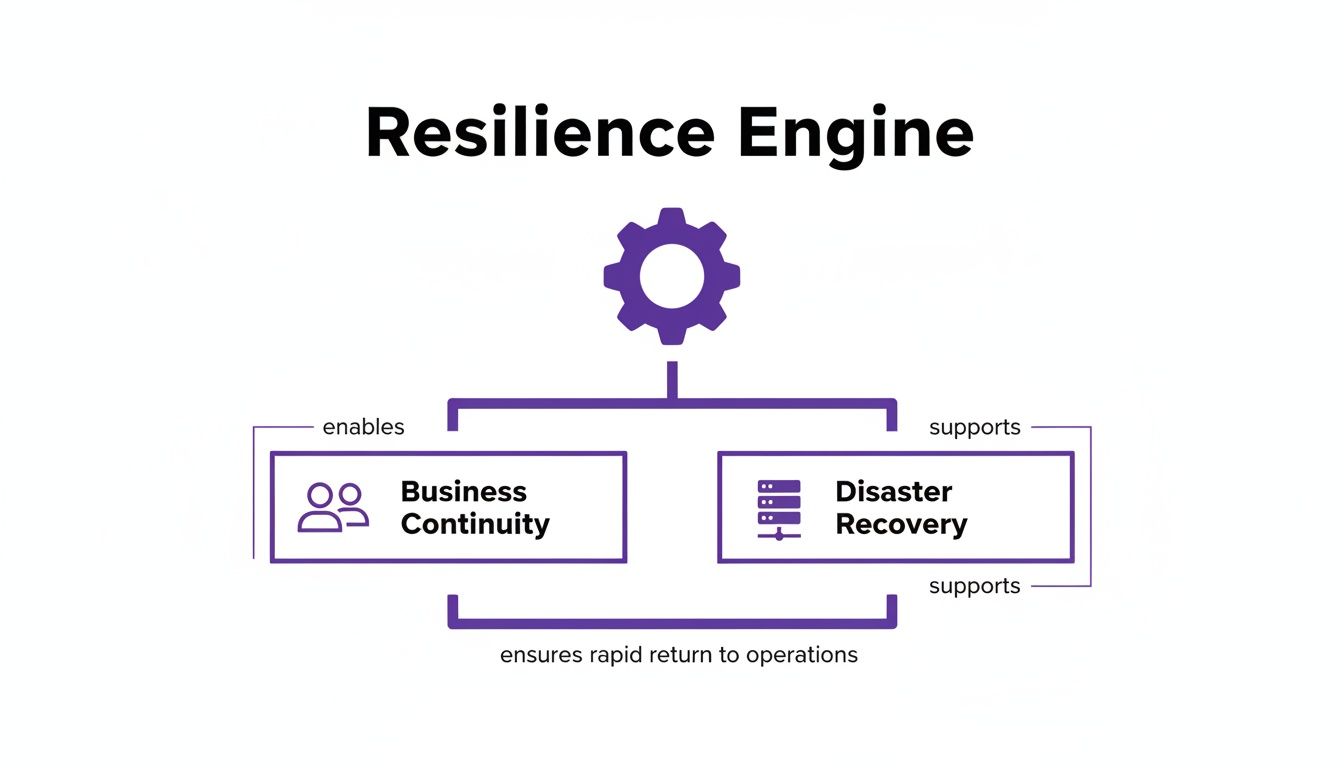
As you can see, Business Continuity is about people and processes, whereas Disaster Recovery zooms in on the technology. Both are vital for keeping the business operational.
A Clear Comparison
To really get to grips with their roles, it helps to put them side-by-side. Each has its own scope, objectives, and specific triggers. Understanding these differences is the first step toward building a truly comprehensive plan that protects your entire business.
A solid DR plan is a non-negotiable part of any modern BC strategy. UK businesses are increasingly recognising this critical link between IT recovery and financial survival. Recent findings show that 92% of organisations with a Business Continuity Plan also have a specific IT disaster recovery plan. What's more, 90% of these organisations tested parts of their recovery process in the last year, proving they understand just how crucial rapid IT restoration is. You can learn more about the growing importance of tested DR plans from Resilience Forward.
To make it even clearer, this table breaks down the key differences at a glance.
Business Continuity vs Disaster Recovery at a Glance
| Aspect | Business Continuity Plan (BCP) | Disaster Recovery Plan (DRP) |
|---|---|---|
| Primary Focus | Maintaining overall business operations and key functions during a crisis. | Restoring IT systems, data, and technological infrastructure after a disaster. |
| Scope | Organisation-wide, covering people, processes, assets, and suppliers. | Technology-focused, covering servers, networks, applications, and data centres. |
| Objective | To minimise disruption and ensure the business continues to serve customers and generate revenue. | To minimise downtime and data loss by recovering critical IT services within set timeframes (RTO/RPO). |
| Triggers | A wide range of disruptions, including power outages, supply chain failures, or pandemics. | Specific IT-related incidents like hardware failure, data breaches, or natural disasters affecting IT. |
Breaking them down like this highlights just how different their remits are.
Why You Need Both
Looking at them separately reveals a crucial truth: a DR plan on its own is just one piece of the resilience puzzle. It might successfully restore your servers, but it won’t tell your customer service team how to handle calls without access to their usual systems. It won’t guide your leadership on how to communicate with anxious stakeholders.
A Business Continuity Plan provides the 'what' and 'why' of survival, while the Disaster Recovery Plan delivers the technical 'how'. One manages the business crisis; the other resolves the technology crisis.
Ultimately, a business continuity plan and disaster recovery plan must be developed in harmony. The needs of the wider business should dictate the requirements for your IT recovery, ensuring your technology strategy is built to support your most critical operational goals from day one.
Building Your Resilience Blueprint Step by Step
Creating a solid business continuity and disaster recovery plan doesn't have to be a monumental task, nor does it require a huge budget. For most UK small and medium-sized businesses (SMBs), it’s all about taking a practical, methodical approach. The real aim is to move past theory and create a living document that your team can actually use when things go wrong.
This framework breaks the whole process down into manageable chunks. By following these steps, you’ll build a resilience blueprint that fits your specific operations, resources, and risks. The result? Clarity and confidence, knowing that everyone understands their role during a crisis.
The journey doesn't start with tech. It starts with a deep dive into what really makes your business tick.
Start with a Business Impact Analysis
Before you can protect your assets, you have to know which ones matter most. This is exactly what a Business Impact Analysis (BIA) is for, and it's the absolute foundation of any credible continuity plan.
A BIA is simply a structured way of identifying your most critical business functions and the resources they rely on. It forces you to answer the tough questions that will shape your entire strategy:
- Which of our services are completely essential for us to operate day-to-day?
- What’s the real cost—financially and to our reputation—if these services go down?
- Which specific IT systems, applications, and data do these critical services depend on?
- How long can we realistically last without each function before the damage gets serious?
By going through this process, you effectively create a recovery priority list. This ensures you're focusing your time, money, and energy on the parts of the business that truly keep the lights on, rather than trying to save everything all at once.
Define Your Recovery Objectives
Once your BIA has pinpointed your critical systems, the next step is to decide how quickly they need to be back up and running. This is where two of the most important metrics in this field come into play: Recovery Time Objective (RTO) and Recovery Point Objective (RPO).
Think of RTO and RPO as the two most important dials in your disaster recovery plan. RTO sets your recovery speed, while RPO determines how much data you can afford to lose. Getting these right is vital for aligning your technical capabilities with your business needs.
An RTO is the maximum acceptable time a system can be offline before the business suffers significant harm. Your RPO, on the other hand, is the maximum age of the data you need to recover from a backup for normal operations to resume.
For example, a busy e-commerce site might have an RTO of one hour and an RPO of just 15 minutes. In contrast, an internal development server could probably get away with an RTO of 24 hours and an RPO of 12 hours. These objectives are what will directly influence the kind of technology—and cost—involved in your DR plan.
Assemble Teams and Document Procedures
A plan is completely useless if people don’t know how to follow it. This stage is all about putting dedicated teams in place and giving them clear, step-by-step instructions.
Your plan needs to spell out:
- Response Teams: Define who is on the continuity team, the IT recovery team, and the communications team. Make sure each has a clear leader to ensure accountability and avoid confusion.
- Roles and Responsibilities: Write down the specific duties for each person during a crisis. Who has the authority to declare a disaster? Who calls the clients? Who signs off on recovery actions?
- Communication Plan: Establish a clear protocol for talking to people inside and outside the company. It’s wise to have pre-approved templates for notifying staff, customers, and suppliers.
- Step-by-Step Procedures: Create detailed runbooks for recovering your critical systems. These need to be simple enough for any qualified team member to follow under pressure, taking the guesswork out of the process.
Documenting these elements transforms your plan from a high-level idea into a practical, hands-on guide. As you build your resilience blueprint step by step, it's also worth looking at more advanced architectural patterns that can boost stability, like exploring essential microservices architecture best practices. This modern approach can help isolate failures and make recovery simpler, strengthening your overall setup.
Putting these foundational pieces in place—the BIA, recovery objectives, and documented procedures—creates a robust blueprint for resilience. It ensures your business isn't just prepared to survive a disruption, but is structured to manage it effectively from start to finish.
Using Microsoft 365 and Azure for IT Resilience
For a lot of UK businesses, the most powerful tools for disaster recovery aren't found in some expensive, specialised software. They're already sitting in your technology stack. If your business runs on Microsoft 365 and Azure, you have enterprise-grade resilience features at your fingertips, ready to form the very foundation of your business continuity and disaster recovery plans.
The real challenge, of course, is moving from having the tools to having a cohesive, tested strategy. While most businesses have some kind of plan on paper, confidence in them is worryingly low. In fact, new research shows only 54% of UK organisations are confident their Business Continuity Plans are up-to-date. This means nearly half are likely relying on dusty, outdated documents – a huge gamble when regulatory scrutiny on data protection and cyber resilience is only getting tighter. The most effective way to close this confidence gap is by leaning into the power of the cloud.
Microsoft's cloud ecosystem gives you a robust and surprisingly affordable way to protect your business, transforming what used to be a massive capital expense into a predictable operational cost.
Azure Site Recovery for Seamless Failover
At the heart of any modern disaster recovery plan is the ability to switch over your critical systems to a secondary location in a flash. That’s precisely what Azure Site Recovery (ASR) was built for. It works by continuously replicating your servers—whether they're physical boxes in your office or virtual machines—to the Azure cloud.
Think of it as having a perfect, up-to-the-minute copy of your essential IT infrastructure on standby, 24/7. If disaster strikes your main site, be it a fire, flood, or a catastrophic server failure, you simply activate your plan and "fail over" to the replicated environment in Azure. Your business keeps running from the cloud.
This approach brings some massive advantages:
- Minimal Downtime: With ASR, you can achieve Recovery Time Objectives (RTOs) measured in minutes, not hours or days.
- Cost-Effectiveness: You only pay for the full-on computing power in Azure when you actually perform a failover. This makes it far cheaper than building and maintaining a physical DR site.
- Simplified Testing: You can run DR drills whenever you like without affecting your live systems. This gives you the confidence to test, refine, and perfect your plan.
Azure Backup for Comprehensive Data Protection
While ASR keeps your systems online, Azure Backup is your ultimate safety net for the data itself. It offers a secure and automated way to back up everything from your on-premise servers and Azure virtual machines to specific applications like SQL Server.
All your backups are encrypted as they travel and while they're stored in geo-redundant data centres. This clever setup protects your data not just from a local incident at your office, but even from a large-scale regional outage affecting an entire data centre. Azure Backup is non-negotiable for a solid DR strategy, giving you the power to restore critical data from a precise point in time if it's ever corrupted or hit by a cyber-attack.
Azure Site Recovery keeps your systems running, while Azure Backup protects the invaluable data within them. Together, they form a powerful duo that underpins your technical recovery, allowing you to meet aggressive RTO and RPO targets that were once out of reach for most SMBs.
And while the cloud offers incredible resilience, it's also worth understanding how to build a resilient data center to fully appreciate the foundational principles that make both on-premise and cloud infrastructure robust.
The Built-in Resilience of Microsoft 365
It’s easy to take for granted, but Microsoft 365 has an incredible amount of resilience built right in. Services like Exchange Online and SharePoint Online are run on a massive, globally distributed network with automatic failover. This means Microsoft is already protecting your emails and documents from their own infrastructure failures.
However—and this is a big "however"—this doesn't get you off the hook for backing up your data. Microsoft uses a shared responsibility model. They are responsible for keeping the service running; you are responsible for the data you put into it. Accidental deletion, ransomware attacks, or even a disgruntled employee can wipe out your data, and Microsoft won't be able to restore it for you. This is why a dedicated, third-party backup solution is vital. You can dive deeper into the importance of backing up Office 365 in our guide.
By combining Azure's powerful DR tools with the native strengths of Microsoft 365 and a solid backup strategy, you can turn your existing IT investment into the cornerstone of your business's resilience.
Don't wait for a crisis to find the gaps in your defences. Phone 0845 855 0000 today or Send us a message to ensure your business is prepared for anything.
Putting Your Plan Into Action
You've done the hard work of creating a solid business continuity and disaster recovery plan. That’s a huge step, but a plan on paper is just a starting point. Its real value is only unlocked when you move it from a document on a shelf to a living, breathing capability within your business.
Think of it this way: an untested plan is just a collection of assumptions. It’s a dangerous gamble you simply can’t afford when a real crisis hits. Regular testing is what turns theory into practice. It builds muscle memory for your team, gives them confidence, and shines a harsh-but-necessary light on the gaps that only reveal themselves under pressure.
It’s the difference between hoping your plan works and knowing it will.

This shift towards active readiness is becoming the standard for UK businesses. Over the past decade, the number of companies testing their Business Continuity Plans (BCPs) has soared. The latest figures show that 85% of UK organisations now have a formal plan in place, a massive leap from just 56% back in 2015.
Even more importantly, 89% tested at least part of their recovery process in the last year. But there's a worrying split: while 97% of large firms have BCPs, only 58% of smaller organisations do. These smaller businesses are also far less likely to test their plans regularly, leaving them dangerously exposed. It’s a risk that disciplined practice can absolutely fix.
Different Ways to Test Your Plan
Testing doesn’t have to mean pulling the plug on your entire operation. There are several ways to approach it, each with a different level of intensity, allowing you to build your team's competence over time.
- Tabletop Exercises: This is the best place to start. You get your key team members in a room and talk through a simulated crisis, like a ransomware attack or a major power cut. The aim is to walk through the plan, clarify everyone's roles, and spot any immediate points of confusion.
- Walk-through Tests: This is a step up from the tabletop. Here, team members go through the motions of their assigned tasks, but in a simulated way. For instance, the IT team might follow the procedure for accessing backups without actually restoring any data.
- Functional Tests: Now we get more technical. These tests focus on a specific piece of your DR plan, like recovering a single server or critical application in an isolated environment. It’s about proving the technology and procedures work as expected without disrupting your live business.
- Full-Scale Simulations: This is the ultimate test, simulating a real disaster as closely as possible. It could involve failing over your core systems to your Azure recovery site or getting all your staff to work from a secondary location. It's disruptive, yes, but a successful full-scale test is the ultimate proof that your plan is ready for anything.
An untested plan isn’t a plan at all; it’s a theory. Testing is how you turn that theory into a proven, reliable capability your business can count on.
The Power of a Well-Crafted Runbook
When you're in the middle of a high-stress incident, clarity is everything. That's where a runbook comes in. It’s not a high-level strategy document; it’s a hyper-detailed, step-by-step instruction manual for a specific recovery task.
Instead of a vague goal like "Restore the finance server," a runbook lists every single command to type, every button to click, and every check to perform. This completely removes guesswork and ensures tasks are done correctly and consistently, even if the person doing them isn't your primary IT manager. A good runbook is the secret to a calm, controlled, and successful recovery. To get a head start on these vital documents, our IT disaster recovery plan template can provide a solid foundation.
Review, Refine, and Repeat
The final, and arguably most important, step of any test is the review. As soon as the exercise is over, get the team together to talk through what happened while it’s still fresh.
You need to be asking:
- What went smoothly and according to the plan?
- Where did we hit a snag? What didn’t work?
- Were any steps in our documentation unclear or just plain wrong?
- Did we meet our target RTOs and RPOs?
The answers you get are gold. They give you a clear roadmap for improving your business continuity plan. Use this feedback to update your documents, fine-tune your technical processes, and train your team on the changes. This continuous cycle of testing, reviewing, and refining is what builds true resilience.
Don't let your plan gather dust. Put it to the test and turn it into a powerful tool for business survival. Call us on 0845 855 0000 today or Send us a message to see how we can help you build and test a plan that truly works.
Finding the Right Partner to Keep You Running
Let's be honest. For most small and medium-sized businesses, building and maintaining a proper business continuity and disaster recovery plan is a daunting task. It takes deep technical knowledge, a serious time commitment, and an outsider's perspective to spot the vulnerabilities you’re too close to see. This is exactly why bringing a specialist Managed IT Services Provider (MSP) on board can be a game-changer.
A good partner isn't just about fixing IT problems. They become a core part of your resilience strategy. They’ll start by digging deep with a Business Impact Analysis (BIA) to get a handle on what makes your business tick. This groundwork is crucial—it ensures your recovery plan is built around your real-world commercial needs, not just generic IT checklists.
It’s More Than Just a Document on a Shelf
A true resilience partner takes your plan from a theoretical document and turns it into a living, breathing capability that you know will work when you need it.
Here’s what that looks like in practice:
- Designing a Fit-for-Purpose Solution: They’ll use modern cloud platforms like Microsoft Azure to build a disaster recovery setup that’s both powerful and cost-effective, hitting the specific RTO and RPO targets you’ve agreed on.
- Day-to-Day Management: They take the weight off your shoulders by handling all the complexities of monitoring backups, managing replications, and keeping everything secure. You get to focus on your business, confident that the safety net is in place.
- Putting the Plan to the Test: A plan is useless if it’s never tested. A good partner will organise and run regular drills, from simple walkthroughs with your team to full-scale simulations, to make sure everything works and everyone knows their role.
Partnering with an MSP isn't just another cost. Think of it as a strategic investment in the survival of your business. They bring the technical firepower, dedicated resources, and hands-on help you need to face a crisis without blinking.
Your 24/7 Recovery Crew
Maybe the biggest benefit of having a managed services partner comes to light when things actually go wrong. When a crisis hits, you won’t be left scrambling and trying to figure out what to do next. You'll have a dedicated team of experts on call 24/7, ready to jump into action, execute the plan, and get you back up and running.
That kind of hands-on support is priceless. It lets you focus on leading your people and talking to your customers, while they wrestle with the technical side of the recovery. It’s the difference between a chaotic, panicked reaction and a calm, methodical response when the pressure is on.
Don't wait for a disaster to show you where the cracks are. To protect your business's future with an expertly managed business continuity and disaster recovery plan, give us a call on 0845 855 0000 today or Send us a message.
Still Have a Few Questions?
Thinking through business continuity and disaster recovery plans can feel a bit overwhelming, so it's natural to have questions. Here are some of the most common ones we hear from UK businesses, with straightforward answers to help you move forward.
How Often Should We Be Testing Our Plan?
As a rule of thumb, a full test should happen at least once a year. Think of it as an annual MOT for your business resilience.
However, if your business changes frequently – new people, different IT systems, updated processes – you really should be testing more often. Quick, quarterly "tabletop" exercises are a fantastic way to keep the plan fresh in everyone's minds and ensure it still works for the business you are today, not the one you were six months ago. A full-blown technical recovery test should definitely be on the calendar annually to make sure all the tech and human parts work together under pressure.
What Do RTO and RPO Mean in Plain English?
These two terms are the absolute bedrock of your disaster recovery strategy. Getting them right dictates everything else – the technology you need, the processes you follow, and the budget you'll require.
- RTO (Recovery Time Objective): This is your deadline. It answers the question, "How long can we afford to be down before it really starts to hurt?" Is it minutes, hours, or a day?
- RPO (Recovery Point Objective): This is about data. It answers, "How much of our most recent data can we afford to lose forever?" Are you okay with losing a day's worth of work, or does it need to be just the last few minutes?
If you need to be back up in minutes with almost no data loss (a low RTO/RPO), you're looking at more sophisticated solutions. If you can tolerate a few hours of downtime, then more standard backup methods will do the job.
Can a Small Business Actually Afford a Proper Disaster Recovery Plan?
Absolutely. In fact, the real question is, can you afford not to have one? The cost of downtime and data loss can be crippling.
The good news is that modern cloud platforms like Microsoft Azure have completely changed the game. Enterprise-level recovery is no longer just for big corporations with deep pockets.
It used to be that you needed a second physical site, full of expensive, redundant hardware. Now, you can use flexible, pay-as-you-go cloud services for backup and failover. This shifts a huge capital expense into a manageable, predictable operating cost.
A good managed IT partner can build a plan that fits your exact RTO and RPO needs without breaking the bank. For many small businesses, a solid cloud backup solution can start from as little as £50-£150 per month. When you think about what's at stake, that’s a small price to pay for genuine peace of mind.
Don't wait for a crisis to find the weak spots in your defences. If you need expert help building, testing, and managing a robust business continuity and disaster recovery plan, the team at F1Group is ready to help.
Phone 0845 855 0000 today or Send us a message to make sure your business is ready for anything.