
A data migration project is far more than a technical exercise; it's a strategic business move. The best practices aren't just about checklists and software—they're about a deep-seated commitment to meticulous planning, airtight security, and crisp execution. Getting this right means moving your critical business information safely and efficiently, all without bringing your operations to a grinding halt.
True success starts long before you move a single file. It’s built on a solid foundation of understanding your data inside and out, setting crystal-clear goals, and getting everyone in the organisation on the same page from day one.
Your Blueprint For a Flawless Data Migration
For most small and mid-sized businesses, the prospect of moving to a powerful cloud platform like Microsoft 365 or Azure can feel daunting. It’s easy to get bogged down in the technical jargon, but from my experience, the projects that succeed are the ones that begin with a clear, strategic vision. This isn't just about shifting files from Point A to Point B; it's about fundamentally repositioning your business for better growth, efficiency, and security down the line.
One of the most common traps I see is the 'lift and shift' approach. This is where you simply copy everything you have into the new environment. The problem? You're often just moving old problems, inefficiencies, and security gaps into a new, more expensive home. A proper migration is a golden opportunity to re-evaluate and improve. It’s your chance to archive what you don’t need, lock down your security, and organise your information so it actually serves your business goals.
Establishing Core Migration Principles
Before you even think about touching the data, you need to establish the guiding principles for the entire project. This groundwork is vital because it ensures everyone involved—from the board room to the front desk—is aligned and understands why you're doing this. This becomes especially critical when you're weighing up your options, like cloud vs on-premises solutions. Your strategic goals will always point you to the right path.
Here are the non-negotiable principles I always recommend:
- Business-Driven Objectives: The migration has to support a tangible business outcome. Are you trying to improve team collaboration, beef up security, or slash operational costs? Define it.
- Stakeholder Alignment: You need buy-in across the board. Clear, consistent communication about the benefits, the timeline, and the potential day-to-day impact is essential.
- Data-Centric Security: Security can't be a box-ticking exercise at the end. It must be woven into every single phase, from the first planning meeting to post-migration health checks.
- Minimised Disruption: The aim is always a seamless transition. A phased, thoroughly tested approach is the only way to prevent costly downtime and keep the business running smoothly.
This diagram shows how these principles create a simple but powerful flow for any migration project.
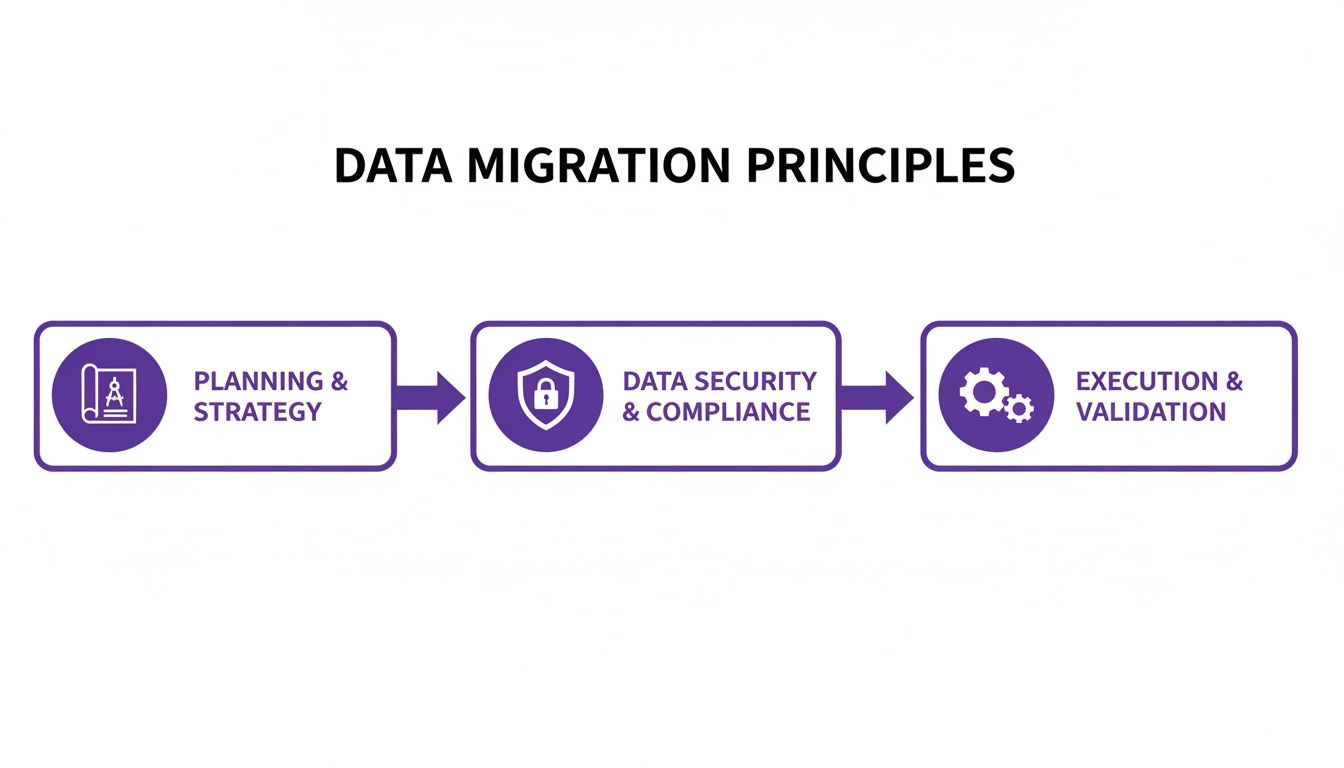
As you can see, planning, security, and execution aren't just separate stages; they're interconnected phases that build on one another.
Laying The Groundwork For Success
With your principles defined, it's time to build a realistic framework. This is where you get into the nitty-gritty of defining the project's scope, assembling the right team, and setting an accurate budget. Underestimating the resources needed is a classic pitfall that can derail a project quickly. A detailed plan helps you fend off scope creep and ensures you have the right people on hand when you need them.
Don't forget to think about the end-of-life for your old hardware, too. A complete data destruction strategy is crucial for protecting sensitive information and staying compliant. Getting a professional hard drive destruction certificate is an essential final step in this process.
By investing proper time in this initial planning phase, you're doing more than just mapping out a migration. You're creating a reliable blueprint that will guide every decision you make, keeping your project on track, on budget, and on its way to delivering real value to your organisation.
Ready to make sure your data migration is a success? Get in touch with our experts. Give us a call on 0845 855 0000 today or Send us a message.
Scoping Your Migration with a Strategic Plan
Any successful migration is built on meticulous planning, not last-minute decisions. This is where you draw the map for the entire journey, turning a high-level vision into a detailed, actionable strategy. I’ve seen it time and again: rushing this stage is the single biggest reason projects go off the rails, leading to budget blowouts, unexpected downtime, and even data loss.
Think of it like drawing up the architectural plans before laying the first brick. You absolutely have to understand every corner of your current data landscape before you can even think about moving it to its new home in Microsoft 365 or Azure.

Building Your Data Inventory
Your first practical job is to create a complete inventory of your entire data estate. This means getting a handle on every single piece of data your organisation holds, where it lives, who’s responsible for it, and how critical it is to day-to-day operations. Most businesses are genuinely surprised to discover just how much ‘dark data’ they have tucked away—forgotten file shares, old databases, and redundant backups they didn’t even know existed.
This audit isn't just a technical box-ticking exercise; it needs input from every department to understand the real-world context behind the data. For a deeper look at the strategic planning and risk management involved here, exploring a modern playbook for data center migration can offer some really valuable insights into this assessment phase.
A solid inventory should answer a few key questions:
- What is the data? (e.g., customer records, financial reports, project files)
- Where is it stored? (e.g., on-premises servers, individual hard drives, legacy cloud services)
- Who owns it? (e.g., the Sales department, HR, a specific project manager)
- Is it still relevant? This is your chance to identify stale or obsolete data that can be archived or deleted.
Classifying and Mapping Your Data
Once you know what you’ve got, the next step is to classify it. This is completely non-negotiable for compliance, especially under UK GDPR. You have to categorise your data based on its sensitivity, its relevance, and any specific regulatory rules it falls under.
This classification directly shapes your security strategy. For example, sensitive customer PII (Personally Identifiable Information) is going to need far stricter controls during and after migration than your general marketing materials.
With your data classified, you can get started on data mapping. This is the critical process of tracing each piece of information from its current location to its destination in the new system. It’s an exercise that ensures nothing gets lost or misplaced along the way. For example, you’ll map ‘Sales Team Project Files’ from your local server to a specific SharePoint site with permissions already defined for the sales team.
A detailed data map is your migration GPS. It doesn't just guide the technical move; it ensures that when your team logs in after the migration, their data is exactly where they expect to find it, with all the correct access permissions in place.
In the UK, meticulous data handling is paramount. For example, recent ONS data revisions highlighted the risks of poor data handling, where initial estimates overstated British emigration by nearly 97,000. This underscores why best practices like a comprehensive audit are essential. We recommend pre-migration cleansing to eliminate duplicates, which can reduce error rates by up to 30%. Ignoring these steps can lead to severe compliance pitfalls under UK GDPR, where fines have reached £18 million in similar mishaps. You can learn more about how data integrity impacts official figures from this recent news analysis.
Choosing the Right Migration Tools
The final piece of your strategic puzzle is picking the right tools for the job. Your choice will really depend on your project's complexity, your budget, and the specific systems you're moving from and to. You can find excellent guidance within the Azure Cloud Adoption Framework to help align your tool selection with proven methodologies.
Generally, your options fall into two main camps:
Native Microsoft Tools
- Azure Migrate: This is your central hub for assessing and migrating on-premises servers, apps, and data over to Azure.
- SharePoint Migration Tool (SPMT): Perfect for straightforward moves of file shares or on-premises SharePoint sites into SharePoint Online.
- Mover.io: A Microsoft-owned tool that’s great for migrating from other cloud storage providers (like Box or Dropbox) into Microsoft 365.
Third-Party Tools
These tools often pack more advanced features like granular filtering, better reporting, and support for more complex source environments. While they do come at a cost—often priced per user or gigabyte (e.g., £4-£12 per user)—they can be invaluable for large or complicated migrations where keeping downtime to an absolute minimum is critical.
By the time you finish this scoping phase, you should have a rock-solid project plan. It needs to outline what you're moving, why you're moving it, how it will get there, and the tools you’ll use. This groundwork is what transforms a migration from a risky leap of faith into a well-managed, predictable project.
Ready to start planning your migration? Phone 0845 855 0000 today or Send us a message.
Precision in Practice: Executing Your Data Migration
Right, you've done the hard yards on planning. Now it's time to move from paper to production. This is where the technical heavy lifting begins, turning all that careful strategy into a real, functioning Microsoft 365 or Azure environment for your business. The name of the game here isn't speed; it's precision.
Success in this phase comes down to methodical testing and a crystal-clear plan for the final switchover. A perfectly executed migration should feel almost anticlimactic for everyone outside the project team, and that’s exactly what we're aiming for. Every potential snag needs to be found and ironed out in a controlled setting, long before it has a chance to disrupt your daily operations.
The Power of Pilot Migrations
Before you even think about moving the whole company, you need to run a pilot migration. Think of it as a full dress rehearsal. This is a small-scale but very real test of your entire migration process, usually in a sandbox or staging environment. I've seen it time and again: skipping this step is one of the most common and costly mistakes a business can make.
The idea is to grab a representative slice of your data—maybe one department's shared drive or a single project's dataset—and put your plan to the test. This dry run is brilliant at uncovering the kinds of roadblocks that are completely invisible in a project plan.
During your pilot, you’re hunting for answers to some crucial questions:
- Performance: How long does the data transfer actually take? Did we just create a network bottleneck at 2 PM on a Tuesday?
- Data Integrity: Did everything arrive in one piece? Are file formats, permissions, and all that important metadata still intact?
- User Permissions: Have the access rights from the old system been mapped correctly? Can our pilot users get to what they need, and more importantly, are they blocked from seeing things they shouldn't?
This small-scale test gives you priceless feedback. It’s your chance to tweak scripts, adjust your timeline, and fix any gremlins before they can grow into full-blown operational disasters.
Choosing Your Cutover Strategy
Once your pilot runs have proven the process is solid, it's time to decide on your final cutover strategy. This is the moment of truth when you flick the switch from the old system to the new one. The right approach really depends on your business's appetite for downtime and how complex your data is.
There are three main ways to handle this, each with its own pros and cons.
Choosing Your Migration Cutover Strategy
A comparison of the three primary data migration cutover strategies to help you decide which approach best suits your organisation's needs and risk tolerance.
| Strategy | Description | Best For | Key Risk |
|---|---|---|---|
| Big Bang | All data is moved in one go, usually over a weekend. It's a single, planned period of downtime. | Smaller organisations or specific systems where a short, defined outage is manageable. | High impact if something goes wrong. A failure can mean a complex rollback and significant delays. |
| Phased | The migration is broken into chunks, moving department by department or by data type over time. | Larger businesses with distinct teams. It lets you learn and refine your process with each phase. | Juggling two systems at once can be confusing for users and add technical complexity for a while. |
| Trickle | Data moves continuously in the background over a long period, with an initial sync followed by ongoing updates. | Complex, 24/7 systems like live databases where any downtime is unacceptable. | The most technically demanding approach. It often requires specialised tools and constant monitoring to work. |
For most small to mid-sized businesses I work with, a well-orchestrated phased migration or a meticulously planned big bang over a weekend provides the best balance between getting it done and managing risk.
The best data migration plans always put the user experience first. A smooth transition for your team is worth more than raw speed, even if it means extending the project timeline a little.
Post-Migration Validation Checklist
The job isn't done when the last file copies over. Post-migration validation is an absolutely critical final check to prove that everything has landed safely and the new system is working as it should. This isn't just a quick glance; it's a proper audit.
Your validation checklist should cover these key areas:
- Data Completeness: Run the numbers. Do the file counts and total data size in the new location match the source?
- Permissions Verification: Spot-check key user accounts and groups. Can they access what they need in Microsoft 365 or Azure?
- Application Functionality: Test any critical software that relies on the migrated data. Does it connect and work correctly?
- System Performance: How does it feel? Monitor load times and general responsiveness to make sure you're hitting performance targets.
- Redirects and Links: Check that any necessary redirects are working and that links inside documents haven't broken.
Only when you've methodically ticked off every item on this list can you confidently say the technical cutover was a success and move on to the final stages of the project.
Ready to ensure your migration is executed flawlessly? Phone 0845 855 0000 today or Send us a message.
After Go-Live: Optimisation and Your Plan B
Even the best-laid migration plans can hit a bump in the road. That’s why a solid rollback plan isn't a sign of pessimism—it’s the mark of a seasoned professional. Think of it as your project's insurance policy. It clearly lays out what to do if things go sideways, preventing a small hiccup from snowballing into a full-blown business crisis.
Once you’re over the finish line and the migration is a success, the work isn't quite done. The focus just shifts. Now, it’s all about fine-tuning the new environment, getting your team comfortable, and ensuring the project delivers the value you planned for all along.

Crafting a Watertight Rollback Plan
A good contingency strategy is far more than a vague idea to "switch back to the old system." It has to be a clear, documented process that every single person on your project team understands. This plan should be a cornerstone of your wider disaster recovery plan for IT, making sure business continuity is always front and centre.
Your rollback plan needs to spell out the specifics:
- Rollback Triggers: What events would actually force a rollback? This needs to be defined upfront. Think critical data corruption, a complete system outage beyond a set time, or a serious security breach.
- Decision-Making Authority: Who makes the call? In a high-pressure moment, you can’t have confusion. Designate a small, specific group to give the final go/no-go.
- Communication Protocol: How will you let everyone know what's happening? A plan for informing stakeholders and users about the decision and its impact is crucial.
- Technical Reversal Steps: This is the nitty-gritty. What is the exact technical process to revert to the source system? This must also account for any new data created in the target system after migration.
You simply can’t overstate the importance of data integrity. As a case in point, recent ONS data revisions showed that initial net migration figures for 2022 were revised up from 606,000 to 872,000. That kind of shift erodes trust and shows just how damaging data inconsistencies can be. A solid contingency plan is your best defence against this kind of uncertainty. You can read more about these statistical revisions from the ONS.
Driving Performance and Getting Your Team On Board
With your data settled in its new home, the real work of optimisation begins. The goal is to evolve from a technically successful project to one that genuinely improves how your business runs. This next phase is all about monitoring, refining, and empowering your team.
We see the best results when businesses focus on a few key areas:
- System Performance Monitoring: Use tools like Azure Monitor to keep a close eye on performance. Are applications loading slowly? Is there network lag? High resource usage could signal that a few configuration tweaks are needed.
- User Training and Support: Never assume your team will instantly click with the new environment. Run targeted training sessions and create an obvious, easy-to-use channel for them to ask questions and report problems. The project's ultimate ROI lives and dies with user adoption.
- Data Health and Governance: Tools like Power BI are fantastic for building dashboards that monitor data quality. This gives you a live view of data accuracy, helps you spot duplicates, and ensures your information stays clean and reliable for the long haul.
Post-migration isn't the end of the project; it's the beginning of a new operational phase. Continuous monitoring and optimisation are what turn a successful migration into a lasting business advantage.
Refining Security for the Long Haul
The security controls you put in place during planning are a great start, but they aren't 'set it and forget it'. The post-migration period is the perfect time to review and strengthen your security posture in the new cloud environment.
This means running regular access reviews to make sure permissions are still appropriate and haven't crept up over time. It's also a smart move to regularly check your Azure security configurations against Microsoft's best practices to stay ahead of new threats.
At the end of the day, a data migration is a major investment. By dedicating the right resources to post-migration optimisation—and having a solid contingency plan in your back pocket—you protect that investment. This is how you ensure your move to Microsoft 365 or Azure truly delivers a more efficient, secure, and agile future for your organisation.
Ready to ensure your entire migration process, from planning to post-migration support, is a success? Phone 0845 855 0000 today or Send us a message.
Common Data Migration Traps and How to Sidestep Them
We’ve seen it all over the years. A data migration that starts with plenty of optimism can quickly turn into a costly headache if you’re not careful. Learning from the mistakes of others is one of the best ways to keep your project on track, so think of this as our hard-won checklist of what not to do.
By far, the most common and damaging mistake is skimping on the initial planning. When teams rush the discovery phase or don't get genuine backing from leadership, the project is already on shaky ground. A plan that looks good on paper but doesn't dig into the real complexity of your data is a recipe for nasty surprises later on.
The "Lift and Shift" Illusion
So many organisations fall into the trap of underestimating the data cleansing effort. You’d be amazed at how much redundant, obsolete, and trivial (ROT) data is hiding in legacy systems. Just moving all of it is like paying a removal company to pack up and transport your rubbish to a new house. It’s a complete waste of time and money, and it clutters up your shiny new cloud environment from the moment you arrive.
Just as damaging is keeping everyone in the dark. If departments aren't clear on timelines, potential downtime, and why this move is happening, you’ll be met with resistance instead of enthusiasm. The project gets labelled as "just an IT thing," which is the kiss of death for user adoption after you go live.
A data migration without a serious cleansing phase is a massive missed opportunity. It’s your best chance to sharpen data quality, tighten security, and lower your storage costs for years to come.
This isn't just a hypothetical risk. Look at the real-world parallel in the UK's net migration data from the ONS. The initial 2022 estimates shot up by 44% (from 606,000 to 872,000) once better data was integrated after the fact. It’s a perfect mirror of what happens in IT projects when undiscovered data leads to scope creep, blowing budgets and timelines out of the water. You can read the full story on the Migration Observatory's analysis of the revisions.
Forgetting What Happens Before and After "Go-Live"
It’s easy to get tunnel vision and focus only on the technical task of moving the data from A to B. But that often means critical security and support elements get missed. If you don't run a thorough security audit before you start, you could be unknowingly putting sensitive information at risk in your new cloud setup. You absolutely have to know what your most valuable data is so you can give it the highest level of protection.
Here are a few other classic blunders we see time and again:
- No Post-Migration Support: The job isn't done when you flick the switch. People will have questions and hit small snags. Without a dedicated support plan, you just create frustration and slow down the whole point of the project—getting people to use the powerful new tools.
- "She'll be right" Testing: Pilot migrations are not optional. Skipping this dress rehearsal to save time is a gamble that almost never pays off. It's your one real chance to find and fix problems before they impact the entire company.
- No Plan B: Hoping for the best isn't a strategy. You need a documented and tested rollback plan. It's your safety net that lets you switch back to the old system quickly if something goes seriously wrong.
Knowing about these pitfalls ahead of time allows you to build a strategy that avoids them. It’s this foresight that separates a smooth, successful migration from one that’s bogged down by delays, budget blowouts, and unhappy users.
Ready to navigate your data migration with an experienced partner? Phone 0845 855 0000 today or Send us a message.
Your Data Migration Questions Answered
When you're looking at a big move to Microsoft 365 or Azure, it’s completely normal to have a list of questions. We certainly did when we started helping UK businesses with this back in 1995, and over the years, we've heard them all.
Here are some straight-talking answers to the questions that come up most often, based on our real-world experience.
How Long Does a Typical Data Migration Take?
This is the classic "how long is a piece of string?" question. The timeline is dictated entirely by how much data you have, how complex it is, and where it's coming from.
For a smaller business with a few hundred gigabytes of files and emails, you could be looking at a 2-4 week turnaround from start to finish. But for a mid-sized organisation with terabytes of data, legacy applications, and intricate user permissions, it's far more realistic to plan for a 3-6 month project.
Remember, a huge chunk of that time—often 40-50% of the entire project—is spent on planning and testing. Rushing this stage is the fastest way to cause problems down the line.
What Is the Biggest Hidden Cost in Data Migration?
It's almost never a technical cost that catches people out. The real budget-breakers are the human factors. The biggest one we see is lost productivity because user training wasn't properly planned or budgeted for.
The other major culprit is the sheer effort of data cleansing. You’d be amazed at how much duplicate, out-of-date, or just plain wrong data is lurking in old systems. Sorting that out before you move it is a massive job, and it’s very easy to underestimate how long it will take.
Underestimating the human element—training, communication, and change management—is where budgets most often break. A technically perfect migration is useless if your team can't use the new system effectively from day one.
Is a Zero-Downtime Migration Realistic for Our Business?
For the vast majority of small and mid-sized businesses, aiming for a minimal-downtime cutover is the most sensible and cost-effective strategy. This usually means scheduling the final switch-over during an evening or a weekend.
True zero downtime is achievable, but it's complex. It requires specialised tools and techniques, like phased or 'trickle' migrations, which can add significant cost and complexity to the project. For things like email, a background sync followed by a very quick final cutover is so smooth that most users will barely notice anything happened.
How Do We Ensure Our Data Stays Secure During the Move?
Security isn't a separate step; it has to be baked into the entire process. This means encrypting data both in transit (as it travels over the network) and at rest (once it’s sitting in the cloud).
You need to use secure transfer protocols from the outset and ensure your new cloud environment is locked down with strong access controls and multi-factor authentication from the very beginning. We also strongly recommend a pre-migration security audit to identify and give special protection to your most sensitive information.
Ready to get clear answers for your specific migration project?
Phone 0845 855 0000 today or Send us a message.
Your Migration Partner: How F1Group Can Help
Let’s be honest, data migration is a complex business. It takes meticulous planning, deep technical knowledge, and a steady hand to see it through successfully. That’s where a good partner comes in.
Since 1995, we've been the team on the ground for businesses across the East Midlands, guiding them through the intricacies of moving to Microsoft’s ecosystem. We’ve seen it all, and we bring that experience to every project, ensuring your migration to Microsoft 365, Azure, or Dynamics 365 isn’t just a technical exercise—it’s a genuine step forward for your business.
Our approach is straightforward: we take complete ownership. From the first discovery call to the final sign-off and beyond, our vendor-certified and DBS-checked engineers manage the entire process. This means you’re not left juggling technical details or worrying about risks. You can get on with what you do best: running your business.
Ready to make your migration a success? Let's have a chat.
Phone 0845 855 0000 today or send us a message to get started.