
At its core, a disaster recovery plan for IT is your business's instruction manual for bouncing back after a major technology crisis. It’s far more than a simple data backup routine. Think of it as a detailed, step-by-step playbook that guides your team through restoring everything from servers and critical applications to keeping customers and staff in the loop when things go wrong.
Why Your Business Cannot Afford to Ignore IT Disaster Recovery
It's tempting to think, "it'll never happen to us," especially when the business is running smoothly. But that's a dangerous assumption. In reality, UK businesses are constantly navigating a minefield of threats, from increasingly sophisticated ransomware attacks to sudden hardware failures and even major cloud service outages. The potential for disruption is always there.

These disruptions aren't just hypotheticals. A recent survey found that 72% of senior IT decision-makers in the UK had to deal with significant IT downtime over the last year. The worrying part? Only 31% felt completely confident in their ability to recover. The fallout was serious: 60% had trouble getting back to normal operations, and an eye-watering 58% suffered major financial losses as a direct result.
The Real-World Cost of Downtime
When an IT disaster hits, the damage goes well beyond the initial tech headache. For a small or mid-sized organisation, the financial and reputational costs can be absolutely crippling.
Let's look at a few all-too-common scenarios:
- A Ransomware Attack: Suddenly, all your critical files are locked, and your business grinds to a halt. Every hour of downtime means lost sales, blown deadlines, and a growing sense of panic. To get ahead of this, see our advice on how to prevent ransomware attacks.
- A Critical Server Failure: The main server running your CRM and finance system dies without warning. Your sales team is flying blind without customer data, and you can't issue invoices. The impact on cash flow and customer trust is immediate.
- A Cloud Service Outage: Your entire operation runs on Microsoft 365 and Azure. While rare, a regional outage can leave your business completely paralysed, with no access to emails, files, or essential apps.
A disaster recovery plan isn't just an IT document; it's a core business survival tool. It shifts your response from chaotic scrambling to a structured, efficient recovery, protecting both your bottom line and your hard-earned reputation.
Modern Cloud Reliance Introduces New Risks
Moving to powerful platforms like Microsoft 365 and Azure has been brilliant for business productivity. But this heavy reliance brings its own set of unique risks. It's crucial to understand that while Microsoft provides a resilient platform, their main job is to guarantee their service uptime. They aren't responsible for protecting your business from data loss caused by accidental deletion, a rogue employee, or a simple configuration mistake.
Without a recovery plan designed specifically for these cloud services, you're leaving a massive gap in your defences. A good plan recognises these risks and puts the right protections in place, making sure your data is secure and your business can keep running, no matter what happens.
For a free consultation about your IT Disaster Recovery Plan, phone us on 0845 855 0000 today or Send us a message.
Getting Started: Your Business Impact Analysis
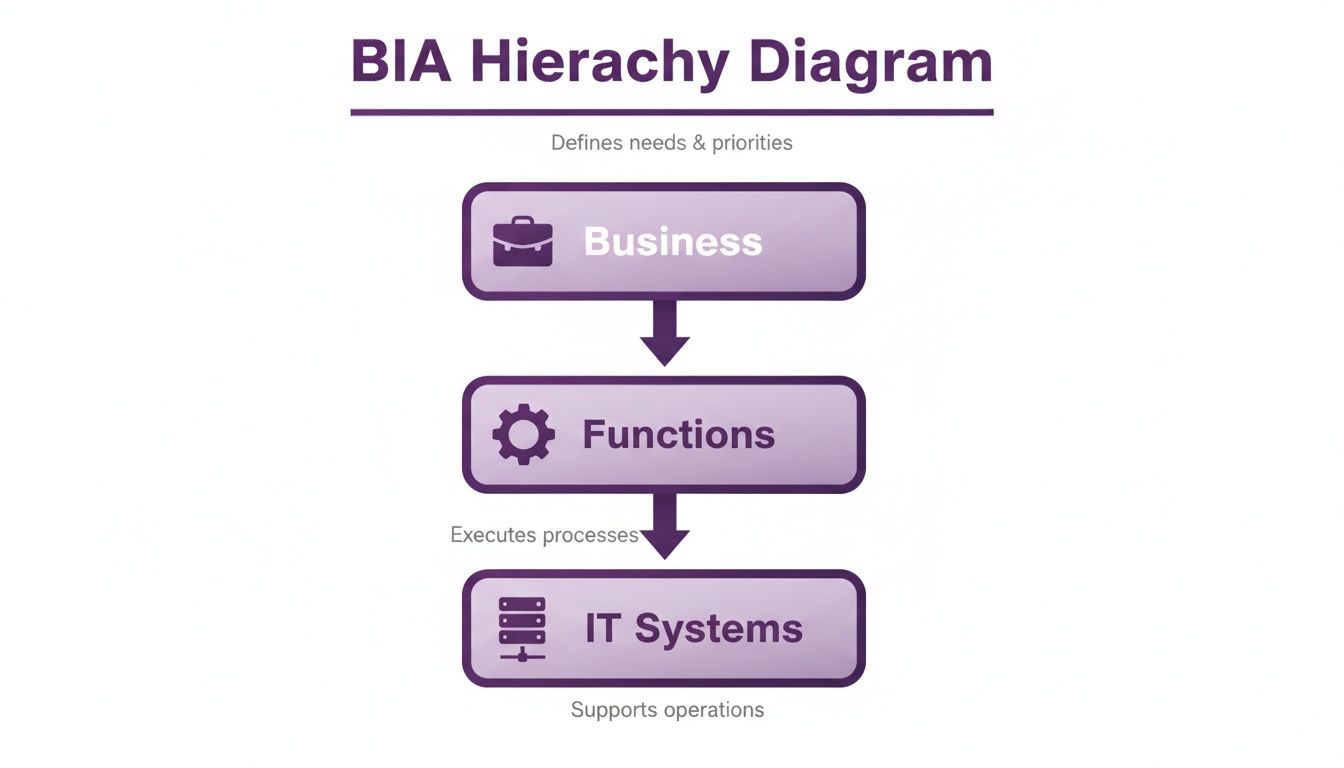
Before you even think about backup solutions or recovery protocols, you need to figure out exactly what you’re protecting and why. This is where a Business Impact Analysis (BIA) comes in. Forget technical jargon for a moment; a BIA is simply about connecting your technology directly to your bottom line. It’s the process that shifts your disaster recovery plan from a vague IT task to a sharp, business-focused strategy.
The whole point is to identify which parts of your business are absolutely critical and then trace them back to the specific IT systems they depend on. This helps you understand the real-world cost of downtime, so you know precisely where to focus your recovery efforts when things go wrong.
What Really Keeps the Lights On? Pinpointing Critical Functions
First things first, step away from the tech. Look at your organisation from a 30,000-foot view and ask a simple question: what activities make us money and keep our clients happy?
This isn't just an IT job. You need to get out and talk to people in different departments—sales, finance, operations, customer service—to build a complete picture.
You'll likely end up with a list of functions like:
- Processing customer orders through your CRM or website.
- Managing invoices and payments with your accounting software.
- Keeping in touch with clients using your Microsoft 365 email and Teams.
- Running the production line or delivering services managed by your core operational software.
By mapping this out, you start to get a gut feel for which dominoes would cause the most chaos if they fell. This clarity is the essential first step towards building a plan that actually works in the real world.
Connecting the Dots: Mapping IT Systems to Business Functions
Now that you have your list of critical functions, it’s time to connect them to the tech that makes them tick. This is where your disaster recovery plan starts to take real shape. Every important process relies on a piece of technology, whether it’s a server humming away in a cupboard or a cloud service like Microsoft Azure.
Let's make this practical. It might look something like this:
- Business Function: Processing Sales Orders
- Supporting IT System: Dynamics 365 CRM, Xero for finance, and the on-site server that hosts the database.
- Dependencies: The main internet line, the office firewall, and specific user accounts with the right permissions.
This mapping exercise often uncovers some surprising weak spots. You might suddenly realise that your entire sales pipeline depends on a single, ageing server you’d completely forgotten about. That kind of insight is gold dust when it comes to prioritising what to protect.
Don't get bogged down trying to create a perfect, hundred-page document. A good Business Impact Analysis is about asking the right questions to build a quick, practical hierarchy of what to save first. Your goal is to protect revenue-generating functions above everything else.
Putting a Price on Downtime
This is the part that really focuses the mind: figuring out what an outage actually costs. It can feel a bit like guesswork, but putting a number on downtime is what turns a "nice-to-have" recovery plan into a "must-have" business investment. You need to work out both the direct financial hit and the softer, operational costs for each critical function.
To get to a realistic figure, ask yourself these questions:
- What’s the direct financial loss? If our e-commerce site goes down, how much revenue do we lose per hour? For a business with a £5 million annual turnover, a single day of downtime could easily mean a loss of over £13,000.
- How much reputational damage will this cause? What’s the long-term impact of unhappy customers? If we can't fulfil orders or answer emails, how many clients might walk away for good?
- What are the hidden productivity costs? Think about salaries paid to staff who can’t do their jobs. If you have 20 employees sitting idle for half a day, the cost quickly runs into thousands of pounds.
- Are we exposed to regulatory fines? In the middle of a crisis, it’s easy to forget about things like GDPR. A data breach or failure to meet compliance rules during an incident can lead to massive penalties.
Answering these questions gives you a clear, data-driven pecking order for your systems. You’ll know without a doubt which services need to be back online in minutes versus those that can wait a few hours. This hierarchy is the foundation of your entire disaster recovery strategy.
Ready to build a plan that protects what matters most? Phone 0845 855 0000 today or Send us a message to speak with an expert.
Setting Your Recovery Objectives: RTO and RPO
Once you’ve finished your Business Impact Analysis (BIA), you should have a really clear picture of which parts of your business are the most critical. The next step is to attach some hard numbers to that hierarchy. This is where we get into the nuts and bolts of any good IT disaster recovery plan, defined by two crucial acronyms: RTO and RPO.
Your BIA tells you which systems to rescue first from the proverbial burning building. Recovery Time Objective (RTO) and Recovery Point Objective (RPO) tell you how fast you need to get them out and how much data you can accept losing along the way. Nailing these two metrics is what separates a practical, cost-effective plan from an expensive guessing game.
How Fast Do You Need to Be Back Online? Understanding RTO
Put simply, your Recovery Time Objective (RTO) is your stopwatch. It’s the maximum amount of time a particular system can be down before the business starts to seriously hurt, whether that’s in lost revenue, operational chaos, or reputational damage. It directly answers the question, "What's our deadline for getting this fixed?"
For instance, your customer-facing e-commerce site probably has an RTO measured in minutes. Every second it’s offline, you’re losing sales and annoying customers. On the flip side, an internal development server might have an RTO of several hours, maybe even a full day. Its downtime is a problem, for sure, but it isn't causing an immediate financial bleed.
This is why we start with the BIA – it ensures the needs of the business drive the technology decisions, not the other way around.
How Much Data Can You Afford to Lose? Defining RPO
If RTO is about time, Recovery Point Objective (RPO) is all about data. It specifies the maximum age of files that must be recovered from backup storage for normal operations to resume. In essence, it sets the minimum frequency for your backups.
Let’s say your finance system has an RPO of one hour. This means you’ve decided you absolutely cannot lose more than an hour’s worth of transactions. That decision immediately dictates your backup strategy—you’ll need something that captures data at least every 60 minutes.
Contrast that with a shared drive for marketing assets. Losing a day's worth of work on a few brochures would be frustrating, but not a company-ending event. For that system, an RPO of 24 hours, covered by a simple nightly backup, is probably perfectly acceptable.
Setting RTO and RPO isn't just an IT exercise; it's a critical business decision. Chasing near-zero targets requires incredibly sophisticated—and expensive—technology. The real goal is finding that pragmatic balance between what the business absolutely needs to function and what your budget can realistically support.
Tying Your Objectives to Specific Business Systems
The true power of RTO and RPO comes to life when you assign them to the specific applications and systems you mapped out in your BIA. You’ll quickly find that different systems command very different targets, which logically leads to different technology choices.
To give you a better idea, here's a table illustrating what this might look like for a typical mid-sized business.
Example RTO and RPO Targets for a Mid-Sized Business
This table shows how different business systems require varied recovery objectives, influencing technology choices and costs.
| Business System | Criticality Level | Example RTO | Example RPO | Associated Technology Strategy |
|---|---|---|---|---|
| E-commerce Website | Mission-Critical | < 15 Minutes | < 5 Minutes | Automated failover, continuous replication (e.g., Azure Site Recovery) |
| Finance System | High | < 4 Hours | < 1 Hour | Regular snapshots, warm standby server |
| Microsoft 365 | High | < 1 Hour | < 15 Minutes | Third-party cloud-to-cloud backup solution |
| Internal File Server | Medium | < 24 Hours | < 12 Hours | Nightly backups to a separate location |
| HR System | Medium | < 8 Hours | < 24 Hours | Daily backup with off-site storage |
As you can see, there’s no "one-size-fits-all" solution here. The mission-critical e-commerce platform justifies the cost of an always-on replication tool to meet its aggressive targets. Meanwhile, the less critical HR system is adequately protected with a far simpler and more affordable daily backup.
By defining these objectives from the outset, you can make smarter, more defensible investments. You end up spending your budget where it matters most, giving you maximum protection for every pound spent.
Ready to define your recovery objectives? Phone 0845 855 0000 today or Send us a message to discuss how we can help.
Choosing Your Backup and Recovery Strategies
Once you’ve nailed down your RTO and RPO numbers, it's time to move from planning to doing. This is where we build the technical framework that actually makes your disaster recovery plan work. It’s all about picking the right tools and strategies to create a multi-layered defence, ensuring your data is safe and sound, whatever happens.

The foundation of any solid backup strategy I've ever built starts with the classic 3-2-1 rule. It's been around for ages for one simple reason: it works.
It’s a straightforward but incredibly effective framework:
- Keep three copies of your data (your live one and two backups).
- Use two different media types (e.g., a local server and cloud storage).
- Store one copy off-site, physically separate from your office.
This simple approach covers you for everything from an accidentally deleted spreadsheet to a fire in the server room. Even with everything moving to the cloud, the core logic of the 3-2-1 rule is just as crucial today.
Modernising the 3-2-1 Rule for Today's Threats
The 3-2-1 rule is a fantastic starting point, but the game has changed. Modern threats like ransomware mean we have to add more layers to our defences. Cyber criminals aren't just after your data; they actively hunt down and destroy your backups to leave you with no choice but to pay.
This is where immutable and air-gapped backups come into their own.
- Immutable Backups: Think of these as "write-once, read-many." Once a backup is created, it cannot be altered or deleted for a set period. This is a game-changer against ransomware. Even if an attacker gets admin access, they simply can't touch your backup files.
- Air-Gapped Backups: An air gap is a physical or logical separation between your network and your backups. The old-school way was tapes stored in a vault. Today, this means using separate credentials and isolated cloud storage accounts that aren't constantly connected to your primary network.
Combining the classic 3-2-1 rule with modern techniques like immutability and air-gapping creates a seriously tough nut to crack. It ensures that even in a worst-case scenario, you always have a clean, untouchable copy of your data ready to go.
Leveraging the Power of Microsoft Azure and Third-Party Tools
For businesses running on the Microsoft stack, Azure Site Recovery (ASR) is a phenomenal tool. It can replicate your physical servers or cloud VMs to a completely different Azure region. If your primary site goes down, you can trigger an automated failover and be back up and running remarkably quickly.
This is how you meet those really tight RTOs for your most critical applications. Instead of spending hours or days rebuilding a server from scratch, ASR can have a replica running in minutes.
But here’s a common pitfall: many people assume their Microsoft 365 data is automatically protected. Microsoft guarantees the service will be online, but protecting your actual data—your emails, your SharePoint files—is your responsibility. Accidental deletion, a disgruntled employee, or a ransomware attack could wipe it out. Our guide on backing up your Microsoft 365 data digs into why a third-party solution is non-negotiable.
Why Air-Gapped Backups Are Winning the Fight
This isn't just theory; the numbers back it up. We're seeing that cyber attacks are the leading cause of downtime for 71% of organisations. The good news? The tide is turning against ransomware, largely because businesses are getting smarter with their backups. Today, only 17% of victims end up paying a ransom, a massive improvement directly linked to the adoption of air-gapped backups. Securing data is a universal challenge, and you can learn a lot from sectors with the highest stakes; reviewing robust healthcare data security solutions provides excellent insights into the principles of protecting critical information.
By mixing foundational strategies like the 3-2-1 rule with powerful cloud tools and modern defences like immutable storage, you build a resilient IT framework that truly fits your business needs and budget.
Ready to build a resilient backup and recovery strategy? Phone 0845 855 0000 today or Send us a message.
From Theory to Action: Building and Testing Your Recovery Playbook
Having a solid backup strategy is a great start, but it's only half the battle. The most sophisticated technology is useless if your team doesn't know what to do when a real incident hits. This is where your recovery playbook, often called a runbook, comes in.
Think of it as your emergency instruction manual—a clear, simple guide your team can grab and follow under immense pressure. It’s what turns panic into a structured, confident response.

A plan gathering dust on a shelf is a liability, not an asset. Your playbook is what makes the whole thing real and actionable. The aim isn't to write a massive, overly-technical novel; it's to create a practical guide that anyone on the response team can use to get the business back on its feet.
Building Your Actionable Runbook
A great runbook is all about clarity. When a crisis unfolds, nobody has time to decipher jargon or hunt for missing information. Your playbook needs to be the single source of truth for the entire recovery.
So, what should be in it?
- Key Personnel & Contact Details: Who’s on the disaster recovery team? List their names, roles, and multiple ways to contact them (work phone, mobile, personal email). You never know what systems will be down.
- Step-by-Step Technical Procedures: Get specific. Detail the exact actions needed to restore critical systems. Think "How to failover the finance server using Azure Site Recovery" or "Restoring the Microsoft 365 backup." Don't assume anything.
- Vendor & Supplier Contacts: Keep a list of contacts for your internet provider, key software vendors, and your IT support partner. Include account numbers and support contract details to speed things up when you need to escalate.
- A Clear Communication Plan: This is arguably just as important as the technical steps. It outlines exactly how you will keep everyone in the loop during the crisis.
Who to Talk to and What to Say
During an incident, communication is everything. A well-defined communication plan stops misinformation in its tracks and helps manage expectations, which is vital for protecting your reputation.
Your plan needs to specify:
- Stakeholder Communications: How and when will you update senior management? They need clear, concise updates on the situation and realistic recovery timelines.
- Employee Updates: Your staff will be anxious and unsure of what to do. Provide regular updates on which systems are affected and when they can expect to be operational again.
- Customer Messaging: If the incident impacts customer-facing services, you must have pre-approved messages ready for your website, social media, and customer service teams. Honesty and transparency are always the best policy.
A well-rehearsed playbook is the difference between controlled recovery and complete chaos. It empowers your team to make confident decisions when it matters most, minimising downtime and protecting the business from further harm.
You Don't Know if It Works Until You Test It
Your disaster recovery plan for IT is a living document, not a "set it and forget it" project. The only way to find out if it actually works is to test it—regularly and rigorously. Testing builds muscle memory, uncovers hidden flaws, and gives your team the confidence they need for the real thing.
The operational impact of even minor incidents is growing. The UK Government's Cyber Security Breaches Survey found that the temporary loss of access to files or networks has risen to 7% for businesses. With the average cost per business for non-phishing cyber crime hitting £990, often driven by staff time spent on remediation, the need for an efficient, well-rehearsed playbook is undeniable. You can review the complete findings about UK cyber security breaches on gov.uk.
There are a few ways to put your plan through its paces:
- Tabletop Exercises: This is the simplest starting point. Gather the recovery team, present a disaster scenario ("A ransomware attack has encrypted our main file server"), and talk through the playbook step-by-step. It’s a fantastic way to find gaps in logic and communication without touching any live systems.
- Partial Failover Tests: Here, you test the recovery of a single, non-critical system. For instance, you could restore a secondary application server to an isolated environment to verify that your backups and procedures work as expected.
- Full Failover Simulations: This is the ultimate proof. You actually switch operations over to your backup site or systems. It’s more disruptive, yes, but it’s the only way to know for sure that your entire plan is effective and your RTOs are achievable.
Regular testing ensures your plan keeps up with changes in your IT environment. It transforms your disaster recovery plan from a document into a proven, reliable capability.
To create a recovery playbook that truly protects your business, Phone 0845 855 0000 today or Send us a message.
When to Call in the Experts for Your Disaster Recovery
Let’s be honest: building a truly effective disaster recovery plan is a heavy lift. For many growing businesses, there's a tipping point where the DIY approach just doesn't cut it anymore. Your systems get more complex, the threats get more sophisticated, and suddenly, you realise you might be in over your head. Knowing when to ask for help is a sign of a smart leader.
So, what are the tell-tale signs? Often, it’s rapid growth. Your IT environment, which was once simple, has become a sprawling, complex network that’s a full-time job to manage. Or perhaps you lack the niche skills needed to get the most out of powerful tools like Azure Site Recovery. These are clear signals that it’s time to bring in a specialist.
What an Expert Partner Really Brings to the Table
Working with a managed IT services provider changes the game entirely. You shift from putting out fires to preventing them in the first place. This means 24/7 monitoring that catches problems before they turn into disasters, regular maintenance to keep everything running smoothly, and expert advice to ensure your DR plan is always fit for purpose.
An expert partner doesn't just hand you a document and walk away; they take ownership of your resilience. This frees you up to focus on running your business, knowing your operations are in the hands of people who live and breathe disaster recovery.
A fresh pair of expert eyes can be invaluable. They'll spot vulnerabilities your own team might have overlooked and make sure your strategy is built on proven, industry-standard practices. They do the technical heavy lifting—from configuring complex backup routines to running full-scale failover tests—so your team can focus on what they do best.
Ultimately, engaging a specialist turns disaster recovery from a daunting chore into a real strategic asset. It provides the peace of mind that comes from knowing you have a solid, tested framework ready to handle whatever comes your way. To see how this works in practice, you can learn more about the benefits of our comprehensive managed IT support services.
Ready to make your business more resilient? Give us a call today on 0845 855 0000 or Send us a message.
Your IT Disaster Recovery Questions, Answered
When you start digging into disaster recovery, a lot of questions naturally pop up. It’s a complex area, so let's clear up a few of the most common queries we hear from business owners and IT managers.
How Often Should We Be Testing Our Disaster Recovery Plan?
The standard advice is to test your plan at least once a year, and that’s a decent starting point.
But honestly? If your IT systems are constantly changing or if downtime would be catastrophic for your business, you should really be aiming for quarterly tests. A lot can change in twelve months.
Testing doesn’t have to mean shutting everything down either. You can start with a 'tabletop' exercise—essentially a structured walkthrough where your team talks through a specific disaster scenario. From there, you can move up to more involved simulations, like a full failover test where you actually switch over to your backup environment. This is the only real way to find the hidden gaps and make sure everyone knows exactly what to do when the pressure is on.
Can We Just Rely on Microsoft 365’s Built-in Protection?
This is a huge and very common misconception. Microsoft does a fantastic job of keeping its own infrastructure running, but their responsibility ends there. They are focused on platform availability, not your specific data protection.
Think of it this way: Microsoft ensures the lights stay on in their data centres. They don't protect you from accidental file deletion, a disgruntled employee wiping a SharePoint site, or a ransomware attack that encrypts your entire inbox. Their built-in retention policies are a very short-term safety net, not a proper backup.
For genuine business continuity, a dedicated third-party backup solution for all your Microsoft 365 data—including emails, SharePoint, OneDrive, and Teams—is non-negotiable. It’s the only way to get the long-term, easily-restorable data protection you actually need.
What’s the Real Difference Between a Disaster Recovery Plan and a Business Continuity Plan?
It's easy to get these two mixed up, but the distinction is pretty important. The easiest way to think about it is that your Disaster Recovery (DR) plan is a key part of your wider Business Continuity (BC) plan.
- A Disaster Recovery Plan is the technical playbook. It's all about the "how-to" of getting your IT infrastructure, systems, and data back online after a major incident. It's very IT-focused.
- A Business Continuity Plan is the big-picture strategy for the entire organisation. It covers everything needed to keep the business running during a disruption. This includes things like how you'll communicate with customers, where staff will work if the office is unavailable, and even how to manage your supply chain—in addition to the IT recovery steps from the DR plan.
A proactive, well-thought-out strategy is the best defence you have. The team at F1Group has spent decades helping organisations across the East Midlands build robust and reliable IT disaster recovery plans that actually work when they're needed most.
Give us a call on 0845 855 0000 or send us a message to have a chat about your specific needs and how we can help secure your business's future.
Phone 0845 855 0000 today or Send us a message