
Getting your head around licensing Office 365 can feel like you’re trying to decipher a secret code. But at its heart, it’s simply about choosing the right bundle of cloud tools for your business. It means subscribing to the familiar Microsoft apps like Word, Excel, and Outlook, along with the behind-the-scenes services that run your email and store your files.
Making the right choice here, right from the get-go, is the secret to getting real value from your investment and avoiding paying for things you just don’t need.
Office 365 vs. Microsoft 365: What’s The Difference?
For many UK businesses, the confusion starts with the names. You hear “Office 365” and “Microsoft 365” used almost interchangeably, but they’re not the same thing. Understanding the distinction is the first, and most important, step in building a smart licensing strategy.
Think of Office 365 as the core toolkit. It’s what gives your team the applications they know and rely on every day—Word, Excel, PowerPoint, and Outlook—all delivered from the cloud. It’s the engine that keeps daily work, collaboration, and communication ticking over.
Microsoft 365, on the other hand, is the whole workshop. It includes everything you get in Office 365 but wraps it in crucial layers of security, device management, and often, the Windows operating system itself. It’s a complete package designed not just for creating documents, but for securing your entire working environment from end to end.
Understanding the Licence Families
To make things a bit clearer, Microsoft groups its licences into “families,” each designed for a different type of organisation. For most businesses, it comes down to these three:
- Business Plans: Perfect for small and medium-sized businesses (SMBs) with up to 300 staff. These plans are the sweet spot, mixing powerful productivity apps with essential security features at a price point that makes sense for a growing company.
- Enterprise Plans: Built for larger organisations with more complex needs. If you’re dealing with strict compliance regulations or managing a large-scale IT setup, these plans provide the advanced security, compliance, and analytical tools you’ll require.
- Frontline Plans: A clever option specifically for workers who are customer-facing or hands-on in service and manufacturing roles. These lower-cost licences deliver the essentials like Teams and email without the full desktop app suite that these roles typically don’t need.
Looking at it this way helps you think beyond just a list of apps. It forces you to consider your company’s bigger picture—your security posture, compliance obligations, and how your team actually works. It’s also worth seeing how this ecosystem compares to its main rival; our guide on Microsoft 365 vs Google Workspace breaks this down further.
The real trick to effective licensing is to stop seeing it as a cost centre and start seeing it as a strategic investment. When you match the right licence to the right person, you empower your team and ensure every pound you spend on software is working hard for the business.
With this foundation in place, you can tackle the process of licensing Office 365 with confidence, ready to make smart decisions that truly support your business today and in the future.
Comparing Microsoft 365 Business Plans for UK SMBs
Choosing the right Microsoft 365 plan is where your strategy really hits the road—and your budget. For small and medium-sized businesses in the UK, Microsoft has a family of plans designed to give you what you need without paying for what you don’t. Let’s break down the three main options: Business Basic, Business Standard, and Business Premium.
Getting your head around the differences is the key to smart licensing. Each plan is built for a different type of user and business priority, from simple cloud access to a full-blown security fortress.
Microsoft 365 Business Basic
Think of Business Basic as your foundational cloud toolkit. It’s perfect for businesses that have gone all-in on the cloud and need reliable access to email, files, and collaboration tools from anywhere. The key thing to remember is that it doesn’t include the installable desktop versions of the Office apps.
This plan is a great fit for:
- Teams that are always on the move, working mainly from web browsers or their phones.
- Frontline workers who just need to check email and stay in touch via Microsoft Teams.
- Startups and small businesses wanting the most affordable way into the Microsoft ecosystem.
With Business Basic, your team gets the web and mobile versions of Word, Excel, and PowerPoint, plus professional email (Exchange), 1 TB of cloud storage per user (OneDrive), and the full collaboration power of Teams.
Microsoft 365 Business Standard
Business Standard is the go-to choice for a huge number of SMBs, and for good reason. It includes everything from Business Basic but adds the all-important desktop versions of the Office apps we all know—Word, Excel, PowerPoint, Outlook, and more—for both PC and Mac.
This is the sweet spot for any role that involves creating a lot of content. A marketing team, for instance, would find the web-only apps in Basic a bit limiting. They need the full-fat desktop versions of PowerPoint and Word to build polished, client-ready materials.
For many businesses, Business Standard represents the best of both worlds: robust cloud services for collaboration and the familiar, powerful desktop applications employees are used to. It strikes that perfect balance between flexibility and functionality.
Microsoft 365 Business Premium
At the top of the ladder is Business Premium. It gives you everything in Business Standard and then layers on advanced security and device management features. This is where Microsoft 365 stops being just a productivity tool and becomes a cornerstone of your security posture, which is essential for any business handling sensitive data.
You can read more about Microsoft Business Premium and its security features in our dedicated guide.
This plan is non-negotiable for:
- Businesses in finance, legal, or healthcare that must comply with strict data protection rules.
- Companies managing a mix of work-issued and personal devices (BYOD) and needing to keep them secure.
- Any organisation that wants to protect itself from sophisticated cyber threats like phishing and ransomware.
The key additions here are Microsoft Intune for device management and Defender for Business, giving you enterprise-grade security that’s been specifically tailored for smaller businesses. Choosing this plan turns your licensing decision from a simple software purchase into a strategic security investment.
With costs always on the agenda, making the right choice is more important than ever. In the UK, Microsoft 365 licensing costs are set to rise from 1st July 2026, directly impacting businesses like those F1Group serves in the East Midlands. For example, the popular Microsoft 365 Business Basic plan will jump from £4.90 to £5.75 per user per month—a 17.3% increase.
UK Plan Comparison at a Glance
To help you visualise the differences, we’ve put together a simple comparison table. It breaks down the core features and current UK pricing to help you make an informed decision. All prices are per user, per month (excluding VAT) and are subject to change by Microsoft.
Microsoft 365 Business Plans UK Comparison (Per User/Month)
| Feature | Business Basic | Business Standard | Business Premium |
|---|---|---|---|
| Ideal User Profile | Remote & mobile workers | Office-based content creators | Security-conscious businesses |
| Web & Mobile Apps | Yes | Yes | Yes |
| Desktop Office Apps | No | Yes | Yes |
| Business-Class Email | Yes (50 GB mailbox) | Yes (50 GB mailbox) | Yes (50 GB mailbox) |
| Microsoft Teams | Yes | Yes | Yes |
| Cloud Storage (OneDrive) | Yes (1 TB per user) | Yes (1 TB per user) | Yes (1 TB per user) |
| Advanced Security | No | No | Yes (Defender for Business) |
| Device Management | No | No | Yes (Microsoft Intune) |
| Current UK Price (Annual) | £4.90 | £10.30 | £18.10 |
Ultimately, choosing the right plan comes down to taking a hard look at how your team actually works and what level of security your business realistically needs.
How to Choose the Right Licence for Each Person on Your Team
When it comes to Office 365 licensing, defaulting to the same plan for everyone is a guaranteed way to burn through your IT budget. A far smarter, and more cost-effective, approach is to look at what each person on your team actually does day-to-day. This lets you create a mixed-licence environment where every pound you spend makes sense.
The idea is simple: why pay for advanced features for someone who only needs email and Teams? By taking a moment to map your team’s roles to their real-world needs, you can assign the most appropriate licence to each person. This stops you from just buying a high-spec plan for everyone and can unlock some serious savings.
Tailoring Licences to Roles
Let’s walk through a few common business roles to see how this plays out in the real world. Every business has different types of users, and they certainly don’t all need the same tools.
Example 1: The Frontline Worker
Think about a warehouse operative or a member of your retail staff. Their job revolves around communicating with the team, checking rotas, and maybe looking up stock on a shared tablet. They have absolutely no need for a full desktop version of Excel or PowerPoint.
- What they need: Microsoft Teams for instant messaging and video calls, plus a basic email account for company-wide news.
- The right licence: A Microsoft 365 Frontline plan (like F1 or F3) is perfect. These are specifically designed—and priced—for staff who don’t work at a desk, giving them the core communication tools they need without the cost of the full Office suite.
This chart gives a great overview of how the main M365 Business plans stack up, from basic cloud access to comprehensive security features.
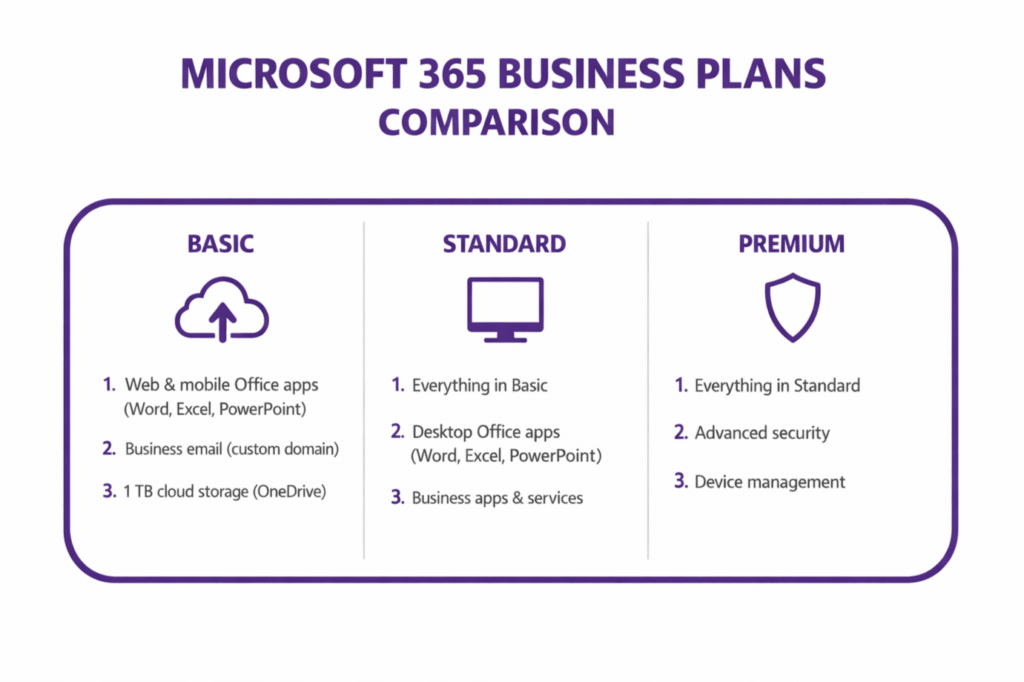
As you can see, moving from Basic to Premium is less about getting more apps and more about adding powerful layers of security and device management.
Example 2: The Sales Executive
Now, let’s picture a sales executive. They’re always on the move, meeting clients and drafting proposals from their laptop, tablet, and phone—often without a reliable internet connection.
- What they need: The full, installable desktop versions of Word, Excel, and PowerPoint are non-negotiable for creating professional documents. They also need seamless access to their email, calendar, and files from any device.
- The right licence: Microsoft 365 Business Standard is the ideal fit here. It provides the essential desktop apps they can’t live without, along with the cloud services needed to keep everything in sync, no matter where they’re working.
Example 3: The IT Manager
Finally, consider your IT manager or the person tasked with protecting your company’s data and devices. Their job isn’t just about productivity; they’re the ones responsible for keeping your digital operations secure.
- What they need: Everything in Business Standard, but with added advanced threat protection to block phishing attacks and malware. Critically, they also need tools to manage and secure all company laptops and mobile phones.
- The right licence: Microsoft 365 Business Premium is the clear choice. The extra cost is easily justified because it includes Microsoft Defender and Intune. If you’re not familiar with it, our guide explains in more detail what Microsoft Intune is and how it’s used to secure company data on any device.
A role-based licensing audit is a powerful exercise. It forces you to move beyond product names and focus on what your team actually needs to do their job securely and efficiently.
With price rises coming, this kind of strategic thinking is more important than ever. UK businesses using Microsoft 365 are facing a 17% average price increase on key Business plans from July 2026. The good news? Smart optimisation can offset up to 25% of that impact. For instance, Business Premium is holding its price at £18.10 per user/month, rewarding companies that have already invested in its security tools. In contrast, the popular E3 plan is set to climb by 8%, from £33.10 to around £36—a change that could add thousands to an annual bill. You can read more on these forecasts in this UK-focused report from Bytes.
How to Cut Your Office 365 Licensing Costs
With software spending on the rise, getting a firm grip on your licensing Office 365 costs has become a non-negotiable part of running a smart business. Think of your licences not just as an IT expense, but as a portfolio that needs active management. The good news is that you can trim your Microsoft bill significantly without getting in the way of your team’s work.
The biggest culprit for wasted money? “Shelf-ware.” It’s a simple concept: licences you’re paying for that nobody is using. You’d be surprised how often licences linger on accounts for former employees or are tied to projects that were shelved months ago, quietly siphoning money from your budget.

Get into the Habit of Regular Licence Audits
A proper licence audit is your best tool for fighting this wasted spend. This means regularly jumping into the Microsoft 365 admin centre to check who has what and, crucially, if they’re actually using it. A great place to start is by looking for accounts with no sign-in activity in the last 30, 60, or 90 days.
This process gives you clear, actionable insights:
- Find the Ghosts: Quickly spot licences still assigned to people who have left the company.
- Right-size the Plans: Identify users on a pricey premium plan who only ever open Outlook and save a few files. They could be moved to a cheaper tier.
- Recycle and Reassign: Unassign those dormant licences. You can then either give them to new starters or remove them from your next bill.
Doing this quarterly turns licence management from a headache into a routine. It’s a core discipline of Unlocking Strategic Value Through Software Asset Management and ensures you’re not leaving money on the table.
Choose Wisely: Annual vs. Monthly Commitments
Under Microsoft’s New Commerce Experience (NCE), you face a big decision: pay for your licences annually or month-to-month. The choice has a direct impact on your bottom line.
- Annual Commitment: This is your best bet for stability and savings. You lock in a price for 12 months, which makes budgeting predictable and lowers the per-user cost. It’s perfect for your core, permanent team.
- Monthly Commitment: This option gives you flexibility. You can add or remove licences every month, which is handy for seasonal staff or short-term contractors. However, that freedom comes at a price—often around 20% more than an annual plan.
The smartest approach is a hybrid one. Put your permanent staff on cost-effective annual plans and keep a small pool of the flexible (but more expensive) monthly licences for any temporary roles.
When you start managing your licences like this, you stop being a passive bill-payer. You become a strategic manager, ensuring every pound you spend on software is actually helping your business.
Don’t Forget About Frontline Licences
Many businesses completely overlook the savings potential of Microsoft 365 Frontline plans. These are cheaper licences designed specifically for workers who aren’t tied to a desk—think staff in retail, logistics, or on the factory floor.
These plans provide the essentials like Teams, email, and SharePoint access, but without the full (and more expensive) desktop Office applications. By correctly identifying these roles in your organisation and giving them a Frontline licence instead of a Business Standard or Premium one, the savings can be huge. This kind of role-based approach to licensing Office 365 is fundamental to running a lean, efficient IT operation.
Navigating these strategies on your own can be tricky. A specialist partner can help you dig deeper, uncovering savings and optimisations you might have missed.
Why Partnering with an Expert Simplifies Licence Management
Let’s be honest, managing Microsoft 365 licences can feel like a full-time job in itself. What starts out as a straightforward subscription can quickly become a tangled mess of underused plans, dormant accounts, and costs that creep up month after month. It’s a constant juggle, and it pulls your focus away from what you do best: running your business.
This is exactly why handing the reins to a specialist IT partner is such a smart move. When you work with an expert like F1Group, you’re not just offloading an admin task. You’re gaining an extension of your own team, one whose sole focus is to make your IT work harder for you. We take a proactive approach to licensing Office 365, turning what was a headache into a well-managed asset.
Proactive Management and Cost Optimisation
One of the biggest shifts you’ll notice is moving from reactive fire-fighting to proactive, strategic management. Instead of you needing to set a reminder for an annual licence audit, we build regular health checks right into our service. We’re constantly reviewing your entire Microsoft 365 setup to spot opportunities to save you money.
This hands-on approach delivers real, tangible results:
- Eliminating ‘Shelf-ware’: We find those licences still assigned to former employees or sitting on inactive accounts and get them reallocated or removed. It’s a simple way to stop paying for things you aren’t using.
- Right-Sizing Plans: By looking at actual usage data, we make sure your team has the right tools for their job—and not paying for features they never touch. We’ll recommend downgrading plans where it makes sense.
- Strategic Advice: We help you find the right balance between annual and monthly commitments. This gives you price stability for your core team while keeping the flexibility you need for temporary staff or project-based work.
This constant vigilance means you’re only ever paying for what you genuinely need. It’s about making sure your investment is delivering maximum value.
For businesses across the East Midlands, from Lincoln to Nottingham, we provide more than just remote support. We offer a dedicated partnership, ensuring your Microsoft 365 setup is not only efficient but also perfectly aligned with your business goals.
Beyond Licensing to Strategic Integration
A true IT partner’s value goes far beyond just counting users. The Microsoft ecosystem is always evolving, with powerful tools like Copilot and the Power Platform offering incredible potential to boost productivity and automate processes. But knowing how to actually integrate these tools to get a real return requires expertise.
That’s where we come in. As your partner, we provide the strategic guidance needed to make the most of these innovations. We’ll help you build a solid business case for new technology, plan a smooth rollout, and ensure your team has the training to use it effectively. Whether it’s designing a custom business app with Power Apps or using Copilot to supercharge your workflows, we help you connect the technology to tangible business outcomes.
Ultimately, partnering with an expert simplifies every part of licensing Office 365. You get a single, reliable point of contact for support, compliance, and strategy. It means problems are solved quickly by certified professionals, your data stays secure, and your technology investment becomes a genuine driver for business growth.
Your Office 365 Licensing Questions, Answered
Even with a solid plan, a few specific questions always crop up when it’s time to manage the subscriptions. Getting the details right is the key to building a setup that’s both cost-effective and efficient for your business.
Let’s tackle some of the most frequent queries we hear from businesses across the East Midlands.
Can I Mix and Match Different Microsoft 365 Plans?
Yes, and you absolutely should. Thinking you need one plan for everyone is a common misconception that costs businesses money. Mixing plans based on what people actually do is a cornerstone of a smart licensing strategy.
For example, your accounts team might genuinely need the full desktop apps in Microsoft 365 Business Standard. But your field engineers, who primarily need email and Teams on their phones, could be perfectly served by a lower-cost Frontline licence. A partner like F1Group can help you figure out who needs what, so you’re not overspending.
What Is the Difference Between an Annual and a Monthly NCE Commitment?
This choice, part of Microsoft’s New Commerce Experience (NCE), really boils down to balancing your budget against your need for flexibility.
- Annual Commitment: You lock in a price for 12 months. This gives you predictable costs and is cheaper overall, making it the best fit for your core, permanent staff.
- Monthly Commitment: You gain the freedom to add or remove licences every month, but it comes at a premium—typically around 20% more expensive. This is ideal for temporary staff, contractors, or seasonal roles.
The most effective strategy we see is a hybrid one. Use annual commitments for the stability of your permanent team, and keep a small pool of flexible monthly licences for roles with high turnover or short-term projects.
What Happens to a Licence When an Employee Leaves?
This is where a lot of businesses trip up. When an employee leaves, their licence isn’t automatically cancelled. You have to go into the admin centre and manually unassign it from their account. Forgetting this step means you’re literally paying for nothing.
Once you unassign it, the licence goes back into your available pool, ready for a new starter. If you don’t, you’ll keep paying for that “shelf-ware” until your subscription term is up. This is precisely why a tight offboarding process is essential for good licensing Office 365 management.
Why Use a Microsoft Partner Instead of Buying Directly?
You can certainly buy straight from Microsoft. The real question is whether you have the time and expertise to manage it all yourself. Working with a partner like F1Group isn’t just about the transaction; it’s about getting ongoing value.
We provide the expert guidance to make sure you’re on the right licences from day one, help you find savings as your business changes, and handle all the day-to-day support. It gives you a single, expert point of contact, saving you time and preventing costly mistakes.
Take Control of Your Microsoft Licensing Today
Getting to grips with Microsoft licensing isn’t about just ticking a box; it’s about making a smart, strategic decision for your business. When you have the right plan and the right partner, you’re not just buying software—you’re equipping your team to do their best work without letting costs spiral.
Don’t let unused licences quietly drain your budget or find yourself paying for features you simply don’t need. A little expert guidance can go a long way. We can help you conduct a quick, no-obligation review of your current setup to find those hidden savings and make sure your investment is working as hard as you are.
Ready to get started? Chat with us at F1Group. Phone 0845 855 0000 today or Send us a message.