
Security awareness training is all about educating your team on cybersecurity threats and making sure they understand their role in protecting the business. The goal is to build a human firewall — your people’s collective ability to spot and stop cyber attacks like phishing before they do any damage. For small and mid-sized businesses, this isn’t a ‘nice-to-have’; it’s a core part of keeping the lights on.
Why Security Awareness Training Is an Essential Investment
Let’s be blunt: in most businesses, the biggest security risk isn’t some sophisticated piece of malware, but a well-meaning employee who just doesn’t know what to look for. For companies here in the East Midlands and across the UK, we need to stop thinking of training as a box-ticking exercise for compliance. It’s the bedrock of a solid defence against cyber crime. Attackers know that people are the real gatekeepers to your company’s data.

This is particularly true for businesses running on platforms like Microsoft 365. Cyber criminals are getting frighteningly good at crafting attacks that look like they belong, from fake SharePoint notifications to clever social engineering attempts over Microsoft Teams. One wrong click can give them the keys to the kingdom, causing absolute chaos.
The Real-World Risks for UK Businesses
Picture this: it’s a frantic Tuesday morning in a Nottingham office. Someone in accounts gets an email that looks exactly like it’s from a trusted supplier, complete with an invoice. The logo is right, the tone is familiar, but the sender’s email address is off by a single letter—a detail that’s easily missed. They click the link, and just like that, ransomware starts encrypting everything in SharePoint and Dynamics 365. Work stops, customer data is exposed, and the fallout is immediate.
This isn’t just a scare story; it’s a daily threat. A formal security awareness and training programme turns your team from potential targets into your first line of defence, giving them the skills to spot and report these threats.
The numbers really drive this home. The UK government’s Cyber Security Breaches Survey revealed that a massive 43% of businesses suffered a breach or attack in the last year. It’s clear that no one is safe, and phishing or simple human error is almost always the way in. What’s truly concerning is that while 76% of large businesses conduct staff training, that number drops to just 19% for businesses overall. That leaves a huge vulnerability, especially for SMEs.
Shifting from Cost to Critical Investment
Thinking of training purely as a cost is a massive strategic error. The money you invest in a proactive training programme is tiny compared to the potential bill from a breach—we’re talking regulatory fines, recovery costs, and the hard-to-measure loss of customer trust. At the end of the day, security awareness training is about creating a culture where everyone consistently follows effective data security practices.
Before we move on, let’s put the risks into context. A lack of training doesn’t just create abstract problems; it has tangible, often devastating, consequences for a business.
The Business Impact of Untrained Staff
| Risk Area | Potential Impact for a UK SME | Preventative Training Focus |
|---|---|---|
| Phishing & Ransomware | Complete operational shutdown, data recovery costs of £10k-£50k+, reputational damage. | Identifying malicious emails, safe link/attachment handling, reporting procedures. |
| Data Breach (GDPR) | Fines up to 4% of global turnover, loss of customer trust, legal fees. | Data handling policies, recognising social engineering, secure data disposal. |
| Business Email Compromise | Fraudulent invoices paid (£5k-£100k+), loss of sensitive financial data. | Verifying payment requests, spotting spoofed email domains, multi-factor authentication. |
| Insider Threat (Accidental) | Accidental deletion of critical data, sharing sensitive info with wrong recipients. | Understanding permissions in M365, double-checking email recipients, data classification. |
As you can see, the financial and operational stakes are incredibly high. Building your human firewall is one of the most cost-effective security measures any business can take. It’s a direct investment in your organisation's stability and resilience. To dig deeper, you can learn more about the critical role of cyber security training for staff.
To discuss how to build your own human firewall, call us on 0845 855 0000 today or send us a message.
Designing a Training Programme That Actually Works
Let’s be honest: a generic, off-the-shelf security training programme is a waste of everyone’s time. To get real results, you need a strategy designed specifically for your company’s unique risks, your culture, and the tech you use every day. Building something that genuinely changes how people behave means moving beyond simple box-ticking and taking a more deliberate, thoughtful approach.
And that starts with getting a clear-eyed view of where you stand right now. Before you can build up your defences, you need to know exactly where the walls are weakest. This involves a proper baseline assessment to pinpoint your current security posture and find the specific knowledge gaps in your team. It’s about asking the hard questions and getting real answers.
Establish a Clear Baseline
You can't map out a journey without knowing your starting point. For security awareness, this means getting a handle on your team's current level of understanding. I've found that a simple, unannounced phishing simulation is one of the most revealing ways to do this. The results—who clicked the link, who entered their details, who reported the email—give you a stark, data-driven snapshot of your human vulnerability.
This isn't about naming and shaming; it's about gathering intelligence. I usually pair the simulation with brief, anonymous surveys to see how confident people feel about spotting threats. You’ll often find a big gap between perception and reality. People might think they know what a phishing email looks like, but the click-rate tells a very different story. This initial data is the foundation for everything that follows.
A baseline assessment isn't just a metric; it's a mandate for action. It transforms the abstract threat of a cyber attack into a tangible risk that your specific organisation needs to address immediately.
Once you have this baseline, you can set meaningful goals. Vague ambitions like "make staff more secure" are useless. You need to aim for concrete outcomes you can actually measure.
- Slash Phishing Click-Rates: Aim to cut the percentage of employees clicking on simulated phishing links by 50% within six months.
- Supercharge Incident Reporting: Set a target to get a 300% increase in the number of suspicious emails people report to your IT team or support partner.
- Boost Knowledge Scores: Work towards having 90% of employees pass a basic security quiz with a score of 80% or higher after the first round of training.
Goals like these give your programme focus and, just as importantly, let you prove it's working when it comes time to talk about budgets.
Tailor Training to Specific Roles
One of the biggest mistakes I see is the one-size-fits-all approach to security training. It just doesn't work. Your finance team is up against completely different threats than your sales team or your IT admins. Generic content is irrelevant, and irrelevant content gets ignored. For training to stick, it has to acknowledge that different roles carry different risks.
Take your finance department, for example. They are a massive target for business email compromise (BEC) and invoice fraud. Their training needs to be laser-focused on how to verify payment requests, spot spoofed domains, and stick to financial approval processes. They don’t need a deep dive on securing Azure infrastructure.
On the other hand, your IT administrators need advanced training on protecting cloud environments, managing permissions in Microsoft 365, and responding to security alerts in the Azure portal. Sending them a basic "how to spot a phish" module is a complete waste of their time and expertise.
Think about creating distinct training streams:
- Finance & HR: Zero in on invoice fraud, data privacy (GDPR), and the secure handling of sensitive employee information.
- Sales & Marketing: Train them on using social media like LinkedIn safely, CRM security within Dynamics 365, and protecting customer data when they're on the road.
- Leadership Team: Focus on the big-picture business risks, managing reputation after a breach, and their critical role in championing a security-first culture.
- All Staff: Cover the essentials—phishing awareness, strong password habits, and safe internet browsing.
When you segment your training this way, the content becomes directly relevant to each person's day job. That's how you get engagement and make sure the lessons are remembered.
Create Engaging and Accessible Content
Finally, the training itself has to be good. Your people are busy. Dry, jargon-filled PowerPoints are forgotten the second they’re closed. The secret is to make security training feel less like a chore and more like practical, genuinely helpful advice.
Stick to short, easily digestible formats. Think five-minute videos, interactive quizzes, and simple infographics instead of hour-long webinars. It's also crucial to frame the training around real-world scenarios people can relate to. Instead of talking about 'malware propagation', show them a realistic example of a fake delivery notification email and walk through the red flags.
Keep the language simple and direct. Ditch the technical acronyms and complex explanations. The goal isn't to turn every employee into a security expert; it's to give them the core skills to make safe decisions every single day. When the lessons are clear, relevant, and easy to apply, they are far more likely to stick.
For expert guidance on designing and implementing a security awareness programme that delivers real results, call us on 0845 855 0000 today or Send us a message.
Putting Your Security Training Plan into Action
Right, you’ve done the groundwork and have a solid plan on paper. Now comes the exciting part: bringing it to life. Moving from theory to execution is where many programmes falter. A successful launch is about more than just sending out a few training videos; it’s about a deliberate, well-communicated rollout that gets everyone on board, from the C-suite to the newest hire.
The very first, and most critical, step is getting genuine buy-in from your leadership. I’m not just talking about getting the budget signed off. I mean making security a visible, top-down priority. When your senior team actively participates and champions the training, it sends a crystal-clear message: this isn't just another IT tick-box exercise, it's a core business responsibility. A simple, unified message from the top can completely change employee attitudes from grudging compliance to shared ownership.
This initial communication is your foundation for building a positive security culture. It's crucial to frame the programme as a collective effort to protect the company and its people, not as a test designed to catch staff out. Make sure you celebrate the wins—like a spike in reported phishing attempts—to reinforce the right behaviours.
Tap into Your Existing Microsoft 365 Tools
For many UK businesses, the perfect tools for the job are probably already sitting in your software stack. If your organisation has a Microsoft 365 E5 or Microsoft Defender for Office 365 Plan 2 licence, you have access to a powerful feature called Attack Simulation Training. Frankly, this is a game-changer for SMEs, allowing you to run incredibly realistic and trackable phishing campaigns without spending a penny on third-party platforms.
You can craft simulations that mirror the exact threats your team sees every day. For example, you could set up a phishing email masquerading as a Power BI report request, complete with convincing company branding. Or, what about a fake Microsoft Teams message asking an employee to approve a document via a dodgy link? These tests assess vigilance right where your people work, giving you a far more accurate picture of their awareness than any abstract quiz ever could.
This diagram shows the simple but effective design process that should underpin your action plan.
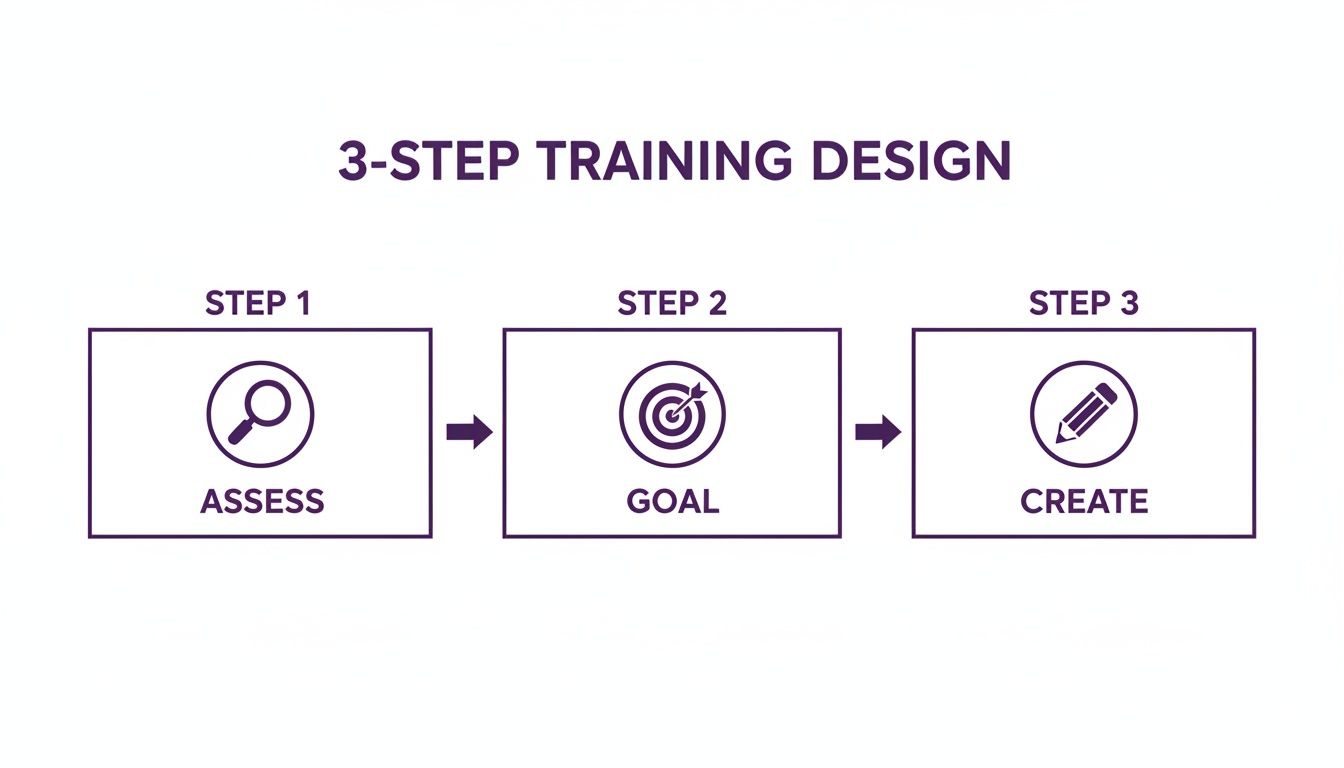
Moving from assessing your risks to setting clear goals and then creating the right content is the fundamental flow for a successful rollout.
Schedule for Constant Reinforcement, Not a One-Off Event
Let’s be honest: the old model of a single, annual training session is next to useless. To build lasting security habits, awareness needs to be a continuous, ongoing effort. From my experience, the "little and often" approach works wonders in keeping security front and centre in people's minds.
A practical, repeatable schedule could look something like this:
- Quarterly Phishing Simulations: Run unannounced phishing tests every three months. It's vital to vary the templates and difficulty to keep people on their toes. Use the results to pinpoint which teams or individuals might need a bit of extra support.
- Monthly Bite-Sized Training: Assign short, sharp training modules or videos (think 5-10 minutes) each month on a specific topic. One month might be on password best practices, the next on spotting social engineering on LinkedIn.
- Immediate "Just-in-Time" Training: This is incredibly powerful. Configure your system so that if someone does click on a simulated phishing link, they’re immediately taken to a short, educational page explaining the red flags they missed. That instant feedback loop is where the real learning happens.
By breaking the training into manageable, regular chunks, you avoid overwhelming your team and ensure key messages are constantly reinforced. This transforms training from a once-a-year chore into a steady rhythm of learning and improvement.
Within Microsoft 365, the dashboard for setting up these campaigns is surprisingly intuitive. You can easily select different attack techniques and payloads to launch sophisticated tests in minutes. But the real value is in the detailed reports that show you exactly who is vulnerable and where to focus your training efforts next. For more hands-on advice, have a look at our detailed guide on how to protect against phishing attacks.
Putting your plan into action is all about building and maintaining momentum. Kick things off with clear communication, use the powerful tools you likely already pay for, and establish a consistent schedule of continuous learning. This practical approach is how you turn a well-designed plan into a real, functioning human firewall.
Measuring the Success of Your Training Efforts
So, you’ve launched your security awareness and training programme. That’s a massive step forward, but how do you know if it's actually working? Without solid ways to measure its impact, you're essentially flying blind. To truly show the value of what you’re doing—and keep the budget for it—you need to move beyond simple completion rates and focus on metrics that prove a real shift in employee behaviour.
It’s all about translating security data into business value. Telling your leadership team that 85% of staff finished a module is one thing. But showing them this led to a 50% drop in people clicking on phishing tests is far more powerful. That’s a direct reduction in the risk of a costly data breach, and it’s a language every executive understands.
Key Performance Indicators That Matter
The right Key Performance Indicators (KPIs) are your proof. These numbers tell the story of how you're building a stronger human firewall. Instead of drowning in dozens of data points, it’s best to concentrate on a few high-impact ones that clearly show progress.
Here are the essentials I always recommend monitoring:
- Phishing Simulation Click-Rate: This is your headline figure. You need to track the percentage of employees who click a link in a simulated phishing attack over time. A steady downward trend is the clearest sign that your training is sinking in.
- Suspicious Email Reporting Rate: This one is just as important as the click rate, but here, you want to see the number go up. A significant increase in employees actively reporting suspicious emails shows they’re shifting from passive targets to active defenders in your organisation.
- Training and Quiz Scores: While not the be-all and end-all, tracking scores from your training modules helps pinpoint knowledge gaps. If the entire finance team scores poorly on a topic like invoice fraud, you know exactly where to focus your next micro-learning session.
Your goal is to build a narrative supported by data. A security scorecard that shows a falling click-rate alongside a rising reporting rate provides irrefutable proof to leadership that the investment in training is paying off handsomely.
Creating Your Security Scorecard
A security scorecard is a simple, visual way to report on your progress. It takes your core KPIs and presents them in a format that’s easy for stakeholders—who aren’t security experts—to digest. Think of it as a living document, updated quarterly, that shows clear trends.
A good scorecard not only demonstrates progress but also helps justify your budget requests for the next year. You can find more detail on what to include by reviewing our cyber security audit checklist.
The impact of consistent training and measurement is dramatic. We’ve seen effective security awareness programmes lead to huge risk reductions, with some UK data pointing to potential 70% drops in security incidents. For businesses in Nottingham or Newark using Dynamics 365, this often translates to a 40% improvement in phishing awareness after just the initial training.
The timeline for these improvements is often quite predictable. From experience, click rates can fall by 15-20% within three months, with people’s ability to spot threats improving by 50% at the six-month mark. You can learn more about the impressive statistics behind security awareness training effectiveness.
To give you a clearer idea, here are the sorts of KPIs you should be tracking from day one.
Key Performance Indicators for Security Training
This table outlines the essential metrics to track the effectiveness and ROI of your security awareness and training programme.
| KPI | What It Measures | Example Target (First Year) |
|---|---|---|
| Phishing Simulation Click Rate | The percentage of users who click a malicious link in a test. | Reduce from 25% to below 10% |
| Phishing Email Report Rate | The percentage of users who correctly report a simulated phishing email. | Increase from 5% to over 20% |
| Mean Time to Report | The average time it takes for an employee to report a suspicious email. | Reduce from 2 hours to under 30 minutes |
| Training Completion Rate | The percentage of assigned training modules completed by staff. | Achieve >90% completion within 30 days |
| Knowledge Assessment Scores | Average scores on quizzes and tests post-training. | Maintain an average score of 85% or higher |
| Real Incident Reduction | The actual number of security incidents caused by human error. | Decrease by 50% year-on-year |
Setting realistic targets like these gives you a clear roadmap and helps you demonstrate tangible progress to the rest of the business.
The Crucial Role of Employee Feedback
Metrics and data are vital, but they only tell part of the story. The other essential ingredient for refining your programme is getting direct feedback from your team. Do they find the training engaging? Is the content relevant to their day-to-day work?
Don't be afraid to ask. Simple, anonymous surveys after a training module can provide invaluable insights that numbers alone can't give you.
You might discover that:
- Your sales team finds short video clips far more engaging than reading articles.
- The accounts department needs more specific examples related to BACS fraud.
- Staff are confused about the official process for reporting a suspicious text message.
This kind of qualitative feedback lets you fine-tune your approach, making sure the content stays relevant and effective. When your team feels heard, they become more invested in the programme's success, which is exactly what you need to build a stronger, more resilient security culture from the ground up.
If you need help measuring and improving your security awareness efforts, phone 0845 855 0000 today or send us a message.
Budgeting for Your Security Training Programme
Let’s talk money. Investing in security awareness training isn't about finding spare cash; it’s about making a smart, calculated decision to protect your business. For many UK SMEs, the thought of another expense is tough, I get that. But this isn't just another line item.
When you weigh the cost of training against the financial fallout of a single data breach—which for a UK small business can easily spiral into tens of thousands of pounds in recovery costs, fines, and lost trust—the perspective shifts entirely. Suddenly, it’s not an expense. It's one of the most effective insurance policies you can buy. Your goal is to build a business case that shows a clear return by strengthening your most critical defence: your people.
Breaking Down the Potential Costs
So, where does the money actually go? When you're planning your budget, the costs really boil down to three main areas: the tech platform, the training content itself, and the time your team invests. Getting a handle on each of these will help you build a realistic financial plan with no nasty surprises.
Here’s a look at the key areas to account for:
- Platform Licensing: This is the software you use for training and running phishing tests. The good news? If your business is on Microsoft 365 E5 licences, the excellent Attack Simulation Training tool is already included. For everyone else, you might look at an add-on like Microsoft Defender for Office 365 Plan 2, which costs around £4.10 per user per month.
- Third-Party Platforms: If the Microsoft tools don't quite fit the bill, there are some fantastic dedicated platforms out there. They often come with huge libraries of training content and slick features. Expect costs to range anywhere from £20 to £50 per user per year, depending on who you go with and what you need.
- Content Creation: While most platforms are packed with ready-to-go modules, you’ll probably want to create some of your own material that hits on the specific risks your business faces. This is usually an internal cost, measured in the time it takes your team to put it together.
- Internal Time Costs: This is the one everyone forgets. Don't. If your staff spend 30 minutes a month on training modules and phishing simulations, that's a real, quantifiable cost to the business. It absolutely has to be part of the overall calculation.
A Sample Budget for a 50-Employee UK Business
Let's make this real. Here’s a sample budget for a company with 50 employees that wants to run a proper, comprehensive programme. We'll assume they're on a Microsoft 365 Business Premium plan and need to add the security features.
| Cost Item | Description | Calculation | Estimated Annual Cost |
|---|---|---|---|
| Platform Licensing | Microsoft Defender for Office 365 Plan 2 add-on for phishing simulations. | 50 users x £4.10/month x 12 months | £2,460 |
| Employee Time | Staff spend 30 mins/month on training. Average hourly cost: £20. | 50 users x 0.5 hours/month x 12 months x £20/hour | £6,000 |
| Admin Time | An IT manager spends 4 hours/month managing the programme. Hourly cost: £30. | 4 hours/month x 12 months x £30/hour | £1,440 |
| Total Annual Investment | £9,900 |
In this scenario, for just under £10,000 a year—which works out to £16.50 per employee per month—the business gets a robust defence against threats that could easily cost five times that amount to clean up.
This is the kind of calculation you need for your business case. It proves that for a modest, predictable investment, you massively reduce the risk of a chaotic and potentially catastrophic financial hit. This isn't just spending; it's smart risk management.
Ultimately, setting a budget for your security awareness and training programme is about balancing a manageable cost with the immense value of protecting your business. By breaking down the numbers and comparing them to the alternative—the crippling cost of a successful cyber attack—you can easily justify the investment and turn your team into your greatest security asset.
Ready to build a cost-effective security training programme for your business? Phone 0845 855 0000 today or Send us a message to discuss your options.
Building a Lasting Security Culture
The real end-game for any security awareness programme isn't just about ticking boxes or lowering click rates on phishing tests. It’s about embedding security so deeply into your company's DNA that it becomes second nature. This is how you move from basic compliance to a genuine culture of shared responsibility, where everyone feels accountable for protecting the business.
This cultural shift hinges on creating a safe reporting environment. Too often, employees are scared of getting in trouble for making a mistake, so they keep quiet. You need to flip this on its head. Actively praise and reward people who flag something suspicious, even if they admit they clicked on a dodgy link. When your team sees that honesty is celebrated, they become your most valuable source of threat intelligence.
Make Security Engaging and Visible
To keep the momentum going, security can't just be a dull, once-a-year training session. It has to be a constant, visible part of everyday work life. This is where you can get creative and keep the topic fresh long after the initial training is done.
Gamification is a fantastic way to do this. A bit of friendly competition can go a long way in keeping awareness levels high.
- Phishing Leaderboards: Anonymously share which departments are the sharpest at spotting simulated phishes. A little praise for the most vigilant teams works wonders.
- Security Champions: Nominate a 'Security Champion' each quarter. This is someone who consistently reports threats or goes out of their way to help colleagues stay safe.
- Instant Rewards: Keep it simple. Offer a coffee voucher or a small prize to the first person who reports a phishing simulation.
Reinforcing key messages is also crucial. Looking into guides on choosing effective promotional products can spark ideas for embedding security reminders into everyday items that people actually use.
A strong security culture is built on positive reinforcement, not fear. It transforms security from a set of rules employees must follow into a shared mission they actively want to support.
Integrate Security from Day One
Your security culture needs to start the minute a new person walks through the door (or logs on for the first time). Weaving security awareness directly into your onboarding process sets expectations right from the beginning. It ensures new hires understand their responsibilities before they even get full access to your network.
Finally, be transparent. Give your team regular, jargon-free updates on the kinds of threats you’re actually facing and, most importantly, celebrate the wins. When people see that their vigilance helped block a major phishing attack, it powerfully reinforces the value of their efforts and solidifies their role as a vital part of your defence.
To create a security culture that protects your business for the long term, phone 0845 855 0000 today or Send us a message.
Common Security Training Questions
When you're first getting started with security awareness training, a lot of questions come up. Let's tackle some of the most common ones I hear from UK businesses, so you can get a clearer picture of where to begin.
How Often Should We Be Doing This?
Forget about the old-school, once-a-year training session. That approach just doesn't stick. What really works is weaving security into your company's rhythm.
Think of it this way: everyone gets a solid dose of foundational training when they join. After that, it's all about consistent, small touchpoints. A short monthly video on password best practices, a quick quarterly module on a new threat—these keep security front and centre. Most importantly, you need to run unannounced phishing tests throughout the year. It's the only way to see if the lessons are actually sinking in.
What's the One Topic We Absolutely Have to Cover?
If you only have time to focus on one thing, make it phishing and social engineering. It's not even a close contest.
The vast majority of cyber attacks start with a simple, deceptive email or message. Someone clicks a bad link, opens a malicious attachment, or gives away their credentials, and the attacker is in. By training your team to spot and report these attempts without hesitation, you’re closing the main door that criminals use to get into UK businesses.
What's the Smartest, Most Budget-Friendly Way to Start?
Good news if you're already on Microsoft 365. Your most cost-effective first step is probably already at your fingertips. Take a look at the Attack Simulation Training features built right into the platform.
It’s included in certain plans (like Microsoft 365 E5 or available as an add-on) and lets you send realistic phishing tests to your own team. Pair that with the excellent free training materials available from the UK’s National Cyber Security Centre (NCSC), and you've got a fantastic, low-cost foundation to build on.
Ready to transform your team into your strongest defence? Contact F1Group to discuss a practical security awareness and training programme that fits your business.
Phone 0845 855 0000 today or Send us a message.