
Let's get straight to it. What on earth is Identity and Access Management (IAM)?
Imagine your business is a high-security building. IAM is the sophisticated system that acts as both the front-desk security guard and the master locksmith. It's the set of policies and technologies you put in place to ensure that every single person trying to get into your digital "building" is exactly who they claim to be (identity) and that they only have the keys to the specific rooms they're supposed to be in (access).
A Simple Guide to Identity and Access Management
For a small or medium-sized business in the UK, this isn't some abstract IT theory. It's the practical, real-world control that stops a new hire from accidentally seeing the company's financial records, or a disgruntled ex-employee from logging back into your Microsoft 365 account a month after they've left. What was once seen as a 'big corporation' luxury is now absolutely fundamental for any growing business.
At its core, IAM is constantly asking and answering three simple but critical questions for every single login attempt:
- Who are you? This confirms the user's identity is legitimate.
- What should you be able to do? This grants the precise permissions needed for their role, and no more.
- Can you prove it? This is where authentication comes in to verify that identity claim.
The Core Principles of IAM
To really get to grips with IAM, you need to understand its foundational goals. The whole point is to create a secure, efficient, and centrally managed way to handle who gets into your systems and what they can do once they're there. It’s all about giving the right people the right access to the right resources, at the right time.
A solid IAM strategy is the foundation of modern cybersecurity. It creates a digital perimeter around your data, acting as the new castle wall for your business in an age where your office can be anywhere.
This guide will break down how IAM works, its key components, and how you can apply it in your own business, particularly with powerful tools like Microsoft Entra ID. Understanding these concepts is also a great starting point for anyone exploring technical careers, like Identity and Access Management (IAM) specialist roles.
Let's start by summarising the main pillars of a strong IAM system.
Core Principles of IAM at a Glance
This table provides a quick summary of the fundamental pillars that make up any effective Identity and Access Management system.
| Principle | What It Means | Example in Microsoft 365 |
|---|---|---|
| Authentication | Verifying a user is who they say they are. | A user enters their password and then approves a notification on their phone (MFA). |
| Authorisation | Granting specific permissions based on the user's role or identity. | A marketing team member can access the company SharePoint site but not the finance folder. |
| User Provisioning | Creating and setting up a user's digital identity and access rights. | When a new employee joins, their account is automatically created with the right software licences. |
| User Lifecycle Management | Managing a user's access from joining the company to leaving it. | When an employee leaves, their access is automatically revoked from all systems on their last day. |
By the end of this guide, you’ll see how a robust IAM framework isn't just a defensive shield; it’s a critical part of making your operations secure, efficient, and ready for growth.
The Four Pillars of a Modern IAM Strategy
To really get to grips with Identity and Access Management, it's best to break it down into its four foundational pillars. Think of these as the essential cogs in the machine, all working together to create a system that's both secure and efficient. Each pillar answers a critical question about who is accessing your data and what they’re allowed to do.
At its core, IAM is split into two big ideas: first, you define the Identity of a user, and then you manage their Access to your resources.
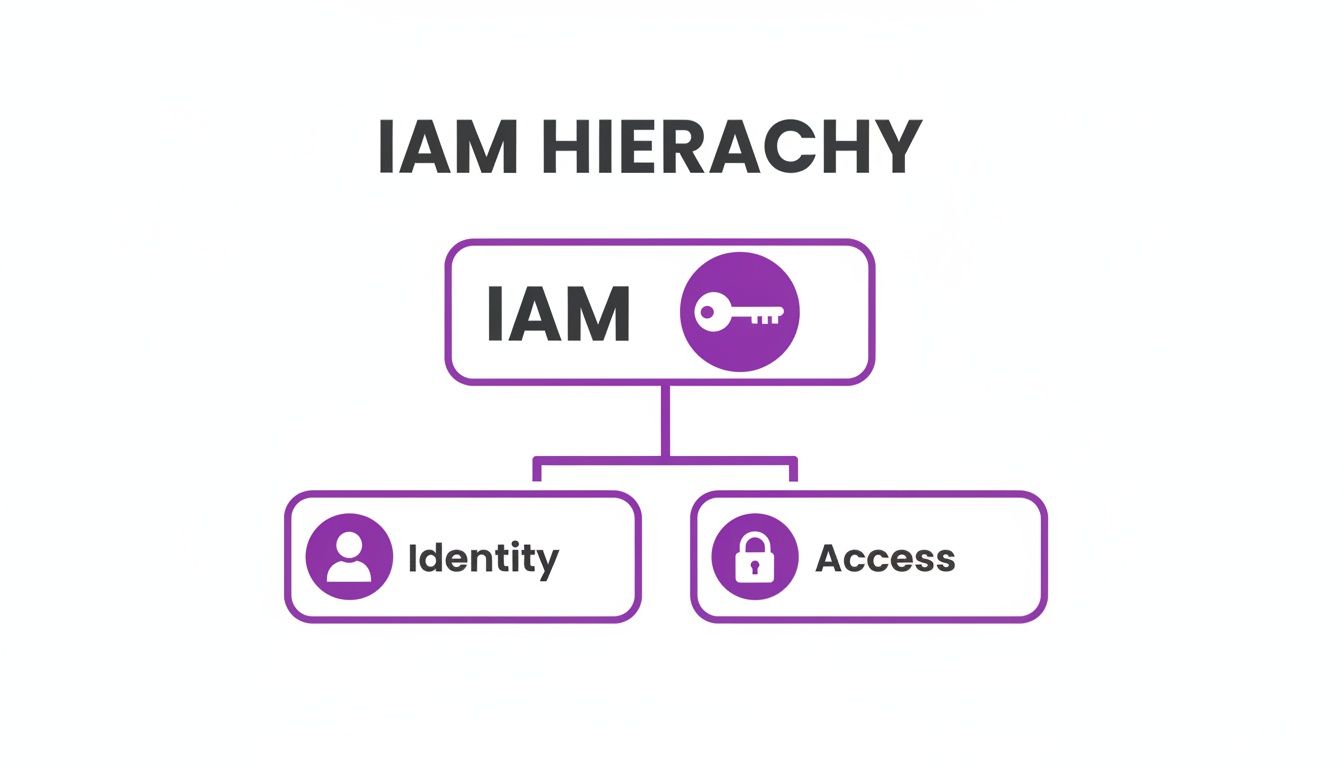
This simple breakdown shows that everything starts with establishing who someone is before you can even think about deciding what they can see or do.
Authentication: Proving You Are Who You Say You Are
The first pillar is Authentication. This is the process of verifying that a person is genuinely who they claim to be. It's the digital equivalent of showing your ID at a security checkpoint. In the past, this was often just a simple password.
Today, proper authentication needs multiple layers. For instance, after typing in a password, a user might have to approve a pop-up on their phone or use a fingerprint scan. This multi-factor approach makes it dramatically harder for an unauthorised person to get in, even if they somehow get hold of a password.
Authorisation: Defining What You’re Allowed to Do
Once you’ve confirmed a user's identity, the next pillar is Authorisation. This is all about deciding what that specific user is permitted to do. Just because you've been let into the building doesn't mean you get the keys to every single room.
Authorisation is built on the principle of least privilege, which means users only get access to the information and tools they absolutely need to do their job. A sales team member in Nottingham, for example, would be authorised to use the customer relationship management (CRM) system but should be completely blocked from seeing sensitive HR files. This simple step contains risk by limiting the potential damage if an account is ever compromised.
For accounts with the highest level of permissions, you need even tighter controls, which is where specialist fields like privileged access management come in.
User Management: The Entire Lifecycle of Access
The third pillar is User Management, sometimes called provisioning and de-provisioning. This covers the entire lifecycle of a user’s access, from the day they join your company to the day they leave. A solid IAM system automates this from start to finish.
Think about a new employee starting at your office in Leicester. On their first day, the IAM system should automatically create their accounts and give them the right permissions for everything they need, like Microsoft 365 and Teams.
Just as importantly, when that employee leaves, the system must instantly revoke all their access rights across every single application. This automation removes the risk of human error and makes sure ex-staff can't walk away with access to sensitive company or client data.
Auditing: Keeping a Close Eye on Everything
The final pillar is Auditing and Reporting. This means keeping a detailed log of who accessed what, when they accessed it, and from where. It gives you a complete, transparent record of all activity happening across your systems.
These audit trails are absolutely vital for both security and compliance. If a security breach happens, these logs are your first port of call to trace what happened. They’re also essential for meeting regulatory standards like GDPR, as they prove you have robust controls in place to protect personal data.
Key IAM Technologies Every Business Should Know
If the core principles of IAM are the blueprint, then these technologies are the tools you use to build your digital defences. As a business leader, you don't need to get lost in the technical weeds, but you do need to grasp what these tools do. They represent the practical layers of security that stand between your organisation and some very real, constantly changing threats.

These aren't optional extras anymore; they're fundamental to modern business security. Let's break down the essential IAM technologies that every UK business owner should have on their radar.
Multi-Factor Authentication (MFA) – The Digital Deadlock
Think of Multi-Factor Authentication (MFA) as adding a high-security deadlock to your digital front door. A password on its own is just a simple lock, and we all know how easily those can be picked. MFA demands a second, and sometimes a third, piece of proof that you are who you claim to be.
This proof falls into different categories:
- Something you know: Your password or a PIN.
- Something you have: A push notification to your smartphone, a code from an authenticator app, or even a physical security key.
- Something you are: A fingerprint scan or facial recognition.
By demanding verification from at least two of these buckets, MFA makes it exponentially harder for a crook to get in, even if they’ve managed to steal a password. While provisioning took up 28.6% of IAM spending in 2023, the rapid adoption of MFA signals a major shift in focus. It's now the fastest-growing part of IAM, with 58% of EU organisations making it a top priority for data protection—a crucial defence for firms from Nottingham to Grimsby.
Single Sign-On (SSO) – The Universal Access Pass
Single Sign-On (SSO) is a fantastic tool for boosting both security and sanity. Instead of your team trying to remember dozens of different passwords for all their apps, SSO lets them log in once with a single set of secure credentials to get into everything they need for their job.
This immediately smooths out daily workflows and tackles "password fatigue"—the main reason people resort to using weak or repeated passwords. From a security standpoint, it gives you one central point for authentication, making it far simpler to manage and monitor who has access to what, right across your company.
SSO simplifies life for your employees while simultaneously giving your IT team a single, powerful point of control over application access. It's a win-win for productivity and security.
Role-Based Access Control (RBAC) – Pre-Defined Security Levels
Role-Based Access Control (RBAC) is how you put the "principle of least privilege" into practice. Rather than manually assigning permissions to every individual user, you create defined roles—like "Sales Manager," "HR Administrator," or "Finance Assistant"—and assign permissions to those roles.
When a new person joins, you just assign them the right role. They instantly and automatically get all the access they need, and nothing more. This approach ensures everyone is treated consistently, massively cuts down on admin time, and shrinks the margin for human error. It's a core element of any serious Security Access Control Systems. Applying these controls to mobile devices is especially vital, a topic we cover in our guide to Microsoft Intune for mobile management.
Putting IAM to Work with Microsoft Entra ID
The theory behind Identity and Access Management is useful, but seeing how it works with the tools you probably already use is where it all clicks. For most SMEs across the East Midlands, the Microsoft ecosystem is the heart of day-to-day operations. This is exactly where Microsoft Entra ID—which you might still know by its old name, Azure Active Directory—comes into play as the control centre for your entire IAM strategy.
Think of Microsoft Entra ID as the digital headquarters for every user identity in your business. It’s far more than just a list of employees; it's a living, intelligent directory that connects your people to the apps and data they need to do their jobs, whether that’s Microsoft 365 or thousands of other software services. To get a better handle on its foundational role, our guide explaining what Azure Active Directory is is a great place to start.
This central hub approach is non-negotiable for modern security. The way UK organisations manage digital identity is changing fast. In fact, a recent government analysis found 69% of providers are now involved in identity verification, following the new UK Digital Identity and Attributes Trust Framework. This directly affects East Midlands businesses using Microsoft tools, especially as services like Right to Work checks (making up 12% of these services) and DBS checks become more integrated. It’s a standard we take seriously, which is why the F1 Group team is vendor-certified and DBS-checked. You can read the full sectoral analysis from GOV.UK to see how this is unfolding nationally.
Using Conditional Access for Smart Rules
One of the standout features inside Microsoft Entra ID is Conditional Access. You can think of it as an intelligent security guard for your digital front door. It doesn't just check for a password; it looks at the whole picture for every single login attempt and checks it against a set of rules you create.
It goes beyond simply asking "who are you?" by also considering the context.
For example, you can easily build policies that:
- Demand Multi-Factor Authentication (MFA) if someone tries to open sensitive company files from an unfamiliar network.
- Block a login attempt completely if it comes from a device that doesn’t meet your company's security standards.
- Limit a user on their personal laptop to only the web-based versions of apps, keeping company data out of a machine you don’t manage.
This shifts your security model from a static password-and-key system to one that is dynamic, risk-aware, and constantly adapting.
Conditional Access is all about applying the right access controls under the right conditions. It gives you the power to enforce tight security without getting in your team’s way, making protection a seamless part of the workflow.
Securing Admin Accounts with Privileged Identity Management
Another vital tool in the arsenal is Privileged Identity Management (PIM). Your administrator accounts are the most powerful—and therefore most dangerous—accounts in your entire organisation. They hold the "keys to the kingdom," and if one is ever compromised, the consequences could be catastrophic.
PIM tackles this head-on by providing just-in-time (JIT) access to these high-level permissions. Instead of an admin having god-like powers 24/7, they have to formally request and justify elevated access for a limited time to complete a specific task.
This single change dramatically shrinks your security risk. It ensures those powerful permissions are only ever active when absolutely necessary and that every action is logged and audited. These aren't just abstract concepts; they are practical, powerful tools for building a rock-solid security posture for your business.
What a Strong IAM Strategy Actually Does for Your Business
Thinking about Identity and Access Management as just another IT cost is a mistake. A proper IAM strategy is far more than a defensive measure; it’s a genuine business advantage that brings concrete, real-world benefits to your bottom line, your security, and your team's sanity.
For most small and medium-sized businesses, the first and most obvious win is a massive security upgrade. By putting strict, clear rules in place about who can access what, you shrink the playground for cybercriminals. This isn't just an abstract concept—it’s the difference between a near-miss and a catastrophic data breach that could cripple your finances and ruin your reputation.
More Than Just Security: Boosting Efficiency and Keeping the Auditors Happy
Once you look past the security angle, you'll see IAM is a huge productivity driver. Automating the whole user lifecycle process is a game-changer. When a new hire starts at your Grimsby office, they get the access they need on day one, automatically. No waiting around, no manual form-filling. Just as importantly, when someone leaves, their access is shut off instantly across every single system, closing the door on those risky "ghost accounts" that often get left behind.
This level of automation also makes staying compliant much easier. Regulations like UK GDPR demand you prove you’re handling personal data responsibly. A solid IAM system gives you the clear audit trails and access reports you need to show you’re doing exactly that.
A great IAM strategy turns security from a messy, manual chore into an automated, reliable part of your business. It's not a cost; it's the engine that powers secure, scalable, and resilient growth.
A Growing Priority for UK Businesses
It's no surprise that UK businesses are catching on fast. The Identity and Access Management market is growing at an incredible pace as companies scramble to get their digital houses in order. In 2023 alone, the market was worth a massive £1.33 billion. That figure is expected to rocket to £2.81 billion by 2030, which is an annual growth of 11.3%.
For a business owner in Leicester or Newark, this trend highlights something crucial: IAM isn't just a "nice-to-have" anymore. It's becoming a fundamental requirement for staying competitive and secure. You can dig into the numbers yourself with this IAM market growth report from Grand View Research.
Finally, let's not forget your team. A well-designed IAM system simply makes their working day better. Features like Single Sign-On (SSO) mean they can log in once to get into all their essential apps, ditching the nightmare of remembering dozens of different passwords. It’s a smoother, less frustrating experience that not only improves productivity but also encourages everyone to adopt better security habits.
Your Practical Checklist for Implementing IAM
So, you understand the theory. But how do you go from knowing what identity and access management is to actually putting it into practice? It can feel like a massive leap, but it’s really just a series of manageable steps. This checklist is designed for UK SMEs who want to build a solid IAM strategy without getting bogged down in complexity.

Think of this less as a one-off IT project and more as a core business function that needs a clear plan. Here’s how you can get started.
Key Implementation Steps
A structured approach is your best friend here. It ensures you cover all your bases, from finding out where you are today to keeping things secure tomorrow.
-
Audit Your Current Access Landscape
First things first: you need to map out who has access to what, right now. This initial audit is often an eye-opener. You’ll likely find old accounts for former employees still active, or people with far more access than they actually need to do their jobs. -
Define Clear Roles and Policies
With your audit findings in hand, you can start building sensible Role-Based Access Control (RBAC) policies. Group people by what they do – think "Sales Team," "Finance Department," or "Project Managers" – and then define the absolute minimum access each role requires. This is the principle of least privilege in action. -
Use Your Existing Technology
For many businesses, the best IAM tools are the ones you already own. If you use Microsoft 365, you have powerful features like Microsoft Entra ID and Conditional Access right there. They provide a brilliant foundation without you needing to splash out on new software.
Implementing IAM isn't about buying every security tool on the shelf. It’s about intelligently using the right tools to enforce a clear, well-defined security policy that makes sense for your business.
Rollout, Training, and Review
Once your foundation is in place, the next phase is all about getting your team on board and making sure your system stays secure for the long haul.
-
Plan a Phased Rollout
Don't try to do everything at once. A "big bang" rollout is a recipe for chaos. Instead, introduce changes in stages, maybe starting with a single department. This gives you a chance to fix any teething problems and makes the transition much smoother for everyone. -
Train Your Team
Your people are your first line of defence, so they need to know what's changing and why. Make sure you train them on new procedures, especially critical ones like using Multi-Factor Authentication (MFA). When your team understands the importance of these changes, they become your greatest security asset. -
Establish Regular Reviews
IAM is never a "set and forget" exercise. You must schedule routine access reviews – perhaps quarterly or twice a year – to make sure permissions are still correct as people move roles or leave the company. Working with an expert like F1 Group can make this a simple and efficient process.
So, where does this leave us?
When you boil it all down, Identity and Access Management is really about being the digital gatekeeper for your business. It's the system that decides who gets the keys to which doors, when they can use them, and from where. For any small or medium-sized business in the UK today, getting a handle on IAM isn't just a good idea—it's absolutely critical for security, staying on the right side of regulations, and just making sure the daily workflow runs smoothly.
What might seem like a tangled mess of security worries becomes a clear, controlled, and largely automated process.
At its heart, IAM is all about protecting your most critical asset: your data. Ignoring who has access to what is the digital equivalent of leaving your office front door wide open overnight and just hoping for the best. Making a conscious decision to build a solid IAM strategy is one of the most powerful investments you can make in the long-term health and growth of your business. It's not a 'nice-to-have' anymore; it's a fundamental part of being a resilient, modern company.
Don’t wait for a security breach to show you where the cracks are. Taking control of your digital identities and access now is the smartest move you can make to protect your reputation, your finances, and the trust your customers have in you. This is the new perimeter of business security.
Ready to take control of your digital identities and properly secure your business's front door? Our team is here to help you map out and build an Identity and Access Management strategy that actually fits the way you work.
Contact Us for Your IAM Consultation
Take the next step towards securing your business with expert guidance from F1 Group.
| Action | Contact Details |
|---|---|
| Get in Touch | Give us a call on 0845 855 0000 |
| Book a Meeting | Send us a message to arrange a chat |
Let's work together to build a security framework that gives you peace of mind and lets you focus on what you do best.
Ready to implement a robust IAM strategy and secure your business? Phone 0845 855 0000 today or Send us a message to get started with our experts.