
Multi-factor authentication (MFA) is a security system that asks for two or more separate ways to prove you are who you say you are before letting you into an account. It’s a bit like needing your house key and a secret password to get through your front door. This makes it incredibly difficult for an intruder to get in, even if they manage to steal your key.
Unlocking The Basics Of Multi Factor Authentication
Think of your company’s digital front door. For a long time, we protected it with a single lock: the humble password. But cybercriminals have become masters at picking that lock, using everything from phishing scams to relentless brute-force attacks. This is precisely why understanding multi-factor authentication has become non-negotiable for modern businesses.
MFA essentially adds more, entirely different kinds of locks to that same door. So, even if a thief gets their hands on your password (the first lock), they’re stopped dead in their tracks. They simply don't have the other keys needed to get inside. This layered security dramatically cuts the risk of a breach, protecting your critical data, finances, and customer information.
Why One Lock Is No Longer Enough
Let's be blunt: relying on passwords alone is a huge liability. The UK’s Cyber Security Breaches Survey paints a stark picture. While 43% of businesses reported a cyber attack or breach, a staggering 60% are not using two-factor authentication. This leaves a massive security gap, especially for SMEs.
To build a truly strong defence, MFA demands proof from different categories, which we call 'factors'. There are three main types:
- Something you know: This is your classic password or a PIN.
- Something you have: A physical item like your smartphone running an authenticator app, or a security key.
- Something you are: A unique part of you, like your fingerprint or your face for a biometric scan.
A genuine MFA system requires proof from at least two of these distinct categories. This creates a security barrier that’s exponentially tougher to break than any single password. It's a cornerstone of a wider security strategy called identity and access management, which governs who has permission to access what across your entire organisation. The logic is simple: if one factor gets compromised, your accounts are still safe and sound.
To quickly break down how this works in practice, here's a simple overview.
MFA At A Glance: How It Works
| Layer | Description | Example |
|---|---|---|
| Knowledge | Information only you should know. This is your first line of defence. | Your password or a secret PIN. |
| Possession | A physical device in your possession that receives a code or prompt. | A one-time code sent to your phone via SMS or an authenticator app. |
| Inherence | A unique biological trait that proves it's really you. | Your fingerprint, a facial scan, or even a retina scan. |
By combining at least two of these layers, you move from a single point of failure (a stolen password) to a robust, multi-layered defence system that is far more resilient against modern cyber threats.
The Three Pillars Of Digital Verification
To really get to grips with multi-factor authentication, we first need to look at what it’s built on. The whole strength of MFA lies in combining different kinds of proof – what we call ‘factors’ – to confirm it’s really you. These factors fall into three main categories, often called the three pillars of digital verification.
A proper MFA setup will always ask for proof from at least two of these pillars. Think of it as a layered defence; it’s incredibly tough for a cybercriminal to break through because they’d need to get past two completely different types of security.
Each pillar represents a fundamentally different way of proving you are who you say you are. By demanding verification from separate categories, MFA makes sure that even if one factor gets compromised—like a stolen password—your account stays safe. The attacker simply won't have the second piece of the puzzle.
This is the basic idea in a nutshell: password plus phone code equals secure access.
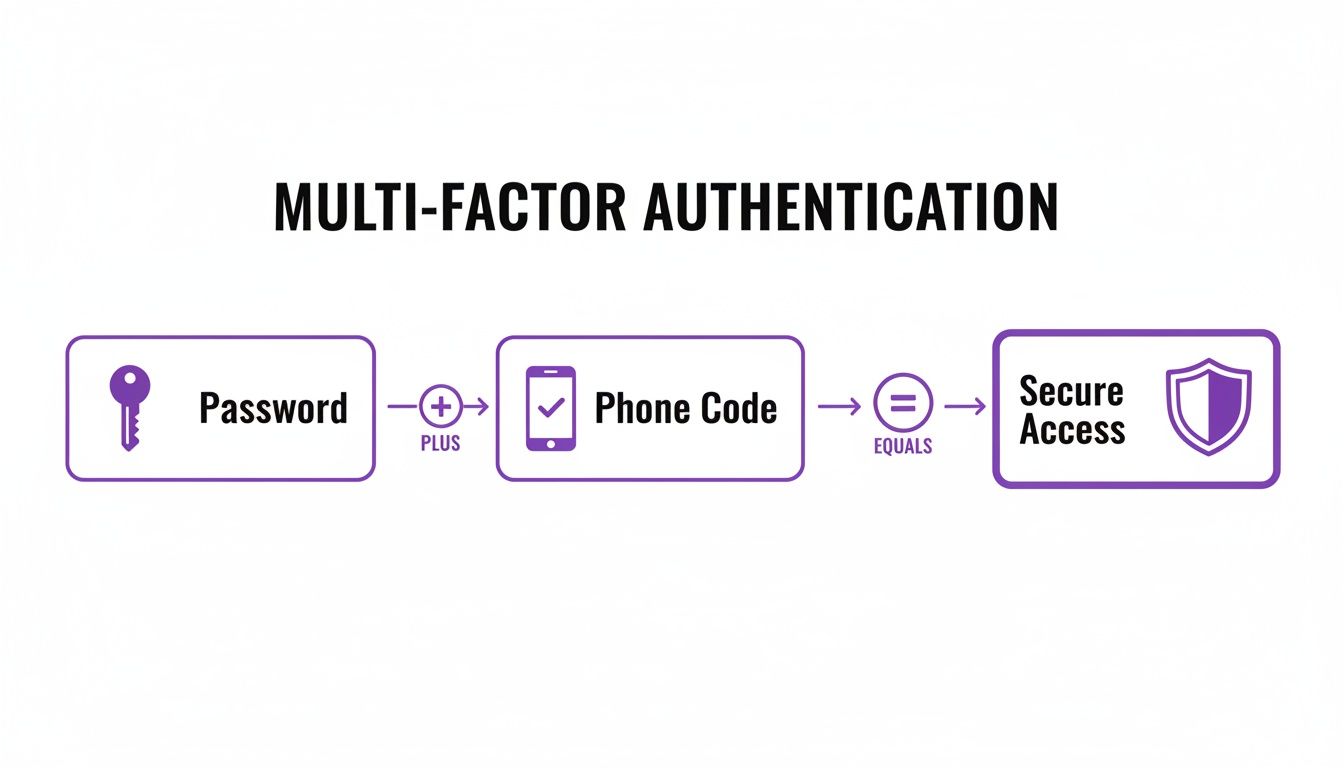
As you can see, mixing a password you know with a code from a device you own creates a much stronger security shield than either one could on its own.
Pillar 1: Something You Know
This is the classic form of security we've all used for years. It’s based on a secret bit of information that, in theory, only you should know.
- Passwords: The most common example by far. A secret string of characters you use to log in.
- PINs (Personal Identification Numbers): A shorter, numeric code often used for bank cards or unlocking your phone.
- Security Questions: Answers to personal questions like "What was the name of your first school?"
While they’re a necessary first step, these knowledge factors are also the weakest link. They can be guessed, phished, or exposed in data breaches, which is precisely why they should never be the only thing protecting your account.
Pillar 2: Something You Have
The second pillar revolves around proving you have a specific physical item in your possession. This is a powerful factor because a hacker on the other side of the world can't easily get their hands on something sitting on your desk or in your pocket.
Adding a physical token into the mix creates a tangible, geographical barrier for attackers. It dramatically cuts down the risk from remote attacks like phishing, where criminals trick you into giving up your password.
Common examples of these possession factors include:
- A Smartphone with an Authenticator App: Apps like Microsoft Authenticator or Google Authenticator generate a time-sensitive, six-digit code you need to enter.
- A Physical Security Key: A small USB device (like a YubiKey) that you plug into your computer and tap to prove it's you. This is widely considered one of the most secure MFA methods available.
- An SMS Code: A one-time code sent as a text message to your registered mobile number.
Pillar 3: Something You Are
The final pillar is biometrics, which uses your unique biological traits as your ID. This is arguably the most secure factor because it’s incredibly difficult for someone else to fake or steal.
- Fingerprint Scans: Using the unique pattern on your fingertip to unlock a device or approve a login.
- Facial Recognition: Analysing your unique facial structure, just like on modern smartphones and laptops.
- Voice Recognition: Verifying your identity based on the distinct characteristics of your voice.
By combining at least two of these pillars—for instance, a password (know) and a fingerprint scan (are)—you create a rock-solid security setup that stops the vast majority of account takeover attempts in their tracks.
Ready to implement this level of security? Phone 0845 855 0000 today or Send us a message to get started.
Why MFA Is No Longer Optional For UK Businesses
Understanding how multi-factor authentication works is one thing. Realising it’s become an essential, non-negotiable part of doing business is another entirely. For UK companies, the conversation has moved on. MFA is no longer an IT add-on or a feature you can put off until next year; it’s a fundamental pillar of modern operational resilience.
In a world where cyber threats are more frequent and sophisticated than ever, relying on passwords alone is like leaving your office front door unlocked overnight. It's an open invitation for trouble. The harsh reality is that a single stolen password can quickly spiral into a devastating data breach, serious financial loss, and irreversible damage to your company's reputation.
The main reason for this shift is just how effective MFA is at shutting down the most common types of cyberattacks. Take phishing emails, for example—a constant headache for businesses of all sizes. They're designed to trick your employees into giving away their login details, handing criminals a key to your network. MFA acts as a powerful circuit breaker in this exact scenario.
Even if an attacker gets their hands on a password, they are stopped dead in their tracks. Without that second authentication factor—like a code from a mobile app or a tap on a security key—the stolen password is completely useless. This simple but powerful defence dramatically cuts the risk of unauthorised access and account takeovers.
Protecting Your Most Valuable Assets
For any UK business, your data is one of your most critical assets. This isn’t just your own company information, intellectual property, and financial records; it's also your clients' personal data. A breach that exposes this information can have severe consequences, including hefty fines under GDPR.
MFA acts as a digital guardian for this data. By demanding multiple forms of verification, it makes sure that only authorised people can get into your systems and access the sensitive information stored there. This builds a robust defence against both external attackers and potential insider threats, helping you maintain the integrity and confidentiality of your data.
On top of that, implementing MFA is fast becoming a core requirement for regulatory compliance and even for getting business insurance.
Many cyber insurance providers in the UK now either mandate the use of MFA as a condition of coverage or offer significantly lower premiums to businesses that have it in place. This shows a clear industry consensus: failing to use MFA is an unacceptable business risk.
Mind The Security Gap
Despite the clear benefits, adoption rates are still worryingly low. The official Cyber Security Breaches Survey from the Department for Science, Innovation and Technology found that only 40% of UK businesses reported using any form of two-factor authentication. This figure highlights a major gap in security adoption among SMEs, particularly in regions like the East Midlands where firms such as F1Group provide essential IT support. You can explore more findings from the official government survey on cyber security breaches.
For a small or medium-sized business, a single successful breach can be catastrophic. The costs of cleaning up the mess, the hit to your reputation, and the business downtime can be immense. Investing in a properly configured MFA solution is one of the most cost-effective moves you can make to protect your organisation's future. It’s a proactive step that shifts your security from being reactive to truly resilient.
To discuss how to implement this essential security layer for your business, Phone 0845 855 0000 today or Send us a message.
Securing Your Business With Microsoft 365 MFA
If you're one of the millions of UK businesses running on Microsoft 365, the conversation quickly moves beyond "what is multi-factor authentication?" to "how do we actually get this working?". The great news is that Microsoft has built powerful, integrated tools right into the platform, letting you secure your accounts without driving your team mad with constant prompts.
It all happens in Azure Active Directory (Azure AD), which is essentially the central nervous system for identity and access in the Microsoft world. This is your control panel. It’s where you set the rules for how and when your users need to provide that extra piece of evidence to prove they are who they say they are, turning a general security concept into a specific, customised defence for your business.
Choosing The Right MFA Method For Your Team
Microsoft gives you a few different ways for users to verify their identity, and each one strikes a different balance between security and ease of use. Getting this choice right is crucial for a smooth rollout that people will actually get on board with.
By far the most common and recommended option is the Microsoft Authenticator app. It’s a simple smartphone app that sends a push notification to a user's phone. A quick tap on 'Approve' is all it takes to log in. It also generates time-based, one-time passcodes (TOTP) that change every 30 seconds, offering a fantastic blend of robust security and a slick user experience.
Of course, there are other options available too:
- SMS Text Messages: A classic method where a one-time code is sent to a user’s mobile. It’s convenient, but security experts now consider it a weaker option because of the risk of “SIM-jacking,” where a fraudster hijacks your phone number.
- Hardware Tokens: These are small physical fobs, like a YubiKey, that generate codes or require a physical touch to approve a login. They offer top-tier security but come with an extra cost, usually around £40-£50 per device.
- Voice Calls: An automated system calls a user's phone, asking them to press a key to confirm their identity. It’s mostly used as a fallback if other methods aren't available.
To help you weigh up the options, here’s a quick comparison of the most popular methods you can use within Azure AD.
Comparing Microsoft 365 MFA Methods
Choosing the right verification method is a balancing act between watertight security and user-friendliness. This table breaks down the common options to help you decide what's best for different roles within your business.
| Method | Security Level | User Convenience | Best For |
|---|---|---|---|
| Microsoft Authenticator App (Push Notification) | High | Very High | Everyday use for all employees; balances strong security with minimal friction. |
| SMS Code | Medium | High | A fallback or initial setup option, but not recommended as the primary method due to security risks. |
| Hardware Token (e.g., YubiKey) | Very High | Medium | Securing high-privilege accounts (like administrators) or for users without smartphones. |
| Biometrics (via Windows Hello) | High | Very High | Users on modern, compatible devices for a seamless and secure login experience. |
Ultimately, the goal is to make security as seamless as possible. The Authenticator app is a fantastic starting point for most, with hardware tokens reserved for your most critical accounts.
Using Conditional Access For Smart Security
This is where Microsoft 365's MFA really comes into its own. Just switching MFA on for everyone, all the time, is a surefire way to annoy your team. The smarter play is to use Conditional Access policies.
Think of Conditional Access as a smart bouncer for your digital front door. It’s a feature in Azure AD that checks signals from every login attempt—who the user is, their location, the device they’re using—and then decides whether to grant access, block them, or ask for extra proof like MFA.
This lets you be much more intelligent with your security. For instance, you could set up a policy that:
- Allows seamless access with no MFA prompt when an employee logs in from a trusted network, like your office.
- Demands an MFA challenge if that same person tries to sign in from a coffee shop's Wi-Fi or while travelling abroad.
- Blocks access completely from countries known to be a source of cyberattacks.
By putting policies like these in place, you hit that sweet spot between security and productivity. Your defences are strongest where the risk is highest, but the day-to-day experience for your team stays frustration-free. This kind of strategic thinking is a cornerstone of any good security risk management plan.
While our focus here is on Microsoft 365, it’s always useful to see how other industry leaders tackle these challenges. Looking into Okta's approach to enterprise cybersecurity, for example, can provide valuable perspectives on broader identity management strategies. At the end of the day, a well-thought-out MFA setup is one of the single most powerful security measures you can implement.
A Practical Plan For A Smooth MFA Rollout
Getting multi-factor authentication up and running is about much more than just flicking a switch. At its heart, it’s a change management project. Your success depends entirely on how well you bring your people along for the ride.
If you get the rollout wrong, you’re in for a world of frustration, user resistance, and a helpdesk flooded with support tickets. That completely undermines the security you’re trying to build. But with a bit of strategy, you can make sure your team not only accepts this vital upgrade but actually embraces it.
The secret to a smooth rollout? Clear, positive, and consistent communication. Long before you enable anything, you need to explain why this is happening. Don't frame MFA as another IT headache. Position it as a collective effort to protect the business, its data, and ultimately, everyone's jobs from the very real threat of cyberattacks. This simple shift in perspective turns it from a chore into a shared responsibility.

Start Small With A Phased Approach
Whatever you do, don't go for a 'big bang' launch where everyone gets enrolled at once. A phased rollout is infinitely more effective, minimising disruption and letting you gather crucial feedback before going company-wide.
- Find a Pilot Group: Kick things off with a small, tech-savvy group of volunteers from different departments. Your IT team plus a few keen managers is a great place to start. Their real-world experience will shine a light on any potential problems.
- Ask for Feedback: Don't be shy. Actively ask your pilot group what worked and what didn't. Was the setup process confusing? Were the instructions easy to follow? Use their honest insights to polish your user guides and training materials.
- Expand Incrementally: Once you've ironed out the initial wrinkles, start rolling MFA out department by department. This staggered approach makes life so much easier for your support team, allowing them to handle questions and provide one-on-one help where it's needed most.
This controlled deployment is a key part of effective change management in digital transformation. It’s about making sure new systems are adopted willingly, not forced upon a resistant workforce.
Prepare Your Team And Your Support
Giving your staff the right knowledge is half the battle. People are far more willing to accept change when they feel confident and prepared.
A successful MFA rollout is 90% communication and 10% technology. The goal is to demystify the process and make it feel like a minor, manageable tweak to their daily routine—not a massive technical hurdle.
Focus on creating simple, easy-to-digest resources:
- User Guides: Put together straightforward, visual guides (think PDFs or short videos) that show people exactly how to register and use their MFA method, like the Microsoft Authenticator app.
- Brief Training Sessions: Offer short, optional drop-in sessions, either in person or online. This gives people a chance to ask questions and get hands-on help with the setup in a relaxed setting.
- Get IT Support Ready: Make sure your IT support team is prepped with a clear FAQ document covering the most likely issues, like what to do if someone loses their phone.
The good news is that people are becoming much more security-savvy. A recent Yubico survey showed a huge jump in confidence for hardware security keys and passkeys, with the number of UK users citing them as the most secure method climbing from 17% to 37%. This 20% increase shows a growing public understanding of phishing-resistant MFA, which is a fantastic sign for any business looking to implement stronger security. You can explore the full global authentication survey findings on Yubico.com.
By communicating clearly and rolling out the technology thoughtfully, you can turn what could be a point of friction into a security win that everyone in the organisation gets behind.
Ready to plan your secure MFA rollout? Phone 0845 855 0000 today or Send us a message to get expert guidance.
So, What's Next for Your Business Security?
We've covered a lot of ground, but the core message is simple: Multi-Factor Authentication is no longer a 'nice-to-have'—it's an absolutely essential layer of modern business security. In truth, relying on passwords alone has become a massive liability. They're a weak point that cybercriminals have become incredibly skilled at breaking. MFA is your most powerful and practical defence against the tidal wave of attacks targeting employee accounts.
When you implement MFA, you’re doing more than just ticking a box for compliance. You are actively protecting the crown jewels of your business: your sensitive data, your reputation, and the very stability of your day-to-day operations. In a world where one stolen password can bring a company to its knees, leaving your digital front door guarded by a single lock is a gamble you can't afford.
Time to Take Action
The numbers don't lie. Microsoft’s own research confirms that MFA blocks 99.9% of automated attacks on accounts. Think about that for a second. It's one of the most effective security moves you can possibly make. Putting it off is like knowingly accepting that you’re vulnerable to common threats like phishing and credential theft—the very tactics behind most data breaches.
Making the switch to MFA is a clear, decisive step towards building a more resilient business. The tools are already at your fingertips, especially if you're using platforms like Microsoft 365, and with a bit of planning, the rollout can be surprisingly smooth.
Protecting your business really does start with securing every single login. MFA is the most impactful step you can take right now to defend against what's coming tomorrow. It turns a single, fragile password into a robust, layered defence.
Don't wait for a security breach to become your wake-up call. Now is the time to secure your business with a properly managed MFA solution that protects your operations without getting in your team's way. Being proactive isn't just good practice; it's the bedrock of any successful modern business.
For specialist help with planning and rolling out MFA in your organisation, our expert team is here to help.
Call us on 0845 855 0000 today or send us a message to talk through your options.
Frequently Asked Questions About MFA
It's completely normal to have a few practical questions before rolling out a new security measure, even one with clear benefits like MFA. Let's tackle some of the most common queries we hear from businesses looking to make their accounts more secure.
Is MFA Difficult for Non-Technical Employees to Use?
This is probably the number one concern we encounter, and it's a valid one. The good news is, the answer is a firm no. Modern MFA systems are designed from the ground up to be user-friendly and intuitive, not a technical puzzle.
Take the most common method today: a simple push notification. When an employee signs in, a message just pops up on their phone via an app like Microsoft Authenticator. All they do is tap ‘Approve’. It’s that simple – a single tap that takes a second.
With a bit of clear communication during the rollout, we find that teams get the hang of it almost immediately. It quickly becomes a normal, reassuring part of their login routine, not another hurdle to jump over.
Will MFA Slow Down Our Employees' Workflow?
No one wants to bog down their team with security that gets in the way of actual work. A well-designed MFA setup is built to be smart, not intrusive, so productivity doesn't take a hit.
The secret lies in using clever features like Microsoft's Conditional Access policies. This allows us to apply MFA based on risk, rather than plastering it over every single login. In practice, this means the system might only ask for that second factor in higher-risk scenarios, such as:
- Someone logging in from a brand-new or unrecognised device.
- An access attempt from an unusual location or a public Wi-Fi network.
- Trying to open particularly sensitive company files or applications.
For everyday work on a trusted company computer in the office, users might not be prompted at all. This intelligent approach gives you rock-solid security when it matters most, without creating frustrating delays for your team.
What's the Difference Between Two-Factor Authentication and MFA?
It's easy to see why these two get mixed up, as people often use them interchangeably. While they're related, there's a small but important technical difference.
Think of Two-Factor Authentication (2FA) as a specific type of MFA. As the name implies, 2FA always requires exactly two distinct factors to prove who you are. A classic example is your password (something you know) combined with a one-time code from your phone (something you have).
Multi-Factor Authentication (MFA) is the wider, umbrella term. It describes any system that requires two or more verification methods. So, while all 2FA is a form of MFA, an MFA system could potentially ask for three or even four factors for accessing highly critical data.
For most businesses, the system you'll be implementing will use two factors. While you'll hear both terms, MFA has become the more accurate industry standard because it reflects a modern, layered approach to security. At the end of the day, both have the same goal: making it exponentially harder for the wrong people to get into your accounts.
Ready to add this essential security layer without causing a headache for your team? The expert team at F1Group can help you plan and deploy a seamless, intelligent MFA solution that fits your business perfectly.
Phone 0845 855 0000 today to discuss your requirements, or Send us a message to start the conversation.