
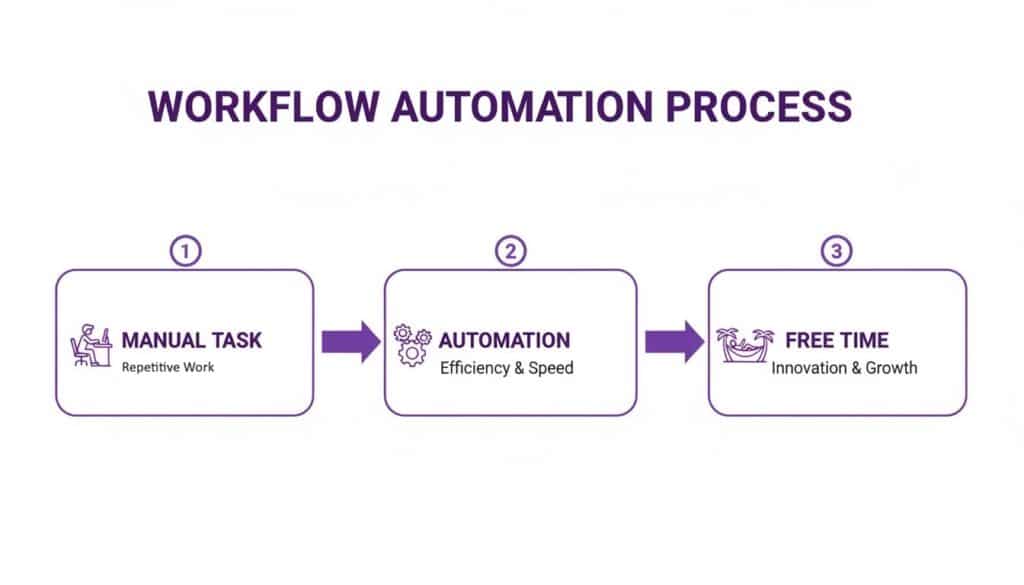
At its heart, workflow automation is about using technology to run a series of tasks for you, all based on rules you set in advance. It’s the digital equivalent of putting your business processes on autopilot.
Think of it as the invisible team member who handles all the predictable, repetitive jobs—like sending follow-up emails, updating customer records, or chasing invoice approvals—without you ever having to lift a finger. The whole point is to take the grunt work off your team's plate so they can focus on the stuff that really matters: creative thinking, customer relationships, and growing the business.
From Manual Drudgery to Automated Efficiency
Let’s use a simple analogy. Imagine you have a coffee machine with a built-in timer. You set it to grind the beans and start brewing at 7 a.m., so a fresh pot is ready the moment you walk into the kitchen. Workflow automation does the exact same thing for your business. It turns those tedious, multi-step manual tasks into smooth, hands-off operations.
For example, instead of an employee manually copying details from a new customer form into a spreadsheet, then drafting a welcome email, and then creating a follow-up task in your project management tool, an automated workflow does it all in a split second. The moment that form is submitted, the system kicks into gear.
The basic idea is to teach your software how to handle a process from start to finish. This isn’t about replacing people; it’s about giving them an upgrade. When you remove the burden of mundane tasks, your team is free to do what they do best—solve complex problems and drive the business forward.
So, how does it actually work? It transforms your operations by:
- Connecting Your Tools: It acts as the digital glue linking the apps you use every day, like your email, CRM, and accounting software, so they can talk to each other.
- Following Simple Rules: It runs on straightforward "if this, then that" logic. For instance, "IF a new lead comes in from the website, THEN add them to our CRM and assign them to a sales rep."
- Working Around the Clock: An automated system never gets tired or takes a day off. It ensures tasks are completed consistently and on time, 24/7.
An automated system virtually eliminates the risk of human error in repetitive jobs. In manual data entry, that error rate can be as high as 1-4%. Automation means better accuracy across the board, from financial reports to customer records.
To see this in action, here's a quick comparison of how automation changes everyday tasks.
Manual Tasks vs Automated Workflows
| Manual Process | Automated Workflow Example | Key Benefit |
|---|---|---|
| Employee onboarding emails and IT requests are sent one by one. | A new hire is added to the HR system, which automatically triggers welcome emails, IT account setup, and training invitations. | Consistency & Speed. New starters get a great experience from day one, without administrative delays. |
| A project manager manually chases team members for status updates. | A daily reminder is automatically sent to team members with overdue tasks, and their responses update the project dashboard. | Improved Accountability. Managers spend less time chasing and more time leading. |
| Invoices are downloaded from an email, entered into accounting software, and then routed for approval. | Software “reads” an invoice from an email, extracts the key data, creates a draft in the accounting system, and sends an approval request. | Time Savings & Accuracy. The accounts payable process is faster and free from data entry mistakes. |
As you can see, the benefits go far beyond just saving a bit of time; it’s about creating more reliable and efficient systems.
The Power of A Connected System
Ultimately, workflow automation is about building a smarter, more nimble business. When you start exploring areas like marketing workflow automation, you quickly realise how much efficiency can be gained from connecting your various systems.
For any organisation in the East Midlands, from a small charity in Lincoln to a growing business in Nottingham, this technology makes streamlining business processes a completely achievable goal, not just a concept for large corporations.
How Does Workflow Automation Actually Work?
So, how does all this work in practice? It’s far less like magic and much more like a simple, logical recipe. At its heart, every automated workflow is built from just three core ingredients: triggers, actions, and a bit of logic. Once you understand these, you can see how straightforward it is to start building your own.
A trigger is simply the starting gun. It’s the specific event that tells the system, “Right, time to go!” This could be anything from a new email landing in an Outlook inbox, a customer filling out a form on your website, or even a new file being dropped into a SharePoint folder.
Once that trigger fires, it sets off an action. This is the task that gets done automatically. For example, if an email arrives (the trigger), the action might be to save its attachment to a specific OneDrive folder. If a customer submits a form (the trigger), the action could be to create a new contact for them in your Dynamics 365 system.
The Brains of the Operation: Logic
The secret sauce that holds it all together is logic. This is the set of rules that steers the workflow, often using simple “if this, then that” conditions. Logic is what allows the automation to make smart decisions on its own, adding a real layer of intelligence to the process.
Let’s look at a classic real-world example using Microsoft Power Automate, a brilliant tool that many businesses in the East Midlands already have as part of their Microsoft 365 subscription.
- Trigger: An email arrives with the word “Invoice” in the subject line.
- Logic: IF the email is from a known supplier (by checking the sender’s address), THEN continue.
- Action: Automatically save the invoice attachment into a SharePoint folder called “Invoices for Approval” and ping the finance team on Microsoft Teams to let them know it’s there.
In a few simple steps, you’ve built a system that captures, organises, and flags important financial documents the second they arrive. No more manually monitoring an inbox. If you want to dive deeper into what’s possible, you can learn more about how to use Power Automate and connect the different apps your business relies on.
The real beauty here is that it shifts your team’s focus from repetitive data entry to valuable, strategic work.
Your Team Can Build This
Perhaps the best part about modern tools like Power Automate is their ‘low-code’ approach. You don’t need to be a developer to build powerful, effective automations.
Using a visual, drag-and-drop interface, your own team members—the people who actually understand the processes inside-out—can design and build better ways of working.
This puts the power to improve directly into the hands of the departments that need it most, without creating a bottleneck in your IT team. It’s all about empowering your staff to solve their own problems using the tools they already use every day.
What Automation Actually Does for Your Business
It’s one thing to understand the ‘how’ of workflow automation, but what really matters is the return on your investment. For any UK business or charity, the proof is in the pudding. When you look past the technical side, you’ll find that automation tackles the most common, nagging problems that organisations face every day. The result? A business that runs smoother, safer, and is ready to grow.

Ultimately, workflow automation is about getting back your two most precious resources: time and money. By making your teams and systems work smarter, not harder, you’ll see positive effects ripple through the entire organisation.
Slash Costs and Reclaim Your Time
The first thing you’ll notice is how much less time is wasted on tedious, manual jobs. Just think about all the hours your team sinks into admin – entering data, pulling together reports, or chasing people for approvals. Automation can do these jobs in the blink of an eye, freeing up your people to focus on the kind of work that actually pushes the business forward.
For instance, an automated purchase order system means the finance team isn’t buried in paperwork and can concentrate on actual financial planning. In the same way, automating the onboarding for a new client ensures they get a warm, professional welcome straight away, without anyone on your team having to lift a finger. This saved time directly cuts costs by letting you achieve more with the people you already have.
We’re seeing the impact right here in the East Midlands. The UK is on track to have Europe’s biggest warehouse automation market by 2025, and this is sparking wider adoption of workflow automation in all sorts of businesses. For local SMEs, the results are real, with some seeing 40-75% fewer errors and a 25-30% jump in productivity. When you consider that 94% of companies are wrestling with repetitive tasks, automation isn’t just a nice-to-have; it’s essential for staying competitive. It’s thought that up to 90% of jobs could be improved by it. You can explore more on UK warehouse automation market trends and what it means for businesses like yours.
Boost Accuracy and Stay Compliant
Let’s be honest, people make mistakes. It’s a natural, if sometimes expensive, part of running a business. A single wrong digit on an invoice or a missed step in a compliance checklist can cause major headaches, both financially and legally. Workflow automation practically eliminates this risk by making sure processes are followed to the letter, every single time.
By setting up standard procedures, you create a clear, traceable record of every action. This is absolutely critical for staying compliant with regulations like GDPR, where you need to prove your processes are consistent and secure.
An automated workflow never has an ‘off’ day or forgets a step. It just follows the rules you’ve set, ensuring total consistency and accuracy, whether it’s the first task of the day or the thousandth.
A Better Experience for Staff and Customers
Something amazing happens when you take the soul-crushing, repetitive jobs off your team’s plate: they become happier. People are more engaged and satisfied when they can use their brains to solve real problems instead of just doing admin. This boost in morale often leads to lower staff turnover and a far more motivated team.
And that internal boost has a knock-on effect for your customers. Key improvements they’ll notice include:
- Quicker Responses: Automated systems can acknowledge a customer’s query or process their order instantly, so they’re not left hanging.
- Total Consistency: Every customer gets the same high level of service because the process is locked in.
- Proactive Updates: Workflows can automatically fire off shipping notifications or appointment reminders, keeping customers in the loop without any manual effort.
In the end, all these little improvements add up to a more responsive, reliable, and professional experience. This builds customer loyalty and strengthens your reputation, showing that the return on investment from automation goes far beyond just saving a bit of time.
Seeing Workflow Automation in Action with Microsoft Tools
It’s one thing to talk about the theory, but seeing how workflow automation actually works is what makes it all click. For many businesses across the UK, especially those already invested in Microsoft’s ecosystem, the tools you need to get started are probably right under your nose. The real engine here is Microsoft Power Automate, which acts as the glue connecting the apps you use every day—from Microsoft 365 to Dynamics 365—and turning them into a single, cohesive system.
This isn’t about writing complex code. Power Automate connects hundreds of different applications, building bridges between them to get things done automatically. Let’s look at a few real-world scenarios to show you what’s possible for your organisation.
Speeding Up Your Sales Process in Dynamics 365
A new lead is gold dust for any business. But if you’re too slow to follow up, you can bet a competitor will get there first. The manual process of assigning leads, setting reminders, and logging that first conversation is often where delays and mistakes creep in.
Here’s how automation flips the script:
- The Bottleneck: A new lead from your website lands in Dynamics 365 Sales. A sales manager has to spot it, manually assign it to someone, and that salesperson then has to remember to create a follow-up task. It’s slow and clunky.
- The Automated Fix: We build a simple flow in Power Automate that kicks in the second a new lead is created. It instantly assigns the lead to the right person based on rules you’ve set, like territory or current workload.
- The Result: The flow doesn’t stop there. It automatically creates a “First Contact” task in the salesperson’s Microsoft To Do list and even blocks out time in their Outlook calendar. Every single lead gets a rapid, consistent follow-up, which directly boosts conversion rates and makes for a much better customer experience.
Taking the Pain Out of Document Approvals with SharePoint
We’ve all been there. A contract, proposal, or purchase order gets stuck in someone’s inbox, holding up entire projects. Chasing people for signatures is a tedious waste of everyone’s time.
An automated approval process completely smooths out this friction.
The Problem: A new supplier contract needs a signature from the department head and then the finance director. This usually means a flurry of emails, multiple document versions floating around, and a headache trying to track who has signed it.
The Solution: An employee simply uploads the final contract to a designated SharePoint folder. That single action triggers a workflow that pings the department head in Microsoft Teams with a link to the document and simple “Approve/Reject” buttons.
The Outcome: Once the department head clicks “Approve,” the workflow automatically forwards it to the finance director. When the final approval is given, the document is moved to a “Signed Contracts” folder, and the person who started the process gets a notification. It’s fast, transparent, and creates a perfect audit trail.
Automating HR Onboarding for New Starters
A great onboarding experience is critical for keeping new talent. A chaotic first few days filled with paperwork and waiting around for system access is a terrible first impression. Automating the onboarding checklist ensures every new team member feels welcome and ready to contribute from day one.
The screenshot above from Microsoft Power Automate’s website shows just how straightforward building these flows can be, thanks to pre-built templates and visual connectors. This “low-code” approach means departments like HR can build their own solutions without needing a developer.
This ease of use is a huge driver behind the market’s growth. In the UK, the robotics process automation (RPA) market—a key part of workflow automation—was valued at £133.72 million in 2024. It’s projected to explode to over £1 billion by 2033. This incredible growth shows how UK SMEs, especially in regions like the East Midlands, are using cloud-based tools like Power Automate to become more efficient without huge upfront costs. You can dig into more data on the UK robotics process automation market growth and its impact.
Looking at these scenarios, you can begin to see how the concept of what is workflow automation becomes a real, tangible benefit for your business. For more ideas, have a look at other powerful business process automation examples that could make a difference in your organisation.
These examples are really just scratching the surface. The technology you probably already own has the power to change how your business runs, making it faster, more accurate, and more agile.
Ready to find the hidden potential in your processes? Phone 0845 855 0000 today or Send us a message to see how we can help.
Getting Started with Workflow Automation in Your Business
The idea of automating your business workflows can sound like a huge undertaking, but it doesn’t have to be. The trick is to forget about big-bang, company-wide projects. Instead, think small.
By breaking the process down into clear, manageable steps, you can start seeing the benefits almost immediately. The key is to prove the value with a quick win and build momentum from there.

Think of it like bringing on a new, super-efficient team member. You wouldn’t give them your most complex job on day one. You’d start them off with a straightforward task to help them find their feet. The same principle applies here.
Identify the Right Processes
First things first: you need to find the right jobs to hand over. You’re hunting for the bottlenecks, the tasks that create friction in your day-to-day operations. These are usually the jobs your team hates—the repetitive, tedious ones where a tiny human error can cause big headaches.
Keep an eye out for processes with these traits:
- High-Volume and Repetitive: Think of tasks that happen over and over, like processing weekly expense claims or sending out standard welcome emails to new customers.
- Rule-Based: If a process follows a clear, predictable logic—something you could map out with “if this happens, then do that”—it’s a perfect candidate for automation.
- Involves Multiple Systems: Any task where someone is manually copying and pasting information between different apps (like from an Excel sheet into your CRM) is screaming out to be automated.
- Time-Sensitive: Workflows where speed is essential, like acknowledging a new sales enquiry or processing a customer order, benefit massively from the instant response of automation.
Don’t try to boil the ocean. Just pick one or two small but frustrating processes to start with. Nailing a quick win is the best way to get everyone on board and excited about what’s possible.
Plan and Govern Your Approach
Once you’ve picked your starting point, sketch out a simple plan. This isn’t about writing a 100-page strategy document; it’s about setting clear goals and a few ground rules. Define what success looks like. For example, your goal might be to “cut the time spent processing invoices by 50% within three months.”
Governance is also crucial, especially as you start doing more with automation. You need to decide who is allowed to build and manage workflows. While tools like Power Automate are incredibly user-friendly, you still need to make sure automations are built securely and don’t accidentally create data leaks. Setting these rules early will save you a lot of trouble later on.
Choose the Right Tools
For many UK businesses, the best tools are probably already sitting on their computers. If your organisation uses Microsoft 365, you have access to Power Automate, a brilliant platform designed to connect all your existing applications. Starting with a tool that’s already part of your ecosystem is by far the most efficient and cost-effective way to begin.
Choosing a familiar platform like Microsoft Power Automate dramatically lowers the barrier to entry. Your team already knows the interface, and the security is built-in, making your first steps into what is workflow automation much smoother and more secure.
Implementation and Change Management
Finally, never forget the human element. The most successful automation projects are the ones where the team is fully behind it. It’s absolutely vital to communicate why you’re bringing in automation, framing it as a tool to help them, not to replace them.
Get your team involved in identifying which tasks to automate. Give them training and show them exactly how the new, slicker workflows will make their jobs less of a grind. By focusing on the benefits—less boring admin, more time for genuinely interesting work—you can turn potential resistance into real enthusiasm. A smooth rollout is just as much about people as it is about technology.
Ready to take your first step? Phone 0845 855 0000 today or Send us a message to chat about which process in your business is the perfect candidate for automation.
Your Next Steps with F1Group
Hopefully, you can now see that workflow automation isn’t some complex, out-of-reach technology reserved for giant corporations. It’s a practical, powerful strategy that any UK business, charity, or organisation can use to grow and improve. At its heart, it’s all about making your daily operations more efficient, reliable, and secure.
The benefits aren’t just theoretical; they’re real and measurable. You’ll save money by making better use of your resources, improve accuracy by taking human error out of repetitive tasks, and free your team from soul-crushing admin. This gives them the time and headspace to focus on the creative, strategic work that really pushes your organisation forward.
Start Small with What You Have
The best part? You probably already have the tools you need to get started. Powerful automation features are built right into the Microsoft 365 and Dynamics 365 platforms that so many businesses rely on every day. You don’t need a massive budget or a dedicated team of developers to see a genuine impact.
The trick is to start small. Pick one repetitive, frustrating process—just one—and focus on improving it. Nailing a quick win is the perfect way to prove the value of automation and get your whole team excited about what’s possible.
As a local, dependable IT partner with decades of Microsoft expertise, F1Group is perfectly placed to help businesses across the East Midlands work smarter. We can help you pinpoint that ideal starting process and make sure you’re getting every ounce of value from the technology you already own.
Take the first step towards a more efficient future.
Phone us on 0845 855 0000 today or send us a message to explore how we can help your business thrive.
Got Questions About Workflow Automation? We’ve Got Answers
It’s completely normal to have a few questions when you’re looking at a new way of working. Let’s tackle some of the most common ones we hear from businesses right here in the UK, with some straight-talking answers to clear things up.
Isn’t This Going to Be Expensive for a Small Business?
Not at all. In fact, you might be surprised to learn you probably already own the tools to get started. Many Microsoft 365 subscriptions include access to Power Automate, a seriously powerful automation platform, at no extra cost.
The real “cost” comes down to how complex your needs are. You can begin by automating simple but time-consuming tasks—like automatically saving email attachments to the right folder—with little to no investment. The time you save and the mistakes you avoid often pay for any costs almost immediately. For more advanced features, plans can start from around £12 per user per month, but the value you get back in efficiency is usually many times that. We can even take a look at your current licences and show you the smartest, most cost-effective way to begin.
Do We Need to Hire a Team of Developers for This?
Absolutely not. That’s the old way of thinking. Modern tools like Microsoft Power Automate are built on a ‘low-code’ or even ‘no-code’ principle. This means your own team can build powerful automations using simple drag-and-drop visual designers, without ever touching a line of code.
This approach puts the power directly into the hands of the people who know the processes best—your staff in finance, HR, or marketing. They can become ‘citizen developers’, building solutions to their own everyday headaches. Of course, for really complex or business-critical integrations, you might want an expert in your corner. That’s where a partner like F1Group comes in to handle the heavy lifting.
How Safe Is It to Automate Processes Using Company Data?
Security is everything, and platforms from providers like Microsoft are designed with world-class security baked in from the very beginning. The Microsoft Power Platform is built on the same foundations as Microsoft 365 and Azure, so it inherits all of their robust, enterprise-grade security and compliance controls. Your data is protected by default.
The key thing to remember is that security features are built-in, not bolted on afterwards. You get things like Data Loss Prevention (DLP) policies, which stop sensitive information from being shared where it shouldn’t, and really specific access controls to manage who can build workflows and what data they’re allowed to touch.
As a partner with a deep focus on cyber security, F1Group helps businesses put strong governance in place right from the start. We’ll make sure your automations are not just efficient, but completely secure.
What’s the Difference Between Workflow Automation and RPA?
That’s a brilliant question, as the two are often mentioned together. Here’s a simple way to think about it:
-
Robotic Process Automation (RPA) is brilliant at mimicking repetitive, mouse-and-keyboard human actions on a computer screen. It’s perfect for getting data out of older, legacy systems that don’t have modern connections (APIs). Think of it as a digital worker that can copy information from one programme and paste it into a spreadsheet, just like a person would.
-
Workflow Automation is a bit broader. It’s all about connecting modern applications and services that are already designed to talk to each other through APIs. A great example is when a new contact form is filled out on your website, it automatically creates a new lead in your CRM system.
The great thing is that a versatile tool like Power Automate can do both. It gives you one platform to streamline your processes, whether you’re working with the latest cloud apps or a twenty-year-old piece of desktop software.
Ready to see what automation could do for your business? F1Group is here to help you get it right.
Give us a call on 0845 855 0000 or Send us a message to start the conversation.