
Let's be blunt: the old way of doing IT security is broken. For years, we relied on a 'castle-and-moat' model – if you were inside the network, you were trusted. But in a world of remote work and cloud apps, that approach is a recipe for disaster. This is where Zero Trust comes in. It’s a completely different way of thinking about security, built on a simple but powerful idea: never trust, always verify.
Why Your Firewall Is No Longer Enough
Think of your company’s network as a medieval castle. Traditionally, security meant building a high wall (your firewall) and having a single, heavily guarded gate (your VPN). Once someone was inside, they were assumed to be a loyal subject and could wander around pretty much as they pleased. This worked fine when all your employees and all your data were safely inside those walls.
But that’s not how we work anymore, is it? Your team connects from home, from client sites, even from the local coffee shop. Your most critical data isn't locked in a server room; it’s in cloud services like Microsoft 365. The old perimeter has simply vanished.
The Problem With Implied Trust
This new, borderless way of working leaves businesses wide open. A single stolen password or a malware-infected laptop is all it takes for an attacker to get inside your 'secure' network. And once they're in, they often find they can move around without raising any alarms because the network implicitly trusts them. The game has changed, and relying solely on a firewall is like trying to protect the castle when your people are already outside the gates. Today's sophisticated attacks, including internal threats, demand more advanced strategies and advanced insider threat detection tools.
The statistics for UK businesses are pretty sobering. The government's 2024 Cyber Security Breaches Survey revealed that 50% of all UK businesses had suffered a breach or attack in the last year. For medium and large businesses, that number skyrockets to over 70%.
A New Mindset for a New Reality
This is the gap that Zero Trust fills. Instead of asking "where is this connection coming from?", it asks "who is making this request, are they who they say they are, is their device secure, and should they have access to this specific resource right now?"
Zero Trust isn’t a single product you can install. It’s a strategic shift in mindset, starting from the assumption that your network is already compromised. It means every user, every device, and every application must prove its identity and integrity before being granted access.
This approach massively shrinks your 'attack surface'. If an attacker does manage to steal a user's login details, their access is severely limited. They can't just wander through your digital corridors. They're confined to only what that specific user is explicitly allowed to access, from a verified device, at that very moment.
To help illustrate the difference, let’s compare the two approaches side-by-side.
Traditional Security vs Zero Trust Security
This table highlights the fundamental shift in thinking from the old, perimeter-based model to the modern, identity-centric Zero Trust approach.
| Security Principle | Traditional 'Castle and Moat' Model | Zero Trust Model |
|---|---|---|
| Trust Assumption | "Trust but verify." Anyone inside the network is trusted by default. | "Never trust, always verify." No user or device is trusted by default. |
| Security Focus | Securing the network perimeter (the "moat"). | Protecting data and resources directly, regardless of location. |
| Access Control | Broad network access based on location (inside vs. outside). | Granular, least-privilege access based on identity and context. |
| When Verification Happens | Primarily at the point of entry (e.g., VPN login). | Continuously, for every single access request. |
| Response to a Breach | Difficult to contain, as intruders can move freely once inside. | Breaches are contained ("micro-segmented") to a very small area. |
As you can see, Zero Trust is a far more robust and realistic framework for the way we work today. A crucial piece of this puzzle is ensuring every device connecting to your network is secure, which is why understanding what endpoint security means is a vital first step. Adopting this proactive stance is no longer just a good idea—it’s essential for protecting a modern business.
To build a more secure future for your business, talk to an expert.
Phone 0845 855 0000 today or Send us a message.
The Three Pillars of Zero Trust Security
Zero Trust isn’t something you can just buy and install; it’s a completely different way of thinking about security. It's a strategic model built on three core ideas that, once you grasp them, will make the old ‘castle-and-moat’ approach feel dangerously outdated. These principles work together to build a much more resilient defence, drastically reducing the damage an attacker can do if they manage to slip past your outer walls.
At its heart, Zero Trust shifts the focus from trusting a network to continuously verifying every single request for access. Let's break down each pillar with a real-world analogy to see how it all fits together.
Pillar 1: Verify Explicitly
The first and most important rule is to verify explicitly. This means every attempt to access your systems must be authenticated and authorised based on all the data you have available. A correct password simply isn't enough anymore. We need to check who the user is, their location, the health of their device, the service they're trying to reach, and more.
Think of it like the security at a top-secret government building. The guard at the main gate checks your ID when you arrive. But then, to get into a specific lab, you need to use a different keycard. To access a secure terminal inside that lab, you need to enter a PIN. Each step is a separate verification. It doesn't matter that they've seen you before; access is granted one request at a time, based on the context of that exact moment.
Pillar 2: Use Least-Privilege Access
The second pillar is all about using least-privilege access. This principle is simple but powerful: give people access only to the resources they absolutely need to do their jobs, and not a single thing more. It’s about shrinking the potential attack surface by keeping user permissions to a bare minimum.
It's a bit like giving a set of keys to a contractor working on your office. You wouldn't hand the plumber a master key that opens the front door, the server room, and the CEO's office. You'd give them a single key that only works for the boiler room, and maybe only for the day they’re scheduled to be on-site. You're minimising your risk.
This is exactly how it should work in your IT environment. Someone in the marketing team shouldn't be able to view HR files, and a system administrator should only use their powerful "master key" for specific tasks, not for day-to-day work like checking emails. This way, if an account is ever compromised, the damage is contained.
Pillar 3: Assume Breach
Finally, the third pillar requires a real mental shift: assume breach. Instead of believing your network is a safe, trusted space, you design your entire security system with the assumption that an attacker is already inside. This forces you to plan for the worst-case scenario, rather than just hoping it never comes to pass.
This is the same logic behind your office fire safety plan. You don't just lock the doors and hope a fire never starts. You install smoke alarms and fire extinguishers in every room, and you practise fire drills. By assuming a fire is a real possibility, you build systems to detect it early, contain it, and minimise the damage. In cybersecurity, assuming a breach means segmenting your network, encrypting your data, and having constant monitoring in place to spot and isolate threats before they can spread.
Working in concert, these three principles create a modern, powerful defence for any business.
Ready to implement these principles in your organisation? Phone 0845 855 0000 today or Send us a message to speak with a security expert.
Making Identity Your New Security Perimeter
In a world where your team can work from anywhere, the old idea of a secure office network is gone for good. The most important thing to protect now isn't a physical location—it's the digital identities of your people and their devices. Your security boundary has shifted. It's no longer the office walls; it’s now defined by identity, making it the absolute frontline of defence, especially for businesses running on platforms like Microsoft 365 and Azure.
Think about it: a single stolen password can hand a cybercriminal the keys to your entire kingdom. Once they’re in with legitimate credentials, they can waltz through your sensitive emails, financial records, and client data. This is precisely why rock-solid identity verification is the heart of modern security and a central pillar of the Zero Trust approach.
Beyond the Password
Let's be blunt: a simple username and password just doesn't cut it anymore. Today's identity tools are far more sophisticated, designed to confirm that a user is truly who they say they are.
-
Multi-Factor Authentication (MFA): This is your foundational layer of defence. MFA demands more than just a password. It requires users to prove their identity with at least two different methods—something they know (the password), something they have (a code from an app on their phone), and sometimes, something they are (a fingerprint). It’s a straightforward step that makes a successful attack dramatically more difficult.
-
Conditional Access: This is where things get really smart. Picture an intelligent bouncer at an exclusive club. They don't just glance at an ID; they assess the whole situation. Are you arriving at an odd hour? From a dodgy part of town? Do you seem a bit off?
Conditional Access policies in systems like Microsoft 365 work the same way, analysing different signals in real-time before granting access. It can automatically block a sign-in from an unrecognised country or demand an extra MFA check if someone tries to log in from a new or untrusted device.
The Business Case for Identity-First Security
Focusing on identity isn't just a technical box-ticking exercise; it's a vital business strategy. The entire industry is moving in this direction. In fact, Okta’s 2023 State of Zero Trust report found that a staggering 91% of organisations see identity as important to their Zero Trust strategy. Even more telling, 80% increased their budgets for identity initiatives despite wider economic uncertainty.
For UK businesses, especially those in the East Midlands handling sensitive personal or financial information, demonstrating robust identity controls is no longer optional—it's essential for building and keeping trust. A strong approach to identity and access management proves you're serious about protecting company and client data, which is a powerful way to stand out from the competition.
By making identity your new perimeter, you create a security model that follows your data and users, protecting your assets no matter where they are.
To fortify your identity security, speak with one of our experts. Phone 0845 855 0000 today or Send us a message.
How Can You Implement Zero Trust with Microsoft 365?
So, how do you turn the theory of Zero Trust into a practical reality for your business? It can sound like a huge undertaking, but here's the good news: if your business already uses Microsoft 365, you're sitting on a goldmine of powerful security tools. This isn't about buying a whole new stack of expensive software; it's about making the most of your current Microsoft investment by configuring it the right way.
The first step in any Zero Trust journey with Microsoft 365 is building a rock-solid identity foundation. This is the job of Microsoft Entra ID (which you might still know by its old name, Azure Active Directory). Think of it as the central control tower for every user identity in your organisation, giving you one place to manage exactly who has access to what.
Step 1: Verify Explicitly with Entra ID
Microsoft Entra ID is the engine that brings the ‘Verify Explicitly’ principle to life. Every single time a user tries to open an application, access a file, or connect to any other company resource, Entra ID is there to challenge and confirm their identity. It’s your digital bouncer, and it never takes a break.
To make this verification truly meaningful, you have to enforce Multi-Factor Authentication (MFA) for every single user, no exceptions. This one action is arguably the most effective defence against unauthorised access, stopping attackers in their tracks even if they’ve managed to steal a password. Understanding how Azure Active Directory works is absolutely fundamental to getting this foundational layer right.
Modern security has moved beyond the old idea of just protecting the network perimeter. Today, identity is the true control plane.
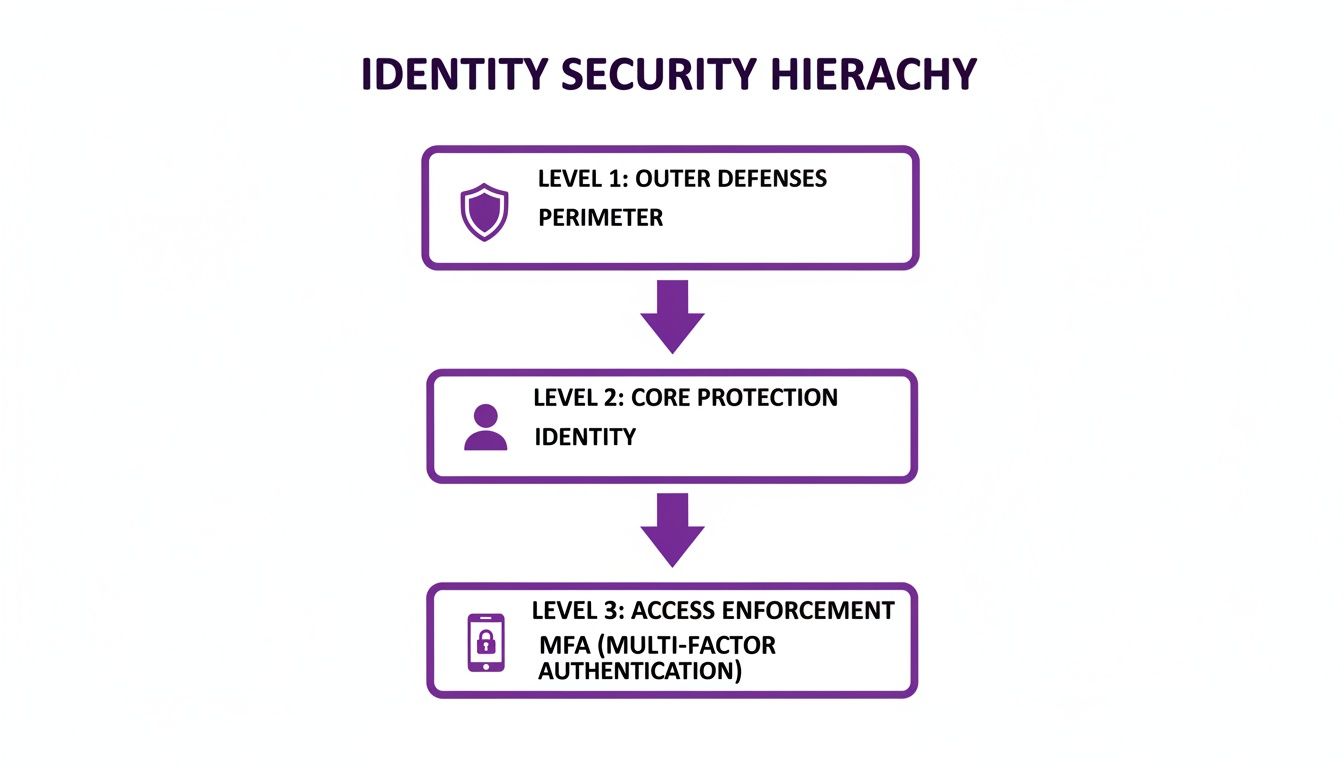
As this shows, the network might be the outer wall, but the real security checkpoints are a user's identity and the strength of their sign-in, which is where MFA comes in.
Step 2: Enforce Least Privilege with Conditional Access
Once you’ve confirmed a user is who they say they are, the next question is: what should they be allowed to do? This is where the ‘Least Privilege’ principle comes in, and Microsoft’s tool for the job is Conditional Access.
Think of Conditional Access as a set of incredibly smart ‘if-then’ rules that grant or deny access based on real-time signals. For instance, you can create a policy that says, "IF a user is trying to access our finance system, AND they are signing in from an unrecognised device, THEN they must complete an MFA challenge and will only have read-only permissions."
This lets you get incredibly specific, ensuring users only get the precise level of access they need, for that specific task, at that specific moment. Nothing more, nothing less.
Step 3: Assume Breach with Defender and Purview
Finally, to operate with an ‘Assume Breach’ mindset, you need tools that are constantly on the lookout for threats and actively protecting your data, just in case an attacker slips through.
-
Microsoft Defender for Endpoint: This is your device security. It works on your laptops, mobiles, and servers to detect, investigate, and respond to threats automatically. It also ensures that only healthy, compliant devices are allowed to connect to your company’s resources in the first place.
-
Microsoft Purview: This is all about your data. Purview helps you find, classify, and protect your most sensitive information, wherever it lives. You can set up policies that automatically apply labels to documents containing financial data or personal details, which can encrypt the file and restrict who can open or share it.
By weaving these services together, you create a powerful, layered defence. Entra ID verifies the user, Conditional Access enforces the rules of engagement, Defender secures the device, and Purview protects the data itself.
The table below maps these core principles to the specific services within the Microsoft ecosystem that make them happen.
Mapping Zero Trust Principles to Microsoft 365 Services
| Zero Trust Pillar | Primary Microsoft Service | Example Function |
|---|---|---|
| Verify Explicitly | Microsoft Entra ID | Enforcing Multi-Factor Authentication (MFA) for every sign-in attempt. |
| Use Least Privilege Access | Conditional Access Policies | Granting read-only access from an unmanaged device. |
| Assume Breach | Microsoft Defender Suite | Detecting and isolating a compromised laptop. |
| Assume Breach | Microsoft Purview | Automatically encrypting a document labelled 'Confidential'. |
This integrated approach makes implementing a genuine Zero Trust strategy an achievable goal for any UK business using Microsoft 365, turning abstract principles into concrete security controls.
The Tangible Business Benefits of Adopting Zero Trust
So, what does all this mean for your bottom line? Let's move past the technical jargon. A Zero Trust strategy delivers powerful and practical business outcomes, connecting robust security directly to what matters most to your organisation. This isn't just about blocking cyber attacks; it's about building a more resilient, flexible, and competitive business.
The most immediate benefit is a dramatic drop in the risk of a costly data breach. By checking every single access request, you make it incredibly difficult for an attacker to move around your network, even if they manage to sneak in. This approach helps prevent operational downtime, shields you from hefty regulatory fines, and protects the hard-earned trust you've built with your clients.
Enabling Modern Work and Gaining a Competitive Edge
In today's world, Zero Trust is the key that unlocks secure and flexible remote working. It gives your team the freedom to be productive from anywhere, on any device, without sacrificing security. For many businesses, offering this kind of flexibility is essential for attracting and retaining top talent, giving you an edge over less adaptable rivals.
Beyond that, having a mature security posture is a powerful business differentiator. Think of it as a quality certification for your digital operations. When you can prove to potential clients that you have strong controls in place to protect their sensitive data, you build confidence and stand out from the competition. In many tenders and contract negotiations, it's the deciding factor that wins the business.
For UK businesses, Zero Trust isn't just a defensive shield; it's a proactive strategy for growth. It signals to the market that you are a responsible, forward-thinking organisation that can be trusted with critical information.
The data backs this up. Broader industry statistics on advanced security show that organisations using these models report, on average, around 42% fewer security incidents than those that don't. They also see up to a 68% reduction in insider threats when identity and access controls are properly managed. For a mid-sized UK company, a drop like that could be the difference between constant disruption and a handful of well-contained events per year. You can explore more insights on Zero Trust effectiveness to see the full picture.
Ultimately, adopting Zero Trust is a direct investment in your company's stability, reputation, and future success.
Ready to realise these benefits for your business? Phone 0845 855 0000 today or Send us a message.
Your First Steps Towards a Zero Trust Future
Getting started with Zero Trust doesn't have to be a massive, all-at-once project that disrupts your entire business. Think of it as a journey, not a destination. The best way to begin is by taking small, manageable steps that give you the biggest security bang for your buck. A simple, three-stage process is often the most effective way to build real momentum.
Before you can protect anything, you first need to know what you're trying to protect. This initial work is the foundation for everything that comes next and helps set your priorities.
An Actionable Three-Step Roadmap
This first phase is all about putting in place the fundamental controls that will become the bedrock of your Zero Trust architecture.
-
Identify Your Most Valuable Assets: Before you touch any technology, you need to know what you're protecting. Start by identifying your "crown jewels"—the critical data, applications, and services that your business simply cannot function without. This could be anything from your client database and financial records to intellectual property or the systems that run your daily operations.
-
Enforce Multi-Factor Authentication (MFA): If you only do one thing, do this. Making MFA mandatory for every single user, with no exceptions, is the single most important step you can take. It adds a powerful layer of defence against stolen passwords, which remain the most common way attackers get in.
-
Get a Handle on Your Devices: You can't protect what you can't see. The third crucial step is to gain visibility and control over every device trying to access your network. You need systems in place to ensure that only healthy, compliant, and authorised devices are allowed to connect to your resources.
As you start down this path, picking the right partner is just as critical as the technology itself, much like finding the right security system supplier is for physical security. An experienced guide can help shape your strategy and make sure the implementation goes smoothly.
These initial steps lay a solid foundation, preparing your business for a much more secure and resilient future. At F1 Group, we're here to guide you through the entire process, from the first assessment to full implementation and ongoing support.
Ready to build a more secure future for your business? Phone 0845 855 0000 today or Send us a message.
Your Zero Trust Questions, Answered
As businesses across the UK get to grips with new security realities, it's only natural that questions pop up. We hear these a lot, so here are some straightforward answers to help clear things up.
Is Zero Trust Just a Product I Can Buy?
That’s a common misconception, but no. Think of Zero Trust less as a single piece of tech and more as a security philosophy. It's a fundamental shift in how you view trust within your IT environment, moving from the old "trust but verify" mindset to a much more rigorous "never trust, always verify" approach.
You can't buy a "Zero Trust box," but you can absolutely use integrated platforms like Microsoft 365 to build one. The goal is to apply the principles across your entire operation, not just to plug in another device.
So, Does This Mean I Can Ditch My Firewall?
Definitely not. Your firewall is still a critical line of defence, your digital front door, protecting you from a barrage of external threats. What Zero Trust does is acknowledge the modern reality: determined attackers can, and often do, find a way past that front door.
The model is built on the principle of "assume breach." This means having robust security controls inside your network to stop an intruder from moving around freely once they're in. Zero Trust works hand-in-hand with your firewall, adding essential layers like strict identity checks and device health validation to protect your internal resources.
This Sounds Complicated. Is It Right for My Small Business?
It might sound like something only a large enterprise could handle, but the beauty of Zero Trust is that it's completely scalable. For most UK small and medium-sized businesses, the journey doesn't have to be a giant leap; it can start with a few powerful first steps.
A fantastic starting point is enforcing Multi-Factor Authentication (MFA) for everyone and making sure all company devices are properly managed and secure. Just doing those two things will massively boost your security without needing a top-to-bottom IT overhaul.
Ready to take the next step and build a more secure future for your business? The team at F1Group is here to help you navigate your Zero Trust journey.
Phone 0845 855 0000 today or Send us a message to speak with a security expert.