
The final deadline for Windows Server 2012 has come and gone. On 10th October 2023, Microsoft officially ended its free support, meaning no more security updates, no more patches, and no more technical help for any servers still running the old system.
If you’re still using it, your business is now exposed to some serious risks.
So, What Does Windows Server 2012 EOL Actually Mean for You?

Think of it like this: running your business on an unsupported server is like driving a car that can no longer be serviced. The manufacturer won’t issue safety recalls, and your local garage can’t get the parts to fix new problems. For a while, it might run just fine, but you’re essentially waiting for a breakdown.
For business owners and IT managers here in the East Midlands, this isn’t just a technical footnote; it’s a critical business issue. The purpose of this guide is to give you a straightforward, practical plan to handle this transition and keep your operations, data, and reputation safe. The heart of the problem is that without Microsoft watching its back, your server is now a sitting duck for any new threats that emerge.
Why This Matters to Your Business
The end of support isn’t a vague, distant threat—it has immediate and very real consequences. Cybercriminals actively seek out systems running old, unsupported software because they know those systems are easy targets.
Here’s what you’re up against:
- Security Gaps: Without new security patches, your servers are wide open to malware and hackers looking for an easy way in.
- Compliance Nightmares: Many regulations require you to use supported software. Sticking with Server 2012 could put you in breach and lead to hefty fines.
- Compatibility Issues: Newer software and hardware often won’t play nicely with an outdated operating system, causing headaches and holding your business back.
For UK businesses that handle personal data under GDPR, running unsupported software since 10th October 2023 is a major red flag. Failing to apply security updates from the vendor makes it difficult to argue you’ve taken “reasonable technical measures” to protect data. You can learn more about the specific Windows Server 2012 end-of-life risks on tctg.co.uk.
Trying to save a bit of money by ignoring the Windows Server 2012 EOL is a false economy. It’s a gamble that exposes your organisation to ever-increasing financial and reputational damage. The only truly safe and sensible option is to plan your move to a modern platform.
For expert guidance on navigating your transition away from Windows Server 2012, phone 0845 855 0000 today or Send us a message.
The Hidden Costs of Sticking with Server 2012
Thinking you’re saving a bit of cash by sticking with Windows Server 2012 long after its ‘use by’ date might seem smart on the surface. But in reality, it’s a high-stakes gamble where the potential losses dwarf the cost of a planned upgrade. We’re not just talking about minor technical glitches here; these are real-world financial and operational threats that can seriously damage a business.
The most glaring danger is, of course, cyber security. Once Microsoft stopped rolling out free security patches, every newly discovered flaw in Server 2012 became a permanent, unlocked door for criminals. They actively hunt for systems running unsupported software, making your server a glowing red target for ransomware and data theft. It’s no longer a question of if a vulnerability will be found, but when it will be used against you.
The Ever-Growing Threat of Cyber Attacks
Without a steady flow of security updates, your server’s defences are frozen in time. Attackers, on the other hand, are constantly finding new ways to break into old systems. A single successful breach could bring your entire operation to a standstill.
Just think about the fallout from a ransomware attack:
- Downtime Costs: Every hour your systems are down is an hour of lost revenue, missed deadlines, and unhappy customers.
- Remediation Expenses: Bringing in cyber security experts to clean up the mess, remove malware, and restore your data can cost a fortune.
- Reputational Damage: Telling clients their data might have been stolen can shatter years of trust and send them straight to your competitors.
The decision to stay on an unsupported platform creates a domino effect of risk. It’s not about one server; it’s about the security of your entire business network and the data you’re responsible for.
This is one of those situations where prevention is infinitely better—and cheaper—than the cure. A planned migration is a predictable, manageable expense. Recovering from a major security breach is anything but.
Navigating the Compliance and Insurance Maze
Beyond the immediate threat of an attack, clinging to Windows Server 2012 creates massive compliance and insurance problems, especially for businesses here in the UK. Regulations like UK GDPR aren’t just suggestions; they legally require you to take ‘appropriate technical and organisational measures’ to protect personal data. Running a server with known, unpatched security holes simply doesn’t cut it.
A breach could lead to crippling fines from the Information Commissioner’s Office (ICO), which can be as high as £17.5 million or 4% of your annual global turnover—whichever is greater. And that’s on top of the costs of cleaning up the breach itself.
As if that wasn’t enough, your cyber insurance policy is probably on shaky ground. After the 10th October 2023 EOL milestone, UK IT firms highlighted that insurers often see running unsupported software as negligence. Buried in the small print of many policies are clauses that void coverage if a breach happens because of a known, unpatched vulnerability. If your outdated Server 2012 is how attackers get in, your insurer could rightly refuse to pay out, leaving you with the entire bill. You can learn more about how unsupported servers impact cyber risk at boxxe.com. The financial risk of doing nothing is just too great.
Don’t leave your business exposed to these hidden costs. Phone 0845 855 0000 today or Send us a message to discuss a secure migration plan.
What Are Your Strategic Options?
Now that we’ve established the risks, let’s talk about the solutions. If you’re running a business in the East Midlands and still grappling with Windows Server 2012, you essentially have three main paths forward. Each one has its own set of costs, benefits, and strategic trade-offs, so the “right” choice really comes down to your business needs, budget, and long-term vision.
This decision tree gives you a quick visual breakdown of the immediate consequences. It shows how the choices you make right now lead directly to either a secure, compliant future or a vulnerable one.
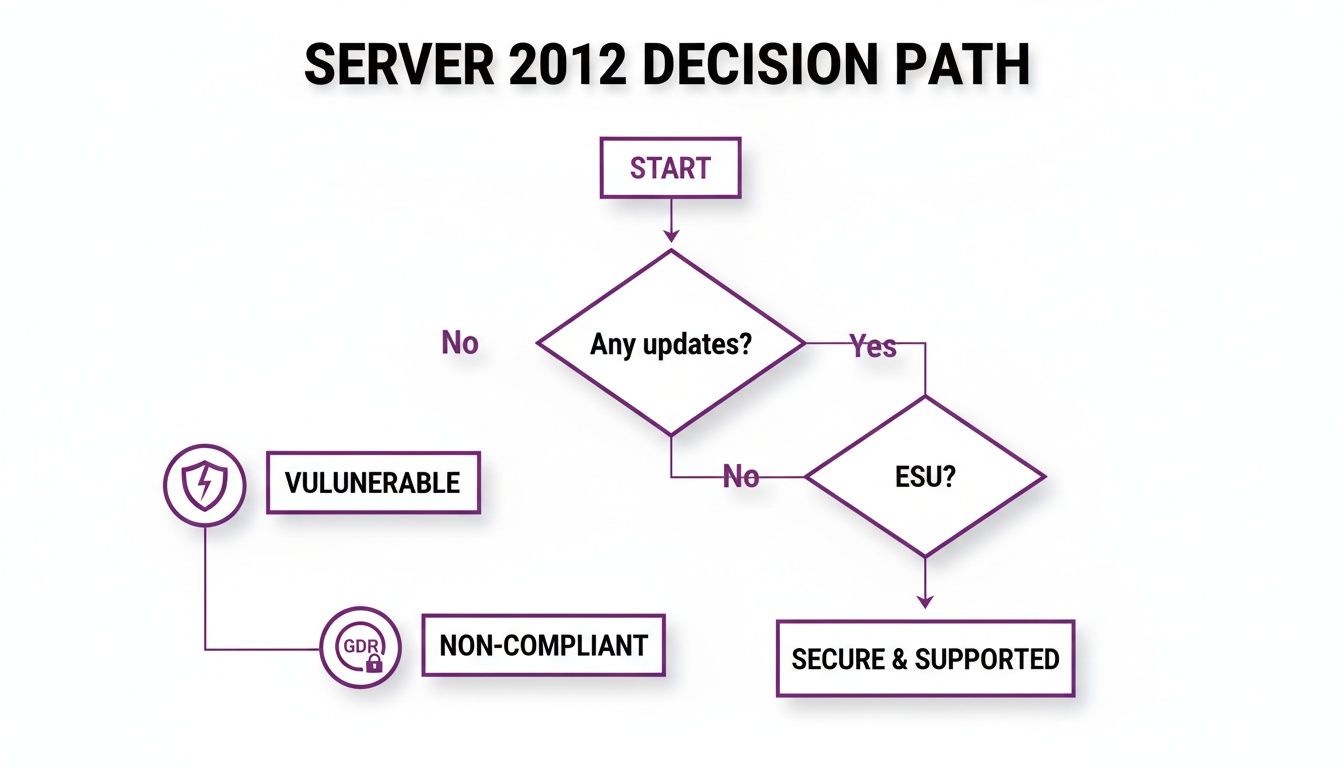
The bottom line is pretty clear: ignoring security updates leaves your systems wide open. At the same time, choosing not to purchase official Extended Security Updates (ESUs) puts you on the wrong side of compliance regulations like UK GDPR. Let’s dig into the practical options you have to avoid these headaches.
Option 1: Buy Extended Security Updates (ESUs)
The most direct, short-term fix is to purchase Extended Security Updates (ESUs) from Microsoft. Think of it as putting a plaster on the problem – it’s not a permanent cure, but it buys you precious time to figure out your next move.
ESUs deliver critical security patches for up to three years, shielding you from newly discovered threats while you plan a proper migration. This is often the go-to choice for businesses with legacy applications that are notoriously difficult to move or upgrade without causing serious operational disruption.
But be warned, this convenience comes with a hefty and escalating price tag. The cost of ESUs goes up each year, making it a very expensive sticking plaster. To give you an idea, a single Windows Server 2012 Datacenter 16-core licence could set you back around £6,000 in Year 3 alone. It’s a tactical delay, not a long-term strategy.
Option 2: Upgrade Your On-Premises Servers
Your second option is the more traditional route: an on-premises upgrade to a modern platform like Windows Server 2022. This means replacing your old Server 2012 hardware and software but keeping everything physically located at your own site.
For many organisations, especially those with strict regulatory requirements or specific performance needs, this is the preferred path. It gives you direct, physical control over your data.
Upgrading on-premises brings some solid advantages:
- Total Control: You own the hardware and have complete authority over your data.
- Modern Features: You get all the security and performance enhancements of the latest server OS.
- Familiar Ground: Your IT team gets to work in an environment they already know well, which can shorten the learning curve.
An on-premises upgrade is a capital investment. It means paying upfront for new server hardware and software licences, but it gives you a robust, long-term foundation if the cloud isn’t the right fit for you.
When you’re planning this kind of upgrade, don’t forget about the old kit. A proper IT Asset Disposition (ITAD) plan is essential for decommissioning old servers securely and responsibly.
Option 3: Migrate to the Microsoft Azure Cloud
The third, and arguably most forward-looking, option is to move your servers and applications to the Microsoft Azure cloud. Instead of buying and managing physical boxes, you’re essentially renting computing power from Microsoft’s vast, global data centres. This approach offers incredible flexibility and lets you switch from large, one-off capital expenses (CapEx) to a more predictable monthly operational cost (OpEx).
Microsoft is really pushing for this, and they’re offering a massive incentive to get you there: free Extended Security Updates for several years if you migrate your Server 2012 workloads to Azure. That alone can save you a small fortune.
Moving to the cloud also unlocks powerful tools for disaster recovery, gives you a global reach, and opens the door to a whole ecosystem of modern cloud services. To get a feel for how to approach this kind of project, it’s worth understanding the Azure Cloud Adoption Framework.
Comparing Your Windows Server 2012 EOL Options
To help you weigh things up, here’s a quick summary of the three main paths you can take to deal with the Windows Server 2012 End of Life. Each has its place, depending on your business’s specific circumstances.
| Migration Path | Best For | Key Benefits | Primary Considerations (Cost & Complexity) |
|---|---|---|---|
| Buy ESUs | Businesses needing more time to plan or with applications that are hard to move. | Immediate security coverage; buys up to 3 years to plan a proper migration. | High and escalating annual cost. It’s a temporary fix, not a permanent solution. |
| Upgrade On-Premises | Companies with strict compliance needs, requiring physical data control or with predictable workloads. | Full control over hardware/data; familiar environment for IT staff; robust security. | Significant upfront capital investment (hardware/licences); ongoing maintenance costs. |
| Migrate to Azure | Businesses seeking flexibility, scalability, and a shift to operational spending. | Free ESUs; pay-as-you-go model; enhanced disaster recovery; access to modern cloud services. | Can be complex to migrate; requires new skill sets; ongoing monthly subscription costs. |
Ultimately, whether you need a quick reprieve with ESUs, the solid control of an on-site upgrade, or the modern flexibility of the cloud, understanding these options is the first step toward a secure and future-ready IT setup.
How to Build a Practical Migration Plan
Moving away from Windows Server 2012 isn’t something you can do on a whim. Success hinges on a clear, structured plan. For businesses across Lincolnshire and Nottinghamshire, breaking the project down into manageable stages is the only way to ensure a smooth transition with the least possible disruption. A good plan transforms a mammoth task into a series of achievable steps.
The whole process has to be methodical. You must start by understanding exactly what you have before you can decide where you’re going. This simple principle ensures no critical systems get left behind and that the final setup perfectly matches how your business actually operates. Working with an experienced IT partner can take a lot of the risk out of each phase, giving you the expertise to handle the technical hurdles and sidestep the usual traps.
Stage 1: Discovery and Assessment
The journey starts with a full inventory. It’s an old saying but it’s true: you can’t protect what you don’t know you have. This first stage means auditing your entire network to find every single instance of Windows Server 2012 and 2012 R2.
But this is more than just counting servers. For each one, you need to document:
- Its specific role: What does it actually do for the business? Does it handle file storage, run your CRM, or host a key database?
- Application dependencies: What software runs on it, and what other systems does it talk to? Pulling this plug could have a knock-on effect elsewhere.
- Hardware specifications: Is the physical box it’s running on also ancient and ready for retirement?
This detailed audit is the bedrock of your entire migration strategy. It’s a core part of good IT governance, and you can see how it fits into the bigger picture by understanding what is IT asset management. Getting this phase right gives you the hard data needed to make smart decisions down the line.
Stage 2: Application Compatibility and Path Selection
Once you have your complete inventory, the next job is testing your critical business applications. You have to be certain that the software you depend on daily will run properly on a modern system like Windows Server 2022 or in the Azure cloud. It’s often the older, bespoke applications that throw up compatibility issues, so it’s best to find these problems early.
With compatibility confirmed, you can finally make a strategic call on your migration path. Using the information from Stage 1 and the options we’ve discussed (ESUs, upgrading on-site, or moving to Azure), you can now choose the route that makes the most sense for your budget, timeline, and long-term goals. This is the point where your plan becomes a real, concrete project.
A common mistake is just assuming all your software will work perfectly on a new system. Thorough testing in a safe, non-production environment is absolutely non-negotiable if you want to avoid chaos and unexpected downtime after you go live.
Stage 3: Execution and Validation
This is the “doing” phase where the migration actually happens. Whether you’re setting up new servers in your comms room or creating virtual machines in Azure, the work needs to be carefully scheduled to minimise disruption. This often means working outside of normal business hours. A phased approach, where you move less critical systems first, is almost always the wisest choice.
After the technical work is done, you move into post-migration validation. This isn’t just a quick check; it’s a comprehensive process to confirm every application works as it should, all data is present and correct, and performance is as good as, or better than, before. It’s vital to get the staff who use these systems every day involved to make sure everything works from their perspective.
Finally, once the new system is running smoothly and fully signed off, the old Windows Server 2012 machines must be securely retired. As you build your migration plan, don’t forget the end-of-life for your old gear; this comprehensive server decommissioning checklist is a great guide for retiring those old servers securely. This last step ensures sensitive data is properly wiped and hardware is disposed of responsibly, closing the loop on the project.
Don’t let planning get in the way of progress. Phone 0845 855 0000 today or Send us a message to get expert help building your migration roadmap.
On-Premises Upgrade or Azure Cloud Migration?
Paying for Extended Security Updates (ESUs) is really just kicking the can down the road, and it’s an expensive way to do it. The real conversation starts when we look at the two main long-term solutions for the Windows Server 2012 EOL problem. You either stick with what you know and upgrade your physical, on-premises servers to a modern OS, or you take the leap into the cloud and migrate your workloads to Microsoft Azure.
Both routes will get you to a secure, supported setup, but they’re fundamentally different ways of thinking about your IT infrastructure. Making the right call comes down to your company’s budget, day-to-day operational needs, and where you see the business heading in the next few years.
This isn’t just a technical fork in the road; it’s a strategic financial decision that will shape how you manage your IT spend for the foreseeable future. Let’s break down the practicalities of each option to help you figure out which path makes the most sense.
The On-Premises Upgrade Path to Server 2022
For many businesses, upgrading on-premises to a newer platform like Windows Server 2022 feels like the most natural and comfortable choice. It’s the traditional route. This approach means you keep full physical control over all your hardware and data, right there in your own server room.
This path is especially attractive if you have strict data sovereignty rules to follow or run specialised, high-performance applications that just work better on local hardware. You own the kit, you manage it, and you always know exactly where your critical information is.
But that level of control comes with a price tag. A server upgrade almost always means a significant upfront capital expenditure (CapEx). The hardware that ran Server 2012 is almost certainly not up to the job of running Server 2022. On top of the new machines, you’ve got software licensing to think about. For instance, a Windows Server 2022 Standard 16-core licence pack will set you back somewhere in the region of £900 to £1,100.
For many, the key benefit of an on-premises model is predictability and control. While the initial investment is higher, you aren’t subject to the variable monthly costs that come with cloud services.
This route gives you a tangible asset and a solid foundation, but it also leaves you responsible for all the ongoing maintenance, power, cooling, and physical security.
The Azure Cloud Migration Path
The alternative is to move your servers out of the building and into the Microsoft Azure cloud. This completely changes the financial model, shifting your IT infrastructure from a capital expense (CapEx) to an operational one (OpEx). Instead of big, infrequent hardware purchases, you pay a predictable monthly subscription. If you want a deeper dive, check out our complete guide on the differences between on-premises vs cloud solutions.
One of the biggest carrots Microsoft is dangling for this route is a massive cost-saver. If you move your Windows Server 2012 workloads to Azure, you get free Extended Security Updates for up to three years. This benefit alone can save you thousands of pounds compared to paying for ESUs on your on-premise servers.
There are a couple of ways to tackle the migration itself:
- Lift-and-Shift: This is the most straightforward method. You essentially make a copy of your existing server and run it as a virtual machine in Azure. It’s the quickest way to get there and requires minimal changes to your applications.
- Cloud Re-architecture: This is a more involved approach where you rebuild your applications to take full advantage of cloud-native services. It delivers better efficiency and scalability down the line but takes more planning and development work upfront.
The Azure path offers incredible flexibility. You can scale your computing power up or down almost instantly as business needs change, and you get access to world-class security and disaster recovery tools that would be prohibitively expensive to build yourself.
Since the Windows Server 2012 EOL deadline passed, we’ve seen clear trends emerge among UK businesses. Many have opted for on-premise upgrades, while others have done a quick lift-and-shift to Azure Virtual Machines to grab those free ESUs. Some have gone all-in and fully re-architected their services. The consensus from UK IT experts is that for many, migrating to Azure is the simplest path to securing those legacy workloads while simultaneously modernising their infrastructure.
Ultimately, the choice between on-premise and cloud boils down to a Total Cost of Ownership (TCO) calculation, where you have to weigh the upfront costs against long-term operational spending and strategic benefits.
Don’t let the Windows Server 2012 EOL deadline leave your business vulnerable. Phone 0845 855 0000 today or Send us a message to get expert help with your migration strategy.
How F1Group Guides Your Business Through the Transition
Making your way through the maze of the Windows Server 2012 EOL isn’t just a technical exercise. It takes real-world experience and a partner who genuinely understands the pressures modern businesses face. That’s where we come in.
Since 1995, F1Group has been the go-to IT partner for organisations right across the East Midlands. For decades, we’ve been helping businesses in Lincoln, Nottingham, and beyond turn complex IT challenges into real opportunities for growth and security.
Your Local Team of Certified Experts
Our approach has always been built on trust and proven expertise. Our entire team is made up of DBS-checked, vendor-certified engineers who take complete ownership of your project. We’re not some faceless helpdesk on the other end of a phone line; we’re your hands-on IT department, ready to manage your entire migration from start to finish.
We’ll handle every stage of the process, making sure the whole transition is smooth and secure, with as little disruption to your daily operations as possible.
- Initial Assessment: We kick things off with a thorough audit of your current setup to get a clear picture of every dependency and potential roadblock.
- Strategic Planning: Next, we’ll sit down with you to map out the best path forward, whether that’s a straightforward on-premise upgrade or a move to the Azure cloud.
- Flawless Execution: Our engineers then get to work on the technical side of the migration, focusing on minimising downtime and making sure every system is running perfectly.
- Post-Migration Support: Our job isn’t over when the project is done. We provide ongoing support to keep your new environment stable, secure, and running at its best.
Choosing an IT partner is about more than just technical skill. It’s about finding a team that is invested in your success, understands local business needs, and is committed to delivering dependable and secure solutions that provide genuine business value.
Don’t leave your organisation exposed to the very real risks of running unsupported software. The threats are serious, but the solutions are clear and achievable with the right guidance. It’s time to protect your operations, your data, and your future by taking decisive action.
Our team is ready to have a no-obligation chat to discuss your specific needs and help you build a plan that works for you.
Phone 0845 855 0000 today or Send us a message to get started.
Frequently Asked Questions About Windows Server 2012 EOL
It’s completely normal to have questions swirling around now that Windows Server 2012’s end-of-life date has passed. To help, we’ve gathered the most common queries we hear from business owners and IT managers across the East Midlands and answered them directly.
What Is Our Single Biggest Risk Now?
Plain and simple, your biggest risk is a security breach. Cybercriminals specifically target unsupported systems because they know any new security holes discovered will never be patched by Microsoft. They see servers still running 2012 as low-hanging fruit.
A single successful attack can spiral into a nightmare of ransomware, data theft, and crippling downtime. And it doesn’t stop there. You could also face hefty fines for non-compliance with data protection laws like UK GDPR, not to mention the very real possibility of your cyber insurance provider refusing to pay out.
What Is a Typical Cost to Migrate a Single Server in the UK?
This is a tricky one because there’s no “one-size-fits-all” price. The cost really depends on what the server does, how complex its applications are, and where you’re moving it to.
For a relatively simple job, like an on-premises upgrade or a straightforward “lift-and-shift” to an Azure Virtual Machine, you might be looking at anything from several hundred to a few thousand pounds. That ballpark figure includes software licensing, the labour to get it done, and proper testing.
The only way to get a firm cost is through a proper assessment of your specific environment. This uncovers the exact work needed and makes sure there are no nasty surprises or hidden costs down the line.
An expert evaluation gives you a clear financial picture based on your actual setup.
What Is the Best First Step to Address Our Systems?
Your immediate priority should be a full audit. You need to find every single instance of Windows Server 2012 and 2012 R2 running on your network. You can’t secure what you don’t know you have.
This discovery process means documenting what each server is used for, which applications rely on it, and how critical it is to your day-to-day business. This inventory is the absolute bedrock of a solid migration plan. If you’re not sure how to get started, getting an experienced IT partner involved is the quickest way to get the ball rolling with confidence.
Don’t let unanswered questions leave your business exposed. The team at F1Group can provide the clarity and expertise you need to navigate your migration securely.
Phone 0845 855 0000 today or Send us a message for a no-obligation consultation.