
So, what is managed IT support, really?
At its core, it's about switching from a reactive 'firefighting' approach to a proactive partnership with an IT expert, often called a Managed Service Provider (or MSP). This partner takes full responsibility for keeping your business technology running smoothly, securely, and efficiently—all for a predictable monthly fee.
It’s less about fixing problems after they happen and more about preventing them from happening in the first place.
What Does Managed IT Support Actually Mean?
Let's ditch the jargon for a moment. Think about how you handle IT problems right now. If a server goes down or your email stops working, you probably call someone in a panic. That's the 'break-fix' model. It's like only calling a plumber after a pipe has already burst and flooded your office. It’s chaotic, stressful, and the final bill is always a nasty surprise.
Managed IT support flips this on its head. Imagine having a dedicated building maintenance team that constantly checks the plumbing, services the electrics, and reinforces the locks. They spot the weak pipe long before it bursts. That’s what an MSP does for your technology.
The Shift from Reactive to Proactive
The real game-changer here is moving from a break-fix mentality to a proactive one. Your MSP doesn't just wait for your call; they become a genuine extension of your team, taking complete ownership of your entire IT environment.
What does this proactive care look like in practice?
- Constant Monitoring: Your systems, networks, and servers are watched 24/7. This means potential issues are flagged and often fixed before you even notice something is wrong.
- Preventative Maintenance: Think of it like a regular service for your car. Consistent updates, security patches, and system health checks are carried out behind the scenes to keep everything running at peak performance.
- Strategic Planning: A good MSP does more than just maintain. They offer expert advice, helping you budget for future upgrades and ensuring your technology actively supports your business goals, rather than holding them back.
This proactive model isn't just a niche idea; it's rapidly becoming the standard. The wider UK IT services market was valued between £105 billion and £112 billion in 2025 and is on track to hit an estimated £180 billion by 2032. This growth is overwhelmingly driven by businesses moving away from reactive support. You can read more about this shift in the UK IT support guide.
From Unpredictable Cost to Stable Asset
Perhaps the most immediate benefit you'll feel is the financial stability. No more surprise invoices for emergency call-outs or unexpected hardware failures. Instead, you pay a simple, fixed monthly fee.
This simple change transforms your IT. It stops being a volatile, unpredictable expense and becomes a reliable, budgeted asset. You can plan your finances with confidence, free from the anxiety of what might break next.
Ultimately, an MSP's success is tied directly to yours. If your systems are constantly down, it costs them more time, money, and resources to fix everything. Their incentive is to keep your operations as stable and trouble-free as possible. It creates a powerful partnership where everyone is pulling in the same direction.
Ready to make your IT a strategic asset? Phone 0845 855 0000 today or send us a message to discuss how proactive managed support can benefit your business.
What's Really Included in Managed IT Support?
When you bring a Managed Service Provider (MSP) on board, you’re not just getting an IT helpline. You're investing in a whole suite of services designed to stop your technology from being a headache and turn it into one of your biggest assets.
Let’s look beyond the technical jargon and see what these core services actually mean for a small or medium-sized business here in the UK. Think of it as a protective, performance-boosting layer wrapped around your entire operation, keeping things running smoothly today while setting you up for growth tomorrow.
The Foundation: Proactive Monitoring & Helpdesk Support
At the very heart of any good managed IT service is a simple promise: keep your team working and your systems online. This boils down to two things that work hand-in-hand: watching for trouble before it starts and being there to fix things quickly when it does.
Imagine a security guard who never sleeps, constantly patrolling your entire IT network—your servers, laptops, and internet connections. That's essentially what proactive network monitoring is. It's an early-warning system that spots signs of trouble, like a server about to run out of memory or some unusual network activity, long before anyone in your office notices a problem. This preventative approach is absolutely vital; a recent study found that 96% of businesses face at least one outage a year, and the cost of that downtime can be eye-watering for an SMB.
But of course, issues can still happen. A user forgets a password or a critical piece of software has a wobble. That’s where a fast, effective helpdesk comes in. This isn't just a faceless call centre; it's your dedicated team of skilled technicians ready to solve problems and get your people back to work. A great helpdesk is the difference between a five-minute hiccup and a whole day of lost productivity.
Expert Management of Your Cloud Platforms
The modern workplace is built in the cloud. For most of us, that means relying heavily on Microsoft 365 and Azure. These are incredibly powerful platforms, but getting the most out of them—and keeping them secure—requires a specialist touch. That’s exactly what an MSP provides.
Expert management of Microsoft 365 typically includes:
- Rock-Solid Security: Properly configuring essential security features like multi-factor authentication (MFA) to stop hackers in their tracks.
- Smart Data Management: Setting up policies in tools like SharePoint and OneDrive to make sure your sensitive company data is always protected and handled correctly.
- Licence Optimisation: Making sure you’re on the right licence plan, so you aren't wasting money on features you simply don't need.
And for businesses using Microsoft Azure for their cloud infrastructure, an MSP takes care of all the complexity. They manage your virtual servers, configure secure networks, and keep a close eye on performance to stop costs from spiralling. It means you get all the flexibility of the cloud without needing to hire a dedicated Azure expert.
Support for Your Key Business Applications
Your business runs on specific software, whether that’s for accounts, operations, or sales. An MSP makes sure these applications are always running as they should. For many, this includes platforms like Microsoft Dynamics 365, which pulls together everything from sales to customer service. Having expert support on hand for these critical systems prevents frustrating and costly delays.
It doesn’t stop there. A good MSP is also looking ahead, helping you take advantage of new tools that can make a real difference. For example, the Power Platform (Power BI, Power Apps, Power Automate) allows you to create custom reports, simple apps, and automated workflows, often without needing complex coding.
Imagine building a simple app for your field team to log their jobs on-site, or an automated alert that tells you when stock is running low. A forward-thinking MSP can help you spot these opportunities and bring them to life, saving your team countless hours.
This also applies to new AI tools like Microsoft Copilot. A provider won't just switch it on; they'll help you integrate it safely, provide training, and set up clear usage policies. This ensures you’re getting the productivity benefits while keeping your company data completely secure.
A Defensive Shield of Managed Cyber Security
Let's be clear: cyber security isn't an optional extra anymore. It's an absolute necessity. A managed IT provider acts as a multi-layered defensive shield for your business, protecting you from the constant barrage of threats like ransomware, phishing scams, and data breaches.
This goes way beyond just installing some antivirus software. It’s a continuous, proactive strategy to keep you safe.
So, what's in this defensive shield?
- Endpoint Detection and Response (EDR): This is next-level protection for your laptops and PCs. It doesn't just block known viruses; it actively hunts for any suspicious behaviour to stop new threats before they can do damage.
- Email Security: Actively filtering out phishing emails, spam, and dangerous attachments before they even land in your team's inboxes.
- Security Patching: Methodically keeping all your software and systems up-to-date with the latest security patches, closing the doors that attackers love to exploit.
- Firewall Management: Actively managing and monitoring the gateway to your network to block any unauthorised access attempts.
With cyber threats getting more sophisticated by the day, having a dedicated team focused on your security is one of the single biggest advantages of managed IT support. For a closer look at this crucial area, you can learn more about our comprehensive cyber security managed services.
By bringing all these core services together, an MSP doesn't just fix problems. They transform your IT into a secure, resilient, and strategic part of your business that actively helps you succeed.
Ready to build a more secure and productive IT foundation? Phone 0845 855 0000 today or Send us a message.
Comparing Your IT Support Options
When your business tech goes wrong, you've got a few options. But how do managed IT support services really stack up against the old-school ways, like hiring your own IT guy or just calling someone when a computer breaks? Getting to grips with the real differences in cost, expertise, and long-term value is key to making the right call for your business.
Each approach to managing your technology is fundamentally different, and that has big implications for your budget, your team's productivity, and your own peace of mind. Let’s lay them out.
The In-House IT Team Model
For a lot of businesses, the first instinct is to hire an in-house IT manager. The appeal is obvious: you get a dedicated person on-site who knows your systems inside and out. For most small and mid-sized businesses (SMBs) here in the UK, though, this model comes with some serious drawbacks.
The first, and most glaring, is the cost. The salary for just one skilled IT professional can be huge, and that's before you even think about National Insurance, pensions, training, and other benefits. More importantly, it's almost impossible for one person to be a genuine expert in everything. You can't expect them to master cloud systems, cyber security, network infrastructure, and day-to-day user support. This creates a dangerous single point of failure.
What happens when your one IT expert is on holiday, off sick, or hands in their notice? Your entire business is left exposed, without the crucial support it needs to keep running. It's a vulnerability many SMBs simply can't afford to risk.
The Break-Fix Model
The break-fix model is the IT world’s equivalent of calling an emergency plumber. You pay an hourly rate for a technician to fix a problem after it’s already brought your work to a standstill. It might look cheaper on paper because you only pay when something goes wrong, but this approach often hides a much higher price.
That hidden cost is downtime. Every single hour your systems are offline is an hour of lost productivity, frustrated staff, and potentially lost sales. Worse still, a break-fix provider has zero incentive to stop problems from happening again—their business model actually depends on things breaking. This leads to surprise invoices and a constant cycle of reactive firefighting instead of proactive, strategic planning. Looking into alternatives like IT outsourcing can help businesses sidestep these common traps and find a more stable solution.
A proactive strategy, on the other hand, is built on a foundation of core services working together.
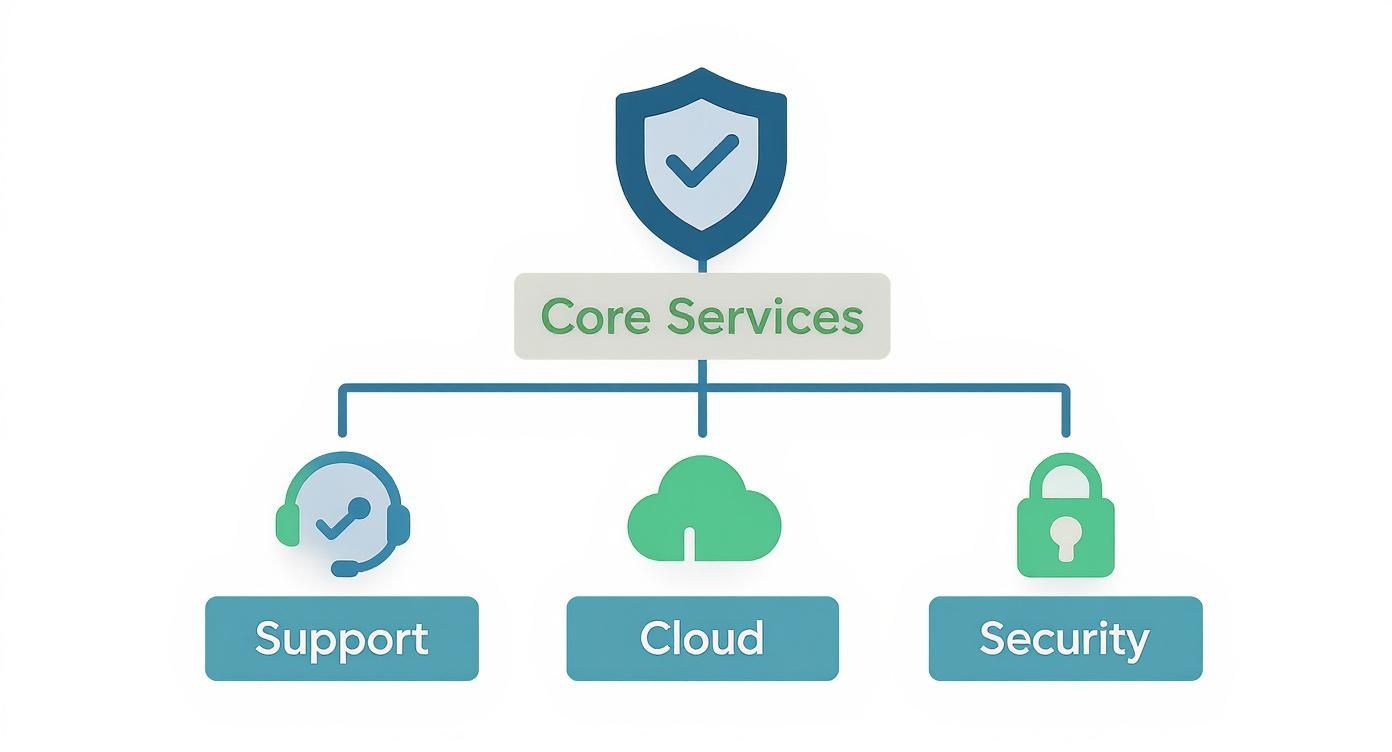
As you can see, a proper managed service combines the essential pillars of support, cloud management, and security into one seamless, cohesive strategy.
Comparing IT Support Models for Your Business
To make the differences even clearer, let's put these three models side-by-side. This table breaks down what you can realistically expect from each approach when it comes to the things that matter most to your business.
| Feature | Managed IT Support | In-House IT Team | Break-Fix Model |
|---|---|---|---|
| Cost Structure | Predictable, fixed monthly fee. | High fixed cost (salary, benefits, training). | Unpredictable, hourly rates plus parts. |
| Expertise | Access to a full team of specialists. | Limited to the knowledge of 1-2 individuals. | Varies by technician; no ongoing relationship. |
| Approach | Proactive: Prevents issues before they happen. | Mix of proactive and reactive. | Reactive: Fixes problems after they occur. |
| Business Impact | Minimises downtime, focuses on strategy. | Dependent on staff availability (sickness, holidays). | High risk of significant, costly downtime. |
| Budgeting | Simple and predictable. | A major, ongoing operational expense. | Impossible to budget for accurately. |
| Scalability | Easily scales with your business growth. | Difficult and expensive to scale. | Not scalable; service is ad-hoc. |
Choosing the right model isn't just an IT decision; it's a business one. Your choice directly impacts your budget, operational resilience, and ability to focus on growth rather than on fixing broken tech.
The Managed IT Support Advantage
Managed IT support gives you a powerful alternative, blending the best of both worlds. For a predictable, fixed monthly fee—often less than what you’d pay for a single in-house employee—you get an entire team of specialists on your side. This team brings a huge range of expertise, making sure every corner of your IT is properly looked after.
There's a good reason this model is becoming the standard. As of March 2025, there are 12,867 active Managed Service Providers in the UK. What's really telling is that government research found only 5% of MSPs now offer on-site support as their main model. This shows a massive industry shift towards the proactive, remote management that keeps your systems humming along smoothly without constant fires to put out.
By partnering with an MSP, you trade unpredictable costs and reactive chaos for a stable, strategic partnership. Their goal is the same as yours: to prevent problems from ever happening. This turns your technology from a constant headache into a reliable asset that actually helps your business grow.
Understanding Costs and Service Agreements
Let's talk numbers. One of the biggest wins with managed IT support is swapping those unpredictable, often painful, reactive invoices for a clear, fixed monthly cost. But what does that actually look like, and how are those costs put together? Figuring out the pricing is the first step to really understanding the value a provider brings to the table.
You’ll find most Managed Service Providers (MSPs) worth their salt don’t offer a rigid, one-size-fits-all package. Instead, the support should be shaped around your business—your team size, how complex your systems are, and what you’re trying to achieve. This way, you’re not paying for bells and whistles you simply don’t need.
Common Pricing Models Explained
When a quote lands in your inbox, it will almost certainly be built on one of a few common structures. Each has its pros and cons, but the ultimate goal is always to bring predictability to your IT budget.
Here’s a breakdown of what you're likely to see:
- Per-User Pricing: This is easily the most popular model out there. You pay a simple flat fee for each person on your team every month. That fee usually covers everything they use—their laptop, desktop, and mobile phone. It’s wonderfully straightforward and scales up or down as your team changes.
- Per-Device Pricing: In this model, the cost is tied to each bit of hardware on your network. Think servers, laptops, printers, or even firewalls. This can work out well for businesses that have more devices than people, like in a manufacturing plant or a hotel.
- Tiered Pricing: Many MSPs package their services into different levels—think Bronze, Silver, and Gold. A basic tier might cover essentials like remote monitoring and helpdesk support. As you move up, you'll see more advanced services added, such as robust cyber security, on-site engineer visits, and strategic IT consultancy.
In the UK, you can expect to see tiered pricing fall into a few general brackets. Basic remote helpdesk and monitoring services usually sit between £35-£55 per user per month. For mid-tier support that bundles in better security and cloud management, you're looking at £55-£85. Comprehensive, enterprise-level support with strategic planning and advanced cyber security can range from £85-£175 per user. You can discover more insights about UK IT support pricing on micropro.com.
The Crucial Role of the Service Level Agreement
While the price is a big part of the conversation, the real bedrock of any IT partnership is the Service Level Agreement (SLA). This is far more than just a piece of admin. It’s a binding document that lays out, in black and white, exactly what you can expect from your provider. It’s all about setting clear, measurable benchmarks for quality.
Think of an SLA as your guarantee. It cuts through the jargon and holds your provider accountable, turning vague promises of ‘great service’ into solid commitments you can bank on. A transparent, detailed SLA is the sign of an IT partner you can trust.
When you’re looking over an SLA, you need to hunt for specifics. Don’t get bogged down in legal jargon; focus on the practical metrics that matter to your business.
Key things to look for include:
- Guaranteed Response Times: How quickly will they actually acknowledge your ticket when you raise a problem?
- Resolution Times: What’s their target for getting different types of issues fixed?
- Uptime Guarantees: This is often shown as a percentage (like 99.9% uptime) and is a promise of how available your systems will be.
- Scope of Support: This should clearly define what’s included and—just as importantly—what’s not.
A good SLA gives you the power to see the true value you’re getting for your money. It provides peace of mind that your partner is committed to keeping your business running without a hitch. For a little help defining your own needs, take a look at our guide on creating an RFP for IT services.
Phone 0845 855 0000 today or Send us a message.
How to Choose the Right IT Partner
Picking a company to manage your IT support isn’t just another vendor contract. It’s a strategic decision. You're handing over the keys to the digital heart of your business, so you need to find a true partner you can trust, not just a supplier. The right choice requires looking past the sales pitch to see their real-world capabilities, their reliability, and what they truly stand for.

Think of it less like buying a service and more like building a relationship that will underpin your growth for years. A bit of structured homework now will help you sift through the options and find a provider who delivers genuine, lasting value.
Verifying Technical Expertise and Local Presence
First things first: you need proof they know their stuff. Don’t just take their word for it. Look for official accreditations that prove their technical skill. Certifications, like being a Microsoft Solutions Partner, are a big deal—they show the team has passed rigorous standards set by the tech giants themselves.
This step is non-negotiable. It tells you the provider invests in keeping their team sharp and has a proven ability to handle critical platforms like Microsoft 365 and Azure.
A local presence is also a huge factor, especially for businesses here in the East Midlands. While most support happens remotely these days, there will always be times when you need an engineer on-site—fast. Whether it’s a major hardware failure or help with an office move, you can’t afford to wait.
Confirming a potential partner has a real local team means you won’t be stuck waiting for someone to drive up from London when an emergency hits. It’s about getting timely, hands-on help when you need it most. You can see how this plays out by exploring the different models offered by various managed services companies.
Scrutinising Security and Trustworthiness
Your IT partner is also your frontline defence against cyber threats. You have to be completely confident in their security credentials and how they run their own shop. It’s worth asking direct questions about how they protect not only your data but their own systems too.
A provider's internal security is a direct reflection of the security they will provide for you. If they are casual about their own standards, they will be casual about yours.
One of the clearest signs of a trustworthy provider is how they vet their own people. Ask if their engineers undergo DBS checks (Disclosure and Barring Service). It’s a crucial detail, as these are the people who will have privileged access to your most sensitive commercial data.
Reading Between the Lines of Case Studies
Testimonials and case studies are great, but you need to read them with a critical eye. Are they showcasing work with businesses like yours? A glowing review from a five-person startup won’t mean much if you’re a 100-person manufacturing firm with completely different challenges.
When looking at your options, the principles for choosing the right data services outsourcing partner offer some great insights, as much of the thinking applies here, too.
Look for case studies that get specific. They should clearly outline the problem, the solution they implemented, and—most importantly—the measurable business outcome. Vague success stories are just marketing fluff; you want concrete examples of how they’ve solved real-world problems.
Key Questions to Ask Potential Partners
To really get a feel for a provider, you need to ask sharp questions that go beyond their glossy brochures. Their answers will tell you a lot about their communication style, proactivity, and strategic thinking.
Here’s a checklist to get you started:
- Onboarding: What does your onboarding process look like? How will you make the transition from our current setup seamless?
- Proactive Strategy: Give me a specific example of how you spotted and fixed a potential issue for a client before it caused any downtime.
- Communication: Who is our main point of contact? How do you keep us in the loop about the health of our IT systems?
- Strategic Reviews: How often will we sit down to review our IT performance and plan for the future?
- Security Incidents: If we have a security breach, what is your exact step-by-step process?
- Team Expertise: What specific certifications and qualifications do the engineers supporting our account hold?
Ultimately, finding the right partner is about finding an expert team that gets your business goals and gives you the peace of mind to focus on what you do best.
Ready to find a trustworthy IT partner? Phone 0845 855 0000 today or Send us a message to see how we can help.
The Future of IT and Your Business
The world of IT support is changing, and fast. Gone are the days when IT was just about fixing what’s broken. It's now becoming a strategic part of your business, focusing on predicting issues and automating solutions before they can slow you down. This isn't just a tech trend; it's a fundamental shift that directly impacts your ability to compete and grow.
Driving this evolution are powerful new tools like artificial intelligence (AI) and automation. Forward-thinking IT providers aren't just waiting for an alert to pop up. They're using intelligent systems to spot potential failures, shut down security threats before they strike, and handle routine maintenance automatically. The result? Your operations run smoother with far less disruption.
The Rise of Intelligent IT
Think about how tools like Microsoft Copilot are being woven into the fabric of everyday work. This isn’t a gimmick; it’s about real, measurable productivity gains. A good Managed Service Provider (MSP) will help your team use these AI assistants to work smarter—summarising long email chains, drafting documents, or analysing data in a flash. This frees up your people to focus on the work that really matters, not repetitive admin.
This intelligence is also critical for your security. Modern managed IT services now build cyber security into their core offering, because it’s no longer an optional extra.
In today's climate, a solid cyber defence and a well-practised disaster recovery plan aren't 'nice-to-haves'. They are the absolute bedrock of business continuity, essential for any resilient and trustworthy company.
A Strategic Foundation for Growth
It's no surprise that the UK's managed IT services market is growing. In 2024, it was projected to hit £1.39 billion in revenue, and that's expected to climb to £1.67 billion by 2029. This growth is being fuelled by the very same AI integration that makes proactive monitoring and automation possible. You can read more about the future of managed services at Aztech IT.
The takeaway for any business leader is clear. The right IT partner does so much more than fix things. They build the stable, secure, and intelligent foundation you need to innovate, adapt, and succeed. Choosing a partner who understands this isn't just an IT decision—it's a business one.
To build a future-proof IT strategy for your business, phone 0845 855 0000 today or Send us a message.
Your Questions About Managed IT Support, Answered
Thinking about switching to managed IT support? It’s a big decision, and it’s natural to have questions. To help you get a clearer picture, here are some straight answers to the things UK business owners ask us most often.
How Much Does Managed IT Support Cost for a Small Business in the UK?
You’re looking for predictable costs, and that’s exactly what managed IT is designed to deliver. Most providers work on a simple per-person basis. For the essentials—like system monitoring and access to a helpdesk—you can typically expect to budget between £35 and £55 per person each month.
If you need a more hands-on approach that includes advanced cyber security and strategic advice, plans usually range from £85 to £175 per user. The final figure really depends on your team's size, how complex your IT setup is, and the level of support you need. The best part? You get a fixed monthly fee, so those nasty, unexpected IT bills become a thing of the past.
Can an MSP Support Our Industry-Specific Software?
Yes, and this is a really important point. While we might not be experts in the niche software that runs your specific industry, our job is to be the expert on the systems it runs on. We manage the servers, the network, and the infrastructure that keeps that software stable and secure.
When an issue pops up with the application itself, a good provider steps in and deals directly with your software vendor for you. Think of us as your technical translator. This means you have one number to call, and we’ll work with the other tech experts to get it sorted without you being stuck in the middle.
What Does Switching IT Providers Actually Involve?
A professional MSP will have a well-oiled process to make the switch feel seamless. It always starts with a deep dive into your current IT environment. We need to get under the bonnet to understand your systems, pinpoint any security weaknesses, and see what’s working and what isn’t.
Once we have that complete picture, we’ll build a detailed onboarding plan. This involves rolling out our monitoring tools, setting up new security measures, and carefully transferring responsibility, piece by piece. The entire goal is a smooth, planned handover with absolutely no disruption to your day-to-day business.
Will We Lose Control of Our IT by Using an MSP?
This is a common worry, but the reality is the complete opposite. Working with an MSP isn't about giving up control; it's about gaining a strategic partner who handles the daily technical grind, freeing you up to focus on what you do best—running your business.
You’re always in the driver's seat. A good MSP is a trusted advisor. We provide clear reports and make strategic recommendations, but the final say on your company's technology roadmap is always yours. It’s a partnership, not a takeover.
Phone 0845 855 0000 today or Send us a message.