
The usual trigger isn’t a love of telephony. It’s frustration.
A business in Leicester or Nottingham grows past the point where a small on-site phone system can keep up. Calls ring out while staff are in Microsoft Teams meetings. Someone working from home can’t transfer a customer properly. A sales manager wants call notes inside Dynamics 365, but the phone system sits off to one side like a relic from another era. The hardware still functions, technically, yet the business around it has moved on.
That’s why a hosted telephone system matters in 2026. This isn’t only about replacing handsets or swapping one supplier for another. It’s about moving business telephony into the same cloud-first, Microsoft-led environment your team already uses for collaboration, customer service, reporting and automation.
For East Midlands organisations, the key question usually isn’t “Do we need new phones?” It’s “How do we stop our phone system holding the rest of the business back?”
Why Your Old Phone System is Costing You More Than Money
A legacy phone system rarely fails all at once. It chips away at the business in smaller, more expensive ways.
A growing firm might still have a reliable-looking PBX in a comms cupboard. The problem starts when customer expectations rise. Clients expect quick transfers, accurate routing, voicemail that reaches the right person, and staff who can answer from the office, at home or on the road without exposing personal mobile numbers.

The hidden costs show up in daily work
The obvious cost is maintenance. Old hardware needs support, replacement parts, engineer time and workarounds.
The less obvious cost is lost momentum. Reception has to manually redirect calls. Department managers can’t see useful call patterns. Staff create their own fixes by forwarding calls to mobiles, writing details on paper, or asking customers to call back later.
Those problems don’t appear on an invoice, but they affect:
- Customer experience by making the business sound harder to reach than it should be
- Staff productivity because simple call handling turns into a manual process
- Hybrid working when employees outside the office lose the same telephony tools as desk-based colleagues
- Management visibility because call data sits in one place and customer records sit in another
Old telephony also blocks modern systems
Many IT leaders often get stuck at this point. They’ve invested in Microsoft 365, perhaps moved files to SharePoint, adopted Teams, and started using Dynamics 365. Yet voice is still isolated.
That separation matters. If the phone platform can’t connect cleanly with the tools your teams already use, every inbound call becomes a context switch. Staff hunt for records. They retype notes. They lose history.
A phone system should reduce friction. If it adds extra steps every time a customer calls, it’s no longer doing its job.
For many organisations, the move to hosted telephony starts as a telephony project and ends up being an operations project. That’s the right way to see it. The value isn’t just in replacing ageing kit. The value is in making communication faster, clearer and easier to manage.
What Is a Hosted Telephone System Really
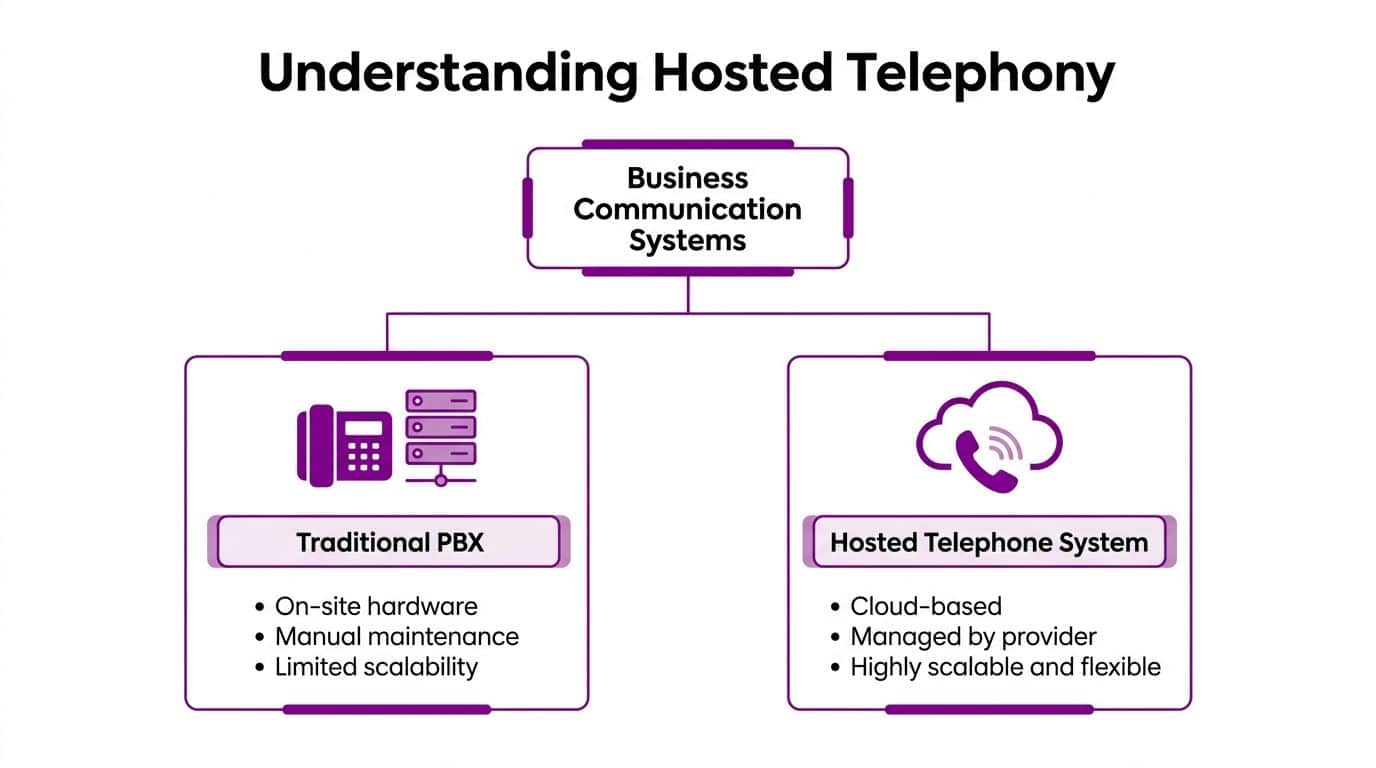
A hosted telephone system is a business phone platform that runs in the cloud rather than on a physical PBX box in your building.
That means the core call handling, routing, voicemail, menus and administration sit in a provider-managed environment. Your users connect over the internet through desk phones, softphone apps, mobiles or tools such as Teams.
An analogy
An on-site PBX is similar to running your own physical server in the office. You own the equipment, you carry the maintenance burden, and changes usually need technical effort.
A hosted system is closer to using a managed cloud service. The provider runs the platform, maintains the infrastructure, applies updates and gives you an admin layer to control users, numbers, routing and features.
That’s why you’ll hear several terms used almost interchangeably:
- VoIP means Voice over Internet Protocol. Calls travel over data networks rather than traditional phone lines.
- Hosted PBX means the PBX functions are delivered from the provider’s cloud platform.
- Cloud phone system is the plain-English label many businesses prefer.
- Hosted telephone system is usually the most practical umbrella term in day-to-day conversations.
If you want a simple external explainer that frames the basics well, SnapDial’s overview of a hosted business phone system is a useful companion read.
Why this shift happened
Business telephony has been moving towards automation and abstraction for decades. The introduction of Subscriber Trunk Dialling in the UK in 1958 automated long-distance calling, and the first hosted PBX launched in 1997. By 2023, over 70% of UK businesses had migrated to VoIP, with the move being accelerated by the projected 2027 PSTN switch-off, according to this account of telephony history and VoIP adoption in the UK.
That history matters because it explains why hosted telephony now feels normal. The model fits the broader move to cloud services across Microsoft 365, Azure and line-of-business systems.
A short walkthrough helps make that clearer:
What changes for the business
The practical difference isn’t that calls somehow become magical. It’s that telephony stops being a self-contained hardware project.
With a hosted model, you can usually:
- Add users quickly without ordering and installing more PBX hardware
- Support remote and hybrid teams on the same business number set
- Apply call handling rules centrally across office, home and mobile working
- Bring telephony closer to Microsoft tools instead of treating it as a separate estate
Hosted telephony isn’t just “phones over the internet”. It’s the shift from owning a phone system as hardware to consuming it as a managed service.
That distinction reveals the rest of the benefits.
Core Features and Business Benefits for UK SMBs
Feature lists can be misleading because they all sound similar on a brochure. The key question is what each feature changes for the business day to day.
Better routing means fewer wasted calls
An auto-attendant gives callers a clear path without forcing reception to act as a switchboard all day. Done well, it makes a smaller business sound organised and easy to deal with. Done badly, it traps callers in menus.
The right setup is usually short and specific. Sales. Support. Accounts. Dial by name if needed. That’s enough for most small and mid-sized organisations.
Call queues matter even if you don’t run a formal contact centre. If two or three people handle inbound enquiries, queues stop calls bouncing or dying when everyone is busy. That directly protects sales opportunities and service levels.
Skills-based routing is where hosted systems become more useful than an old hunt group. Modern hosted platforms can apply time-of-day rules and direct callers to the right people. Benchmarks cited by Vonage say that skills-based routing with time-of-day rules leads to 30% faster resolution times for mid-sized firms, and the same source highlights automatic fraud detection blocking 99% of CLI spoofing attempts alongside SRTP/TLS encryption in hosted systems, as described in this hosted phone system feature overview.
Professionalism without extra admin
Voicemail-to-email is one of those features people underrate until they use it properly. Staff don’t have to dial into a mailbox and work through prompts. They receive the message where they already work.
Time schedules and after-hours routing do something similar. A Leicester office can route calls one way during business hours and another out of hours, without anyone manually changing the setup every evening.
Useful examples include:
- Out-of-hours cover sending urgent calls to an on-call mobile
- Branch routing steering callers to the right location first time
- Holiday handling changing announcements and destinations without engineer visits
- Temporary campaigns adding short-term menus or recorded messages for events, recruitment or service alerts
Hybrid work gets easier when telephony follows the user
This is the point many businesses feel immediately after go-live. Staff stop thinking about where the phone system lives.
They answer from a laptop, mobile app or headset at a hot desk and still appear as part of the same business telephony environment. Transfer, hold, voicemail and presence become consistent.
That’s one reason hosted telephony sits naturally alongside wider remote-working practices. If you’re reviewing broader digital working models, this guide to best collaboration tools for remote teams is useful because voice works best when it’s treated as part of collaboration, not apart from it.
Short menus, sensible routing and clear ownership beat flashy features every time.
Reporting helps managers fix significant bottlenecks
Hosted systems also improve visibility. Managers can review missed calls, peak periods, queue pressure and response patterns without relying on guesswork.
That doesn’t mean drowning in dashboards. It means being able to answer practical questions such as:
| Business question | What the phone system should show |
|---|---|
| Are we missing sales calls at lunch? | Missed-call timing and queue pressure |
| Is one team overloaded? | Agent or group activity patterns |
| Are after-hours calls going to the right place? | Routing outcomes by time period |
| Do customers wait too long before speaking to someone? | Queue and answer behaviour |
For UK SMBs, that’s a significant win. A hosted telephone system doesn’t just add features. It turns call handling into something you can shape, measure and improve.
Cost Licensing and Network Considerations
A finance director in Leicester does not usually object to hosted telephony because the monthly price looks high. The objection normally comes when they compare that monthly figure with a phone system they bought years ago and now treat as "already paid for". That comparison is too narrow. The true cost of an older PBX sits in several places at once. Support contracts, ISDN or SIP line rental, call charges, engineer callouts, replacement handsets, and internal IT time all add up. The bigger problem is that these costs rarely improve how the business works inside Microsoft 365, Teams, or Dynamics. If telephony still sits outside the applications your staff use all day, you are funding a separate stack that creates extra admin and slower customer handling.
What the cost model looks like
Hosted telephony usually shifts spend from periodic capital purchases to a monthly service model. That helps with budgeting, but predictable billing is only part of the case.
The stronger argument is flexibility. You can add users for a new team, remove licences after a restructure, and avoid another hardware refresh project just because the old controller is out of support. For East Midlands firms with hybrid staff across Leicester, Nottingham, and nearby sites, that matters more than headline handset savings.
Licensing needs proper design. Teams Phone, calling plans, shared area phones, contact centre add-ons, call recording, and compliance requirements all change the final monthly figure. If the phone project is tied to wider Microsoft decisions, F1Group's guidance on Microsoft software licensing for business environments is useful for mapping telephony into the rest of the estate.
A Microsoft-centric rollout often costs less in operational terms because staff work in one environment instead of jumping between separate voice, CRM, and collaboration tools. That saving will not always appear neatly on a carrier invoice, but it shows up in fewer dropped handovers, faster call logging, and less duplicated admin.
Cost comparison in practical terms
| Cost Category | On-Premise PBX (Legacy) | Hosted Telephone System (Modern) |
|---|---|---|
| Upfront spend | Higher, due to hardware and installation | Lower, usually service-led |
| Maintenance | Internal responsibility or separate support cost | Included within provider-managed service |
| Scaling users | Often slower and tied to hardware capacity | Typically simpler to add or remove |
| Upgrade path | Can require replacement hardware or rework | Usually delivered through platform updates |
| Budgeting | Mixed capital and support costs | More predictable monthly spend |
Network quality decides whether it works well
Poor network preparation is one of the main reasons a hosted phone project gets blamed for problems the phone platform did not create.
Voice traffic is not especially heavy, but it is sensitive to delay, variation, and packet loss. Ofcom's guidance for internet telephony explains that call quality depends on connection quality and traffic management, not just advertised broadband speed. Their advice on VoIP and internet calling quality is a better reference point for UK businesses than generic vendor marketing.
In practical terms:
- Latency is delay between speaking and hearing the response.
- Jitter is uneven packet delivery, which causes broken or metallic audio.
- Packet loss removes parts of the conversation altogether.
I have seen offices with fast leased lines still produce poor call quality because Wi-Fi coverage was weak, switches were old, or backups and guest traffic were competing with voice. I have also seen smaller firms run Teams Phone very well on modest connections because the network had been checked properly and traffic was prioritised.
What works and what doesn’t
A short pre-deployment assessment usually saves far more than it costs. Check bandwidth, switching, cabling, Wi-Fi performance, firewall settings, and whether QoS is configured correctly for voice traffic.
Do not rely on a broadband speed test alone.
For businesses planning to tie telephony into Teams and Dynamics, network readiness matters even more because the phone service is becoming part of the working platform, not a standalone utility. If calls, presence, customer records, and reporting are all feeding into Microsoft tools, poor call quality affects sales, service, and user adoption at the same time.
A sensible rule is simple. Do not approve the migration until somebody has assessed the network users will work on, including home workers, meeting rooms, and shared office areas.
Leveraging Power with Microsoft 365 and Dynamics Integration
The strongest reason to replace an old phone system often isn’t telephony at all. It’s integration.
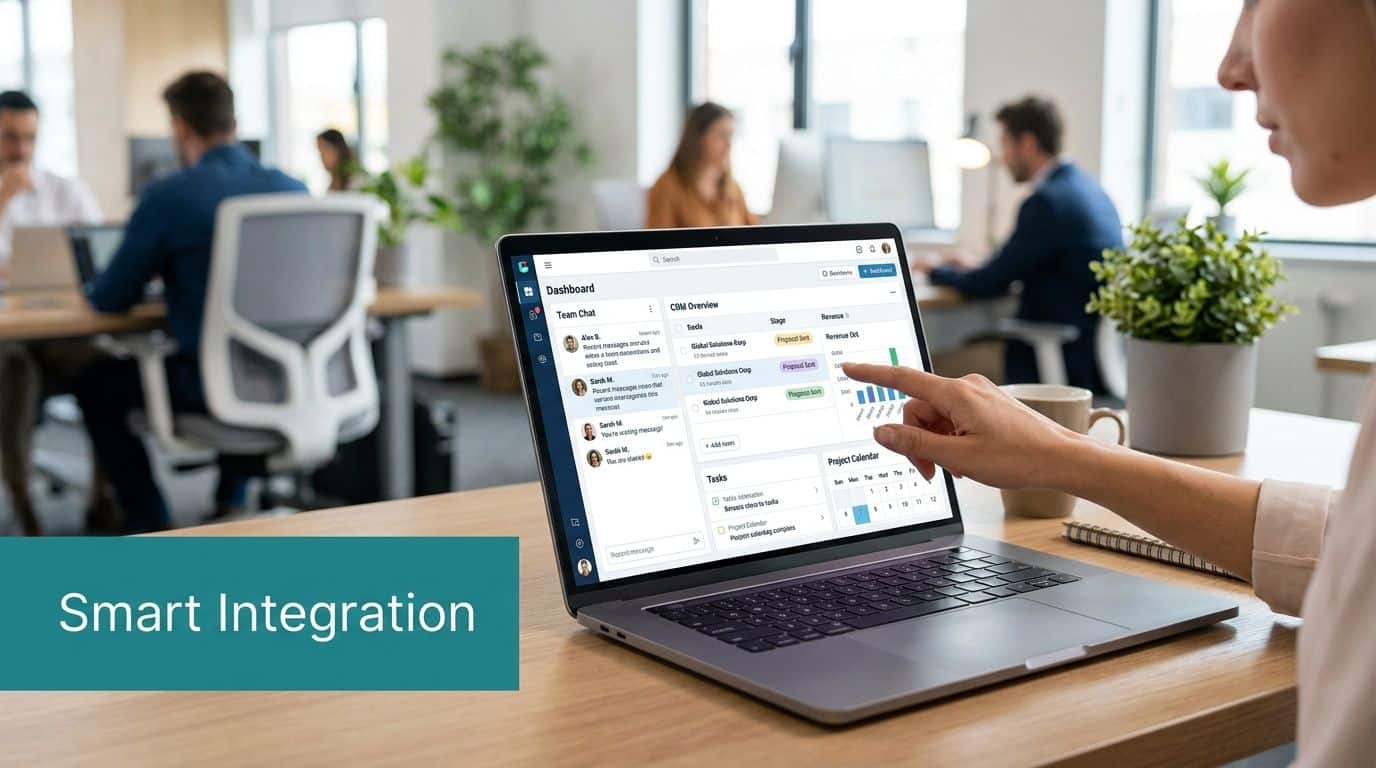
If your staff already live in Microsoft 365, a hosted telephone system becomes far more valuable when it works inside Teams, links to customer records and feeds useful information into Dynamics 365. That’s the point where a phone call stops being a disconnected event and becomes part of your operating process.
Teams turns voice into part of everyday work
For most users, Teams adoption changes behaviour because they don’t need another communications app to manage. They can chat, join meetings and handle external business calls in a familiar interface.
That matters operationally. Staff don’t have to jump between a desk phone, a softphone client and separate status tools. Presence becomes more useful. Internal handover becomes smoother. Hybrid workers stay in the same flow whether they’re at home, in Leicester, or travelling between sites.
A practical starting point for that model is Microsoft Teams Phone. F1Group provides an overview of how it fits into business communications here: https://www.f1group.com/microsoft-teams-phone/
Dynamics 365 is where significant efficiency appears
The payoff gets bigger when telephony is tied to customer context.
An inbound call can trigger a screen pop with the caller’s record. A user can click to call from a contact or case. Notes from the conversation can flow back into the system the business already uses to manage sales or service.
That reduces three common problems:
- Searching for customer information while the caller waits
- Re-entering details after the conversation ends
- Losing continuity when a case moves from one employee to another
In a sales environment, this shortens the gap between conversation and follow-up. In customer service, it gives agents the context they need before they even say hello.
AI is becoming practical, not theoretical
The market is moving quickly in this area. The integration of hosted telephony with AI is no longer a novelty item.
According to this write-up on hosted telephone systems and AI integration, Microsoft’s Copilot update enables real-time call transcription and sentiment analysis within Teams Phone, and early UK adopters reported 22% faster response times. The same source states that 35% of East Midlands charities are seeking Dynamics 365 telephony integrations, while only 8% have implemented them, and 42% of IT directors cite integration security as a key concern without proper Azure safeguards.
Those figures matter because they reflect what many organisations are feeling already. They want the data and workflow gains, but they don’t want to bolt together a fragile solution.
The trade-off is integration quality
A weak deployment gives you fragmented apps, inconsistent logging and confused ownership between telephony and Microsoft admins.
A strong deployment gives you:
| Area | What good integration looks like |
|---|---|
| User experience | Calling from the tools staff already use |
| Sales workflow | Click-to-call and customer context in Dynamics 365 |
| Service delivery | Faster triage and cleaner case histories |
| Management insight | Better reporting from call activity and business records |
| AI readiness | Transcription, summaries and automation with proper controls |
The phone call is often the highest-value interaction in the business. If that interaction sits outside Microsoft 365 and Dynamics, you’re leaving useful context on the table.
For East Midlands firms that have already standardised on Microsoft, this is usually the central reason for the switch. The phone system isn’t just moving to the cloud. It’s moving into the same platform strategy as the rest of the business.
Your Migration Roadmap and Vendor Selection Checklist
A migration usually goes wrong before the first number ports.
The pattern is familiar. A business in Leicester or Nottingham signs off the new hosted telephone system, assumes the provider will "move everything across", and only then starts asking which numbers are still live, how reception really handles peak call volumes, whether Teams is staying as the main client, and how call data should appear in Dynamics 365. That late discovery work creates delay, confusion and avoidable risk.
Start with discovery, not devices
Handsets, headsets and apps come later. First, get clear on how the business uses voice today and where it needs voice to sit tomorrow.
That means documenting call flows, hunt groups, voicemail handling, remote and mobile usage, compliance requirements, shared numbers, and any dependency on Microsoft 365, Teams or Dynamics 365. It also means checking what must happen when a call arrives. Should it ring a person, a queue, an auto attendant, or create context for the next action inside Dynamics?
Network checks belong here too. In practice, poor call quality is often traced back to site conditions that nobody tested properly, such as weak Wi-Fi coverage, oversubscribed internet circuits, ageing switches, or a branch office with very different connectivity from head office. Those are fixable problems if they are identified early.
Set the Microsoft plan before the cutover plan
For businesses already invested in Microsoft, this is usually the point that separates a simple phone replacement from a worthwhile platform move.
Decide early how telephony will work with Teams, Entra ID, Dynamics 365 and, where relevant, Copilot. Confirm whether users will live in the Teams client, whether Direct Routing or Operator Connect fits the requirement, how call records should map into customer or case records, and who owns the relationship between telephony admin and Microsoft admin. If that ownership is vague, support issues drag on because each supplier points at the other system.
A good migration plan treats Microsoft integration as part of the core design, not an add-on after go-live.
Get the number strategy right
Most organisations want to retain existing numbers, and in most cases they can. The detail matters.
Published main numbers, direct dials, hunt groups, emergency location data, dormant lines that still receive supplier calls, and fallback routing all need to be inventoried before porting starts. A clean number list saves a lot of pain later, especially where Teams calling and Dynamics workflows depend on the right destination and caller identity.
A practical sequence looks like this:
- Confirm every live number and flag any line that still has a business function.
- Map each number to its target such as a user, call queue, auto attendant or service line.
- Define fallback routing for delayed ports or failed cutovers.
- Plan communications so staff and key contacts know what will change and when.
Improve the call flow while you are there
Lifting the old PBX setup into a cloud platform often preserves old problems.
Use the project to remove workarounds that built up over the years. Reception may no longer need to manually route every call. Service teams may benefit from queues and presence visibility in Teams. Sales teams may need click-to-call and automatic record matching in Dynamics 365 rather than a desk phone and handwritten notes. Managers may need reporting by team, location or campaign rather than a basic missed-calls count.
Those decisions affect adoption far more than the handset choice.
Train by role
Training works best when it is short and specific.
Reception needs call handling, transfer paths and queue management. Managers need reporting, user oversight and escalation options. General users need the basics: answering, transferring, voicemail, presence, and using the desktop or mobile client properly. If Teams is the primary calling interface, show staff exactly how that changes their day. If Dynamics is in scope, show them what should happen to call notes, records and customer context.
People adopt new telephony quickly when the training reflects their actual job.
Vendor selection checklist
Monthly price is only one line in the decision. The harder question is whether the provider can deliver a phone system that fits your Microsoft estate, your support model and your operating reality.
Use this checklist when comparing suppliers:
| Question area | What to ask |
|---|---|
| Discovery and design | Do they map business call flows, user roles and Microsoft dependencies before proposing the solution? |
| Network readiness | Will they test site connectivity, Wi-Fi and call performance before go-live? |
| Microsoft integration | Can they support Teams calling, Direct Routing or Operator Connect, Entra ID alignment, and Dynamics 365 workflows? |
| Support boundaries | Who handles faults that cross telephony, Teams and Microsoft 365 administration? |
| Security and compliance | How are access control, call data, retention and GDPR handled? |
| Number migration | What is their process for inventory, porting, cutover and fallback? |
| Reporting and administration | What can your internal team manage directly, and what still needs the provider? |
| Future use cases | Can the design support transcription, summaries, automation and Copilot-related workflows later? |
If procurement needs a more structured starting point, this IT RFP template for supplier comparison helps frame the technical, operational and Microsoft-specific questions up front.
The best migrations are disciplined and boring in the right places. Clear discovery, tested assumptions, defined ownership and a Microsoft-first design produce a much better result than a fast quote and a rushed port date.
Partnering for a Smooth Transition and Beyond
A hosted telephone system can make a business sound more professional, support hybrid working properly, and remove a surprising amount of day-to-day friction. The gains become much bigger when telephony is tied into Microsoft 365, Teams and Dynamics 365 instead of being treated as a standalone service.
That’s the fundamental shift. You’re not just replacing an old PBX. You’re making voice part of your wider business platform.
The technology itself is mature. The variable is implementation. Call flows need to reflect how your teams work. Networks need checking before promises are made. Security, licensing, routing and user adoption all need proper attention. Integration work especially needs a partner that understands both telephony and the Microsoft estate around it.
For East Midlands organisations, that usually means choosing a provider that can handle the practical detail as well as the platform design. The project should leave you with clearer call handling, better visibility, simpler administration and a phone system that fits the rest of your cloud strategy.
A well-run migration shouldn’t feel like a leap into the unknown. It should feel like overdue alignment between the way your business communicates and the way it already works.
If your current phone system is holding back hybrid working, customer service or your Microsoft 365 investment, speak to F1Group. Phone 0845 855 0000 today or Send us a message at https://www.f1group.com/contact/