
Most business owners don't think about backup disaster recovery until a normal day stops being normal. Staff arrive on Monday, open Outlook, try to reach shared files, and nothing works. The finance folder is locked. The line-of-business system won't load. Microsoft 365 sign-ins start failing because one compromised account triggered a wider mess. At that point, nobody cares how neat the backup dashboard looked on Friday.
What matters is whether the business can keep trading.
That's the gap many firms miss. Having copies of data is important, but copies alone don't restore operations. A resilient business needs both backup and a practical recovery plan that tells people exactly what to do, in what order, and how to prove systems are usable again. For UK organisations, this isn't edge-case planning. It's routine risk management.
When Disaster Strikes Are You Prepared
A common failure starts small. A member of staff clicks a phishing link. An account is hijacked. Mail rules are altered, files are deleted or encrypted, and the problem spreads into SharePoint, OneDrive, Teams, or an on-premise file server linked to cloud identities. The first call usually isn't “Where is our backup?” It's “How do we get everyone working again?”
That's the right question.
The Information Commissioner's Office reported 244 personal data breach reports in the first quarter of 2024 alone, as cited by InvenioIT's summary of UK backup and disaster recovery statistics. Incidents that trigger legal review, customer communication, and urgent technical recovery are happening often enough that every SME should assume they'll need a worked recovery process at some point.
Backup protects data
IBM's distinction matters here, and the same InvenioIT source summarises it well. Backup is the creation of copies. It preserves data so you can recover it later.
That's necessary, but it's only part of the answer.
Disaster recovery restores the business
Disaster recovery is the plan and process used to restore access to applications, data, and IT resources after an outage. That includes decisions about priorities, people, failover, validation, and communication. Without those pieces, a backup can exist and the business can still be down.
Practical rule: If your team can restore files but can't restore the service that depends on them, you don't have a recovery capability yet.
Many organisations also overlook power and hardware dependencies. If you're reviewing resilience properly, it's worth taking time to compare uninterrupted power supply options as part of the wider continuity picture, especially for offices with local servers, network equipment, or internet edge devices that still matter when cloud systems are in use.
A workable backup disaster recovery approach starts with one blunt assumption. Something important will fail, and it probably won't fail in a tidy, isolated way.
Backup and Disaster Recovery The Critical Difference
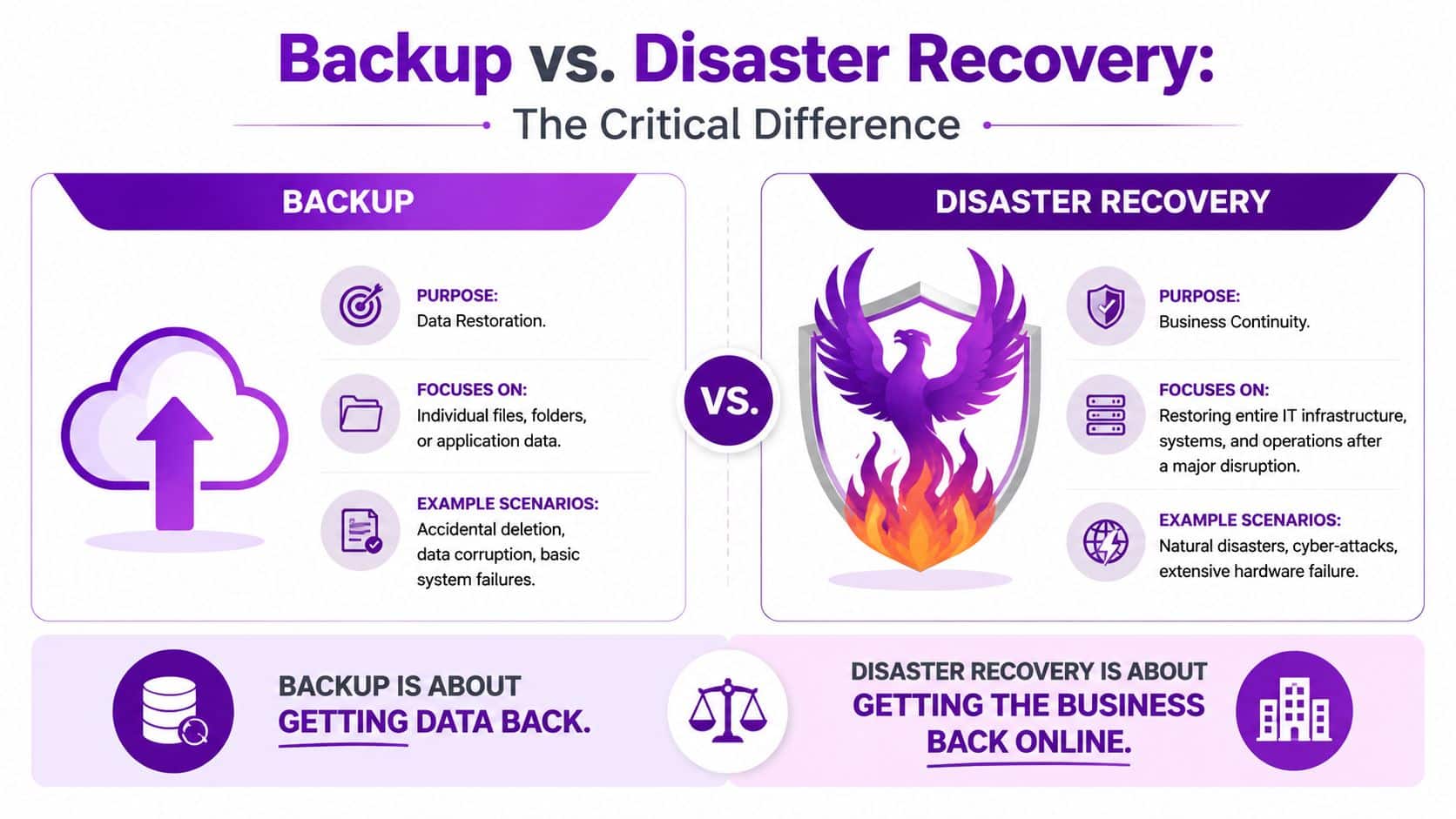
The easiest way to explain this is with a road analogy. A backup is the spare tyre in the boot. Disaster recovery is the roadside assistance plan, the instructions, the tools, and the route that gets you moving again when the problem is bigger than one puncture.
That distinction sounds simple, but it changes how businesses buy technology and write procedures.
What backup actually does
Backup is about data preservation. It helps when someone deletes a file, a database becomes corrupted, a device fails, or you need to recover a previous version of something important. Good backup design covers retention, immutability where appropriate, recovery points, and the practical ability to search and restore the right dataset.
A backup system answers questions like these:
- What was protected
- When it was captured
- How far back you can go
- How quickly an individual item can be restored
What disaster recovery actually does
Disaster recovery is about service restoration. It deals with broader failure. Think ransomware, major hardware loss, loss of a production environment, failed updates, identity compromise, or a platform outage that affects more than one workload.
A disaster recovery plan answers a different set of questions:
- Which systems come back first
- Who approves failover
- How users reconnect
- How applications are validated
- When production is stable enough to resume normal work
| Attribute | Backup | Disaster Recovery (DR) |
|---|---|---|
| Primary goal | Preserve and restore data | Restore business services and operations |
| Scope | Files, folders, mailboxes, databases, application data | Applications, servers, networks, identities, dependencies, user access |
| Typical trigger | Deletion, corruption, isolated failure | Major outage, cyber attack, platform failure, site loss |
| Main success measure | Correct data restored | Business operating again within required target |
| Core concern | Recovery point | Recovery time, order, validation, failover and failback |
| Ownership | Often handled by IT operations | Requires IT, leadership, vendors, and business owners |
Backup gets data back. Disaster recovery gets the business back online.
This is why “we have backups” can be a misleading answer. If payroll, finance, customer service, and operations all depend on different systems speaking to each other, then a pile of restored files won't help much unless the wider estate is brought back in a controlled sequence.
Strategic Planning with RTO RPO and SLAs
RTO and RPO are often treated like technical jargon. In practice, they're business decisions expressed in technical terms. If you get these wrong, the rest of the design will either cost too much or fail when you need it.
RTO is about downtime
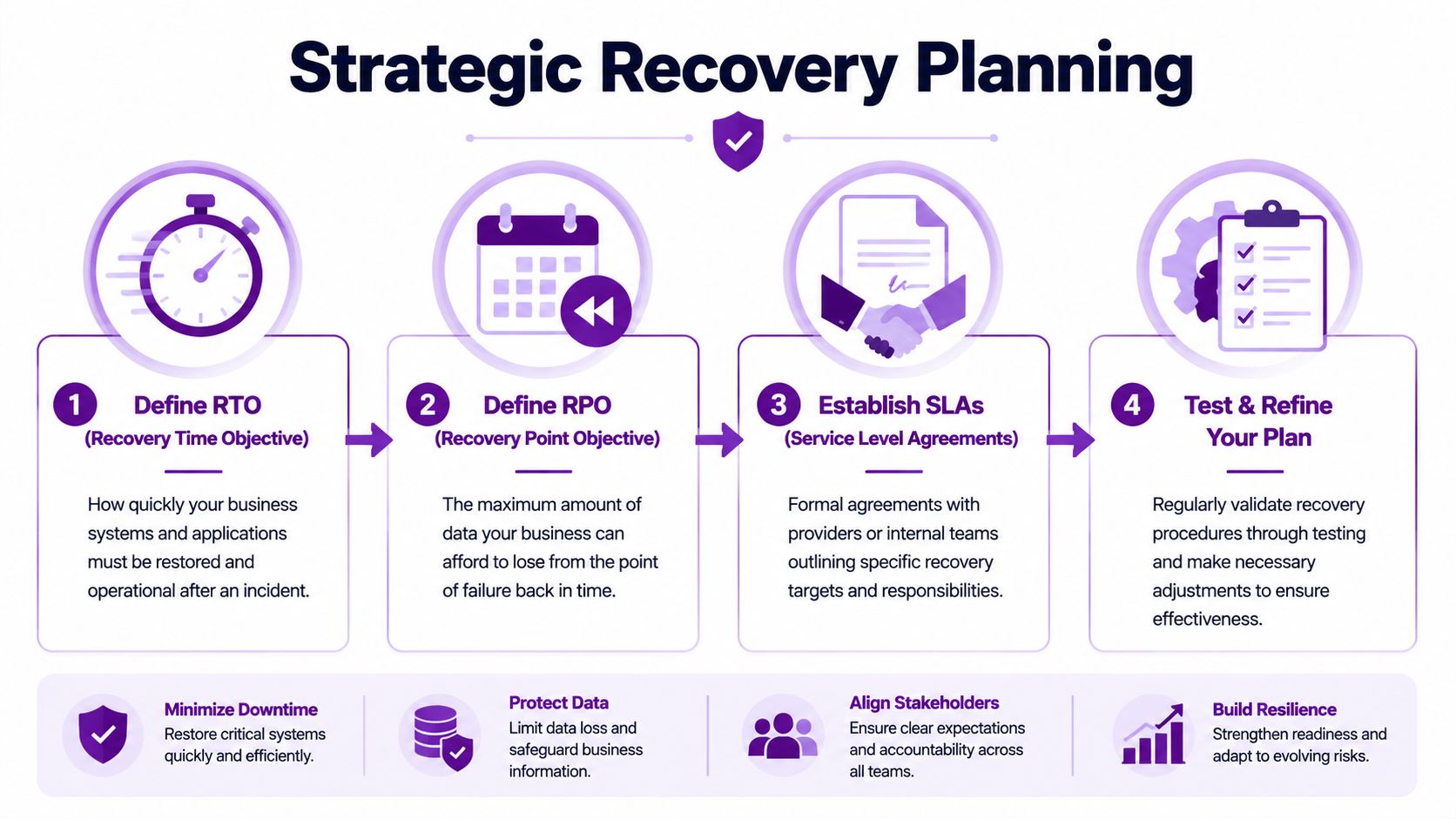
Recovery Time Objective is how long the business can tolerate a service being unavailable. Not how long IT would like. Not how long the supplier hopes. The actual tolerable outage before the organisation starts missing commitments, losing work, or creating operational backlog it can't easily clear.
If your service desk can cope with a short interruption but your ERP platform cannot, those systems need different recovery designs.
RPO is about data loss
Recovery Point Objective is how much data loss is acceptable measured backwards from the point of failure. If the business can only tolerate losing a very small amount of recent work, then the backup method, replication pattern, and storage design must support that.
The mistake is to define these in policy and then buy a product that can't meet them in reality.
A recovery target that isn't matched by the tooling, media, and procedure is only paperwork.
The University of Michigan's DS-12 policy guidance makes the right point. Documented recovery procedures must account for cross-system dependencies, and backup methods and media should allow teams to meet required restoration windows and data-loss tolerances. You can review that principle directly in the DS-12 recovery policy guidance.
Dependencies change everything
A database might restore cleanly and still be unusable. Why? Because the application tier hasn't been restored yet, authentication isn't available, or an integration to another system is broken. Many backup projects fail for these reasons. They protect assets individually but don't model how the business operates.
A simple way to tighten this up is to define recovery in tiers:
- Tier one systems are the services that stop revenue, operations, or regulated activity if unavailable.
- Tier two systems support key teams but can tolerate a longer interruption.
- Tier three systems matter, but they don't need the same urgency.
SLAs should reflect business reality
Service Level Agreements matter because they set expectations internally and externally. If your contract says a service must be available or recoverable within a certain window, your backup disaster recovery design has to support that. Otherwise, the SLA becomes an empty promise.
For teams that need a structured starting point, this IT disaster recovery plan template is useful for documenting priorities, owners, and restoration requirements.
A short explainer can help if you're aligning business targets with technical execution:
Modern Recovery Architectures On-Prem Cloud and Hybrid
There isn't one correct architecture for every SME. The right model depends on your workloads, your tolerance for downtime, your budget, and whether your estate is mostly on-premise, mostly in Microsoft 365 and Azure, or spread across both.
On-premise recovery
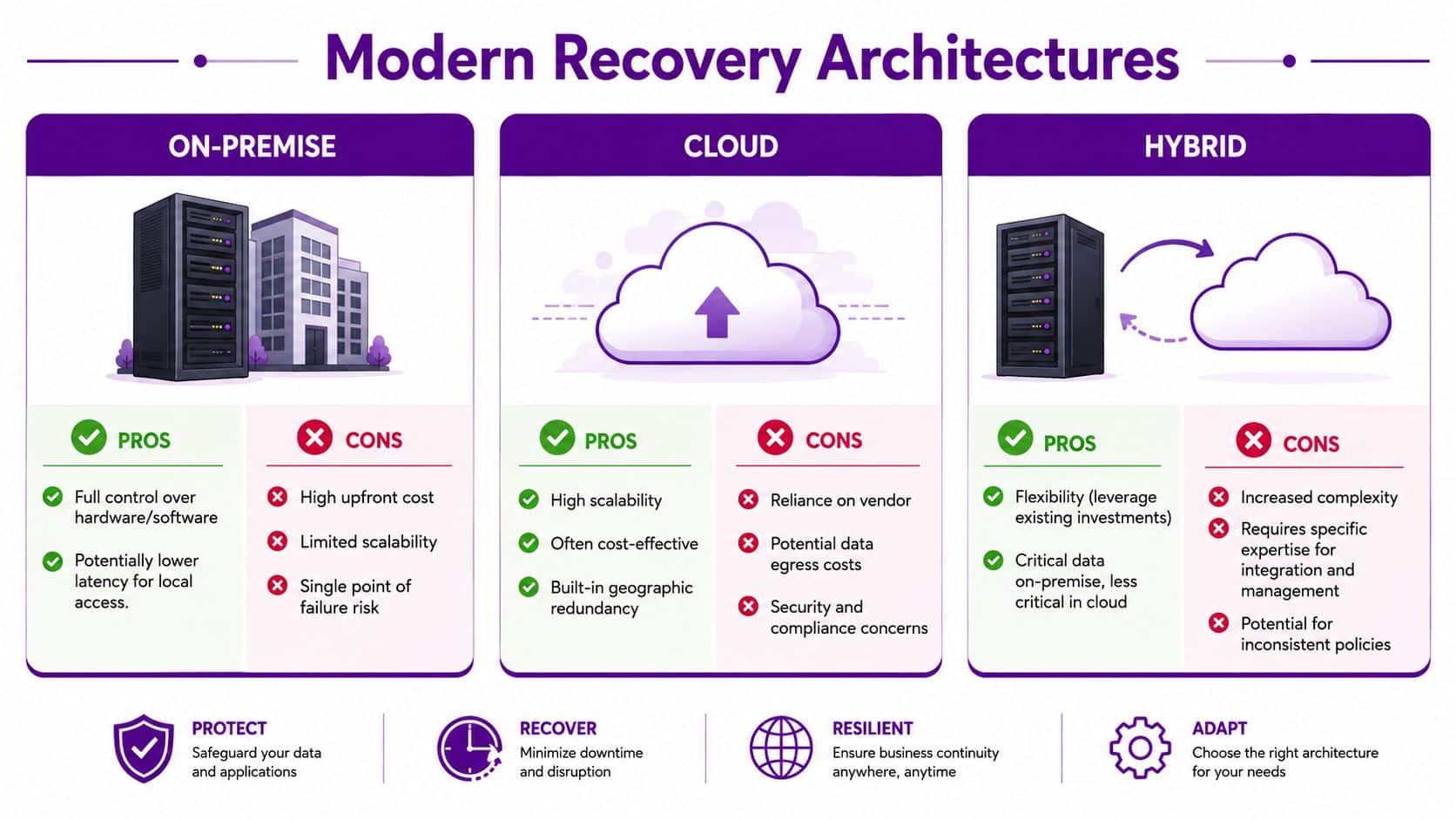
Traditional on-premise recovery still suits some businesses. If you run specialist applications, local manufacturing systems, or equipment that relies on low-latency access, local backup appliances and secondary infrastructure can make sense.
The drawbacks are usually practical rather than theoretical:
- Hardware burden means someone has to patch, monitor, replace, and secure it.
- Site dependency becomes a problem when the building itself is the issue.
- Scaling pain appears as storage, compute, and retention demands grow.
Cloud recovery
Cloud-based recovery is attractive because it reduces the need to maintain spare production-like hardware. For many Microsoft estates, cloud orchestration can improve speed, standardisation, and geographic separation.
IBM's guidance is useful on one key point. Backup is periodic copying and storage. Disaster recovery is restoring applications and IT resources after a broader outage. For Azure-based environments, that distinction matters because the design should assume region-level failure, not just a damaged host or deleted file. The relevant principle is outlined in IBM's overview of backup and disaster recovery planning.
Hybrid recovery
Hybrid is often the most realistic answer for a Midlands-based SME. Keep what is essential to stay local. Protect cloud workloads properly. Use different recovery methods for different classes of system rather than forcing everything into one pattern.
That usually works well where you have:
- Legacy line-of-business systems still tied to on-premise servers
- Microsoft 365 collaboration workloads used by everyone
- Azure-hosted applications that need failover planning
- Compliance or operational constraints that make a fully cloud-only estate impractical
The strongest design is usually the one that matches real dependencies, not the one that follows a fashionable architecture.
The hard part with hybrid isn't buying products. It's keeping policy, identity, networking, runbooks, and ownership consistent across environments. That's where many recovery plans become messy. They aren't wrong on paper. They're just difficult to execute under pressure.
Protecting Your Microsoft 365 and Azure Assets
A dangerous assumption still turns up in a lot of boardrooms and IT meetings. “It's in Microsoft 365, so Microsoft backs it up.” That isn't a safe working assumption for business recovery.

Microsoft keeps the service running. You still own the data risk
For most organisations, Microsoft is responsible for the availability of the platform. The customer remains responsible for protecting business data from deletion, malicious change, compromised accounts, configuration mistakes, and the practical need to restore information quickly in the right format.
The UK Cyber Security Breaches Survey 2024 found that 50% of UK businesses experienced some kind of cyber security breach or attack in the previous year, as cited in this summary of breach statistics relevant to cloud data loss and recovery. In that same discussion, phishing is highlighted as a primary vector. That matters because Microsoft 365 is identity-driven. If an attacker gets into the account layer, mailboxes, files, and collaboration spaces can all be affected quickly.
Where built-in retention falls short
Retention policies, recycle bins, and version history are useful. They are not the same as a dedicated backup strategy. They don't always provide the operational simplicity, isolation, or point-in-time recovery options a business needs during a serious incident.
For Microsoft 365, the usual protection scope should include:
- Exchange Online for mailbox and calendar recovery
- SharePoint Online for document libraries and site content
- OneDrive for Business for user file protection
- Teams-related data where collaboration history and files matter operationally
If you're assessing options for that layer, this guide on Microsoft 365 backup considerations is a practical place to start.
Azure needs recovery orchestration, not just snapshots
Azure workloads bring a different challenge. Virtual machines, managed services, networking, and identity all have to be restored in a usable order. Snapshots and backups help, but they don't replace orchestration. For critical workloads, failover planning to an alternate region is the real test of resilience.
A sound Microsoft-focused backup disaster recovery design usually separates three concerns:
- Data backup for granular restoration.
- Workload recovery for application-level availability.
- Identity resilience so users and admins can access recovered services.
Miss any one of those, and the restore may be technically successful but commercially useless.
Validating Your Plan Through Testing and Maintenance
An untested recovery plan is a risk, not reassurance. Teams often discover this at the worst possible moment, when credentials are missing, the wrong backup set was retained, or nobody remembers the order in which the systems need to come back.
That's why the most useful question isn't “Do you have backups?” It's “How quickly can you restore what the business needs?” The Cutover discussion on backup and disaster recovery makes that point directly and notes that 32% of UK businesses reported a cyber breach or attack in the last year in the context of restore readiness and testing realism. It also argues, correctly, that a backup never restored is a liability disguised as resilience. You can read that perspective in Cutover's article on backup and disaster recovery testing and realism.
Tests that don't break the business
Testing doesn't always mean a dramatic full failover in working hours. Most SMEs can validate recovery sensibly through a mix of lower-risk exercises.
- Tabletop review brings IT, operations, and management into one room to walk through the recovery sequence and decision points.
- File and mailbox restore drill checks whether staff can recover common items quickly and correctly.
- Isolated sandbox test restores a server, application, or dataset into a separate environment for validation.
- Planned failover exercise proves whether critical services can move to the recovery platform when needed.
What to record after every test
Testing only improves resilience if the results feed back into the runbook.
Keep a short record of:
- What was tested
- Who carried it out
- What failed or slowed the process
- Which documents, passwords, approvals, or licences were missing
- What changed afterwards
Recovery confidence comes from evidence, not intention.
For organisations that want help shaping that process, this overview of business disaster recovery planning covers the broader operational side as well as the technical one.
Maintenance matters just as much as testing. New staff join. Servers are retired. Microsoft 365 permissions change. Vendors alter platforms. If the runbook isn't updated to reflect those changes, your documented plan drifts away from your actual estate.
An Actionable Recovery Runbook for Your Business
A good runbook is short enough to use under pressure and detailed enough to prevent guesswork. If yours lives in one person's head, it isn't a runbook yet.
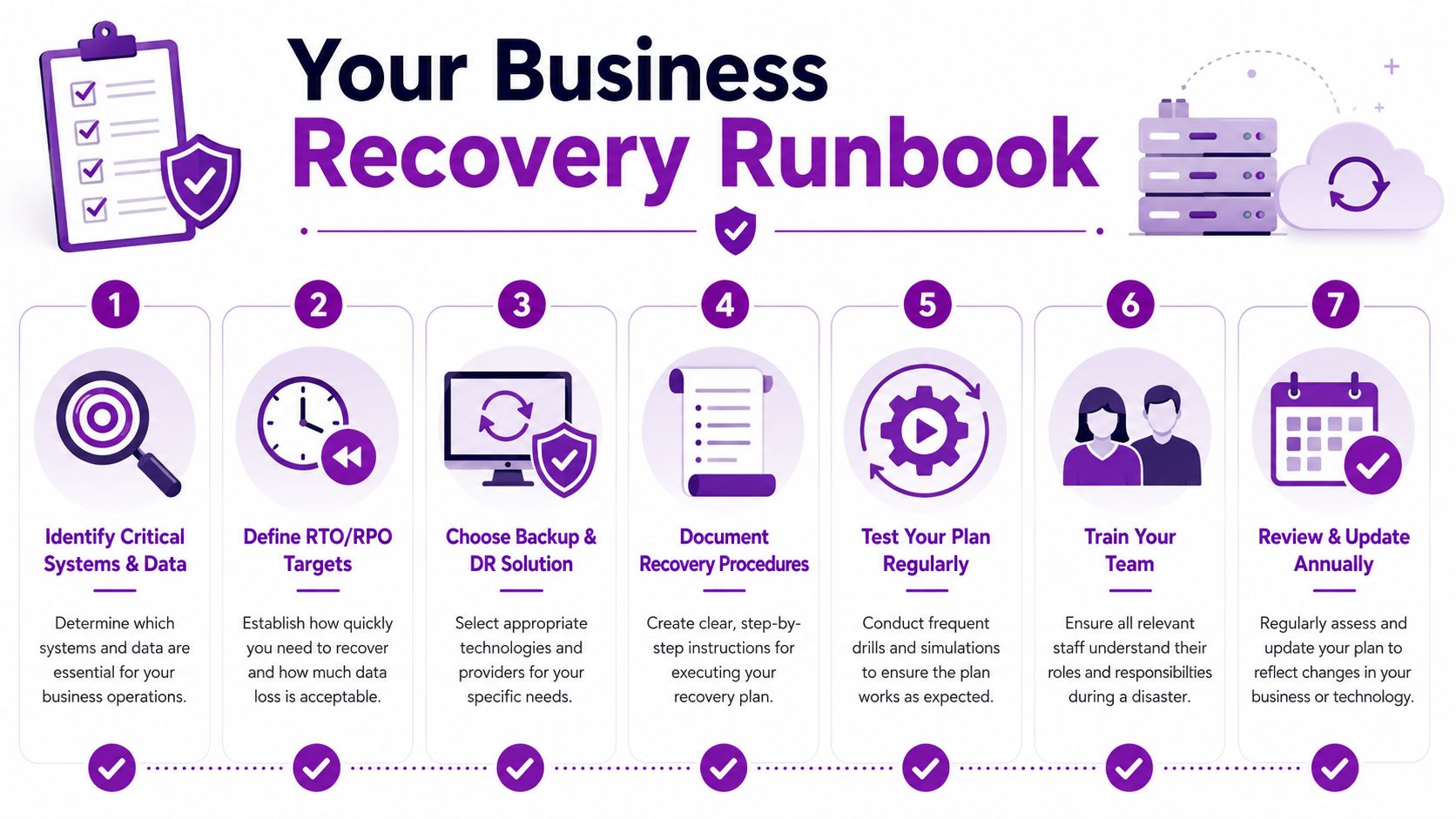
Use this checklist as a starting point:
-
Identify critical systems and data
List the applications, file stores, mail services, identities, and devices that the business can't operate without. -
Set RTO and RPO by workload
Don't use one target for everything. Finance, operations, customer service, and archive data rarely need the same treatment. -
Map dependencies
Record which databases, authentication services, integrations, and network components each critical application relies on. -
Choose the right protection method
Use backup for granular restoration. Use DR orchestration where the whole service must be recovered, failed over, or validated as a working application stack. -
Document the recovery sequence
Name owners, approvals, credentials location, vendor contacts, restore order, validation checks, and user communication steps. -
Test one realistic scenario first
Pick a likely event such as account compromise, deleted SharePoint data, or server failure. Run the drill and record what breaks. -
Review and update routinely
Any significant change to Microsoft 365, Azure, networking, identity, or business applications should trigger a runbook review.
One practical option for businesses that want a structured starting point is F1Group's documented planning material for Microsoft-focused environments and wider SME recovery requirements.
A backup disaster recovery plan doesn't need to be flashy. It needs to work on a bad day, with the people you currently have, using systems you currently run.
If you need help building a resilient and tested recovery plan, speak to F1Group. Phone 0845 855 0000 today or Send us a message to secure your operations.