
Your team probably already has a shortlist of jobs nobody enjoys doing. Chasing approvals. Moving files from email into SharePoint. Copying customer details from one system into another. Checking whether the same spreadsheet has been updated by three different people. None of these tasks are difficult. They're just repetitive, easy to miss, and oddly expensive once they pile up across a week.
That's where Power Automate starts to make sense for an East Midlands SMB. It isn't magic, and it isn't only for large enterprises with a dedicated development team. Used well, it acts like a dependable digital assistant inside Microsoft 365, handling routine steps the same way every time so your staff can focus on work that needs judgement.
Escaping the Grind of Repetitive Tasks
A familiar example is the Friday report. Sales figures sit in one spreadsheet, stock updates in another, and open orders in a shared mailbox or a Teams message thread. Someone in the office pulls it all together manually before the management meeting. The process works, but only if the right person remembers every step and has time to do it.
Power Automate can take that chore and run it on a schedule. At a set time, it can collect the files, sort the data, place the output where the team expects it, and send a notification when it's ready. Instead of relying on memory, the business relies on a repeatable process.
Where smaller businesses feel the pain first
SMBs usually don't struggle because work is complicated. They struggle because capable people are spending part of every day acting as the glue between systems.
Common examples include:
- Accounts teams copying invoice details from email into a tracker
- Operations staff sending the same updates to customers after each status change
- Managers approving holiday, expenses, or purchase requests through long email chains
- HR teams assembling starter information from forms, attachments, and internal notes
Good automation removes hand-offs first. That's usually where delays and mistakes start.
If you're exploring broader ways to automate daily tasks with AI, it helps to think in layers. AI can help create or interpret content. Power Automate handles the workflow around it, such as routing, notifying, recording, and escalating.
The practical win isn't just speed. It's consistency. Staff don't have to remember who gets copied in, which folder to use, or whether an overdue item has already been chased. The workflow does that part for them.
What Exactly Are Power Automate Workflows
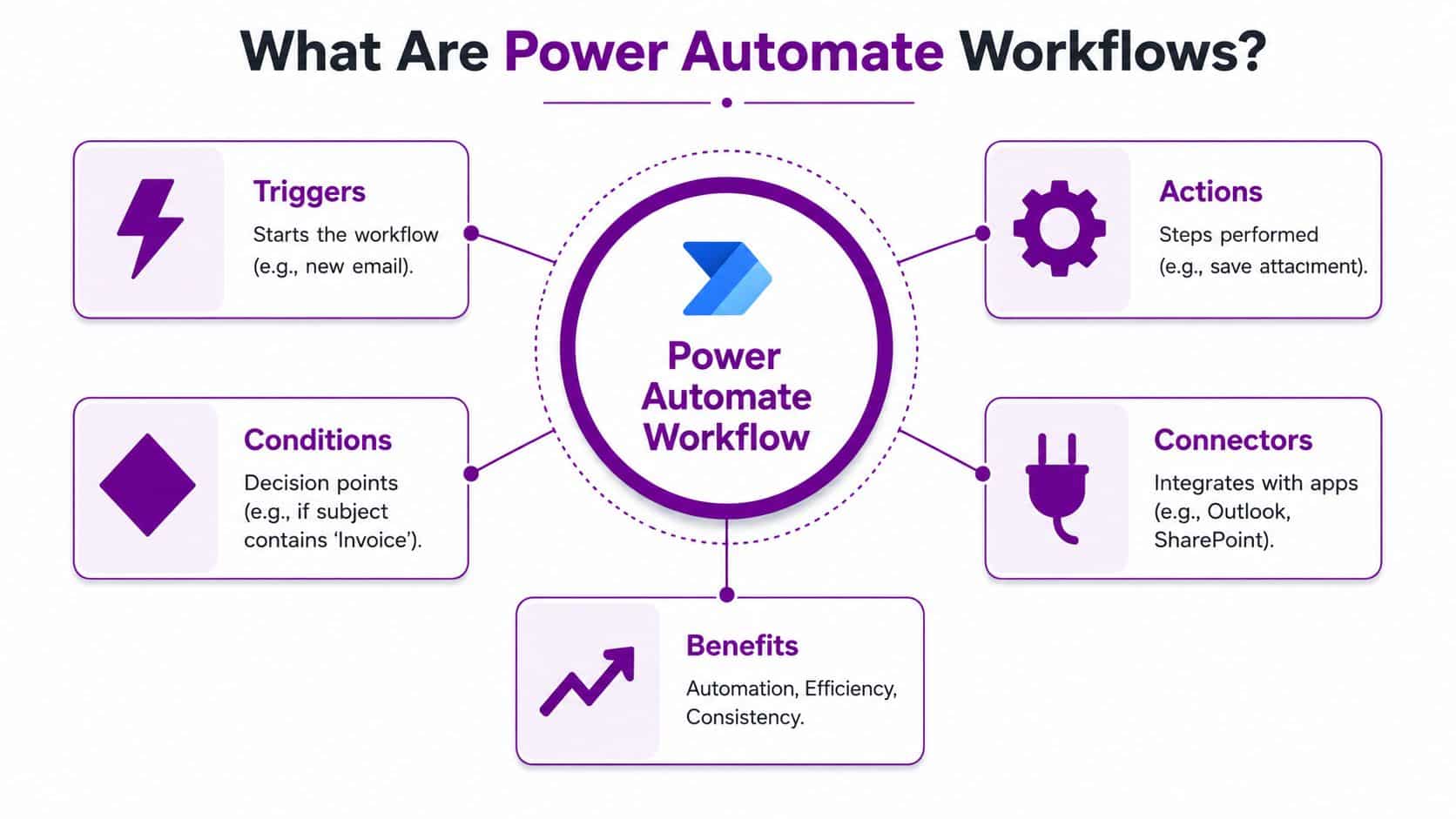
A Power Automate workflow is easiest to understand as a digital assembly line. Something happens first. Then the system follows a set of instructions. Each instruction moves the task forward until the work is finished.
The building blocks that matter
Every workflow has a few core parts:
- Trigger. This is the starting point, such as a new email arriving, a form being submitted, or a scheduled time being reached.
- Action. This is a step the workflow performs, such as creating a file, sending a Teams message, updating a list, or requesting approval.
- Condition. This is the decision point. If the invoice is above a threshold, send it to a manager. If it isn't, move it on automatically.
- Connector. This is the link to the app involved, such as Outlook, SharePoint, Teams, Excel, or another system.
A simple example looks like this: an invoice lands in a mailbox, the attachment is saved to SharePoint, the details are logged, and accounts receives a message to review it. No one has to sit and watch for the email.
Businesses that are already using Microsoft tools often find this easier to adopt because the workflows sit naturally alongside Outlook, Teams, SharePoint, and the rest of the platform. If you want the wider context, this overview of Power Platform tools and how they fit together is a useful place to ground the terminology.
The main types of workflow
Power Automate offers different flow types. The names sound technical, but the use cases are straightforward.
| Flow type | What it does | Simple business example |
|---|---|---|
| Automated flow | Starts when an event happens | When a customer enquiry form is submitted, send it to sales and log it |
| Instant flow | Starts when a person presses a button | A manager taps a button on their phone to alert the team that a site visit is complete |
| Scheduled flow | Runs at a set time | Every morning, compile yesterday’s orders and send a summary |
| Desktop flow | Mimics user actions on a computer | Enter data into an older system that doesn’t offer a modern connector |
Where people often get confused
The biggest misunderstanding is thinking a workflow needs to be complicated to be useful. It doesn't. Some of the best Power Automate workflows do three or four things only, but they do them reliably.
Practical rule: Start with a process that already follows clear rules. If people do it differently every time, fix the process before you automate it.
Another point of confusion is ownership. A workflow isn't “set and forget” forever. Someone still needs to know why it exists, what it touches, and what should happen if a step fails. That matters more as your automation estate grows.
The Tangible Business Benefits of Automation
Most business managers don't need to hear that automation is “transformational”. They want to know what changes on a normal Tuesday. That's the right question.
Before and after in finance and admin
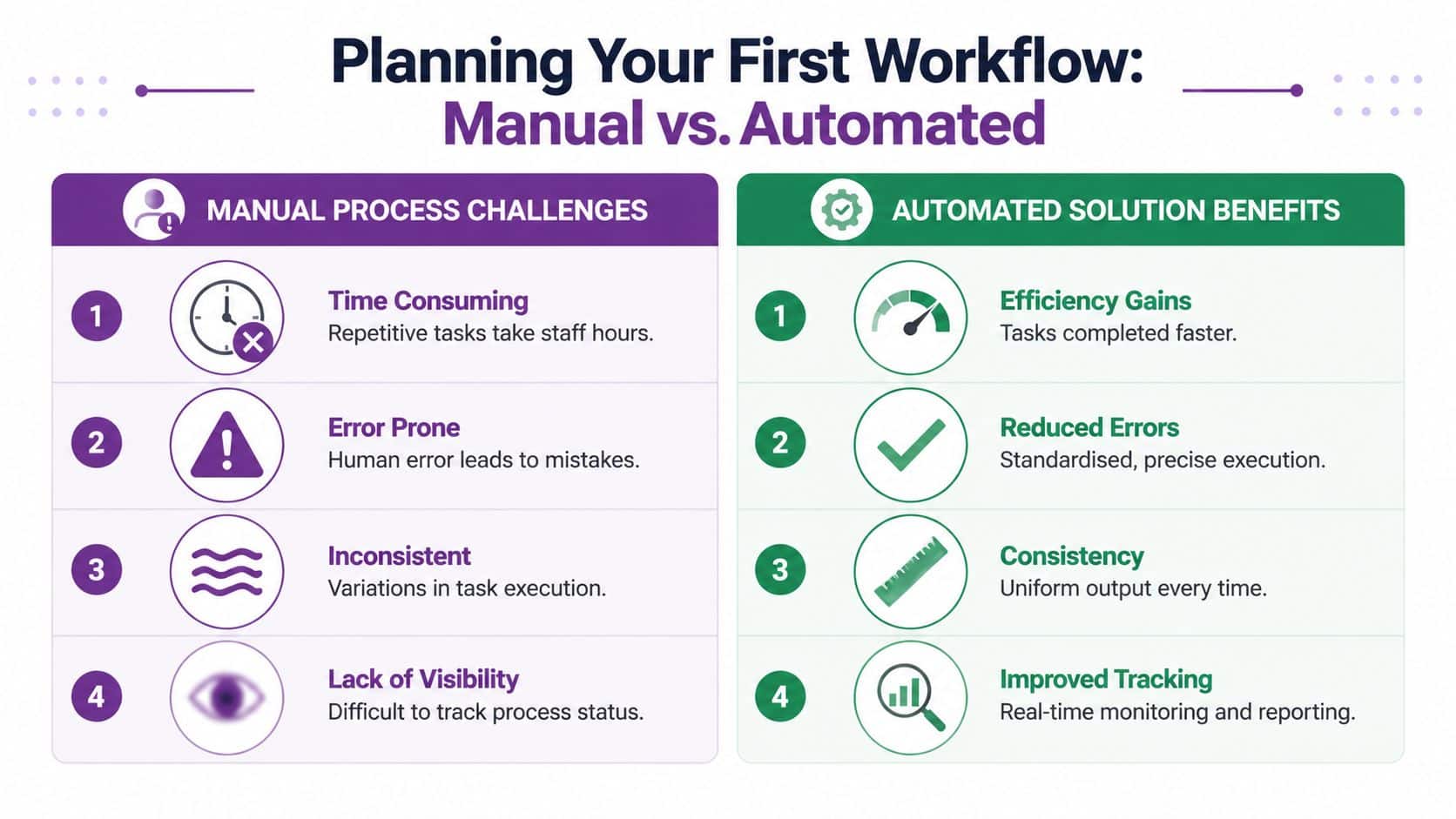
Take invoice handling. Before automation, an accounts assistant opens the email, downloads the file, renames it, saves it, enters the details into a tracker, and forwards it for approval. If they're interrupted halfway through, the process can stall or the details can be recorded twice.
After automation, the same invoice can be routed the same way each time. The file lands in the right location. The record is created. The approver gets notified. Accounts can spend more time checking exceptions instead of repeating admin.
The same pattern shows up in customer data entry. A sales co-ordinator might receive lead details from a website form, then copy them into a CRM and email marketing list. That's the sort of work people can do, but it's not where they add most value.
Better use of capable staff
Automation rarely removes the need for people. It removes the need for people to do clerical work that slows down the rest of the business.
That shift usually improves three things:
- Focus. Staff spend less time switching between systems and more time solving actual business issues.
- Consistency. The workflow follows the same route every time, so your service doesn't depend on who happens to be on shift.
- Visibility. Managers can see where work is waiting, rather than hunting through inboxes and spreadsheets.
A service team feels this quickly. If each request follows a standard path, handovers become cleaner. Customers receive updates more predictably. Internal chasing drops because the process itself creates prompts and status changes.
The less visible gain
There's also a governance benefit, even before you formalise policy. Manual processes often live in people's heads. One staff member knows the naming convention. Another knows which supplier needs extra approval. A third knows where the final file should be stored.
When that knowledge sits in a workflow, the business becomes less fragile.
That doesn't mean every process should be automated. Some tasks need discretion, negotiation, or interpretation. But when the work is repetitive and rule-based, Power Automate workflows can give a smaller firm the sort of process discipline that used to be associated with much larger organisations.
Practical Workflow Examples for Your Business
The best way to judge whether automation is worth it is to walk through a few situations you can recognise.
Invoice approval that doesn't sit in someone's inbox
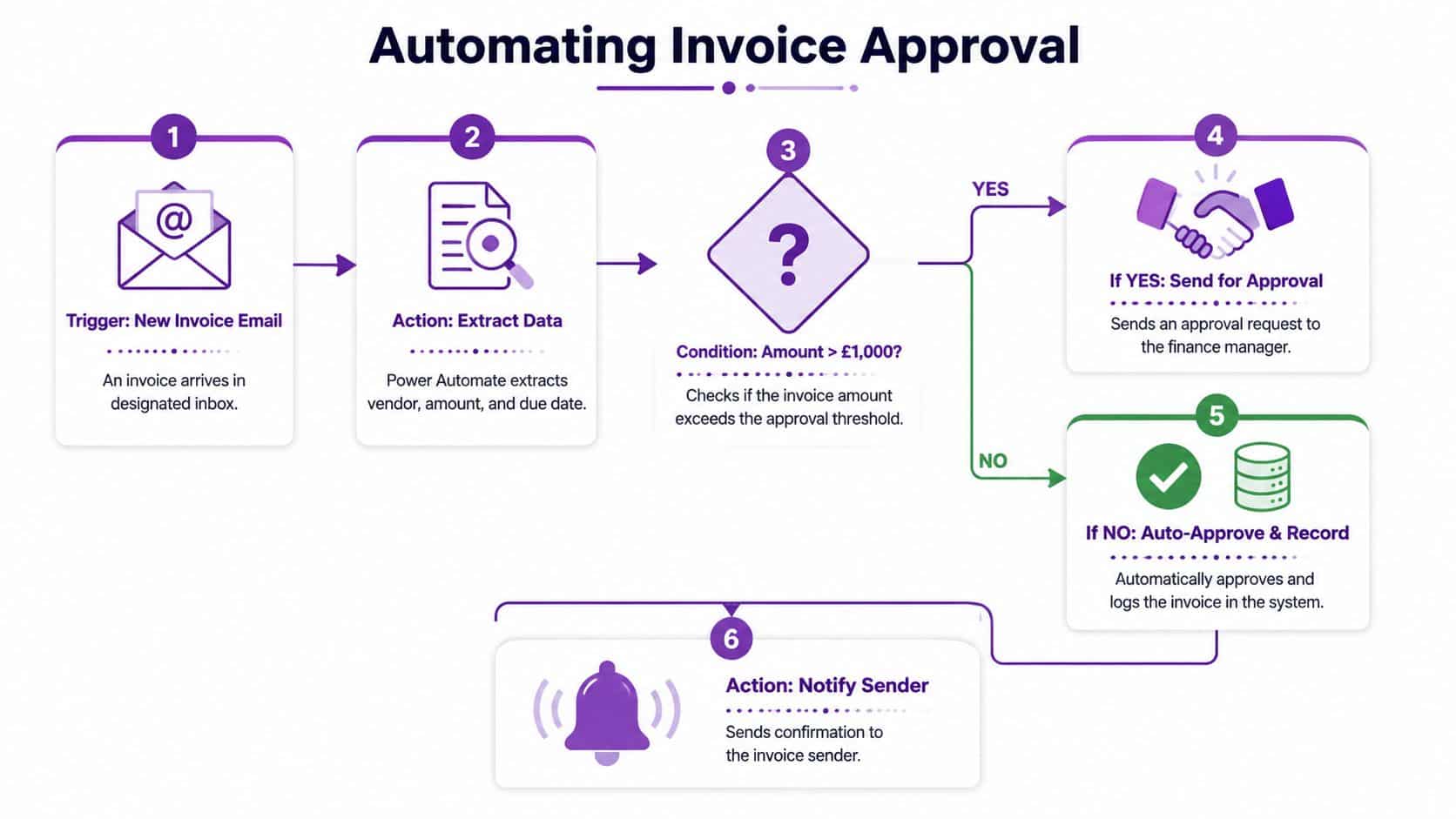
An invoice arrives at accounts. Instead of waiting for a member of staff to notice it, the workflow picks it up, stores it in the right place, and checks whether it needs approval.
If the amount is routine, the process can move it straight into the next stage. If it needs sign-off, the relevant manager receives an approval request in Teams. They can approve it on their phone while travelling between meetings, and the workflow records the decision and moves the file to the correct folder.
This is a good example because it removes delay without removing control.
To see more examples of how this kind of process can be structured, browse these business process automation examples for everyday operations.
A short video can help make the flow feel more concrete:
New starter onboarding that feels organised
A new employee joins on Monday. In many SMBs, that kicks off a scramble. HR has one checklist, IT has another, and the line manager remembers a third set of tasks only after the person has arrived.
A workflow can start as soon as the starter form is submitted. It can notify IT, create task prompts, send welcome information, and make sure each team sees what they need to do. The result isn't flashy. It's just calmer and more consistent.
Marketing hand-off without copying and pasting
A smaller marketing team often posts a new article or campaign update and then manually shares it in several places. One person updates the mailing list. Another posts in Teams. Someone else adds the item to a tracker.
Power Automate can connect those steps. Publish the item once, then trigger the supporting actions automatically. That keeps the team focused on the content itself rather than distribution admin.
Data sync that protects against drift
This one matters more than many firms realise. Customer records often drift apart between systems. A contact changes role in one place but not another. A team updates an email address in the CRM but forgets the mailing platform.
A workflow can act as the bridge. When a record changes in one system, the corresponding update happens in the other. That keeps reports cleaner and reduces awkward customer errors.
The strongest early use cases usually share one trait. They're repetitive enough that people already know the steps by heart.
If a process needs constant exceptions, heavy interpretation, or multiple off-the-record workarounds, it's often a poor first candidate. Pick the boring jobs first. They usually deliver the clearest win.
Planning and Budgeting for Your First Workflow
Most SMBs don't fail with automation because the idea is wrong. They fail because they start with the wrong process or the wrong licensing assumption.
Choose the right first process
A good first workflow usually has these features:
- High volume. The task happens often enough that the time saving is noticeable.
- Low complexity. The rules are clear, and there aren't endless exceptions.
- Easy trigger. Something obvious starts the process, such as an email, form, file, or scheduled time.
- Visible outcome. The team can quickly see whether the workflow is helping.
Examples include approval routing, document filing, reminders, and data capture between Microsoft 365 tools.
Understand the licence picture before you commit
For UK organisations, the numbers matter. One source puts the Microsoft Power Automate Premium licence at approximately £12.30 per user per month in the UK market, while a Power Automate Process licence for unattended bots starts from £123.10 per bot per month according to this licensing overview from F1Group.
A separate UK-focused review notes that the entry point for most organisations needing advanced automation is the Power Automate Premium per-user licence at £11.50 a month, which provides unlimited cloud flows, premium connectors, attended desktop automation, and a small bundle of AI Builder credits, as outlined in this Power Automate pricing discussion.
Those figures aren't contradictory so much as a reminder to check exactly which licence model and capability set you need before budgeting.
The SMB pricing reality gap
Many smaller firms often receive poor advice. Enterprise-led guidance often assumes the business can absorb the licensing model without much debate. Many SMBs can't.
A UK comparison of no-code automation tools highlights a genuine affordability issue. It states that Power Automate's entry cost can reach £384.50 per month for 5 flows, while Make.com is listed at £100 per year and Zapier at £480 per year for smaller teams building 6,000 actions per month. The same comparison says 76% of East Midlands small businesses cannot afford Power Automate's per-flow licence at £76.90 per month, and 89% of UK SMEs with under 10 employees abandon Power Automate after 3 months due to cost. Those figures come from this UK SMB pricing comparison.
That doesn't mean Power Automate is a bad fit. It means you should match the tool to the process and to the budget.
| Situation | Likely decision |
|---|---|
| You live mainly in Microsoft 365 and need tight integration | Power Automate often makes sense |
| You need a few lightweight automations on a very small budget | A lower-cost alternative may be worth considering first |
| You expect unattended desktop automation or premium connectors | Budget for the relevant Microsoft licence from day one |
Start with the business case, not the product badge. The right platform is the one you can sustain.
For many East Midlands firms, the practical path is to pilot one workflow with a clear owner, a defined scope, and a cost you're comfortable carrying beyond the test phase.
Governance Security and Best Practices
Once a business has more than a handful of workflows, the challenge changes. Building them is no longer the hard part. Managing them is.
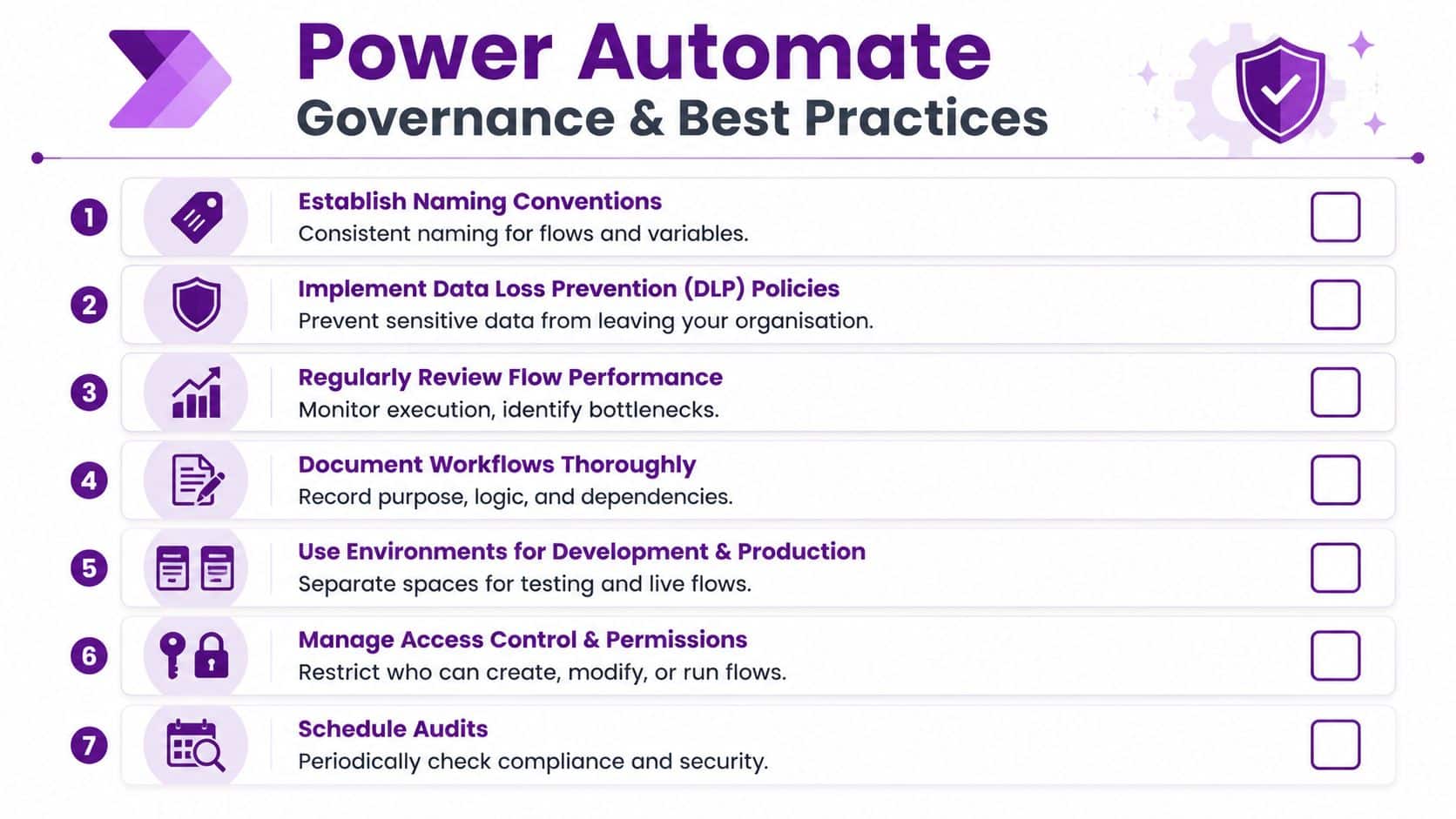
A sensible governance model doesn't have to be heavy. It just needs to stop your automations becoming a collection of mystery flows that nobody owns and everybody depends on. If you're building this into wider operational policy, a broader IT governance framework for control and accountability helps connect automation with the rest of your technology standards.
A practical checklist for IT managers
Start with naming. The University of Bath's automation standards say reliable workflows should use the convention “FAC Dept Project (Flow Type)” and should be tested across all possible scenarios before deployment, according to their Power Automate standards guidance. The same guidance says failing to adopt that naming and testing approach leads to a 30–40% increase in maintenance overhead.
That might sound administrative, but it solves a real problem. When a flow is called “Test 3” or “Invoice New”, no one knows who owns it or whether it's safe to change.
A working checklist should include:
- Clear naming so ownership and purpose are visible at a glance
- Documented logic so another person can support the workflow if the original creator leaves
- Controlled permissions so not everyone can edit or publish production automations
- Environment separation so development and live workflows don't trip over each other
Reliability and error handling
Power Automate workflows need defensive design. A good workflow assumes that files may be missing, emails may arrive with odd subject lines, and approvers may not respond on time.
Best practice guidance notes that workflows with 80% functional actions are more reliable than those with frequent failures, and stresses the value of handling errors gracefully with alerts and progress tracking in this Power Automate best practices article.
That's a useful benchmark because it pushes teams to think beyond “it ran once in testing”.
Operational advice: Build the failure path as carefully as the success path. A silent error is worse than a visible one.
In practical terms, that means sending an alert when a key action fails, logging what was attempted, and making it clear who should step in.
Performance limits you can't ignore
There are also platform limits to respect. Microsoft states that invoke calls are capped per five minutes based on licence tier, with Low-tier plans limited to 4,500 calls and all other tiers allowing up to 45,000 calls, as set out in Microsoft's Power Automate limits documentation.
For an SMB, that matters when flows begin processing high volumes or when one workflow triggers too many downstream calls too quickly. If you ignore those limits, throttling can cause delays or failures.
A few design habits help:
- Spread heavy workloads across parallel or staged flows where appropriate.
- Avoid unnecessary actions that add volume without business value.
- Test realistic loads, not just ideal demo scenarios.
- Review run history regularly so bottlenecks are spotted early.
Governance sounds dull until a payroll notification fails, an approval queue backs up, or nobody knows why a live process stopped overnight. Then it becomes the difference between useful automation and avoidable disruption.
Knowing When to Partner with an Automation Expert
There's a lot you can do yourself with Power Automate, especially if your first workflows are simple, well-bounded, and tied to Microsoft 365. That DIY start is often the right move because it helps the business understand its own processes before investing more heavily.

The point where outside help becomes valuable is usually easy to spot. You need to connect an older line-of-business system. You're handling sensitive data and need stronger controls. Several departments want their own flows, and suddenly naming, ownership, permissions, and support can't stay informal.
An automation specialist also helps when the tool choice itself is unclear. Some organisations need Power Automate because of their Microsoft estate. Others need a more cost-conscious starting point and a roadmap for moving into deeper automation later. Good advice should reflect that reality, not gloss over it.
The other trigger is scale. One useful workflow saves time. A collection of workflows changes how the business runs. At that stage, design discipline, testing, licensing choices, and governance matter just as much as the flow logic.
If you want automation that's secure, supportable, and aligned to how your organisation works, getting experienced guidance is a strategic decision, not a sign that the internal team has failed.
If you're ready to make Power Automate work in a practical, cost-aware way for your organisation, speak to F1Group. We help East Midlands businesses turn repetitive manual work into dependable, well-governed automation. Phone 0845 855 0000 today or send us a message.