
Relying solely on Microsoft to protect your M365 data is a gamble many UK businesses don't even realise they're taking. While the platform itself is incredibly robust and secure, a dedicated backup for Microsoft 365 is non-negotiable. Why? Because when it comes down to it, the ultimate responsibility for protecting your business information is yours, not theirs. This isn't just an IT best practice; it's a fundamental business necessity.
The Hidden Risk in Your Microsoft 365 Data
It's an easy assumption to make: my data is in the cloud with Microsoft, so it must be automatically backed up and safe. Many businesses operate under this belief, thinking their files, emails, and Teams chats are immune to loss. But this overlooks a critical detail in how the service actually works.

Think of Microsoft 365 like a high-security bank. The bank provides the reinforced vault, the security guards, and the 24/7 surveillance to protect the building from fires, floods, or break-ins. Their job is to keep the infrastructure running and secure.
However, the bank isn't responsible for what's inside your personal safety deposit box. You hold the key. If you accidentally shred an important contract or misplace a family heirloom stored inside, the bank can't magically bring it back. That’s the perfect analogy for your relationship with Microsoft. They secure the building; you secure your assets.
Real Threats Facing UK Businesses
The dangers to your data aren't always dramatic, headline-grabbing cyberattacks. Often, they come from mundane, everyday situations. Without a proper backup, your business is left wide open to common scenarios that can cause permanent data loss and major disruption.
These aren't just theoretical risks; they happen to businesses like yours every single day. The most common culprits include:
- Accidental Deletion: This is, by far, the biggest cause of data loss. An employee cleans out their Outlook, permanently deleting a crucial email thread. A vital project folder in SharePoint gets deleted by mistake, and no one notices for weeks—long after it's gone from the recycle bin.
- Internal Security Risks: A disgruntled employee on their way out could maliciously wipe entire shared folders. A departing staff member's OneDrive account could be purged, taking years of work with it. These insider threats can cause catastrophic damage before you even spot them.
- External Cyberattacks: Ransomware is still a huge problem. If an attacker compromises a user's account, they can encrypt everything in their OneDrive and connected SharePoint sites. Without a clean, air-gapped backup, your only choices are paying the ransom (with no guarantee of getting your data back) or losing it all.
Protecting your data isn't just about disaster recovery; it's a core part of business continuity and legal compliance. For any organisation handling sensitive information, understanding frameworks like HIPAA compliance for legal nonprofits makes it crystal clear that having a robust, independent data protection strategy isn't optional.
At the end of the day, Microsoft makes sure the lights stay on, but you are responsible for the data you create and store. Accepting this is the first and most important step toward building a truly resilient business.
Understanding Microsoft's Shared Responsibility Model
To really get why backing up Microsoft 365 is so critical, you first need to understand the deal you've made with Microsoft. It’s all laid out in their Shared Responsibility Model, which is just a straightforward way of explaining who’s on the hook for what. Think of it as the dividing line for keeping your data safe.

In a nutshell, Microsoft takes care of its massive global infrastructure—the "cloud" itself. They make sure the lights stay on, the applications are running, and their data centres are physically secure from things like fires or power cuts. Their promise is all about service uptime.
Where a lot of businesses get caught out is realising that the responsibility for the data inside that service is entirely theirs. You are accountable for protecting your company’s information, controlling who can access it, and securing the devices your team uses. Microsoft keeps the platform running, but they won't save your data from an accidental deletion or a targeted cyber-attack on your accounts.
To make this crystal clear, let's break down who does what.
Microsoft's Role vs Your Responsibility: A Clear Breakdown
This table spells out the division of labour when it comes to securing your Microsoft 365 environment. It’s crucial to understand where their job ends and yours begins.
| Responsibility Area | Microsoft's Role | Your Business's Role |
|---|---|---|
| Infrastructure & Uptime | Ensuring the M365 service is available and running across their global data centres. | – |
| Data & Information | – | Protecting all your company's data, including emails, files, and Teams chats. |
| User Access & Accounts | – | Managing user permissions, passwords, and access controls. |
| Endpoint Security | – | Securing the laptops, phones, and devices your team uses to access M365. |
| Backup & Recovery | Providing geo-redundancy for their own platform-level disaster recovery. | Implementing a dedicated solution to back up and restore your specific data. |
As you can see, there’s a clear hand-off. Microsoft manages the container, but you own everything you put inside it.
What Microsoft Manages
Microsoft's job is to provide a rock-solid and secure foundation for millions of users worldwide.
Their core duties include:
- Physical Security: Guarding the physical data centres against unauthorised entry, environmental disasters, and hardware failures.
- Application-Level Security: Making sure the main M365 apps (Exchange, SharePoint, Teams) are patched and protected from widespread software bugs.
- Infrastructure Uptime: Using geo-redundancy to copy your data across different locations. This is a fail-safe, ensuring that if one data centre has an issue, the service stays online from another.
That last point is key. Geo-redundancy is for their disaster recovery, not yours. It is not a backup you can call on to restore a single deleted file or an entire mailbox.
What Your Business Is Responsible For
This is the side of the coin that many businesses simply miss, and it’s where the real risk of data loss lives. Your responsibilities are all about the data itself and how your team uses it.
The most important thing to remember is this: Microsoft protects its cloud, but you have to protect what's in the cloud. That covers everything from individual emails and files to user accounts and access rights. Your data is your duty.
A huge part of this is building a solid plan for security risk management, which is the only way to protect your information from constant threats. And those threats are very real. In 2023, the UK's National Cyber Security Centre (NCSC) reported a shocking 15% jump in ransomware attacks on businesses nationwide. This trend hit small and mid-sized enterprises hard in regions like the East Midlands, where companies in Lincoln, Nottingham, and Leicester live and breathe on Microsoft 365.
Ultimately, your tasks are clear:
- Data Security: This is all the information stored in your SharePoint sites, OneDrive accounts, Exchange mailboxes, and Teams chats.
- User Access Management: You alone control who can view, edit, or delete company data.
- Endpoint Protection: It’s up to you to secure the computers, laptops, and mobiles connecting to your M365 tenancy.
- Backup and Recovery: You need a proper solution to take point-in-time copies of your data so you can restore it when something goes wrong.
Without your own dedicated backup, you're leaving a massive hole in your data protection strategy—a hole that Microsoft's own model says you are responsible for filling.
Why the Recycle Bin Is Not a Backup Plan
It’s a common misconception, and a dangerous one at that. Many businesses believe the built-in tools in Microsoft 365 are all they need for data protection. After all, you have the Recycle Bin, which feels like a safety net for accidentally deleted files.
But leaning on the Recycle Bin as your backup strategy is like using a plaster for a serious injury. It gives you a false sense of security for a problem it was never built to solve.
The Recycle Bin is a short-term recovery feature, plain and simple. When someone deletes a file from SharePoint or OneDrive, it lands in a site-level Recycle Bin. Delete it from there, and it moves to a second-stage bin. It's great for those "oops, I didn't mean to do that" moments, but it's just a temporary holding area.
Anything deleted stays in this system for 93 days from the day it was first deleted. After that, it’s gone forever. For many organisations, a critical data loss incident might not even be discovered within that three-month window, making the Recycle Bin totally useless when you need it most.
Beyond the Bin: Litigation Hold and Retention Policies
So, what about the more advanced tools like Litigation Hold and Retention Policies? People often mistake these for backups, but their job is completely different. These are tools designed for legal compliance and eDiscovery, not for getting your business back on its feet after a data disaster. Their purpose is to preserve data to meet legal or regulatory rules, ensuring nothing can be permanently erased.
While that sounds a lot like a backup, trying to use these features for a real-world recovery is a world away from the seamless process you need in a crisis.
Let's imagine a real-world scenario. A disgruntled employee maliciously deletes an entire project folder from SharePoint just before they leave.
- A retention policy might have kept copies of the individual files safe in a special, hidden library.
- But trying to restore that project to how it was is a manual, time-consuming nightmare.
- The entire folder structure is gone. All the document versions are lost. The specific user permissions for each file have vanished. Rebuilding all of that, piece by piece, could take your IT team hours, if not days, causing massive disruption.
This is where the difference becomes painfully clear. A retention policy saves the data, but a true backup solution saves the state. A proper backup lets you restore the entire folder—structure, permissions, metadata, and all—with just a few clicks.
A dedicated backup turns a potential business disaster into a minor operational hiccup. It’s the difference between a forensic reconstruction project and a simple point-and-click restore, getting your team back to work in minutes, not days.
The Real-World Risks of Having No Backup
The consequences of not understanding this distinction can be severe. A Veeam UK webinar in 2023 painted a chilling picture for UK businesses: 53% reported Microsoft 365 data loss or corruption over the past year. What’s worse, half of those affected were completely unprepared for it. This statistic really hits home for us at F1Group, as we support IT departments in places like Scunthorpe and Newark who face these exact challenges.
What's more, these native tools offer zero protection against data corruption. If a file gets corrupted by malware or a sync error, the retention policy will dutifully preserve the corrupted version. There's no way to roll back to a clean, uncorrupted version from a week ago. This is especially risky for complex data structures in SharePoint, where knowing how your data is stored is crucial, as our guide on the differences between SharePoint and OneDrive explains.
Ultimately, Microsoft’s built-in features are essential for compliance, but they are dangerously inadequate for business continuity. They lack the granularity, speed, and structural integrity you need for a swift and complete recovery. A proper backup for Microsoft 365 is the only way to be sure you can restore your operations quickly with minimal data loss and disruption.
Ready to secure your data with a real backup plan? Phone 0845 855 0000 today or Send us a message.
Choosing Your M365 Backup Solution
When you decide to properly backup Microsoft 365, you'll find two main paths to choose from. On one side, you have Microsoft's own native backup service. On the other, there's a mature market of third-party solutions, each offering a different set of features and benefits. Making the right choice really boils down to your business’s specific needs for recovery speed, control, and cost.
The biggest draw for Microsoft's native solution is its tight integration and incredible speed. Because it lives and breathes inside the Microsoft 365 ecosystem, it can restore data at a phenomenal rate. This direct approach means no external vendors are involved, keeping all your data within the secure Microsoft trust boundary—a major plus for any business with strict data residency rules.
This flowchart shows the standard data deletion process in Microsoft 365 and highlights why simply relying on the Recycle Bin isn't enough.
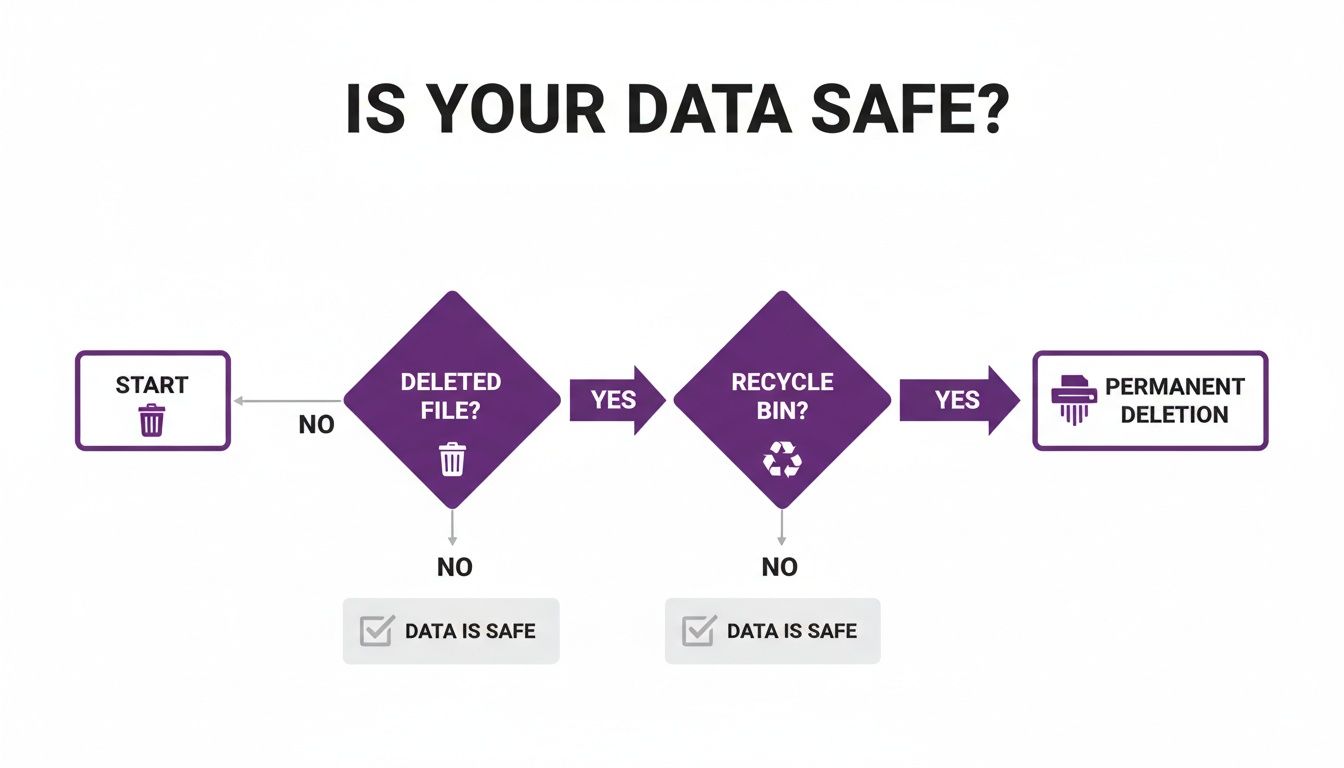
As you can see, once an item is permanently deleted—either by a user or automatically after 93 days—it's gone for good unless you have a separate backup in place.
The Case for Third-Party Backup Solutions
While Microsoft's native offering is powerful, it might not tick every box for every business. Third-party backup solutions have been honing their services for years, often providing a more comprehensive and flexible feature set that many organisations need for complete operational resilience.
They tend to really shine in a few key areas:
- Granular Control and Flexibility: Third-party tools often give you more detailed options for what you back up and how you restore it. You can perform point-in-time restores of single emails, specific SharePoint list items, or entire Teams channels with far greater ease.
- Immutable Storage: This is a critical defence against ransomware. Immutability ensures that once a backup is written, it cannot be altered or deleted, even by an administrator whose credentials have been compromised. It creates a secure, unchangeable copy of your data that attackers simply can't touch.
- Cross-Platform Recovery: Many third-party solutions let you restore data to different locations or even export it in various formats. This flexibility is vital for data migration, testing, and fulfilling the industry-standard 3-2-1 backup rule (3 copies of your data, on 2 different media, with 1 copy off-site).
The core strength of a third-party solution is its independence. By storing your backup in a separate, air-gapped location, you create a vital layer of protection that insulates your recovery data from any potential issues affecting your primary Microsoft 365 tenancy.
This separation is a fundamental principle of robust data protection. It ensures that a problem in one system doesn't wipe out your ability to recover.
Comparing Costs and Capabilities
The pricing models for these two approaches are also worlds apart, which can have a big impact on your IT budget. Getting your head around these differences is key to making a sound financial decision.
Microsoft’s native backup service has certainly shaken things up for UK firms. Its public preview kicked off in late 2023, with general availability following in mid-2024. The service provides native backups for OneDrive, SharePoint, and Exchange at impressive speeds, capable of restoring up to 2TB per hour, all within the secure M365 environment. You can find out more by reading Microsoft's backup announcements from Ignite 2023.
Let’s break down the two pricing structures:
| Pricing Model | Microsoft Native Backup | Third-Party Solutions |
|---|---|---|
| Structure | Pay-as-you-go based on storage consumption. | Typically a fixed per-user, per-month licence fee. |
| Billing | You are billed for the total amount of data being protected, measured in gigabytes. For example, £0.113 per GB per month. | A predictable monthly cost based on the number of users in your organisation. |
| Budgeting | Can be difficult to forecast, as costs will fluctuate with data growth. | Straightforward and easy to budget for, regardless of data volume. |
| Best For | Organisations with highly variable data storage needs or those prioritising recovery speed above all else. | Businesses that require predictable costs, advanced features like immutability, and long-term data retention. |
Ultimately, the best solution depends entirely on your priorities. If your organisation values maximum recovery speed and prefers keeping everything within the Microsoft family, the native tool is a compelling option. However, if you need predictable costs, enhanced ransomware protection, and the flexibility to meet stringent 3-2-1 backup policies, a dedicated third-party solution is often the more prudent choice.
Ready to find the right backup solution for your business? Phone 0845 855 0000 today or Send us a message.
Building Your Microsoft 365 Backup Strategy
Having a powerful backup tool is one thing; having a clear, actionable plan is what truly protects your business. A well-defined strategy makes sure your backup of Microsoft 365 isn't just a technical box-ticking exercise, but a core part of your business continuity planning. It gives you a roadmap for protecting your data and getting back on your feet quickly when things go wrong.
The foundation of any solid data protection plan is the time-tested 3-2-1 backup rule. This principle is brilliantly simple yet incredibly effective at ensuring your data survives almost any failure. It’s the gold standard for a reason.
Here’s the breakdown:
- Have at least three copies of your data. This means your original, live data in Microsoft 365, plus two separate backups.
- Store these copies on two different types of media. This stops a failure in one storage type from wiping out everything. For Microsoft 365, that's your live cloud data and a backup stored on a completely separate platform.
- Keep one of these copies off-site. This is your ultimate insurance policy against a major disaster affecting your primary location. For cloud data, an "off-site" copy means storing it in a separate cloud environment, totally isolated from your main M365 tenancy.
Applying this rule to your Microsoft 365 setup creates a resilient shield around your most critical business asset.
Defining Your Recovery Objectives
Before you can even think about choosing a solution or setting up policies, you need to answer two crucial questions. These questions define your Recovery Point Objective (RPO) and Recovery Time Objective (RTO), which are the absolute cornerstones of your strategy.
-
Recovery Point Objective (RPO): How much data can you afford to lose?
This dictates how often you need to run backups. If your business could handle losing a full day's worth of emails and files, a simple nightly backup might suffice. But if losing even an hour's work would be a catastrophe, you'll need a solution that can back up far more frequently. -
Recovery Time Objective (RTO): How quickly do you need to be up and running again?
This is all about the speed of recovery. Is it acceptable for a critical SharePoint site to be down for a day while you sort out a restore? Or does it need to be back online within minutes? Your RTO will heavily influence the kind of backup solution you invest in.
Answering these two questions isn't just an IT exercise; it's a business decision. The right RPO and RTO strike a balance between the cost of the backup solution and the cost of potential downtime and data loss to your business.
Once you’ve nailed these down, they will guide every other decision you make.
A Practical Checklist for Your Strategy
With your objectives set, you can start building the practical elements of your strategy. This checklist provides a clear path from assessment to implementation, making sure you cover all the bases while staying aligned with UK regulations like GDPR.
-
Assess and Classify Your Data: Let's be honest, not all data is created equal. Pinpoint your most critical information—client records, financial documents, key project files—and prioritise it for your most frequent backups. This ensures your most valuable assets get the tightest protection.
-
Choose the Right Solution: Based on your RPO, RTO, and budget, select a backup tool. Decide whether Microsoft's native features are enough or if a third-party solution, with features like immutable storage, is needed to properly meet the 3-2-1 rule.
-
Define Backup Scope and Frequency: Decide exactly what needs backing up (which mailboxes, SharePoint sites, OneDrive accounts) and how often. You might decide to back up critical project sites every hour, but run a general backup for all user data just once a day.
-
Establish Retention Policies: Figure out how long you need to keep your backups. UK regulations might require you to hold certain data for several years. Your policy should balance these compliance needs with storage costs, so you aren't keeping data for longer than necessary.
-
Test Your Recovery Plan Regularly: A backup strategy is completely worthless if you can't actually restore from it. Schedule regular, controlled tests to run through real-world recovery scenarios. This not only confirms your backups are working, but it also ensures your IT team knows exactly what to do when a real crisis hits.
Building a robust Microsoft 365 backup strategy is a proactive measure that moves your business from a position of risk to one of genuine resilience.
Ready to build a strategy that protects your business? Phone 0845 855 0000 today or Send us a message.
Protect Your Business with Managed M365 Backup
Putting a solid backup Microsoft 365 plan in place is non-negotiable, but it’s far from a "set it and forget it" job. Getting backups right demands constant attention, deep technical knowledge, and a lot of time—resources that most businesses, particularly here in the East Midlands, can't easily spare. This is precisely where partnering with a managed service provider (MSP) changes the game.
Handing over your data protection to an expert team takes the weight and complexity off your shoulders. Instead of your internal staff trying to juggle backup schedules, check for failures, and run recovery drills, you get a dedicated partner focused on one thing: keeping your data safe, secure, and ready to restore.
Your Expert IT Partner in the East Midlands
At F1 Group, we offer more than just a backup service; we deliver genuine peace of mind. Based right in the heart of the East Midlands, our team has over 25 years of hands-on experience with Microsoft technologies. Our vendor-certified and DBS-checked engineers take care of every last detail of your M365 backup strategy.
This end-to-end management covers everything:
- Initial Setup and Configuration: We start by sitting down with you to establish your RPO and RTO goals. Then we roll out and fine-tune the right backup solution for your specific business needs.
- Daily Monitoring and Management: Our team keeps a close eye on your backups every single day. We proactively spot and fix any potential issues long before they can turn into real problems.
- Regular Recovery Testing: We don't just hope your backups work; we prove it. Routine testing confirms the integrity of your data, guaranteeing a swift and complete restoration when it matters most.
- Rapid Recovery Support: If the worst happens and data is lost, our team is ready to step in. We manage the entire recovery process to slash downtime and get you back up and running as quickly as possible.
Focus on Your Business, Not Your Backups
Ultimately, the biggest win of a managed approach is freedom. It frees you and your team to focus on what you’re actually in business to do. You can find out more about the wider advantages by exploring the key benefits of managed IT services. To really dig into how a dedicated team can safeguard your M365 data, this detailed Guide to Managed Backup Services is a great resource. By outsourcing, you get specialist skills and enterprise-grade tools without the hefty price tag.
Choosing a managed backup service transforms data protection from a reactive, often stressful chore into a proactive, reliable, and expertly handled business process. It ensures your most valuable asset—your data—is always protected by a team of specialists.
Let us handle the protection, so you can focus on growth.
Ready to secure your data with an expert partner? Phone 0845 855 0000 today or Send us a message.
Got Questions? We've Got Answers
When you start digging into Microsoft 365 backups, a few common questions always pop up. Let's tackle them head-on, clearing up any confusion so you can make the best decision for your business.
How Often Should We Be Backing Up Our Microsoft 365 Data?
For most businesses in the UK, a daily backup is the bare minimum. Think of it as your safety net—it ensures that if something goes seriously wrong, you won’t lose more than a single day’s work.
But is that enough for you? The real answer comes down to your Recovery Point Objective (RPO). In simple terms, how much data can your business afford to lose? If you're constantly handling vital client files, financial data, or project updates, losing even a few hours of work could be a disaster. In that case, you might want to back up critical SharePoint sites or your management team's mailboxes several times a day to keep that window of potential loss as small as possible.
But Doesn't Microsoft Already Back Everything Up for Me?
This is easily the biggest and most dangerous misconception out there. Yes, Microsoft has incredible resilience. They use geo-redundancy, which means your data is copied across multiple data centres. This protects their service from a major disaster like a fire or a flood.
Microsoft's geo-redundancy is for their disaster recovery, not yours. It is not a backup you can access or use to restore your own data.
That system won’t help you one bit with the everyday data loss threats your business actually faces. It can't undo an accidental file deletion, reverse a ransomware attack, or recover data maliciously deleted by a disgruntled employee. For that, you need a proper, independent backup solution that lets you restore specific files, folders, or mailboxes to a precise point in time.
What's the Cost of a Microsoft 365 Backup Solution?
The price tag really depends on which route you go down, and the two main models are quite different.
Most third-party backup providers use a simple per-user, per-month licence. This makes budgeting a breeze because the cost scales directly with your headcount, no matter how much data you're storing. It's predictable and easy to manage.
Microsoft’s own backup service, on the other hand, is a pay-as-you-go model. You're billed based on the total gigabytes of data you're protecting (e.g., £0.113 per GB per month). This can be flexible, but it also makes it much harder to forecast your costs as your data inevitably grows. The right choice for you depends on your data volume, retention needs, and the features you can't live without. We always recommend getting a tailored quote to see exactly what the numbers look like for your business.
Ready to secure your data and get some peace of mind? Contact F1Group to discuss your Microsoft 365 backup needs.
Phone 0845 855 0000 today or Send us a message.