
So, what do we actually mean by change management in digital transformation? It’s the essential work of guiding your entire organisation—and all the people in it—from where you are today to where you need to be. It’s about making sure that new technology isn’t just switched on, but truly embraced and used to its full potential.
Ultimately, it’s the people-focused strategy that turns a technology investment into a genuine business asset.
Why You Can’t Afford to Skip Change Management
Let’s be blunt: digital transformation is much more than a tech refresh. It’s a complete rethink of how you operate, how you delight your customers, and how you enable your team to do their best work.
Too often, I see UK businesses pour money into powerful platforms like Microsoft Azure or Copilot, expecting a magical boost in productivity. Instead, they hit a wall of resistance from staff, processes fall apart, and the promised return on investment never materialises. Without a solid plan to manage the human element of this shift, even the most impressive technology is destined to fail.

The Real Cost of Forgetting Your People
Here’s a story I’ve seen play out time and again. A mid-sized company in the East Midlands decides to roll out Microsoft Dynamics 365 to finally get all their customer data in one place. The leadership team sends out a single email announcing the go-live date, assuming everyone will immediately grasp the benefits.
Fast forward six months. Adoption is shockingly low. The sales team clings to their old spreadsheets, customer service finds the new system confusing, and that expensive new platform is basically an empty digital warehouse.
This scenario reveals a fundamental truth: technology adoption without people adoption is a costly failure. The software wasn’t the problem. The failure was the complete lack of a strategy to help employees through the change, listen to their worries, and clearly answer the “what’s in it for me?” question.
The challenge is crystal clear: investing in powerful tools without investing in the people who use them is a recipe for wasted resources and missed opportunities. A proactive change strategy isn’t a ‘nice-to-have’—it’s the crucial ingredient for making your digital investment pay off.
A Growing Market Facing Old Problems
The investment in this space is massive. The UK’s digital transformation market is set to hit around £48 billion in 2025 and is expected to more than double by 2030.
But here’s the catch. Despite all that spending, research consistently shows that about one-quarter of UK organisations point to ‘change management complications’ and a ‘lack of internal alignment’ as the biggest roadblocks to success. This gap between spending and actual results proves that good change management is the real key to unlocking value.
To make sure your efforts don’t fall into this trap, it pays to understand the latest digital transformation best practices. This playbook is designed to fill that gap, offering a practical framework for small and mid-sized businesses to lead their people through change with confidence.
Ready to make sure your digital transformation delivers real value? Phone 0845 855 0000 today or Send us a message to speak with one of our experts.
Building Your Change Management Blueprint
Before a single piece of software is rolled out, the most important work needs to happen. A successful digital transformation is built on a solid foundation—a detailed blueprint that guides every decision you make along the way. This isn’t just about Gantt charts and deadlines; it’s about understanding the human landscape of your organisation.
Rushing into deployment without this foundational work is like building a house without checking the ground it’s on first. You might end up with a brilliant piece of architecture in a completely unworkable spot. The goal here is to get a plan down on paper that aligns everyone, from the boardroom to the front-line staff, long before anyone clicks ‘go-live’.
Uncovering Who Really Matters with Stakeholder Mapping
Proper stakeholder mapping goes much deeper than just listing department heads. Think of it as an exercise in understanding the complex web of influence, interest, and potential resistance running through your business. You need to identify not just the key decision-makers, but also the informal leaders, the influencers, and even the sceptics who hold sway over their teams.
Start by thinking about who will be most affected by the changes. For a Microsoft Dynamics 365 rollout, for example, your list must include the sales team, customer service agents, and the finance department. From there, broaden your scope to include IT support, marketing, and senior leaders who might not use the system daily but have a vested interest in the results.
Once you have your list, you can start analysing each person’s or group’s position. This is where you get strategic, allowing you to tailor your communication and engagement plans to turn potential roadblocks into your biggest advocates.
Below is a simple but effective template to get you started on mapping out your key players.
Sample Stakeholder Analysis Matrix
| Stakeholder (Role/Dept) | Level of Influence (High/Med/Low) | Level of Interest (High/Med/Low) | Key Concerns/Motivations | Engagement Strategy |
|---|---|---|---|---|
| CEO | High | High | ROI, strategic alignment, market competitiveness | Regular high-level briefings, involve in key decisions |
| Head of Sales | High | High | Team adoption, commission tracking, sales pipeline visibility | Involve in Steering Committee, showcase efficiency gains |
| Customer Service Team | Medium | High | Ease of use, impact on daily tasks, training provided | Regular updates, hands-on training, ‘Champion’ involvement |
| IT Manager | High | Medium | Security, integration, support workload, data migration | Early involvement in technical planning, clear support plan |
| Finance Department | Medium | Medium | Reporting accuracy, integration with accounting software | Targeted demos, ensure their reporting needs are met |
| Long-serving Account Mgr | Low | High | “We’ve always done it this way”, fear of new tech | One-to-one coaching, highlight personal benefits (e.g., less admin) |
Filling this out forces you to think critically about how to approach different groups, rather than using a one-size-fits-all communication blast.
Establishing a Clear Governance Structure
One of the quickest ways a project can fail is through ambiguous leadership. Without a designated group steering the ship, the entire effort can quickly lose direction and momentum. This is why a clear governance structure, or a ‘Transformation Steering Committee’, is non-negotiable.
This committee shouldn’t just be a room full of senior executives, either. A truly effective group needs a mix of perspectives:
- An Executive Sponsor: A senior leader who will champion the project, fight for resources, and consistently communicate its strategic importance.
- Project Leads: Key people from affected departments (like IT, Sales, Operations) who manage the day-to-day reality of the implementation within their teams.
- An HR Representative: Someone to make sure training, employee wellbeing, and people-centric communication remain at the heart of the process.
- ‘Champion’ Users: Enthusiastic employees from various teams who can provide honest, real-world feedback and encourage their peers to get on board.
This diverse group ensures decisions are made with a full view of the organisation’s needs, not just from a top-down bubble. They are responsible for setting the pace, sorting out conflicts, and keeping the project anchored to its core business goals. For bigger projects, like a company-wide move to the cloud, a structured model like the Azure Cloud Adoption Framework can provide an excellent governance template.
There’s often a massive gap between what leaders think is happening and what employees experience. UK surveys show that while 74% of leaders believe they involve staff in change strategy, only 42% of employees actually feel included. This disconnect is exactly what a well-formed steering committee is designed to fix.
Defining What Success Actually Looks Like
How will you know if all this effort is actually working? You need realistic, measurable Key Performance Indicators (KPIs) that track the human side of the transformation, not just the technical one.
Vague goals like “improve efficiency” just won’t cut it. You have to get specific. Your KPIs should be directly tied to the new tools and the behaviours you want to see. For instance:
- User Adoption Rate: Aim for 80% of the sales team to be actively logging activities in Dynamics 365 within 60 days of launch.
- Process Efficiency: Reduce the time taken to generate a sales quote using a new Power Automate workflow by 25% within the first quarter.
- Collaboration Metrics: Increase the number of cross-departmental projects in Microsoft Teams by 50% in six months to prove you’re breaking down silos.
These tangible metrics give everyone clear targets and, crucially, allow you to demonstrate the real-world value of the new technology. They shift the conversation from “did we install the software?” to “are people using the software to work better?” That, right there, is the ultimate measure of success.
Crafting a Communication Plan That Engages Everyone
Clear, consistent communication is the absolute lifeblood of any successful change. When you’re bringing in something new like Microsoft 365 or Copilot, a single ‘launch day’ email is a surefire way to spark confusion and resistance. What you really need is a thoughtful communication plan that uses different channels to keep everyone in the loop, engaged, and on board from start to finish.
The goal here isn’t just to broadcast information. It’s about building a compelling narrative around the change. This story needs to get people genuinely excited, tackle their worries before they fester, and ultimately turn that initial uncertainty into active support for what’s coming.
Move Beyond the All-Staff Email
Let’s be honest, a one-size-fits-all email blast just doesn’t cut it. Different messages land differently with different people, and everyone has their own preferred way of getting information. Your communication strategy has to reflect that reality, using a mix of channels and tailoring the content for each audience.
A successful plan recognises that a big announcement from the leadership team needs a completely different tone and format from a quick tip shared with the sales team. It’s all about meeting people where they are, giving them the right information, at the right time, in the right way.
Here’s how you might break down a multi-channel approach:
- Leadership Announcements: A video message from your CEO explaining the ‘why’ behind the change has far more impact than a block of text. This is your chance to set the strategic vision and show that the commitment comes from the very top.
- Weekly Update Emails: Keep these short and scannable. A quick email from the project lead can keep everyone up to speed on progress and key dates. Use bullet points and bold text to make the important stuff stand out.
- Intranet or Viva Engage Posts: These platforms are perfect for bitesize, ‘what’s in it for me?’ content. You can share success stories from early adopters, post quick tips, or even short video tutorials showing a new feature in action.
- Team Meetings: This is where the magic happens. Departmental meetings are the ideal setting for managers to translate the high-level vision into practical, day-to-day impacts for their teams, making the change feel personal and relevant.
Build a Two-Way Feedback Loop
Communication during a major tech rollout has to be a dialogue, not a monologue. You need to create obvious, accessible channels for people to give feedback. This is crucial for spotting problems early, shutting down rumours, and making your team feel heard. When people see their feedback is actually being acted upon, they become active participants in the change, not just people it’s happening to.
Creating this two-way street is all about building trust. It shows you respect your team’s experience on the ground and are committed to making the transition as smooth as possible for them.
Here are a few practical ways to do this using tools you likely already have:
- Dedicated Microsoft Teams Channel: Set up a public Teams channel just for the project (e.g., ‘#Dynamics365-Questions’). This creates a central hub where anyone can ask questions, share concerns, and get fast answers from the project team. Bonus: everyone else can see the answers, which cuts down on repeat questions.
- ‘Ask Me Anything’ (AMA) Sessions: Schedule regular live video sessions with project leads or the steering committee. This gives employees a direct line to leadership for transparent, unscripted conversations that can quickly clear up widespread concerns.
- Quick Pulse Surveys with Microsoft Forms: Use short, simple surveys to get a read on how people are feeling. Asking a question like, “On a scale of 1-5, how confident do you feel about the upcoming changes?” can give you incredibly valuable, real-time insights into where you need to offer more support.
A critical mistake is assuming silence means agreement. Proactively creating feedback channels uncovers the small issues before they become major roadblocks. It’s the difference between navigating with a map versus driving in the dark.
A Sample Communication Timeline
To make this all a bit more tangible, let’s look at what a communication sequence for a Microsoft Copilot rollout could look like. Think of this as a flexible template, not a rigid schedule.
| Phase | Timing | Communication Activity | Channel(s) | Key Message |
|---|---|---|---|---|
| Pre-Launch | 6 Weeks Out | Leadership video announcing the “why” | Intranet, All-Staff Email | “We are investing in AI to help you work smarter, not harder.” |
| 4 Weeks Out | FAQ document and ‘AMA’ session invite | Teams, Email | “We’re here to answer all your questions.” | |
| 2 Weeks Out | “What’s in it for you?” blog post with examples | Intranet, Viva Engage | “See how Copilot will save you time on daily tasks.” | |
| Launch Week | Go-Live Day | Official launch announcement & welcome pack | Email, Teams | “Welcome to a new way of working! Here’s how to start.” |
| Go-Live + 2 Days | Quick tip video: “Your first 3 prompts” | Teams, Intranet | “Get started in under 5 minutes with these simple tips.” | |
| Post-Launch | Week 2 | Pulse survey on initial experiences | Microsoft Forms | “How is it going so far? Let us know.” |
| Week 4 | Share an early success story from a team | Intranet, Team Meetings | “See the great results the marketing team are already getting.” | |
| Ongoing | “Tip of the Week” posts | Viva Engage, Teams | “Did you know you can ask Copilot to summarise meetings?” |
This kind of structured, multi-faceted plan ensures that communication is a constant, supportive presence throughout the entire change management in digital transformation process. It helps turn the journey from something that happens to employees into something they feel a real part of.
Ready to build a communication plan that gets everyone on board with your next big project? Phone 0845 855 0000 today or Send us a message to discuss how we can help.
Designing Training and Support That People Actually Use
Let’s be honest, training is often the moment a change initiative lives or dies. If your plan is to run a single webinar and email out a dense PDF guide, you’re setting yourself up for a struggle, especially with powerful tools like Microsoft Dynamics 365 or Copilot.
Real, lasting adoption happens when you realise people learn in different ways and at their own pace. The goal isn’t to host a one-off training event; it’s to build an entire ecosystem of ongoing support. It’s about shifting from a mandatory lecture to providing valuable resources that genuinely help people do their jobs better. You need to show them how these new tools make their work life easier, not just tell them.
Moving Beyond the Single Webinar
The best training plans are multi-layered. They have to be. A single, long webinar just doesn’t work because it wrongly assumes everyone learns the same way and has the same starting point.
A much smarter strategy is to create a blend of live, interactive sessions and on-demand resources that your team can tap into whenever they need them. This blended model meets people where they are. For any training to stick, it needs to be built on a solid understanding of adult learning theory principles in training, which champions self-direction and hands-on application.
Think about building your programme around these core elements:
- On-Demand Video Tutorials: Create a library of short, sharp videos that solve a specific problem. A three-minute clip on “How to create a sales lead in Dynamics 365” is infinitely more useful than scrubbing through a two-hour recording to find that one key step.
- Hands-On Workshops: For the more complex stuff, nothing beats a live workshop, whether it’s in-person or virtual. These sessions create space for real-time questions and let people actually practise their new skills with an expert right there to help.
- Role-Based Training Paths: Ditch the one-size-fits-all approach. Your marketing team needs to know how Copilot can help them write better copy, while the finance team needs to see its power for data analysis. Tailor the training to the job.
The Power of a Champions Network
One of the most effective tools in your change management toolkit is a ‘Champions Network’. This is simply a group of enthusiastic, tech-curious employees from across the business who get a bit of early access and extra training.
They become your advocates on the ground and the first port of call for peer support. These champions aren’t just trainers; they’re translators. They can explain the benefits of a new Azure-based app using the language of their own department, which is far more powerful than any email from IT or senior leadership.
A well-supported Champions Network can dramatically reduce the load on your IT helpdesk. When a colleague has a quick question about Microsoft Teams, it feels much easier to ask their department’s friendly champion than to log a formal support ticket.
A Sample Training Timeline
Mapping out your training gives the whole process structure and lets everyone know what to expect. A good timeline should cover everything from the initial buzz-building to long-term support, reinforcing the idea that learning is a continuous journey.
Here’s a sample timeline for rolling out Microsoft 365:
| Phase | Timing | Activity | Goal |
|---|---|---|---|
| Awareness | 4 Weeks Pre-Launch | “What’s Coming” intranet posts and short teaser videos. | Generate initial excitement and awareness. |
| Foundation | 2 Weeks Pre-Launch | Live introductory webinars on the basics of M365. | Provide a foundational understanding for all staff. |
| Go-Live | Launch Week | On-demand “Quick Start” video library goes live. Champions are available for floor-walking support. | Ensure everyone can perform essential day-one tasks. |
| Deep Dive | Weeks 2-4 Post-Launch | Role-specific, hands-on workshops (e.g., Teams for Project Managers). | Build proficiency in job-critical applications. |
| Sustainment | Ongoing | “Tip of the Week” emails and advanced skills workshops every quarter. | Encourage continuous learning and mastery of tools. |
At the end of the day, the goal here is to build both competence and confidence. When your team feels capable and knows help is available, they’re far more likely to embrace new ways of working. Exploring how to upskill your staff with expert Microsoft training is a great next step in creating a programme with real, lasting impact.
Phone 0845 855 0000 today or Send us a message
Executing a Strategic and Phased Rollout
Let’s be honest, trying to launch a major digital transformation with a ‘big bang’ is a recipe for disaster. I’ve seen it attempted, and it rarely ends well. It puts an incredible amount of pressure on your people and your systems, leaving absolutely no margin for error.
A much smarter, and far less stressful, way to handle it is with a strategic, phased rollout. You start with a pilot programme.
This approach gives you a controlled environment to test, learn, and tweak things before you go big. By starting with a hand-picked group, you can iron out the kinks, get honest feedback from the front line, and build a genuine success story that creates a buzz for the main event.
Selecting the Perfect Pilot Team
Choosing your pilot group is one of the most important calls you’ll make in this entire process. It’s not about finding your most tech-savvy team or the department that shouts the loudest. You need a team that’s a true reflection of your organisation, grappling with the everyday problems your new tech is meant to solve.
I always look for a team that ticks these boxes:
- A Representative Workflow: Their day-to-day work should look a lot like what happens in other departments. This is crucial because it means the lessons you learn will actually apply elsewhere.
- Enthusiastic and Open-Minded Leadership: You need a manager who is genuinely excited about the change and is prepared to champion it. Their attitude sets the tone for everyone else.
- A Mix of Technical Abilities: The team should have a blend of people—some who are comfortable with new tech and others who are a bit more hesitant. This gives you a realistic preview of the training and support you’ll need to provide later.
Running a Successful Pilot Programme
Once you have your team, the pilot itself needs a bit of structure. Think of it as a mini-project with its own goals and measures of success. Your main objective here isn’t just to prove the technology works; it’s to learn as much as you possibly can.
A solid pilot programme always covers these bases:
- Set Clear Goals: What does success look like? Be specific. If you’re piloting Microsoft Copilot with the marketing team, a goal might be to reduce the time spent on first-draft content creation by 20% over four weeks.
- Collect Rigorous Feedback: Use a mix of channels to get the full picture. I find that weekly check-in meetings, quick surveys via Microsoft Forms, and a dedicated Teams channel work well to capture everything—the good, the bad, and the confusing.
- Evaluate and Refine: At the end of the pilot, pull all the feedback and data together. Did you hit your goals? What went wrong? Were there technical glitches? Was the training actually helpful?
The insights from a pilot are pure gold. They let you move forward with a rollout plan built on evidence, not just assumptions. This is where you turn your blueprint into a battle-tested strategy.
The pilot is also the perfect time to refine your training approach. A blended model often works best, combining different ways for people to learn.
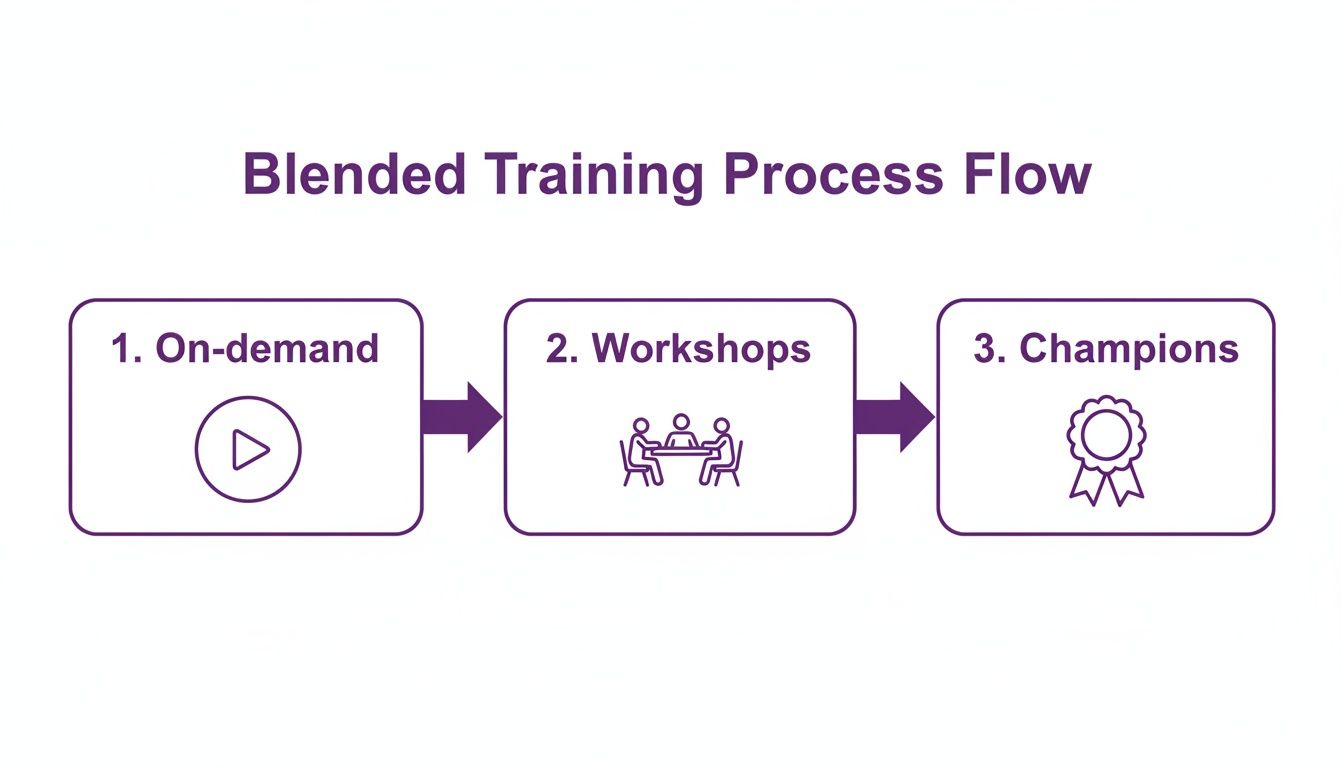
This process ensures you cater to different learning styles—something you’ll get a real feel for during a hands-on pilot.
Taking this test-and-learn approach helps you sidestep a common pitfall. Even huge projects can stumble here. For example, HM Land Registry’s digital programme made massive technical progress, but wider reviews still found gaps in embedding new digital skills among staff. Read more on how technical success and adoption challenges can coexist. A pilot helps you bridge this exact gap by focusing on the human side of the rollout, allowing you to fine-tune everything based on what real users have told you.
For expert guidance on structuring your digital transformation rollout for maximum success, Phone 0845 855 0000 today or Send us a message.
Measuring Success and Sustaining Momentum Post-Launch
The go-live date isn’t the finish line; it’s the starting gun. Now the real work begins. This is the crucial phase where you need to measure what’s working, reinforce new habits, and continuously improve to make sure your new technology sticks for the long haul.
Your job isn’t done just because the system is live. This is when you have to prove the value of the investment and maintain all that positive energy you worked so hard to build. Without a solid post-launch plan, you’ll see user adoption drop off as people inevitably slip back into their old, comfortable routines.
Tracking What Matters
It’s time to dust off those Key Performance Indicators (KPIs) you defined way back in the blueprint stage. A vague feeling that the project “went well” just won’t cut it. You need hard data to tell the real story, and this is where the tools within the Microsoft ecosystem really shine.
For example, Microsoft 365’s adoption reports give you concrete data on which teams are actually using Teams, SharePoint, or OneDrive. You can pinpoint which departments are thriving and which ones might need a little extra help, allowing you to focus your efforts where they’ll have the most impact. This data-first approach is essential for making smart decisions and showing leadership tangible progress.
Turning raw usage data into actionable insights is the real game-changer. It’s the difference between knowing that a tool is being used and understanding how it’s actually improving business performance.
Keeping the Energy Alive
Momentum is a fragile thing after a big launch, and you have to actively protect it. Just launching the tech and walking away is a guaranteed way to see enthusiasm fade. Instead, you need a proactive plan to keep the change fresh in everyone’s minds.
Here are a few simple but incredibly effective tactics I’ve seen work time and again:
- Celebrate and Share Early Wins: Did the sales team just close their first deal using Dynamics 365? Shout about it on the company intranet. Has one department used Power Automate to save hours on a tedious manual task? Make them heroes in the next team meeting.
- Introduce ‘Tip of the Week’ Communications: Set up a dedicated Teams channel or send a short weekly email sharing a simple, high-impact tip for the new tools. This keeps the learning going and consistently demonstrates value.
- Turn Feedback into Action: You’re going to get some resistance after launch; it’s unavoidable. Don’t treat this feedback as a complaint—see it as a gift. Use it to refine your training guides, tweak a clunky workflow, or clarify your communications.
This constant cycle of measuring, reinforcing, and listening is where the real transformation happens. For a deeper dive into using your data effectively, exploring business intelligence consulting can bring in the expertise needed to turn your project data into a powerful strategic asset.
The ultimate goal here is to shift from a temporary “project” mindset to a culture where these new, better ways of working are just “how we do things around here.”
Ready to ensure your digital transformation delivers lasting value? Phone 0845 855 0000 today or Send us a message.
So, What’s Next on Your Transformation Journey?
We’ve walked through the entire playbook, from mapping out who’s who to keeping the momentum going long after launch. If there’s one thing to take away, it’s this: a successful digital transformation is never just a technology project. It’s a fundamental shift in how your business operates, and its success rests entirely on a solid, people-first change management plan.
This isn’t a one-and-done deal. Think of it as a continuous cycle. The groundwork you lay supports your communication plan, which in turn makes your training effective, and that training is what helps sustain momentum. Each piece is connected, turning what could be a simple software rollout into a genuine evolution of your company’s culture and capabilities. The whole point of change management in digital transformation is to guide, support, and empower your people every step of the way.
From Good Ideas to Great Habits
When does it all click? You’ll know you’ve nailed it when the new ways of working become second nature. It’s that moment when your teams automatically jump into Teams for a project, use Dynamics 365 to get a clearer customer view, or use a Power BI dashboard to make a smarter decision without even thinking about it.
That’s the real return on your investment. It’s not just about having the latest tech; it’s about what your people can achieve with it.
Embracing change management is what separates the organisations that simply install new software from those that truly weave it into their company DNA. It’s the difference between a short-term project and a long-term competitive edge.
If you’re looking at this playbook and feeling a bit overwhelmed by the scale of it all, that’s completely normal. Getting it right is a big undertaking. Our team lives and breathes this stuff, helping organisations just like yours navigate the complexities of transformation and ensure the effort pays off with real-world results. Don’t let a major investment fall flat by overlooking the most critical part of the puzzle: your people.
Ready to make sure your digital transformation delivers lasting value? Don’t leave your people behind. Talk to the experts at F1Group.
Phone 0845 855 0000 today or Send us a message to chat with one of our specialists.