
For many UK businesses, especially those here in the East Midlands, finding ways to improve operational efficiency has moved from a ‘nice-to-have’ to a ‘must-do’. It’s not about cutting corners or asking people to work harder. It’s about working smarter. This means using technology to get rid of clunky processes, automate the tedious, repetitive tasks, and ultimately give your team the tools they need to shine.
This guide is a practical playbook designed to help you turn those daily operational headaches into a real competitive advantage.
Why Operational Efficiency Is a Game-Changer for UK Businesses

With costs rising and competition getting fiercer, the ability to get more done with the resources you already have is what separates the successful from the struggling. For small and mid-sized businesses, this isn’t some vague corporate objective; it has a direct impact on your cash flow, your team’s morale, and your ability to jump on new opportunities when they appear.
When your operations run smoothly, projects get turned around faster, mistakes are less frequent, and you can adapt quickly when the market shifts. Yet, so many organisations are stuck in a rut, wrestling with manual processes, systems that don’t talk to each other, and admin work that eats up far too much valuable time. This isn’t just an individual company problem; it reflects a wider economic challenge.
The UK’s Productivity Puzzle
Productivity growth in the UK has been sluggish since 1997, which means any gains a company can make through better IT and automation are hugely valuable. The Office for National Statistics (ONS) found that the average gross value added per worker grew at a compound rate of just 0.9% between 1997 and 2023. In 2023, the median figure was £39,500 per worker, which really highlights the gap between the most and least productive firms.
What this data tells us is that the businesses pulling ahead are the ones actively trying to close that gap by investing in smarter ways of working.
For a business in the East Midlands, this isn’t just a national statistic. It’s the daily reality of needing to compete. Every hour saved on admin is an hour you can spend looking after clients or growing the business.
How Technology Gives You the Edge
The good news is that the tools to make a real difference are more accessible and affordable than ever. The trick is to stop seeing technology as just another business cost and start viewing it as a strategic investment. By focusing on the right solutions, you can see tangible results without having to rip out and replace everything you do.
This guide will walk you through how to apply powerful, practical technologies to transform your daily work:
- Microsoft 365 and Azure: Moving to the cloud is about more than just storage. You can check out the key benefits of cloud computing for business to see how it cuts down on hardware headaches and gives your team secure access from anywhere.
- Microsoft Power Platform: This is a suite of brilliant low-code tools that lets you automate manual jobs and even build simple apps to solve those unique little problems every business has.
- AI and Copilot: Think of artificial intelligence as an assistant for your entire team. It can summarise long documents, help draft emails, and free people up to focus on more creative, high-value work.
By focusing on these key areas, you can start building a business that’s more resilient, more productive, and ultimately, more profitable. The next sections lay out a clear roadmap for taking stock of where you are now, spotting some quick wins, and putting these solutions into practice.
Ready to transform your business operations? Phone 0845 855 0000 today or Send us a message to discover how we can help.
Finding Your Inefficiencies: A Practical Self-Audit

Before you can start fixing things, you need a crystal-clear picture of what’s actually broken. It’s tempting to jump straight to solutions, but without understanding the root cause of friction in your business, you’re just guessing.
The most damaging inefficiencies often aren’t the big, obvious calamities. They’re the small, daily frustrations that have become part of the background noise—the little roadblocks your team has learned to work around.
A self-audit isn’t about blaming people; it’s about gaining clarity. This process will help you map out your core processes, listen to your team, and build a solid, data-backed plan to solve the problems that are genuinely holding you back.
Map Your Core Business Workflows
Start by getting a key process down on paper—or a whiteboard. For most businesses, the sales-to-invoice cycle is a fantastic place to begin because it snakes through multiple departments like sales, operations, and finance, making it a hotspot for hidden bottlenecks.
Get the right people in a room. Don’t just talk about the process; physically map every single step from start to finish.
- Lead to Quote: How does an enquiry arrive and get logged? Who puts the quote together, and what information do they need to chase down?
- Order to Delivery: What happens when the client says “yes”? Who is notified, and how does the work get scheduled and completed?
- Invoice to Payment: Who creates the invoice? Is data being manually re-keyed from the original quote? How is the final payment tracked?
This exercise is incredibly revealing. You’ll almost immediately spot duplicated effort, communication black holes, and clunky manual handovers. For example, you might realise your finance team is manually typing up invoices from a sales quote PDF—a classic time-waster that’s just begging for a typo to slip through.
Listen to Your Team’s Daily Frustrations
Your employees are on the front line; they live and breathe your processes every day. They know exactly what slows them down, what tasks are mind-numbingly repetitive, and which systems create more problems than they solve.
While formal surveys have their place, you’ll often get the most honest feedback from informal chats.
Try asking specific, open-ended questions to get people talking:
- “What’s the one task you wish a robot would do for you every day?”
- “Which part of your job involves copying and pasting between different apps?”
- “Where do you most often find yourself waiting on someone else before you can move forward?”
You’ll quickly see patterns emerge. Maybe it’s the endless email chain to get a simple approval. Or the time wasted hunting for the latest version of a document. Or the hours spent compiling weekly reports from five different spreadsheets.
These aren’t just minor grumbles. A recent study found that the average UK office worker is only truly productive for around three hours a day. The rest of the time is often eaten up by admin and fighting against inefficient processes.
Create a Prioritised Pain Point List
Now, bring it all together. Consolidate your process maps and team feedback into a single list of every inefficiency you’ve uncovered, big or small.
Next, work with your team to rank this list. Judge each item against two simple criteria:
- Impact: How much time, money, or energy does this issue drain? Does it hurt client satisfaction or create business risk?
- Effort to Fix: Is this a quick win we can tackle next week, or is it a larger, more complex project?
This prioritised list is now your strategic roadmap. You’re no longer making reactive decisions. Instead, every action you take is directly tied to a known, validated problem, whether that’s automating invoice creation or giving your team a central place to collaborate.
Ready to transform your operational efficiency? Phone 0845 855 0000 today or Send us a message to discuss how we can help your business thrive.
Getting Your Foundation Right with the Microsoft Cloud
Once you’ve pinpointed where the snags are in your operations, the next logical step is to build a solid tech foundation to fix them. The good news for most UK businesses is that this foundation probably already exists, sitting largely untapped within your Microsoft 365 subscription. It’s time to think bigger than just Outlook and Word.
These tools are the bedrock of a more efficient, collaborative, and secure business. By properly embracing the Microsoft cloud ecosystem, you create a central hub where information flows freely, teams connect without friction, and all those clunky manual workarounds finally start to fade away.
Stop Chasing Emails: Centralise with Microsoft Teams
If there’s one quick and impactful win, it’s tackling scattered communication. We’ve all seen it: endless email chains with slightly different attachments are where projects slow down, information gets lost, and version control becomes a nightmare.
Microsoft Teams is the answer, creating dedicated digital workspaces for projects and departments. Imagine you’re kicking off a major client project. Instead of firing off a dozen emails, you create a single Teams channel.
- All Conversations in One Place: Every discussion, question, and sign-off happens right there in the channel, visible to the whole project team. No more “who was on that email?” confusion.
- A Single Source for Files: All relevant documents, from the initial brief to the final report, live in the channel’s file tab. Everyone works from the same live version, which kills the risk of using outdated information.
- Integrated Task Management: You can add a Planner tab directly into the channel to assign tasks and track progress without ever leaving Teams. This gives everyone instant clarity on who is doing what and when it’s due.
This simple shift from fragmented emails to a centralised Teams channel removes so much friction and saves a surprising amount of time previously lost to just hunting for information.
Think of it this way: if your team spends just 15 minutes a day searching for documents or chasing updates via email, that adds up to over 60 hours per employee per year. A centralised workspace gives that time straight back.
Ditch the Risky Spreadsheet for SharePoint Lists
The humble spreadsheet has served us well, but it has its limits. When you’re using it to track critical assets like IT equipment, vehicle fleets, or client contracts, spreadsheets quickly become unwieldy, riddled with errors, and almost impossible for multiple people to update at once.
SharePoint, the platform that underpins file storage in Teams, offers a much smarter alternative: SharePoint Lists. This isn’t some complex database; think of it as a simple, intelligent table that lives securely in your cloud.
For example, instead of an “IT_Assets_FINAL_v3.xlsx” file buried on a shared drive, you could create a SharePoint List to track every company laptop.
- Customisable Fields: Set up specific columns for things like Asset Tag, Assigned User, Purchase Date, and Warranty Expiry.
- Live, Multi-User Access: Your IT and admin teams can view and update the list simultaneously without creating conflicting copies.
- Automated Alerts: You can even set up simple rules. For instance, get an automatic email notification 60 days before a laptop’s warranty expires, giving you plenty of time to act.
This small change moves a critical process from a static, fragile document to a dynamic, reliable system, massively improving accuracy and cutting down on admin overhead.
Making Sense of Microsoft Azure for Better Operations
While Teams and SharePoint transform daily collaboration, Microsoft Azure tackles a more fundamental operational headache: the physical hardware humming away in your office. That server in the corner requires maintenance, cooling, security, and eventual replacement—all of which are a distraction from your actual business.
Moving your servers and applications to Microsoft Azure isn’t just about putting things online; it’s about offloading the entire burden of hardware management to experts.
In plain English, Azure gives your business a secure, professionally managed data centre on demand. This brings immediate operational benefits:
- Top-Tier Security and Reliability: Your systems are protected by Microsoft’s multi-billion-pound security infrastructure, which is far beyond what most SMEs could build themselves. This includes built-in backups and disaster recovery plans.
- Work from Anywhere, Securely: Your team can access company data and applications from any location with an internet connection, properly enabling flexible working without opening up security holes.
- Scale as You Grow: If your business expands, you don’t need to buy a bigger server. You simply increase your cloud resources with a few clicks and pay only for what you use. This turns a large capital expense into a predictable operational one.
By moving to Azure, you free your team from the reactive cycle of fixing hardware and empower them to focus on work that actually drives the business forward. This strategic shift is a cornerstone of any truly efficient, modern operation.
To start building a more efficient foundation for your business, contact our experts. Phone 0845 855 0000 today or Send us a message.
Putting Automation to Work with the Power Platform
Imagine reclaiming hours of your team’s time every single week. This isn’t some far-off dream; it’s the direct result of smart, targeted automation. With Microsoft’s Power Platform, you have a suite of low-code tools that let you tackle those repetitive tasks and daily frustrations without needing a dedicated team of software developers.
This is where the high-level goal of improving operational efficiency gets real. Instead of just accepting clunky, manual processes as “the way things are,” you can build simple yet powerful solutions. You give your team back the time they need to focus on the work that actually drives your business forward.
Let’s look at a few common scenarios where this plays out.
Automate Your Workflows with Power Automate
One of the biggest time-wasters in any business is shuffling information around manually. Just think about how often an important email attachment lands in someone’s inbox. That person has to stop what they’re doing, open it, save it to the right network folder, and then ping the relevant team members. It’s a tiny task, but it happens dozens of times a day, creating constant interruptions and opportunities for mistakes.
This is a perfect fix for Power Automate. You can build a simple “flow” that watches an inbox for specific emails—say, anything with “Invoice” in the subject line or from a key client.
Here’s a breakdown of how that works in practice:
- The Trigger: The moment an email arrives that meets your criteria (e.g., from a specific sender with an attachment), the flow kicks off automatically.
- The Action: It immediately saves the attachment into a designated SharePoint folder. No more dragging and dropping, no more files saved to the wrong place.
- The Notification: Finally, it posts a quick message in a Microsoft Teams channel, letting the finance team know a new invoice has arrived and is ready for them.
In one go, you’ve eliminated manual data entry, slashed the risk of human error, and kept the process moving without delay. This is a foundational step in improving your operational efficiency, tapping into the core Enterprise Workflow Automation Benefits and Use Cases that modern tools provide.
Build Simple Apps with Power Apps
We’ve all seen it: paper forms, sprawling spreadsheets, and endless email chains being used for jobs they were never meant for. This is especially true for teams out in the field. Think of a team of site engineers. They might fill out a paper report, drive it back to the office, and then wait for someone to manually key all that information into a central system. It’s slow and inefficient.
With Power Apps, you can build a straightforward, mobile-friendly application in a few hours to completely replace that process.
Now, an engineer can use their phone or tablet to:
- Log site details and client information on the spot.
- Snap photos of the completed work and attach them directly to the report.
- Capture a digital signature from the client for immediate sign-off.
The second they hit “Submit,” all that information is instantly and securely saved to a central SharePoint List. The team back at the office gets real-time access, invoicing can start straight away, and the reliance on paper disappears. You can get a deeper look into these tools in our article on what the Power Platform is and what it can do for your business.
This isn’t just about convenience. You’re compressing a process that used to take days into a matter of minutes. That single change can improve cash flow, client satisfaction, and data accuracy all at once.
Get Clear Insights with Power BI
Good business decisions rely on good data. The problem for most businesses is that this data is scattered across different systems—accounting software, the CRM, various sales spreadsheets, and project management tools. Trying to pull it all together into a meaningful report is often a painful, manual task that someone has to wrestle with in Excel every week.
Power BI is designed to solve exactly this problem. It connects to all those different data sources and pulls the information together into a single, interactive dashboard.
Instead of staring at a static spreadsheet, you get live, visual reports that can be refreshed with a click. You could build a dashboard that shows you:
- Live Sales Figures: Track performance against your targets in real time, not weeks after the month has ended.
- Project Profitability: See at a glance which projects are on budget and which are heading for trouble.
- Client Trends: Quickly identify your most profitable clients or spot patterns in customer service requests.
This gives you and your leadership team the insights needed to make proactive decisions, rather than reacting to information that’s already out of date. We’ve seen just how effective this can be in the UK public sector. The UK Statistics Authority’s Annual Report highlights that through process automation, it achieved efficiency savings of £12.8 million—far exceeding its target. This was part of a wider programme that delivered £39.9 million in sustained cost reductions, proving that automation directly lowers costs while improving service quality.
Ready to see what automation can do for your business? Phone 0845 855 0000 today or Send us a message.
4. Let AI and Copilot Handle the Heavy Lifting
Artificial intelligence has officially moved on from being just a buzzword. It’s now a genuinely practical tool that can make a real difference to your day-to-day operational efficiency. Forget complex, futuristic concepts; AI is now woven into the software your business probably already uses. Microsoft Copilot, built right into Microsoft 365, is the perfect example of this shift, acting as a smart assistant for your entire team.
This isn’t about replacing people. Far from it. It’s about giving your team a powerful head start on their most important work by letting AI handle the mundane, time-sapping admin that drains their creative and strategic energy.
Get Hours Back from Repetitive Work
Think about how much time your team loses just trying to get up to speed. A project manager might spend the first hour of their day digging through a monster email thread just to find one specific decision. It’s a common bottleneck that kills momentum before the real work even starts.
With Copilot, that whole process looks completely different. You can simply ask it to:
- Sum up a long email chain: It pulls out the key points, decisions, and action items instantly, so you don’t have to read every reply.
- Draft a proposal in Word: Just give it a few bullet points on a client’s needs. Copilot will generate a structured first draft, professionally formatted and ready for your expert touch.
- Whip up a PowerPoint presentation: A simple prompt like, “Create a presentation on our Q3 sales performance from this report” is all it needs to build the slides for you.
Each of these tasks represents a huge time saving. A job that used to take an hour can now be done in minutes. This frees up your people to focus on refining the content and adding the kind of strategic insight that only a human can.
By automating the first draft and the information-gathering grunt work, you’re not just saving time. You’re cutting down the mental load on your team, which allows them to focus on the higher-value activities that actually drive the business forward.
Make Your Business Data Instantly Accessible
Beyond individual tasks, AI can completely change how you interact with your company’s information. For most businesses, critical data is scattered across countless documents, spreadsheets, and emails. Finding the right piece of information often feels like a full-blown investigation.
Copilot acts as a conversational front-end for all your business data. This means your team can ask it plain-English questions and get immediate, context-aware answers.
For example, anyone could ask:
- “What was the final decision on the Project Alpha budget?”
- “Give me a summary of our last meeting with Client XYZ.”
- “What are the next steps for the new marketing campaign?”
Copilot will search through your emails, Teams chats, and documents to find the answer in seconds. This ability to query your entire digital workspace removes so much friction. It empowers everyone in the organisation to make faster, better-informed decisions without having to tap a colleague on the shoulder and break their concentration.
For a deeper dive, you can also explore dedicated AI automation solutions to build on this and further enhance your operational intelligence.
A Practical Way to Get Started with AI
You don’t need a massive, company-wide project to start seeing the benefits of AI. The secret is to start small and target high-impact, low-effort use cases.
First, identify the most common administrative drags on your team’s time. Is it writing meeting summaries? Creating weekly reports? Answering the same client questions over and over?
Once you’ve found those pain points, you can introduce Copilot as the specific solution. For instance, you could run a pilot with your sales team to help them draft proposals faster, or with your project managers to automate weekly progress updates. By showing clear, immediate value, you’ll naturally encourage wider adoption and build a culture where technology is seen as a helpful partner, not a burden.
Ready to make your operations smarter with AI?
Phone 0845 855 0000 today or Send us a message to discover how we can help your business thrive.
Why a Managed IT Partner Is the Final Piece of the Puzzle
You’ve done the hard work. New software is in place, workflows are automated, and perhaps you’re even dabbling with AI to get ahead. These are brilliant moves for boosting your operational efficiency. But here’s the reality I’ve seen time and again: technology is only as good as its management.
This is where a managed IT partner comes in, not just as a supplier, but as a strategic ally to make sure all your hard-won gains stick for the long haul.
Expert oversight isn’t about fixing things when they break; it’s about making sure they don’t break in the first place. Instead of your team constantly firefighting IT issues, a partner proactively monitors your systems, handles critical updates, and defends against cyber threats before they ever disrupt your business. It’s a fundamental shift from a reactive to a proactive mindset.
This lets you and your team get back to what you do best—running your business—with complete confidence that your technology infrastructure is solid, secure, and performing at its peak.
Protecting Your Newfound Efficiency
Imagine spending months refining your processes, only to have it all grind to a halt because of a security breach or a botched software update. It’s a frustratingly common scenario. A managed IT partner acts as the guardian of your tech stack, ensuring the stability and security you now depend on.
Here’s what that looks like in practice:
- Proactive System Monitoring: We’re not sitting around waiting for a helpdesk ticket. Our systems are designed to spot trouble early—like a server hitting its capacity or unusual network traffic—and sort it out before it impacts your team’s productivity.
- Robust Cybersecurity: Threats are getting smarter, and your defences need to be smarter, too. A managed partner provides enterprise-level security, including managed firewalls, endpoint protection, and a relentless schedule of security patching to shield your data.
- Strategic Guidance: The tech world moves incredibly fast. A good partner keeps you ahead of the curve, advising on new opportunities and ensuring your IT strategy scales with your business ambitions, so you never hit a technical ceiling.
By handing over these complex responsibilities, you get a whole team of specialists for a fraction of what it would cost to hire them yourself. You can explore the full benefits of managed IT services to see how this model provides both peace of mind and a predictable budget.
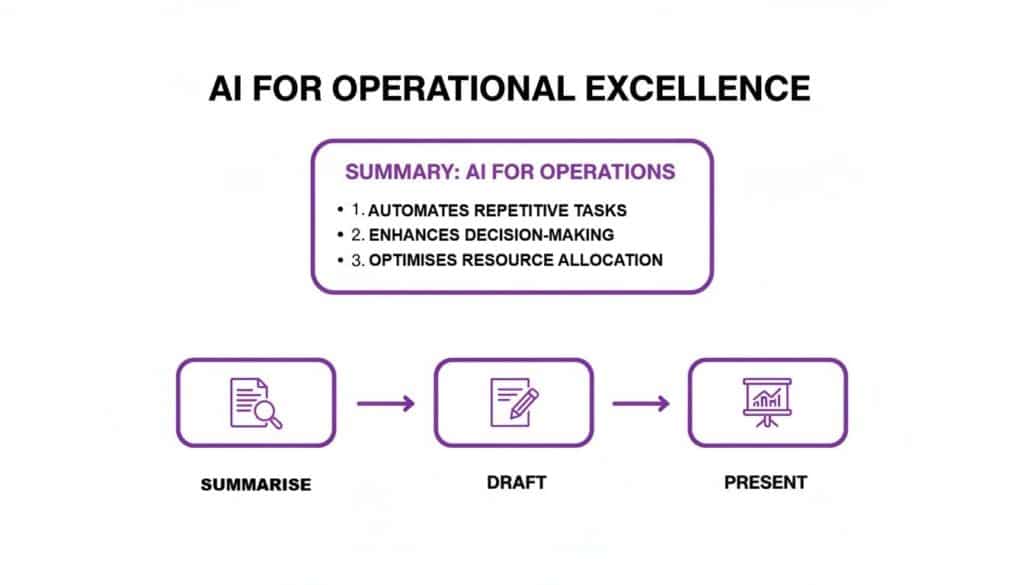
The diagram below nails this concept, showing how modern tools like AI, when managed correctly, can turn complex operational tasks into a simple, effective workflow.
how to improve operational efficiency ai operations1
It’s a perfect illustration of how the right technology, backed by expert management, transforms administrative headaches into simple, value-adding activities.
In-House IT vs Managed IT Partner for Efficiency
When it comes to maintaining your newly efficient systems, you essentially have two choices: keep it all in-house or work with a specialist partner. The difference in approach—and outcome—can be significant.
| IT Function | In-House Management Approach | Managed Partner Approach (F1Group) |
|---|---|---|
| System Monitoring | Often reactive; responding to alerts or user-reported problems. | 24/7 proactive monitoring; potential issues are identified and resolved before they cause downtime. |
| Cybersecurity | Relies on internal expertise, which can be limited. Updates and patches may lag. | A dedicated security team deploys enterprise-grade tools and ensures constant threat management. |
| Strategic Planning | Focused on day-to-day tasks, leaving little time for long-term strategy. | Provides a Virtual CIO service to align your IT roadmap with your business goals. |
| Cost Model | Unpredictable costs with high capital expenditure for staff and hardware. | A predictable monthly fee that covers all expertise, tools, and support. |
| Team Focus | IT staff are stretched thin, and other employees may be pulled into IT troubleshooting. | Your team is freed to focus on their core roles, boosting overall productivity. |
As the table shows, a managed partner doesn’t just take tasks off your plate; they elevate your entire approach to technology management, turning it from a cost centre into a strategic asset.
Efficiency as a Key to Business Resilience
In the current UK economic climate, being operationally efficient is no longer a “nice to have”—it’s directly linked to business resilience. ONS data paints a challenging picture, with 33% of businesses (with 10 or more employees) reporting a drop in turnover. That’s the highest figure we’ve seen since early 2021.
When a third of employers are fighting falling revenues, getting lean and controlling costs through efficiency becomes a core survival strategy. And with over 99% of UK businesses being SMEs, these small improvements add up to a massive impact.
A managed partner is crucial for building this resilience. By guaranteeing your systems are always on and always secure, they minimise the risk of costly downtime that could be devastating in a tight financial spot. This makes your technology a reliable asset, not a recurring liability.
Working with an expert team ensures the efficiency you’ve built is protected and sustained for the future. It’s the final, vital step in transforming your operations for lasting success.
Where Do You Go From Here?
Boosting your operational efficiency isn’t a one-and-done project. Think of it as a continuous cycle—a commitment to always looking for better ways to work by assessing, refining, and optimising your processes.
You’ve seen the path forward: dig into your real pain points, make the most of the powerful tools you likely already own in the Microsoft 365 suite, and introduce smart automation. By following this approach and backing it up with expert support to keep everything secure, you’re not just tweaking things—you’re building a more resilient, productive, and ultimately more successful business.
If you’re ready to stop firefighting and start building a smarter way of working, we’re here to help you take those first practical steps.
Ready to get started? Phone 0845 855 0000 today or Send us a message to talk about how we can help your business thrive.