
Think of your business operating from a single, digital headquarters that’s accessible from anywhere. That’s the simple idea behind what Microsoft calls the Modern Workplace. It isn’t just another software package; it’s a complete environment built to bring your team’s communication, collaboration, and security together under one roof.
The result is a smarter, more connected way of working.
What Is the Microsoft Modern Workplace?
At its core, the Microsoft Modern Workplace marks a real shift away from the old way of doing things. Gone are the days of siloed apps and on-premise servers that only talk to each other when forced. Instead, you get a cloud-first platform where all your essential tools are designed to work in harmony from the get-go.
This setup empowers your team to be productive and secure, no matter where they are—in the office, working from home, or on the road—and on any device they choose.
For small and medium-sized businesses, especially here in the East Midlands, this is a game-changer. It gives you access to enterprise-grade technology without needing a huge internal IT team or a massive upfront investment. You're no longer juggling different suppliers for email, file storage, video calls, and security. It’s all in one place.
Beyond the Buzzwords
To truly grasp the value of the Modern Workplace, it helps to look past the technical jargon and focus on the four key pillars it’s built on. Each one is designed to solve a real-world business challenge.
- Productivity & Collaboration: This is all about giving your team a central hub to get things done together. Instead of chaotic email threads and files saved in a dozen different places, tools like Microsoft Teams and SharePoint create a single space for projects, conversations, and documents.
- Business Process Automation: The Modern Workplace gives you the tools to automate those repetitive, time-consuming tasks. With the Power Platform, your staff can build simple custom apps and automated workflows without needing a computer science degree, freeing them up for more important work.
- Security & Compliance: This is non-negotiable. The platform comes with built-in, AI-powered security that protects your company data and devices around the clock. It guards against threats, controls who can access sensitive information, and helps you tick the boxes for regulatory requirements like GDPR.
- Analytics & Insights: It’s about making smarter, data-driven decisions. The tools give you clear insights into how your team works and how the business is performing, making it easier to spot bottlenecks and find opportunities for improvement.
The big idea is simple: create an environment where technology genuinely helps people do their best work, securely and from anywhere. It’s about making work feel more intuitive, connected, and efficient.
This joined-up approach is what makes the Microsoft Modern Workplace so powerful. Every component is designed to connect seamlessly. For instance, a file shared in a Teams chat is automatically saved securely in SharePoint, with access permissions managed by Microsoft Entra ID. There's no friction, just a more effective way of operating that helps your business adapt and grow.
Ready to see how these tools could reshape your business? Give us a call on 0845 855 0000 today or send us a message to chat about what you need.
What Are the Core Components of the Microsoft Modern Workplace?
To really grasp what the Microsoft Modern Workplace is, it helps to stop thinking of it as a collection of separate software products. Instead, picture it as a single, finely-tuned engine. Each component is an essential part, designed to work in harmony with the others to create a secure, productive, and genuinely collaborative environment for your team.
Let's break down the key technologies that make this system tick.
The Table: Key Components of the Microsoft Modern Workplace
Before we dive into the details, this table gives you a quick overview of the main players and the roles they perform within your business.
| Component | Primary Role | Business Example |
|---|---|---|
| Microsoft 365 | The foundational suite of productivity and cloud services. | Using cloud-based Word and Excel for real-time document collaboration. |
| Microsoft Teams | The central hub for all communication and teamwork. | Hosting video meetings, sharing files, and managing project chats in one place. |
| Microsoft Entra ID | Manages user identities and secures access to resources. | Implementing multi-factor authentication (MFA) to protect against account breaches. |
| Microsoft Intune | Secures and manages company and personal devices (laptops, phones). | Remotely wiping company data from a lost or stolen employee mobile phone. |
| Microsoft Power Platform | A low-code suite for automating tasks and building custom apps. | Creating a simple app for employees to submit and track holiday requests. |
These technologies aren't just standalone tools; they're designed to integrate deeply, amplifying each other's strengths to support your entire operation.
The Foundation: Microsoft 365 and Teams
At the heart of it all is Microsoft 365. This is more than just the Office apps—Word, Excel, PowerPoint—that your team has used for years. It's those familiar tools, but supercharged for the cloud. This means documents are always live, always accessible from any device, and collaboration happens in real-time, not through a confusing chain of email attachments.
Seamlessly integrated with M365 is Microsoft Teams, the communication hub where everything and everyone comes together. It’s designed to replace the chaotic mix of emails, instant messages, and separate video conferencing tools. Teams organises conversations, meetings, and files into dedicated channels. Imagine a Leicester-based charity coordinating a fundraising event; they could create a specific channel where all volunteer communications, planning documents, and schedules live in one easy-to-find place.
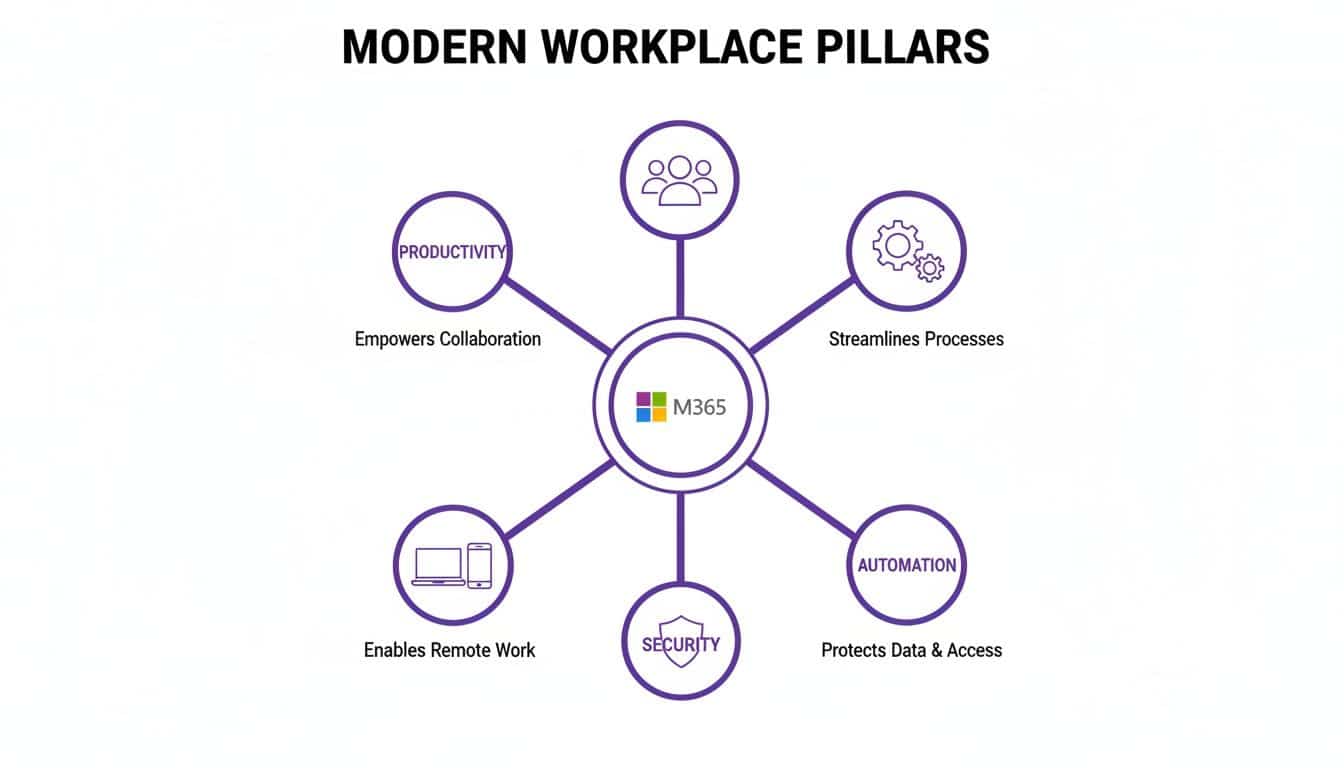
As the diagram shows, Microsoft 365 isn’t just about documents; it’s the engine that powers everything from productivity and automation to security. This tight integration is its greatest strength. In fact, around 1.9 million businesses in the UK alone now rely on Teams, a testament to how essential it has become for small and medium-sized businesses.
Securing Your Digital Workspace
A flexible workplace has to be a secure one. Two key components work tirelessly behind the scenes to protect your data without frustrating your team.
-
Microsoft Entra ID (formerly Azure Active Directory): Think of this as your company’s digital bouncer. It manages who gets access to what, ensuring that only authorised people can access company information. It's the technology that powers secure single sign-on and multi-factor authentication (MFA)—a simple but incredibly effective defence against password theft.
-
Microsoft Intune: With people working from anywhere on a mix of devices, Intune gives you crucial oversight and control. It’s a cloud-based service for managing both company-owned and personal devices (known as Mobile Device Management and Mobile Application Management). You can enforce security policies on laptops, tablets, and phones to keep company data safe, wherever it goes.
For instance, a Lincoln manufacturing firm could use Intune to secure the tablets its sales team uses on the road. They can require a PIN to access company apps, enforce device encryption, and even remotely wipe all business data if a device is lost or stolen, safeguarding sensitive customer information.
The real magic of the Microsoft Modern Workplace isn't what any single tool does on its own. It's how security, productivity, and collaboration are woven together into one seamless experience.
Automating and Extending Your Capabilities
Beyond the daily essentials, the ecosystem includes powerful tools for streamlining your business and building custom solutions. The Microsoft Power Platform is a suite of low-code tools that empowers your team to automate repetitive processes and even build simple apps without any coding experience. This could be something as simple as automating an approval workflow for purchase orders or creating a custom app for on-site safety checks.
Each component, from Teams to Intune, plays a crucial role. When brought together, they create a powerful, secure, and adaptable platform that enables businesses across the East Midlands to work smarter, not harder.
How the Modern Workplace Drives Business Growth
All the tech components are interesting, but let's get to the question every business leader in the East Midlands is asking: "How does this actually help my business grow?" Adopting the modern workplace Microsoft has designed isn't about collecting shiny new tools; it's about achieving real, tangible results. It’s a strategic shift that directly impacts your bottom line by changing how your team operates, protects itself, and adapts to new challenges.
Ultimately, this is about making a technology investment that pays for itself through measurable gains in productivity, security, and overall efficiency.
Boost Your Team’s Productivity
The most immediate benefit you'll see is a significant jump in your team's productivity. Think about the old way of working: fragmented communication, endless email chains, and time wasted just trying to find the right document. It’s a system full of friction that slows everyone down.
A modern workplace tears down those barriers.
By centralising work in Microsoft Teams, you create a single source of truth for your business. Conversations, files, project plans, and meetings all live in one organised, accessible place. This puts an end to the frustrating hunt through cluttered inboxes for a specific file or chasing colleagues for a simple update. Information flows freely, and the context is always right there when you need it.
When everything is connected, decisions happen faster and projects move forward with far fewer delays. Your team can stop managing information silos and start focusing on what they do best.
Strengthen Security and Simplify Compliance
For any small or medium-sized business, a single security breach can be devastating. The Microsoft Modern Workplace gives you enterprise-grade security that is built-in from the ground up, not just bolted on as an afterthought. For businesses without a large, dedicated security team, this is a game-changer.
Tools like Microsoft Entra ID and Intune work in tandem to protect your business from every angle:
- Identity Protection: Multi-factor authentication (MFA) becomes the standard, drastically reducing the risk of a breach from stolen passwords.
- Data Protection: Built-in tools help prevent both accidental and malicious data leaks, ensuring your sensitive company and client information stays secure.
- Device Management: You gain complete control over every device accessing your company data—whether it's a company-owned laptop or an employee's personal mobile phone.
This integrated approach doesn't just strengthen your defences against cyber threats; it also makes meeting compliance obligations like GDPR much simpler. You get the visibility and control you need to protect your valuable data and your business's reputation.
Enable True Workplace Flexibility
The ability to work effectively from anywhere isn't a perk anymore; it's a core business necessity. The entire Microsoft ecosystem is designed to support hybrid and remote working models, both seamlessly and securely.
Because all your data and applications live in the cloud, your team gets the same productive, familiar experience whether they're in the office, working from home, or out on a client site. This level of flexibility is key to attracting and retaining the best talent, who now expect modern working arrangements. It also builds incredible resilience, ensuring your business can continue running smoothly, no matter what external disruptions come your way.
The platform's true strength lies in its ability to consolidate multiple functions into a single, cohesive subscription. This not only simplifies IT management but also delivers significant cost savings.
We saw this firsthand with a professional services firm in Nottingham. They were paying for several separate apps for video conferencing, file sharing, and project management. By consolidating everything into a single Microsoft 365 Business Premium subscription, they replaced all of those individual tools. The move immediately cut their monthly software bill and made life much simpler for their IT administrator.
This is a fast-growing trend. Adoption of Microsoft 365 among UK SMEs is surging, with revenue growth in the SMB sector hitting 22%. It shows just how profoundly a consolidated platform can change how businesses operate. You can see more on this and other Microsoft 365 statistics on sqmagazine.co.uk.
To explore how consolidating your tech stack can drive growth for your business, phone 0845 855 0000 today or send us a message.
Weaving AI into Your Workflow with Copilot and the Power Platform
The conversation around artificial intelligence and automation has moved from "what if?" to "how soon?". These aren't just buzzwords for tech giants anymore. They are real, practical tools built right into the modern workplace Microsoft has created, and their primary job is to give your team back its most precious asset: time.
Meet Copilot: Your Everyday AI Assistant
At the heart of this shift is Microsoft Copilot. Think of it less as a complex piece of technology and more as a new team member—an incredibly fast and efficient AI assistant who lives inside the Microsoft 365 apps you use all day, every day. It's there in Word, Excel, Teams, and Outlook, ready to help.
For an East Midlands business, this isn't abstract; it's a direct route to getting more done. Imagine your sales director prepping for a quarterly review. Instead of spending hours buried in spreadsheets, they can simply ask Copilot in Excel to "analyse sales data from last quarter and summarise the top three performing regions." A task that could take half a morning is finished in moments.
Putting Your AI Assistant to Work
The real value of Copilot shows up in the dozens of small tasks that eat away at a productive day. It takes on the heavy lifting of finding, summarising, and creating information, freeing your people to focus on the bigger picture.
Here are just a few ways we see businesses using it:
- Drafting Communications: Ask it to create a first draft of a project proposal in Word or a formal client email in Outlook from a few bullet points. It gets the ball rolling instantly.
- Summarising Meetings: Missed a long Teams call? Copilot can give you a quick summary of the discussion, action points, and decisions without you having to re-watch the whole thing.
- Analysing Data: Find trends and build charts from a complex Excel sheet without needing a degree in pivot tables. Just ask your question in plain English.
Copilot isn't here to replace anyone. It's designed to augment your team's skills, taking the repetitive, administrative grind off their plate so they can focus on high-value work that actually grows the business.
For most small businesses, this is a surprisingly accessible way to start using AI. A Copilot for Microsoft 365 licence has a clear, predictable cost—in the UK, it’s £24.70 per user per month (with an annual plan). It’s an affordable way to gain a serious competitive advantage. To see what it’s truly capable of, take a look at Microsoft's AI assistant in our detailed guide.
Empowering Your Team with the Power Platform
Beyond AI assistance comes intelligent automation, and that's where the Microsoft Power Platform shines. It’s a set of tools that lets your own staff build custom solutions to their specific problems—all without needing to be professional software developers.
This "low-code" approach puts the power to solve problems directly into the hands of the people who know the business inside and out. The main components you'll use are:
- Power Apps: For building simple, custom business apps that work on any phone or computer.
- Power Automate: For creating automated workflows that connect different apps and services together.
Picture a logistics company based in Scunthorpe. Using Power Apps, they could create a simple app for drivers to log deliveries on their phones. The moment a delivery is marked as complete, Power Automate could trigger a workflow that sends an invoice, updates the inventory system, and notifies the account manager.
Mastering no-code workflow automation is becoming a game-changer for efficiency, and the Power Platform makes it a reality. These tools are no longer reserved for big companies with huge IT departments; they're made for you to solve your own challenges and add genuine value to the business.
By combining the intelligence of Copilot with the automation of the Power Platform, the Microsoft Modern Workplace becomes a powerful toolkit for any forward-thinking business in the East Midlands.
Ready to see how AI and automation can reshape your operations? Phone 0845 855 0000 today or Send us a message to get started.
Planning Your Move to the Modern Workplace
Thinking about shifting your business over to the Modern Workplace Microsoft has built can feel overwhelming. The good news is, you don’t have to do everything at once. For most busy businesses in the East Midlands, a phased, practical approach is the only way to get it right without causing chaos in your day-to-day operations.

It all comes down to having a clear, structured plan that maps out the journey from where you are today to where your business needs to be.
Assessment and Goal Setting
The first step is always to take stock of your current situation. A thorough assessment means taking a hard look at your IT setup. What software are you actually using? Where is your data held? What security measures are in place, and are they working?
Just as important, you need to connect this to your business goals. Are you trying to get your remote and in-office teams working together more effectively? Do you need to get serious about your cyber security defences? Or is the goal to cut costs by getting rid of overlapping software subscriptions? Your answers here will shape the entire project.
Strategic Planning and Licensing
Once your goals are clear, the real planning can begin. This is where you make crucial decisions about which Microsoft 365 licences genuinely fit your team's needs and your budget. A small business with basic productivity needs has a very different profile from a company handling sensitive data that requires advanced security and compliance tools.
This stage is also the perfect time to think strategically about costs. For example, don't overlook powerful savings opportunities like the Azure Hybrid Benefit, which can seriously reduce costs if you have existing on-premise licences.
A key consideration for UK businesses is the upcoming Microsoft 365 price adjustment. Strategic timing can lead to significant long-term savings.
It's worth noting that UK businesses face a significant price reckoning in 2026, with Microsoft 365 price hikes of up to 33% on certain frontline plans from 1st July. This creates a "Golden Window" between now and mid-2026, allowing you to lock in current prices for up to three years. You can read more in these strategic insights on the Microsoft 365 price increase to inform your planning.
Migration and Adoption
With a solid plan in your hands, the migration can start. This is the technical part—moving your emails, files, and user accounts over to the new platform. A well-managed migration should be a non-event for your team, with everything moved securely and with minimal disruption.
But the work isn’t finished just because the technology is switched on. The final, and arguably most important, phase is adoption and training. New tools are worthless if your team doesn't use them. A focused adoption plan ensures everyone understands the new way of working and feels confident using the tools every day.
For many East Midlands businesses without a large, dedicated IT department, trying to navigate this alone is a huge risk. This is where partnering with a specialist like F1 Group makes all the difference. Expert guidance helps you avoid common pitfalls like security gaps, data loss during migration, and poor user uptake, ensuring you get the full value from your investment.
To discuss your migration plan and ensure a smooth transition, phone 0845 855 0000 today or send us a message.
Your Modern Workplace Questions Answered
Moving to a new way of working is a big step, so it’s completely normal to have questions. Even with a clear plan, you need to be sure the modern workplace Microsoft offers is the right fit. Here are the answers to some of the most common queries we get from businesses across the East Midlands.
Our goal is to give you straightforward, practical answers that help you move forward with confidence.
Is Microsoft 365 Secure Enough for Our Sensitive Business Data?
We hear this one a lot, and the answer is a firm yes. For most small and medium-sized businesses, the security built into Microsoft 365 is far stronger and more sophisticated than anything they could manage on their own. Security isn't an afterthought; it’s a core part of the entire system.
Think of it as multiple layers of intelligent defence, all working together to protect your organisation from modern threats.
- Advanced Threat Protection: This acts like a digital bodyguard for your email, spotting and stopping clever phishing attacks or malicious attachments before they can cause any harm.
- Multi-Factor Authentication (MFA): A simple but incredibly effective tool. By requiring a second form of proof (like a code on your phone), it makes stolen passwords practically useless to a hacker.
- Data Loss Prevention (DLP): This feature helps you set rules to stop sensitive information—like financial records or client lists—from being accidentally or deliberately shared outside your company.
The key is getting it set up correctly. A partner like F1 Group will configure these powerful tools to match your specific industry and risk profile, giving you enterprise-grade security that’s fit for purpose right from the start.
We Are a Small Business in the East Midlands. Is This Really for Us?
Absolutely. One of the best things about the Modern Workplace is that it's designed to scale. It’s not just for big corporations. Microsoft has plans like Microsoft 365 Business Premium, which is created specifically for businesses with fewer than 300 employees.
These plans bundle all the essential productivity tools with advanced security and device management, all at a manageable price. For a UK business, this plan currently costs £18.70 per user per month (with an annual commitment).
This really puts smaller businesses in places like Lincolnshire or Nottinghamshire on a level playing field with larger competitors. You get access to the same calibre of technology without the need for a huge upfront investment in hardware and software.
Will Our Team Struggle to Adopt All These New Tools?
This is a very common and understandable worry. After all, technology is only useful if people actually use it. The secret isn't to throw everything at your team at once. A "big bang" rollout where everything changes overnight is a recipe for confusion and resistance.
The most successful transitions happen with a phased rollout and clear, consistent communication. You introduce new ways of working gradually, giving your team time to adapt and feel comfortable.
The good news is that most people are already familiar with apps like Word, Excel, and Outlook. This makes the learning curve for the wider Microsoft 365 suite much smoother than you might think. Working with an expert ensures you have a proper training plan in place to help your team feel confident, not overwhelmed.
What Happens if We Need IT Support After Migrating?
This is where having a managed IT partner becomes so important. When something goes wrong, the last thing you want is to be stuck waiting in a queue for an anonymous call centre. With a local partner, you have a dedicated team that already knows your business and your IT setup inside and out.
F1 Group provides continuous support, proactive monitoring, and ongoing security management. Our job is to make sure your Modern Workplace keeps running smoothly and delivering value long after the initial project is finished. We handle the tech, so you can focus on running your business.
To discuss your own business needs or ask more questions, just get in touch with our team. Phone 0845 855 0000 today or Send us a message.
Let's Make Your Modern Workplace a Reality
You’ve seen the potential. A workplace where your team can collaborate securely from anywhere, where your data is protected, and where everyday tasks are made simpler. The question is, how do you get there without disrupting your business?
That's where we come in. At F1 Group, we're not just another IT company; we're your local East Midlands team, with our feet on the ground in Lincoln, Nottingham, and Leicester. We live and breathe this stuff, focusing on one thing: making Microsoft's powerful tools work for businesses like yours.
We are a certified Microsoft Cloud Solution Provider, but more importantly, we’re a team of vendor-certified, DBS-checked engineers who take a security-first approach to every project. We provide the dependable, hands-on managed IT support that local SMBs need to compete and grow.
Our philosophy is simple: technology should make your life easier, not more complicated. We handle all the technical heavy lifting of the Microsoft Modern Workplace so you can get on with what you do best—running your business.
From mapping out the initial plan to migrating your systems securely and providing day-to-day support, we manage the entire journey. We're committed to building a solution that delivers a real, positive difference to your daily operations. Let our team give you the expert, practical guidance needed to build a more efficient and secure foundation for your business's future.
Ready to get started? Phone 0845 855 0000 today or Send us a message to talk about your next steps.