
You're probably already backing up something.
Most East Midlands firms are. A file server copies overnight. Microsoft 365 keeps deleted items for a while. Azure has replication somewhere in the background. On paper, that can feel reassuring.
The problem starts when a real incident hits. A member of staff clicks a bad link, a laptop syncs corrupted files into SharePoint, an admin account is compromised, or a line-of-business system won't start after an update. That's the moment many owners find out they didn't have a recovery plan. They had copies of some data, but no clear way to get the business working again.
Why Your Business Needs a Resilient Recovery Plan
A disruption rarely arrives as a neat IT problem. It lands as a business problem. Staff can't send email. Orders stop moving. Customers can't get answers. Directors want to know how long the outage will last, what's been lost, and whether the business can trade today.

For UK organisations, this isn't hypothetical. The government's Cyber Security Breaches Survey 2024 found that 50% of UK businesses reported a cyber security breach or attack in the previous 12 months, and the average cost reached £1,205 for small firms, £10,830 for medium firms, and £21,780 for large firms per attack, as cited in this summary of the survey findings.
That matters because many incidents don't look dramatic at first. A user deletes a folder. A synced library is encrypted. A server fails on a Monday morning. Even when the event is smaller than a full site outage, the interruption still costs money, time, and trust.
Backup alone doesn't protect the business
A backup is useful. It can save your data. But if nobody knows:
- Which systems come back first
- Who authorises recovery decisions
- How users keep working during the outage
- Whether the backup can be restored under pressure
then the business is still exposed.
A successful recovery isn't measured by whether the backup job completed. It's measured by whether your team can trade again.
For a non-technical owner, the easiest analogy is this. Backup is like having car insurance documents and a spare key. Disaster recovery is having a hire car arranged, the claims process ready, and a plan for how your staff still get to appointments tomorrow morning.
Why this matters for East Midlands firms
Smaller and mid-sized businesses often assume recovery planning is something bigger organisations do. In practice, the opposite is often true. A large enterprise may absorb disruption more easily because it has more people, more systems, and more fallback options. A local manufacturer, charity, recruiter, accountancy firm, or professional services business often can't.
If your core systems sit in Microsoft 365, Azure, or a mix of cloud and on-premises servers, your backup and disaster recovery approach needs to reflect how your business works now, not how IT worked ten years ago.
Backup vs Disaster Recovery What Is the Difference
People often use the two terms as if they mean the same thing. They don't.
Backup is a copy of data you can restore. Disaster recovery is the wider plan for restoring systems, access, and business operations after a serious disruption.
A simple way to think about it
If you lose your house key, a spare key solves the problem. That's backup.
If your car is stolen and you still need to visit customers, deliver stock, and get staff to work, you need more than a spare key. You need transport, insurance steps, a temporary arrangement, and a clear order of actions. That's disaster recovery.
Backup vs. Disaster Recovery at a Glance
| Aspect | Backup | Disaster Recovery (DR) |
|---|---|---|
| Main purpose | Protect a copy of data | Restore business operations after disruption |
| Focus | Files, databases, mailboxes, settings | Systems, applications, users, connectivity, priorities |
| Typical question answered | “Can we get the data back?” | “How do we get the business working again?” |
| Scope | Narrower | Broader |
| Useful for | Deletion, corruption, point-in-time restore | Ransomware, major outage, server loss, cloud compromise |
| Success measure | Data restored | Services available within agreed targets |
| Owner | Often IT only | IT plus management, operations, and key decision-makers |
Why firms get caught out
A common mistake is assuming a backup product equals a recovery strategy. It doesn't.
You might have:
- Microsoft 365 retention in place, but no way to quickly restore a whole user's working environment
- Azure replication configured, but no tested failover process
- Server backups running, but no written order for which application comes back first
- Copies of data stored off-site, but no credentials or permissions ready for a clean restore
Practical rule: If your plan ends with “restore from backup”, it isn't a disaster recovery plan yet.
What each one should cover
A sensible backup plan usually answers:
- What data is protected
- How often it's copied
- Where the copies are stored
- How long versions are kept
A sensible disaster recovery plan answers:
- Which services are critical
- How quickly each one must return
- What people do during the outage
- How you avoid restoring the same compromise back into production
That last point matters in Microsoft-heavy environments. If an attacker has compromised identities, permissions, or admin access, restoring files alone won't fix the underlying problem.
Understanding Key Recovery Metrics RTO and RPO
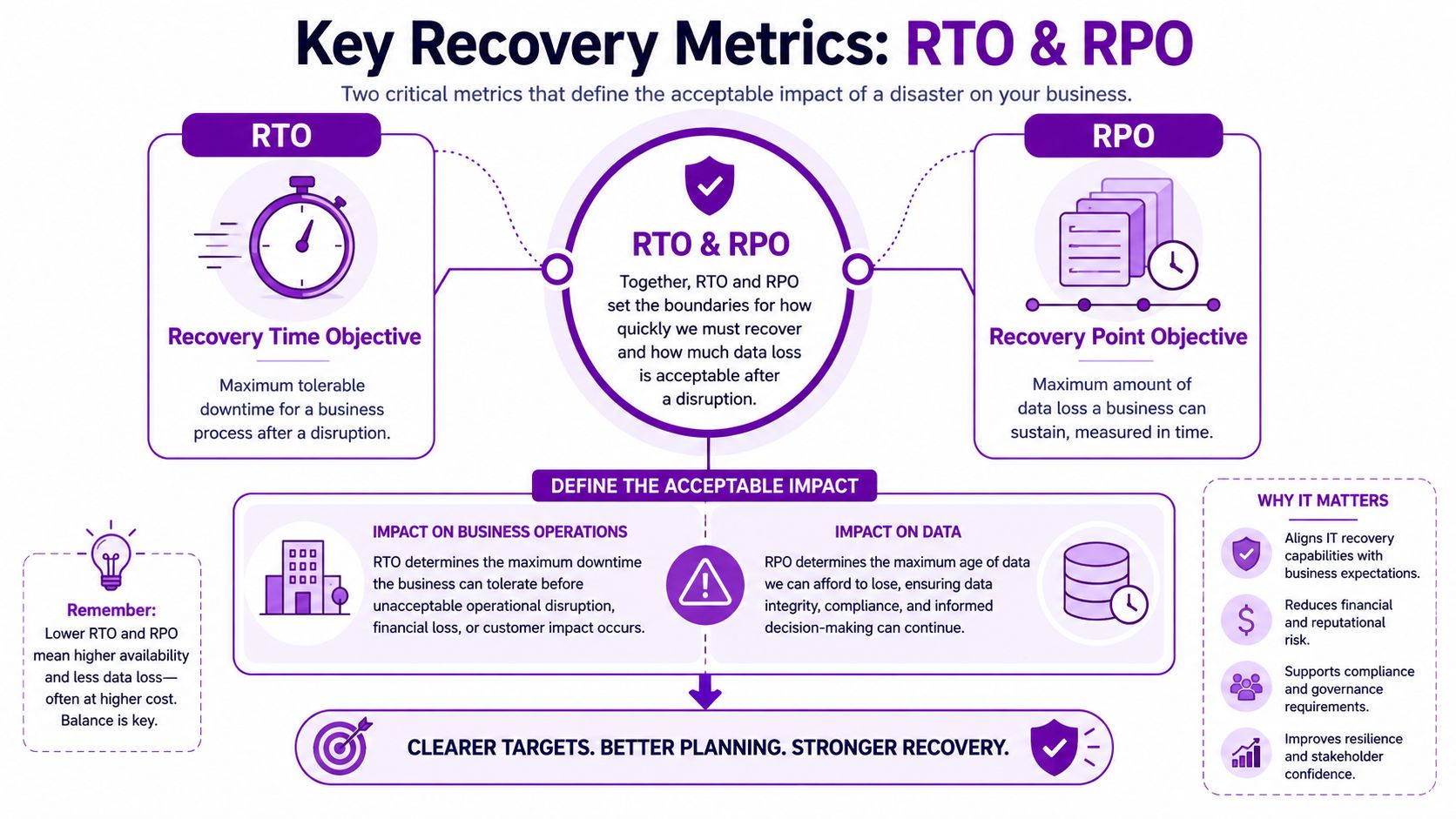
Two terms sit underneath every sensible recovery plan. RTO and RPO. They sound technical, but they're really business decisions.
RPO means how much data loss you can live with
Recovery Point Objective, or RPO, is the maximum amount of data you can afford to lose, measured in time.
Think of a paper diary. If you copied it only once each evening and it was destroyed at 4 pm, you'd lose that day's entries. In business terms, that could be orders, emails, case notes, invoices, or stock movements.
Ask yourself this. If a system failed right now, how much work could your team realistically re-enter by hand without causing serious disruption?
RTO means how long you can afford to be down
Recovery Time Objective, or RTO, is the maximum downtime you can tolerate before the impact becomes unacceptable.
Using the same diary example, RTO isn't about the lost entries. It's about how long the person using that diary can't work at all. For one system, that might be a few hours. For another, perhaps until the next day. For something customer-facing, it may need to be much faster.
Why undefined targets create trouble
A major UK telecoms outage in 2023 disrupted emergency call routing, showing how failures can spread across shared infrastructure and how single-point dependencies can undermine recovery, as discussed in this analysis of backup and disaster recovery design.
That lesson applies well beyond telecoms. If your broadband, identity platform, Microsoft 365 access, and key application all depend on one route back, one broken link can hold up the whole recovery.
Decide your RTO and RPO before you choose the technology. Otherwise, you're buying tools without knowing what problem they must solve.
A quick business example
A small professional services firm might decide:
- Email and Teams must return quickly because client communication can't stop
- Finance system can be down a bit longer if invoices can wait
- Archived files can return later because they aren't needed on day one
That's the right way round. Start with business tolerance, then design the backup and disaster recovery approach around it.
For owners who want a plain-English way to think about service recovery, this guide to business continuity strategies for MSPs is useful because it frames recovery targets around operational impact rather than just storage. If you want a practical starting point for documenting your own requirements, F1Group also provides an IT disaster recovery plan template.
Building Your Disaster Recovery Plan Step by Step
A recovery plan doesn't need to start as a huge document. It does need to be clear, current, and tested.
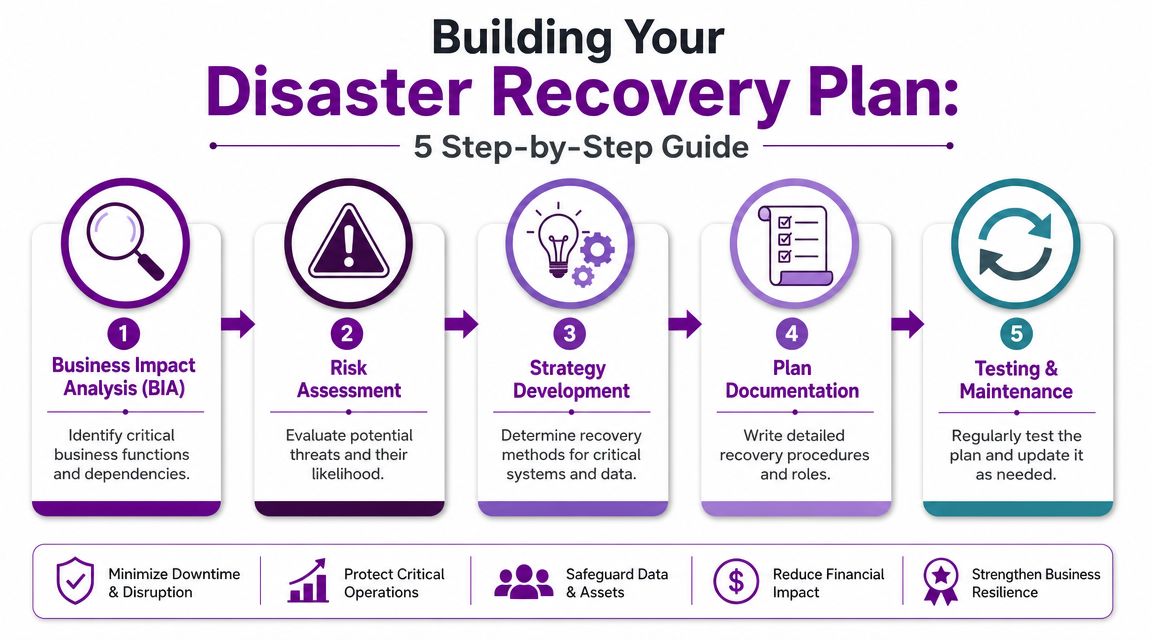
The UK ICO's security guidance requires organisations to implement appropriate technical and organisational measures for resilience. In practice, that means defining recovery objectives, testing restore procedures, and protecting backups against loss and unauthorised access, as summarised in this discussion of resilience requirements. That's why disaster recovery should sit with management and governance, not just with whoever looks after the servers.
Step 1 Identify what the business cannot run without
Start with business functions, not hardware.
List the things that would stop trading if they disappeared tomorrow morning. For many SMBs, that includes Microsoft 365 email, Teams, SharePoint, line-of-business applications, finance systems, identity services, and internet connectivity.
A short exercise helps:
- Name the process such as quoting, dispatch, payroll, client support
- Name the system behind it such as Dynamics 365, a file server, Microsoft 365, Azure SQL
- Name the actual impact if it's unavailable
Step 2 Assess what could interrupt those services
Don't limit this to fire or flood. Modern recovery planning usually has to account for cyber incidents, accidental deletion, failed updates, cloud misconfiguration, credential compromise, and supplier dependency issues.
Many businesses realize a key point: The risk isn't only “server down”. It may be “admin account compromised” or “SharePoint data overwritten and synced everywhere”.
Step 3 Choose the recovery method for each workload
Different systems need different protection.
A sensible design might include:
- Immutable or isolated backups for ransomware resilience
- Application-aware backups for databases and key servers
- Microsoft 365 backup for Exchange Online, SharePoint, OneDrive, and Teams-related data
- Azure recovery options for virtual machines and selected workloads
- A clean identity recovery process so restored systems aren't handed back to compromised accounts
The right question isn't “What backup product should we buy?” It's “What must be restored, in what order, and under whose control?”
For organisations that need a more formal framework, F1Group has published guidance on creating a disaster recovery plan for IT.
Step 4 Write the plan so people can use it under pressure
Good plans are practical. They include names, roles, dependencies, contacts, escalation routes, and the order of restoration.
Keep the wording simple. In a real outage, nobody wants to decode jargon-heavy policy language.
Include:
- Who leads the incident
- Who can approve major recovery steps
- Which systems come back first
- How staff communicate if normal systems are down
- When to involve suppliers, insurers, or outside IT support
Step 5 Test, correct, repeat
A plan that hasn't been tested is still a draft.
Test restores. Test access. Test whether key staff know their role. Test whether your backup credentials are separate and secure. Then update the document to reflect what happened.
Some firms run a technical restore test. Others begin with a tabletop exercise where managers talk through a ransomware or outage scenario. Both are useful. The important thing is proving the plan works in real conditions, not assuming it will.
Protecting Your Microsoft 365 and Azure Estate
Many businesses now run most of their operations in Microsoft 365 and Azure. Email, files, identity, collaboration, virtual servers, and line-of-business apps may all sit inside the Microsoft ecosystem. That changes what backup and disaster recovery looks like.
A lot of generic advice still talks as if every company has a server room, a tape rotation, and a secondary site. This overlooks the primary concern for modern UK SMBs. The harder question is how to recover a Microsoft 365 or Azure-based business without losing configuration, permissions, and audit evidence after a compromise, as highlighted in this discussion of disaster recovery planning gaps.
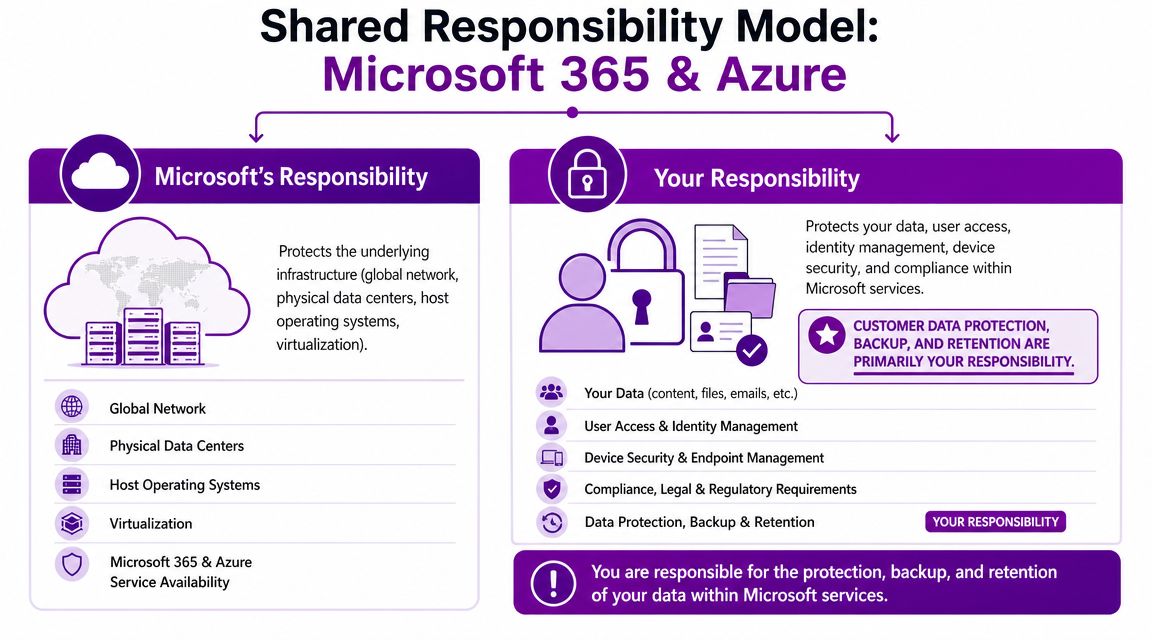
Microsoft protects the platform. You protect your business data and access
Confusion usually begins at this point.
Microsoft is responsible for the underlying cloud platform. That includes the global infrastructure and service availability at that level. But your organisation is still responsible for what happens inside your tenant and subscriptions. That includes user access, security settings, retention choices, and recovery from deletion, corruption, or malicious change.
In plain terms, if somebody with the wrong permissions deletes content, changes settings, or damages your environment, that's still your business problem to solve.
What should be protected in a Microsoft-centric business
When owners hear “backup”, they usually think files and email. In Microsoft environments, recovery often needs to include much more:
- Exchange Online data so mailboxes can be restored cleanly
- SharePoint and OneDrive content including version history where appropriate
- Teams-related data tied to collaboration and document storage
- Azure virtual machines and workloads where failover or restore may be needed
- Identity and access settings so you don't rebuild a compromised environment with the same weakness still in place
- Permissions and configuration because a restored file set is only part of a working service
Practical measures that make a difference
A useful Microsoft-focused recovery approach often includes:
- Third-party Microsoft 365 backup rather than relying only on native retention behaviour
- Separate privileged accounts for backup administration
- Multi-factor authentication on admin access
- Offline or immutable recovery options where appropriate
- Documented restore priorities for the services staff utilize first
If your business has compliance or audit pressures, this matters even more. Recovery isn't just getting a document back. It's preserving enough structure and evidence to continue operating in a controlled way. For teams trying to understand the wider security obligations around cloud platforms, this guide on how to achieve SaaS compliance is a useful companion read.
For Microsoft 365 specifically, one practical option is using a separate backup platform alongside native Microsoft capabilities. F1Group discusses this approach in its guidance on backup for Office 365.
If Microsoft 365 is where your business works, then Microsoft 365 recovery is part of business continuity, not a side issue for IT.
Your Practical Business Readiness Checklist
Most firms don't need more theory. They need a quick way to see where the gaps are.
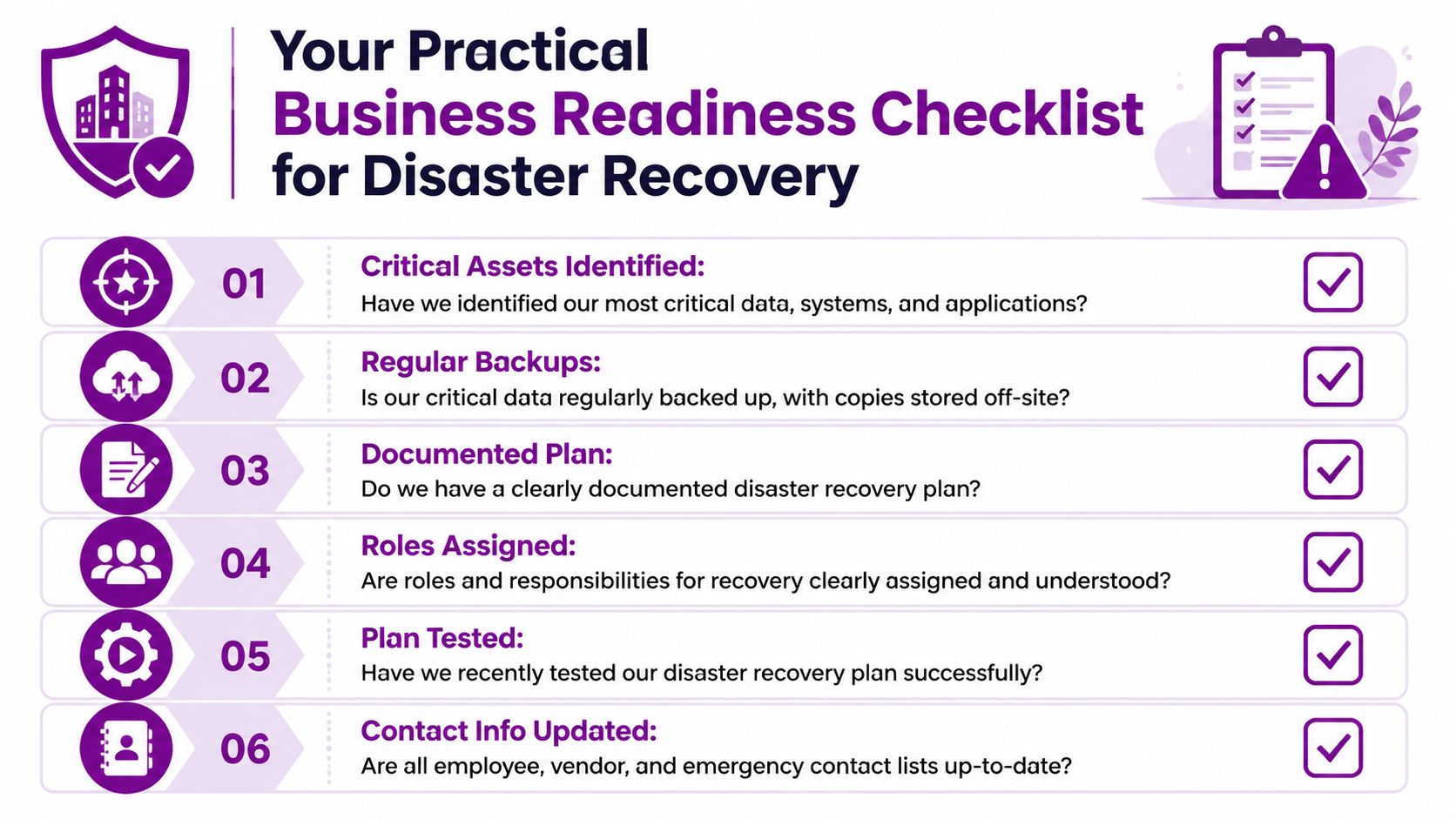
UK government data shows that 50% of businesses experienced a cyber attack in the previous year, yet many still treat recovery as a policy exercise rather than a tested capability. The more useful measure is recovery readiness: whether you can restore business-critical apps within agreed targets, as noted in this discussion of backup and disaster recovery readiness.
Ask these questions honestly
-
Critical systems identified
Do you know which systems must come back first for the business to trade? -
Recovery targets agreed
Have you set realistic downtime and data-loss tolerances for each key service? -
Independent Microsoft 365 protection
Are Exchange Online, SharePoint, OneDrive, and other important Microsoft data sets protected in a way you can control and restore quickly? -
Isolated backups in place
Do you have at least one recovery copy that isn't exposed to the same credentials and risks as production? -
Restore process documented
Could a colleague follow the recovery steps if your usual IT lead were unavailable? -
Permissions and identity considered
Have you planned for restoring access securely, not just restoring data?
The test most businesses skip
-
Recent restore proof
When did you last restore a critical system or workload and confirm that users could work? -
Application-level validation
Did you test only files, or did you prove the application, database, and user access all functioned properly? -
Staff roles understood
Do managers know who makes recovery decisions and who speaks to staff, customers, and suppliers?
A backup report tells you something was copied. A restore test tells you whether the business can recover.
If several answers above are “not sure”, that's useful. It means you've identified the actual priorities.
Next Steps for East Midlands Businesses
For most SMBs, backup and disaster recovery comes down to four practical truths.
First, a backup is not the same as a recovery plan. Second, RTO and RPO should be business decisions, not just technical settings. Third, Microsoft 365 and Azure still need their own recovery design. Fourth, testing matters more than assumption.
East Midlands organisations often have a mixed estate. A bit of on-premises infrastructure, a lot of Microsoft 365, maybe some Azure, and one or two critical legacy applications that nobody wants to touch unless they have to. That's exactly why generic advice usually falls short. You need a recovery plan that matches the way your staff work.
For some firms, the next step is a short internal review. For others, it's a structured assessment with an IT partner who can map dependencies, document recovery order, and validate whether backups are restorable under pressure. If you want a practical checklist for testing discipline, this guide to DR plan validation for managed IT is a useful reference point.
If your business is based in Lincoln, Nottingham, Leicester, Newark, Scunthorpe, Grimsby, or the surrounding area, local context matters. Internet links, site access, legacy kit, supplier dependencies, and small internal teams all affect what “recoverable” really means on the ground.
The right plan doesn't need to be overcomplicated. It needs to be current, Microsoft-aware, and proven.
If you'd like help reviewing your backup and disaster recovery approach, speak to F1Group. We work with East Midlands organisations using Microsoft 365, Azure, and hybrid IT to turn backup into a practical recovery process. Phone 0845 855 0000 today or send us a message.