
Most UK firms still haven't done the one piece of cyber preparation that matters when things go wrong. According to the UK Government's Cyber Security Breaches Survey 2024, 78% of UK businesses lack a formal incident response plan. That means most organisations are still relying on memory, goodwill, and panic when a ransomware alert lands, a finance mailbox is hijacked, or customer data is sent to the wrong place.
For East Midlands SMEs, incident response planning isn't a compliance exercise. It's a practical operating document for the first few hours of a bad day. If your business runs on Microsoft 365, Azure, Teams, SharePoint, Exchange Online, and a handful of business-critical integrations, you need a response plan that reflects that reality. Generic frameworks help, but they don't tell your IT Manager who has authority to isolate a laptop at 07:15, who checks Exchange inbox rules, or who rings your cloud support contact on a Sunday.
That's the gap this guide addresses. It focuses on what works for smaller and mid-sized UK organisations without a full in-house security team, and how to build a plan that people can follow under pressure.
Why Your Incident Response Plan Cannot Wait
Most UK businesses still do not have a formal incident response plan. That matters because the first hour of a cyber incident is rarely spent on forensic analysis. For most SMEs, it is spent working out who is in charge, whether systems should be cut off, and how to reach the right people outside office hours.
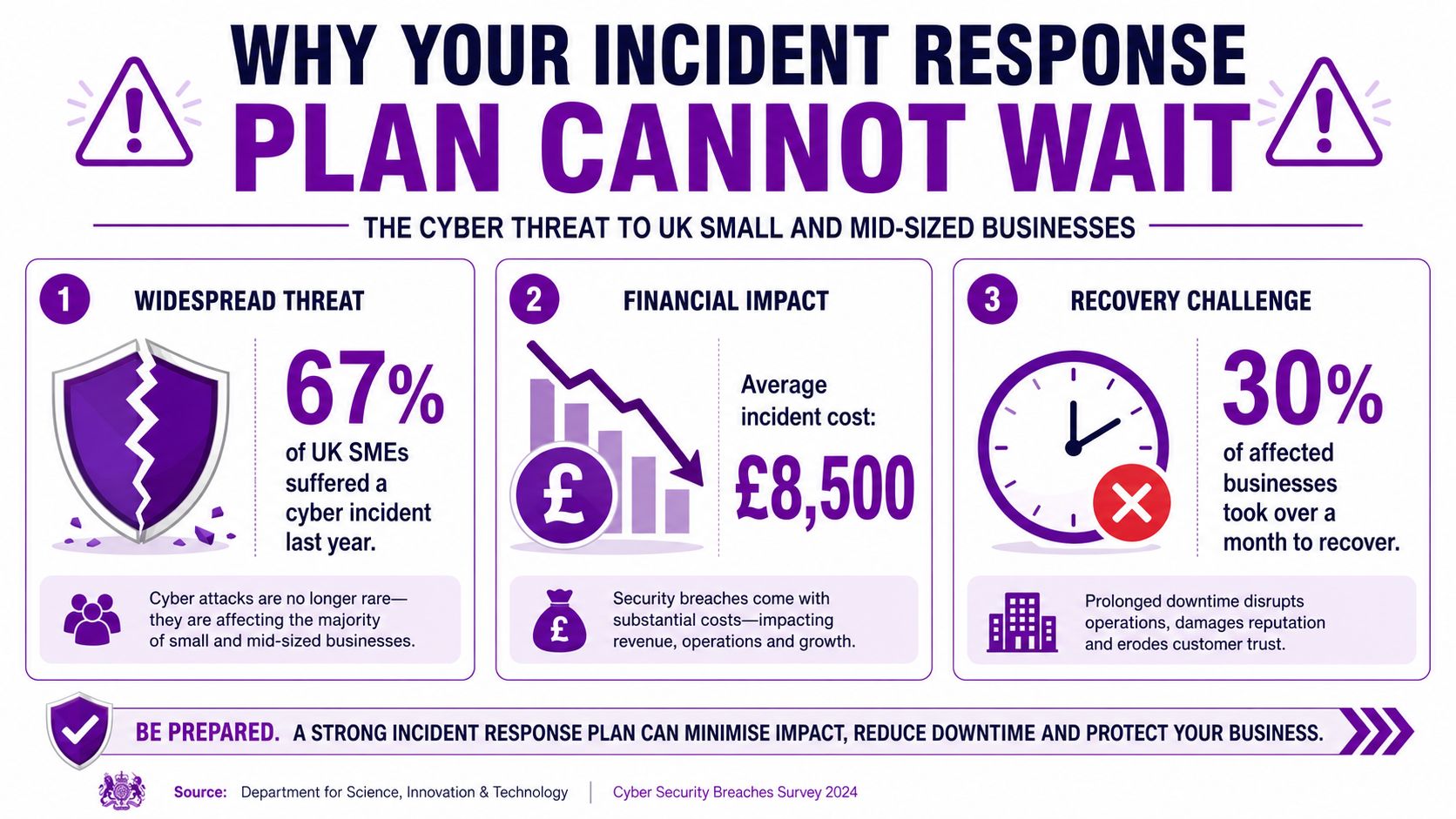
That delay is expensive. In Microsoft 365 and Azure environments, a compromised account can start forwarding mail, sending phishing messages internally, accessing SharePoint files, or registering suspicious sign-in activity long before anyone has agreed what the response should be. If your only plan is “call IT”, you will lose time at exactly the point where time matters most.
For East Midlands SMEs, the problem is usually practical rather than technical. There may be one internal IT lead. Directors may be unavailable at 06:30 or on a Sunday afternoon. Your managed service provider may cover support, but not live incident coordination or containment decisions. Someone still needs authority to disable a user, isolate a device, block external mail flow, or engage Microsoft and cyber insurance contacts.
Downtime starts before recovery costs are calculated
The first hit is usually disruption to normal operations. Staff lose access to email and files. Teams cannot process orders. Finance cannot confirm what is genuine. Customer service has no clear message to give clients. In firms with warehousing, production, or field operations, that disruption spreads fast because Microsoft 365 is tied into day-to-day communication and scheduling.
This is the point many SMEs underestimate. The incident is not just a security problem. It is a business interruption problem with technical causes.
Practical rule: If your team would need to ask, “Who approves this action?” during a live incident, the plan is not ready.
A workable incident response plan removes hesitation. It sets out what happens in the first 15 minutes, the first hour, and the first working day. It names the systems that matter most, the people who can make disruptive decisions, and the checks that should happen immediately in a Microsoft environment, such as reviewing risky sign-ins, disabling token refresh, checking Exchange inbox rules, and confirming whether affected devices are still connected.
Prevention still matters. Baseline hardening, MFA, endpoint protection, conditional access, and user training all reduce risk. If that side needs work too, start with these practical ransomware prevention steps. But prevention does not remove the need for a response plan. Credentials still get stolen. Users still approve the wrong prompt. Attackers still look for quiet periods, including evenings and bank holidays, when internal teams are hardest to reach.
That is why incident response planning cannot wait. For a UK SME running on Microsoft 365 and Azure, the true test is not whether a framework exists in a folder. It is whether your team, your leadership, and your support partner can act quickly, in the right order, when the alert arrives out of hours.
Assembling Your Incident Response Team and Roles
Most SMEs don't need a large formal incident response team. They need a small group with clear authority, named backups, and phone numbers that work outside office hours. In practice, four roles are enough to start. The same people may wear more than one hat, but each responsibility must be explicit.
NCSC guidance on planning your response to cyber incidents says an effective incident response plan must define how incident severity is determined, delegate authority for key decisions, and outline responsibilities for contacting board members, suppliers, and regulators. That's the point many SMEs miss. They assume “IT will handle it”, then discover that IT can't authorise service interruption, legal notification, or supplier escalation on its own.
The four core roles
Here's a workable template for a mid-sized business.
| Role | Key Responsibility | Example in an SME | F1Group Support |
|---|---|---|---|
| Incident Commander | Owns the response, sets priorities, approves major actions | Managing Director, Operations Director, or IT Director | Acts as senior technical adviser during live incidents |
| Technical Lead | Investigates, contains, and coordinates technical actions | IT Manager or senior systems administrator | Provides Microsoft 365, Azure, endpoint, and recovery expertise |
| Communications Lead | Manages updates to staff, customers, suppliers, and leadership | Office Manager, HR lead, or senior operations manager | Helps shape accurate technical messaging for stakeholders |
| Scribe | Maintains timeline, records decisions, captures actions taken | Service desk lead, PMO staff member, or administrator | Supports structured documentation for review and evidence |
Define severity before you need it
A severity model doesn’t need to be complicated. It just needs to be agreed in advance. Many SMEs work well with four levels.
- Low severity incidents affect a single user or device with limited business impact.
- Medium severity incidents involve a small number of users, suspicious account activity, or limited data exposure.
- High severity incidents affect critical systems, senior accounts, or customer-facing services.
- Critical severity incidents involve widespread compromise, ransomware, major outage, or likely regulatory involvement.
Don’t stop at labels. Tie each severity level to action. For example:
- Authority to isolate devices: Who can approve endpoint isolation or account disablement.
- Senior escalation trigger: Which incidents require immediate director involvement.
- External contact trigger: When to contact legal advisers, insurers, critical suppliers, or cloud support.
- Communications threshold: When to prepare a staff-wide or customer-facing message.
If a compromised finance account can’t be disabled until a manager replies to an email, your plan is too slow.
Use named people, not job titles alone
Staff go on leave. Phones die. A title in a document won’t answer at 02:00. Assign a primary and backup contact for each role and keep two contact methods for each person. That discipline is especially important if your organisation has a lean internal team and depends on a managed provider for security operations or Microsoft escalation.
The best SME plans are short, specific, and realistic. They reflect the team you have, not the one you wish you had.
Creating Your Core Incident Response Playbooks
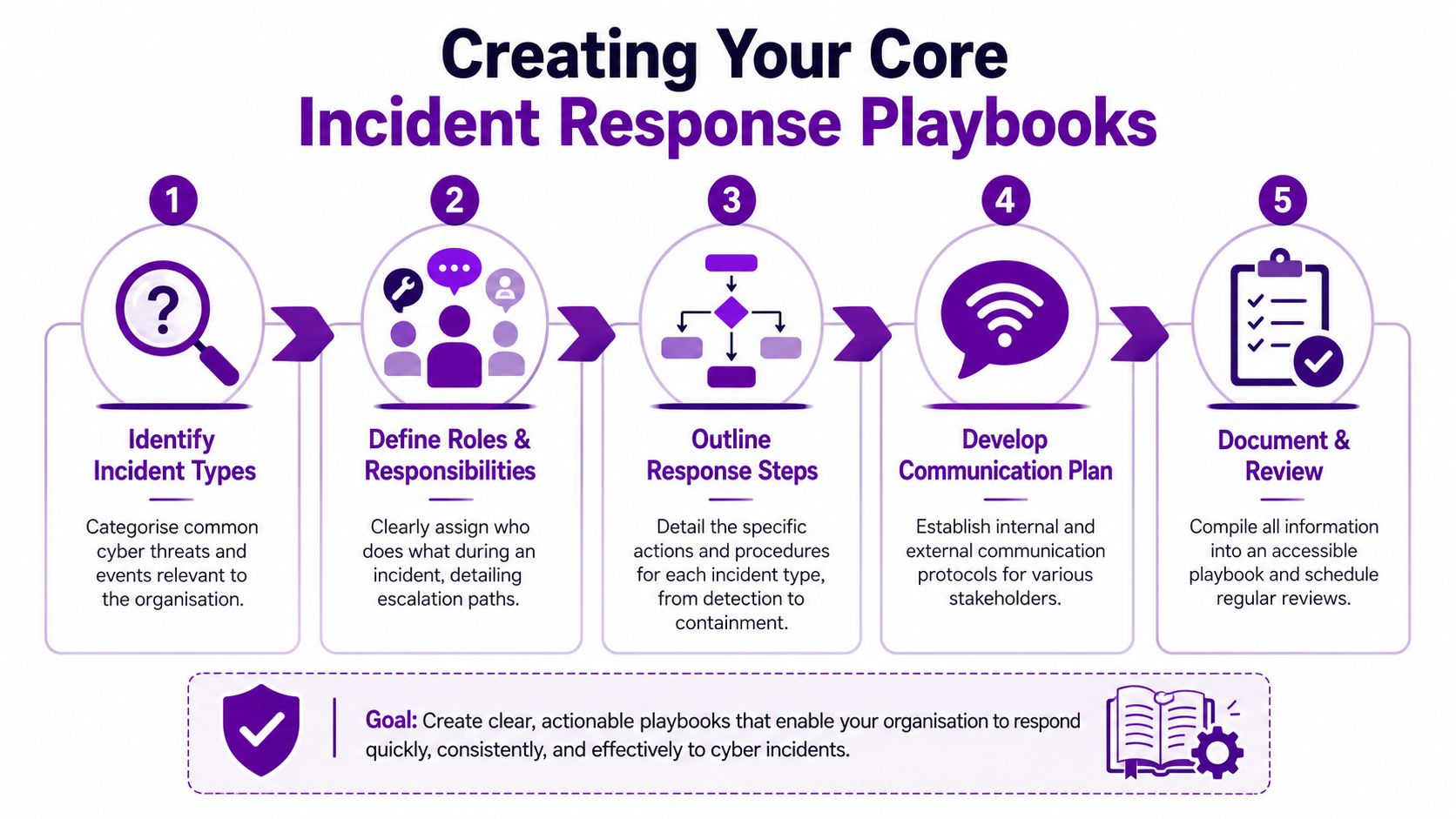
A plan only starts working when it becomes a set of playbooks people can use at speed. For a typical SME on Microsoft 365 and Azure, that usually means writing procedures for the handful of incidents that are both likely and disruptive, then making sure they still work at 19:30 on a Friday when your in-house team is thin and a managed partner may need to step in.
Start with the incidents your business is most likely to face, as noted earlier in the article. In practice, I advise East Midlands clients to focus on the scenarios that create immediate operational pressure, insurance questions, and awkward judgement calls around Microsoft tooling.
Which playbooks to write first
For most SMEs using Microsoft 365 and Azure, the first five are usually:
- Ransomware on an endpoint or server
- Business email compromise in Exchange Online
- Accidental or unauthorised data exposure through SharePoint, OneDrive, or email
- Compromised Microsoft 365 account with suspicious sign-ins
- Azure service or identity incident affecting production workloads
These are the incidents that force decisions quickly. Do you isolate the device now, even if it stops someone in dispatch from working? Do you disable a director’s account out of hours if Entra ID shows impossible travel and mailbox rule changes? Do you pull external sharing links straight away, knowing a live client project may be interrupted? A playbook should answer those questions before the alert arrives.
Use one structure across every playbook
Consistency matters more than elegance. If every playbook follows the same format, the team can find the right action without reading the whole document under pressure.
A practical structure for SMEs is:
Detection and triage
Define what should trigger the playbook and what qualifies as enough evidence to act. In a Microsoft estate, that often includes user reports, Defender alerts, Entra ID sign-in anomalies, Exchange mailbox activity, or unexpected changes in Azure resources.
Be specific about the first checks. Record where the alert came from, confirm the affected user, device, mailbox, or workload, and preserve screenshots or logs before anyone starts clicking around and altering the evidence.
Containment
Containment needs direct, approved actions. Without such actions, weak plans usually break down, especially out of hours.
For example:
- Ransomware: isolate the endpoint, disable the user account if compromise is likely, review mapped drives and SharePoint sync activity, and stop scheduled tasks or remote sessions linked to the device.
- Business email compromise: reset the password, revoke active sessions, review MFA methods, remove malicious inbox rules, check for forwarding, and warn finance or sales if payment or quotation fraud is possible.
- Data exposure: remove public or external access where appropriate, preserve audit detail, identify the files or mailboxes involved, and confirm whether the exposure is internal error, oversharing, or active misuse.
- Azure identity or workload issue: lock down the affected account or service principal, review recent privilege changes, restrict network access if needed, and capture activity logs before making larger configuration changes.
Containment should also state who can approve business disruption. If isolating a device affects production, warehousing, or field staff, name the approval path. If your internal team does not provide 24×7 cover, say exactly when your MSP or security partner is authorised to act without waiting for management approval. That is often the difference between a contained incident and a larger one by morning.
Eradication
Eradication is about removing attacker access and the conditions that allowed it. A password reset on its own rarely closes the issue in Microsoft 365.
Check for new MFA methods, delegated mailbox access, token persistence, rogue inbox rules, suspicious enterprise applications, newly assigned Azure roles, and devices that should no longer be trusted. If the compromise came through weak policy, poor privilege control, or an exposed admin path, record the fix in the playbook so the same gap is not rediscovered in the middle of the next incident.
Recovery
Recovery needs a clear return-to-service test. The service owner should confirm the business process works, and the technical owner should confirm there are no active indicators of compromise still present.
Set a short list of checks. Confirm logging is back to normal, review fresh sign-ins and alerts, watch the affected account or workload more closely for a defined period, and tell staff what has changed. If users need to re-register MFA, stop using a shared folder, or expect a temporary block on external sharing, say so plainly.
Build for the team you actually have
Good SME playbooks reflect staffing reality. They account for the fact that your Microsoft 365 admin may also be your infrastructure lead, your compliance contact may be part-time, and serious alerts do not wait for office hours.
That is why the best playbooks include named systems, exact admin portals, tenant-specific checks, and a clear split between actions handled internally and those handed to a partner. If your business relies on outside support for escalation, Microsoft security operations, or forensic coordination, your documentation should point to that from the start rather than treating it as an afterthought. This is one of the areas covered in F1Group’s security risk management services.
Keep them short enough to use
One or two pages per playbook is usually enough.
Use checklists, screenshots when helpful, and decision points written in plain English. If a capable non-specialist cannot follow the first ten actions without guessing, the playbook still needs work.
Essential Tooling and Microsoft 365 Runbooks
A lot of SME incident response planning becomes vague the moment it touches cloud tooling. That’s a mistake. If your business runs on Microsoft 365 and Azure, your plan should include short runbooks for the actions your team might need to take immediately.
NCSC incident management guidance at cyber incident response processes stresses the need for at least two contact methods and multiple people per role. That matters even more in cloud incidents because the issue may sit across identity, email, endpoint, and Azure administration at the same time. If nobody knows who has rights to act, response slows down fast.
The Microsoft runbooks that matter most
You don’t need dozens. Start with the actions most likely to be needed in anger.
Isolating a device in Microsoft Defender for Endpoint
Document:
- Who can initiate isolation
- What evidence to capture first
- When to use full isolation versus watchful monitoring
- How to confirm the device has been isolated
This runbook is critical because endpoint isolation is one of the fastest ways to stop spread while preserving visibility.
Checking suspicious inbox rules in Exchange Online
Business email compromise often leaves traces in mailbox rules, delegated access, forwarding settings, and sent items. Your runbook should tell the responder where to look and what to document.
Include a prompt to check whether the user’s account was used to target suppliers, payroll staff, or finance contacts. That drives the business response, not just the technical one.
Running a content search in Microsoft Purview
When data may have been sent to the wrong people, copied externally, or exposed through email, a Purview-based runbook helps determine scope. It should specify:
- What type of search to run
- Who is allowed to approve and review results
- How findings are recorded
- When legal or management review is required
Reviewing sign-in and identity activity in Entra ID
This runbook should cover impossible travel-style concerns, unusual sign-in locations, repeated failures, session revocation, and authentication method review. It should also state when to force re-registration of multi-factor authentication.
Out-of-hours support is where many SME plans fail
A weekday playbook is only half a plan. Incidents often surface after hours because that’s when attackers expect slower reactions and fewer staff online.
The practical problem in SMEs isn’t just technical skill. It’s access and availability. Who can get into the Microsoft tenant at night? Who can make a disruptive change? Who can verify whether an Azure alert is real or just noise? Who rings if the internal IT lead is unavailable?
That’s why many firms build managed support into the plan for cloud incidents. A partner with Microsoft access, escalation routes, and defined responsibilities closes the out-of-hours gap that internal teams often can’t cover alone.
For organisations reviewing that wider security posture, it’s worth looking at security risk management in a Microsoft-focused environment.
Cloud response fails most often because the tool exists, but the runbook, permissions, or out-of-hours ownership doesn’t.
Tooling supports judgement. It doesn’t replace it
Microsoft Defender, Entra ID, Exchange Online, Purview, and Azure monitoring can all accelerate response. But they only help if your plan tells responders when to use them, what action is approved, and how to record decisions.
That’s the difference between having security tools and having an operational response capability.
Testing Your Plan with Tabletop Exercises
A written plan looks tidy until real people try to use it. Then the gaps appear. Someone’s mobile number is old. A director assumed legal would handle notifications. The IT lead can investigate a mailbox compromise, but nobody knows who approves a tenant-wide reset of sessions.
That’s why testing matters so much. Only 30% of organisations regularly test their incident response plans, according to JumpCloud’s incident response statistics summary. Most plans therefore remain unproven until a real incident forces the issue.
A simple exercise that works
Start with a common Microsoft 365 scenario.
A finance employee receives a convincing phishing email, enters their Microsoft 365 credentials, and approves an authentication prompt. Within a short period, suspicious emails begin leaving the mailbox and a new inbox rule appears. Finance also notices an unexpected supplier payment request.
That’s enough for a useful tabletop exercise. You don’t need drama. You need realism.
Ask the team to work through the first hour:
- How would we know this had happened
- Who declares the incident
- What is the first containment action
- Who contacts finance
- Who checks Exchange Online
- Who reviews sign-in activity
- Who records decisions and times
- At what point do directors get involved
Run the discussion like an incident, not a lecture
The Incident Commander should ask direct questions and push for actual decisions.
“Tell me the first action you would take, not the fifth.”
That single prompt usually exposes whether the playbook is usable. If the room starts debating theory, the plan is too abstract.
A good tabletop also reveals assumptions around cloud administration. Many SMEs discover that the person expected to review Microsoft 365 evidence doesn’t hold the right role, or that the approved responder is on annual leave, or that no one knows the insurer contact details.
This short video is a useful prompt for teams preparing their first exercise:
What to look for after the session
Don’t mark people. Mark the process.
Use a short review list:
- Missing contacts: Were any key people or suppliers absent from the escalation path?
- Unclear authority: Did anyone hesitate because approval rights were vague?
- Weak technical steps: Did the team know how to perform the Microsoft actions they named?
- Communication gaps: Was there confusion over staff updates, customer messaging, or board reporting?
- Documentation issues: Could the scribe capture a clean timeline and decision trail?
The best tabletop exercises feel slightly uncomfortable. That’s useful. It’s much cheaper to find confusion in a meeting room than in the middle of a live compromise.
Post-Incident Review and Continuous Improvement
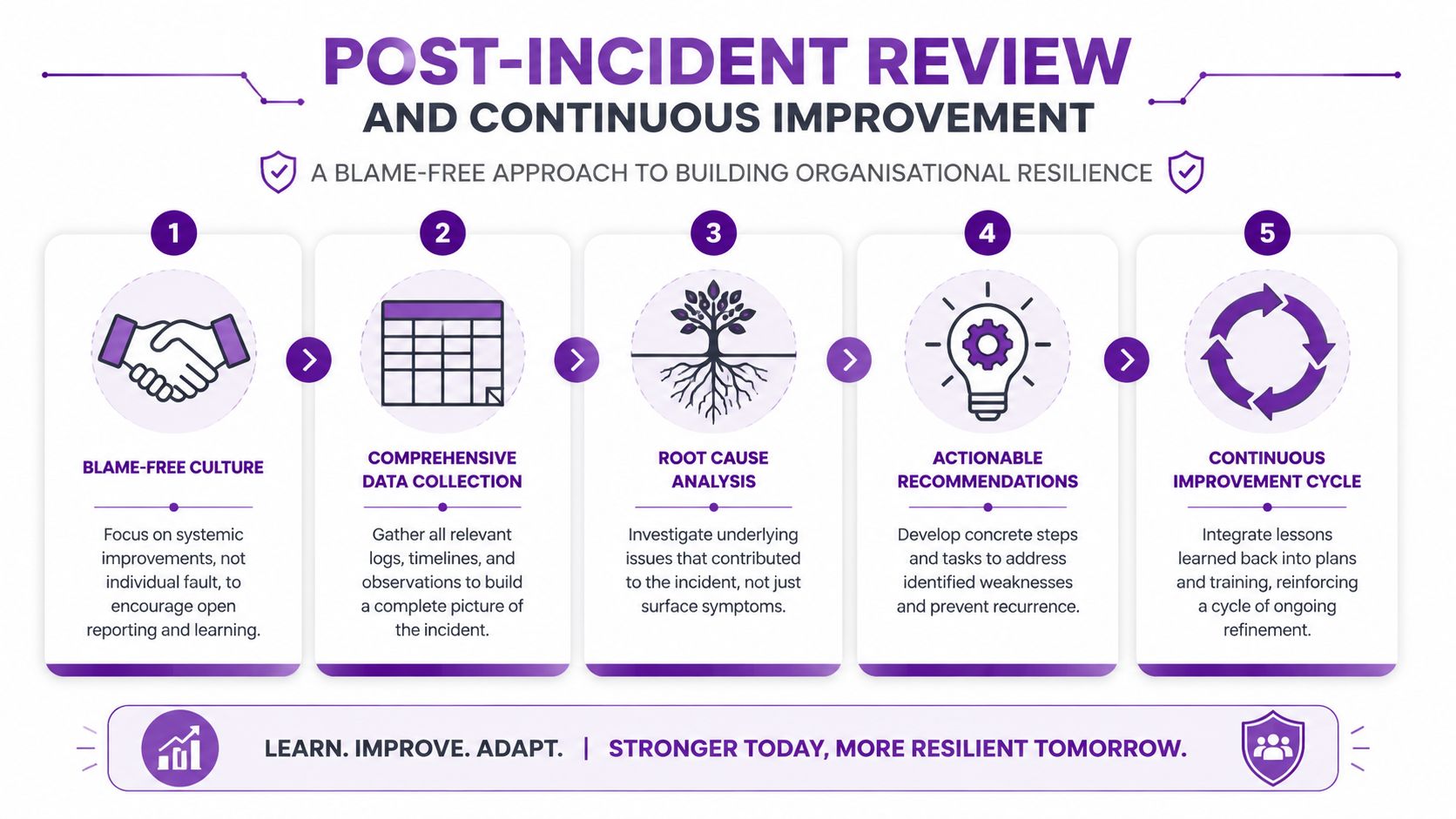
The organisations that recover best are usually not the ones with the longest incident response document. They are the ones that turn each incident into a short list of concrete fixes, assign owners, and check those fixes happen.
Under proposed UK legislation such as the Cyber Security and Resilience Bill changes discussed by WorkNest, organisations may face mandatory 24-hour incident reporting timelines. That puts pressure on SMEs to capture evidence properly, review decisions quickly, and tighten weak points before the next incident. For Microsoft 365 and Azure environments, that often means checking whether the team could get the right logs, make the right account changes, and reach the right people outside office hours.
Keep the review evidence-led and operational
Run the review while the details are still fresh. Leave it too long and people forget timings, side conversations, and why certain calls were made.
A useful post-incident review answers four questions:
- What happened
- What worked
- What slowed us down or failed
- What changes get made now
That review needs to stay focused on actions, controls, timing, and communication. Teams learn very little when the discussion drifts into blame. In practice, the more useful question is usually, “What made the right action harder than it should have been?”
Pull together the timeline, Microsoft 365 audit data, Azure activity logs, ticket notes, Teams messages, supplier communications, and records of business impact. Then compare what the team did against the playbook. If responders had to improvise because permissions were missing, contacts were out of date, or no one could approve a disruptive containment step after 6pm, write that down as a control gap, not a personal failure.
Measure the delays that matter
SMEs do not need a big metrics programme to improve. A small set of operational measures is enough if the numbers lead to decisions:
- Time to detect: How long it took to recognise the issue and confirm it was real.
- Time to contain: How long it took to disable access, isolate devices, block malicious sign-ins, or stop spread.
- Time to escalate: How quickly the right internal leaders, insurer, outsourced IT partner, or cyber adviser were engaged.
- Time to recover: How long it took to return a business service to safe operation.
Use those measures after real incidents and after exercises. Look for patterns. If containment is slow every time, the root cause is usually practical. Missing Global Administrator cover, unclear authority to disable an executive account, weak Conditional Access documentation, or no out-of-hours support path into your Microsoft tenant.
I see this regularly with East Midlands SMEs. The weekday support model looks fine on paper, then an incident lands on a Friday night and the person who can access Microsoft Purview, review sign-in logs, or reset a privileged account is unavailable. If you rely on a managed partner such as F1Group for parts of your Microsoft estate, the review should confirm exactly when they are engaged, what authority they have, and what evidence they are expected to preserve.
Feed lessons into recovery planning
Incident response and recovery need to join up. A team can contain a compromise well and still lose time if restoration priorities, recovery order, or fallback communications are unclear. That is why lessons from incidents should feed into a broader disaster recovery plan for UK SMEs, particularly where Microsoft 365, Azure workloads, and line-of-business systems rely on each other.
Turn each lesson into a tracked action with an owner and a deadline. Update the playbook. Adjust permissions. Add missing supplier contacts. Test the out-of-hours call path. If your documentation is scattered across Word files, tickets, and someone’s notebook, bring it into one maintained record. A practical starting point is an IT disaster recovery plan template that lets you record dependencies, recovery priorities, and changes after each exercise or live incident.
Good plans change. Contact lists need refreshing. Microsoft runbooks need updating when roles, licences, or tooling change. If your business has shifted from on-premise servers to Microsoft 365 and Azure, the review process should reflect that reality rather than a network diagram from five years ago.