
You’ve probably got the signs already. Finance is chasing one spreadsheet, sales is working from Dynamics 365, operations is updating a legacy ERP, and someone in the middle is stitching it together by hand before month-end. That arrangement works until it doesn’t, and in a UK business environment where 50% of businesses reported a cyber security breach in the previous 12 months, rising to 70% of medium-sized businesses in the UK government’s 2024 survey, disconnected systems are no longer just untidy, they’re harder to defend and harder to trust, too. UK Cyber Security Breaches Survey 2024 context
Why Data Integration Matters in Everyday Operations
A typical East Midlands firm usually does not fall over because one system breaks. The strain shows up in the gaps between systems. Accounts sits in one application, customer records live in another, HR keeps its own files, and reporting depends on a weekly export that someone remembers to run on a Friday afternoon.
Data integration matters because those
hand-offsaffect ordinary work. When a sales rep updates a customer address in Dynamics 365 but the billing team still works from an older spreadsheet, the business starts creating duplicate records, sending invoices late, and asking staff to check the same information twice. Each issue looks minor on its own. Together, they slow the day down and make routine decisions harder to trust.
Practical rule: if a process depends on someone copying data by hand, the process is already fragile.
The policy background makes that fragility more serious. UK guidance on linked data and the National Data Strategy has pushed interoperability, access, and governance as the basis for making data usable across services and organisations, and it treats secure data sharing as part of better evidence and better decisions. UK policy on linked data and the National Data Strategy
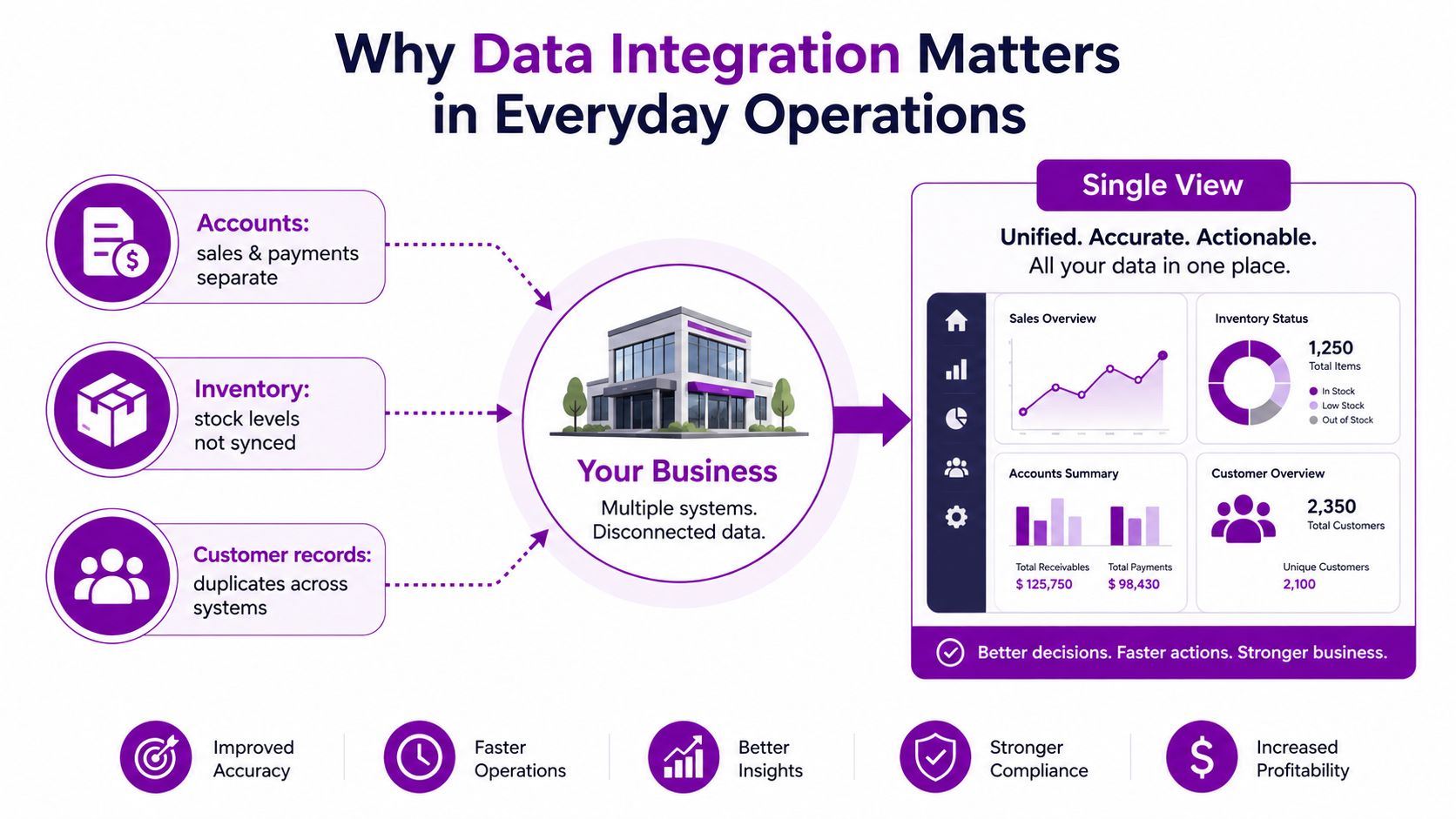
For mid-sized firms, especially those running Microsoft-heavy environments, integration is tied to continuity. Cloud adoption, remote working, and cyber risk have pushed manual data movement out of the safe zone. A business can still survive on disconnected spreadsheets for a while, but it cannot rely on them when reports need to be current, controls need to stand up to audit, and more than one department needs the same answer.
The market direction points the same way. Market size and growth projection shows the sector expanding quickly, which reflects a simple operational reality. Firms are trying to connect ERP, CRM, cloud storage, and analytics into a governed layer instead of juggling disconnected exports, and that shift is just as relevant in a Leicester finance team as it is in a larger London head office.
What Data Integration Actually Means
If you’ve ever waited for five departments to email one briefing, you already understand the logic. One inbox full of half-finished attachments is not a decision pack. A single, organised briefing with the right sections in the right order is.
Data integration works the same way. It takes information from separate sources, shapes it into a common structure, stores it in a central place, and presents a unified view for reporting or operational use. Domo describes this as a five-stage process, identifying source systems, building pipelines, transforming and standardising the data, storing it centrally, and sharing the unified view. Five-stage data integration process
The technical part that matters to leaders
The phrase schema alignment sounds abstract until a CRM field, a finance table, and a warehouse extract all disagree about what “customer name” or “order date” means. Exasol’s guidance is useful here, because it highlights transformation, validation, record-count checks, checksum comparisons, and monitoring for schema drift and latency breaches as part of a proper integration process. Schema alignment, validation, and monitoring controls
That is the difference between moving data and trusting it. A pipeline can connect systems and still produce misleading output if formats don’t match, values get truncated, or a source field changes without anyone noticing. In practice, the business wants three things at once, consistency, traceability, and enough resilience to survive source-system change.
Data that isn’t checked as it moves is just data with a transport layer.
The practical shape of integration in a Microsoft-first estate is usually straightforward. A source connects, data is extracted or streamed, transformation rules clean it up, the result lands in a warehouse or lake, and the business consumes one version of the truth in Power BI, Dynamics 365, or a departmental app. That sequence is repeatable, which is why it scales better than a one-off spreadsheet export.
For a useful parallel on system connections in Microsoft environments, see this guide to API development. The technical naming changes, but the core discipline stays the same, define the source, control the shape of the data, and keep the downstream view stable.
Integration Patterns and Architectures Compared
The hardest mistake is treating all integration jobs as the same job. A nightly finance feed, a near-real-time stock update, and a system-to-system customer sync each have different tolerance for delay, cost, and complexity. The pattern has to match the business need.
Choosing the pattern by business need
ETL still works well when the destination is the point of use and freshness can wait until later. ELT fits cloud warehousing better when you want to land data quickly and transform it inside the warehouse. CDC, streaming, and API-led integration are for cases where delay hurts, especially when operational systems need incremental updates instead of full reloads.
| Pattern | Latency | Typical Use Case | Best Fit |
|---|---|---|---|
| ETL | Batch or scheduled | Finance reporting, structured warehousing | Stable source systems and predictable reporting cycles |
| ELT | Low to moderate | Cloud analytics and warehouse-first design | Teams using modern warehouse tooling |
| Change Data Capture | Near real-time | Sales, stock, and operational sync | Systems where only changes should move |
| Streaming | Near real-time | Event-driven operations and live dashboards | Fast-moving processes with multiple consumers |
| API-led integration | On demand | SaaS-to-SaaS and app-to-app connections | Microsoft-first estates needing controlled service calls |
The trade-off is always the same. Lower latency usually means more operational care, more monitoring, and more design discipline. Batch methods are simpler to run, but they can leave teams looking at stale numbers long after the business has moved on.
For firms already trying to connect CRM and finance, a useful reference point is this overview of integrated CRM and accounting software. It’s a reminder that the choice is rarely “integration or no integration”, it’s usually “which pattern keeps the business honest without creating a maintenance burden”.
API-led integration deserves special mention in Microsoft environments. A good service layer lets Dynamics 365, Power Platform, and custom apps exchange data without hard-wired scripts everywhere, and that’s why disciplined teams often push this work through a defined API strategy rather than direct database access. See API development for the architectural angle.
The Microsoft Integration Toolkit Explained
Microsoft gives mid-sized firms a usable stack, but only if each tool owns a clear job. Problems start when the team uses one product to do four different things, then blames the platform when support gets messy.
Which tool should do what
Azure Data Factory is the orchestration layer when you need scheduled or event-triggered movement across multiple systems. It suits pipeline design, source control, and repeatable ingestion from databases, file stores, and SaaS sources.
Azure Synapse makes sense when the destination is analytics and warehousing. If the business wants a central place to query integrated data at scale, Synapse gives the warehouse-style structure that reporting teams usually need.
Dataverse is the common data model behind Power Platform and Dynamics 365. Use it when the business wants shared app data, cleaner entity relationships, and less duplication across low-code solutions.
Logic Apps fits workflow and system-to-system orchestration. It’s the right layer for approvals, notifications, service calls, and business rules that have to travel between applications with controlled steps.
Power Platform connectors are for fast departmental integration. They work well when a team needs to connect Microsoft 365, Dynamics 365, or third-party services without waiting for a large engineering project.
For firms building automations around approvals and
hand-offs, this related guide on Power Automate workflows shows how orchestration and low-code automation fit together in practice.
Budgeting in pounds, not platform slogans
Microsoft pricing changes often enough that budgeting should stay pragmatic. In UK planning, the right way to think about cost is not “which licence sounds generous”, it’s “which service owns the work, and how much control do we need over runtime, governance, and support”. That usually means separating the integration engine from the analytics layer and the workflow layer, rather than pretending one product can replace all three.
Rule of thumb: use the lightest Microsoft service that can do the job safely, then add control only where the process actually needs it.
Dynamics 365 sits in the middle of this picture because it’s often both a source and a destination. When it’s treated as one node in a governed integration architecture, not the entire architecture, it becomes much easier to support customer 360 reporting, service visibility, and finance
hand-offswithout creating a tangle of point-to-point customisations.
Security, Governance and Regulatory Foundations
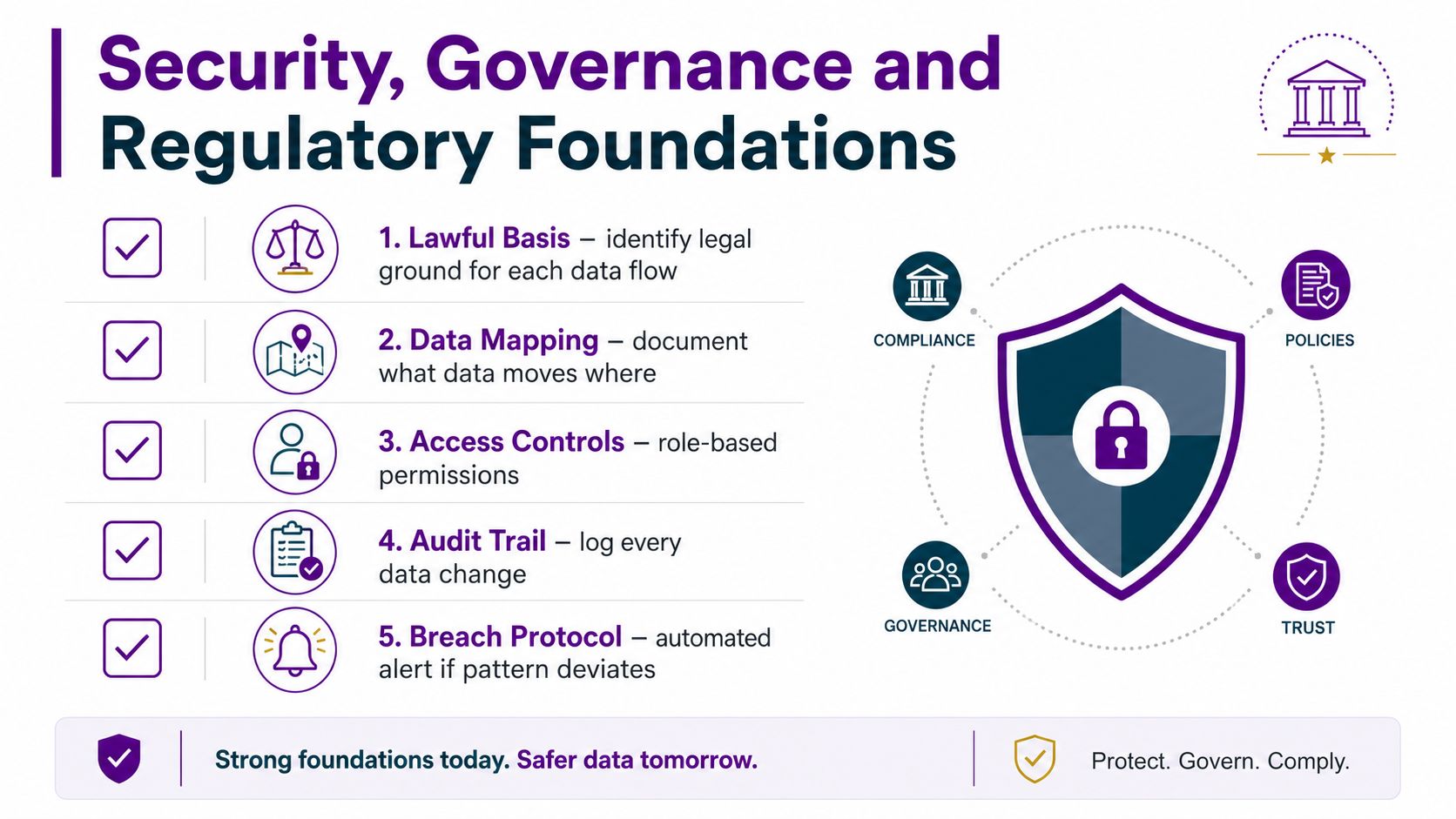
The most expensive integration mistakes are usually legal and governance mistakes, not coding mistakes. A pipeline can work perfectly and still be unusable if the business never established a lawful basis, purpose limitation, retention rule, or controller and processor agreement for the data being combined.
What has to be decided before a build starts
UK guidance on data sharing is clear enough for practical work, the organisation needs to know why the data is being combined, what the lawful basis is, what the minimum necessary dataset looks like, how long it will be kept, and who is responsible for each party in the flow. The UK Information Commissioner’s Office treats this as a governance matter, which is why the business has to design the integration around compliance, not bolt it on afterwards. Data sharing and integration strategy guidance
The Ministry of Justice’s Data Strategy also reinforces the point that better use of data depends on how it is captured, shared, and managed, not just whether the connector works. In the same vein, the National Audit Office has repeatedly highlighted that fragmented data and poor data quality weaken operational efficiency and decision-making across government systems. Public-sector data strategy and audit concerns
That has a direct business implication. If you’re integrating Microsoft 365, Azure, Dynamics 365, Power Platform, and bespoke apps, you need role-based permissions, audit logging, encryption, and metadata capture from the start. Microsoft Purview becomes useful here because labelling and classification only help if the data flow is mapped first and the labels travel with the data.
Identity matching is the awkward bit
The hardest part is often not transporting records, but joining them safely. Customer data, employee data, and service data rarely share one clean identifier, so teams end up using matching rules, pseudonymous keys, or consent-based linkage to avoid exposing more personal data than necessary.
Practical rule: if you can’t explain how two records are matched, you probably can’t defend the integration either.
That’s why lineage matters. When a report is questioned, someone needs to trace the data back to source, transformation, and storage without guessing. Without that trail, trust disappears quickly, and staff go back to shadow spreadsheets.
For broader internal controls, this guide to information governance is a useful companion when the business wants its integration work to remain auditable and policy-aligned.
Planning Checklist and Performance Essentials
A good integration workshop starts with the boring questions, because that’s where most projects get derailed. Who owns the source? Which fields are sensitive? What should happen when a record fails validation? If the team can’t answer those without debate, the build is premature.
A practical planning pass
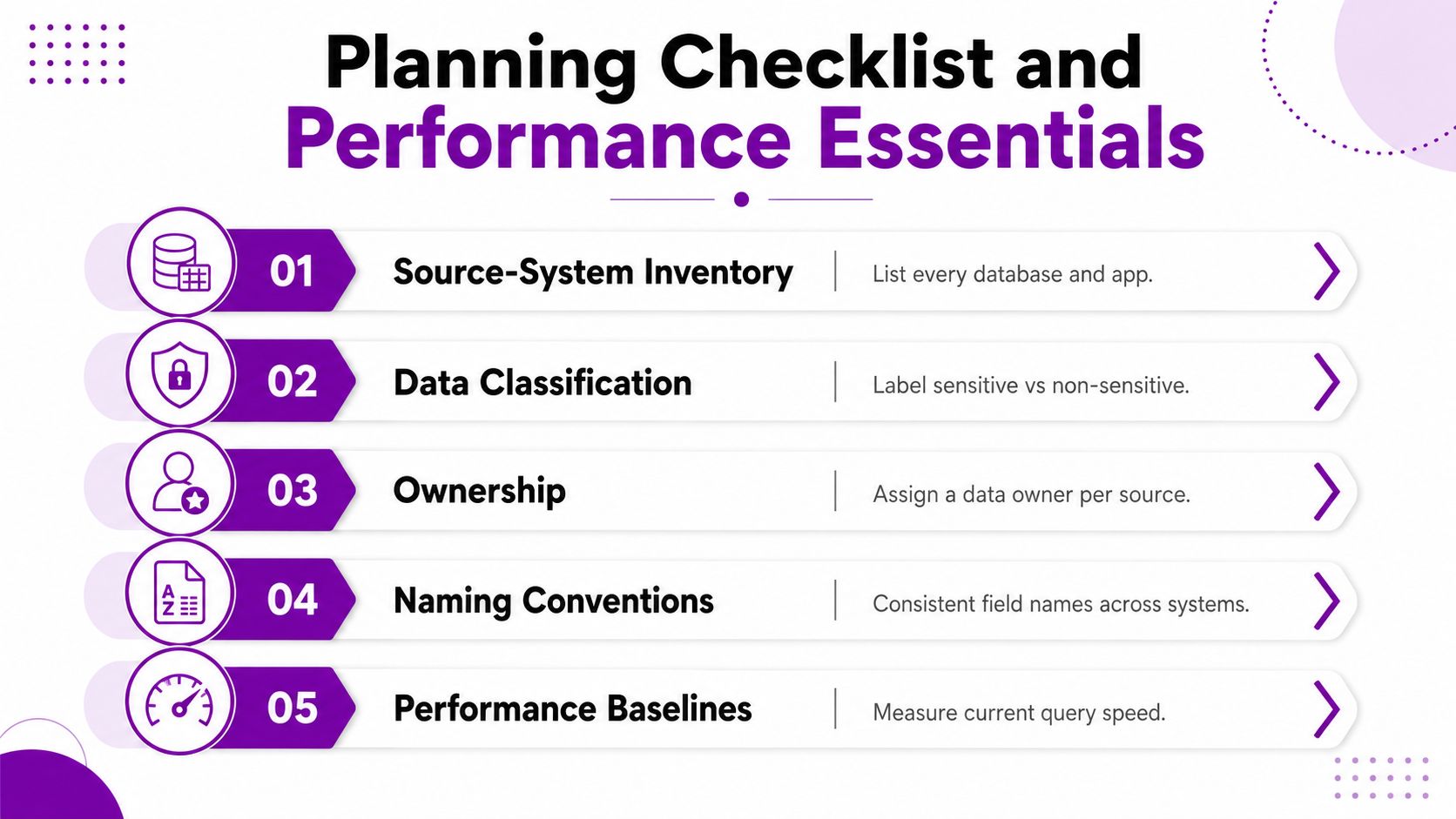
Start with a source-system inventory. List every database, SaaS app, spreadsheet, and file drop the integration will touch, then mark the owner for each one. After that, classify the data into sensitive and non-sensitive categories, because permissions and retention rules depend on that split.
Naming conventions matter more than many organizations expect. If one system uses CustomerID, another uses Cust_ID, and a third uses client_number, the mapping layer gets harder to support over time. Standard naming makes change control easier, especially when the same dataset ends up in Power BI, Dynamics 365, and a warehouse.
What to instrument once it’s live
Use a small set of controls from day one.
- Source-System Inventory: capture every source, including hidden spreadsheet dependencies.
- Data Classification: tag personal, financial, and operational data separately.
- Ownership: assign one accountable owner per source and one owner per pipeline.
- Naming Conventions: keep field names, reference codes, and status values consistent.
- Performance Baselines: measure query speed, load time, and error rates before go-live.
Performance is mostly about avoiding unnecessary strain. Partitioning helps when the dataset is large and regularly queried by date or business unit. Parallelism helps when multiple independent loads can run safely at the same time. Throttling matters when a source system is sensitive and shouldn’t be hit too hard.
If a pipeline fails quietly, the problem isn’t just technical. It means someone trusted a number that never made it through.
For a 50 to 250-person organisation, right-sizing usually means keeping the first release modest, then instrumenting the places where latency, retries, and costs might drift. Caching reference data can also help when the same lookup table is used repeatedly and rarely changes. The goal is not maximum throughput, it’s predictable behaviour that the support team can live with.
Measuring ROI and Real Business Benefits
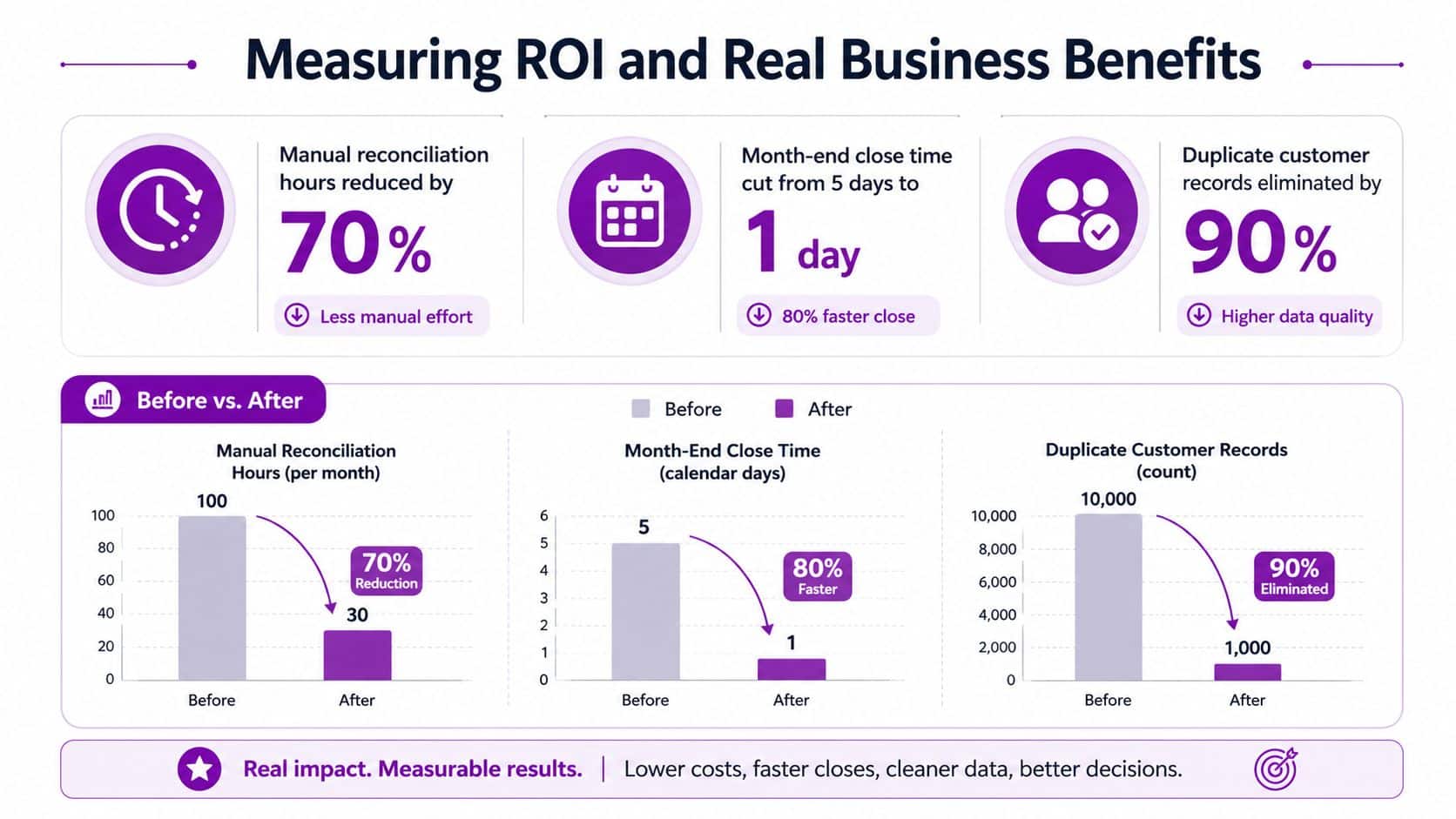
Integration pays off when it removes repeat work that staff have already stopped trusting. The clearest gains usually show up in reconciliation, reporting, and support load, not in flashy dashboards.
What to measure first
Track the hours spent moving data manually, the time it takes to close month-end, the number of duplicate customer records, and the time between a source-system change and a usable report. Those are the numbers a CFO or IT Director will understand quickly, because they map directly to labour, risk, and decision speed.
The business case also has a resilience angle. When systems are integrated with proper controls, it becomes easier to spot bad data early, limit exposure, and reduce the number of places where an error can spread unchecked. That matters in an environment where breaches are common and fragmented systems are harder to defend.
What a solid return looks like
A medium-sized East Midlands business usually sees value first in reduced manual reconciliation and more reliable reporting, then in lower key-person risk because the process no longer depends on one person knowing the spreadsheet chain. Staff satisfaction improves too, because no one enjoys being the human bridge between three systems.
If you need a practical comparison point, modernising a legacy platform often becomes part of the integration programme rather than a separate project. This guide to modernize your legacy platform is useful context when the source system itself is the thing slowing the business down.
Common Pitfalls and a 90-Day Implementation Roadmap
Most integration projects drift for the same reasons. Scope creeps because every department wants one more feed. Ownership stays vague. Data quality gets postponed. Security review arrives too late. Cost management is treated like an afterthought until someone notices the runtime bill.
A workable 90-day plan keeps the first release narrow. Days 1 to 30 are for discovery, source inventory, ownership, and data classification. Days 31 to 60 are for foundation work, connections, governance, test data, and validation rules. Days 61 to 90 are for the first production pipeline, with monitoring, error handling, and a defined support process.
Success is simple to judge. If the business can trace the data, trust the output, and support the pipeline without heroics, the project is on the right track. If not, the scope is still too loose.
For organisations still tied to older systems, the right first move is often to modernise one source while integrating the rest. That’s why the legacy-platform work and integration design should be planned together, not treated as separate budgets.
F1Group helps East Midlands businesses design and support Microsoft-focused integrations across Dynamics 365, Power Platform, Azure, and legacy systems, with governance and monitoring built into the work from the start. If you’re planning a data integration project and want a practical review of the sources, risks, and likely delivery path, visit F1Group and speak with the team about your next step.