
Your Microsoft 365 tenant is live. Azure hosts the workloads that matter. Backups are running. On paper, that sounds safe.
Then a Monday morning incident lands. A ransomware alert locks users out, phones start ringing, orders stall, and finance can’t issue invoices because the process only exists inside one system. IT may be able to restore data, but the business still can’t trade. That’s the gap many East Midlands firms discover too late when they treat backup as the whole answer.
UK SMBs using Microsoft cloud services are especially exposed to this mistake because cloud adoption can create a false sense of resilience. The technology stack looks modern, but resilience isn’t just about recovering files or virtual machines. It’s about keeping customer service, sales, operations, finance, and leadership functioning while recovery work is underway.
Beyond Backups The Real Meaning of Business Resilience
A typical failure starts with a reasonable assumption. The business has Microsoft 365, files are in SharePoint, mail is in Exchange Online, servers are in Azure, and someone has bought a backup product. Management hears “we can restore” and assumes the problem is covered.
It often isn’t.
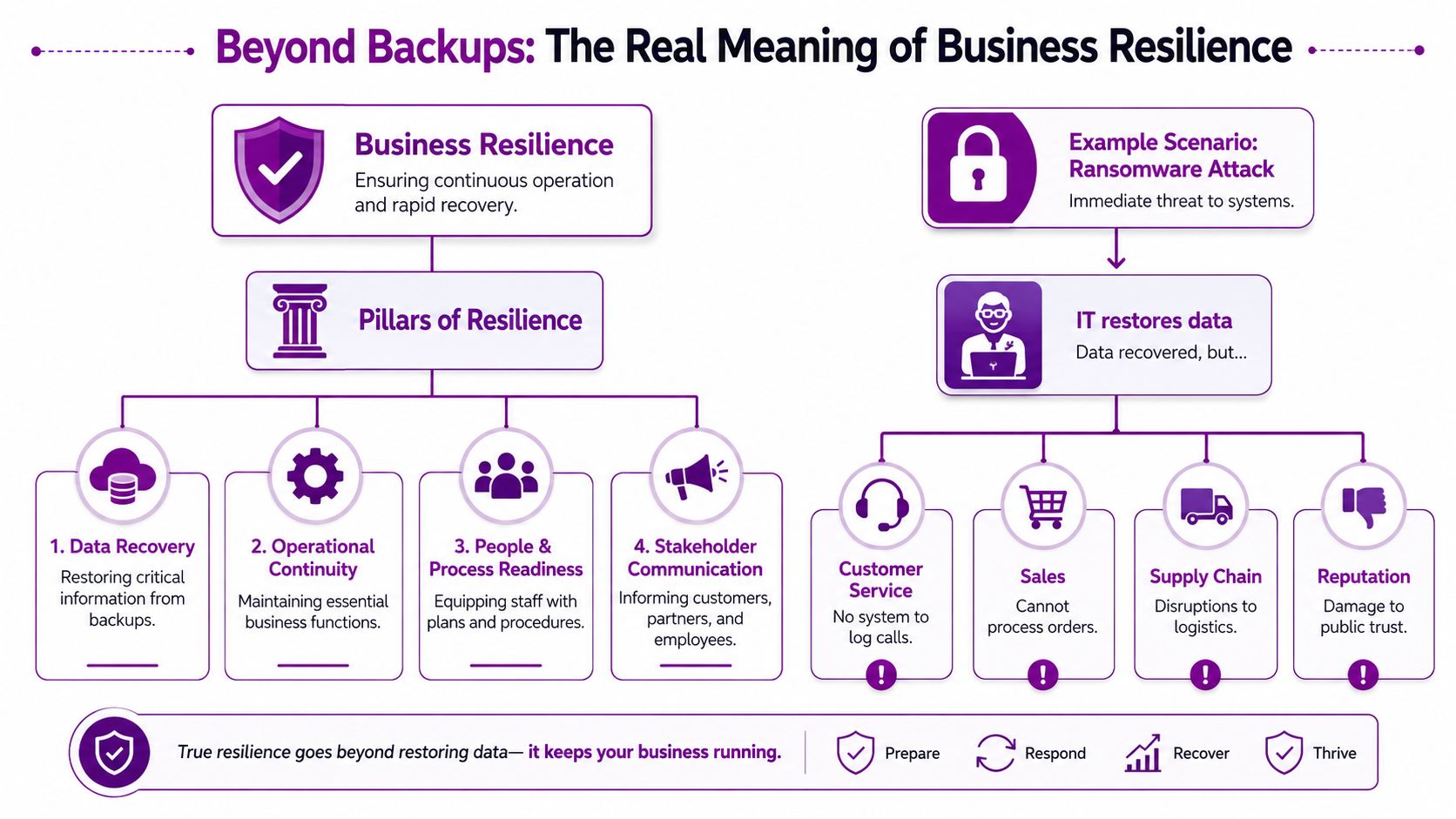
Disaster recovery is the technical discipline. It restores systems, applications, data, and access. Business continuity keeps the company operating while that restoration happens. If your service desk can answer calls on paper, if sales can capture orders in a temporary form, and if finance can hold a manual invoice queue, that’s continuity. If your team can rebuild a server or restore a SharePoint library, that’s disaster recovery.
That distinction matters because many firms still blur the two. Guidance on UK SMEs and continuity planning notes that most UK SMEs conflate BCP and DR, and 80% of UK businesses without continuity plans fail within 18 months of a major incident. The technical restore may succeed, but the operation can still break down.
Practical rule: If the answer to “how do we trade by lunchtime if Microsoft 365 is unavailable?” is silence, you have a continuity problem, not just an IT problem.
For a useful primer on why backup discipline still matters underneath all of this, myhalo data recovery advice is worth a read. Backup is foundational. It just isn’t the whole plan.
A proper BCP disaster recovery approach joins both sides. The technical recovery sequence, the fallback business processes, the decision makers, and the communication plan need to line up. That’s the difference between restoring systems and preserving the business. F1Group has outlined that relationship in its guidance on business continuity and disaster recovery planning.
Laying the Foundation Risk and Impact Analysis
Most weak plans fail before anyone writes a runbook. They fail because nobody has agreed what matters most, how long each function can be down, or how much data loss the business can tolerate.
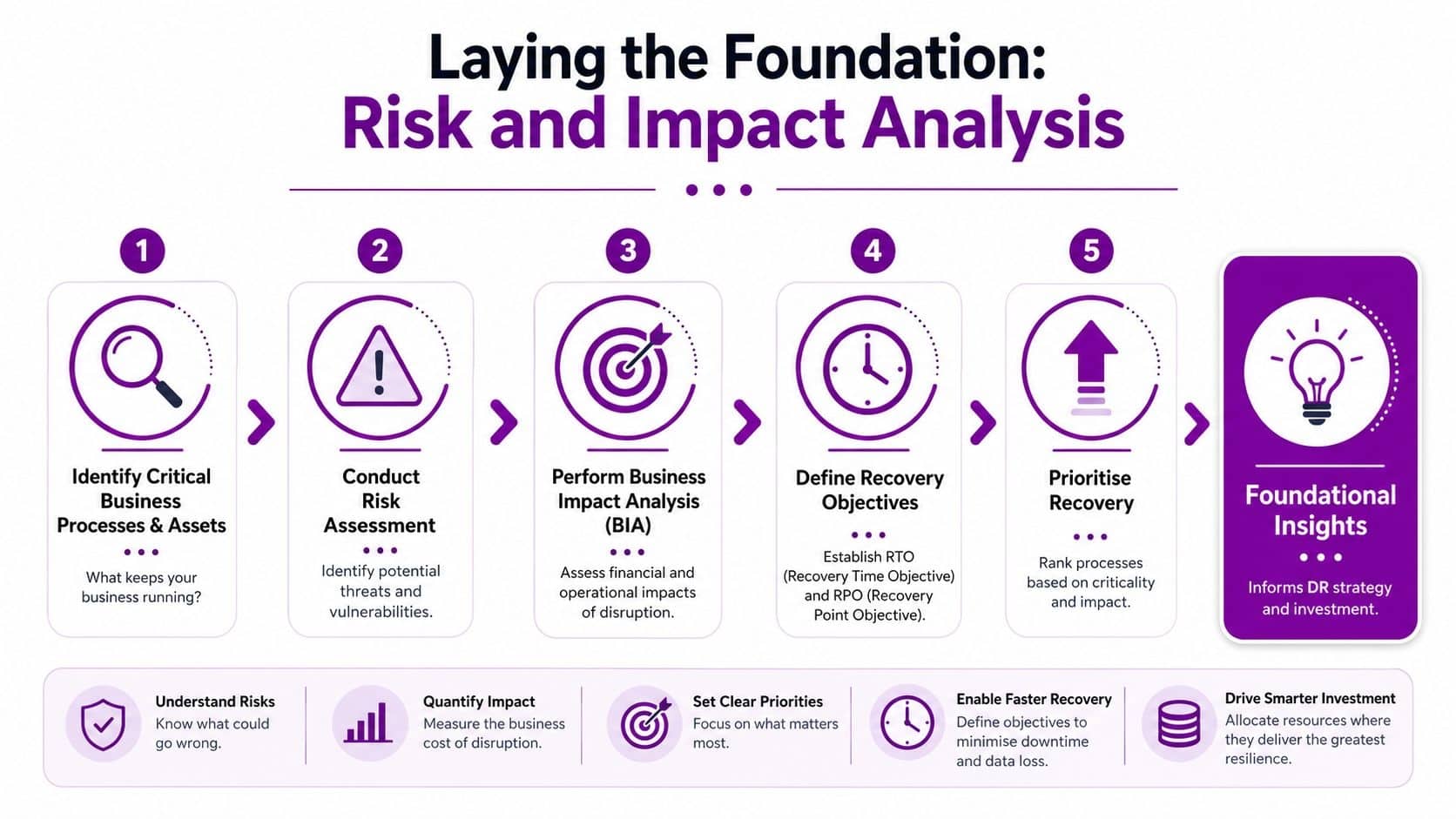
In practice, start with business functions, not servers. An East Midlands manufacturer may depend on order intake, stock visibility, dispatch, purchasing, and finance. A professional services firm may depend on email, document access, telephony, timesheets, and billing. A charity may put donor systems, safeguarding records, and staff communications at the top.
Start with what must keep moving
Use a short workshop with departmental leads and ask blunt questions:
- What stops revenue or service delivery fastest
- What causes contractual or compliance pain if it fails
- What can staff do manually for a day
- What has no manual workaround at all
This produces a business-first list. Only then should IT map the applications, devices, identities, and vendors that support each process.
A recognised UK six-phase methodology includes risk analysis, business impact analysis, recovery strategy, plan development, testing, and programme management. In that framework, the BIA stage requires RTO and RPO to be set for each core function, and the UK study on continuity methodology notes that UK SMEs in the East Midlands often set RTOs under 4 hours for critical IT systems because of their dependence on platforms such as Microsoft 365.
Risk assessment means local reality, not generic threats
A useful risk register for an SMB in Lincoln, Nottingham, Leicester, Newark, Grimsby, or Scunthorpe usually includes a mix of technical and operational issues:
- Cyber incidents such as ransomware, account compromise, and malicious deletion in Microsoft 365
- Connectivity failure where the office internet drops but staff still need access to customers and files
- Power disruption affecting local sites, comms rooms, or edge devices
- Vendor outage where a critical cloud service is unavailable or degraded
- People risk where the one person who knows the recovery steps is absent
Don’t try to score everything with false precision. The value is in ranking plausible disruptions and linking them to business impact.
A BIA should make priorities uncomfortable. If every system is “critical”, the exercise hasn’t been done properly.
Set RTO and RPO in business language
A lot of firms can repeat the acronyms but haven’t decided what they mean commercially.
| Term | Practical meaning | Example question |
|---|---|---|
| RTO | Maximum acceptable downtime | How long can payroll, order entry, or email be unavailable before the business suffers unacceptable harm? |
| RPO | Maximum acceptable data loss | If a restore is needed, how far back can data roll without creating serious rework or liability? |
For Microsoft environments, don't set one RTO for “IT”. Set it by function. Your document repository, ERP integration, telephony, and executive email probably don't share the same urgency. Nor do they rely on the same dependencies.
Prioritise by dependency, not visibility
The noisy systems aren't always the most important. Email gets attention quickly because everyone feels it. But a line-of-business application with fewer users may block order fulfilment or patient services.
A practical BCP disaster recovery plan should produce these outputs:
- A ranked service list tied to business functions
- Named owners for each process and system
- Defined RTO and RPO targets
- Known dependencies including Microsoft 365, Azure, internet access, devices, third-party vendors, and staff roles
- Manual fallback notes for each critical workflow
Without that foundation, the rest of the plan becomes guesswork.
Designing Your Technical Recovery Strategy
Once priorities are clear, the technical design gets easier. Not simple, but easier. You stop buying tools because they sound reassuring and start selecting them because they meet a recovery target.
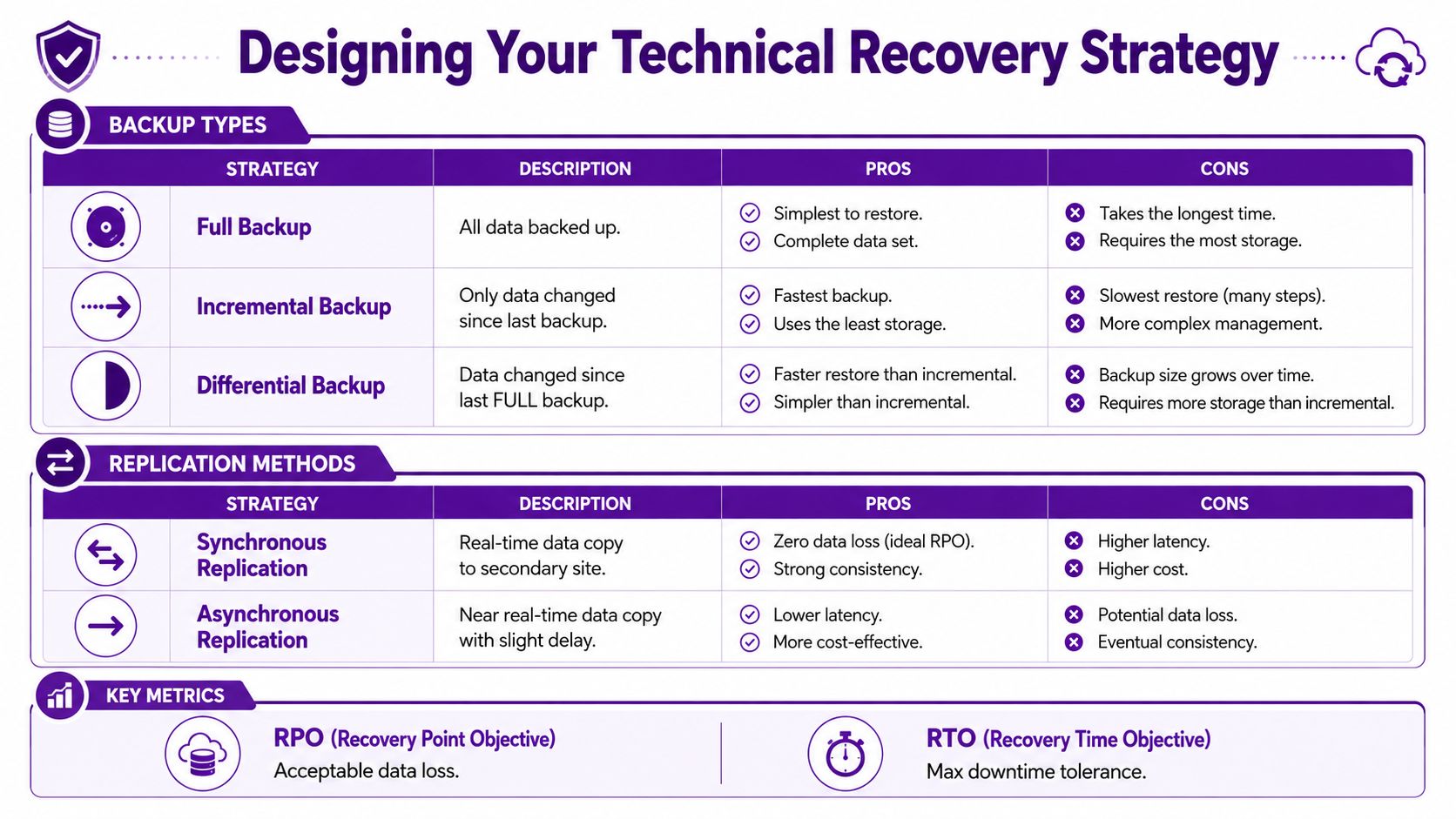
For most East Midlands SMBs, the discussion isn't cloud versus on-premises. It's how to combine Microsoft 365, Azure, and local resilience in a way that avoids a single point of failure.
What each recovery layer is for
Different workloads need different protection methods.
| Recovery need | Usually best suited to | Main trade-off |
|---|---|---|
| Fast file recovery | Backup platform covering servers, endpoints, and Microsoft 365 data | Easy restores, but not full operational continuity on its own |
| Workload failover | Azure-based replication or secondary infrastructure | Faster service recovery, but more planning and cost |
| Microsoft 365 data protection | Dedicated third-party Microsoft 365 backup | Covers deletion, corruption, and retention gaps, but adds another platform to manage |
| Operational continuity | Manual fallback processes plus alternate access methods | Less elegant than automation, but often what keeps trading alive |
The common mistake is treating Microsoft 365 as self-protecting. Microsoft provides resilience in the platform, but that doesn't mean your organisation has a complete backup and recovery posture for every scenario that matters to you, especially accidental deletion, malicious changes, or the need for granular historical restores.
On-premises backup versus Azure-led recovery
For hybrid firms, local backup can still make sense. Large data sets often restore faster from local storage than from a cloud-only design. If you have a local file server, a specialist application, or a branch site with limited bandwidth, on-site recovery may be the fastest path back.
Azure-led recovery is strong where you need infrastructure resilience, virtual machine replication, and geographic separation. It also suits businesses already standardised on Azure networking, identity, and security controls. But cloud recovery isn't magic. It still depends on tested runbooks, access controls, bandwidth, licensing alignment, and people who know the sequence.
Microsoft dependency is a bigger risk than many firms admit
A lot of businesses have standardised on Microsoft 365, Azure, Entra ID, Teams, and Intune. That's understandable. The stack is integrated and productive. The risk appears when that convenience turns into single-vendor dependency.
Research discussed by RUSI highlights the need for vendor review processes to assess preparedness and capacity thresholds, and the same material notes that recent 2025 UK government cyber audits show 62% of East Midlands SMEs use single Microsoft 365/Azure vendors without multi-vendor redundancy. In practice, that means one service family, one identity plane, and one outage pattern.
If your continuity plan depends on one cloud vendor being available for every recovery action, you don't have enough separation.
That doesn't mean every SMB needs a second public cloud. Often the sensible answer is layered protection. For example:
- Independent Microsoft 365 backup stored outside the primary service path
- Offline copies of key contact lists and procedures
- Alternative comms method if Teams and Exchange are both impaired
- Manual trading process for orders, approvals, or service logging
- Secondary vendor review for critical backup or internet services
For firms wanting outside support with that architecture, one option is F1Group's backup and disaster recovery service, which is focused on recovery strategy, protection layers, and operational continuity planning around Microsoft environments.
What works and what doesn't
A few patterns show up repeatedly.
What works
- Separate backup for Microsoft 365 workloads
- Recovery designs tied to real RTO and RPO targets
- Azure replication only where the business justifies it
- Offline access to critical procedures and contacts
- Vendor reviews that ask hard questions about recovery capacity
What doesn't
- Assuming retention equals backup
- One giant “critical systems” label with no ranking
- Replication without tested failover steps
- Plans that require the same unavailable service to coordinate the recovery
- Buying resilience tools without defining who will operate them during an incident
The strongest technical strategy is rarely the most elaborate one. It's the one your team can execute under pressure.
Creating Your Actionable DR Playbooks
A recovery strategy only becomes usable when someone turns it into clear instructions. During a live incident, people don't need theory. They need a short decision path, named responsibilities, and a sequence they can follow without debate.

The numbers behind that urgency are brutal. Business continuity versus disaster recovery analysis states that the average cost of downtime for UK businesses is £14,056 per minute, approximately £1,340,000 per day. That's why vague wording such as “IT will restore services as soon as possible” isn't acceptable in a serious BCP disaster recovery document.
Playbook first, runbook second
These two documents do different jobs.
The DR playbook is for coordination. It should state:
- Who declares the incident
- Who leads the response
- Who approves customer communications
- Who contacts third-party suppliers
- What conditions trigger workarounds or failover
The technical runbook is for execution. It should include:
- The exact recovery order for systems
- Prerequisites and access requirements
- Validation steps after restore or failover
- Clear stop points where escalation is required
If one document tries to do both jobs, it usually becomes too long for managers and too vague for engineers.
Keep instructions brutally clear
Good playbooks remove ambiguity. They don't say “inform stakeholders promptly”. They list the stakeholder groups, the person responsible, the contact method, and the approval path. They don't say “recover finance systems”. They specify the application, the dependency on identity or connectivity, and the user acceptance check.
A simple structure works well:
-
Trigger
What happened, and who can declare this scenario active. -
Immediate containment
Actions to reduce harm before recovery begins. -
Continuity actions
Manual or temporary workarounds for business teams. -
Technical recovery actions
The restoration or failover sequence. -
Validation and sign-off
How you confirm the service is fit for use.
Write for the worst day, not the best engineer. If a competent colleague can't follow the document under stress, rewrite it.
Use workflow tools where they help, not where they complicate
Digital workflow platforms can help structure approvals, track tasks, and document who has completed what. For teams looking at incident coordination, improving efficiency with workflow tools gives a useful view of how structured workflows can support response discipline.
That said, don't make your emergency process dependent on a tool nobody uses in normal operations. If your team lives in Microsoft 365, keep the response artefacts accessible in forms they can use quickly. Printed copies or offline exports for critical roles are still sensible. Elegant software doesn't help if no one can reach it.
How to Meaningfully Test and Maintain Your Plan
Most plans fail in the gap between writing and proving. A polished document gives false confidence because it looks complete. A tested plan reveals where names are out of date, assumptions are wrong, and recovery steps depend on systems that aren't available.
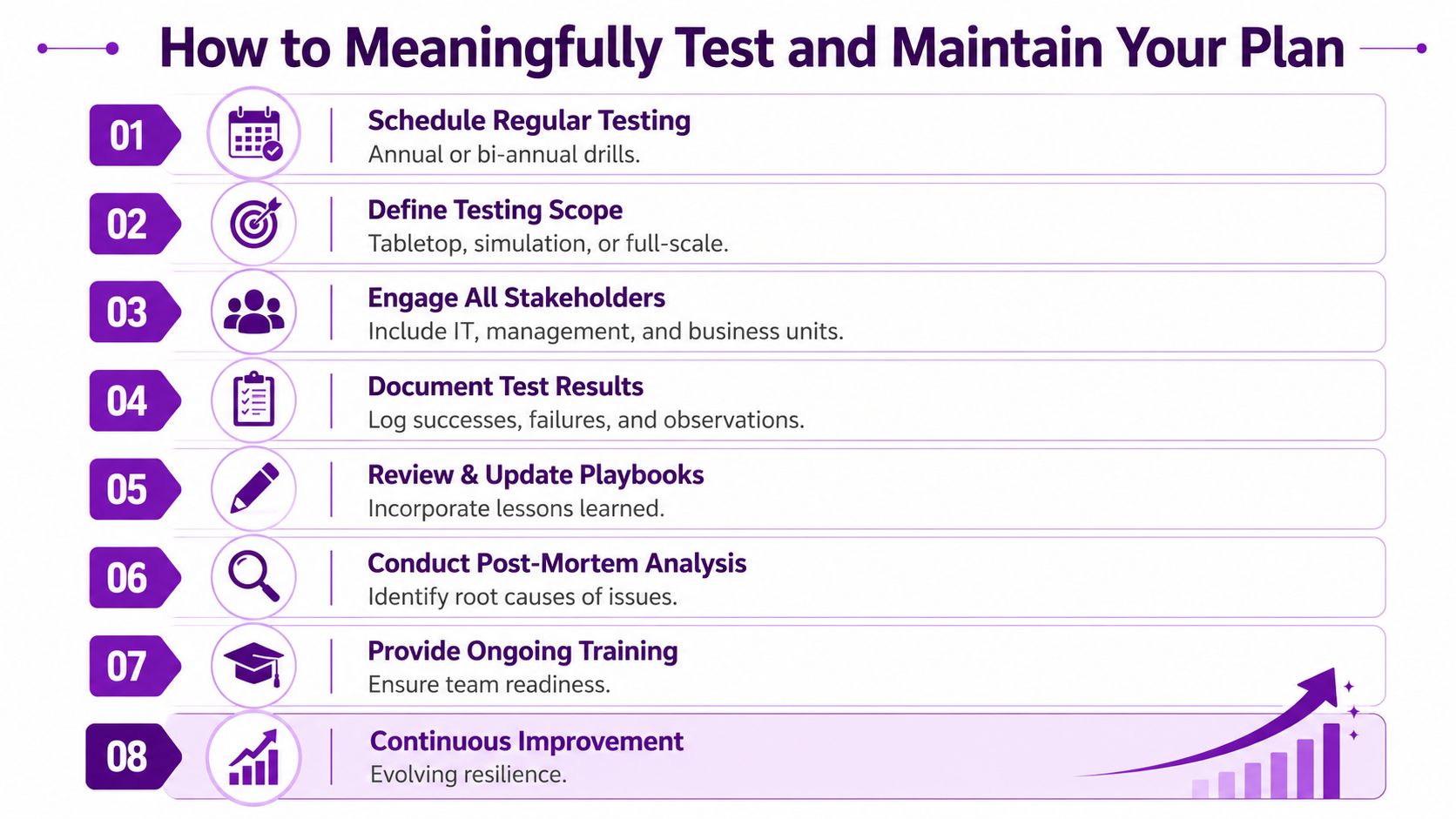
The testing gap is still large. A UK survey on disaster recovery readiness found that only 54% of all organisations have an established company-wide disaster recovery plan, and just one in four companies regularly tests their plan, even though annual testing is essential for data integrity and team readiness.
Start with tabletop exercises
A tabletop exercise is usually the best first move for an SMB. Put leadership, IT, operations, and key business owners in a room and run a realistic scenario. For East Midlands firms using Microsoft cloud services, that scenario might be compromised administrator access, Microsoft 365 outage, or an Azure-hosted line-of-business platform becoming unavailable.
Use a simple script:
- Event begins with a short incident description
- Teams respond based on the written plan
- Facilitator injects issues such as a supplier delay or comms failure
- Observers record confusion, delays, and missing information
The point isn't theatre. It's friction. You want to expose the moments where people say, “who approves that?”, “where is that number?”, or “we assumed sales could work manually, but they can't.”
A useful companion on this point is below.
Build up to stronger tests
Not every exercise needs to be disruptive. A sensible progression looks like this:
| Test type | What it proves | Best use |
|---|---|---|
| Tabletop | Roles, decisions, communications | Early validation of playbooks |
| Technical drill | Restore or failover of a specific service | Proving key runbooks |
| Integrated simulation | Business and IT coordination together | Confirming continuity and recovery alignment |
The formal methodology referenced earlier includes both tabletop exercises and full-scale simulations as part of proper testing discipline. That's the right mindset. Not every firm needs a dramatic full failover every year, but every firm needs evidence that the plan works in more than a document review.
Maintenance is part of the plan
Testing without maintenance turns into repetitive failure. Every test should create action items, owners, and dates for correction.
Keep a short maintenance cycle:
- Review contacts when staff or suppliers change
- Update dependencies when Microsoft 365, Azure, telephony, or business apps change
- Revise workarounds if departments stop using the forms or procedures you documented
- Retest key scenarios after major change projects
The plan should change whenever the business changes. New cloud service, new site, new supplier, new line-of-business system. Update the recovery position too.
A plan that evolves stays useful. A plan filed after sign-off becomes a liability.
When to Engage a Managed DR Partner
Some organisations can build and maintain their own BCP disaster recovery capability. Many can't, or can't do it consistently. The issue usually isn't commitment. It's bandwidth, specialist knowledge, and the discipline needed to keep the plan current as Microsoft 365, Azure, security tooling, and business processes keep changing.
There are a few clear signals that it's time to bring in outside help.
The triggers are usually obvious
You should consider a managed partner when:
- Your environment is hybrid or complex and includes Azure, Microsoft 365, local servers, specialist applications, and third-party integrations
- Your internal IT team is small and already tied up with support, security, projects, and supplier management
- Your continuity plan exists on paper but hasn't been tested in a way that proves business operations can continue
- Your compliance obligations are growing and need documented evidence of planning, controls, and review
The planning gap is still significant for smaller firms. According to a UK survey by Databarracks, only 30% of small businesses in the UK have a Business Continuity Plan in place, compared to 54% of medium-sized businesses. That gap is exactly where unmanaged risk tends to sit.
What a managed approach should add
A managed DR partner shouldn't just sell storage or a backup licence. It should bring structure:
- Risk and impact analysis that reflects the business, not just the infrastructure
- Recovery design aligned to Microsoft cloud dependencies
- Playbooks and runbooks that your teams can use
- Testing discipline with documented outcomes
- Ongoing ownership as systems, staff, and suppliers change
For organisations across the East Midlands, a managed service also helps when local leadership wants one accountable partner rather than a collection of software vendors. If that model fits your business, F1Group provides a managed disaster recovery service for businesses that need planning, protection, recovery processes, and ongoing review around Microsoft-focused environments.
If your business relies on Microsoft 365, Azure, and a small internal team to keep everything running, now is the time to check whether you have a backup strategy or a real resilience strategy. F1Group can help you assess the gap between IT recovery and operational continuity. Phone 0845 855 0000 today or Send us a message.