
Dynamics 365 Sales is Microsoft's cloud-based customer relationship management application for managing the sales process, covering customer relationships, opportunities, activities and deal progression.
Your sales manager may already be chasing updates across spreadsheets, while account managers keep the latest customer conversations in their inboxes. When a director asks which deals will close, someone has to piece together an answer. Dynamics 365 Sales gives that work a shared home, but its value depends on agreeing how your team will use it.
Dynamics 365 Sales Explained in Plain Language
Think of Dynamics 365 Sales as one shared sales notebook. Sellers record customer conversations and potential deals, managers review progress, and directors use the same information to understand the pipeline.
Say an account manager goes on holiday while a customer requests a revised proposal. Instead of searching their inbox, a colleague can open the customer record, find the opportunity and see the latest activity. The aim isn't to record everything indiscriminately. It's to make the information needed for the next decision accessible to the right people.
The opportunity is important: an account represents a customer organisation, a contact represents a person, and an opportunity represents business you might win. Keeping those concepts separate prevents a customer with several potential purchases from becoming one confusing entry.

The sales layer of a wider platform
Sales belongs to the wider Dynamics 365 family, alongside applications such as Customer Service and Human Resources. It can connect with Microsoft 365, Azure and Power Platform rather than operating as an isolated database.
For UK buyers, hosting is part of that conversation. Microsoft's UK cloud announcement states that Dynamics 365 became available from UK data centres in April 2017, following the opening of Microsoft's UK cloud regions in September 2016. Buyers should still confirm their proposed environment's location and arrangements for connected services rather than treating UK availability as a blanket guarantee.
The UK Government's Business Data Survey reported that 77% of UK businesses handled digitised data of any type in 2024. Having digital information, however, isn't the same as having an agreed sales process.
Practical test: Does your team need one shared record of customers and deals rather than separate personal trackers?
Core Capabilities Every Sales Team Should Know
Core capabilities of Dynamics 365 Sales
| Capability | What it does | Typical user |
|---|---|---|
| Lead qualification | Converts a qualified lead into an opportunity and tracks it from first contact | Sales development and account teams |
| Opportunity tracking | Records sales stage, estimated revenue, estimated close date and rating | Sellers and sales managers |
| Quotes and orders | Builds quotes from product and price lists and converts accepted quotes into orders | Sellers and finance teams |
| Relationship analytics | Shows engagement across contacts and accounts | Account managers |
| Sequences | Creates conditional follow-up workflows | Sales operations and sellers |
| Mobile access | Lets field staff update opportunities and activities on site | Field-based sellers |
| Copilot assistance | Drafts emails, prepares meetings, summarises calls and recommends actions | Sellers, with human review |
Microsoft's Sales documentation describes the connected sales cycle, including lead qualification, commercial records, relationship analytics and conditional sequences. Feature access should be checked against the licence and configuration you're considering.
From enquiry to follow-up
A seller usually starts by deciding whether an enquiry merits active pursuit. Lead qualification turns that decision into a working opportunity, rather than allowing every downloaded brochure or unanswered enquiry to inflate the pipeline.
Opportunity tracking then gives the seller somewhere to record the commercial position. Quotes and orders connect that discussion with what the customer is buying. Agree who maintains products and prices, and who checks an accepted order before finance acts on it.
For account managers, relationship analytics can help distinguish an engaged account from one where nobody has spoken to the decision-maker recently. Captiwate's guide to shared account workflows for revenue teams offers useful context when several colleagues work with the same customer.
Assistance without losing ownership
Sequences organise conditional follow-up, such as prompting a seller when a prospect hasn't replied within an agreed interval. Mobile access lets a field seller capture the outcome of a visit while the details are fresh.
Copilot provides another kind of assistance: preparing a draft or summary rather than requiring the seller to start from a blank page. The seller still owns the communication. Check names, commitments, prices and tone before using generated material, particularly where the customer conversation contains exceptions or unresolved questions.
How Deals Move Through the Pipeline
Dynamics 365 Sales models a potential deal as an opportunity. According to Microsoft's opportunity documentation, each opportunity must be associated with one account or contact, while an account or contact can have multiple opportunities.
For a hypothetical £25,000 managed services renewal for a Nottingham-based client, the record might look like this.
Key fields on an opportunity record
| Field | What it holds | Worked example |
|---|---|---|
| Estimated revenue | Expected value of the deal | £25,000 |
| Estimated close date | Expected signing date | Agreed renewal signing date |
| Sales stage | Current position in the pipeline | Proposal |
| Rating | Seller's confidence in the deal | Seller's assessment against agreed rating criteria |
| Customer | Linked account or contact | Nottingham-based client |
| Salesperson | Seller who owns the deal | Assigned account manager |
| Competitor | Rival supplier on the deal | Record the rival if identified |
The relationship between customer records and deals is straightforward.

A practical route from enquiry to order
- Qualify the lead. Confirm that there's a genuine requirement and a sensible reason to pursue it.
- Associate the customer. Link the opportunity to the appropriate account or contact and identify the people involved.
- Progress the opportunity. Move through your agreed stages when the required evidence exists.
- Select products and prices. Record the proposed services and commercial terms.
- Issue the quote. Give the customer a proposal that matches the opportunity.
- Convert acceptance into an order. Preserve the agreed commercial details.
- Hand off for invoicing. Give finance the information it needs through your agreed process or integration.
In the renewal example, the seller records the expected value, then moves from qualified to proposal after confirming scope. When the customer accepts, the quote becomes an order rather than remaining an email attachment nobody else can find.
Attach calls, emails, tasks, notes and supporting documents as the deal develops. Grou's guide to B2B SaaS pipeline progression is useful when considering what evidence should justify a stage change.
Define those stage rules before rollout, so sellers don't interpret the same label differently.
Forecasting, Scoring and Who Acts on Them
A forecast is a reasoned view of likely revenue, not just the total value of every open deal. Microsoft's Premium forecasting documentation explains how forecasting uses targets and pipeline information, with the Premium offering adding AI-driven models based on historical data.
What each role sees in forecasting and what they decide
| Role | What they see | Decision they make |
|---|---|---|
| Seller | Own pipeline against personal targets and pipeline risks | Update stages, close dates and amounts so the forecast stays current |
| Sales manager | Individual performance against quotas | Coach early on stalled or slipping deals |
| Director | Departmental forecast trends across the sales hierarchy | Reallocate resources and sales capacity |
For a seller, the useful question is whether the expected deals are supported by customer activity. A close date entered to satisfy a reporting deadline isn't the same as a date agreed with the buyer.
For a manager, the forecast supports coaching. A proposal that hasn't progressed may need commercial help, access to a decision-maker or a more realistic closing expectation.
The illustration shows how sales information supports different responsibilities.

Predictions need usable history
For a director, departmental trends inform capacity and resource decisions. Premium forecasting provides projections across the sales hierarchy, detailed breakdowns and a prediction column where Opportunity is the roll-up entity.
Predictive lead and opportunity scoring helps prioritise records by their likelihood of progressing. It shouldn't be mistaken for certainty or used to excuse ignoring a seller's knowledge of an account.
A confident-looking prediction isn't a substitute for complete, consistently recorded sales history.
Before relying on scores, check whether won and lost outcomes, stages and dates have been recorded consistently. Teams considering broader reporting can also explore Power BI predictive analytics, while keeping the distinction between historical reporting and prediction clear.
Track forecast accuracy, opportunity ageing, stage conversion, quote-to-order conversion and seller activity completeness. Agree how each measure is calculated and who acts when it deteriorates, rather than creating dashboards without owners.
How Sales Connects to Microsoft 365, Azure and Power Platform
The distinction between a standalone contact database and Dynamics 365 Sales becomes clearer when you consider the surrounding tools. Each connection should solve an identifiable problem, not merely add another integration to maintain.
| Platform | Role alongside Sales | Practical example |
|---|---|---|
| Microsoft 365 | Email, calendars, documents and collaboration | Record an Outlook customer meeting against the relevant deal |
| Azure | Cloud hosting, identity and security foundations | Control sign-in and access to customer information |
| Power Platform | Custom apps, automation and approvals | Route an exceptional discount for approval |
| Power BI | Reporting and analysis | Build a management pipeline dashboard |
With Microsoft 365, sellers can connect customer work with familiar productivity tools. An Outlook meeting can be tracked against the relevant opportunity, subject to the chosen integration and configuration.
Azure provides the wider cloud foundation, while identity services and application security roles help administrators control access. Distinguish sign-in permissions from the records a user can view or edit inside Sales.
Automate a defined process
Power Automate can route a discount request to an authorised manager when it exceeds your agreed threshold. Power Apps can support a customised interface, while Power BI provides reporting across the information managers need to review.
An explanation of what Power Platform is can help buyers separate those responsibilities. For prospecting-specific integration ideas, Pipecorn discusses outbound prospecting workflows for Dynamics CRM.
The connected architecture is shown below.
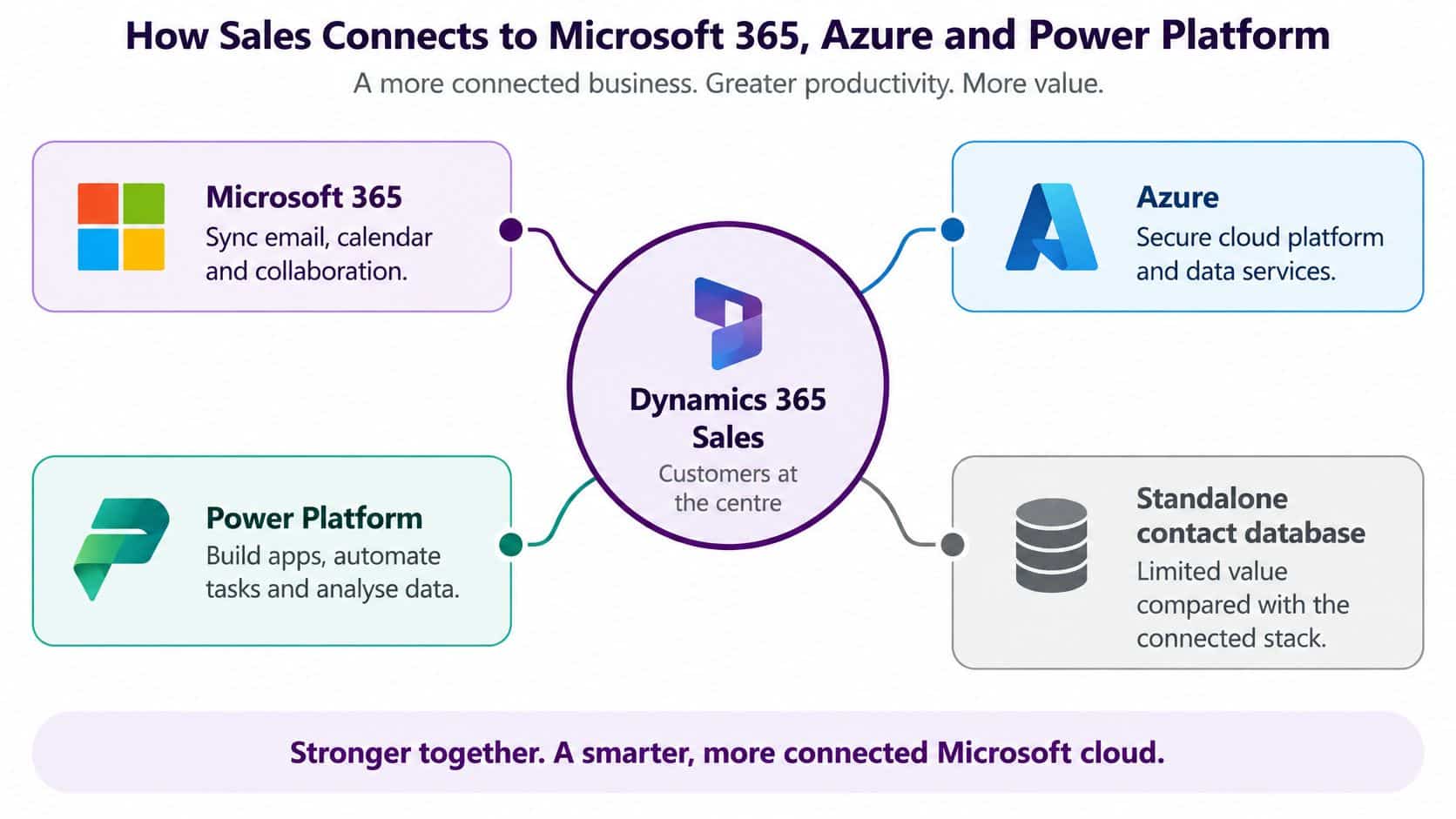
Build selectively: Clean the underlying sales records, then connect the tool that removes the most unnecessary work.
Real Business Scenarios and Common Misconceptions
Consider a hypothetical 120-person engineering firm in the East Midlands. Its sellers track projects in separate spreadsheets, while the sales director spends Monday morning emailing colleagues for updates.
With a shared opportunity record, the review can focus on what changed: which proposal reached the buyer, which project slipped and who needs technical support. The director can ask about commercial decisions rather than reconciling conflicting versions of the pipeline.
The contrast is less about replacing spreadsheets than changing how colleagues share responsibility.

What buyers often misunderstand
- It's just a contact database. Contact storage is only part of the job. The commercial process includes opportunities, quotations, orders and forecasts.
- AI will run sales automatically. Generated outputs need accountable owners. Microsoft's release roadmap lists planned agentic and research capabilities for April to September 2026; those plans aren't proof that every capability is available in your environment.
- Only large enterprises need it. A mid-sized organisation with shared customers and complex handovers may have a clear need. Headcount alone isn't a reliable buying criterion.
The engineering firm still needs somebody to maintain records and challenge unrealistic expectations. Software won't decide whether a buyer is committed or whether a proposed service is commercially sensible.
Give AI a defined operating boundary
Start with assistance that a person can readily check, such as summarising internal records. Treat automated qualification, enrichment and outreach more cautiously because mistakes can affect customers or change which prospects receive attention.
Document who reviews outputs, which customer information may be used, how retention rules apply and what evidence is kept when AI influences prioritisation. Before buying around an announced feature, confirm its availability, licensing and deployment requirements.
For a visual introduction, the following video provides another way to explore the product.
What Dynamics 365 Sales Costs for a Mid-Sized Team
Dynamics 365 Sales licences are priced per user, much like seats in a shared workspace: the more people who need access, the higher the subscription cost. Check the Microsoft UK pricing page for current GBP list prices, billing commitments and applicable tax treatment before building a budget.
Dynamics 365 Sales licence tiers and UK pricing
| Tier | What it adds |
|---|---|
| Dynamics 365 Sales (standard) | Core sales process: leads, opportunities, quotes and orders. |
| Premium offering | Adds AI-driven forecasting and predictive lead and opportunity scoring. |
“Standard” describes the core requirement, not necessarily Microsoft's exact licence name. Ask for a written comparison of the editions being proposed, including their current prices and entitlements.
Budget beyond subscriptions
Monthly licence budget = licensed users × confirmed GBP monthly licence price. Add one-off implementation costs separately.
Count the sellers, managers and directors who need access, and confirm the right licence type for each. Then budget for requirements work, data migration, configuration, integrations and training, as well as ongoing support.
Implementation costs depend on the agreed scope. The proposal should specify who cleans the source data, which records will be migrated and how users will be supported after launch. Partner involvement and remote or on-site delivery can also affect that scope.
Plan Your Rollout and Speak to a Specialist
A team with several sellers, shared accounts and forecasts reported to directors is a strong candidate. A single seller managing a straightforward pipeline in a reliable spreadsheet may not need this level of system yet.
For organisations ready to proceed, a structured CRM implementation approach should establish working rules before adding advanced automation.
- Set mandatory fields and stage-exit criteria. Require information that supports decisions, not unnecessary administration.
- Enable duplicate detection. Agree who resolves duplicate accounts and contacts.
- Define role-based access. Match permissions to responsibilities and sensitive information.
- Check the release roadmap. Validate any AI capability your business case depends on.
- Pilot Copilot with real records. Review a representative sample of outputs before wider use.
Compare potential implementation partners on their ability to understand your sales process, manage migration and support colleagues after deployment. Ask for clear ownership of testing, user training and ongoing changes, whether delivery is remote or on site.
Start with the commercial process you want people to follow. The right configuration should make that process easier to maintain, not conceal uncertainty behind extra fields and dashboards.
F1Group is a Microsoft-focused IT partner offering Dynamics 365 Sales implementation and support alongside Microsoft 365, Azure and Power Platform across Lincoln, Nottingham, Leicester, Scunthorpe, Grimsby and Newark. Its vendor-certified, DBS-checked team can help remotely or on site with your rollout, integrations and ongoing support. Phone 0845 855 0000 today, or send us a message to discuss your sales process, data readiness and licensing requirements.