
A Power Platform CoE is the set of roles, rules, tooling and routines that let an organisation build low-code apps and automations safely at scale.
Your finance team may already have an invoice approval flow, operations may be building an inspection app, and someone in HR may be experimenting with Copilot. The difficulty starts when nobody can explain which solutions matter, what they cost or who fixes them when their creator leaves.
A useful Power Platform Centre of Excellence answers those questions without turning every small improvement into an IT project. Directors should judge it by which apps the organisation chooses to govern, fund, retire or promote, not by whether somebody has installed a governance toolkit.
What a Power Platform CoE Is and Why It Matters
A CoE works like a planning authority for app development: it sets clear boundaries so staff can solve business problems without creating unmanaged risk. Its value is practical. It helps leaders decide which apps to govern, fund, retire or promote, based on their business purpose and the risks they carry.
Suppose an operations manager wants to replace a spreadsheet with a Power Apps inspection form. The CoE can point them to an approved data source, a suitable environment, a reusable template and someone who can answer questions. That gives the team a clear route to a useful solution without asking them to interpret platform policy alone.
The collaboration matters as much as the configuration.
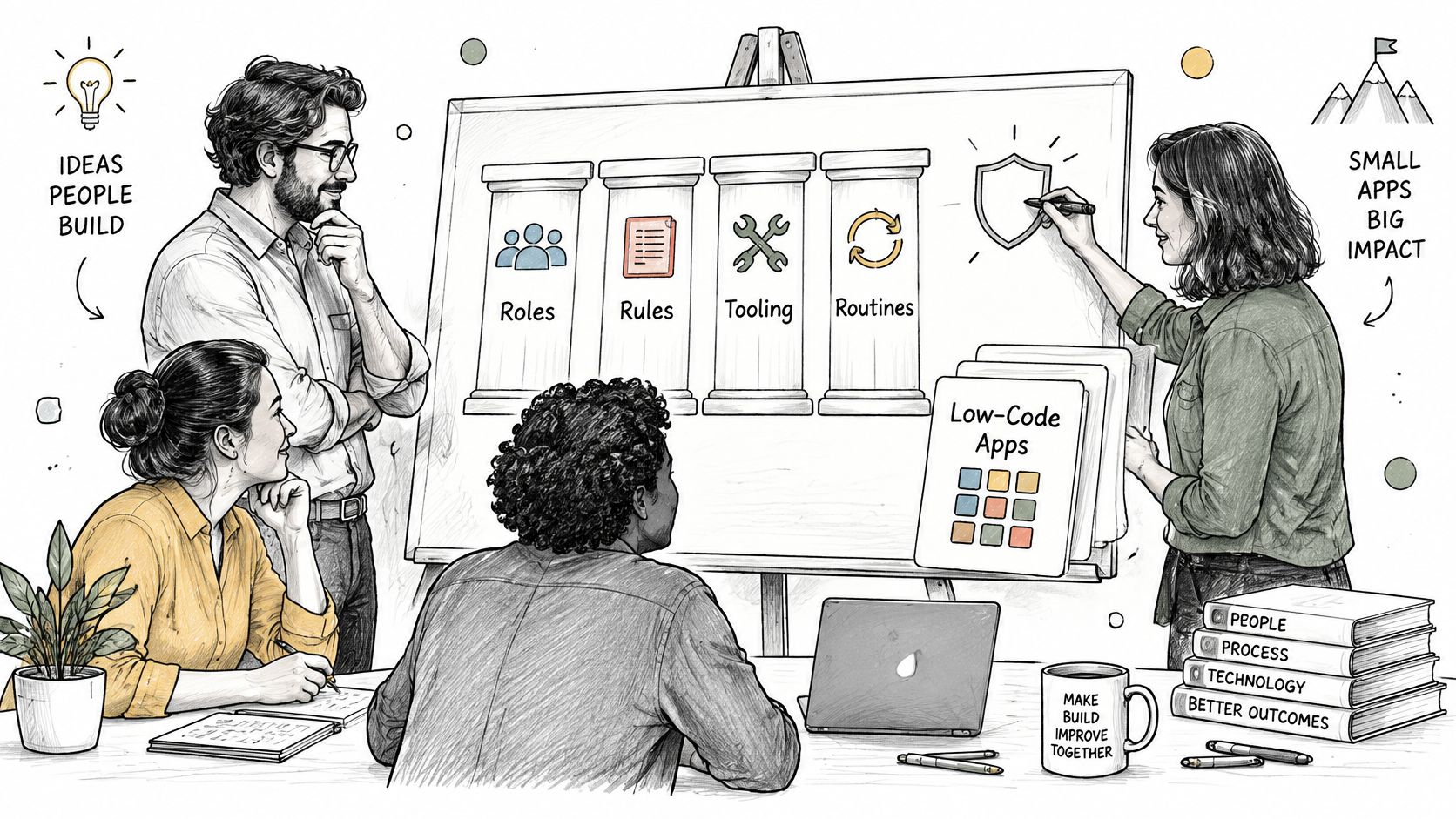
The operating model behind the tools
A practical CoE connects three parts of the organisation:
- People: Those who approve investment, own business processes and support apps.
- Controls: Rules for environments, data policies, access and licensing.
- Enablement: Training, templates and peer support that help staff build useful solutions.
An introduction to Power Platform helps clarify the tools a CoE oversees. Broader app development insights from RapidNative can also inform platform choices. The trade-off is straightforward: tighter controls reduce unmanaged risk, while practical guidance helps staff deliver solutions without creating unnecessary barriers.
Government and public-sector teams often develop communities of practice alongside platform administration. Shared learning and discussion can help makers work within agreed boundaries, while administrators manage the platform. The CoE should fit the organisation's size and risk, rather than copy a larger department's structure.
If staff can create apps or flows but nobody can list them, the organisation needs a way to identify and assess those solutions.
This is ongoing work. Business processes change, employees leave and apps become obsolete. Regular decisions about each solution's value, ownership and risk help keep the platform useful and manageable. A CoE earns its place when those decisions lead to clear action: support the apps that matter, improve those that can deliver more, and stop funding solutions the organisation no longer needs.
Roles and Responsibilities in a Power Platform CoE
Clear ownership matters more than headcount. In a smaller organisation, the same person can hold several roles, provided they know which decisions they're authorised to make.
CoE roles, owners and time commitment
The commitments below are suggested planning allowances, not measured staffing benchmarks.
| Role | Typical owner in an SMB | Core responsibility | Time commitment |
|---|---|---|---|
| Executive sponsor | Finance or operations director | Approves funding and sets risk appetite | Suggested allowance of 1-2 hours a month |
| CoE lead | IT or digital manager | Runs the roadmap and reports value | Part-time, about one day a week in a small firm, as an estimate |
| Platform administrator | IT manager or managed service partner | Manages environments, data policies and licences | Part-time, grows with the estate |
| Business app owner | Head of department | Accountable for each app or flow and its continued need | Named owner per app |
| Citizen developer | Trained staff member | Builds within approved patterns and registers solutions | Within normal duties |
| Security or compliance contact | IT security lead or external adviser | Reviews connectors, data classification and incidents | Recommended quarterly review plus incidents |
The executive sponsor resolves business trade-offs. They decide whether an app deserves funding and whether the organisation accepts its residual risk; they shouldn't approve individual technical settings.
The CoE lead turns those decisions into a delivery roadmap. Their report should explain benefits, unresolved risks and decisions needed, rather than merely listing completed administration tasks.
The platform administrator implements technical boundaries and maintains the service. Keep administrative privileges separate from ordinary maker access, even when the same employee performs both jobs.
Business accountability and technical assurance
The business app owner confirms that the solution still serves a purpose, validates process changes and accepts business testing. Ownership doesn't mean they must understand every expression in a flow.
The citizen developer builds within approved patterns and records what they've created. The security or compliance contact reviews exceptions, sensitive connections and incidents rather than duplicating every administrator decision.
Consider a hypothetical 120-person charity with 15 live apps. The operations director could sponsor the programme, the IT manager could act as CoE lead and administrator, and a managed service partner could provide second-line support. Each live app would still need its own named business owner.
Avoid two predictable failures: an app becoming ownerless when its builder leaves, and an approval chain where three people separately approve the same connector.
The minimum viable arrangement is a sponsor, a lead, an administrator and a mandatory business-owner field in every app record. Assign deputies for critical responsibilities so absence doesn't stop decisions or incident response.
Governance Controls That Protect Business Data
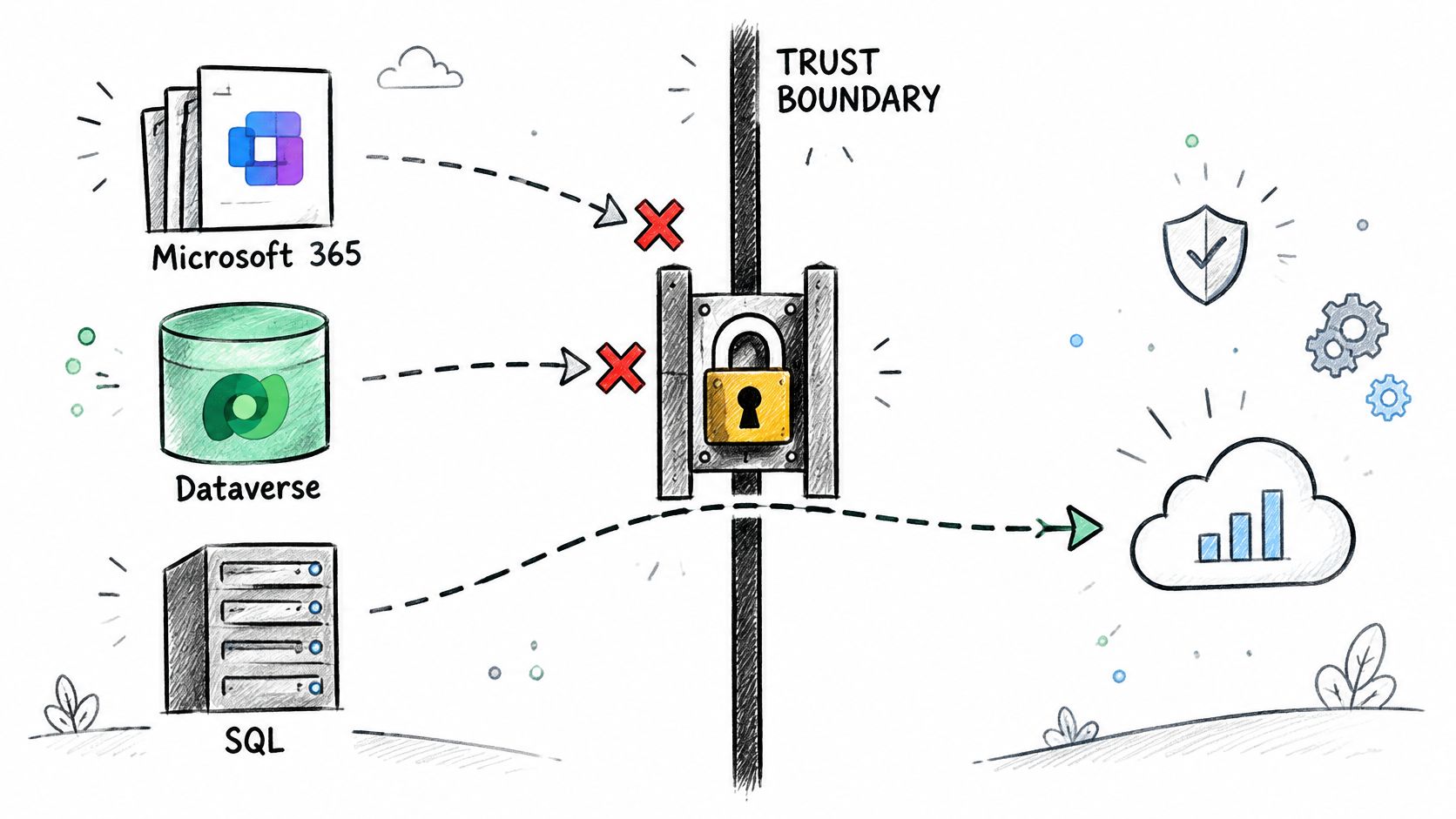
Power Apps and Power Automate can connect Microsoft 365, Dataverse, SQL and external services. An unmanaged connection can therefore move business information across a trust boundary, even when the app itself looks harmless.
A UK Government Digital Marketplace CoE service description identifies information governance, security, audit, change control, documentation, solution mapping and data-loss-prevention policy management as core controls. That listing also describes UK-located service data processing and ISO/IEC 27001-aligned security governance, useful procurement benchmarks rather than blanket assurances about every deployment.
The diagram highlights the boundary your policies need to protect.
Controls that deserve priority
- Classify connectors. Put approved business connectors, non-business connectors and blocked connectors into deliberate policy groups. Review custom connectors separately.
- Separate development, test and production. Makers need room to experiment without changing a live operational process.
- Control sharing through Microsoft Entra security groups. Manage access through maintained groups wherever the resource supports them, rather than accumulating individual permissions.
- Document ownership and production changes. Record who accepts the business risk, who supports the solution and who approved its release.
- Keep audit and change records. Capture administrative changes and significant releases so an investigator can establish what happened.
- Map dependencies. Document connections, underlying data, related flows and recovery arrangements before approving production use.
For example, a finance maker might create a flow that sends invoice information through a personal email connector. Blocking that connector prevents its use; separating business and non-business groups can also prevent prohibited connector combinations. Test the actual policy behaviour rather than assuming a label provides protection.
What these controls don't prove
A permitted connector doesn't make every destination safe. Review connection identities, endpoint configuration, access permissions and the information being transferred.
For teams also commissioning custom mobile software, AppLighter's guidance on shipping privacy-ready Expo and React Native apps provides a useful parallel perspective on privacy-conscious application delivery. Power Platform governance still needs its own platform-specific implementation.
Practical rule: Approve the data movement, not just the app's name or screen design.
Track the percentage of production apps with named owners, approved data policies, documented dependencies, recovery arrangements and review dates. Keep missing controls visible as remediation work, with accountable owners.
The raw number of deployed apps tells a director little about exposure. A smaller estate with undocumented payment workflows can deserve more attention than a larger collection of low-risk forms.
Licensing and Trial Controls at Current UK Prices
UK Power Platform licence prices and limits (ex VAT)
| Licence or route | UK price or limit (ex VAT) | Best fit |
|---|---|---|
| Power Apps Premium | £15.40 per user per month, paid yearly | Production apps and premium connectors |
| Power Apps Premium at volume | £9.20 per user per month, 2,000+ licences | Large buyers only, rarely SMBs |
| Power Apps Developer Plan | Free: 3 developer environments, 2 GB Dataverse, up to 750 flows a month | Building and testing, not production |
| Power Automate Premium | £11.50 per user per month, paid yearly | Cloud flows, attended desktop flows and process mining |
| Power Automate Process | £115.30 per bot per month, paid yearly | Unattended desktop flows serving many internal users |
| Power Automate Hosted Process | £165.30 per bot per month, paid yearly | Hosted bots with the same unattended scope |
| Power Apps trial | 30 days | Convert to a licence or retire before expiry |
| Power Automate trial | 90 days | Convert to a licence or retire before expiry |
| Pay-as-you-go | No upfront commitment, billed through Azure | Variable or seasonal use; reconcile Azure charges monthly |
The Power Apps prices and Developer Plan entitlements above come from Microsoft's UK Power Apps pricing page; the automation prices come from Microsoft's UK Power Automate pricing page. Trial durations and Azure billing arrangements are documented in Microsoft's licensing guidance.
These are UK list prices excluding VAT, not a contractual quotation. Check the applicable agreement, current product terms and workload before committing.
Route the licence before approving the build
Using the listed rates, a hypothetical deployment of ten Power Apps Premium users costs £1,848 annually, calculated as ten multiplied by £15.40 multiplied by twelve. A hypothetical Process bot costs £1,383.60 annually, calculated as £115.30 multiplied by twelve.
Those examples illustrate different licensing units, not interchangeable products. A shared unattended automation shouldn't automatically be priced by counting every employee who benefits from it; equally, a Process licence doesn't remove separate licensing requirements for unrelated apps or services.
For more detailed workload comparisons, use the Power Automate cost guide. Confirm whether execution is attended or unattended and whether hosting is included before comparing totals.
Developer entitlements aren't a production shortcut. Successful experiments need an approved production licensing route, rather than an informal agreement to leave them running.
Give every trial an owner, an expiry review date and a recorded decision to licence or retire it. For pay-as-you-go, reconcile Azure charges against registered solutions each month so variable consumption doesn't become invisible spending.
The licence register should capture:
- Accountability: Business owner, technical owner and budget holder.
- Execution: Attended or unattended operation and users benefiting.
- Entitlements: Premium connectors, Dataverse and process mining requirements.
- Commercial route: Assigned licences, renewal information and relevant Azure billing ownership.
Benefits for SMBs and How to Measure Them
A CoE earns its place when it helps the business decide which apps to govern, fund, retire or promote. For an SMB, the useful question is not how many apps makers build, but whether each one improves a process enough to justify its cost and support burden.
Centrica's reported figures provide scale, not a forecast for smaller organisations. It reported $3.5 million, approximately £2.8 million at roughly £1 to $1.27, from native platform capabilities, and $7.6 million, approximately £6.0 million at roughly £1 to $1.27, from reduced reliance on external suppliers. The figures are described in the Centrica Power Platform account. Its account also describes growth from 2018 to more than 13,000 active users, over 1,100 applications and a maker community of more than 430 employees.
The stated savings components total $11.1 million, approximately £8.7 million, while the account's headline is $10 million, approximately £7.9 million. Treat these as self-reported figures, not a reconciled return-on-investment calculation. The scale is useful context, but it is not a savings promise for an SMB.
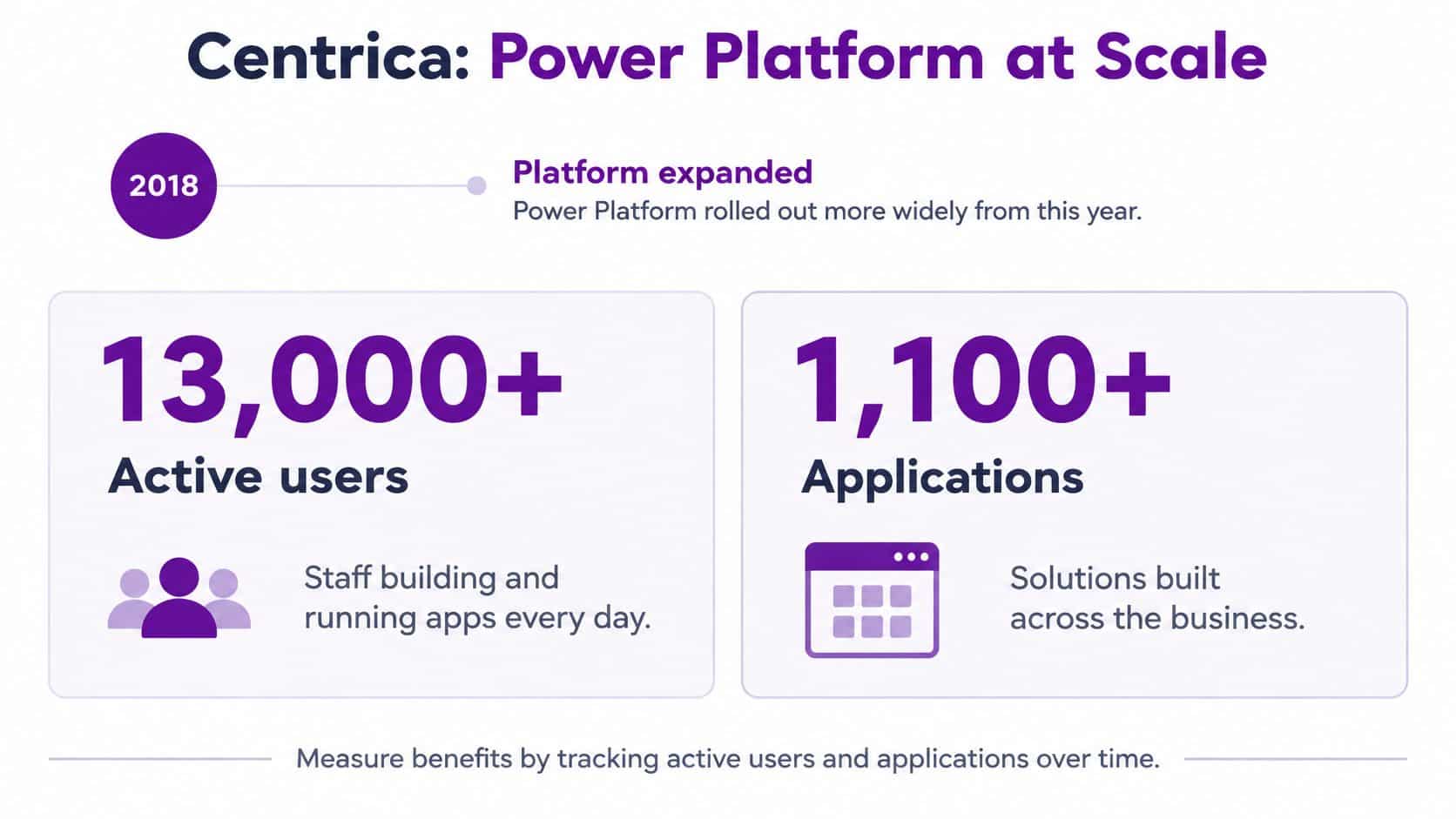
The more transferable lesson is the workflow: identify new development, ask makers to register solutions, assess risk and send higher-risk work for review. That puts governance into delivery, where it can shape an app before it becomes difficult to support.
Measure the benefit you actually receive
Choose measures that help decide what to do with each solution:
- Less duplicated development: Reuse an existing inspection or approval pattern rather than commissioning another.
- Fewer shadow spreadsheets: Offer employees an approved tool that meets the process need.
- Lower supplier spending: Bring suitable internal tools in-house, while retaining bespoke systems that still justify their cost.
- Faster small-app delivery: Track whether reusable patterns reduce repeated configuration and approval work.
- Continuity: Confirm that support arrangements and documentation remain in place when a maker changes role.
Use a scorecard to connect evidence to a business decision.
| Measure | Evidence to capture | Decision it supports |
|---|---|---|
| Hours saved | Previous handling time compared with actual use | Fund further improvement |
| Avoided manual errors | Corrections and rework before and after | Validate process quality |
| Process cycle time | Time from request to completion | Find remaining delays |
| User adoption | Intended users compared with active use | Promote or redesign |
| Support burden | Incidents and maintenance effort | Rebuild or retire |
| Data sensitivity | Information handled and access scope | Set assurance requirements |
| Maker dependency | Documentation and available maintainers | Invest in resilience |
Time saved is not automatically cash saved. Record whether staff use that capacity for additional work, avoid recruitment or reduce paid external effort. Then weigh the benefit against licence costs, ongoing support and the risk tier of the app.
Weak adoption may call for process redesign, not more development. An inexpensive app that creates constant support work may be a candidate for retirement. Use the scorecard to fund apps with clear operational value, improve those with fixable problems and stop supporting those that no longer earn their place.
Using the Admin Centre Before the Starter Kit
Microsoft states that the Power Platform CoE Starter Kit is no longer actively maintained and recommends the admin centre as the primary destination for platform management and governance in its Power Platform adoption guidance. Inventory, usage monitoring, actions, licensing insight and governance capabilities are increasingly available natively.
That changes the starting point for a new CoE. Assess the Power Platform admin centre first, then add only the components your operating model still needs.
CoE capabilities and where to find them now
| Capability | Where it sits now | What your CoE checks |
|---|---|---|
| Inventory of apps, flows and environments | Power Platform admin centre | Owners, environments and connectors in one list |
| Usage monitoring | Power Platform admin centre | Which apps are used and which to retire |
| Licensing insight | Power Platform admin centre | Licence spend against real use |
| Unused and ownerless resources | Admin centre governance prompts | Apps and flows with no active owner |
| Policy impact and showback | Admin centre governance prompts | Effect of policy changes and cost by team |
| Security and capacity planning | Admin centre governance prompts | Exposure and headroom before growth causes problems |
| CoE Starter Kit components | Standalone kit, no longer actively maintained | Only the components still needed after the admin centre check |
Treat this as an assessment checklist, not a promise that every capability appears identically in every tenant. Check feature availability, permissions and applicable licensing in your own environment.
Keep business decisions outside the dashboard
An administrator can identify a flow without an active owner. They still need the relevant department to confirm whether it remains necessary, whether another solution depends on it and who should accept responsibility.
Likewise, low usage doesn't automatically justify deletion. A rarely used emergency process may be important, while an apparently busy flow may be retrying failed actions.
Visibility helps you find the work. It doesn't replace the person authorised to decide what happens next.
For an organisation already running the Starter Kit, start with a component register. Record what each component does, who consumes its outputs and whether the admin centre now meets that need.
Retire duplicate reporting only after comparing results and checking downstream dependencies. Preserve required history, test the replacement and obtain acceptance from the people who use the reports.
Custom extensions need a separate review. A bespoke approval workflow or integration may contain business logic that native inventory doesn't replace. Don't remove the surrounding kit deployment until those dependencies are understood.
If nobody in-house is qualified to assess the changes, obtain administrative support before altering production environments. A rushed clean-up can interrupt the very workflows the CoE exists to protect.
How to Set Up a CoE in Five Phases
For planning purposes, a hypothetical 150-person firm could target a first working operating model in eight to twelve weeks, provided someone owns the work and the estate isn't unusually complex. This is a delivery estimate, not a benchmark or guaranteed implementation period.
The roadmap provides a visual outline; tailor the overlapping workstreams to your available staff.
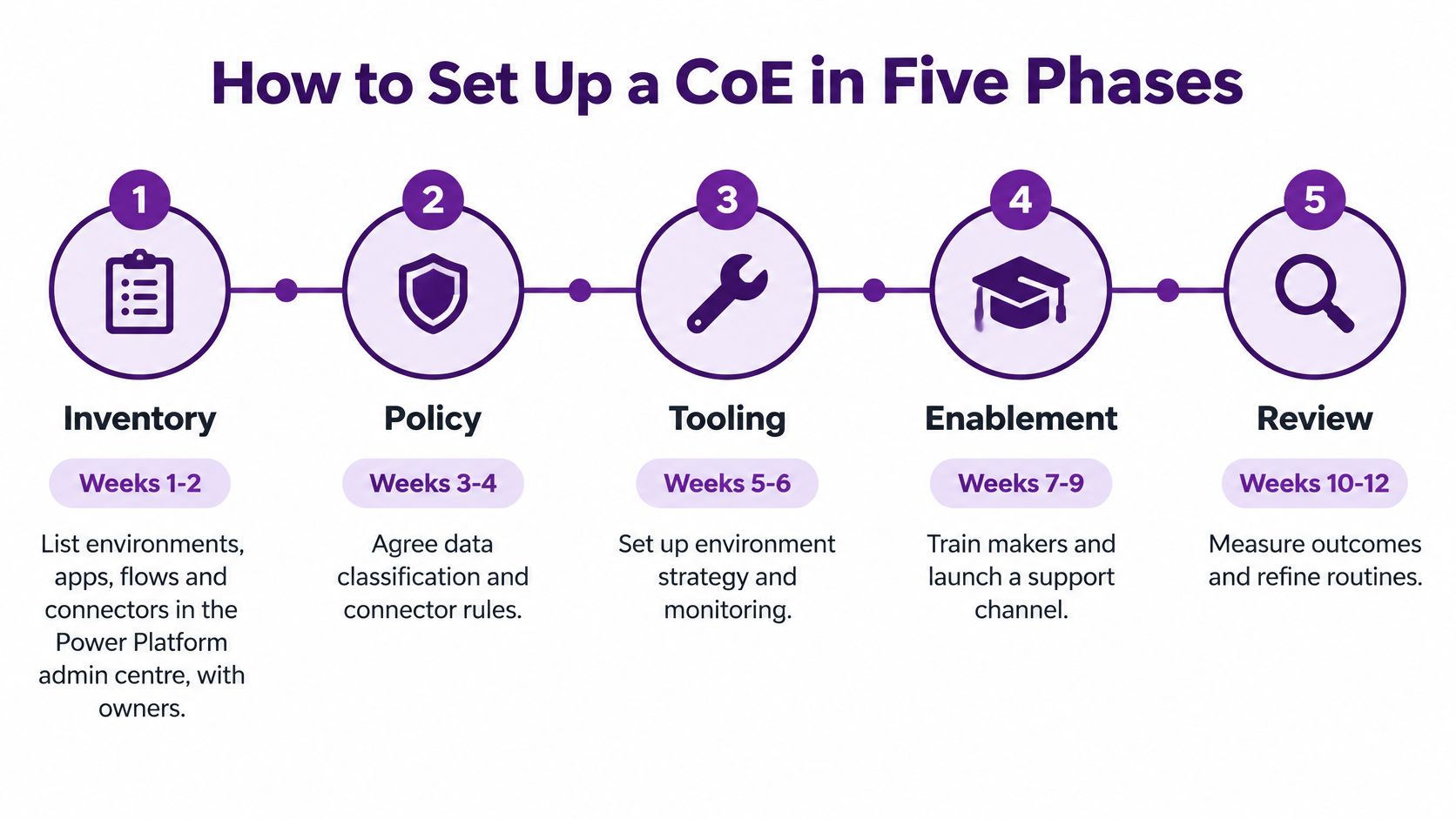
Establish visibility, then improve delivery
Inventory, suggested weeks 1-2. Use the Power Platform admin centre to list environments, apps, flows, connectors and owners. Record existing Starter Kit components too. Add business purpose and criticality, because a technical inventory alone won't tell you what needs attention first.
Form the governance group, suggested week 3. Agree naming standards, environment strategy, support tiers and lifecycle review responsibilities. Give the group authority to resolve exceptions rather than sending every disagreement back to an informal email chain.
Apply controls, suggested weeks 4-6. Configure connector policies, environment boundaries and sharing groups. Test proposed restrictions against existing workloads before enforcement. Assign remediation owners where a business-critical process can't immediately meet the standard.
Enable makers, suggested weeks 6-10. Provide role-based training, approved templates and a discussion channel. Hold a monthly meeting where makers can raise problems and demonstrate reusable approaches. Include release, support and licensing responsibilities, not just app-building techniques.
Measure and review, ongoing. Report the business scorecard quarterly, review applications by risk and maintain a retirement process. Before disabling a solution, check dependencies, notify users, retain required records and define how to reverse the change.
Copy the structure, not an old tooling default
The University of Kent CoE implementation describes a university with more than 3,000 staff, hundreds of manual processes and no established in-house Power Platform capability. The implementation installed Microsoft's CoE Starter Kit and introduced adoption milestones across Power Apps, Power Automate, Power BI and Power Virtual Agents.
Its enduring lesson is the combination of visibility, governance and structured adoption. For a new implementation, preserve that operating structure while assessing today's native administration capabilities before selecting additional tooling.
This video provides another resource for discussing the implementation approach with your team.
Don't wait for a perfect inventory before addressing an obvious critical dependency. If a payment flow relies on a departing employee's connection, resolve that exposure while the broader programme continues.
Equally, don't declare completion when monitoring works. A functioning CoE combines technical telemetry, training, business engagement and an adoption roadmap. The recurring decisions matter more than the launch date.
Govern AI-Assisted Makers and Choose a Proportionate Model
A Power Platform CoE should help leaders decide which apps to govern, fund, retire or promote. That requires enough review to manage risk without sending staff back to shadow spreadsheets, and governance that produces decisions rather than dashboards no one uses.
Unreviewed AI-assisted development creates a separate failure point. Generated flows can look plausible while containing faulty logic, so reviewers need to check what the solution does, what data it uses and who remains accountable.
Hitachi Solutions' low-code and AI guidance reports that 69% of technical leaders are concerned about governance in low-code and AI-assisted coding, while 86% believe additional training is needed. These findings concern that research population, not every UK organisation.
AI assistance changes what reviewers must inspect, not just how quickly makers can build.

Make assurance part of the maker journey
- Approve the use case. Define the task, intended users and unacceptable consequences.
- Classify the data. Set out what information the solution may access or disclose.
- Require human review. Inspect generated apps, prompts, flows, connectors and permissions.
- Collect test evidence. Test invalid inputs, failures and recovery, not only successful demonstrations.
- Assign ownership and logging. Make actions traceable and operational responsibility clear.
- Plan escalation and monitoring. Tell users how to report problems and who can suspend the solution.
Separate model errors, such as inaccurate or unfair output, from conventional defects such as incorrect conditions, duplicate records or failed authentication. Each needs different tests and corrective action.
Bring in a professional developer for complex integration, transaction handling or recovery logic. Involve a security specialist when sensitive information, unclear access boundaries or external data transfer creates material exposure.
Preconfigured controls reduce some infrastructure risks. They do not establish that a generated workflow is correct, fair or suitable for personal information. A practical AI governance framework should connect release decisions to wider organisational accountability.
Match scrutiny to consequences
Set risk tiers with clear review expectations:
- Low risk: Single-user tools without sensitive data, with light registration and an approved pattern.
- Medium risk: Shared team data and departmental workflows, with documented testing and quarterly review.
- High risk: Customer or personal data, finance or production processes, with full review and a named accountable owner.
Agree the tiers with the sponsor before choosing in-house or managed support. Review the portfolio quarterly, then decide which solutions to fund, promote or retire. Remove unused solutions through a controlled process rather than leaving them available indefinitely.
F1Group provides Power Platform setup and managed governance for organisations across Lincoln, Nottingham, Leicester, Scunthorpe, Grimsby and Newark. Its team can help establish risk tiers, review licensing and turn an app inventory into a practical investment and retirement plan. Phone 0845 855 0000, or send a message to discuss a Power Platform CoE.