
If you're running a growing business, this probably feels familiar. Files live in SharePoint, old documents still sit on a shared drive, contracts are buried in email, staff swap information in Teams, and somebody always has a critical spreadsheet on a laptop desktop. When a customer asks for their data, or a manager needs the latest signed version of an agreement, people start searching in five places at once.
That isn't just untidy. It creates legal risk, slows decisions, and makes Microsoft 365 feel harder than it should. Most organisations don't have a technology problem first. They have an information governance problem.
For UK SMBs, information governance is the discipline that turns scattered content into something manageable. Done properly, it helps you decide what information you have, who should access it, how long to keep it, when to delete it, and how to prove you've handled it properly. If you already use Microsoft 365, many of the controls you need are either already available or close at hand. The challenge is knowing how to apply them in a sensible order.
Taming Your Data Overload
Data sprawl usually starts with good intentions. Teams need to move quickly, so they create a new Team, a new folder, a private chat, a spreadsheet copy, or a quick workaround. After a while, nobody's fully sure which location is the system of record.
That's where pressure starts to build. A finance lead wants retention handled properly. HR needs tighter access to employee records. Sales wants easy collaboration without exposing confidential documents. Directors want assurance that if a Subject Access Request arrives, the business can respond without a fire drill.
What the mess usually looks like
In smaller and mid-sized firms, the pattern is often the same:
- Duplicate information everywhere. The same file exists in email, a local download folder, a Teams chat, and a SharePoint library.
- Access that grew by accident. Staff changed roles, but permissions stayed in place.
- Retention by neglect. Information is kept because nobody owns deletion.
- No common labels. Staff know a document is sensitive, but the system doesn't.
None of this means the business is careless. It usually means growth has outpaced structure.
Practical rule: If your team can't quickly answer where a record lives, who owns it, and how long it should exist, governance needs attention before more tools are added.
Information governance gives you a way to restore control without trying to lock everything down. The aim isn't bureaucracy. The aim is a set of practical rules that staff can follow, supported by Microsoft 365 controls that enforce those rules consistently.
For organisations across the East Midlands and beyond, that usually means starting with a realistic plan. Identify the highest-risk information first. Set clear rules for classification, retention, access, and sharing. Then map those decisions into the Microsoft tools your staff already use every day.
What Information Governance Actually Is
Information governance is the set of decisions, rules, and controls that determine how your business handles information from creation to disposal. It covers email, documents, Teams messages, scanned forms, contracts, spreadsheets, paper records, and archived material. In practice, it answers five operational questions. What is this information, who owns it, who can access it, how long should we keep it, and what do we need to prove about it later?
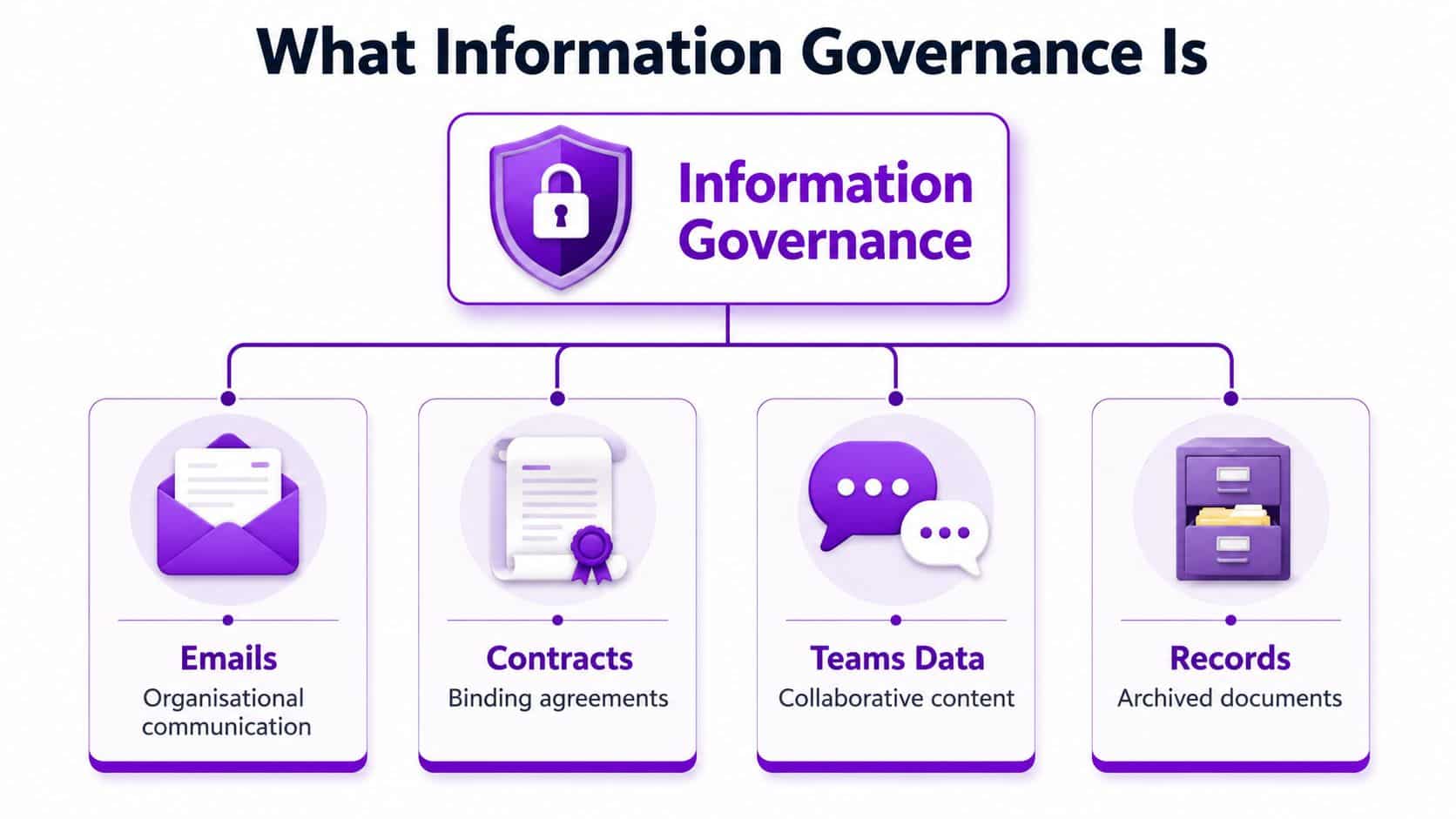
For a UK SMB, that definition matters because governance is not a policy document that sits on a shared drive. It becomes real when those rules are built into the Microsoft 365 tools staff use every day. A retention label in Purview, a sensitivity label in Word or Outlook, access rules in SharePoint and Teams, and audit logs in Microsoft 365 all turn governance from good intentions into repeatable control.
Think bigger than data governance
Information governance and data governance overlap, but they solve different problems.
Data governance usually focuses on the quality, consistency, ownership, and use of data inside business systems. That matters for CRM records, finance platforms, reporting models, and analytics.
Information governance covers a wider operational and compliance scope.
| Focus | Information governance | Data governance |
|---|---|---|
| Scope | All information formats | Mostly structured and digital data |
| Main concern | Lifecycle, compliance, access, retention, accountability | Accuracy, consistency, usability |
| Typical examples | Emails, contracts, Teams chats, scanned forms, records | Customer tables, finance data, reporting datasets |
A finance report can be accurate and still create risk if the supporting emails were shared too widely, the approval record cannot be found, or the underlying files were kept for the wrong period. That is the distinction clients usually feel first.
What it looks like in practice
In delivery terms, information governance is the operating model behind your Microsoft 365 estate. It sets the rules, and the platform enforces them where possible.
That usually includes:
- Classification. Defining information types such as public, internal, confidential, or client-sensitive
- Retention. Setting how long records, emails, and files stay in the system before review or deletion
- Access control. Limiting who can view, edit, download, or share information
- Sharing rules. Deciding what can be sent externally and under what conditions
- Auditability. Keeping evidence of who accessed, changed, deleted, or shared important information
The trade-off is straightforward. Tighter control reduces risk, but too much friction slows staff down and drives workarounds. Good governance finds the point where security, compliance, and day-to-day usability still work together.
When we set this up well, staff do not need to interpret policy from scratch each time they save a file or share a document. The system guides the decision. That is why information governance matters beyond compliance. It gives leadership more confidence in the information the business relies on, and it gives IT a clear plan for configuring Microsoft 365 in a way that is supportable.
Meeting Your UK Legal and Compliance Duties
A common trigger for governance work is a simple client request that turns into a legal problem. A customer asks for the data you hold on them, a contract file is missing its approval trail, or an old HR document is still sitting in SharePoint years after it should have been deleted. At that point, information governance stops looking theoretical.
In a UK business, the main pressure usually comes from a mix of data protection law, privacy expectations, contractual obligations, and sector-specific rules. The legal duty is not to own perfect policy documents. It is to handle information in a controlled, defensible way and to prove that your controls operate.
The older Data Protection Act 1998 helped establish that shift from informal handling to formal accountability. Today, most organisations will be working against newer obligations and regulator expectations as well, but the practical message has stayed consistent. Personal data needs a lawful basis, access needs control, retention periods need definition, and security needs evidence.

For most UK SMBs, these duties show up in five operational questions:
- What personal or sensitive information do we hold?
- Who can access it, and is that access still justified?
- How long do we keep it?
- Can we show what happened to it if challenged?
- Are the controls built into the systems staff already use?
That last point matters more than many firms expect. If governance lives only in a PDF policy, staff will improvise. If it is built into Microsoft 365, with retention labels, sensitivity labels, conditional access, audit logs, and controlled sharing, the business has a better chance of meeting its duties without constant manual policing.
The public sector is a useful reference point here, but the lesson is not the headline number of organisations assessed. It is the assessment model itself. The NHS Data Security and Protection Toolkit sets out a formal way for organisations to evidence data security and information handling against defined standards, and the NHS publishes the toolkit directly through its own service at the Data Security and Protection Toolkit. That is a stronger reference point than relying on a general review article to support cycle-specific figures.
In practice, UK SMBs do not need to copy an NHS framework line for line. They do need the same discipline underneath it. Named owners. Clear retention rules. Access based on role. A record of decisions. Controls that can be tested.
I usually advise clients to translate each legal duty into one Microsoft 365 control decision. If the duty is data minimisation, decide where personal data should and should not be stored. If the duty is retention, define label policies in Purview. If the duty is confidentiality, use sensitivity labels and restrict external sharing. If the duty is accountability, make sure audit logging and alerting are switched on and reviewed.
That is the fundamental link between compliance and implementation. UK legal duties set the standard. Your Microsoft 365 and Azure configuration is how you meet it day to day.
Building Your Information Governance Framework
A framework earns its keep when a manager can answer three questions without hunting through five policies. What data do we hold, who is allowed to use it, and what happens to it over time? If those answers vary by department, governance is still theoretical.
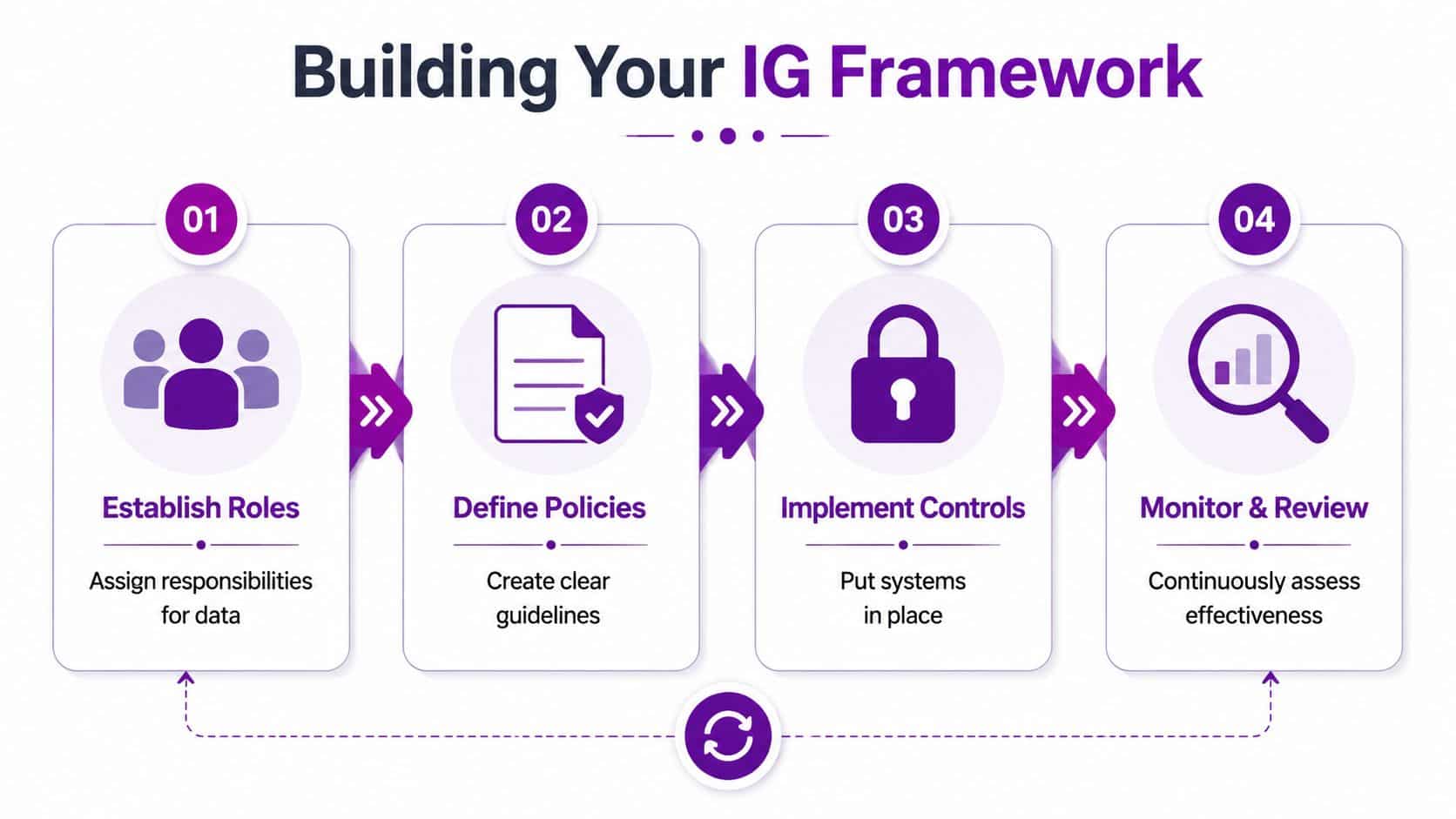
The first job is to set decision rights. In smaller organisations, that usually means one person owns the framework and pulls in IT, operations, HR, and finance when rules affect their teams. In larger firms, the split is often more formal, with a privacy lead, records owners, and Microsoft 365 administrators each owning part of the model. The structure matters less than the clarity.
Start with roles and decision rights
Give each role a specific job:
- Business owners define the value and purpose of the information their teams create.
- IT teams configure and support the controls in Microsoft 365 and Azure.
- Compliance or privacy leads interpret legal and regulatory requirements.
- Department managers apply the rules in day-to-day work and raise exceptions early.
A short governance charter is usually enough. It should name the decision-makers, set out who approves policy changes, and define how exceptions are recorded. I prefer a simple RACI table over a polished document that nobody uses.
Define the minimum policy set
UK SMBs rarely need a large policy library at the start. They need a small set of rules that can be applied in SharePoint, Teams, Exchange, and OneDrive without endless interpretation.
That usually means:
- Classification policy that defines a small number of labels such as Public, Internal, and Confidential
- Retention and disposal policy that states what must be kept, for how long, and what can be deleted
- Access control policy that sets role-based access and approval rules
- Acceptable use guidance for sharing, storing, and working on company information
- Incident handling process for reporting loss, misuse, or unauthorised access
If a policy cannot be turned into a user decision or a Microsoft 365 setting, it is too vague. That is the test.
Make retention and classification operational
This is the point where many projects stall. Teams agree on the principle, then stop short of defining categories that staff can recognise and IT can configure.
Start with a simple classification model based on sensitivity, then map retention to record type. HR files, contracts, invoices, customer communications, and project documents do not need the same handling. A five-category model that people use is better than a fifteen-category model that nobody remembers.
There is a trade-off here. Fewer categories are easier to train and enforce, but they can leave edge cases that need manual review. More categories give better precision, but they raise admin effort and increase the chance of mislabelling. For most SMBs, the right answer is to start simple, run it for a few months, then tighten the model based on real exceptions.
Governance works when deletion is planned, approved, and routine.
Review, audit, adjust
No framework stays tidy once it meets live data. Legacy files sit in the wrong place. Teams create workarounds. One department has a genuine exception because the business process is different.
That does not mean the framework failed. It means the review cycle needs to be real. Check access rights, retention outcomes, label use, and policy exceptions on a set schedule. Record what changed and why. That discipline turns governance from a policy exercise into an operating model the business can maintain.
Putting Your Framework into Action with Microsoft 365
The practical question is always the same. How do you translate governance decisions into the Microsoft stack without turning daily work into a chore?
The answer is to map each governance requirement to a specific control. Microsoft 365 already gives you the building blocks. The work is choosing the right ones, configuring them properly, and rolling them out in a sensible order.
Match the policy to the platform
If your framework says information must be classified, use Microsoft Purview Sensitivity Labels. These labels can mark content as Internal or Confidential and apply protections such as encryption, content markings, or sharing restrictions. That's much more effective than relying on staff to type “confidential” into a document title.
If your framework says records must be kept or deleted in line with policy, use Microsoft Purview retention labels and retention policies. These controls help automate lifecycle management across Exchange, SharePoint, OneDrive, and Teams.
If your framework says sensitive information must not be shared inappropriately, use Data Loss Prevention policies in Purview. DLP helps detect and control risky sharing behaviour in email, documents, and collaboration spaces.
For access control, the core service is Microsoft Entra ID. That's where you manage identity, authentication, conditional access, and role assignment. In practice, good information governance depends heavily on clean group design and disciplined joiner, mover, leaver processes.
A simple Microsoft 365 control map
| Governance need | Microsoft 365 tool |
|---|---|
| Classification | Microsoft Purview Sensitivity Labels |
| Retention and disposal | Purview retention labels and retention policies |
| Preventing oversharing | Purview Data Loss Prevention |
| Access control | Microsoft Entra ID |
| Audit trail | Purview Audit |
| Device and app control | Intune and app protection policies |
The manner of implementation determines its success or failure. Many businesses enable features without deciding the business rule first. That creates noise, false positives, and frustrated users.
What works better than a blanket rollout
A staged rollout is usually safer.
-
Start with high-risk information
Focus first on HR, finance, contracts, customer records, and leadership content. -
Apply a small label set
Don't launch with a taxonomy nobody understands. A simple set is easier to train and audit. -
Restrict external sharing deliberately
Decide where it's allowed, who can approve it, and what should never leave the tenant casually. -
Turn on auditing early
Audit data helps you test assumptions before making broader policy decisions.
Here's a useful explainer if you want a visual overview of the Microsoft side before getting deeper into design:
Governing Copilot and modern collaboration content
One of the biggest current gaps in many governance plans is AI-assisted content. Existing guidance often doesn't say enough about Copilot-generated content, chat transcripts, and externally shared Microsoft 365 documents. With the ICO continuing to emphasise accountability and data protection by design, UK organisations need policies that cover AI-assisted creation, classification, and disposal at scale, as discussed in this industry analysis of information governance and operational gaps.
That has real implementation consequences.
- Copilot output inherits business risk. If staff prompt Copilot with sensitive information, the result may also require classification and retention control.
- Teams chat and meeting content matters. Chat messages, recordings, transcripts, and shared files can all become business records.
- Power Platform needs governance too. Power Apps, Power Automate flows, and Power BI datasets can expose information in ways the original site owner never intended.
A practical rule is to govern the source content first. Copilot doesn't remove governance. It amplifies the consequences of weak governance already in place.
The faster staff can create content, the more important it becomes to classify, secure, and expire that content consistently.
Your Implementation Checklist and Common Pitfalls
Most SMBs don't need a huge transformation programme to begin. They need a sensible first pass that reduces risk quickly and leaves room to mature later.
A common challenge is prioritisation. As noted in this discussion of information governance priorities for smaller organisations, UK SMBs often understand the principles but still ask the practical question: what should we do first when budget is tight?
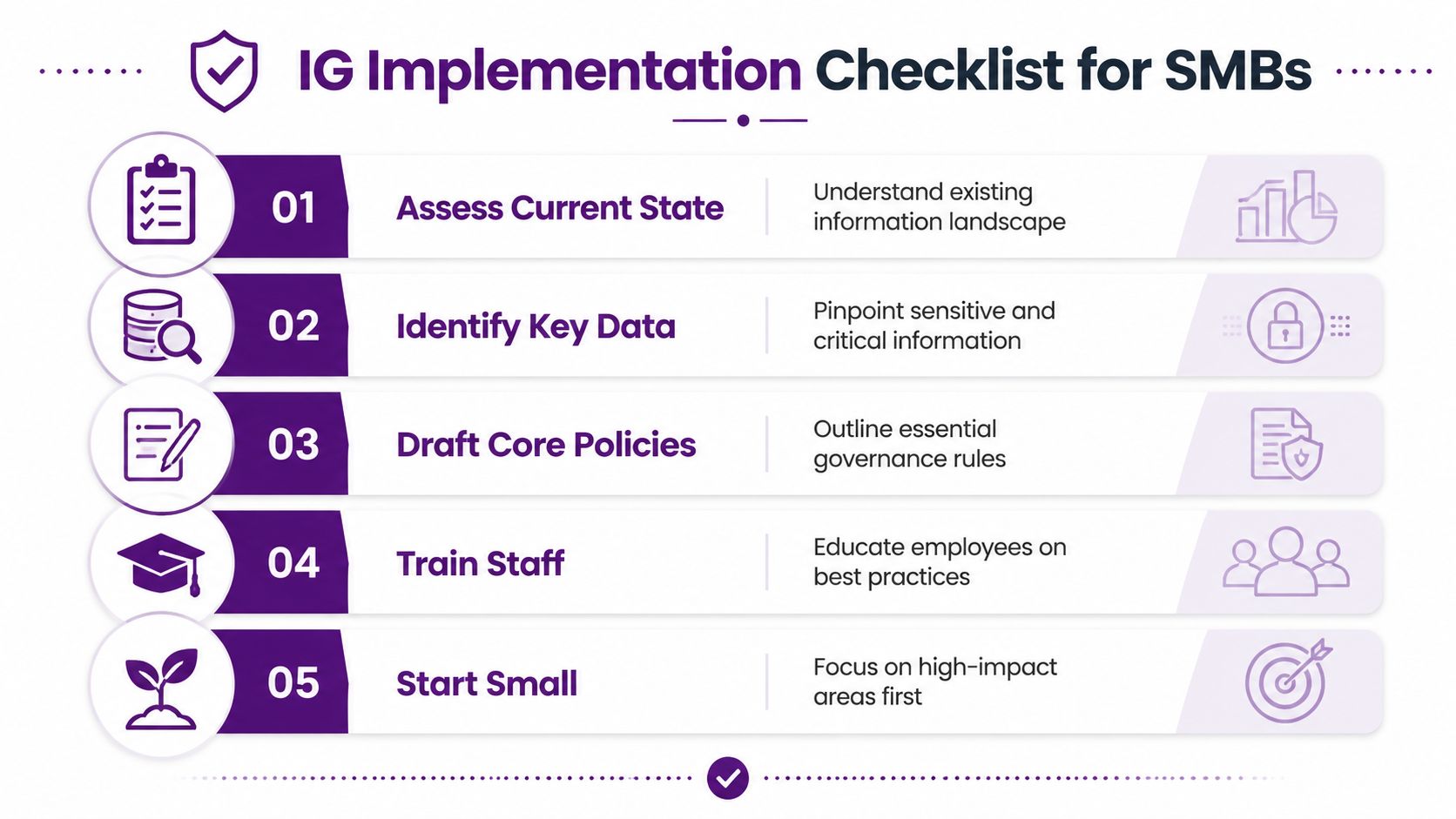
A sensible starting checklist
- Map your critical information. Identify where HR records, contracts, finance documents, customer data, and board material currently live.
- Choose a small classification model. Keep it understandable. Public, Internal, and Confidential is often enough to begin.
- Tighten high-risk access first. Review who can access payroll, HR, legal, and commercial material.
- Set retention for priority record types. Don't wait for a perfect schedule covering everything.
- Control external sharing. Decide which Teams, SharePoint sites, and OneDrive locations can be shared outside the business.
- Enable audit visibility. You need evidence before you can improve confidently.
- Train managers, not just users. Team leaders often create the working habits everyone else follows.
Where projects usually go wrong
The biggest mistake is trying to govern everything at once. That creates policy sprawl and implementation fatigue. A better approach is to start where the legal, commercial, or reputational impact is highest.
The next problem is treating information governance as an IT-only issue. IT can configure Purview, Entra ID, Intune, and SharePoint controls, but IT cannot decide the business value of a contract, the retention need of a personnel file, or the sensitivity of a board paper on its own.
Common pitfalls include:
- Overcomplicating labels. Too many categories mean poor adoption.
- Ignoring legacy data. Old shared drives don't stop being risky because Microsoft 365 exists.
- No executive backing. Without leadership support, exceptions multiply.
- Policy without enforcement. A written rule that nobody can apply in Microsoft 365 won't hold.
Spend where risk drops fastest
For most SMBs, the best early return usually comes from a mix of access cleanup, classification, retention on key record types, and sharing controls. Those measures tend to reduce exposure without demanding a massive redesign of every process.
If your budget is limited, don't start with edge cases. Start with the information that would hurt most if leaked, kept too long, or produced late.
From Compliance Burden to Strategic Asset
A familiar pattern shows up in growing businesses. The company buys Microsoft 365, teams start storing files in SharePoint and OneDrive, someone turns on Teams for collaboration, and compliance is left to policy documents and good intentions. A year later, nobody is fully sure what should be kept, what can be deleted, who can share externally, or whether sensitive records are protected in a consistent way.
The organisations that get this under control make a smaller number of better decisions. They define what matters, assign ownership, and configure Microsoft 365 to support those rules in day-to-day work. That is where information governance starts to pay back.
Handled properly, information governance improves more than audit readiness. It reduces clutter, tightens access, makes retention decisions repeatable, and gives leadership more confidence in the information behind commercial and operational decisions. It also puts the business in a much better position to use Copilot, Power Platform, and Azure services without exposing old weaknesses in permissions, data quality, or record keeping.
For a UK SMB, that matters because the stack is often already in place. The practical job is to turn Microsoft 365 from a collection of tools into a governed operating model. That usually means setting retention rules in Purview, applying sensible sensitivity labels, controlling sharing in SharePoint and Teams, reviewing identity and access through Entra ID, and making sure the business owns the policy decisions that IT will enforce.
Done well, governance stops being a drag on the business. It becomes a way to reduce risk, support growth, and get more value from technology you already pay for.
If you need help turning information governance into a practical Microsoft 365 plan, speak to F1Group today. Call 0845 855 0000 today or Send us a message.