
Your finance team is still copying order details from Dynamics 365 into a legacy job system. Someone in the warehouse is chasing a spreadsheet by email. Then accounts wonders why the invoice went out late, again. That's the day most East Midlands SMEs stop treating integration as an IT nuisance and start treating API development as business plumbing.
The hard truth is simple. If your Microsoft 365, Azure, Dynamics 365 and line-of-business tools don't talk to each other cleanly, your staff become the integration layer. That means re-keying, avoidable mistakes, slower fulfilment and more time spent checking work than doing it.
Why East Midlands SMEs Are Asking About API Development Now
A Nottingham manufacturer can run sales in Dynamics 365, keep stock in a warehouse system in Lincoln, and still finish the day with three people retyping the same customer data. That points to a business process problem, not a technology gap, and it shows up in cash flow, customer service and staff frustration.
The reason API development keeps coming up now is that disconnected systems have become too expensive to ignore. Government digital services in the UK pushed departments towards reusable services and API-based integration through the Government as a Platform approach in the early 2010s, and the financial sector followed with regulated API infrastructure through Open Banking after the CMA's 2016 retail banking investigation. That matters to SMEs because the model is no longer theoretical. APIs are how modern systems exchange data without hand-cranked admin.
What an API does in plain English
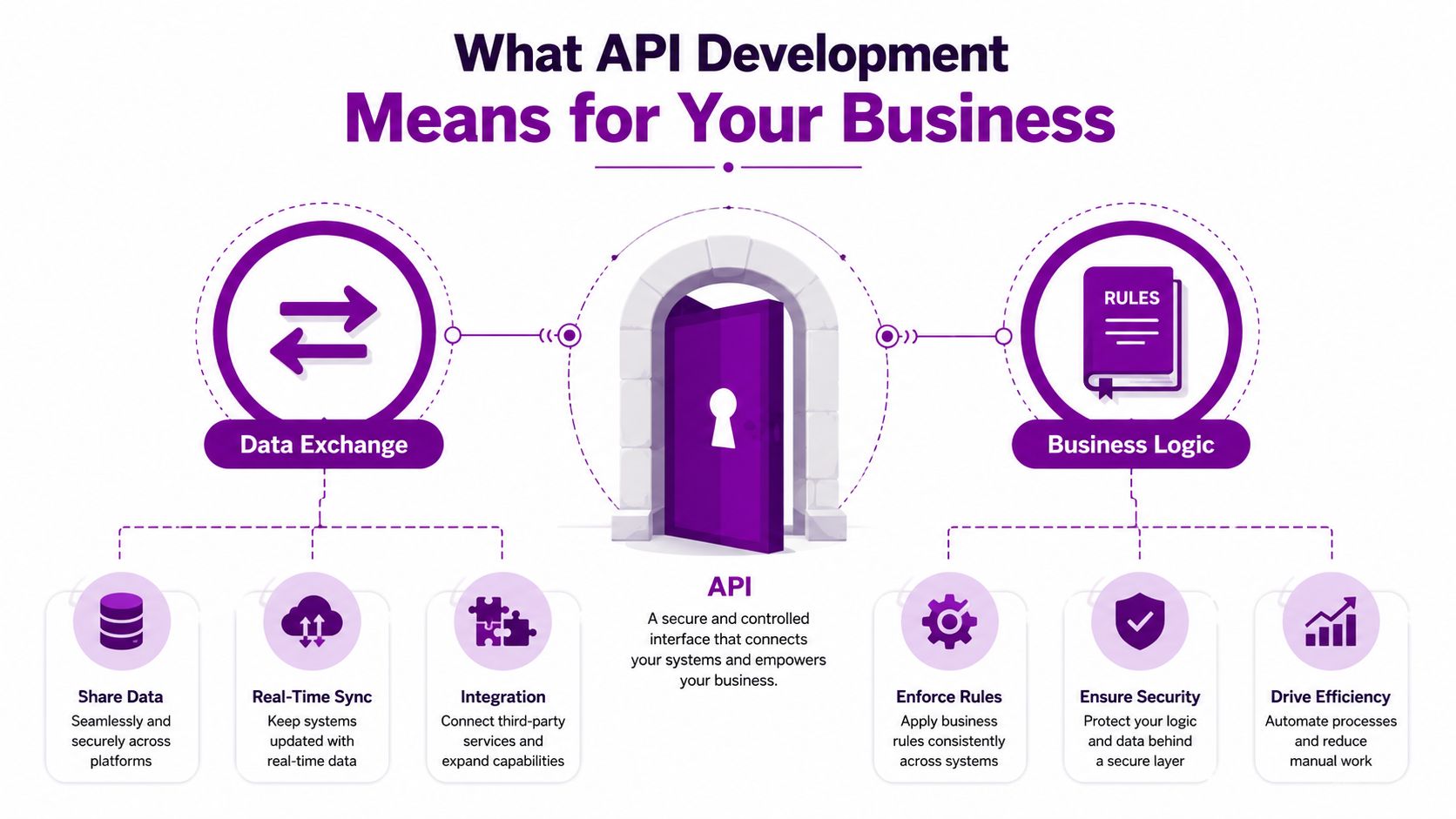
An API is a controlled post box between systems. One system sends a request, the other system returns a response, and both sides agree on the format before anything starts moving. That agreement is the difference between a tidy integration and a brittle one that breaks every time a supplier changes a field name.
Practical rule: if your team cannot explain how data moves between systems without using jargon, the integration is probably too fragile already.
For an East Midlands SME, the sensible approach is to keep the Microsoft stack as the centre of gravity, then connect outwards only where the business needs it. That keeps the operational mess smaller, makes support simpler, and stops every process from becoming a custom project.
By 2020, UK Open Banking had already moved beyond pilot territory into a live ecosystem, with the Open Banking Implementation Entity reporting millions of active users and fast-growing payment initiation and data-sharing activity as institutions connected through API standards. The lesson for SMEs is blunt. API work is not a side issue anymore. It is the layer that lets your current systems behave like one business instead of a pile of tools. If you are weighing up whether to build in-house or bring in help, the API docs for virtual numbers are a useful example of how a clean interface is supposed to read, but the key question is whether your own team can keep that standard across Microsoft 365, Dynamics 365 and older line-of-business systems.
What API Development Means for a Business
A business API is a controlled handoff between systems. One system asks for a defined piece of data or a defined action, the other returns it in the agreed format or explains why it cannot. That is enough for a finance manager, operations lead, or IT director to judge scope, risk, and cost without getting buried in developer talk.
Endpoints and contracts are the two terms that matter
An endpoint is the place you send the request. A contract is the rulebook that sets out what can be asked for, what comes back, and how errors are handled. If a supplier changes the endpoint without warning, your automation breaks. If they change the contract after your team has built against it, the rework bill lands with you.
Design-first thinking avoids that mess. The contract comes first, then the code follows the contract. Your team can review, test, and agree the interface before anyone writes the wrong thing. It also lets front-end and back-end work happen in parallel, which suits smaller Microsoft-heavy teams that cannot afford wasted cycles. The design-first API principle sets that order out clearly.
Agree the contract before you write application code. Skip that step, and you are not speeding delivery up, you are just moving the rework to later.
A common mistake is treating an API like a database. A database stores the raw records. An API controls how those records are requested, validated, and returned. That extra layer gives you better governance, tighter security, and less chaos when several systems need the same data.
The other term you will hear is versioning. It means the interface can change without breaking everything already connected to it. For an SME, that matters in plain operational terms. One upgrade should not take down order processing on a Monday morning.
For teams mapping a Microsoft 365 or Dynamics 365 integration, the practical question is who will own the interface after go-live. A single in-house developer can cover a small, tidy build, but once the connection touches legacy line-of-business systems, support, monitoring, and change control need a proper owner. That is where the F1 Group guide on integrating software systems is useful as a reference point for the wider integration job, while the API docs for virtual numbers show how a clean public interface separates request, response, and error handling well enough for automation teams to build against it.
Choosing the Right API Pattern for the Job
Most SMEs do not need a debate club. They need the right pattern for the job and a reason to choose it. REST, GraphQL and SOAP each solve different problems, and pretending they're interchangeable wastes time.
REST is the dependable default
For most Microsoft 365 and Dynamics 365 integrations, REST is the sensible choice. It's predictable, widely supported and easy to explain to suppliers who need to keep the project moving. If your business is syncing customers, jobs, invoices or approvals between Microsoft tools and a third-party app, REST is usually the least risky route.
GraphQL fits selective, multi-source experiences
Use GraphQL when a portal or mobile app needs to pull a specific set of data from several systems in one request. That can reduce over-fetching and simplify the front-end if users need a tightly designed experience. It's useful, but don't force it into back-office work just because it sounds modern.
SOAP still shows up where legacy matters
SOAP is the formal standard many older enterprise systems still expect. In manufacturing, local government and older line-of-business platforms, you'll run into it whether you like it or not. If a critical supplier or civic system only speaks SOAP, support it. If you get to choose, keep your new work simpler where possible.
| Microsoft API Toolkit at a Glance | Best For | Typical SME Effort |
|---|---|---|
| REST | Everyday Microsoft 365 and Dynamics 365 integration | Low to moderate |
| GraphQL | Portals and mobile apps pulling data from several systems | Moderate |
| SOAP | Legacy enterprise and regulated systems | Moderate to high |
The decision should be boring. If the task is standard business integration, default to REST. If the user experience needs tightly customized data across multiple systems, consider GraphQL. If the supplier platform dictates the format, support SOAP and move on.
Decision check: ask which system is the source of truth, who owns the contract, how version changes will be managed, and what happens when a response fails halfway through.
If your own team keeps debating formats instead of business outcomes, the issue is usually not the pattern. It's the lack of an integration strategy. A useful starting point is this systems integration guide when you're trying to decide how much of the work belongs in-house and how much should sit with a partner.
The Microsoft and Azure API Toolkit in Practice
Microsoft shops do not need a random toolbox. They need the right tool for the right layer of the problem. If you already run Microsoft 365, Dynamics 365 and Azure, the sensible move is to build around that stack instead of introducing extra complexity for the sake of it.
Use the right Microsoft tool for the job
Azure Functions work well as low-cost, event-driven glue. If a job is created in one system and needs a notification, a record update or a lookup in another system, a function can handle that trigger without requiring a heavyweight application.
Azure API Management is the control point. It gives you a place to govern access, apply security policies, expose documentation and keep the interface consistent. If you want one front door instead of six hidden ones, that discipline lives here. For teams taking a more formal support route, managed Azure services usually make sense once the environment becomes business-critical.
Power Platform connectors, including custom connectors, let operational teams hook systems together without waiting weeks for a developer. A Leicester service firm, for example, could use a custom connector to pull job data from a third-party field service system into Power Apps so engineers can see updates on site.
Dynamics 365 integration patterns matter when CRM is your system of record. If sales, customer service and finance all rely on the same customer view, the integration should respect that record rather than duplicate it in three places.
| Tool | Best For | Typical SME Effort |
|---|---|---|
| Azure Functions | Event-driven system-to-system tasks | Low to moderate |
| Azure API Management | Governance, security and a single API front door | Moderate |
| Power Platform connectors | Fast integration for business users and ops teams | Low |
| Dynamics 365 integration patterns | CRM-led customer and process data | Moderate |
The right question is not “which Microsoft product is newest”. It's “which layer should own the integration so support stays manageable?” That is where a Microsoft-focused partner earns its keep, especially when the alternative is one in-house developer becoming the only person who understands the whole mess.
Security, Governance, Testing and Monitoring as One Discipline
Treat security, governance, testing and monitoring as one control system. Split them up and the gaps show up in production, not in planning meetings. A token leak becomes an access problem. A shadow API becomes a support problem. Silent failures become a finance problem.
Start with identity and access
Authentication and authorisation are not optional extras. Use OAuth 2.0, managed identities where they fit, and role-based access so only the right people and systems can call the API. If a connector can reach everything, it will eventually reach too much.
Put an API gateway or management layer in front of anything important. It gives you one place to enforce policy, record usage and stop every team inventing its own conventions. It also cuts the shadow API problem, where people build hidden integrations over time and nobody owns the whole picture. For East Midlands SMEs already running Microsoft 365 or Dynamics 365, that control point matters because support cannot depend on one developer remembering every exception. If you need help shaping that layer, a systems integration services partner can put the guardrails in place without turning the estate into another isolated tool.
Monitor what matters
For operations, track uptime, error rate, latency and authentication failures from day one. Those four measures tell you whether the service is usable and where it is falling over. Latency deserves particular attention. P95 and P99 matter more than averages because they show the slow tail, the queueing, the dependency bottlenecks and the retry storms that make users complain while dashboards still look fine (API metrics guidance).
For UK public-sector style API work, the Government Digital Service also expects stable resource models, lowercase hyphenated path names, explicit versioning where needed, predictable HTTP semantics, consistent JSON payloads and machine-readable documentation (GDS API standards). That is not just government housekeeping. It is a practical way to reduce integration defects because every consumer knows what shape to expect.
Practical rule: if you cannot explain who owns the API, who can change it, and how you will detect failure, you have a hopeful prototype, not governance.
Testing belongs in the same workflow
Testing is not a final gate. It is part of the release process. A strong API test plan checks happy paths, invalid inputs, permissions, failures from downstream systems and response consistency. If your supplier cannot show how they test those conditions, they are asking you to discover the problems in live use.
Costs, Common Pitfalls and When to Outsource API Development
The cost question gets messy because people ask it the wrong way. They want a build figure, but the actual spend is split between the initial project and the ongoing work that keeps the API safe, current and supportable. If you only budget for the first part, you've underfunded the second half before the work starts.
What you should expect to pay attention to
A Microsoft or Azure quote should clearly separate build effort from recurring operational work. That recurring work usually includes monitoring, patching, security reviews, key rotation, documentation updates and support for failures that appear after release. If those items are missing from the proposal, they're not absent. They're just hiding.
The common pitfalls are predictable. Teams underestimate authentication complexity, especially when several systems and user roles are involved. They treat the API like a one-off project instead of a product that needs ownership. And they forget that integrations age, so maintenance has to be planned rather than improvised.
When in-house is enough and when it isn't
A single in-house developer can handle a small, tightly defined integration if the scope is modest and the dependency list is short. That can be the right choice when the business problem is clear, the Microsoft stack is already well organised, and there's no need for around-the-clock support.
A project partner makes more sense when the integration has a defined outcome but needs specialist design, delivery and handover. That's common when you need a clean first release, a documented contract and a sensible support plan without hiring permanent headcount.
Ongoing managed support is the right answer when the integration is business-critical, several people rely on it daily, or nobody in-house has time to own security, version changes and incident response. That's where a Microsoft-focused IT partner can reduce risk instead of adding process.
The practical line is simple. If the API is going to sit inside finance, fulfilment or customer service, it needs adult supervision. If it's going to be important and nobody has time to watch it, outsource the ownership, not just the build.
A useful reference point for that kind of delivery is systems integration services, especially when you need one team to take responsibility for the moving parts instead of handing you a pile of code and a wish.
A Practical 90-Day Path for Your First API Project
Start with the pain, not the platform. Pick one process that already costs time, creates errors or forces staff to re-key data. For most East Midlands SMEs, the right target is the integration that breaks most often, not the one that sounds most impressive.
Days 1 to 30, discover
List the systems that are currently passing data by email, spreadsheet or manual copy and paste. Identify who owns each system, where the data starts, where it ends and what breaks when it's late. Your deliverable is a single-page integration map and a ranked list of the worst friction points.
Days 31 to 60, design
Choose the API pattern, agree the contract and define the security model. Keep the first version small. One clean workflow is better than three half-finished ones.
Days 61 to 90, deliver
Build a thin slice that proves the integration works end to end, with monitoring and error handling turned on from the start. Test the failure paths, not just the happy path. Your supplier question at this stage is blunt: what happens when the downstream system is slow, unavailable or returns bad data?
Final rule: if the first release cannot be monitored, supported and explained to the business in one meeting, it's too big.
Call 0845 855 0000 today or Send us a message at https://www.f1group.com/contact/ if you want a Microsoft-focused team to scope your first API project and turn a messy integration into something your staff can reliably depend on.
F1Group helps East Midlands businesses design, build and support Microsoft-focused integrations that fit real operational needs, not just technical theory. If you're trying to connect Dynamics 365, Microsoft 365, Azure or older line-of-business systems without creating more chaos, visit F1Group and talk through the integration that's slowing your team down.