
When you get right down to it, the Microsoft 365 vs Google Workspace debate boils down to a fundamental difference in philosophy. Microsoft gives you a powerful, feature-packed suite that works hand-in-glove with its desktop software. Google, on the other hand, offers a slick, cloud-first experience designed from the ground up for real-time collaboration.
Your choice really hinges on what your business values more: the sheer depth and familiarity of traditional applications, or nimble, browser-based teamwork.
Choosing Your Business Suite: An Executive Decision Guide
Picking the right productivity suite is a serious decision for any UK business. It directly shapes your daily workflows, impacts your security posture, and can even influence your long-term growth. The choice between Microsoft 365 and Google Workspace isn't just about comparing features; it's about matching a technology ecosystem to your company's culture and the way your team actually works. This guide is here to cut through the noise and help you make a properly informed decision.

Understanding the Core Philosophies
At its heart, this is a choice between two very different ways of getting things done. Microsoft 365 is built on the solid foundation of its classic desktop apps—Word, Excel, Outlook—and then supercharged with a host of cloud services. It's often the default choice for established organisations that need advanced offline features and tight integration with the Windows operating system.
In contrast, Google Workspace was born and raised in the cloud. Its strength is in its simplicity and its brilliantly seamless, real-time collaboration, all happening right inside a web browser. For fast-paced teams and businesses that have always been cloud-focused, this approach offers an agility and ease of access that's hard to beat, no matter what device you're on.
The competition for UK business productivity is incredibly tight. In the UK market, Google Workspace has a slight edge with around 50% market share among businesses, just ahead of Microsoft 365's 45%. It's a close race, showing just how much the right choice can affect a company's efficiency. You can explore more about these market dynamics and what they mean for UK businesses.
For small and mid-sized businesses (SMBs) in the UK, this decision is particularly important. The fact that the market is so evenly split proves there's no single "best" answer—only the best fit for your specific operational needs.
Quick Comparison: At a Glance
| Aspect | Microsoft 365 | Google Workspace |
|---|---|---|
| Primary Environment | Desktop-first, with powerful cloud integration. | Cloud-native, designed to be browser-first. |
| Ideal User | Businesses that need advanced features and robust offline capability. | Teams that prioritise real-time collaboration and simplicity. |
| Application Style | Feature-rich, comprehensive desktop and web apps. | Streamlined, intuitive web-based applications. |
| Collaboration Model | Structured workflow via Teams, SharePoint, and co-authoring. | Fluid, live collaboration within Docs, Sheets, and Slides. |
To make the right call, you need to look past this high-level summary and really think about the day-to-day reality of how your team gets work done.
For expert advice on choosing and implementing the perfect productivity suite for your organisation, phone 0845 855 0000 today or send us a message.
Core Applications: A Practical Feature Breakdown
When you're weighing up Microsoft 365 and Google Workspace, the decision usually boils down to how your team will actually use the core tools day in, day out. It’s not just about a feature checklist; it’s about how these applications feel and function in the real world. The core difference really comes down to their DNA: Microsoft’s suite grew from powerful desktop software that was later adapted for the cloud, whereas Google’s tools were born in the browser, built from the ground up for online simplicity.
This heritage is immediately obvious when you look at the email clients. Outlook is an organisational powerhouse, designed for people who juggle huge volumes of email using intricate rules, folders, and categories. It's long been the go-to for corporate environments where that kind of granular control is essential. Gmail, on the other hand, is all about search. It encourages you to use labels and its incredibly powerful search function to find anything in seconds, which is a perfect fit for a more fluid, less structured way of working.
Documents and Spreadsheets: The Depth vs. Speed Debate
That same philosophical split carries right over into documents and spreadsheets. There's no getting around it: Microsoft Word and Excel are the industry standards, benefiting from decades of feature development.
For tasks that demand complex formatting, mail merges, or heavy-duty financial modelling with macros and pivot tables, the desktop versions of Word and Excel (included in most Microsoft 365 plans) are simply in a league of their own. For many UK businesses in sectors like law, finance, or research, that depth isn't a 'nice-to-have', it's a necessity.
Google Docs and Sheets shine in a completely different area: real-time collaboration. The experience of having several people editing a document simultaneously is remarkably smooth and intuitive. When you need to brainstorm ideas quickly, co-author a report, or track straightforward data, the simplicity and seamless live editing in Google's tools often get the job done faster.
The question isn't about which is "better," but which is the right tool for the job. A financial analyst building a complex forecast will almost certainly need Excel. A marketing team co-writing a press release against the clock will probably be more efficient in Google Docs.
Communication Hubs: Teams vs. Meet and Chat
Modern work happens in a central communication platform, and this is another key battleground in the Microsoft 365 vs Google Workspace contest. Microsoft Teams is an all-in-one hub, tightly knitting together chat, video meetings, file storage (via SharePoint and OneDrive), and third-party apps into one very comprehensive piece of software. It’s designed to be the central nervous system for everything a team does.
Google’s approach is more modular, with Google Meet for video calls and Google Chat for messaging. While they are clean, fast, and integrate nicely with other Workspace apps like Calendar, they don't provide that single-pane-of-glass experience you get with Teams. If your business wants one unified platform to manage all internal communications and project work, Teams often has the edge.
Presentations and Calendars: A Closer Race
When it comes to presentations, the gap narrows significantly. Microsoft PowerPoint still holds the crown as the more powerful tool for creating complex animations, embedding different media types, and designing highly polished presentations you can deliver offline. Google Slides, true to form, is simpler and makes building a presentation with your team an absolute breeze.
Both platforms offer fantastic calendar applications. Outlook Calendar is deeply embedded in the whole Microsoft ecosystem, especially with Teams for scheduling meetings. Google Calendar is famous for its clean interface and smart scheduling features. To get a real sense of what Google’s scheduling and time management tools can do, this ultimate guide to Google Calendar time tracking offers a brilliant deep dive into optimising your day, which is a core strength of the suite.
Below is a quick breakdown of how the core apps stack up feature by feature.
Core Application Feature Comparison: Microsoft 365 vs Google Workspace
This table offers a direct comparison of the primary applications in each suite, highlighting key functionalities, ideal use cases, and limitations relevant to UK businesses.
| Feature Category | Microsoft 365 (e.g., Outlook, Word, Excel, Teams) | Google Workspace (e.g., Gmail, Docs, Sheets, Meet) |
|---|---|---|
| Email & Organisation | Outlook: Powerful rule-based organisation, folders, categories. Ideal for high-volume corporate email management. Desktop app is feature-rich. | Gmail: Search-centric with labels and filters. Superior search function. Best for fast-paced, flexible workflows. Browser-first experience. |
| Document Processing | Word: Unmatched for complex formatting, mail merge, and offline editing. The industry standard for formal documents. | Docs: Superior real-time collaboration and commenting. Simple, clean interface. Ideal for collaborative writing and quick drafts. |
| Spreadsheets | Excel: The gold standard for complex data analysis, financial modelling, macros, and pivot tables. Essential for data-heavy roles. | Sheets: Excellent for collaborative data entry and straightforward analysis. Seamless integration with Google Forms for data collection. |
| Communication Platform | Teams: An all-in-one hub for chat, video, file sharing (SharePoint), and app integrations. A single, unified workspace. | Meet & Chat: Separate, fast, and simple apps for video and messaging. Deep integration with Calendar and Gmail but lacks a single unified hub. |
| Presentations | PowerPoint: More advanced features for animations, transitions, and offline design. Better for highly polished, corporate presentations. | Slides: Incredibly easy for multiple users to build a presentation together in real time. Simple, effective, and cloud-native. |
Ultimately, the right choice really does depend on your team’s established ways of working. If your business depends on powerful offline applications and feature depth, Microsoft 365’s suite is hard to look past. But if your main priority is speed, simplicity, and seamless cloud-based collaboration, Google Workspace offers a wonderfully agile and intuitive set of tools.
For expert guidance on which suite's applications are the right fit for your business needs, phone 0845 855 0000 today or Send us a message.
How Each Platform Handles Collaboration And Workflow
How a team works together is at the heart of any modern business, and the approaches taken by Microsoft 365 and Google Workspace couldn't be more different. It really is a tale of two philosophies. Google earned its stripes by pioneering real-time, browser-based co-editing, completely changing the game for how teams could collaborate on documents. It’s a fluid, fast, and incredibly intuitive system that’s perfect for brainstorming and agile projects.
Microsoft, on the other hand, built its collaborative tools by evolving its dominant desktop legacy. They've blended their incredibly powerful applications with increasingly slick cloud co-authoring features. This hybrid approach is firmly anchored by Microsoft Teams, which acts as a structured, all-in-one hub for chat, file management, and project work.
The Real-Time Co-Authoring Experience
Google’s main collaborative advantage is its sheer simplicity and immediacy. When several people jump into a Google Doc, Sheet, or Slide, the experience is seamless. You see cursors flying across the page, changes pop up instantly, and the commenting and suggestion features are dead simple to use. It creates a really dynamic environment for live editing sessions, like when the whole team is co-writing a press release or building a presentation together on the fly.
Microsoft has made huge leaps forward with its co-authoring in Word, Excel, and PowerPoint, both online and in the desktop apps. It's now very, very good, but it can still feel a little less immediate than Google’s browser-native experience. The system is engineered to handle much more complex documents, which sometimes means the updates feel a fraction less instantaneous than what you see in Google Docs.
File Sharing and Version Control
Both platforms give you sophisticated controls for sharing files, letting you set precise permissions for viewing, commenting, and editing. Google Drive has a famously straightforward interface, making it incredibly quick to share a file with anyone, inside or outside your company, using just a link.
Microsoft 365, with its combination of SharePoint and OneDrive, offers far more granular and powerful control over file management. This is a significant plus for larger businesses or those in regulated industries. That said, the way these two services work together can sometimes be a bit confusing for new users. If you want a deeper dive into how they function, you can learn more about SharePoint vs OneDrive in our detailed guide.
When it comes to tracking changes, both systems are excellent. Google automatically saves a detailed version history, so rolling back to an earlier state is easy. Microsoft 365 offers a similarly robust version history, but with the added power of SharePoint's check-in/check-out system for more formal document control.
Task Management and Workflow Integration
This is where the two ecosystems really show their differences. Microsoft provides a deeply interconnected workflow, which is a massive advantage for any business already using its wider suite of tools.
- Microsoft Planner: A simple, Kanban-style board for organising team tasks that slots directly into Microsoft Teams.
- Microsoft To Do: A personal task list that syncs perfectly across all your devices.
- Power Platform: For businesses that need custom workflows, Power Automate is a game-changer. It lets you build complex automated processes that link various Microsoft 365 apps and even external services.
Google’s approach to task management feels lighter and more spread out. Google Tasks works well with Gmail and Calendar for personal to-do lists, but there isn’t a direct equivalent to Planner for team project management in the core package. For more advanced workflow automation, businesses usually turn to the extensive Google Workspace Marketplace, integrating tools like Asana, Trello, or Zapier.
Ultimately, the right choice really boils down to how your team operates. If your priority is fast, simple, live co-editing in a browser, Google Workspace is hard to beat. But if you need a more structured collaborative hub with deep integrations into a wider business ecosystem and rock-solid file management, Microsoft 365 provides a far more complete solution.
For help deciding which collaborative ecosystem best suits your operational processes, phone 0845 855 0000 today or Send us a message.
Evaluating Security, Compliance, And Control
When your business is built on sensitive client data and confidential internal information, security isn't just a checkbox; it's the very foundation of trust. Looking at the Microsoft 365 vs Google Workspace debate, both platforms deliver robust security. The real difference lies in how they approach data protection and administrative control, a distinction that can significantly shape how your business operates.
Microsoft 365 comes from an enterprise-first world. Its DNA is rooted in serving large corporations and regulated industries, and you can see this in its incredibly deep and granular control systems, often managed through Azure Active Directory. On the other hand, Google Workspace was born in the cloud, offering a more streamlined but equally powerful security model that really shines in sniffing out modern threats like phishing and enabling secure access from absolutely anywhere.

Security Architecture And Threat Protection
Microsoft 365’s security suite is multi-layered, extensive, and, let’s be honest, complex. If you invest in the higher-tier plans, you get access to formidable tools like Microsoft Defender for Office 365. This isn't just basic spam filtering; it provides sophisticated protection against phishing, malware, and business email compromise. It even uses advanced sandboxing to detonate suspicious attachments in a safe, isolated environment, giving your IT team rich reports to track and neutralise threats.
Google’s main advantage is its sheer scale and powerful machine-learning capabilities. It processes billions of signals every single day to spot and block threats before they even have a chance to land in a user's inbox. Features like Context-Aware Access are a great example of its modern, zero-trust security approach. This allows administrators to set up detailed access rules based on who the user is, where they are, and how secure their device is.
Compliance And Data Governance
For any UK business, staying compliant with regulations like GDPR is absolutely non-negotiable. Both platforms are fully GDPR compliant and provide tools to help you meet your obligations, including data residency options to keep your information within the UK or EU.
Where Microsoft often pulls ahead is in the breadth and specificity of its compliance offerings, especially for certain industries. Microsoft 365 holds a staggering number of certifications tailored for sectors like finance, healthcare, and government. Its Compliance Manager tool gives you a central dashboard to see exactly where you stand and how you can improve your compliance posture against specific regulations. For firms in heavily regulated fields, these tools can be the deciding factor.
While Microsoft 365 commands 45% of the UK productivity software market, trailing Google's 50%, it leads in the enterprise-grade features that are essential for many mid-sized businesses and charities. For organisations deploying custom integrations, Microsoft's granular admin controls through Azure AD can significantly reduce breach risks. While both suites guarantee 99.9% uptime, Microsoft's compliance certifications cover a wider array of UK public sector requirements. You can discover more about these productivity suite statistics to understand the market landscape better.
This level of detail is a key reason why organisations with strict regulatory burdens often feel more at home in Microsoft's ecosystem. A proactive stance is vital here, and understanding your exposure is the first step. For a thorough evaluation of your current setup, it’s worth exploring professional guidance on comprehensive security risk management.
Administrative Control And Usability
Great security tools are only effective if you can actually manage them. The Microsoft 365 admin centre is an incredibly powerful hub, but it can feel like a labyrinth. It gives you precise, granular control over every nut and bolt of the service, from user permissions and device policies with Intune to setting up complex data loss prevention (DLP) rules. For an experienced IT team, this level of control is a huge plus, but it comes with a steep learning curve.
In contrast, the Google Workspace Admin console is celebrated for its simplicity and clean design. Core tasks like adding users, managing groups, and setting essential security policies are refreshingly straightforward. While it might not offer the same microscopic level of control as Microsoft straight out of the box, it provides powerful and efficient management for most businesses. It allows IT teams to secure their environment quickly without getting bogged down.
Ultimately, the choice here often boils down to your IT team's resources and expertise.
For tailored advice on which platform offers the security and control your organisation needs, talk to one of our experts. Phone 0845 855 0000 today or Send us a message.
A Look at UK Pricing and What You Actually Get for Your Money
Beyond all the features and workflows, the choice between Microsoft 365 and Google Workspace often boils down to pounds and pence. But to get a true picture of the cost, you have to look past the headline price per user. It's about understanding what you’re really getting for your investment in storage, apps, and the more advanced tools that sit under the bonnet. For any UK business, a straight comparison in GBP (£) is the only way to budget properly.
Both platforms offer tiered subscriptions where costs go up as you add more features. No surprises there. Where they differ, though, is in their whole approach to value, which really just reflects their different philosophies.
Breaking Down the UK Price Tiers
On the face of it, both suites look very competitive at the entry level. Google Workspace Business Starter usually kicks off at £5 per user per month, giving new businesses a solid starting point. Microsoft 365 Business Basic is right there with it at around £4.90 per user per month, offering web and mobile versions of its core apps.
It's when you start moving up the ladder that the differences become much clearer.
- Microsoft 365 Business Standard at £10.30 per user per month is a hugely popular option for one simple reason: it includes the full, installable desktop versions of Word, Excel, PowerPoint, and Outlook.
- Google Workspace Business Standard costs £10 per user per month and gives you more storage and better meeting features, but it’s still fundamentally a web-first experience.
For any business that depends on the powerful, offline features of desktop software—think complex financial models in Excel or intricate designs in PowerPoint—having those apps included in Microsoft's mid-tier plan is a massive plus.
The real question isn't just about the monthly fee; it's the total cost of ownership. If your team needs proper desktop applications, Microsoft 365’s all-in-one approach often works out cheaper than getting Google Workspace and then having to find separate software to fill the gaps.
To help you see the differences at a glance, here’s a quick breakdown of the most common plans for UK businesses.
UK Pricing and Plan Comparison (GBP £)
This table summarises the main business plans from both providers, focusing on per-user cost, storage, and the key features that deliver the most value.
| Plan Tier (e.g., Business Basic/Standard) | Microsoft 365 Price (£/user/month) | Google Workspace Price (£/user/month) | Key Value Differentiator |
|---|---|---|---|
| Business Starter/Basic | £4.90 (Business Basic) | £5.00 (Business Starter) | Very similar entry points. Microsoft offers 1 TB storage vs. Google’s 30 GB. |
| Business Standard | £10.30 | £10.00 | Microsoft includes full desktop apps; Google increases pooled storage to 2 TB. |
| Business Premium | £18.10 | £15.00 (Business Plus) | Microsoft adds advanced security and device management (Intune, Defender). |
As you can see, the value you get for your money really depends on what your team needs to get the job done. A few pounds' difference a month can mean access to a completely different set of tools.
The Critical Difference in Cloud Storage
Storage is another area where they take completely different paths. Most Microsoft 365 Business plans give you a hefty 1 TB of OneDrive storage per user. It's a simple, dedicated allowance for each person, which makes it incredibly easy to manage and predict.
Google Workspace, on the other hand, uses a pooled storage model. A Business Standard plan, for instance, provides 2 TB per user, but this is all thrown into one big pot for the whole company to share. This can be flexible—if one person needs 3 TB, they can borrow from the pool. The downside is that it requires someone to keep an eye on it to make sure you don't run out, which could lead to a surprise bill.
So, Which Offers Better Overall Value?
When you weigh it all up, it's about more than just the monthly subscription. Microsoft’s value is anchored in its all-encompassing ecosystem and the inclusion of those powerful desktop apps. If your business is already comfortable in a Windows environment, it creates a seamless, feature-rich experience. Move up to plans like Microsoft Business Premium, and you’re adding serious security and device management tools, which is fantastic value for any business that takes security seriously. To see what that looks like in practice, you can explore the details of Microsoft Business Premium in our guide.
Google’s value is in its simplicity, speed, and brilliant real-time collaboration. For teams that live in the cloud and don't need desktop software, its clean pricing and straightforward tools offer a compelling, cost-effective package. The right choice is the one that best fits how your team actually works day-to-day and where you see the business going.
For a personalised cost-benefit analysis and expert advice on which suite offers the best return on investment for your business, phone 0845 855 0000 today or send us a message.
Making The Final Decision For Your Business
After weighing up the features, security, and costs, the right choice between Microsoft 365 and Google Workspace really comes down to the DNA of your company. It’s about how your team actually works, the tools they can't live without, and where you want to be in the long run. Let's distil everything we've covered into some practical, real-world advice.
For a lot of UK businesses, the decision becomes much simpler when you look at how you operate day-to-day. If your company is built on the Windows ecosystem and relies heavily on the advanced, offline features of desktop apps like Excel and Word, then Microsoft 365 is almost always the natural choice. Likewise, if you're in a heavily regulated industry like finance or law, Microsoft’s granular security controls and comprehensive compliance certifications tend to tip the scales.
Scenario-Based Recommendations
To put it more directly, think about which of these profiles best describes your business:
- Choose Microsoft 365 if: Your team needs to run complex data analysis in Excel, create polished, formal documents in Word, or you operate under strict regulatory standards. The all-in-one platform, with Teams at its heart, is perfect for structured, process-driven collaboration.
- Choose Google Workspace if: Your team lives in the cloud, thrives on speed, and puts seamless, real-time collaboration above everything else. We often see startups and fast-moving, agile teams prefer its browser-first simplicity to keep things moving quickly.
This decision tree gives a good visual summary of that core choice: are you prioritising a lower upfront cost, or do you need the value-add of powerful desktop applications?
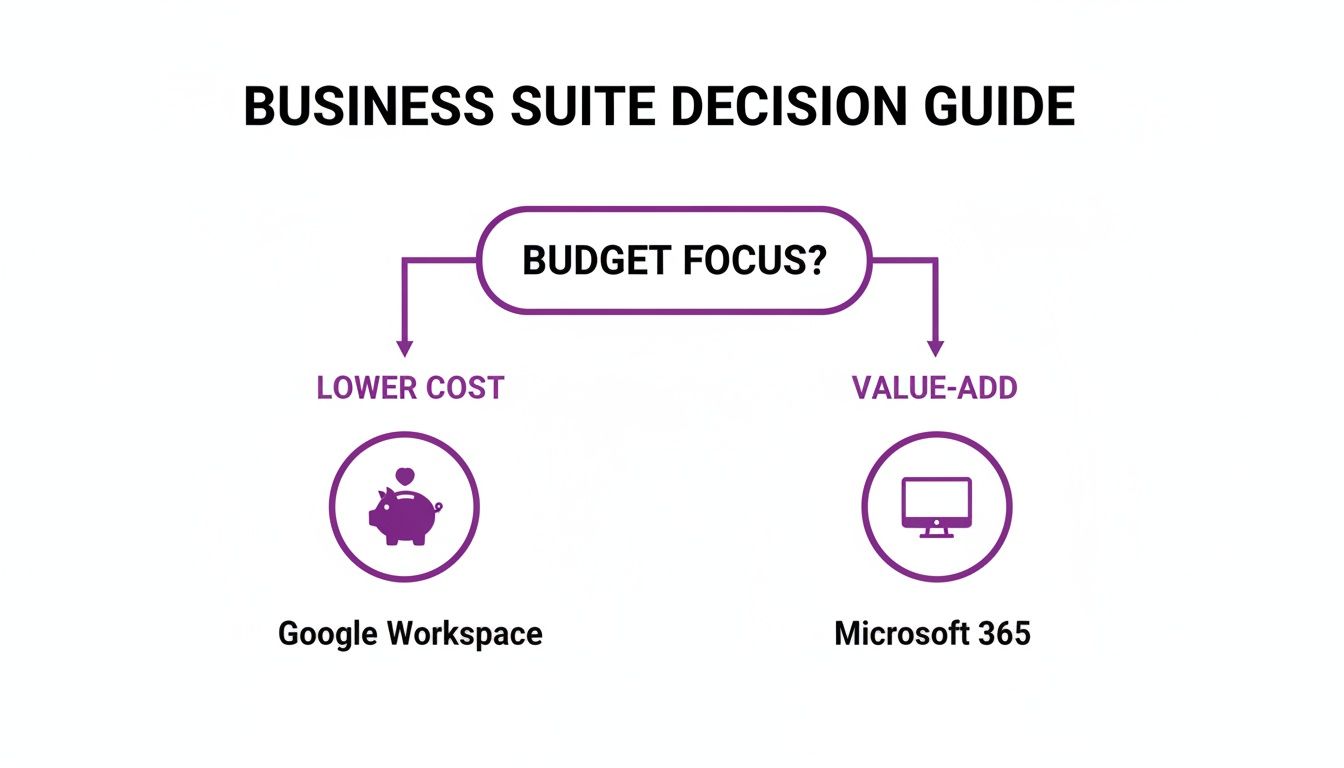
As the graphic shows, if the budget is the number one factor, Google Workspace often has a lower barrier to entry. But if having access to best-in-class desktop software is non-negotiable, Microsoft 365 delivers more value for that investment. It’s a bit like deciding on coffee machine leasing vs buying for your business – you have to weigh the initial outlay against the long-term benefits.
Whichever way you lean, bringing in a managed IT support partner like F1 Group can make all the difference. Expert guidance makes the migration, implementation, and day-to-day management far smoother, ensuring you get the absolute most out of your investment and that it genuinely supports your business goals.
For advice tailored to your specific situation, give us a call on 0845 855 0000 today or send us a message.
Frequently Asked Questions
When it comes down to choosing between Microsoft 365 and Google Workspace, we find that most UK businesses end up asking the same practical questions. Here, we tackle the most common queries we hear about migration, security, and app access to help you feel confident in your final decision.
Is It Difficult to Migrate from Google Workspace to Microsoft 365?
Moving your entire team's emails, files, and calendars is a serious undertaking. While there are automated tools that can do the heavy lifting, the real challenge lies in ensuring nothing gets lost or corrupted, keeping business disruption to an absolute minimum, and getting everyone trained up and comfortable.
This is exactly why we always recommend working with a managed IT partner for a migration. An expert team takes the technical headaches off your plate. They can run the entire process, making sure the switch is smooth, secure, and gets your staff working effectively on the new platform from day one.
Which Platform Is Better for Security in the UK?
Honestly, both platforms offer rock-solid, enterprise-grade security that’s more than enough for most UK businesses. The "better" choice really hinges on your specific industry and any regulatory hoops you need to jump through.
- Microsoft 365 often gets the nod from organisations needing extremely granular control over their data. If you're in the legal or financial sectors in the UK, its specific compliance certifications can be a deciding factor.
- Google Workspace, being built from the ground up in the cloud, provides fantastic baseline security and threat detection that is perfectly suited for the vast majority of businesses.
Do I Lose Access to Desktop Apps with Google Workspace?
Yes, and this is a fundamental difference in philosophy. Google Workspace is a browser-first suite, meaning it doesn't offer installable desktop programs that are direct equivalents of Microsoft Word or Excel.
While Google Docs and Sheets have very capable offline modes, they don't quite match the full-blown power of Microsoft's desktop software. If your team lives and breathes the advanced features of traditional Office apps, Microsoft 365 will feel like a much more natural fit.
Can I Mix and Match Licences Within My Company?
Technically, you can run a hybrid setup with some users on Microsoft 365 and others on Google Workspace, but we strongly advise against it. This approach almost always creates major headaches with administration, security, and just getting people to collaborate smoothly across the two systems.
For most small and mid-sized businesses, picking one platform and sticking with it creates a far more efficient, secure, and cohesive work environment for everyone.
Making the right choice is crucial for your business's productivity and security. For expert advice tailored to your specific needs, contact F1Group.
Phone 0845 855 0000 today or Send us a message.