
Thursday evening in an East Midlands manufacturing business is rarely quiet. Production carries on, finance staff check email from home, and the IT lead assumes Microsoft 365 security alerts can wait until morning. Then a convincing phishing message lands in a Loughborough firm's finance inbox at 23:15. By Monday, the ledger has been altered, nobody can explain who accessed it, and the first question from the managing director is simple: why didn't our security tools stop this?
That question usually has an uncomfortable answer. The business bought security products, but nobody was responsible for watching them continuously, deciding which alerts mattered, and taking immediate action. Manage detection and response properly, and you turn disconnected warnings into an operational service with people, technology, procedures and accountability.
What Managed Detection and Response Actually Does
Managed Detection and Response, or MDR, is an outsourced security operations service. It collects telemetry from endpoints, identity systems, cloud platforms and email, applies detection logic, investigates suspicious activity, filters false positives, and drives a contained incident response through agreed playbooks. A credible service provides analysts, a security platform and a contractual response time, not just another dashboard for your internal team to ignore.
The distinction matters. Endpoint Detection and Response can identify suspicious behaviour on a laptop, but it won't decide whether the activity forms part of a wider compromise unless someone investigates it. An MDR provider should correlate the endpoint event with Microsoft 365 sign-ins, mailbox activity, Azure logs and identity changes, then explain what happened and what needs doing.
Practical rule: If the supplier only sends you alerts, you're buying monitoring. If it investigates and can take agreed containment actions, you're buying response.
Ask the provider to show the workflow, not a sales diagram:
- Collect: Confirm which endpoints, users, mailboxes, cloud workloads and network devices are covered.
- Detect: Check whether the service uses behavioural analytics, use-case rules and threat intelligence, rather than default alerts alone.
- Triage: Establish who reviews alerts, when they do it, and how they classify severity.
- Respond: Document actions such as endpoint isolation, account disablement, session revocation and malicious process blocking.
- Evidence: Require an incident timeline, affected assets, actions taken and recommended improvements.
This guide focuses on the decisions that matter to an East Midlands SMB. It covers the service components, Microsoft 365 and Azure integration, UK pricing bands, supplier selection, onboarding, Cyber Essentials and the point where MDR stops being sensible value.
Why SMBs Can No Longer Rely on Alerts Alone
A security alert arriving at 2am is not an incident response plan. A 15 to 80-person firm rarely has a dedicated SOC, an overnight analyst and the capacity to investigate every identity, endpoint and email warning consistently. Alerts then accumulate, staff chase the loudest notifications, and a quieter compromise can remain undetected.
The UK Government's Cyber Security Breaches Survey 2025/2026 found that 43% of UK businesses and 28% of charities experienced a cyber security breach or attack in the previous 12 months. The survey estimated about 5.19 million cyber crimes affecting UK businesses and 525,000 affecting UK charities during that period. For an East Midlands SMB, this is routine operational exposure, not a risk limited to large banks.
The earlier Cyber Security Breaches Survey 2024 estimated 7.78 million cyber crimes against UK businesses, including about 116,000 non-phishing cyber crimes, during the previous 12 months. The practical requirement is straightforward: continuous monitoring, rapid detection and agreed containment, rather than occasional manual checks.
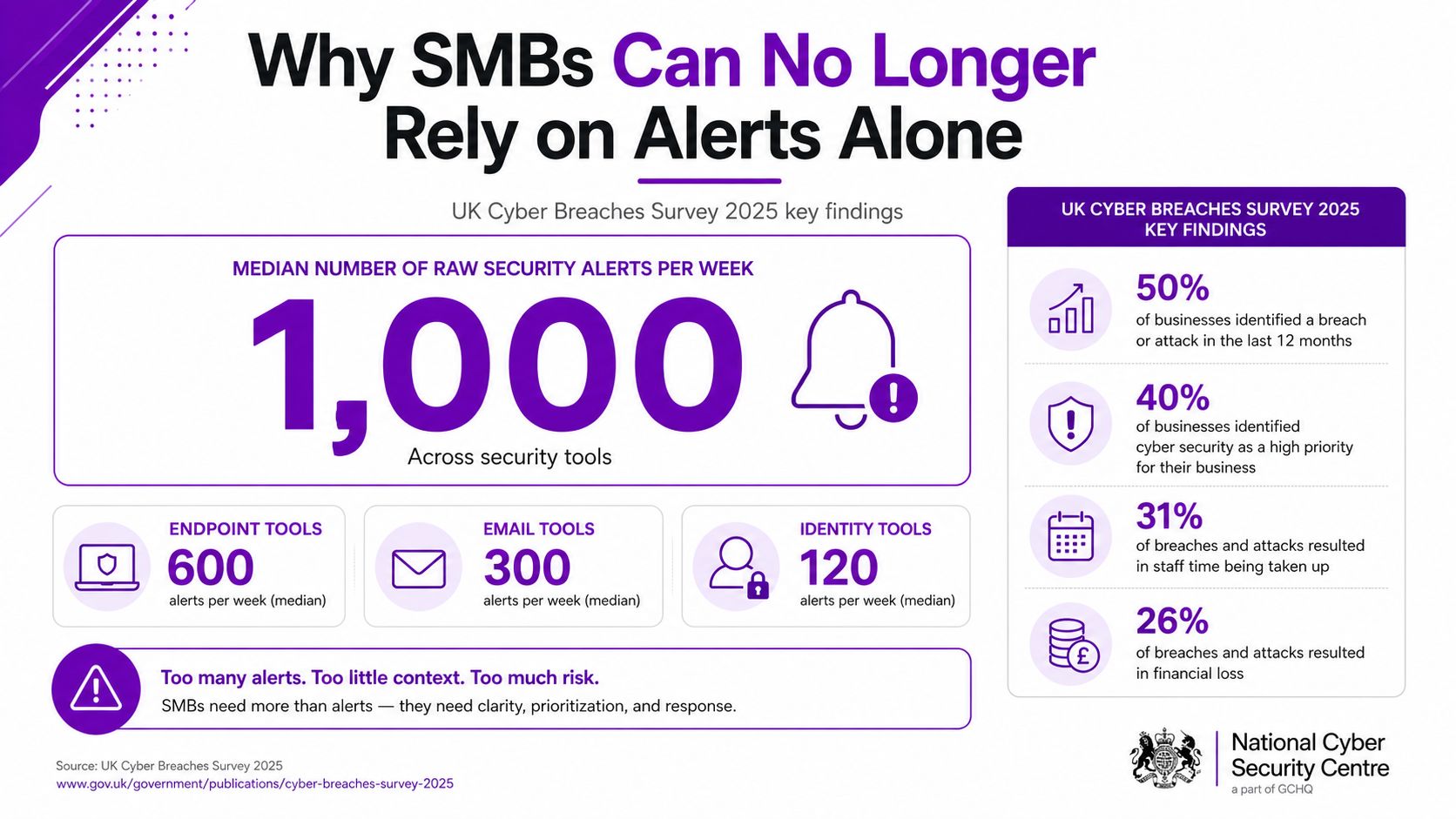
The NCSC Annual Review 2025 records 1,727 incident tips, 429 incidents requiring support and 204 nationally significant incidents, compared with 89 nationally significant incidents the previous year. That volume makes triage quality a service-level issue. Your provider must separate useful signals from background noise and act within the agreed response window.
MDR should give leadership a clear escalation, not a 4,000-row SIEM queue. The SOC should identify the account, endpoint or mailbox involved, show the supporting evidence, confirm what it contained and state what you must approve next. That clarity is what turns monitoring into a working security service.
The Core Components Inside a Modern MDR Service
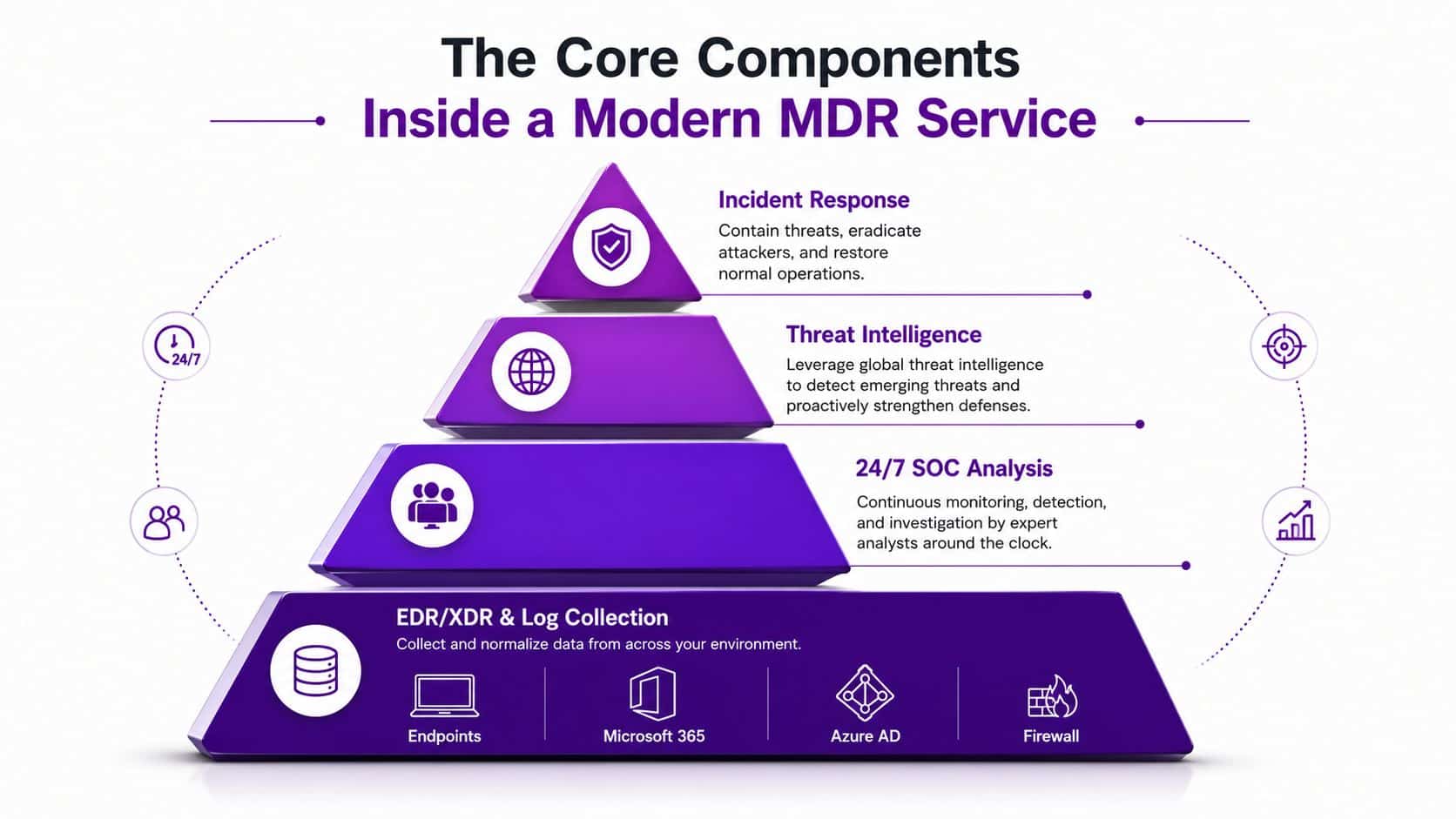
A credible MDR service works as a stack. Each layer has a job, and a missing layer creates a predictable weakness.
Start with complete telemetry
At the foundation sit EDR or XDR agents and log collectors. Endpoint data should cover laptops, desktops and servers. Microsoft 365 audit events, Azure identity logs, firewall activity and relevant cloud workload signals should feed the same investigation process. Microsoft Defender for Endpoint, Defender for Identity, Microsoft Sentinel and third-party XDR platforms are common building blocks.
If the provider only monitors endpoints, it won't see a compromised mailbox creating a forwarding rule or an attacker abusing a valid identity. Ask for a data-source matrix that names every included signal and identifies retention limits.
Correlate events before an analyst reviews them
A SIEM or cloud-native data lake stores and correlates events. Correlation turns isolated warnings into an attack chain. A risky sign-in followed by an unfamiliar mailbox rule and suspicious PowerShell on a workstation deserves a different response from three unrelated failed logins.
Detection logic then adds behavioural rules, use-case analytics and threat intelligence. Suppliers cut corners by enabling default detections, suppressing noisy alerts without tuning, or calling a small notification team a SOC. Ask to see examples of custom rules, threat hunts and tuning reviews.
Confirm the human and response layers
Analysts investigate, hunt for activity that didn't trigger a rule, classify severity and escalate according to your runbook. The response layer should cover practical actions such as endpoint isolation, account disablement, session revocation, malicious process blocking and forensic handover.
The NCSC Cyber Incident Response scheme provides a formal UK model for assured incident response, while NCSC Incident Management triages every reported incident by severity and potential impact. That makes provider assurance and escalation design important, particularly for firms with regulated customers.
Use managed security operations as a reference point when assessing how the service should operate day to day. The contract must distinguish detection-only from managed response. If the supplier needs your approval before every containment action, define which actions are pre-authorised, which require a named contact and how an unreachable contact is handled.
How MDR Plugs Into Microsoft 365 and Azure
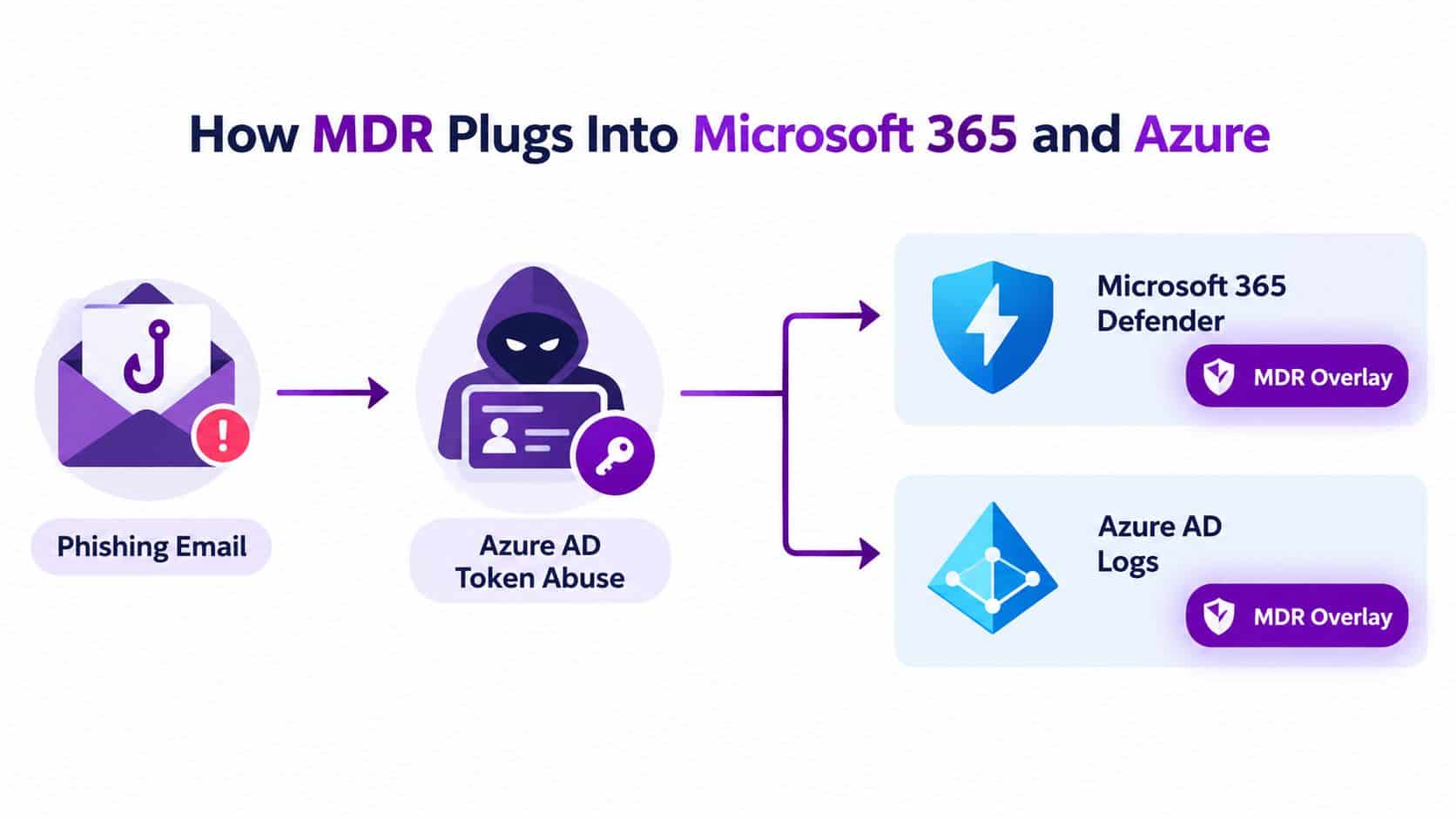
Take a realistic Nottingham example. A marketing employee opens a convincing phishing message and submits credentials to a lookalike sign-in page. The attacker uses the stolen session or credentials against Azure AD, tests access to cloud resources, and attempts to move through the tenant without immediately triggering an obvious malware alert.
An MDR provider should connect the clues. The required data sources include the Microsoft 365 unified audit log, Azure sign-in logs, risky-user information, endpoint telemetry and mailbox items. Microsoft 365 Defender can provide email, identity and endpoint context, while Defender for Cloud can add visibility into relevant Azure workloads. Sentinel can correlate the signals and retain the investigation record.
Licence position matters. Business Premium can provide a stronger security foundation for smaller organisations, while E3 and E5 environments expose different Microsoft security capabilities and telemetry. Don't assume the licence you already hold includes every signal your MDR supplier wants. The provider should identify missing permissions, ingestion charges and any licence uplift before the contract starts.
The SOC's final view should be concise. It might show the original message, the user's sign-in history, risky-user status, device activity, mailbox changes and attempted cloud access. From there, an authorised analyst may revoke sessions, isolate a device, disable an account or tighten Conditional Access while your internal contact confirms business impact.
Cloud security solutions should be assessed alongside MDR rather than treated as a separate purchase. The useful question isn't whether Microsoft has security features. It is whether somebody is watching the resulting signals and can act when the evidence connects.
UK Pricing, Service Levels and Coverage Tiers Compared
Price MDR by coverage and responsibility, not by the logo on the portal. A UK pricing guide lists office-hours MDR at £10 to £18 per endpoint per month, while 24/7 MDR is listed at £15 to £35 per endpoint per month with 15-minute response SLAs. See the UK cyber security pricing guide for those published bands.
The table below uses those bands as a straightforward planning benchmark. The totals assume one endpoint per seat and exclude VAT, onboarding, additional ingestion and incident-response work outside the agreed service.
UK MDR price comparison by service tier
| Service Tier | Price per Endpoint/Month (GBP) | 50-Seat Monthly Total | 150-Seat Monthly Total | What’s Included |
|---|---|---|---|---|
| Office-hours alert triage | £10 to £18 | £500 to £900 | £1,500 to £2,700 | Business-hours monitoring, alert review and escalation. |
| 24/7 SOC monitoring | £15 to £35 | £750 to £1,750 | £2,250 to £5,250 | Round-the-clock monitoring, named analyst response and 15-minute response SLA. |
| Full MXDR | Quote required | Quote required | Quote required | Broader identity, email, cloud and endpoint coverage, threat hunting and custom playbooks. |
The top tier needs a quote because MXDR scope varies materially. One supplier may include Microsoft 365 and Azure ingestion, while another charges separately for log volume, custom detection engineering, threat hunting days or after-hours incident response.
Budget warning: A low endpoint price can become expensive when the provider excludes identity telemetry, sets a log cap, imposes minimum user counts or requires a Microsoft 365 licence uplift.
The government procurement benchmark cited in UK MDR market pricing information shows £370,000 to £555,000 for a 24/7 Microsoft Sentinel-based detection-and-response service. That is an enterprise-grade reference point, not an SMB quotation. It proves why buyers must compare scope carefully.
My rule is simple. Choose office-hours service only when your risk and internal cover justify the gap. Choose 24/7 for businesses that can't investigate overnight. Choose MXDR when identity, cloud, email and applications matter as much as endpoints, or when customer and regulatory expectations demand wider evidence.
Choosing and Onboarding an MDR Provider
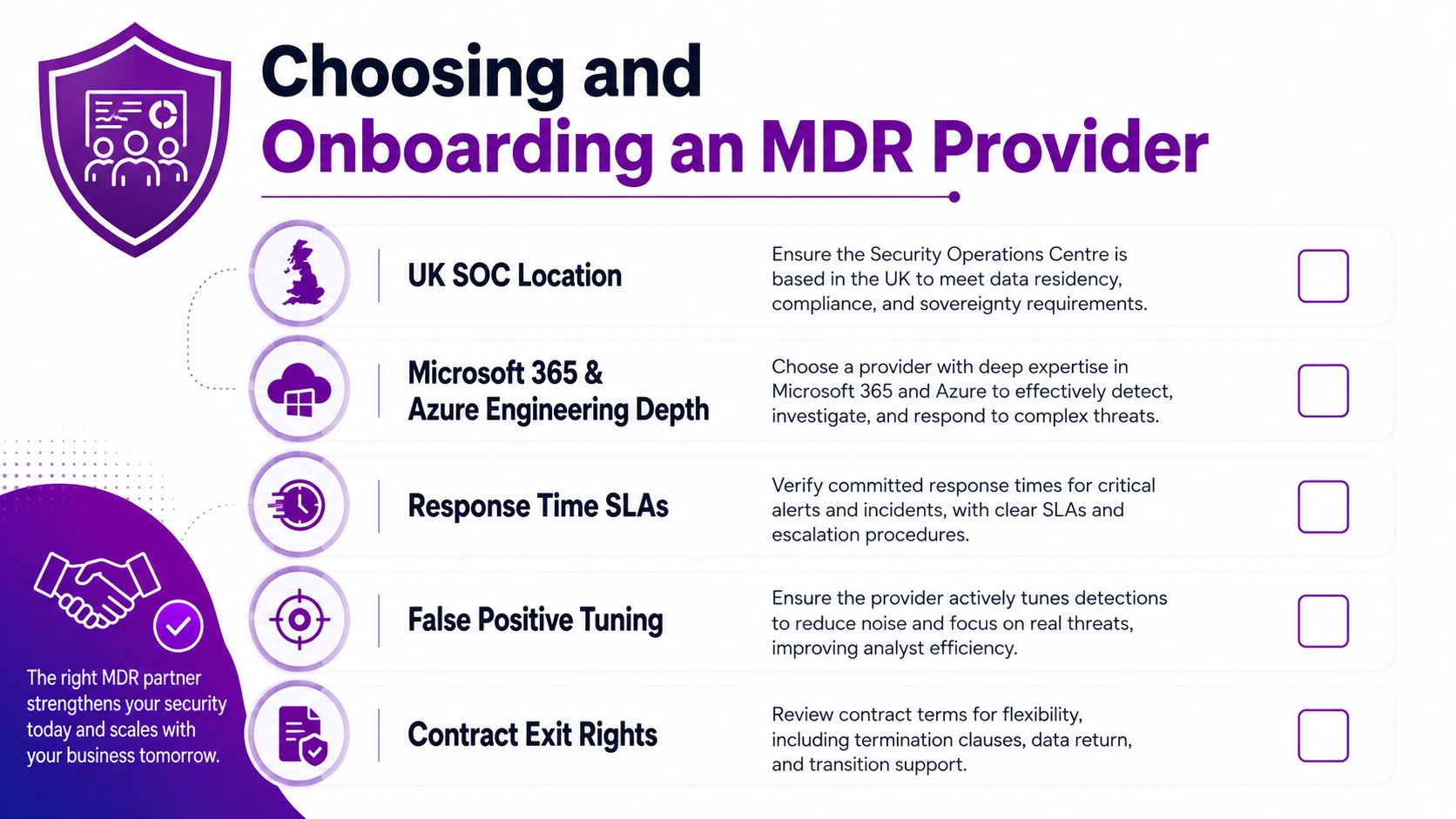
A polished SOC presentation proves very little. Use a scorecard that forces the bidder to explain where analysts sit, what they can do and what happens when your contact doesn't answer.
Ask every supplier these questions:
- UK SOC location: Where are analysts located, and which functions are outsourced?
- Microsoft engineering: How do you work with Microsoft 365, Azure, Defender and Sentinel?
- Defender for Business: Do you support Microsoft Defender for Business specifically?
- Response authority: Which containment actions can analysts take without waiting for approval?
- SLA definition: Does the response clock begin at detection, analyst confirmation or customer notification?
- False-positive tuning: Who tunes noisy detections, and how often do you review them?
- Log ownership: Who owns the data, where is it stored, and how can we export it?
- Playbooks: Can you show playbooks for account compromise, ransomware and business email compromise?
- Reporting: Will we receive incident timelines, monthly metrics and management summaries?
- Exit rights: Can we retrieve configurations, detection rules, logs and investigation records when the contract ends?
The first 30 days
Grant tenant access through controlled roles, confirm the endpoint inventory, nominate business and technical contacts, and record escalation preferences. The provider should baseline normal activity, tune obvious noise and identify telemetry gaps. Don't leave legacy administrator accounts active while onboarding a security service.
Days 31 to 60
Build and approve playbooks for account compromise, ransomware, suspicious mailbox rules and lost devices. Test runbooks with the provider, confirm who authorises isolation, and run a Purple Team exercise that checks whether the SOC sees and handles realistic activity.
Days 61 to 90
Hold the first quarterly-style review, even if the formal cadence comes later. Demand KPI reporting, unresolved risks, detection tuning actions and a tabletop exercise with senior stakeholders. Assign an internal MDR owner, budget time for staff awareness training and make sure the service fits your existing incident response planning.
The common failure is treating MDR as a technical deployment. It is a business process. Finance, HR, operations and senior management need to know who gets called and what decisions they may need to make.
MDR, Compliance and Cyber Essentials in the UK
A Derbyshire firm can have MDR running and still fail a Cyber Essentials assessment. MDR supplies detection, investigation, response records and useful evidence. It does not create an asset register, patch an overlooked laptop, train staff or restore a failed backup.
Cyber Essentials is a baseline control framework, not a substitute for managed detection. Current UK pricing examples list basic certification at £450 plus VAT for 1 to 9 users and £650 plus VAT for 10 to 49 users. Cyber Essentials Plus starts at £1,350 plus VAT for 1 to 9 users and £1,600 plus VAT for 10 to 49 users, according to this Cyber Essentials pricing guide. Use these figures as certification price anchors. Budget separately for preparation, remediation and the MDR service.
MDR covers monitoring, incident handling and evidence collection. The client still owns secure configuration, access control, supported software, malware protection, patch management and documented policies. A Nottingham manufacturer must protect production systems and removable media. A Leicester professional services firm must control privileged access, understand personal-data processing and test recovery procedures.
GDPR Article 32 expects appropriate technical and organisational measures. The NIS Regulations apply to relevant services and organisations within scope. FCA and ICO expectations can also extend beyond installing a monitoring tool. MDR supports operational response, while the client remains accountable for governance and control ownership.
The NCSC Cyber Incident Response scheme concerns recognised incident-response providers and the handling of significant cyber incidents. It is separate from an organisation's own incident-management triage process, which determines severity, ownership and escalation. Do not present provider recognition as proof that your internal response process is complete.
UK Frameworks vs MDR Coverage
| Framework / Control | MDR Coverage | Responsibility Gap |
|---|---|---|
| Cyber Essentials, malware protection and monitoring | Helps investigate endpoint and identity alerts | Secure configuration, patching, supported software and scope remain with the client |
| Cyber Essentials Plus, technical verification | Supplies useful investigation evidence | The assessment and remediation of failed controls remain the client’s responsibility |
| GDPR Article 32, security of processing | Supports detection, containment and incident records | Risk assessment, policies, processor management and data governance remain client duties |
| NIS Regulations, relevant services | Helps provide monitoring and response capability | Scope determination, resilience, reporting and governance need separate ownership |
| FCA and ICO expectations | Supports response workflows and evidence trails | The organisation must demonstrate oversight, training, testing and accountability |
Use British-English spelling guidance from Cambridge in customer-facing policies and evidence. Consistent documentation makes reviews easier and gives auditors a clearer record of ownership, decisions and follow-up actions.
Your Next Steps with F1Group
Don't start by asking vendors for a generic demo. Start with the data already in your tenant and make the commercial discussion concrete.
Build your baseline this week
- Review 90 days of Microsoft 365 sign-ins and alerts. Look for repeated risky sign-ins, disabled detections, suspicious mailbox activity and devices that aren't reporting reliably.
- Count the estate. Record endpoints, users, Microsoft 365 licences, Azure workloads, existing security tools and current security spend.
- Separate coverage from ownership. Write down who investigates alerts during working hours, who can act overnight and who approves account or endpoint isolation.
- List the business-critical systems. Include finance, production, customer records, file shares, line-of-business applications and privileged administration paths.
Your numbers will show whether you need endpoint monitoring, 24/7 response or wider MXDR coverage. They'll also expose hidden costs, such as missing telemetry, inactive agents and licences that don't provide the signals a provider needs.
F1Group is a Derby-based Microsoft-focused IT partner that can handle Microsoft 365 and Azure integration in-house, with named engineers rather than a remote ticket queue. For an East Midlands business, that local operational context matters when a response affects finance, manufacturing, customer service or a site that needs on-site support.
Test before committing
Book a 30-minute scoping call and map your endpoint count, Microsoft licensing and current controls against the pricing tiers above. Then schedule a 14-day proof-of-value pilot covering identity, endpoint and email telemetry. Agree the success criteria before it starts: which signals are collected, how alerts are escalated, what response actions are tested and what the final report must contain.
Use the pilot to challenge the provider. Send difficult questions, test an account-compromise playbook and ask the SOC to explain a detection in plain English. A dashboard full of green icons isn't proof of readiness. Clear evidence, fast escalation and controlled response are.
Ask for a one-page MDR readiness checklist before the call so your IT lead and management team can arrive with the same information. That short preparation will make the conversation about risk, scope and cost rather than sales terminology.
F1Group can assess your Microsoft 365 and Azure telemetry, design a managed detection and response service around your endpoints and identities, and define the response actions your team can trust. Phone 0845 855 0000 today or send us a message to arrange a practical scoping conversation, then visit F1Group to review the wider Microsoft-focused support available to your organisation.