
Managed IT support for a UK SME typically costs about £45 to £85 per user per month for core support, with security, compliance and strategic services pushing the figure above £100 per user per month. The price depends less on the headline rate than on what your MSP takes ownership of across Microsoft 365, Azure, devices, security, backups and service levels.
A finance director in Leicester, Nottingham or Northampton can easily receive two apparently comparable quotes that are nothing alike. One might show a low per-user figure for remote helpdesk access. The other might include endpoint protection, Microsoft 365 administration, backup monitoring, compliance evidence and out-of-hours cover. The cheaper quote often becomes expensive when the missing services are added.
That's the central issue in managed IT support pricing. You're not buying a single technician's time. You're buying a defined operating model, and every extra responsibility changes the cost.
What Managed IT Support Pricing Actually Covers
The finance director has two quotes open. Quote A looks attractive because its per-user rate is low. Quote B costs more, but it includes monitoring, Microsoft 365 administration and security management. Once the director adds helpdesk allowances, backup checks and the tools missing from Quote A, the gap narrows sharply.
That comparison is common because managed support is a bundle, not a single line item. A provider may include remote helpdesk, device monitoring, patching, backup oversight, Microsoft 365 administration and vendor management. Another may treat several of those services as chargeable extras. The practical definition of an MSP and its responsibilities matters more than the label on the proposal.
Included services need precise wording
A sensible contract makes proactive or unlimited-by-design services clear. That normally means the MSP monitors agreed devices, applies patches, handles routine user support and manages defined Microsoft 365 tasks without charging for every ordinary ticket.
Excluded work should be equally visible. Project delivery, hardware supply, major migrations, bespoke consultancy, new-site installations and unusual third-party applications usually sit outside the recurring fee. They're legitimate exclusions, but they mustn't be buried in a footnote.
Practical rule: If a service affects your day-to-day operation, ask whether it's included, limited, or billed separately.
Why the headline rate changes
A basic package around £30 to £55 per user per month is cited in UK market benchmarking for entry-level support, while mid-tier services sit around £50 to £85 and fully managed or enterprise-class support can reach £80 to £150 or more per user per month, as outlined in this UK MSP pricing benchmark.
The buyer's assumption is usually the problem. Microsoft 365 licensing may be separate. Advanced security tooling may be absent. Out-of-hours cover may only be available at an hourly rate. A £30 headline can therefore move materially once the estate is scoped.
The Main Pricing Models Used by UK MSPs
UK MSPs generally use four commercial structures. Choose the model that matches your staffing pattern and technical estate, not the one with the most attractive first figure.
| Pricing Model | How the Price Is Calculated | Best Fit For | Watch Out For |
|---|---|---|---|
| Per user per month | A recurring fee for each supported user | Standardised Microsoft 365 organisations with predictable headcount | Shared devices and non-user costs may sit outside the rate |
| Per device | A recurring fee for each supported computer, server or network device | Warehouses, factories and shift-based operations | One employee using several terminals can increase the total |
| Tiered package | A fixed service band with different support, security and review levels | Businesses that want a clear choice between service depths | Bronze, Silver and Gold labels aren't standard between providers |
| Block hours or pay as you go | Payment for reserved or consumed engineering time | Small estates or seasonal demand | You may pay separately for monitoring, security and urgent work |
Per-user pricing
Per-user-per-month works well when most employees use a similar Microsoft 365 setup. The cost scales with seats, which makes budgeting straightforward as headcount changes. It fits an office-based SME where each person has a laptop, Microsoft 365 account and similar support needs.
A warehouse or manufacturer may not fit as neatly. One employee could use a desktop, shared terminal and production workstation, while another uses only a shared device.
Per-device pricing
Per-device billing follows the equipment rather than the person. It can be fairer where shared workstations dominate, but ask whether servers, firewalls, mobile devices and specialist equipment have separate rates.
Tiered and flexible models
Tiered packages let you choose the response target, security stack and strategic review cadence. Block hours suit a small organisation that needs occasional engineering input, although it shouldn't be mistaken for proactive managed support.
Some all-inclusive models advertise unlimited support. Read the exclusions carefully. Project work, hardware, third-party applications and complex changes normally remain chargeable. A useful benchmark for outsourced service desk scope is this guide to service desk support.
Per-User Cost Bands and What Each Tier Includes
For an East Midlands SME, £45 to £85 per user per month is a practical benchmark for core managed support, with additional cybersecurity, compliance and strategic consultancy commonly adding £15 to £30 per user per month, according to this UK managed IT cost guide.
The useful question isn't “What's the average?” It's “Which responsibilities does my estate require?”
| Band (per user / month) | Core Inclusions | Security and Compliance Layer | Typical Additions That Push Price Up |
|---|---|---|---|
| £45 to £60 | Remote helpdesk, monitoring, routine patching and business-hours support | Basic endpoint protection and standard Microsoft 365 administration | More devices per user, on-site visits, advanced backup or project work |
| £60 to £85 | Core support plus stronger operational ownership and documented service levels | Advanced endpoint security, conditional access, backup monitoring and tighter response targets | Multi-site support, Azure management, compliance preparation and extended hours |
| Above £100 | Fully managed support across a more complex estate | Cyber Essentials Plus or ISO 27001 alignment, advanced security operations and formal governance | Azure infrastructure, out-of-hours cover, weekend support and strategic advisory time |
The entry band
The lower band suits a stable Microsoft 365 environment with limited regulatory pressure. You should still expect device monitoring, patching and a clear process for user incidents. If the quote excludes backup monitoring or treats every Microsoft 365 change as a project, it isn't equivalent to a fully managed package.
The middle band
Many established SMEs should start their comparison here. Conditional access, stronger endpoint detection and response, backup oversight and documented response targets address risks that a basic helpdesk cannot manage alone. Ask which security products are supplied, who reviews alerts and what happens after detection.
The upper band
Above £100 per user per month, you're paying for ownership beyond routine support. Compliance alignment, Azure infrastructure, formal governance and out-of-hours availability add people, tooling and accountability. A Microsoft-heavy organisation using Azure or Dynamics workloads should request a separate cloud responsibility matrix rather than accepting a generic “cloud support” line.
Sample Pricing Scenarios for Small and Mid-Sized Businesses
These examples apply the stated UK pricing bands to East Midlands SMEs. They are planning figures, not quotes. Confirm VAT separately, since UK providers may exclude it, as shown by this managed IT pricing example.
| Scenario | Users | Scope Included | Per-User Per Month | Indicative Monthly Total |
|---|---|---|---|---|
| Northampton accountancy | 10 | Core helpdesk, Microsoft 365 administration, monitoring, patching and business-hours support | £55 | £550 |
| Kettering manufacturer | 50 | Core support, Azure, line-of-business servers, backup monitoring, endpoint security and Cyber Essentials work | £110 | £5,500 |
| Leicester professional services firm | 100 | Compliance support, advanced security, 24/7 cover and on-site engineer callout provision | £125 | £12,500 |
Northampton accountancy
Ten users leave fixed service costs spread across a small base, so the rate reaches £55 despite a relatively simple estate. The finance risk is scope creep: Microsoft 365 licensing, backup storage, support for line-of-business applications and on-site visits may sit outside the monthly fee. Get each exclusion written into the quote.
Kettering manufacturer
At £110 per user, the provider is responsible for Azure, servers, production dependencies, backup monitoring, endpoint security and Cyber Essentials work. The hidden cost trap is operational dependency. If a production server or Azure workload needs urgent engineering, a user-only agreement may leave the factory waiting for a project quote. Request a responsibility matrix covering systems, backups and recovery actions.
Leicester professional services firm
The Leicester firm pays £125 because compliance work, advanced security, continuous cover and on-site callouts require more staff, tooling and accountability. Ask who handles evidence requests, alert escalation and callouts, and whether the named 24/7 service is staffed. If the provider offers 24/7 cover without an active rota, you will not receive continuous support.
The move from £55 to £110 reflects added security, cloud, compliance and operational responsibility. The service estate changed, so the monthly price changed.
SLA Response Times, Coverage Hours, and What They Mean for Cost
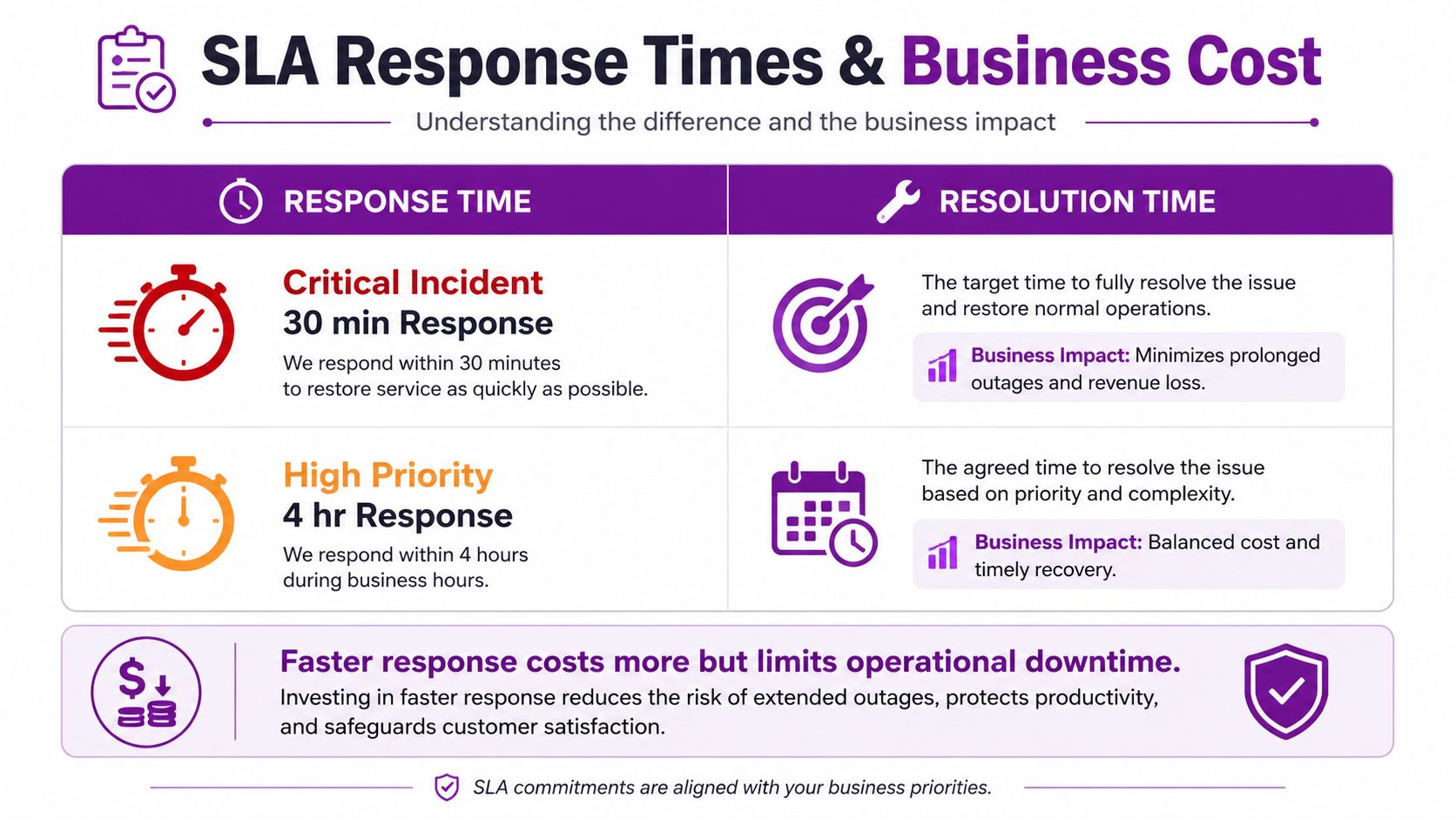
An SLA should tell you what happens after an incident is logged. Response time means when the support team acknowledges or establishes contact. Resolution time means when the underlying issue is fixed or a workable restoration is delivered. They aren't interchangeable.
UK agreements illustrate the range. One contract specifies 15 minutes for the highest-priority issue, 30 minutes for the next tier, 60 minutes for medium issues and 90 minutes for minor issues, with those targets applying during standard working hours unless out-of-hours cover is included, according to this UK SLA document. Another defines response as the time until an engineer establishes contact and offers tiers of 1 hour and 8 working hours, as set out in this Digital Marketplace service agreement.
Match coverage to business exposure
A 30-minute critical response costs more because the provider must prioritise your incident and maintain the capability to act quickly. That may be justified for a manufacturer whose production system stops, but it may be unnecessary for a small office that can work around a non-critical application issue.
Business-hours support is the economical option when staff work predictable hours and downtime has a manageable impact. Extended-hours or 24/7 coverage costs more because the provider must support incidents outside the normal operating window.
Read the exclusions
Third-party software, project work, hardware supply and supplier delays often fall outside the SLA. Ask whether the clock pauses while another vendor investigates, and whether the target covers contact, workaround or full resolution.
Factors That Move the Price Up or Down
The quote changes when the MSP takes on more users, devices, systems or risk. Start with the inventory, then examine the obligations attached to each system.
Estate complexity
A standard Microsoft 365 estate is easier to support than a mixed environment containing legacy servers, specialist production equipment and several sites. Ask your MSP to list every covered user, device, server, firewall and cloud tenant.
Microsoft 365 licences may be supplied separately or bundled into a managed package. Azure creates another cost boundary, because support might cover tenant administration only, or extend to subscriptions, virtual machines, networking, security and cost management. Require a written responsibility matrix for both platforms.
Security and compliance
Endpoint detection and response, managed detection and response, SIEM monitoring, conditional access and backup retention all add tooling or human review. Compliance work adds evidence gathering, policy management and remediation planning. If you need Cyber Essentials Plus or ISO 27001 alignment, ask exactly which preparation and evidence tasks are included.
Location and commercial model
Regional pricing deserves a direct conversation. One UK guide says London can carry a 15 to 25% premium over the national average, indicating that geography affects quotes alongside service depth, as explained in this UK managed support pricing analysis. Don't assume a national average reflects an East Midlands operation, particularly where on-site support is required.
Longer contract terms, bundled licences, a single site and a clean, standardised estate can lower the rate. Use this practical guide to reducing IT costs to challenge waste, but don't remove monitoring or security to reach a cheaper headline.
Ask three questions: What exactly is covered? Which tools are charged separately? What event triggers a price review?
How to Compare Quotes and Avoid Hidden Costs
The lowest quote usually loses when the scope is tested line by line. Compare deliverables, not fonts, logos or the first monthly figure.
Request a one-page pricing schedule from every MSP. It should show the recurring rate, user and device counts, support hours, response and resolution targets, security tools, covered systems and the price of common additions.
| Line Item | Quote A | Quote B | Watch For |
|---|---|---|---|
| Per-user rate | Check whether VAT is excluded | ||
| Included support | Look for ticket or hour limits | ||
| Microsoft 365 and Azure | Separate licence pass-through and cloud administration | ||
| Security stack | Identify EDR, MDR, SIEM and alert handling | ||
| Backup | Check retention, monitoring and storage overage | ||
| Onboarding and migration | Confirm one-off fees and handover responsibilities | ||
| Out-of-hours cover | Check whether it's included or charged per incident | ||
| Project work | Ask for engineering rates and approval rules | ||
| Hardware and third-party software | Identify supply, warranty and supplier exclusions | ||
| SLA remedies | Review service credits, liability caps and exclusions |
Challenge the quiet exclusions
Ask whether onboarding, documentation and migration are included. Confirm whether Microsoft 365 and Azure costs are pass-through charges, whether backup storage has an allowance, and whether extra incidents trigger per-ticket billing.
Pay close attention to consequential-loss exclusions and liability caps. A provider may promise a fast response but offer limited financial remedy if the service fails. That doesn't automatically make the contract unacceptable, but finance and IT should understand the risk they're accepting.
Negotiate with evidence
Before signing, ask the MSP to define the covered estate, approve all chargeable projects, publish out-of-hours rates and state how user numbers are measured. If the proposal can't answer those questions, it isn't ready for procurement.
Budgeting, ROI, and Next Steps
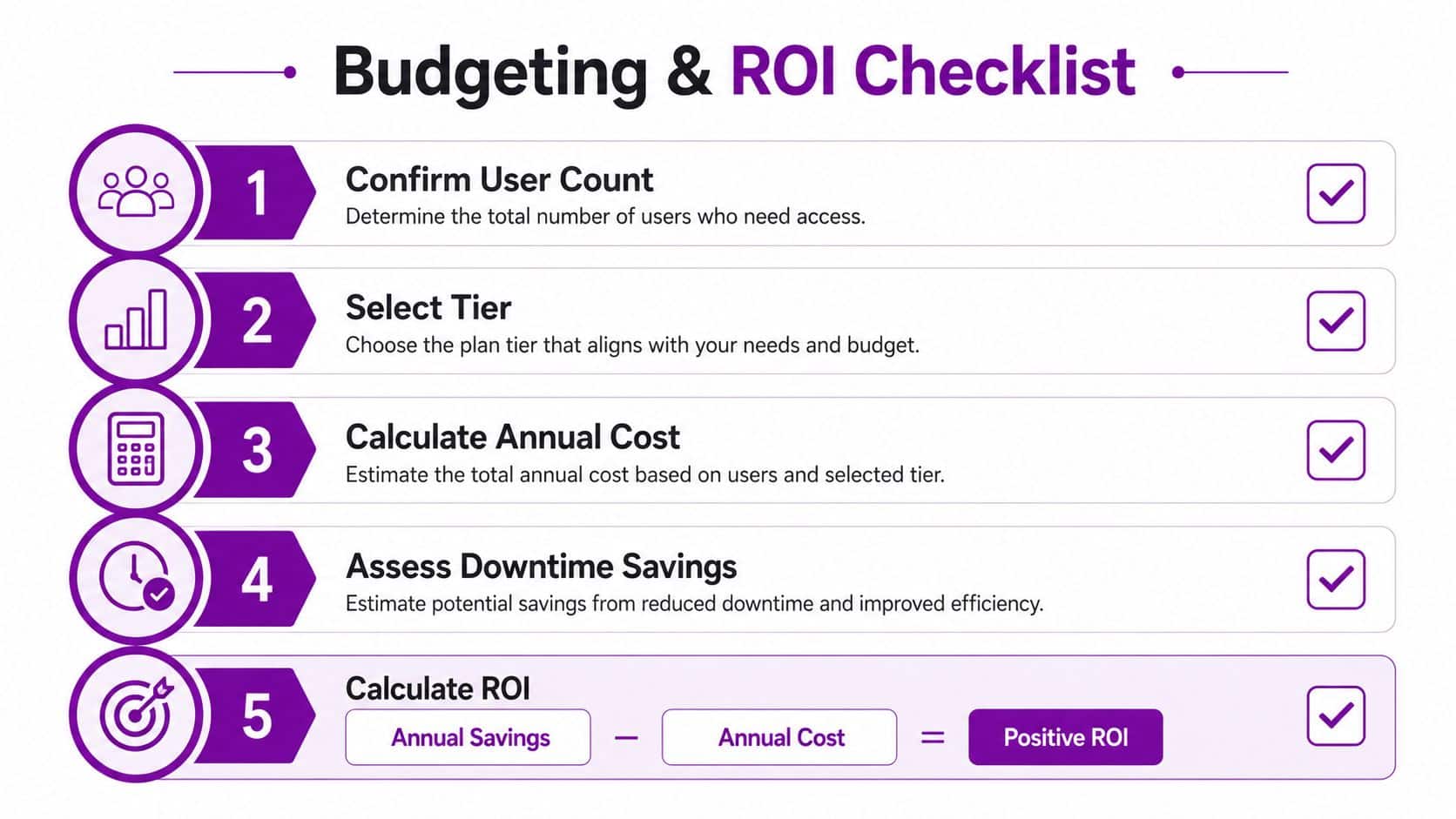
Build the budget from the scope, not from an attractive market headline. Multiply the agreed per-user rate by the supported user count, then add licensing, cloud consumption, one-off onboarding and planned project work as separate lines.
For next year, a practical planning rule is per-user rate multiplied by user count, plus a 10 to 15% allowance for projects and onboarding. That allowance is a budgeting convention rather than a market statistic, so validate it against your migration plan, compliance calendar and Azure roadmap.
ROI should compare the fully loaded cost of internal staffing and tooling with the MSP fee. Include salaries, recruitment, training, monitoring platforms, security products, backup administration and the management time required to run suppliers. Then assess avoided downtime against the response and resolution targets in the proposed SLA.
Review the arrangement after 90 days. Confirm that the user and device inventory is accurate, Microsoft 365 and Azure costs match actual usage, security tools are operating as promised and compliance inclusions meet the agreed requirement.
The formula is simple: annual internal cost avoided, plus credible downtime savings, minus annual managed service cost. If the result isn't persuasive, the scope needs adjustment before the contract is signed.
F1Group provides scoped managed IT support for East Midlands SMEs, including Microsoft 365, Azure, security, compliance and on-site assistance. Call 0845 855 0000 today or send us a message to request a quote built around your actual users, systems and service-level requirements, rather than a misleading headline price.