
A Monday morning ransomware attack rarely presents as a neat list of failed applications. A logistics team may find that Microsoft 365 is inaccessible, Dynamics 365 orders aren't processing, shared documents can't be opened, and customer communications have stopped. The immediate question isn't, “What can IT restore?” It's what must be restored first to keep the business operating?
A business impact analysis, or BIA, answers that question before a crisis. It identifies essential business functions, measures how disruption affects them over time, maps the people, data, suppliers and technology they depend on, and sets recovery priorities. For UK SMEs, the practical value is straightforward: a BIA turns disruption from a general concern into a recovery order that leaders and technical teams can act on.
Why Business Impact Analysis Matters for UK Organisations
Consider a mid-sized UK logistics firm that starts Monday with a ransomware incident. The finance team wants Dynamics 365 restored so invoices can be raised. Operations wants access to delivery information. Sales needs Exchange Online and Teams to answer customers. The IT team has limited recovery capacity, but nobody has agreed which service supports the most time-sensitive business function.
Without a BIA, the loudest request often wins. IT may restore a familiar application first, even though the warehouse needs another system to release consignments or confirm stock. The result is a technically active environment with revenue-generating work still blocked.
The GOV.UK Business Continuity Management Toolkit defines BIA as a way to identify key products and services, the critical activities required to deliver them, the impact of disruption, and the resources needed to resume operations. It also directs organisations to assess impact during the first 24 hours and establish the maximum tolerable disruption before viability is threatened. That time-based approach makes the analysis operational rather than theoretical.

Consequences, not causes
A risk assessment asks what could go wrong, such as ransomware, supplier failure, human error or a cloud outage. A BIA asks what happens to the organisation if a function is unavailable, how quickly the consequences become unacceptable, and what resources are required to recover it.
That distinction matters. A risk register may record a Microsoft 365 identity compromise, but it won't necessarily show that compromised access can prevent staff from reaching Exchange Online, SharePoint, Teams and other connected services. The BIA translates that technical event into business consequences, such as delayed customer responses, blocked project work or interrupted order administration.
UK organisations also face a more demanding resilience environment. Government guidance positions BIA as a basis for continuity strategy, while UK security guidance describes it as supporting disaster recovery, continuity planning, risk assessment and mitigation. ISO 22301 guidance identifies business impact analysis and risk assessment as key requirements of the standard, as outlined in the UK Cyber Assessment Framework guidance.
Practical rule: If the recovery team can't use the BIA to decide what to restore next, the document hasn't finished its job.
Supply chains make this even more important for mid-sized firms. A business may rely on a cloud platform, a logistics partner, a payment provider and shared Microsoft 365 records to complete one customer transaction. The BIA exposes those relationships and shows where a single unavailable service can stop several departments at once.
For a broader view of continuity planning and practical preparation, Networking2000's guide to business continuity provides useful context. The key lesson is simple: recovery priorities should be agreed while people can still think clearly, not improvised during an incident.
Core Components of an Effective Business Impact Analysis
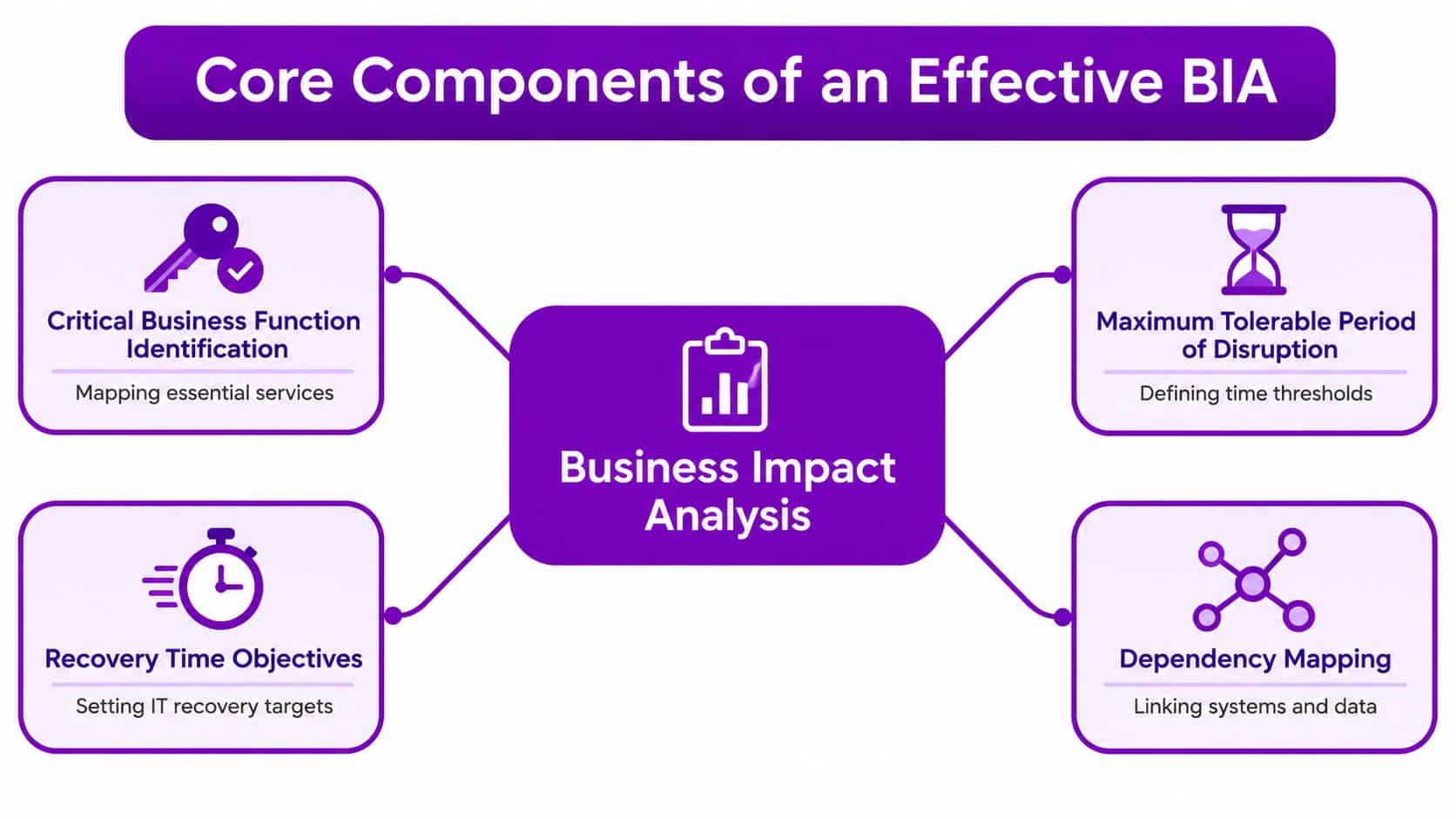
An effective BIA connects business services to time thresholds and technical dependencies. UK government continuity guidance starts with products, services, activities, impacts and required resources. The resulting document should allow a recovery team to answer three questions quickly: what has failed, what does it affect, and what must happen first?
Identify the functions that keep the business viable
Start with services rather than applications. “Process orders”, “deliver goods”, “respond to customers” and “pay staff” are business functions. Microsoft 365, Azure, Dynamics 365 and third-party platforms are dependencies that support those functions.
For each function, record:
- Business owner: The person accountable for service continuity and the accuracy of the impact assessment.
- Operational activity: The work staff must perform, including manual alternatives.
- Supporting technology: Applications, identities, devices, data stores and integrations.
- External dependency: Suppliers, carriers, payment services, outsourced support or telecommunications.
- Impact profile: Financial, operational, reputational and regulatory consequences as disruption continues.
Set disruption and recovery thresholds
The maximum tolerable period of disruption, or MTPD, is the point beyond which the business can no longer sustain the loss of a function. It isn't the same as an estimate of how long recovery might take. It describes the limit the organisation must avoid crossing.
The recovery time objective, or RTO, sets the target time for restoring a function or service. The recovery point objective, or RPO, sets the acceptable amount of data loss measured against the last recoverable point. A process may require rapid access but tolerate little data loss, or it may accept slower recovery while needing a complete recent data set.
Time-based impact ratings create a defensible order. If a customer-facing process becomes critical after four hours, it should generally outrank an internal reporting activity that can tolerate 48 hours. The figures must come from each organisation's operations, contracts and obligations, not from a generic template.
Map dependencies and recovery order
Dependency mapping is where many technology-led BIAs become useful. An Azure-hosted application may depend on a virtual machine, Azure SQL Database, storage, network controls, monitoring and identity services. A Dynamics 365 process may depend on user authentication, integration flows, customer records and access to documents stored in SharePoint.
The map should show upstream and downstream relationships. If SharePoint document libraries are unavailable, project delivery may stop even though the project management application itself remains online. If Teams is inaccessible, customer-facing communications may move to telephones or fail altogether.
The final output should be a prioritised recovery sequence, not just a list of systems. It should tell IT which identity services, data stores, applications and communication channels support the most urgent business functions, while telling department owners what they can do during each stage of recovery.
A Practical BIA Methodology for Mid-Sized Businesses
A mid-sized business doesn't need to begin with a lengthy survey sent to every employee. That approach creates fatigue, produces inconsistent answers and leaves senior managers with a large spreadsheet but little confidence in the results. A focused workshop model works better because it combines operational knowledge with technical evidence.
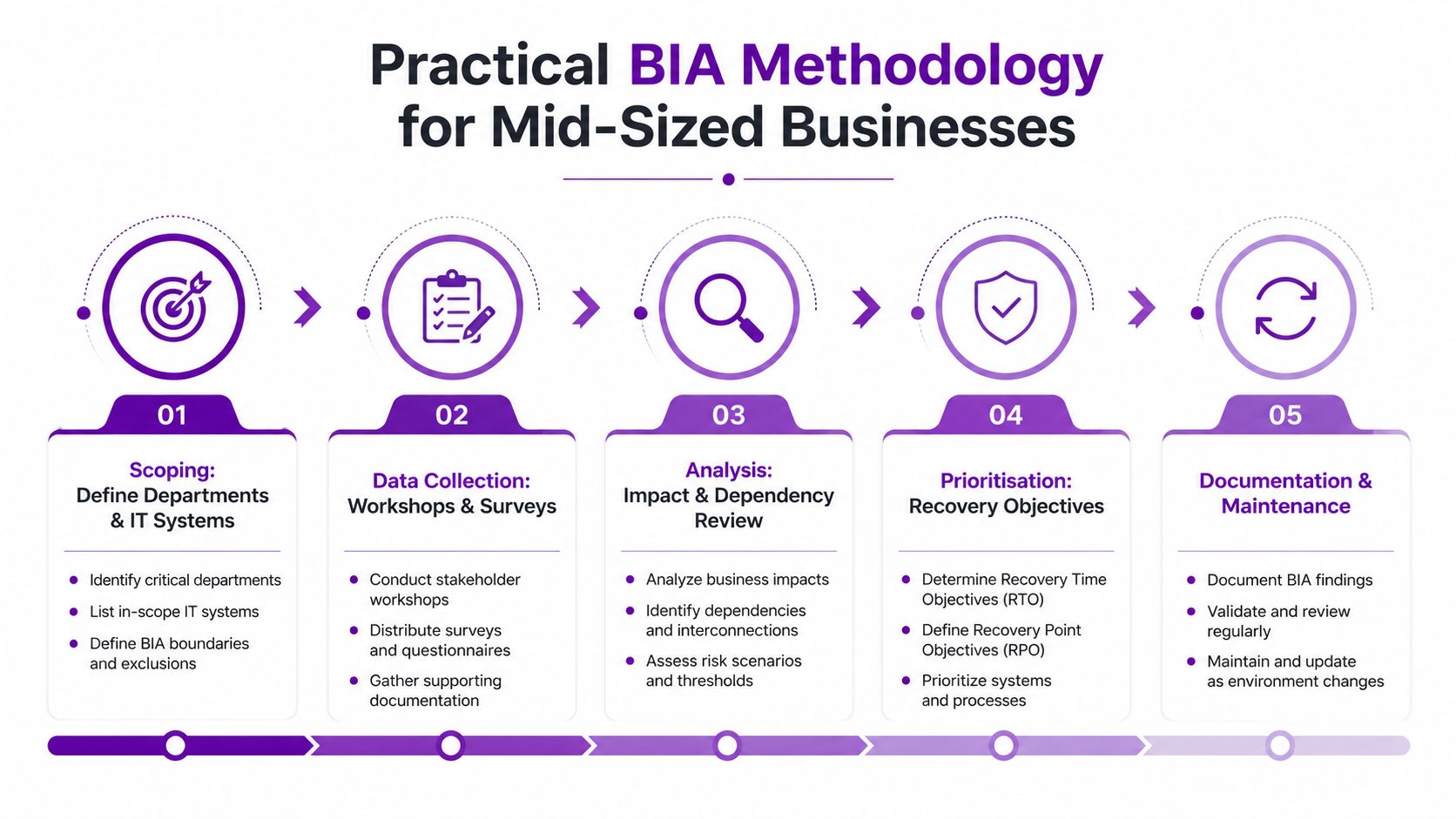
1. Scope the assessment
Define the departments, locations, products, services and IT systems included in the first assessment. Set a clear decision purpose, such as establishing disaster recovery priorities for Microsoft 365 and Azure, or validating continuity arrangements for customer operations.
Keep the initial scope manageable. A narrow assessment that produces agreed recovery objectives is more valuable than an organisation-wide exercise that never reaches approval.
2. Gather evidence through focused conversations
Use short, structured interviews with department heads. Ask what the team delivers, what stops first when work is interrupted, what records it needs, which suppliers are involved and how long manual workarounds can operate.
Follow those interviews with targeted IT workshops. Technical staff should identify tenant configurations, Azure resources, authentication paths, integrations, backup arrangements and privileged access dependencies. Ask business owners to describe consequences in operational language, then translate those consequences into technical requirements.
3. Validate claims against system evidence
Department owners may believe a service is used constantly, while audit records show a different pattern. Microsoft 365 admin centres can help validate activity across services, while Azure monitoring tools can show application dependencies, resource health and usage patterns.
This isn't about replacing business judgement with telemetry. Usage data won't tell you the consequence of losing a process at a critical point in the working day. It will, however, expose forgotten services, inactive accounts, unexpected integrations and systems that appear minor but support a large number of users.
4. Analyse impact and dependencies
Score each function across agreed time intervals. Record when financial, operational, reputational or regulatory impact changes from manageable to serious, then identify single points of failure and shared dependencies.
A useful workshop question is, “What would staff do if this service disappeared now?” The answer often reveals a hidden dependency, such as a spreadsheet export from Dynamics 365, a SharePoint library used for contract evidence, or an identity group controlling access to several applications.
5. Approve, communicate and maintain
Leadership must approve the recovery priorities because restoration decisions involve trade-offs. Faster recovery may require additional resilience, more frequent backups, alternative suppliers or manual procedures.
Give IT a concise recovery summary, not only a detailed report. Give each department owner their critical functions, dependencies, RTOs, RPOs, workarounds and escalation contacts. Use the BIA during exercises and change reviews so it remains a working operational document.
The following video provides a visual introduction to the BIA process:
IT Impact Rating Examples for Microsoft 365 and Azure
A useful impact rating must describe what staff cannot do, which customers feel the effect, and how the consequence changes over time. The matrix below is a workshop starting point for UK SMEs. It isn't a universal rating. Each business should adjust the assessment to its operating model, contractual duties and manual alternatives.
| Service | 1-Hour Impact | 4-Hour Impact | 24-Hour Impact | Recovery Priority |
|---|---|---|---|---|
| Exchange Online | Staff may experience delayed internal and customer email. Teams can use another agreed communication route if available. | Customer responses, approvals and supplier coordination may slow materially. | Unanswered enquiries, missed operational messages and evidence gaps can affect service delivery and reputation. | High where email supports customer or operational decisions |
| Teams | Internal collaboration and customer-facing calls may be interrupted. | Meetings, escalation routes and frontline communications may need manual alternatives. | Distributed teams may lose normal coordination, especially where Teams is the primary channel. | High for communication-dependent operations |
| SharePoint document libraries | Staff may lose access to current project, contract or operational documents. | Project delivery and approval work may pause if no controlled offline copies exist. | Teams may work from stale documents, creating delivery, audit and version-control problems. | High where documents support regulated or customer work |
| Azure virtual machine | A hosted application may become unavailable, depending on its role and dependencies. | Users may require manual processing, while connected workflows begin to queue. | Backlogs can spread to customer service, reporting, finance or fulfilment processes. | Critical when the VM hosts a revenue-supporting application |
| Azure SQL Database | Applications may open but fail when they need transactional data. | Order, stock, case or reporting workflows may be unable to complete. | Data-dependent operations can remain blocked even if front-end infrastructure is restored. | Critical where the database supports core transactions |
| Dynamics 365 Business Central | Order entry, stock visibility or finance tasks may slow or stop. | Manual order and inventory workarounds may become difficult to control. | Processing backlogs, reconciliation work and delayed reporting can affect trading decisions. | Critical for firms that depend on the platform for order-to-cash activity |
Microsoft 365 dependencies deserve particular attention because a single outage may affect communication, collaboration, identity and records at the same time. Azure failures can cascade through infrastructure layers, while Dynamics 365 interruptions may expose the difference between an application being reachable and a business process being executable.
Recovery decision: Restore the service that releases the most constrained business activity, not automatically the platform that is easiest for IT to restart.
RPO decisions also need evidence. If a Dynamics 365 export is used to reconstruct orders, the organisation must know whether that export is complete, protected and accessible during an identity incident. A separate review of Office 365 backup considerations can help teams test whether their Microsoft 365 recovery assumptions match their BIA requirements.
How Cyber Risk Changes Your Recovery Priorities
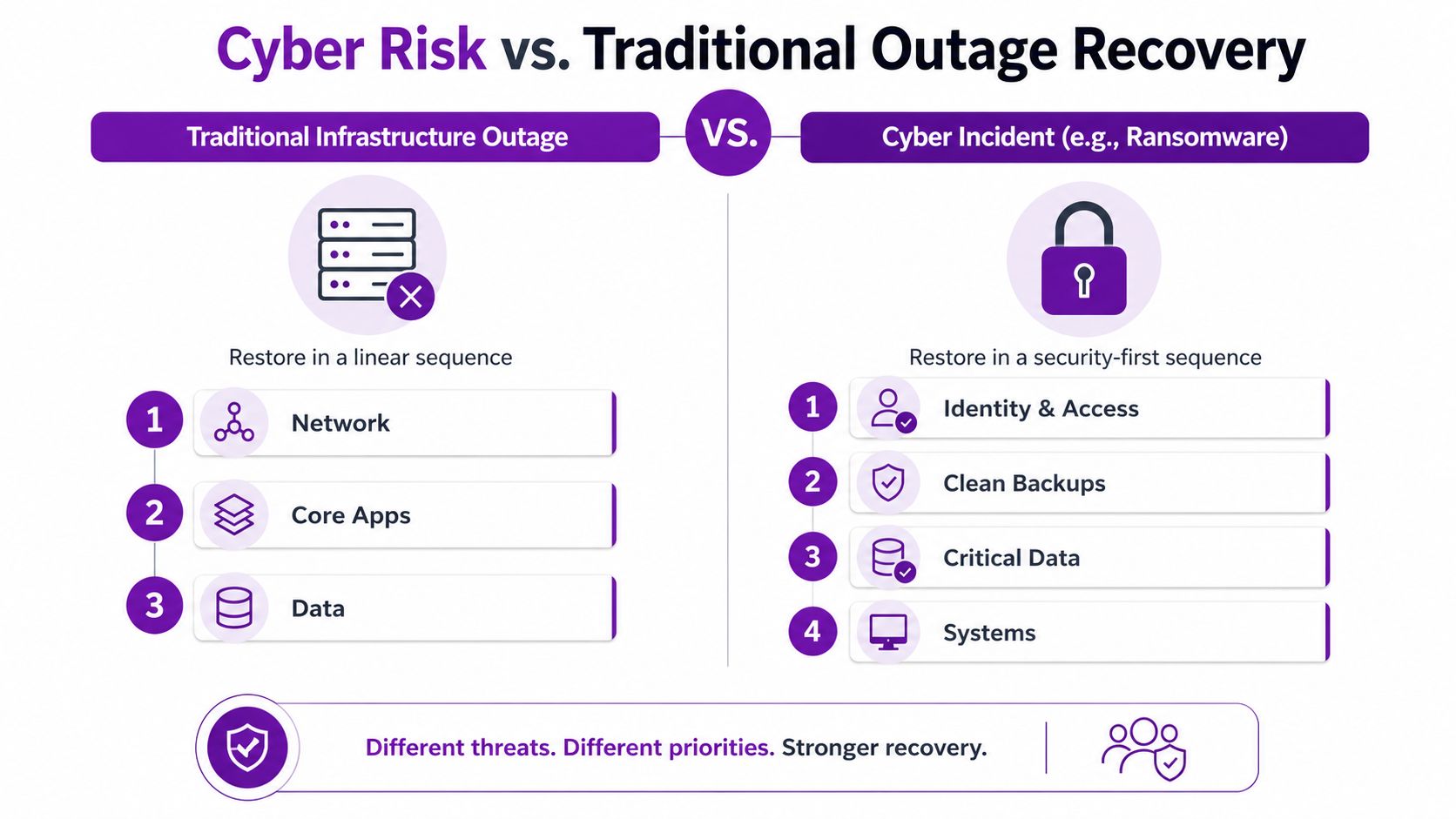
A conventional infrastructure outage usually assumes that the environment is trustworthy. If a server fails, the recovery team can often repair or replace it, restore data and return the application to service. A cyber incident changes that assumption because the systems, credentials and backups may have been altered deliberately.
The first recovery action may therefore be containment rather than restoration. The team needs to isolate affected assets, preserve evidence, confirm the scope of compromise and prevent attackers from regaining access. Restoring a high-priority application before validating the environment can give the attacker another route back in.
Identity comes before many applications
Microsoft Entra ID, formerly Azure AD, is a particularly important dependency. If an attacker compromises identities, privileged accounts or access policies, Microsoft 365 workloads and connected applications may all be affected. An otherwise healthy Dynamics 365 service won't help users if they can't authenticate safely or if their permissions are no longer trustworthy.
A cyber-specific recovery sequence often needs to consider:
- Containment: Restrict compromised accounts, devices, sessions and network paths.
- Identity recovery: Re-establish trusted administrative access, authentication controls and permissions.
- Backup validation: Confirm that recovery copies are clean, complete and usable.
- Data recovery: Restore priority records while checking integrity and access.
- Service restoration: Bring applications back in a controlled order, monitoring for renewed compromise.
- Business resumption: Remove manual workarounds only after owners confirm that processes are safe to resume.
Add cyber scenarios to the existing BIA
Don't create a cyber plan that ignores the business impact analysis. Add adversarial scenarios to the same dependency model, then record how the recovery order changes when confidentiality, integrity or identity is affected.
Data exfiltration may create regulatory and customer consequences even when systems remain available. Under UK GDPR, notification and investigation decisions can compress the time available to leaders, legal teams and technical responders. The BIA should identify who owns those decisions and which records are needed to support them.
Backups also require more than a retention statement. Teams must know whether attackers could alter or delete them, whether administrators can access them safely, and whether restored data can be trusted. For a technical comparison of approaches, a review of virtual machine backup software can support a wider discussion about recovery design, but the final choice still needs to reflect the business's RTO, RPO and cyber threat model.
Cyber recovery principle: A backup isn't a recovery solution until the organisation can restore it safely, verify it and use it in the required business sequence.
Partnering with a Managed IT Provider to Deliver Your BIA
Internal teams understand the business, but they may not have the time or independence to challenge established assumptions. Department heads often describe applications rather than functions, while IT teams may focus on infrastructure without seeing which customer or revenue process depends on it. A managed IT partner can connect those perspectives.
The useful contribution starts with facilitation. A provider can run focused discovery workshops, keep discussions tied to decisions, and translate statements such as “we need access to the system” into requirements for identity, data, integrations, devices, licensing and recovery procedures.
Technical mapping that reflects the real environment
Cloud estates are easy to underestimate. A Microsoft 365 tenant can contain conditional access policies, privileged roles, SharePoint sites, Teams channels, retention settings and third-party integrations. An Azure environment may include virtual machines, databases, storage, networking, monitoring and service identities that internal documentation doesn't fully capture.
The partner should test the map against configuration and monitoring evidence, then connect each dependency to a business owner. That produces a recovery plan with traceable priorities instead of an application inventory detached from operational consequences.
For broader context on the role of external technical support, this IT consultant guide for 2026 offers a useful explanation of how consultancy can support technology decisions. The value in a BIA engagement comes from applying that role to continuity decisions and follow-through.
Turn findings into operational controls
A BIA should influence backup schedules, monitoring thresholds, escalation routes, service desk records and incident playbooks. If a business owner sets a demanding RTO, the provider should test whether the current backup method, access model and recovery runbook can meet it.
F1Group can facilitate BIA workshops and map Microsoft 365, Azure and Dynamics 365 dependencies as part of continuity and disaster recovery planning. Its managed IT services for firms can also connect agreed recovery objectives with ongoing support and service management processes.
The shelf-ware problem needs deliberate controls. Schedule reviews when the business adopts a new Microsoft 365 service, migrates an Azure workload, changes a supplier or alters an operational workflow. Tabletop exercises should challenge the assumptions, while leadership should review unresolved gaps and funding decisions.
UK legislation for central securities depositories provides a clear example of the expectation for ongoing analysis. It requires organisations to identify processes, IT components, interdependencies, impacts, minimum service levels and minimum resources, and to keep the analysis current through review at least annually and after incidents or significant organisational change, as set out in the relevant legislation.
Next Steps to Build Lasting Operational Resilience
A BIA becomes valuable when it changes what people do before, during and after disruption. Start with a manageable plan and make each step produce an operational decision.
- Schedule the first cross-department workshop within 30 days. Include business owners, IT, security, operations, finance and senior leadership. Agree the scope and the decisions the assessment must support.
- Identify the top five critical processes and their IT dependencies. Map the supporting Microsoft 365 services, Azure resources, Dynamics 365 modules, identities, data and third parties.
- Set RTOs and RPOs with department heads. Record the business consequence behind each target, then ask IT whether current backups, access controls and recovery procedures can meet it.
- Test the assumptions with a tabletop exercise. Use a Microsoft 365 identity incident, Azure application failure or Dynamics 365 outage. Make participants decide what happens first and identify where the runbook is incomplete.
- Establish a quarterly review cadence. Trigger reviews after new Microsoft 365 roll-outs, Azure migrations, supplier changes, major process changes or incidents.
The approved analysis should feed disaster recovery runbooks, cyber incident response playbooks and board-level risk reporting. It should also influence investment decisions, because organisations without a current view of business impact can over-prioritise visible but lower-impact systems while under-investing in services that keep revenue flowing.
F1Group's business continuity and disaster recovery guidance provides a starting point for connecting BIA findings with practical recovery planning. The next useful move is to test your own assumptions against the systems staff use every day, not update an old document.
F1Group can facilitate your business impact analysis, challenge recovery assumptions, and map Microsoft 365, Azure and Dynamics 365 dependencies into practical recovery priorities. Call 0845 855 0000 today or send us a message to arrange a scoping conversation, and visit F1Group to see how its managed IT and continuity services can support ongoing resilience.