
A field engineer is standing outside a customer's premises with one bar of signal, trying to submit a safety update through a spreadsheet designed for a desktop screen. The form times out, the photos remain on the phone, and the operations manager only discovers the gap when someone calls the office. A charity team faces the same problem in a different setting, with staff recording visits on paper and re-entering information into Microsoft 365 once the day is over.
That's the true starting point for custom enterprise mobile app development. Not a glossy feature list, but a decision about whether a mobile workflow deserves its own product, whether Power Apps or a progressive web app would be enough, and how to connect the chosen solution to Microsoft 365, Azure, Dynamics 365 and existing operational systems without creating a support problem.
This guide takes a firm position. Most organisations shouldn't commission a custom app by default. When a bespoke build is justified, though, identity, integration, security, delivery automation and post-launch governance must be designed as one connected service.
Why Custom Enterprise Mobile Apps Now Demand a Different Conversation
The familiar failure is rarely the absence of a mobile interface. It's the gap between the interface and the work. A field-service engineer needs to capture structured information, attach evidence, work without dependable connectivity and synchronise safely later. A charity worker may need restricted access to sensitive records, while a manager needs reliable status information without waiting for someone to re-key a paper form.
A consumer app can often optimise for speed and simplicity. An enterprise app has to respect roles, permissions, auditability, device policy, data retention, integration contracts and operational ownership. The screen is only the visible part of the service. The difficult work sits behind it, where the app authenticates a user, retrieves the right records, handles an interrupted connection and records what happened.
Practical rule: If the business process still depends on email, paper or spreadsheet re-entry, define the workflow before choosing the technology.
A custom app makes sense only when the mobile experience changes how a valuable process operates. That might mean giving engineers a reliable offline workflow, letting sales staff capture activity directly into Dynamics 365, or connecting a specialist process to several business systems through a controlled API layer.
The decision shouldn't be driven by the fact that employees own smartphones. It should be based on the cost of delay, rework, errors, training, compliance exposure and poor customer service. The delivery model must then cover Microsoft integration, security architecture, CI/CD, managed deployment and support after release.
The sections that follow return to one question: does this organisation need a custom mobile product, or does an existing Microsoft or web capability solve the problem more proportionately?
When a Custom App Beats Power Apps, PWA or Microsoft 365 Alone
A field service team loses time because engineers re-enter paper notes, a sales team waits for CRM updates, and managers cannot see progress until the end of the day. That situation warrants a process review, not an automatic decision to build an app. In our experience, many mid-market requests are solved better by Power Apps or a PWA, which is why the process map comes first.
Mobile adoption proves that employees are comfortable using phones for digital services. A later UK Government app developer survey stated that 94% of the UK online adult population used apps on smartphones or tablets. The figure supports a mobile-first service review, but it does not prove that a custom native product is required.
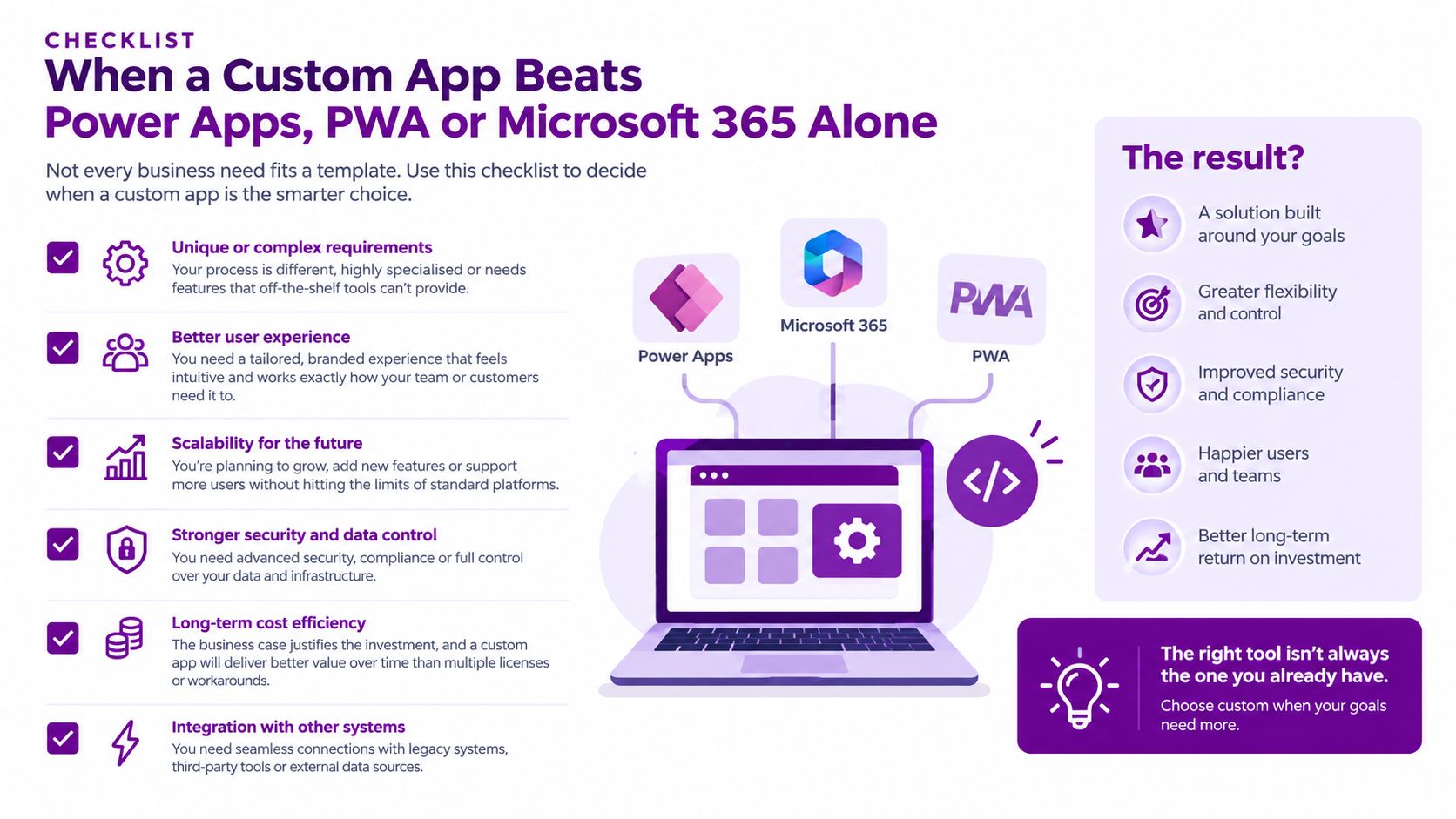
Use this threshold test
A custom app earns its place when several of these conditions apply:
- Workers move between locations: Primary users spend much of the day away from a desk.
- Connectivity is unreliable: The workflow must continue offline, queue updates and show clear synchronisation status.
- Device features matter: Camera capture, GPS, biometrics, push notifications or managed-device controls are central to the task.
- Identity is complex: Access depends on roles, records, device compliance, location or conditional access.
- Integration is deep: The app must coordinate Dynamics 365, Microsoft 365, ERP, CRM or operational systems through more than a simple form.
- The current process has a measurable cost: Leaders can quantify time lost, duplicate entry, errors, missed updates or compliance work.
Power Apps is the right starting point for shallow data capture, approval routing and internal workflows that fit existing Microsoft connectors. Choose a PWA when browser access, broad device reach and straightforward content or form submission matter more than deep device integration. Microsoft 365 may already cover collaboration, document access and communication, avoiding another product to govern.
Custom development becomes defensible when the mobile workflow itself creates value. Examples include an offline engineering process, direct activity capture into Dynamics 365, or a specialist operation that must coordinate several systems through a controlled API layer. Review crawler SDKs from Clearcote Labs for useful background on how software interacts with digital environments. That material is not a case for an enterprise app. It helps separate the visible interface from the systems supporting it.
Decision threshold: Commission a custom build only when mobile, offline, device or integration requirements create value that a configured platform cannot deliver cleanly.
UK SMEs need a measurable business case. Government research published in July 2025 identified information gaps across the SME technology-adoption journey and reported that UK SMEs lag behind G7 competitors in adopting digital tools and AI. State the operational outcome first, then show why Power Apps, a PWA or Microsoft 365 alone cannot achieve it.
Choosing the Right Platform for a UK Mid-Market Rollout
For a UK mid-market firm, platform choice is a delivery and support decision. A 50 to 500-person organisation needs dependable releases, accessible skills, repeatable testing and a support model that survives staff or supplier changes. The architecture must also fit the existing Microsoft estate without creating another isolated product to govern.
Supplier fragmentation makes this practical. Many app partners are small teams, so assess who will own the code, handle operating-system changes, document release procedures and support the app after launch. A technically sound product still becomes expensive if only one person understands its build pipeline or integration boundaries.
| Delivery concern | What to decide |
|---|---|
| Supplier continuity | Can another qualified team build, test and release the app without a lengthy handover? |
| Maintainability | Are business rules, integrations and platform-specific components separated clearly? |
| Skills availability | Can the organisation hire or contract people with the chosen framework and its supporting services? |
| Release control | Are testing, signing, store submission and rollback procedures documented and repeatable? |
| Microsoft fit | Does the app align with the organisation’s identity, device management and integration standards? |
Refer to the previous section's threshold test before selecting a technology. Once the business case supports custom development, compare platforms against the organisation's operating model rather than repeating a feature checklist.
A shared codebase can reduce duplicated client work, but it does not remove platform-specific testing. Native extensions, notification behaviour, permissions, accessibility and device-management policies still require specialist knowledge. A framework only improves delivery when the chosen partner can support it for the full product lifecycle.
The decision also affects recruitment and supplier change. .NET MAUI may suit a Microsoft-focused team, while React Native or Flutter can work where proven capability and long-term support are available. Native development gives the clearest control over operating-system features, but it increases the number of client implementations to maintain.
Set accessibility and device testing requirements before development starts. Cover representative iOS and Android versions, managed devices, camera and GPS permissions, notifications, screen readers, text scaling and low-connectivity conditions. Record these checks as release criteria, not design assurances.
Choose the platform your organisation can maintain after the original delivery team has left. A cheaper first release is not cheaper if it creates a rewrite at the next workflow change.
Designing the Microsoft Integration Layer
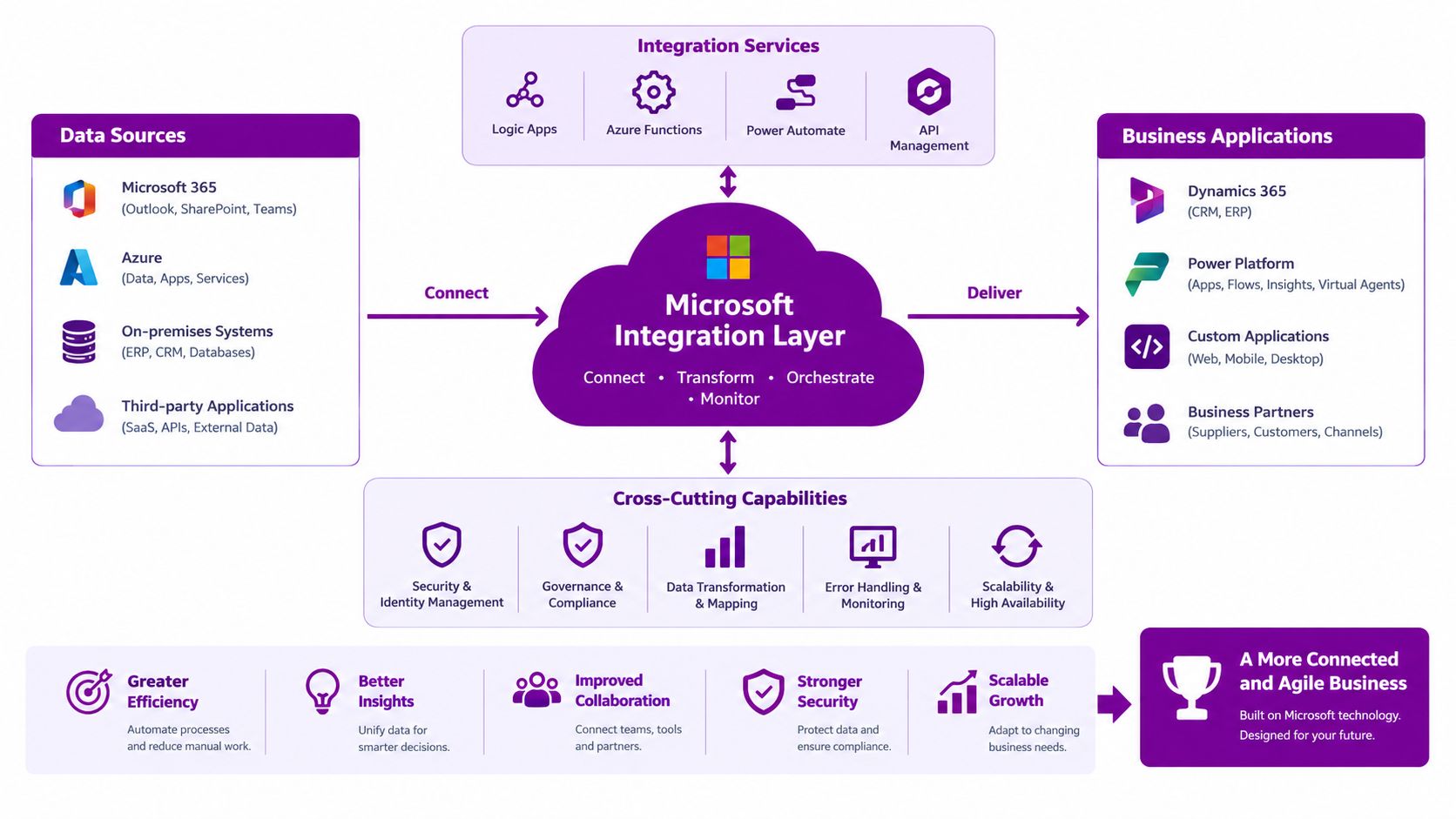
A mobile app shouldn't connect directly to shared databases because the screen happens to need data. That approach creates tight coupling, weak authorisation boundaries and expensive change later.
A durable Microsoft architecture normally separates the mobile client from the systems of record through APIs and services:
- Microsoft Entra ID provides centralised identity, single sign-on, multifactor authentication and conditional access. The app should request only the permissions it needs.
- Microsoft Graph exposes selected Microsoft 365 capabilities, such as user, calendar, files or collaboration data, subject to permission and governance decisions.
- Dynamics 365 supports domain workflows across Sales, Customer Service and Field Service, but the team must decide whether standard connectors are enough or whether a controlled service layer is required.
- Power Platform can extend the solution with Power Apps, Power Automate, Dataverse and reporting, provided its data and process boundaries are agreed.
- Azure services provide the custom backend. App Service, Functions, API Management and Service Bus can support APIs, asynchronous processing, throttling and integration monitoring.
The UK Innovation Diffusion and Adoption Survey found that 71% of medium-sized businesses and 63% of small businesses were existing adopters of at least one surveyed technology, compared with 80% of large businesses and 48% of microbusinesses. That uneven maturity supports a staged, integration-first rollout rather than a large mobile programme that assumes every department is ready at once.
Lock down the contracts before coding
Define versioned API contracts, ownership and failure behaviour before the team builds screens. Every write operation should use idempotency keys so a retry doesn't create duplicate jobs, inspections or customer records. APIs need pagination, throttling, structured errors and observability from the first release.
The backend should also publish explicit synchronisation states. A user needs to know whether an update is saved locally, queued, submitted or confirmed by the system of record. Conflict-resolution rules must be agreed with the business, especially where several people can edit the same record.
A focused API development service can help establish those boundaries before mobile development begins. The important point is architectural ownership. The app should consume stable services, not become the accidental integration layer.
Building Security In From the First Architecture Sketch
Security can't be a release gate added after the screens are complete. If the app connects to Microsoft 365, Azure, Dynamics 365 or operational systems, a stolen mobile identity or API token can expose more than the app itself.
The 2025 UK Government Cyber Security Breaches Survey found that 43% of businesses, approximately 612,000 organisations, reported a cyber breach or attack during the previous 12 months, while phishing affected 37% of businesses. Those figures make identity and token protection core product requirements.
Make these decisions before feature work
- Centralise identity: Use Microsoft Entra ID rather than building a separate user directory into the app.
- Strengthen authentication: Use phishing-resistant or risk-based multifactor authentication where the organisation's risk profile requires it.
- Use modern protocols: Implement OAuth 2.0 and OpenID Connect with short-lived access tokens.
- Apply conditional access: Evaluate device compliance, user risk, location and other relevant policy signals.
- Authorise at the API: Check the user, role, record and requested action. Authentication alone isn't authorisation.
- Protect refresh tokens: Store them in platform secure storage, such as the iOS Keychain or Android Keystore.
- Keep secrets out of the binary: Never embed service credentials or long-lived secrets in the mobile package.
- Minimise offline data: Cache only what the workflow needs, encrypt it locally and define an expiry and removal process.
- Record meaningful events: Log authentication, data access, privilege changes and administrative actions.
- Prepare evidence: Maintain threat models, architecture decisions, test results, incident procedures and operational ownership.
A useful reference for teams formalising customer data security programmes is the discipline of treating protection as an operating model, not a one-off technical task. That same principle applies to mobile applications.
Teams should also document how a lost device is disabled, how compromised sessions are revoked, how offline records are erased and who investigates an unusual access pattern. Mobile device management solutions can enforce device compliance, application policies and remote controls, but they don't replace secure API design.
The government survey reported that 94% of businesses had undertaken at least one action associated with the government's 10 Steps to Cyber Security. A serious project should show how its controls support that baseline rather than merely claiming that the app is secure.
Running a Modern CI/CD Pipeline for Mobile
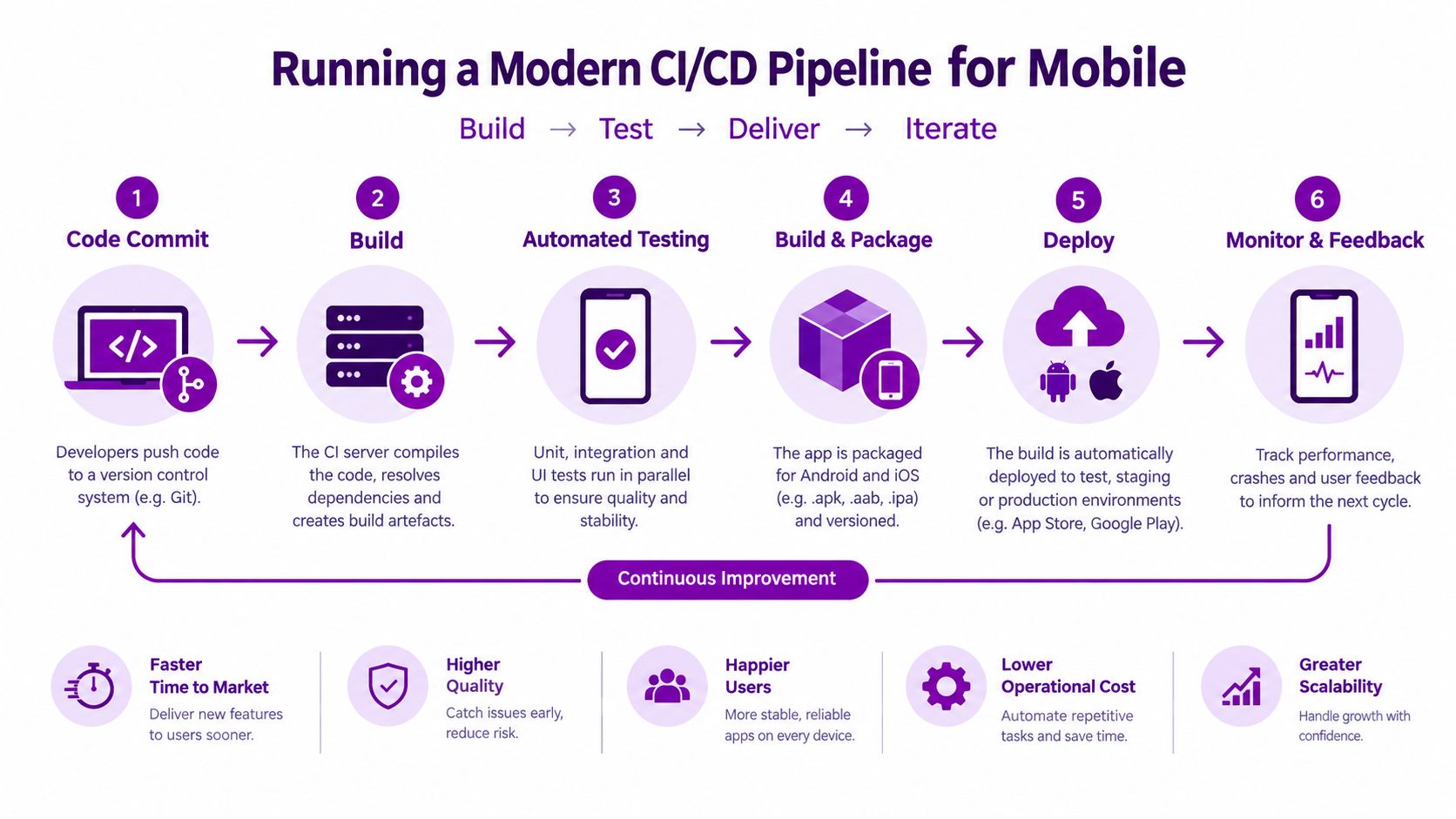
A mobile pipeline should move a tested commit to a managed device with as few manual hand-offs as possible. Put shared business logic, API contracts, infrastructure definitions and mobile clients under disciplined version control, then make every build reproducible.
A practical pipeline includes:
- Commit checks: Run formatting, static analysis, dependency checks and unit tests for mobile and backend code.
- Service validation: Test APIs for authentication, authorisation, idempotency, pagination, throttling and error handling.
- Device testing: Run automated interface and regression tests on representative real iOS and Android devices, including offline and permission scenarios.
- Security gates: Complete threat-model checks, dependency scanning, secret detection and security test review before a release candidate.
- Signed packaging: Create controlled, signed artefacts for Apple, Google and private enterprise distribution.
- Managed release: Deploy through Intune where appropriate, and use staged app-store releases with monitoring and a rollback plan.
The 2025 Cyber Growth Action Plan reported that the UK cyber-security products and services sector generated £13.2 billion in annual revenue, up 12% year on year, and that more than 33,000 Cyber Essentials certificates were awarded during the previous year, a 20% increase. These figures reinforce a practical point: security assurance is a defined professional activity and should be funded and scheduled as such.
Protect installed versions
Installed apps live longer than project plans. APIs need backward-compatible versioning, because users may not update on the same day. Feature flags should separate deployment from activation, allowing the team to release code safely and enable a workflow for a controlled group first.
A clear continuous integration approach should also define who approves production releases, how failed deployments are stopped and how the team restores service when a new mobile build or backend change misbehaves.
Don't rely solely on simulators. Test poor connectivity, interrupted uploads, device storage pressure, revoked access, expired tokens, operating-system updates and notification failure. Those are ordinary operating conditions for an enterprise app.
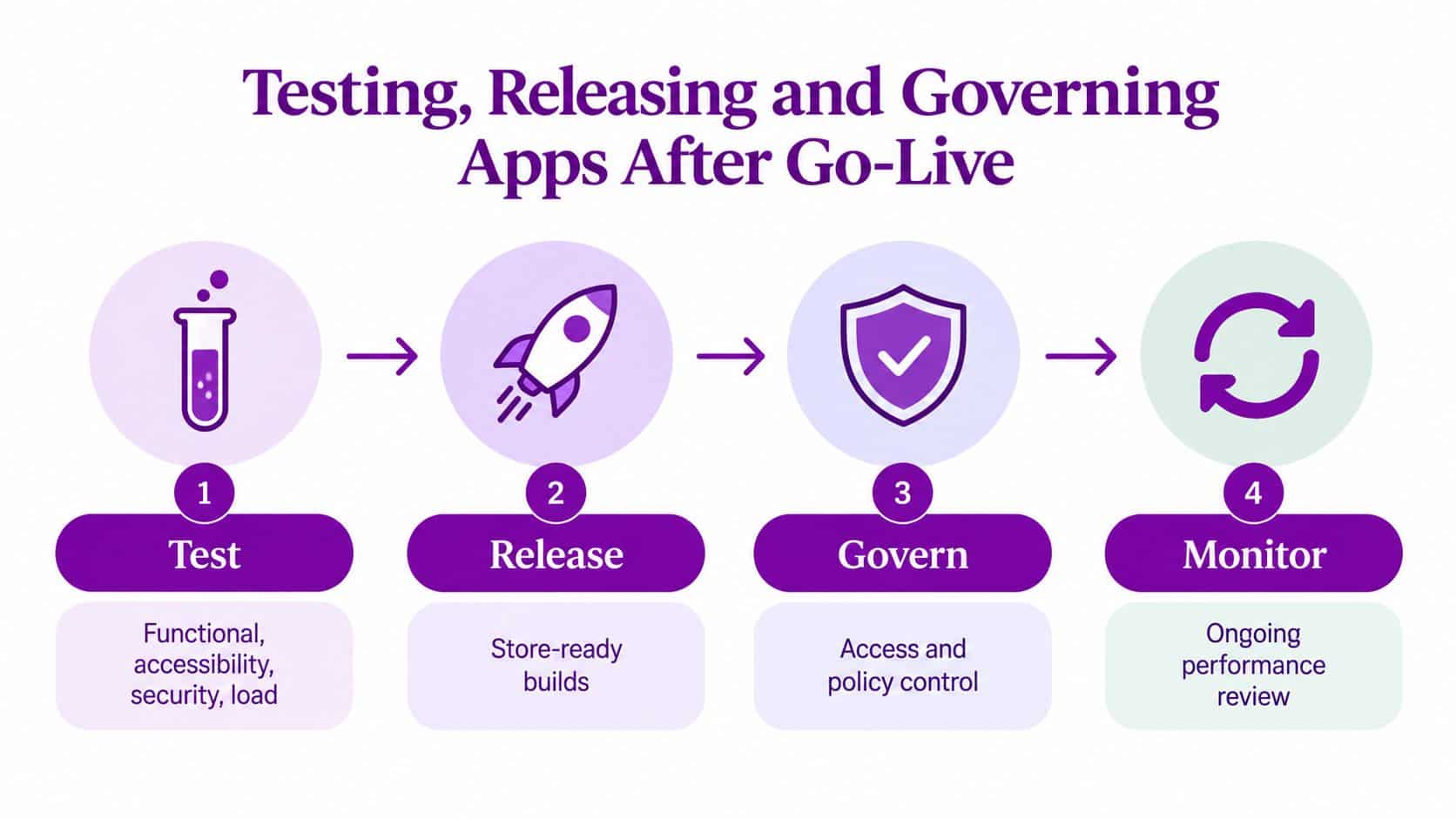
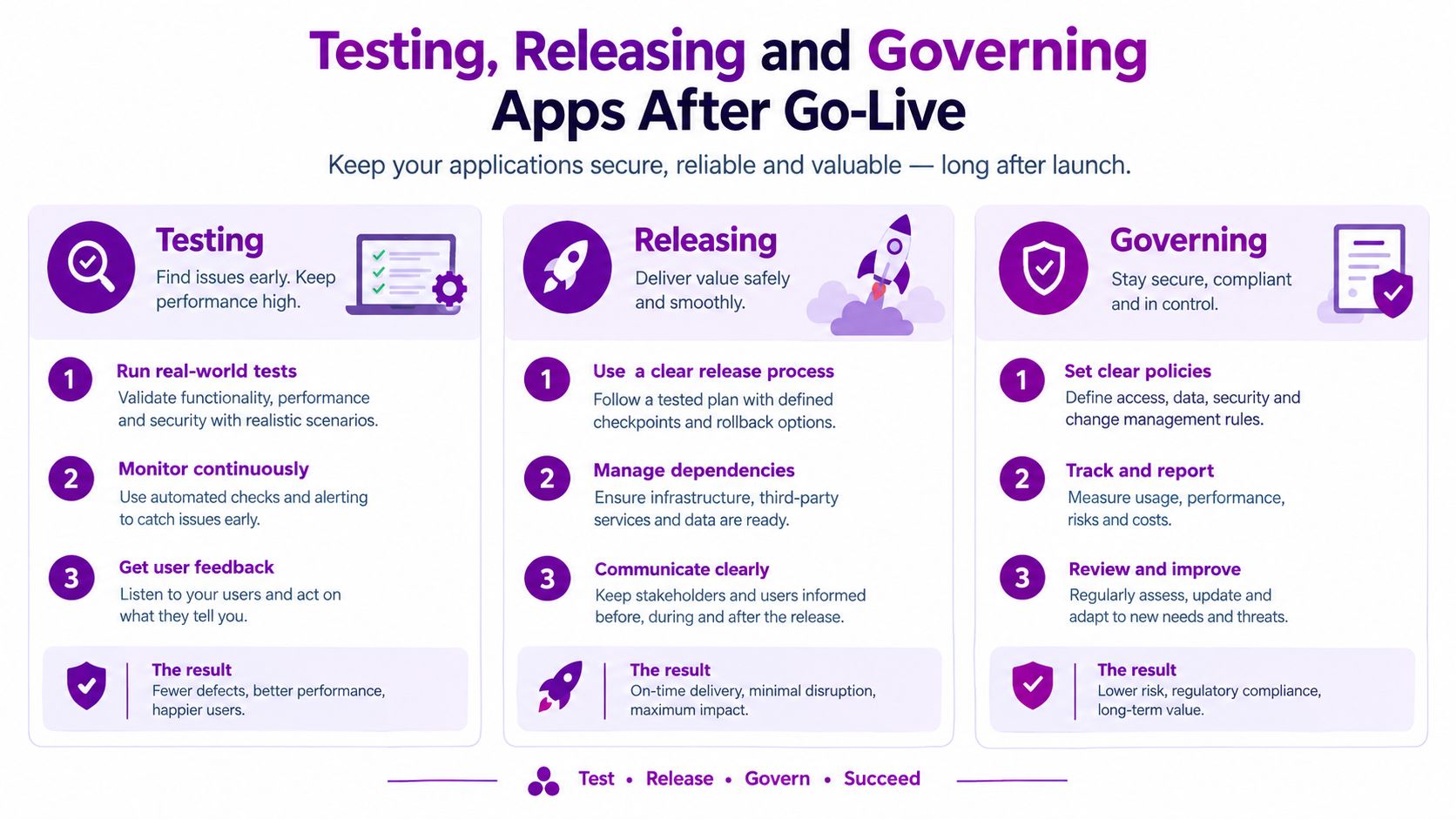
Testing, Releasing and Governing Apps After Go-Live
Go-live starts operational accountability. The support contract must name who monitors the app, owns the APIs, reviews security alerts, manages store submissions and decides whether an AI feature stays enabled. Without those owners, incidents become arguments about responsibility instead of controlled service work.
Testing must go beyond the happy path. Combine functional, accessibility, security and load testing, then validate results on representative devices and UK connectivity conditions. Check large text, screen readers, colour contrast, keyboard navigation, camera and location permissions, offline expiry and synchronisation conflicts. Also test interrupted uploads, revoked access, expired tokens, storage pressure, operating-system updates and notification failure.
Treat data governance as a product feature
The UK Business Data Survey 2026 found that 86% of UK businesses handled digitised data in 2025–26, with 99% of medium businesses reporting this activity. Yet only 2% of businesses handling personal data reported using app-based tracking.
That gap should shape release governance. Organisations already manage substantial digital information, while mobile collection and tracking remain less mature. A custom app can introduce location data, camera uploads, offline records, analytics and AI-generated summaries. Each feature creates decisions about retention, access, audit and incident response.
Set these controls before release:
- Retention: Define when offline records, photos, logs and generated summaries expire.
- Access: Apply least-privilege Entra permissions and review role assignments.
- Audit: Record access, changes, exports, administrative actions and AI-assisted events.
- AI review: Keep a named person accountable for Copilot-style summaries or recommendations.
- Monitoring: Track failed synchronisation, crash patterns, unusual access and API errors.
- Change control: Reassess security when APIs, operating systems, connectors or AI features change.
- Ownership: Name the service owner, technical owner, data owner and incident lead.
Build an honest cost model
The 2025 IPSE Average Day Rates guide, based on responses from more than 1,500 UK freelancers surveyed across 2024, reported an average day rate of £546 for programmers or software-development professionals. Use that figure as a labour-rate reference, not as a quotation.
Budget discovery, UX, architecture, testing, project management, security review, cloud services, store work, monitoring and support as separate lines. A two-platform MVP typically needs 15–20% of build cost per year for OS compatibility and security review. Post-launch support should also cover dependency updates, API changes, device-policy changes, accessibility defects, incident response and controlled enhancements. If these activities are absent from the budget, the organisation will still pay for them, usually during an incident.
Making the Right Call for Your Organisation
A custom app is justified when the operational cost of compromise exceeds the cost of building and running the service. Use this threshold test before choosing a delivery route.
Choose a fully custom app when a high-value workflow needs dependable offline use, device capabilities, complex identity, a specialist user experience or deep integration with Dynamics 365, Microsoft 365 and operational systems. Field service, inspections, stock control, regulated charity work and distributed customer operations can meet that threshold when leaders can measure the current process cost.
Choose Power Apps and Power Automate when the requirement centres on structured data capture, approvals, internal forms or straightforward workflow automation. This is often the right route for a mid-market organisation already using Dataverse, Microsoft 365 and Power Platform, provided it does not need advanced offline conflict resolution or close control of native device functions.
Choose a responsive web app or PWA when users need broad browser access, the process is relatively shallow and managed-device distribution would add avoidable overhead. Select another option when workers require dependable offline operation, rich camera or GPS workflows, background processing or tightly controlled device behaviour.
The data-governance figures earlier in this guide argue for designing controls early, not for collecting more data.
Take a defensible decision to the board
Write a one-page mobility brief containing:
- The workflow: Who uses it, where they work and what currently fails?
- The threshold: Why won't Microsoft 365, Power Apps or a PWA meet the requirement?
- The integration map: Which systems provide, receive and own the data?
- The control model: How will Entra ID, Intune, audit, retention and incident response work?
- The outcome: Which time, error, service or compliance measure will change?
- The ownership model: Who supports the service after the delivery team leaves?
Ask potential partners to demonstrate offline behaviour, API boundaries, security evidence, deployment controls and support arrangements. If you are assessing delivery capacity beyond the UK, Hire Latin American Developers can inform a wider talent discussion. Location does not replace accountability, documentation or integration expertise.
If the threshold test points to a custom build, F1Group can run a short discovery and map the integration layer against your existing Microsoft 365 and Dynamics 365 estate before any commitment. For East Midlands organisations, that is a better first move than approving a large build on assumptions.
F1Group can help you decide whether custom enterprise mobile app development, Power Apps or a PWA fits the workflow, then connect the chosen solution to Microsoft 365, Azure, Dynamics 365 and support processes. Call 0845 855 0000 or send us a message to start a practical conversation.