
A spreadsheet holds the vehicle checks, the holiday rota, or the case list your team relies on every morning. At first it works. Then two versions circulate, a formula breaks, and nobody's sure which tab tells the truth. Microsoft Power Apps development often starts at that point, not with a grand technology plan, but with a practical task that deserves a proper, shared tool.
What Power Apps Development Really Means for Your Business
A driver finishing a vehicle check in a yard may need to record an inspection before returning to work. A hypothetical Lincoln logistics firm could use a Power Apps form with large buttons, photo capture and a controlled vehicle list to make that task easier to complete on a phone. The example shows what an app can support; the result would depend on how the firm designed and used it.

Power Apps development works like fitting a kitchen with standard units: you can assemble tested parts, adjust them to the space, and commission custom work where needed. In practice, teams design, build, test and run apps using a visual builder, Power Fx formulas and connectors to data in services such as SharePoint, Excel and Dynamics 365.
This approach can support larger organisations as well as small firms. Defra reported citizen-developed Power Apps in production in June 2023, including apps used for case and task management and, in some cases, to replace spreadsheets or Microsoft Access databases.
Three lessons for a smaller organisation
- Business users can build: The person who encounters a bottleneck can help shape an initial version, while IT sets boundaries for access, data and support.
- Apps suit practical tasks: An inspection form, approval step or case list gives a project a clear purpose and a way to assess whether it helps.
- Shared learning supports adoption: Examples and guidance help teams avoid solving the same problems separately.
Low-code can speed up screen building, but it does not remove engineering work. It shifts effort towards architecture, security, lifecycle management and support. A small app used by one team may need limited oversight; an app used for important business processes or sensitive data needs stronger controls, a named owner and a support plan. That risk-based threshold helps a UK SME decide when a business maker can safely build and when professional engineering is needed.
Choosing Between Canvas, Model-Driven and Dataverse Apps
Most business apps are either canvas apps or model-driven apps, and Dataverse is the data layer that can sit beneath them. That single distinction clears up much of the early confusion.
Power Apps build approaches compared
| Approach | Best for | Data source | Typical builder |
|---|---|---|---|
| Canvas app | Task screens, mobile and frontline forms, custom layouts | Any connector, including SharePoint, Excel and SQL | Business maker with formula skills |
| Model-driven app | Process heavy case management, approvals and reporting | Dataverse tables | Maker with data modelling knowledge, usually supported by IT |
| Dataverse-first solution | Shared data model, security roles and business rules across several apps | Native Dataverse | Solution architect or data specialist |
Canvas apps start with the screen
A canvas app is a blank page you design screen by screen. You decide where fields sit, how big buttons are, and what a person sees on a phone in poor light or while wearing gloves. That control suits a Newark charity's volunteer sign up or a Nottingham care provider's visit log, where staff need a short, guided task on a mobile device.
The trade off is responsibility. Because you design the experience, you also design consistency, error messages, and accessibility. Power Fx formulas control behaviour, rather like formulas in a spreadsheet, but a tangle of formulas on every screen becomes hard to test. Keep repeated logic in reusable components where you can.
Model-driven apps start with the data and process
A model-driven app is generated largely from Dataverse tables, forms, views, and business process flows. You define the record first, and the platform provides much of the navigation and layout. That's why it suits a Leicester firm's warranty claim handling, where stages, approvals, audit history, and reporting matter more than a distinctive screen design.
Staff see consistent lists and forms, managers can follow work through defined stages, and changes to the data model flow through the app in a more predictable way. It feels less flexible at first, and that's often the point. For process heavy work, constraint is a feature.
Dataverse is the shared store underneath
Dataverse isn't a third kind of screen. It's a structured data service with tables, relationships, security roles, business rules, and an audit trail. A canvas app can use it, a model-driven app depends on it, and several apps can share the same customer, asset, or case records instead of copying them into separate lists.
That sharing is where a Dataverse first design pays back. If inspections, maintenance requests, and compliance reports all need the same vehicle record, model the vehicle once. You'll spend more time at the start deciding fields and permissions, but less time later reconciling three versions of the same registration number.
Decision question: Does the screen design matter more than the data model, or does the process and data model matter more than the screens?
Sometimes the answer is both. You can combine custom canvas screens for frontline users with a model-driven back office in one solution, all reading the same Dataverse tables. Don't start there just because it's possible. Choose the simplest approach that protects the data, then add a second interface only when a distinct group of users works differently.
How a Power Apps Project Moves From Idea to Live
The lifecycle is the same for a single team tool and an enterprise app. Only the depth of each stage changes. Skipping stages doesn't remove the work, it usually moves it to a more awkward moment after people depend on the app.
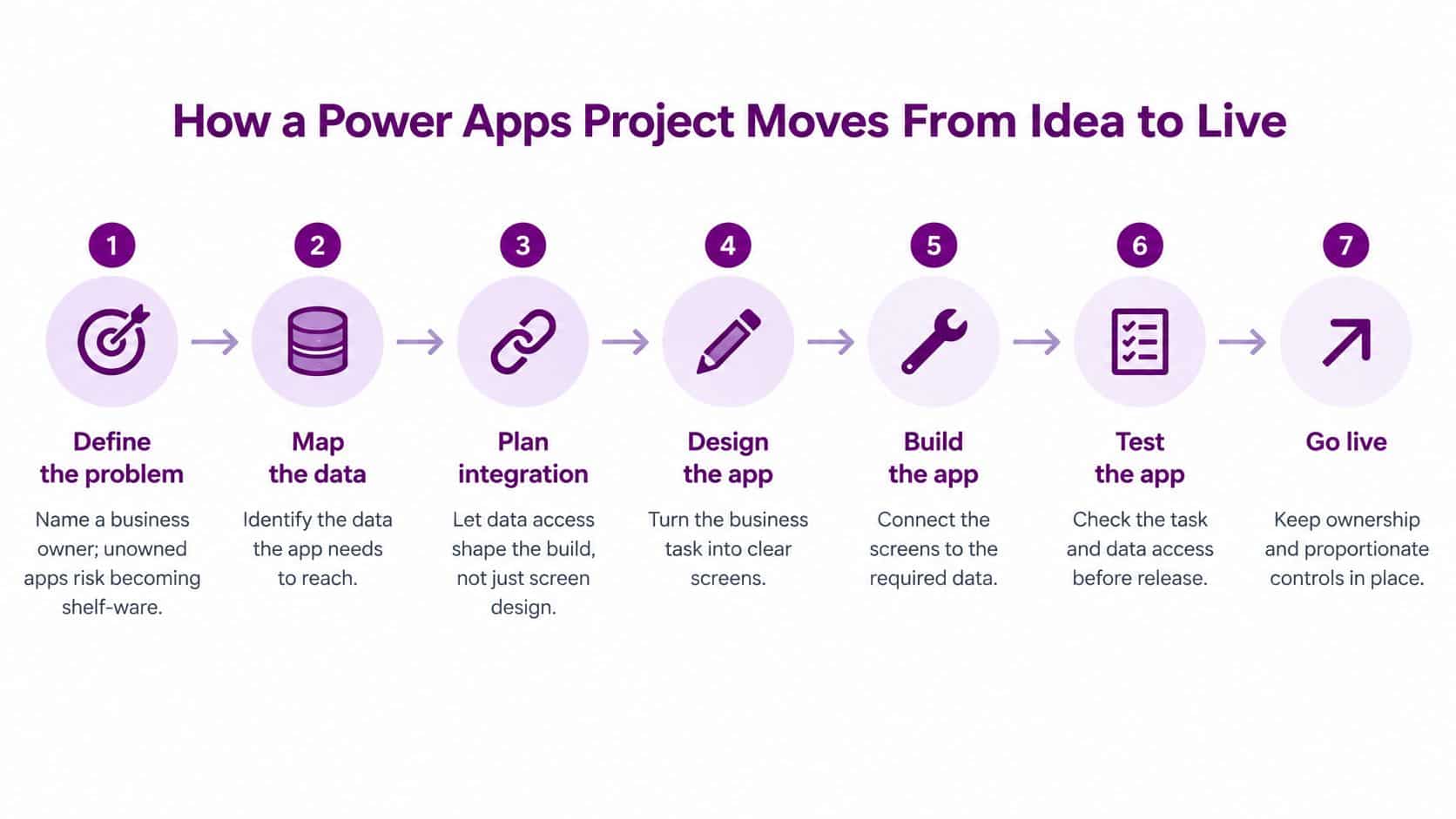
Seven stages from idea to a supported service
- Define the problem and name a business owner. Write down the task, the users, and what success looks like. Unowned apps drift into shelf ware because nobody can approve changes or retire them.
- Map the data and classify its sensitivity. List every field, where it comes from, and who may see it before choosing connectors. Personal or sensitive data changes which services are acceptable.
- Pick the approach and set up environments. Use separate development, test, and production environments so makers never build against live records. Decide canvas, model-driven, or a Dataverse first design at this point.
- Build in a solution with reusable parts. Use reusable components, connection references, and environment variables so the app can move between environments without manual edits. This is also where questions raised by custom application development planning about maintainability become practical build choices.
- Test function and accessibility together. Check calculations, permissions, poor connectivity, and error handling with realistic data. For covered public sector apps, government guidance identifies WCAG 2.2 at level AA as the applicable standard, so test keyboard navigation and a screen reader during the build rather than treating it as a final polish.
- Release through a controlled solution package. Promote the same package from development to test and production, record version notes, and keep a way back if a release behaves badly. Don't edit production directly to save an hour.
- Run, review, and retire deliberately. Monitor usage and errors, assign support cover, and review apps that nobody opens. The plan example of checking after 90 days is useful as an internal review trigger, provided you confirm with the owner before removal.
The accessibility point deserves plain language. The Public Sector Bodies (Websites and Mobile Applications) Accessibility Regulations 2018 came into force for public sector websites on 23 September 2018 and for mobile applications on 23 June 2021, according to the government guidance linked above. Private firms aren't all under the same duty, but building apps that staff can use is still good practice.
Two failures cost more than most build mistakes. Skipped data mapping causes late rework, and hard coded environment values cause a release to point at the wrong list, mailbox, or table.
A small app may pass through these stages in a short workshop and a simple checklist. A regulated case system needs documented testing, security review, and recovery checks. Proportionate doesn't mean informal to the point of invisibility.
Connecting Power Apps to Microsoft 365, Azure and Dynamics 365
A Power App is only as useful as the data it can reach. That's why integration decisions shape the build more than screen design does. A beautiful form connected to the wrong list, or to a copy of data that's already out of date, creates confident mistakes.
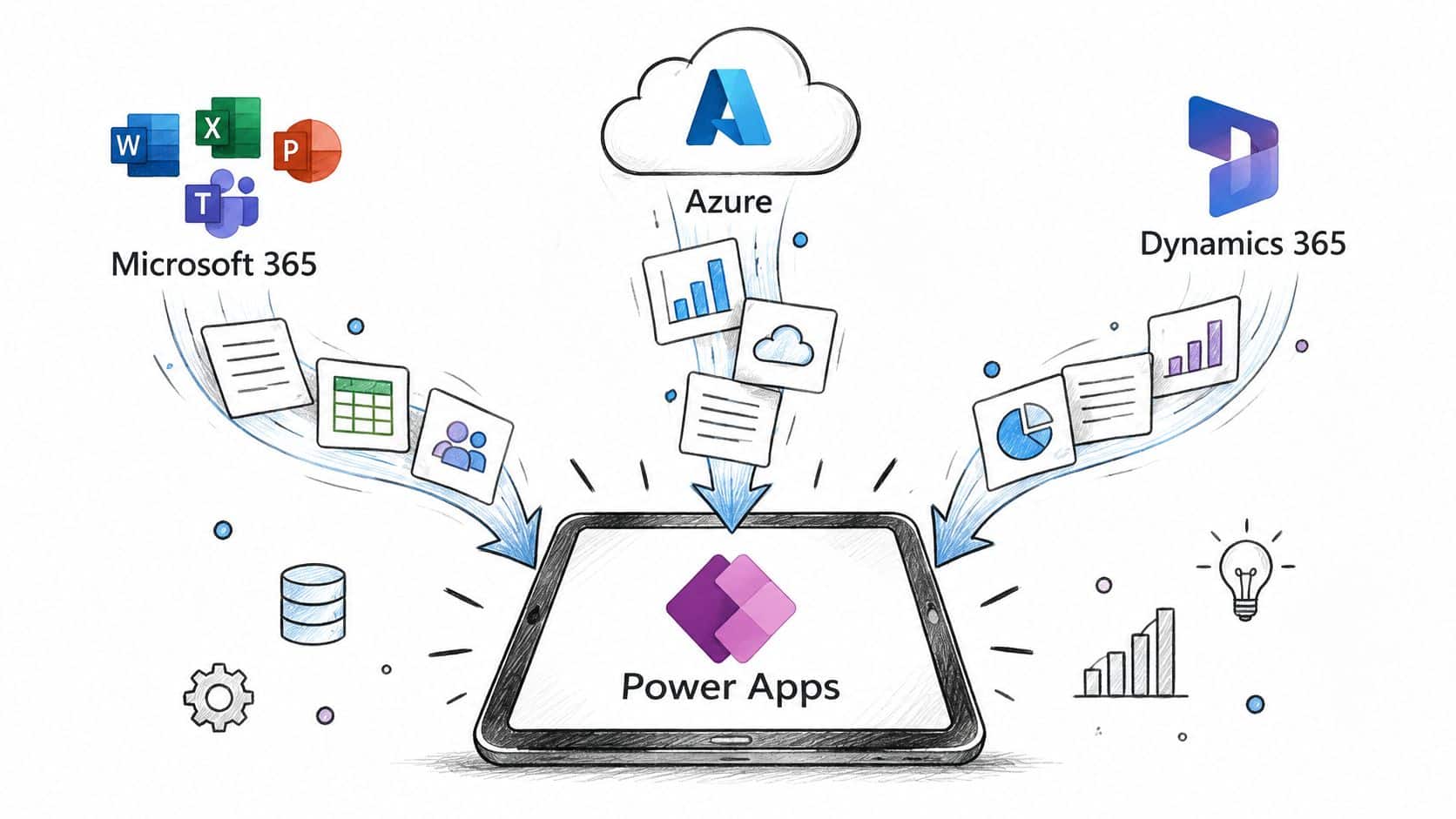
Microsoft platforms Power Apps connects to
| Platform | What the app can reach | Typical example | Watch for |
|---|---|---|---|
| Microsoft 365 (SharePoint, Teams, Outlook) | Lists, libraries, calendars, chat and mail | Site visit checklist stored in a SharePoint list | List item limits and external sharing rules |
| Dynamics 365 (Sales, Customer Service, HR) | Accounts, cases and leave records | Field engineer logs a case from a tablet | Dataverse security roles must mirror Dynamics roles |
| Azure (Logic Apps, Functions, API Management) | Custom APIs, legacy systems and message queues | Nightly order sync to an on-premises ERP | Network access, secrets in Key Vault and cost per call |
| Microsoft Entra ID | Single sign-on and group membership | Staff sign in with a work account, and groups set access | Guest users and conditional access policies |
| Power BI | Reports and dashboards | Approval app writes to a table that a dashboard tracks | Refresh frequency and data source credentials |
| Power Automate | Triggers, approvals and notifications | Approval email sent when a claim is submitted | Flow run limits and premium connector licensing |
Consider a Grimsby manufacturer's quality inspection app. It reads product records from Dynamics 365, writes inspection results to a SharePoint list, and triggers a Power Automate approval when a batch fails. Each connection has a different job, and systems integration services become relevant when those jobs must agree on identity, timing, and error handling.
Where Azure and Entra ID fit
When a legacy system has no ready made connector, Azure Logic Apps or Azure Functions can sit between the app and the old database. Keep API keys in Azure Key Vault, not in formulas or flow text. Microsoft Entra ID provides sign in, so group membership can decide who opens the app and which records a person sees.
The short video below is useful after the table, because it helps to see connected services as one working path rather than separate product names.
Two limits catch teams out. Connectors can be throttled during peak use, so an app that feels fine in testing may queue requests on a busy Monday. Some connectors are premium and need the right licensing, which belongs in the design discussion, not the launch week surprise.
Connect to the system of record where you can, rather than maintaining copies of its data. Copies need synchronisation, conflict rules, and another place to secure.
Governance That Keeps Makers Productive and Data Safe
A team builds a simple request app, then other departments begin relying on it. The screens may remain simple, while the app's data and business impact grow. Governance sets a safe route for makers and a point at which engineering support is needed. Banning app creation can push staff towards unmanaged tools; proportionate controls help them solve routine problems without losing oversight.
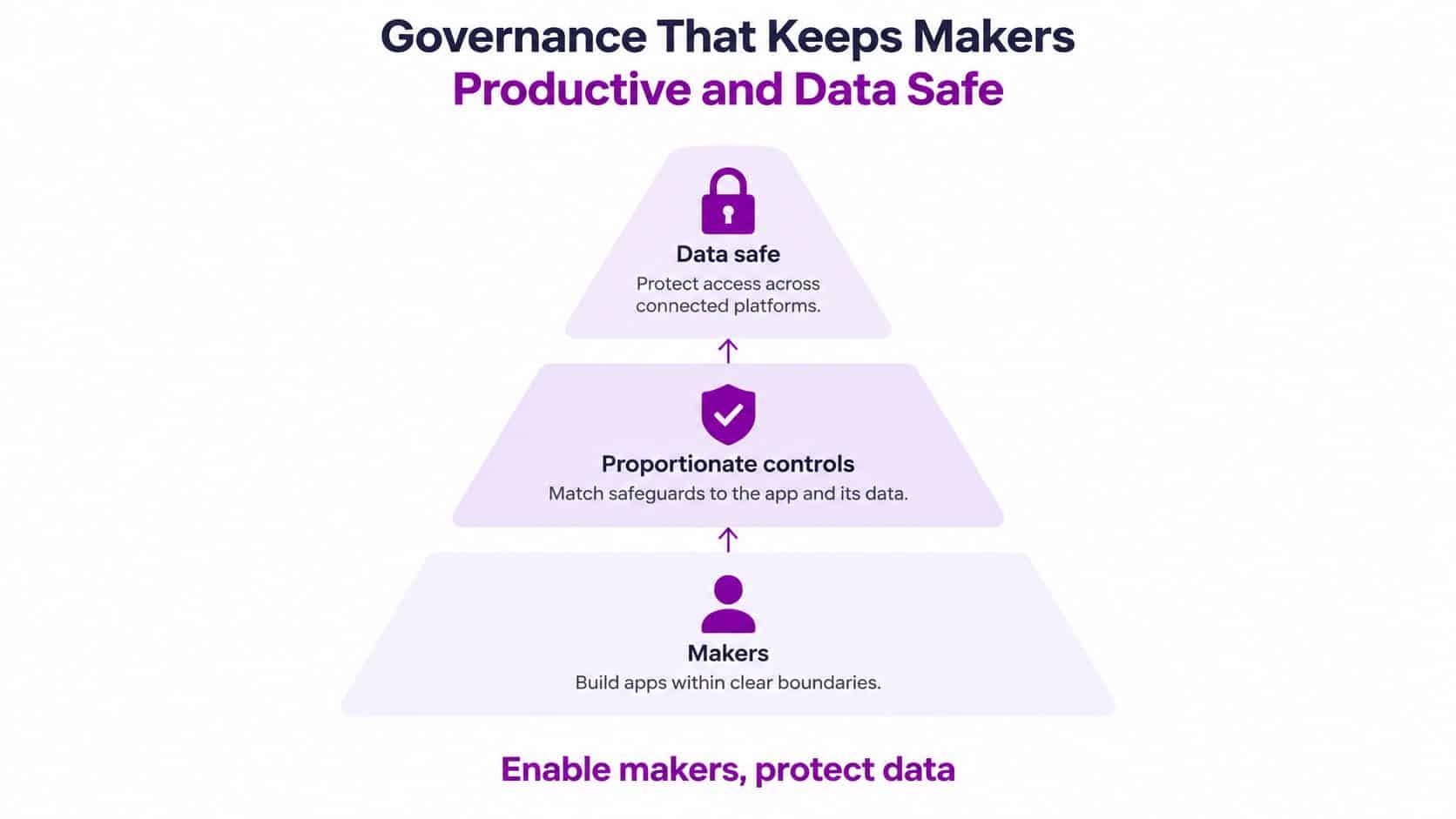
Governance tiers for Power Apps
| Tier | Typical app | Environments | Approval and controls |
|---|---|---|---|
| Tier 1 personal or team tool | Desk booking form for 12 staff | Default environment shared with the team | Registered owner and no sensitive data |
| Tier 2 departmental app | Team absence or equipment request process | Separate test and production environments | Peer review, DLP check and a named support owner |
| Tier 3 business-critical app | Customer case management for a charity | Dedicated production environment for the data classification | Security review, DPIA, backup and recovery test, and monitoring |
Choose a tier according to data sensitivity, user numbers, and business criticality, not the apparent complexity of the screens. A three-field safeguarding form may need tighter controls than a complex room-booking app. Review its tier when its users or data change. An app that began as a small convenience can become part of a daily service, and the maker may then need help with architecture, security, releases, and ongoing support.
Controls that apply across every tier
Tenant-level data loss prevention policies sort connectors into business, non-business, and blocked groups. For example, a policy can prevent an app or flow from combining a business data source with a personal email service. The UK Government Digital Marketplace catalogue describes role-based access control and data loss prevention policies for Power Apps. It describes catalogue features; it does not determine an organisation's data protection obligations.
Dataverse security roles and least privilege access limit records to the teams that need them. Audit logs and retention rules also need clear owners. If someone makes a subject access request, the organisation must be able to trace where their data is stored and how it is handled. A written policy is only useful if staff follow it and someone checks the evidence. The partner resource myhalo's guide to IT compliance offers general compliance guidance; UK organisations should apply their own relevant legal and regulatory requirements.
For HR, safeguarding, customer service, or charity case management, assess whether a Data Protection Impact Assessment is needed under UK GDPR and follow the ICO's guidance. Where required, map the app's data flows, including Dataverse, Microsoft 365, Dynamics 365, and any external API. That map helps identify where lawful use, retention, access, and deletion need attention.
Two habits that prevent orphaned apps
Maintain an app inventory listing each app's owner, purpose, data classification, and criticality. Set a process for dormant apps and for support when a maker leaves. These records connect everyday app building to a wider IT governance framework. As an app becomes more important to operations, its owner should be able to show who maintains it and how changes are controlled.
What Power Apps Costs in GBP for UK Businesses
A small app for a seasonal process may need a different licence approach from a live app used every day by a whole team. Start by separating the licence price from the engineering and support costs around it. Prices below exclude VAT unless stated. Microsoft's UK Power Apps page lists Power Apps Premium at £15.40 per user per month on annual billing, excluding VAT. That plan lets each licensed user build, modernise, deploy, and run unlimited applications.
Power Apps licensing options in GBP
| Option | Price (GBP, excl. VAT) | What it covers | Limit to plan around |
|---|---|---|---|
| Developer plan | £0 | Build and test | Not for production use |
| Power Apps Premium | £15.40 per user per month (annual billing) | Unlimited apps for each licensed user | Cost rises with every licensed user |
| Pay-as-you-go | Azure consumption rates | Variable or seasonal demand | Exact rate depends on usage, so confirm before budgeting |
| Dataverse storage and capacity | No rate stated on the cited UK pricing page; check Microsoft's current UK pricing page | Shared tables, files and logs | Monitor capacity as records and apps grow |
The Premium licence arithmetic is direct: ten licensed users cost £1,848 a year before VAT, calculated as 10 multiplied by £15.40 multiplied by 12. Twenty-five users cost £4,620 before VAT, or £5,544 with VAT at 20%. These are examples using the listed annual-billing rate. Check current pricing before committing, since rates and packaging can change.
The free Developer plan supports building and testing, but isn't for production use. Treat it as a workbench, not the licence for a live business process. Pay-as-you-go is billed through Azure and may fit variable or seasonal demand. Set usage alerts so finance can see consumption before costs become a surprise.
Costs the licence price doesn't show
- Maker and tester time: Staff hours to define the process, build the app, test it, and document how it works.
- Support cover: Time to answer user questions, fix connector failures, and release changes safely.
- Capacity growth: Dataverse storage for tables, files, and logs as records accumulate. Its rate isn't stated on the cited UK pricing page, so check Microsoft's current pricing before setting a capacity budget.
- Specialist review: Architecture, security, and recovery work when an app becomes business-critical.
Low-code reduces the effort of building screens; it doesn't remove engineering work. As an app becomes more important to daily operations, the cost shifts towards architecture, security, lifecycle management, and support. A simple internal app may need modest oversight. An app that handles a core business process needs budget for professional review and ongoing ownership.
To estimate total cost, count the people who will use production apps, the apps that need production capacity, and the support hours required each year. Add a contingency for growth. That gives a more useful ownership estimate than the licence price alone.
Who Builds and Supports Power Apps
A small team needs fewer people, but it can't skip the roles. One person may hold two roles for a low risk app, provided someone else can provide cover.
- Business maker: Understands the process, builds the screens, and tests them with real users.
- Power Platform administrator: Manages environments, DLP policies, licences, and the app inventory.
- Data or solution architect: Designs the Dataverse model, integrations, and release path.
- Named support owner: Answers when the app fails, a connector changes, or users can't sign in.
Each maker needs working knowledge of Power Fx, connectors, and error handling. They also need to understand delegation, which means whether the data source or the app does the filtering when a canvas app queries a large list. Get that wrong and the app may search only part of the data while looking perfectly healthy. Basic accessibility checks belong in the same skill set.
Build capability through a short learning path covering your golden path standards, paired build sessions with an experienced maker, and a shared template library. New makers then start from tested components instead of inventing navigation and error handling each time.
The familiar slip is one enthusiastic maker building a critical app alone. It works until that person is on leave, changes role, or leaves the organisation. For each app, name the maker, administrator, and support owner, and confirm a documented handover before go live.
Decide Whether to Build In-House or Bring In a Partner
Build in-house when an app stays inside one team, uses low sensitivity data, and can pause for a day without harm. Bring in specialist engineering when any of these thresholds is crossed.
- Data sensitivity: Personal, special category, or financial data is involved.
- User numbers: More than 100 daily users, as a suggested guide, or any public facing use.
- Business criticality: A failure stops invoicing, safeguarding, deliveries, or another essential service.
- Integration depth: More than two systems of record, or any legacy connector needing custom work.
- Financial impact: The app drives decisions or payments with material cost if it's wrong.
Scale alone changes the engineering duty. Microsoft's Network Rail story reports almost 11,000 Power Apps and more than 28,000 Power Automate cloud flows since adoption in 2019, with a maker community of over 2,500 people and more than 90% working outside traditional IT roles. Your estate may be far smaller, but the lesson holds. Once many people depend on apps, you need solution architecture, source control, release management, testing, documentation, disaster recovery, and named support.
If you're comparing ways to obtain that capacity, app development outsourcing with NZ Apps offers useful context on using external development support. Locally, F1Group is a Microsoft focused IT partner serving Lincoln, Nottingham, Leicester, Scunthorpe, Grimsby, and Newark since 1995, with vendor certified and DBS checked staff working remotely or on site.
Start by listing your existing apps and scoring each against the five thresholds. Pick out the few that need professional engineering first, rather than trying to fix everything at once. Phone 0845 855 0000 today, or send us a message to talk through that shortlist.
If your organisation is weighing its first business critical app, or trying to regain control of apps that have grown team by team, F1Group can help you assess the architecture, security, licensing, and support model before the next release. Visit F1Group to discuss Microsoft Power Apps development with a team that can design, build, and support the solution as a managed service.