
The UK Home Office's Power Platform programme generated £63.8 million in reported benefits, including avoided costs, direct savings and operational-efficiency gains. That result came from more than building apps: the programme combined governance, user enablement and integration planning, a useful reminder for any UK organisation weighing up Power Platform development services.The Home Office's Power Platform case study shows why build speed alone is a poor measure of value.
For a business, the true investment includes the work that keeps apps and flows secure, supported, and affordable after launch. This guide explains what development services cover, how the tools connect, what licensing and governance involve, and what to check before choosing a delivery partner.
What Power Platform Development Services Include
A site inspector arrives at a property, records a safety issue on a phone and submits the findings. A manager needs to approve the follow-up, the relevant team needs a notification, and a director wants a current view of outstanding issues. A Power Platform solution can join those tasks into one process rather than leaving staff to copy information between forms, email and spreadsheets.
Power Platform development services design, build, connect and support business apps, workflows and reports on Microsoft's low-code platform. Power Apps provides the screens employees use on a web browser, tablet or phone. Power Automate runs the work behind those screens, such as approvals, reminders and file transfers. Power BI turns operational data into reports and dashboards, while connectors link the tools to other services and Dataverse can provide a governed place to store data.
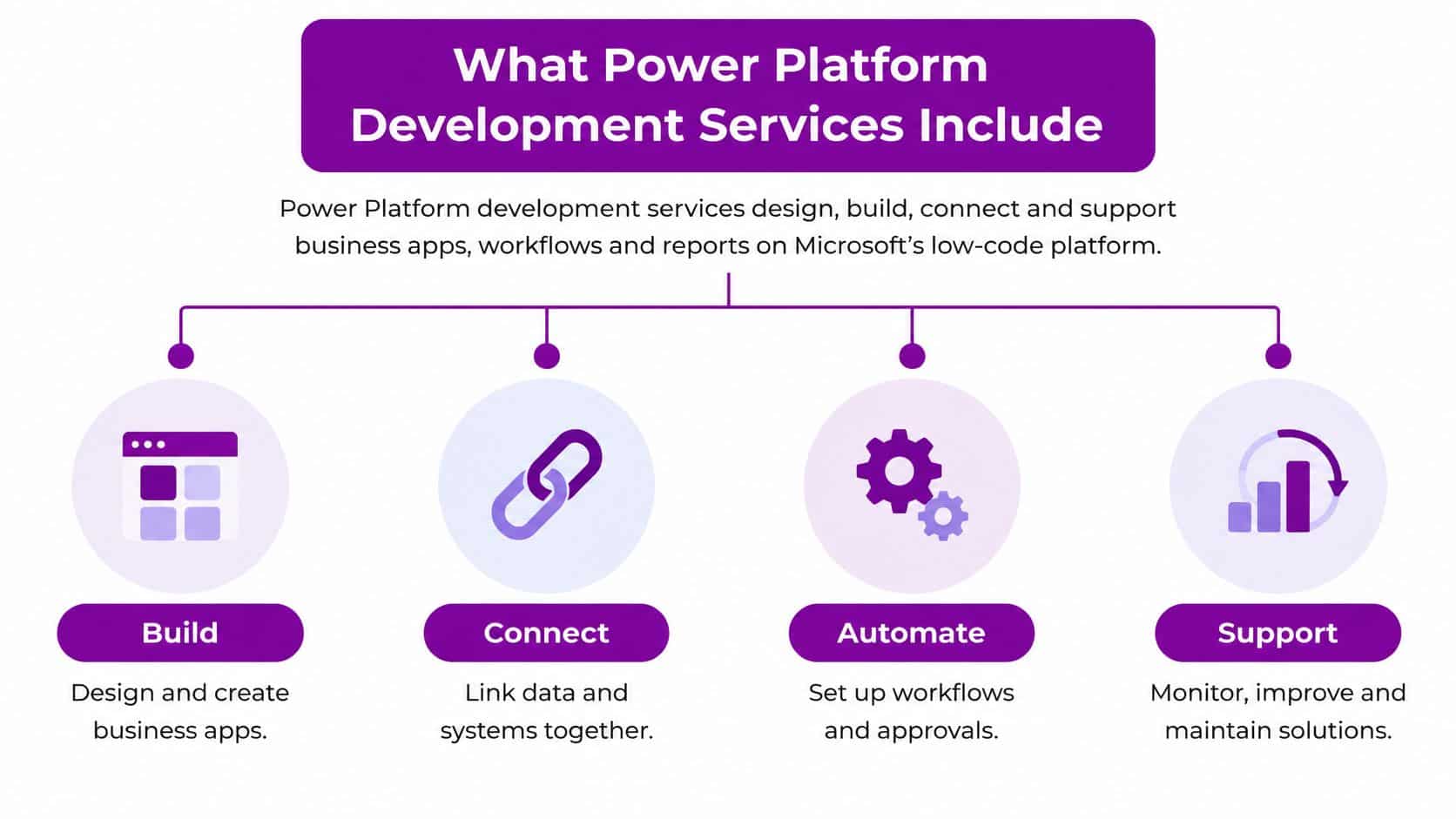
A partner rarely delivers just one tool in isolation. The app, workflow, data and reporting need to fit together, and someone must own each part once the project team has moved on.
Power Platform services and what each one builds
| Service | What it builds | Typical partner task |
|---|---|---|
| Power Apps | Web and mobile forms, screens and task apps | Design screens with process owners and set role-based access |
| Power Automate | Approvals, notifications and system-to-system flows | Map the process, build flows and add error handling and alerts |
| Power BI | Dashboards and reports on operational data | Model the data, agree measures and set refresh and sharing rules |
| Connectors and Dataverse | Links to Microsoft 365, Dynamics 365, Azure and third-party systems, plus a governed data store | Choose connectors, design tables and control premium connector use |
Power Pages can also create externally facing sites for customers, applicants or volunteers. A charity, for example, might use a portal to collect information from volunteers without giving them access to internal systems.
A good partner starts with the process problem, not a request for a particular screen. They should clarify who uses the solution, what information it handles, what happens when something goes wrong and who will own each part after handover.
Connecting Power Platform to Microsoft 365, Dynamics 365 and Azure
| Platform | Role in a build | Example | Check during integration |
|---|---|---|---|
| Microsoft 365 | Everyday front end, documents and approvals | Teams approval for a leave request | Sharing settings and data loss prevention rules |
| Dynamics 365 | Customer, service and HR records | Service case updated from a Power App | Licences for Dynamics users who access the data |
| Azure | Hosted APIs, identity and pay-as-you-go billing | Azure Functions called from a flow | Subscription ownership and cost alerts |
| Dataverse | Shared, governed data layer for apps and flows | Common tables used by several apps | Storage capacity and access by role |
The architecture is easiest to understand as a division of responsibility. Power Apps provides the user interface, Power Automate orchestrates approvals and events, and Dataverse or appropriately governed Microsoft 365 and Azure services hold and expose the data. A field worker might enter an update in an app, a flow might route it for approval, and a manager might use Power BI to review the results.
The integration choices matter because a solution can work on launch day and still become fragile. A flow that writes to a spreadsheet owned by one employee, for example, may fail when that employee leaves or changes permissions. A professional developer should agree connector and API standards, reusable components, role-based access, monitoring and automated testing before more makers build on the same foundation.
A UK survey of IT professionals and developers found that 80% of surveyed UK businesses were already using low-code, while productivity applications and process automation were common use cases.The 2021 UK low-code survey supports focusing on integration and process bottlenecks, not merely creating standalone forms. Professional development practices help citizen developers move quickly without multiplying security gaps, technical debt or avoidable licensing exposure.
For Microsoft 365, check sharing permissions and data loss prevention rules before allowing a flow to move information between services. For Dynamics 365, confirm that users who access records have appropriate rights. Azure integrations need a clear subscription owner and cost monitoring. In Dataverse, agree table structure and role permissions rather than allowing several apps to create inconsistent versions of the same information.
Before building, choose a workflow with a clear transaction volume and baseline processing time. After launch, compare throughput, exception rates and staff hours with that baseline. This gives leaders a practical way to judge whether the system has improved the process, rather than merely whether the app has been delivered.
Licensing and Usage Limits to Budget For
A low build cost does not guarantee a low running cost. Licences, request limits and the work of managing access all affect what a Power Platform solution costs after launch. The right plan depends on who uses each app or flow, which connectors it needs and how often it runs.
Licence and limit benchmarks for Power Platform
| Option | Cost or basis | Limit or scope | Best suited to |
|---|---|---|---|
| Developer Plan | Free | 750 flow runs per month and 2 GB Dataverse, for testing only | Building and testing, not production |
| Power Apps Premium | £15.40 per user per month, paid annually, excluding VAT | 40,000 requests per user per 24 hours | Broad application estates with many users |
| Per-app plan | Per user for one custom app in a specific business scenario | 6,000 requests per user per 24 hours | One custom app for one business scenario |
| Pay-as-you-go | Billed through an Azure subscription | 6,000 requests per user per 24 hours | Pilots and variable workloads |
| Power Automate daily actions | Based on the plan tier | 6,000 for free and lower tiers, 40,000 for Premium or 250,000 for Process per day | Planning flow volume and retry handling |
Microsoft's UK Power Apps pricing page lists Power Apps Premium at £15.40 per user per month when paid annually, excluding VAT. The plan includes unlimited applications for licensed users and pre-built, custom and on-premises connectors. The free Developer Plan is for building and testing, not production deployment. Production users need an appropriate paid plan or pay-as-you-go arrangement.Microsoft's UK Power Apps pricing information
At the UK standard VAT rate of 20%, £15.40 excluding VAT becomes £18.48 including VAT. Ask for VAT as a separate line so your finance team can compare costs consistently. Licences and environments are separate from the build fee. Ask whether the partner proposes a fixed price for a defined scope or time-and-materials day rates in GBP, and request a clear breakdown.
How usage limits affect design
Microsoft's request limits vary by licence. Paid Power Platform users have a limit of 40,000 requests per user in a 24-hour period; Power Apps pay-as-you-go and per-app users have 6,000 requests per user in the same period.Microsoft's Power Platform request-limit documentation Power Automate daily action limits also vary by plan, so batching, retries and monitoring affect whether a flow stays within its allowance.
A frequently running flow can use requests quickly, particularly when each run triggers several actions or retries after a failure. The Developer Plan also has fixed testing limits, and users running assets in a managed developer environment need a premium licence. Ask your partner to estimate usage by user group and workflow, including expected flow runs, exceptions and data storage.
Budget for governance and adoption as well as the licence bill. Someone must manage access, monitor usage and help staff use the solution correctly. Treat these responsibilities as ongoing costs, not work that ends when the build is complete.
How a Typical Engagement Runs From Discovery to Support
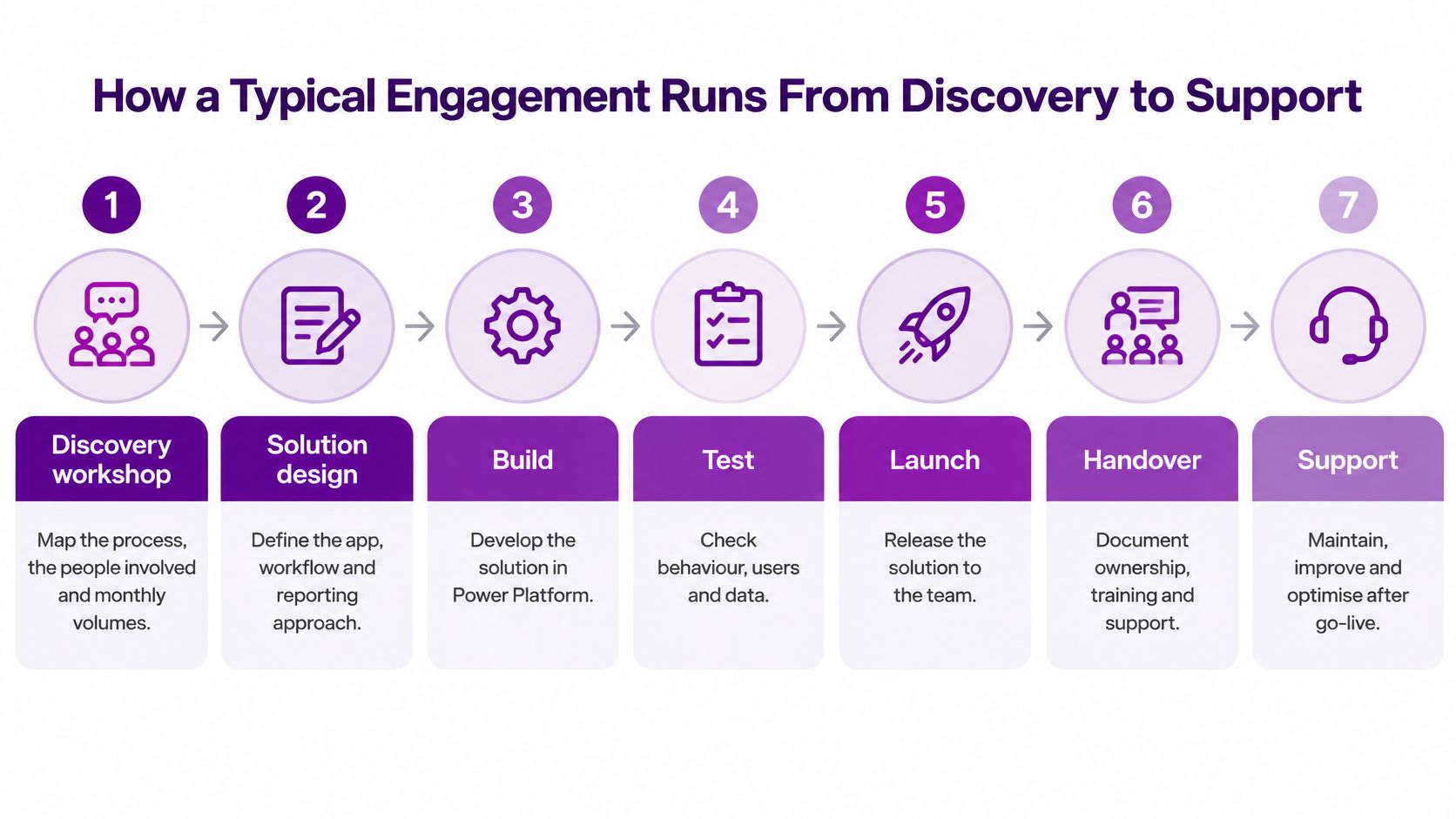
A sound engagement makes decisions in an order that reduces rework. Use these phases to compare proposals and check whether a partner has included the work needed to run the solution after launch.
-
Discovery workshop. Map the current process, the people involved and the monthly volumes. Volumes help determine whether the best fit is an app, a flow or a combination, while skipping discovery often leads to a build that solves the wrong problem.
-
Scoping and licence choice. Agree which apps, flows and reports are included, then assess the appropriate licences before development starts. A common slip is estimating build effort without counting who will use the finished solution.
-
Environment setup. Create separate development, test and production environments, with appropriate access and release controls. This keeps experiments away from live staff and business data.
-
Build in short sprints. Deliver working parts in small increments and review them with the process owner. Frequent reviews catch misunderstandings early; waiting until the end to show the finished solution makes changes more disruptive.
-
Test with real users. Include exception cases such as missing information, duplicate submissions and approvals that time out. Testing only the happy path leaves staff to discover operational failures after release.
-
Release with training and handover. Provide a short user guide, explain the process to staff and name a support route. Without clear ownership, employees may not know where to report a failure or who can approve a change.
-
Support and review. Monitor failed runs, adoption and request usage, then review the solution estate regularly. A go-live date isn't the end of the work: without ongoing attention, flows can break as data, permissions and business processes change.
Practical rule: Ask each bidder to show what you'll receive at every phase, including who approves the design, who tests the release and who responds when an automation fails.
The proposal should also say how changes are managed after launch. A new approval stage, revised form or changed data source can affect several connected components, so the partner should document dependencies and explain how updates are tested before release. That makes it easier for your own team to distinguish a simple improvement from a change that needs formal review.
Governance, Ownership and Proven Results
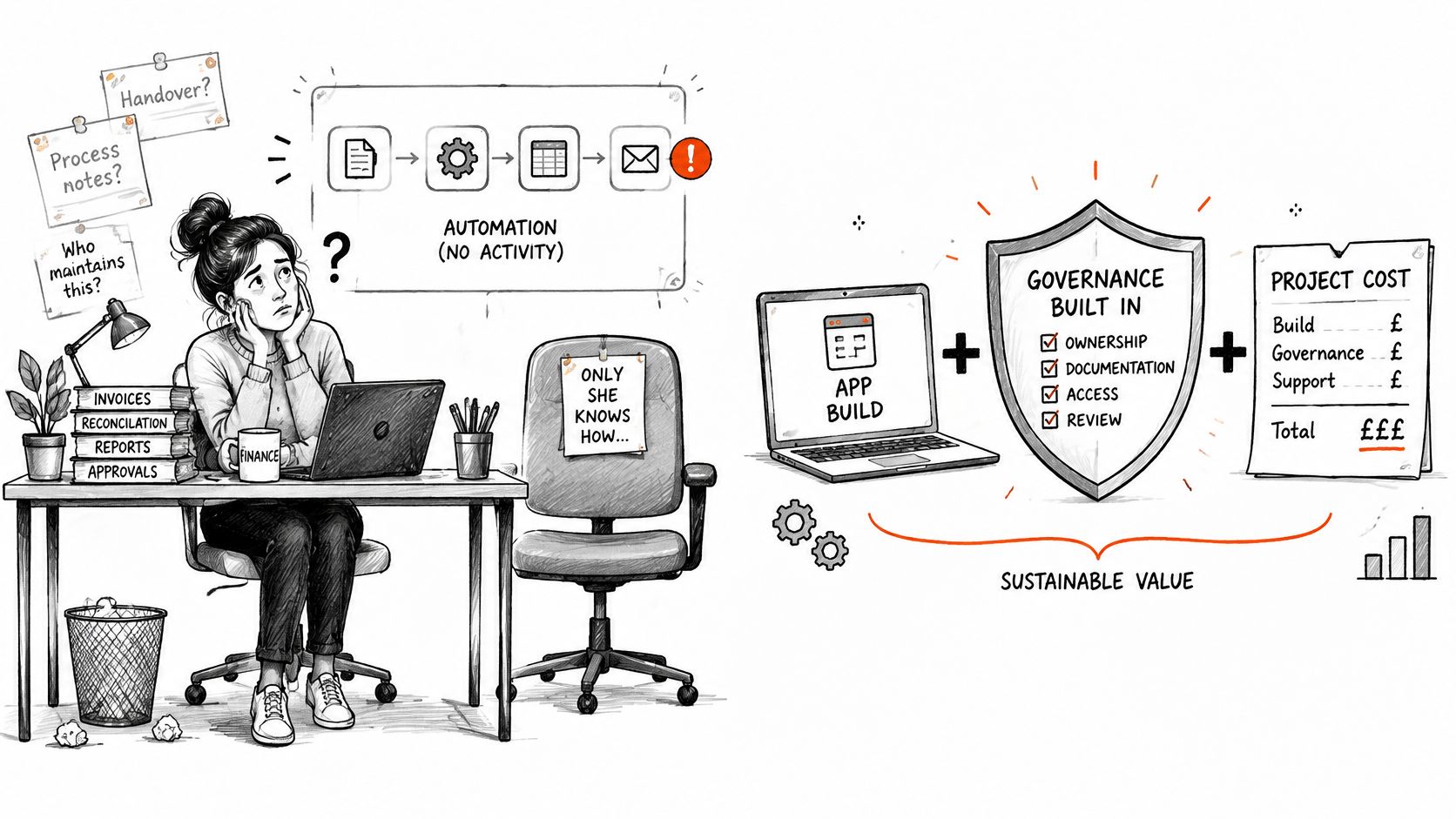
A finance assistant builds a flow to route invoices for approval. It works well until the assistant leaves. Then nobody knows which connection it uses, how to fix a failure or whether it still meets the finance team's needs. The solution needs named owners and a handover plan, not just a successful build.
Governance is part of the running cost. A proportionate operating model starts with an inventory of apps and flows, a named business owner and technical owner for each, and a clear environment strategy. Set review thresholds and rules for premium connectors and personal data. Document backup and recovery, and include a leaver process to reassign flows before a maker departs.
The UK Government's research on advanced-technology adoption identifies internal skills and staff capacity as constraints, alongside difficulty integrating new technology with existing systems.The government's report on barriers and enablers to advanced-technology adoption helps explain why a growing app estate needs clear ownership and controls. For SMEs, several useful automations can create duplicated data, hidden dependencies and licensing surprises if nobody checks how they fit together.
The Home Office offers an example of governance at scale. Its programme built a structured community of more than 1,500 makers using Power Platform to digitise manual processes and automate workflows. It also reported 1,421 active business makers and 696 registered solutions, supported by tiered reviews, data-loss-prevention controls and solution registration.
The programme reported £63.8 million in total benefits: £40.9 million in avoided costs, £7.8 million in direct savings and £15.1 million in operational-efficiency gains. It also recorded more than 60,000 hours of time savings. These figures show the kinds of outcomes an organisation can track when governance, user enablement and integration planning sit alongside app construction.
The same discipline applies to smaller organisations. Before launch, record a baseline so you can assess whether a solution improves the process:
- Leave and expenses approvals: For a firm of around 200 staff, record how many days approvals take.
- Volunteer hours app: For a charity using a Power BI dashboard for trustees, record the volunteer hours entered each month.
- Site inspection form: When replacing paper and email, measure the weekly hours spent re-keying inspection data.
A quarterly usage review can identify apps nobody uses, flows that need a new owner and solutions whose purpose has changed. The lasting cost is not the time spent building. It includes the governance, licensing oversight and staff capacity needed to keep each solution secure, supportable and affordable.
A short video can help teams see the platform in context before they decide what to build.
Training and Adoption for Non-Technical Staff
A working app isn't proof that employees have adopted it. Staff may need to understand what an automated decision means, where to report a problem and which parts of a process still require human judgement. If nobody plans for those needs, a technically successful project can transfer hidden support work to employees who are already busy.
The UK Government's AI-skills research identifies needs including low-code capability, explaining automated outputs, inclusive design and responsible use. It also warns that training can be too technical for non-technical staff, older workers and people outside major hubs.The government's AI-skills research for the UK workforce is a useful reminder that adoption needs more than a launch email.
Questions a training plan should answer
- Training by role: How much practical instruction do users, makers and approvers need?
- Support after handover: Who helps makers when the partner has completed the project?
- Accessible design: How will the team test forms for accessibility and plain-English wording?
- Failed runs: What should happen if a flow fails late in the working day?
- Adoption measures: How will you assess whether staff can complete the process, not just whether they open the app?
A useful programme combines discovery workshops with role-based training, accessible design checks, documented support runbooks and adoption analytics. It should also make clear what staff can change safely and which changes need a technical review.
A non-developer should be able to follow the runbook to identify a failed flow, check whether the issue is a missing input or a permissions problem, and use the agreed support route without guessing.
For a mid-sized firm or charity, a managed support route can be more practical than expecting employees to become platform administrators alongside their existing work. Build time for training and support into the proposal, and agree who owns ongoing questions before the solution goes live.
Choose a Partner Before You Commit Budget
A proposal should explain both how the partner will deliver the solution and how your organisation will manage it afterwards. Compare bids against the same questions, then ask for specifics wherever an answer is vague.
-
Relevant delivery experience. Ask for examples of Power Platform projects of similar size and in a comparable sector. Request references you can contact, and ask what the partner built, integrated and supported.
-
Governance and handover. Check that the scope covers ownership, environments, security controls, documentation and a process for when staff leave. Without a technical owner, even a working app can become difficult to maintain.
-
Licences and full costs. Require licence estimates in GBP, with VAT shown separately and costs broken down by user group. The partner should distinguish build fees from licence and environment costs, and explain the assumptions behind each estimate.
-
Integration capability. Ask how the team will connect Microsoft 365, Dynamics 365 and Azure, and manage identity, data permissions and errors. A standalone app may be easy to demonstrate, yet fail to solve a process that crosses several systems.
-
Support arrangements. Ask for a documented support model covering response times, service hours, escalation and failed runs. “Support available” means little until you know who responds and what happens when a workflow stops.
-
Security and data handling. Ask how access will be assigned, sensitive data controlled and connector choices reviewed. The answers should address your systems and information, not just describe general good practice.
-
Training for the people using it. Check that the plan distinguishes users, makers and approvers, and includes accessible design and plain-English guidance. Ask how staff can get help after handover.
Red flags include a quote without licence costs, no named owner after launch, or a plan that ends at go-live. Ask how the solution will be tested, who will respond to failures and what documentation your team will receive.
How F1Group fits the search
F1Group has supported organisations with Microsoft-focused IT since 1995 and serves Lincoln, Nottingham, Leicester, Scunthorpe, Grimsby and Newark. Its vendor-certified and DBS-checked team provides remote or on-site support, alongside Power Platform, managed IT, Microsoft 365, Azure and Dynamics 365 services.
Before contacting a partner, list three frequently used manual processes and record their monthly volumes. This gives the first discussion a practical starting point and helps you compare proposals against real work, rather than a broad request to “digitise a process”.
F1Group can help assess manual processes, develop Power Apps, Power Automate workflows and Power BI reporting, and plan governance and support after launch. Contact F1Group to discuss your Power Platform requirements and remote or on-site support in Lincoln, Nottingham, Leicester, Scunthorpe, Grimsby or Newark.