
A fast help desk isn't proof that anyone's looking after your identities, backups or recovery plan. That's the trap with many IT support outsourcing services. Tickets close quickly, users feel heard, and the work that lowers risk belongs to nobody. Buy on named ownership first, speed and price second.
Why UK Firms Outsource IT Support
YouGov reported that 70% of British business-to-business decision-makers had outsourced at least one business function. In the same report, 25% said their organisation had never outsourced any part of its operations, 34% wanted to hand IT support to external suppliers, and 48% cited a lack of necessary IT staff. The practical reason is clear: hiring every IT specialism in-house rarely makes sense for a firm with a small team.

The 2026 East Midlands reality
An East Midlands firm may use Microsoft 365, Azure, dozens of endpoints, and perhaps Dynamics 365 or Copilot, while relying on one or two capable generalists. Those staff cannot consistently cover the service desk, cloud administration, security analysis and infrastructure engineering as well as their other duties. Patching, conditional access reviews or backup testing can be left undone.
Four common models divide that work differently:
- Managed service: The provider runs day-to-day operations for a monthly fee.
- Break/fix: You call when something fails and pay for the time used.
- Co-managed: Your internal lead sets direction while the provider adds capacity and specialist skills.
- Project-based: A provider delivers a defined migration or integration, then the work ends.
Choose by deciding who inside your business can own each duty, not by assuming that outsourcing transfers every responsibility. Your provider proposal should name the people responsible for identity, backups, incidents and exit arrangements. Use that scorecard alongside the commercial terms: a low monthly fee or quick ticket response does not show who makes recovery decisions or hands over administrator access when the contract ends.
Compare proposals in pounds, then check whether the service levels cover the work your team needs. Ask which security duties are included, which remain with your staff, and who acts when an incident requires a decision. The answers should be written into the contract, not left as assumptions.
Plan hardware retirement alongside any support change. Agree in advance who arranges device disposal, data wiping and evidence of completion. For a separate perspective on device retirement, sustainable ITAD for Atlanta small businesses addresses that subject.
Use the comparison that follows to identify the model whose ownership fits your organisation. Then test each proposal against its named duties, price and service commitments.
Four IT Support Outsourcing Models Compared
Read the ownership column first. Everything else follows from who's doing the work on a normal Tuesday afternoon.
| Model | Who owns day-to-day work | Best when | Usual commercial shape | Failure to watch |
|---|---|---|---|---|
| Managed service | Provider runs monitoring, patching, service desk and cloud admin | No full internal IT team | Monthly per-user or per-device fee | Bundle does not match the estate, or exit is painful |
| Break/fix | Client calls only when something fails | Tiny, stable estate with rare issues | Hourly rate or prepaid hour blocks | No prevention and a large bill after an outage |
| Co-managed | Internal IT keeps strategy, provider supplies specialists | IT manager or small team needs extra capacity | Monthly retainer plus project rates | Patching or privileged access has no single owner |
| Project-based | Fixed scope with a start and end date | Microsoft 365, Azure or Dynamics 365 change | Fixed price or capped day rate | No support arranged after go-live |
How to read each row
A managed service means the provider owns monitoring, patching, the service desk and Microsoft cloud administration. It's the right call when you don't have a full IT team and nobody inside can chase routine work weekly. It fails when the bundle was built for a generic customer, not your estate, or when leaving means fighting for admin credentials and documentation.
Break/fix is simpler. Something breaks, you call, you're billed by the hour or from a prepaid block. That suits a tiny, stable setup with rare faults. It fails because nothing is prevented, so one outage can become a large, unbudgeted invoice at the worst possible moment.
With co-managed support, your internal lead keeps strategy and supplier decisions while the provider adds specialist capacity, cover and tooling. Our own guide to co-managed IT services sets out how that split should be documented. It suits a mid-sized firm or small PLC, and it fails when patching or privileged access has two supposed owners and therefore none.
Project-based work covers a fixed piece of change, such as a Microsoft 365 migration, an Azure move or a Dynamics 365 rollout. It suits a dated change with a clear outcome. It fails when the project team finishes and nobody has agreed who supports users on the Monday after go-live.
Unnamed ownership is the real risk in every model. If a duty isn't written against a named person on one side of the contract, assume it won't happen.
Combinations that work
Two combinations are normal and sensible. The first is co-managed support plus a separate migration project, so your lead keeps control while specialists deliver the change and then hand it into ongoing support. The second is a short break/fix period while a managed scope is written properly, rather than signing a vague bundle in a hurry.
If you're weighing an internal hire against buying capacity, it helps to understand what junior and mid-level support roles cover day to day. You can compare IT support career options to see how narrow a single hire's remit usually is compared with a provider's bench.
Choose the row where ownership matches who can act, not the row that looks cheapest on a one-page proposal.
Benefits and Risks of Outsourcing IT Support
Outsourcing reliably delivers depth you can't hire. A provider brings specialists across help-desk operations, Microsoft cloud administration, cyber security and infrastructure, which a small or mid-sized firm struggles to recruit and keep in one or two people. You also get cover for absence and holidays without a second permanent hire.
It also brings routine work onto a schedule. Monitoring and patching run because they're someone's contracted job, not because your busiest person found a spare hour. A monthly fee is easier to budget than emergency call-outs, and predictable cost matters when you're asking a board or trustees to approve spend.
Where it goes wrong
The main risk is fragmented accountability. You assume the provider owns a task, the provider assumes you own it, and nobody notices until an incident exposes the gap. Supplier access is a related risk, because you're handing another organisation privileged routes into your systems.
Other risks are commercial rather than technical:
- Bundle mismatch: You pay for services you never use, or lack one you need.
- Painful exit: Admin credentials, documentation and tenant ownership stay with the supplier.
- Hidden exclusions: Travel, line-of-business vendor tickets and project work push real cost above the headline fee.
Each risk has a control later in your buying process. Test what a fee excludes, and test ownership and exit in writing before signature.
The balance test is simple. Outsourcing is worth it when the provider takes work nobody inside can own every week, and the contract makes that ownership visible.
GBP Pricing and Service Level Expectations
Treat every figure below as an indicative 2026 UK proposal band, not a tariff. Providers price on users, devices, sites, coverage hours and estate condition, so use these ranges to sense-check quotes rather than to demand an exact number. 20% VAT is usually extra, so a £1,000 monthly quote is typically £1,200 on the invoice. If a supplier quotes in US dollars, ask for the GBP equivalent in writing before you compare anything.
| Commercial element | Indicative GBP band | Usually excluded |
|---|---|---|
| Remote break/fix | £90 to £150 an hour | On-site travel and major projects |
| On-site engineer | £120 to £180 an hour | Travel and mileage across the East Midlands |
| Managed per user | £40 to £90 per user per month | Line-of-business vendor support |
| Managed per device | £25 to £60 per device per month | Strategic change projects |
| Monthly minimum | £500 to £1,500 a month | Hardware and software licences |
| Co-managed retainer | £1,500 to £8,000 a month | Replacing the internal IT lead |
| Project day rate | £650 to £1,200 a day | Ongoing service desk after go-live |
On-site work often carries a one or two hour minimum plus travel, which matters if your sites are spread across Lincolnshire, Nottinghamshire and Leicestershire. A per-user fee suits office-based teams where people and devices roughly match. A per-device fee suits warehouses, surgeries or schools where devices outnumber named users. Our breakdown of managed IT support pricing explains how those two bases change the same quote.
Response is not resolution
Separate the two in every proposal. A 15 minute response means someone has acknowledged or started work. It does not mean your service is back.
Workable targets look like this:
- Priority 1, whole site or identity down: Response in 15 to 30 minutes, with a four hour restore target.
- Priority 2, a department affected: One hour response, with same business day progress towards a fix or workaround.
- Priority 3, one user affected: Four hour response, resolved in one to two business days.
- Priority 4, a request: Next business day response and a scheduled slot.
Cover outside weekday hours costs more, sometimes considerably more, so only buy 24 hour cover if your operation runs then. Cabling, line-of-business vendor tickets and major projects usually sit outside the monthly fee, and that's reasonable as long as it's stated plainly rather than discovered later.
Sense-check first: Before comparing two proposals, ask whether each pound figure is per user, per device or a site minimum. Two quotes that look £500 apart often aren't pricing the same thing at all.
Security Duties a Contract Must Name
The 2025 UK Cyber Security Breaches Survey found that 43% of businesses experienced a cyber breach or attack in the previous 12 months, while 16% reported a negative outcome. With exposure at that level, a support contract that names only response times and device counts is not a security service. Ask for evidence that shows who owns each control and whether it is being carried out.

Paste this scorecard into your tender
Name an owner on both sides for every duty. Put a person, not just a company, in each owner field. A contract should make clear who reviews access, checks backups, handles incidents and manages the handover if the service ends.
| Contract duty | Evidence to request |
|---|---|
| Microsoft 365 and Azure administration | Admin role list and change log |
| Conditional access and privileged-access reviews | Quarterly review record |
| Patch-compliance evidence | Monthly compliance report |
| Backup restore tests | Test log against the agreed recovery-point objective |
| Endpoint management | Device inventory and coverage report |
| Supplier access logs | Record of provider access to client systems |
| Cyber Essentials or Cyber Essentials Plus support | Certificate status and gap plan |
| First-hour incident call-out | Named escalation list |
| Breach-notification wording | Agreed notification clause |
| Exit assistance | Global-admin handover and documentation pack |
The scorecard gives identity, backups, incidents and exit named owners, instead of treating a fast help desk as proof of lower risk. Outsourcing can reduce operational work while leaving accountability fragmented. Use the contract to assign responsibility for each control and require evidence that the work is done.
East Midlands SMEs and charities without a security specialist should include these controls in the support model, not accept them later as a vague add-on. Ask how the provider measures patch compliance, reviews privileged accounts and logs its engineers' access to your tenant. If the answers are unclear, the contract describes troubleshooting, not risk reduction.
A backup success message does not prove that data can be recovered. Require a restore test that recovers real data to a clean location, with the result logged against your agreed recovery-point objective. The record should show what was restored and whether it met the agreed target.
Before signing, get clear written answers to three questions. Who can reset a global administrator if the account is locked out or compromised? When was the last successful restore test, and can you see the log? What happens to the tenant when the contract ends, including who hands over global admin, documentation and licences, and within how many days?
Shortlist providers that answer plainly and put the duties in writing. If the conversation keeps returning to ticket speed, the contract is not giving you clear ownership of security work.
Which Model Fits East Midlands Organisations
One package can't fit every customer. The UK Business Data Survey 2026 reported that 25% of large businesses, 14% of small businesses and 10% of microbusinesses used servers provided by outsourced IT-services companies, compared with 4% of sole traders. Adoption rises with size, so scope should rise with it too.

Verdicts by organisation type
A sole trader or microbusiness in Newark or Grimsby, running email and a handful of PCs, should stay on break/fix or take a light per-device managed plan. Don't buy a retainer built for a multi-site firm. You need someone competent to call, working backups, and passwords you control. That's the whole requirement at this size.
A small organisation of roughly 10 to 50 people in Lincoln, Leicester or Nottingham with no internal IT should take a fully managed service. Without it, Tuesday faults, new starter setups and Microsoft administration queue behind the owner or the operations manager. That queue represents the true cost, and it never appears on an invoice.
A mid-sized business, small PLC or charity with an IT manager should choose co-managed support. Strategy, budgets and board reporting stay inside, where the business knowledge sits. Specialist capacity, monitoring tooling, holiday cover and project delivery come from outside. Write down who owns patching and privileged access on day one, or this model drifts.
A charity needs two extra protections. Insist on DBS-checked engineers where staff visit sites with vulnerable people, and agree a written budget ceiling so trustees aren't surprised. Volunteer-held admin passwords are a common weak point, so name who holds global admin and review it whenever a volunteer leaves.
A dated Azure, Microsoft 365 or Dynamics 365 Sales rollout should be project-based, with a fixed scope and a go-live date. Agree the managed or co-managed tail before go-live, including user training, hypercare hours and who owns the inevitable list of small fixes. Otherwise the project team disappears and your users are stranded with a system nobody supports.
Adoption rises with size, but the correct scope is always the work nobody inside can own every week.
How to Choose a Local East Midlands MSP
A managed service provider, in the UK government's sense, delivers regular, ongoing management, administration or monitoring of IT systems, infrastructure, applications, networks or security. The UK government's research on managed service providers estimated 11,492 active UK MSPs and £52.6 billion in annual managed-services revenue in 2022, and it found 36% of UK businesses and 26% of charities use an external cyber-security provider. With that many suppliers chasing your business, a generic help desk is a weak filter.
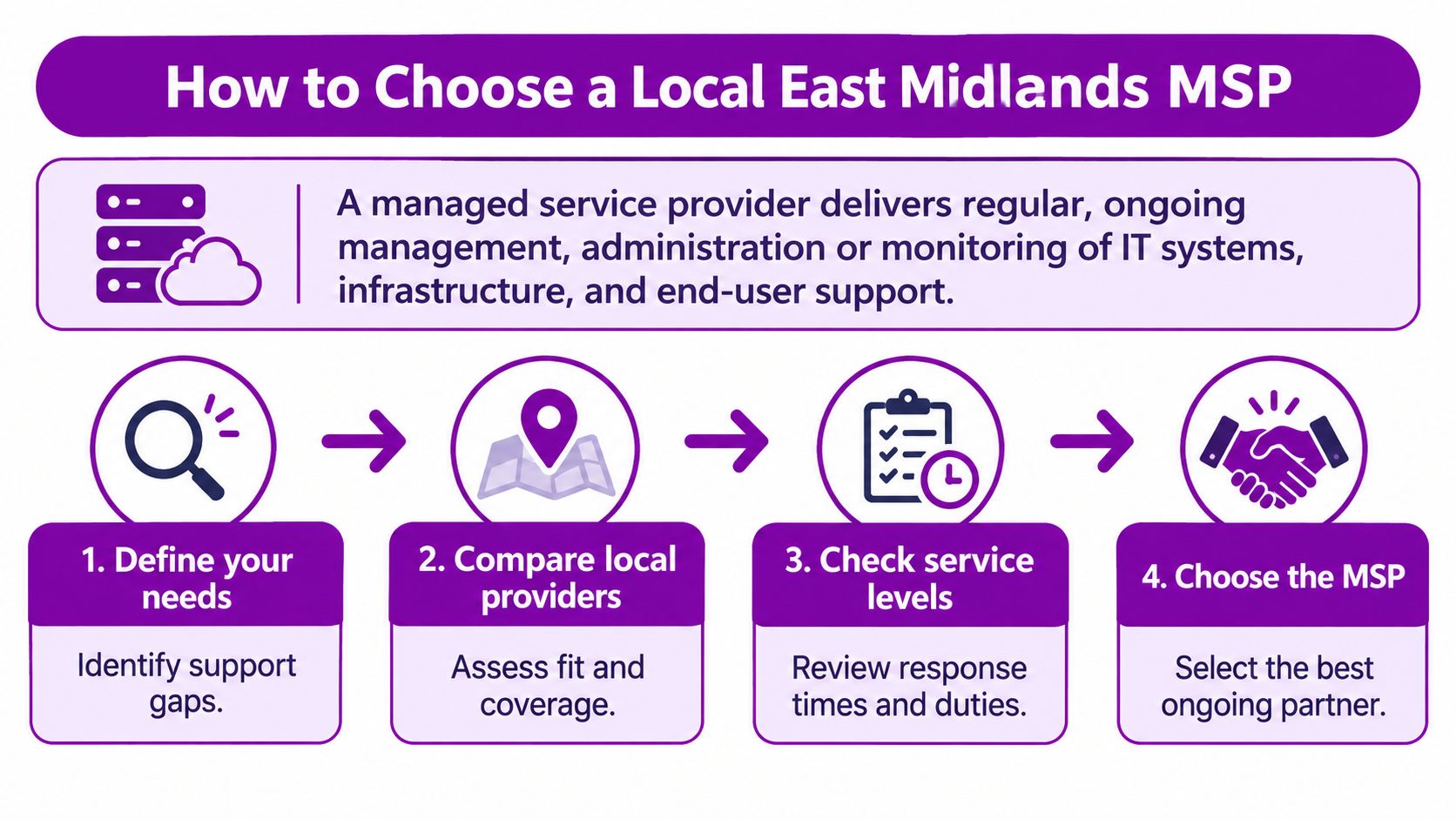
Six buying steps
- List the systems in scope: Include Microsoft 365, Azure, endpoints, line-of-business applications and any Dynamics 365 or Copilot use, plus sites and user counts.
- Make each provider complete the scorecard: Every shortlisted supplier names who owns each security and resilience duty, on their side and yours.
- Judge a sample monthly report: Look for patch compliance, backup test results and ticket trends, not just a count of closed tickets.
- Check credentials and coverage: Confirm vendor certifications, DBS checks where engineers visit charity or similar sites, and whether on-site cover reaches Lincoln, Nottingham, Leicester, Scunthorpe, Grimsby and Newark.
- Compare two written agreements: Read the service levels, exclusions and exit clauses side by side rather than relying on a verbal promise in a sales meeting.
- Pilot before you commit: Run 60 to 90 days on a bounded scope, then decide on a longer term using the monthly reports you received.
If you're still clarifying what an external provider should take on, our overview of choosing an IT service provider covers the scope questions to settle before step one.
F1 Group is one East Midlands option, offering Microsoft-focused managed support, cyber security and project delivery, remotely or on site, for small and mid-sized organisations that want a named owner for each duty. Judge it by the same six steps as everyone else. Any provider that resists the scorecard, won't share a sample report, or gets vague about exit has failed the test before pricing even enters the conversation.
Confirm the Model and Start the Conversation
Bring three items to your first conversation with any provider. Bring your current estate, including Microsoft 365, Azure, endpoints and any Dynamics 365 or Copilot use. Bring the model that fits best from the comparison, and say why. Bring the duties that would have no named owner under your present arrangement, because that list is where your risk sits.
Hold every shortlisted provider to the named security duties before you sign, and confirm whether each pound figure is per user, per device or a site minimum. Don't let a low headline fee carry the decision on its own.
Phone 0845 855 0000 today, or send us a message, to talk through managed, co-managed or project support with F1 Group for your organisation in Lincoln, Nottingham, Leicester, Scunthorpe, Grimsby or Newark. Bring your current estate and your preferred model, and we'll work through the ownership questions with you.
F1Group provides managed and co-managed IT support, Microsoft 365 and Azure administration, cyber security and project delivery for small and mid-sized organisations across the East Midlands, with named ownership for the duties that matter. If you want that accountability written into your next support arrangement, visit F1Group and start the conversation today.