
If you’re running a growing business in Leicester, there’s a good chance your IT team is still spending too much time on jobs that shouldn’t need human effort every single day. Password resets. New starter setup. Leaver offboarding. Chasing files. Moving data from Outlook into Excel, then into a line-of-business system, then into a report someone only looks at on Friday afternoon.
That sort of work feels normal because it’s familiar. It also slows the business down, creates avoidable errors, and ties up skilled people on tasks that add very little value.
Automation in IT isn’t about replacing your staff with robots. It’s about removing repeatable admin from your systems so your team can spend more time on security, service quality, projects, and growth. For East Midlands firms using Microsoft 365, Azure, Dynamics 365, Power Platform, and Copilot, a lot of the tooling is already available. The primary challenge is knowing where to start, what to automate, and how to do it safely.
Why Your Business Can No Longer Ignore IT Automation
It is 8:45 on a Monday in Leicester. A new starter cannot log in, a manager is waiting for access to a shared mailbox, finance is chasing a report that still needs data copied from three places, and your IT team is already buried in tickets. None of those jobs is unusual. All of them pull skilled people into repeat work that Microsoft tools can often handle far more consistently.
Businesses often delay automation because daily workloads get in the way. The result is not just lost time. It is slower response, more avoidable mistakes, patchy audit trails, and higher support costs that are hard to spot until growth puts real pressure on the business.
The commercial risk is straightforward. Firms that automate routine processes respond faster, keep records in better order, and add staff or customers without the same level of admin drag. In practical terms, they spend less time chasing work and more time improving service, security, and reporting.
For East Midlands SMBs, this has become a Microsoft question as much as an operations one. If your business already runs on Microsoft 365, Entra ID, SharePoint, Teams, Power Platform, or Dynamics 365, you likely own more automation capability than you are currently using. The gap is usually not software. It is governance, prioritisation, and confidence about where automation will produce a clear return.
That is why a sensible starting point matters. A process does not need to be complex to justify automation. It needs to happen often, follow a predictable path, and create cost or risk when handled manually. Our own work with regional firms often starts with routine flows such as approvals, onboarding steps, document handling, or alerts that sit inside existing Microsoft licences. For a closer look at that approach, see our guide to workflow automation in Microsoft-based business processes.
What delay usually looks like
In smaller and mid-sized firms, the warning signs are usually operational rather than strategic:
- IT support stays reactive: The team spends too much of the week clearing repetitive tickets instead of fixing recurring causes.
- Growth adds admin overhead: New staff, customers, suppliers, and locations all bring more manual steps.
- Reporting stays fragile: Important decisions depend on somebody exporting, copying, checking, and reformatting data by hand.
- Security controls become inconsistent: Joiner, mover, and leaver actions depend on memory, email chains, or local workarounds.
- AI projects stall: Businesses want the gains promised by AI Automation, but the underlying processes and data flow are still too manual to support it properly.
A simple rule works well here. If the same task is carried out the same way each day, week, or month, it deserves a serious look.
Why this matters in Leicester and the wider East Midlands
A lot of firms across Leicester and the wider East Midlands are in a similar position. They have invested in Microsoft technology over time, often for email, collaboration, file storage, reporting, or CRM, but the process layer between those systems still depends on inboxes, spreadsheets, and individual effort.
That creates a missed ROI problem. The licences are there. The business case is there. What is missing is a practical roadmap that connects automation to governance, accountability, and measurable business outcomes.
You do not need a large transformation programme to get value. You need a shortlist of the right problems, a clear owner for each process, and controls around how automations are approved, tested, and monitored. That is usually the difference between a useful automation estate and a collection of one-off fixes that become hard to manage later.
Understanding Automation in IT A Practical Definition
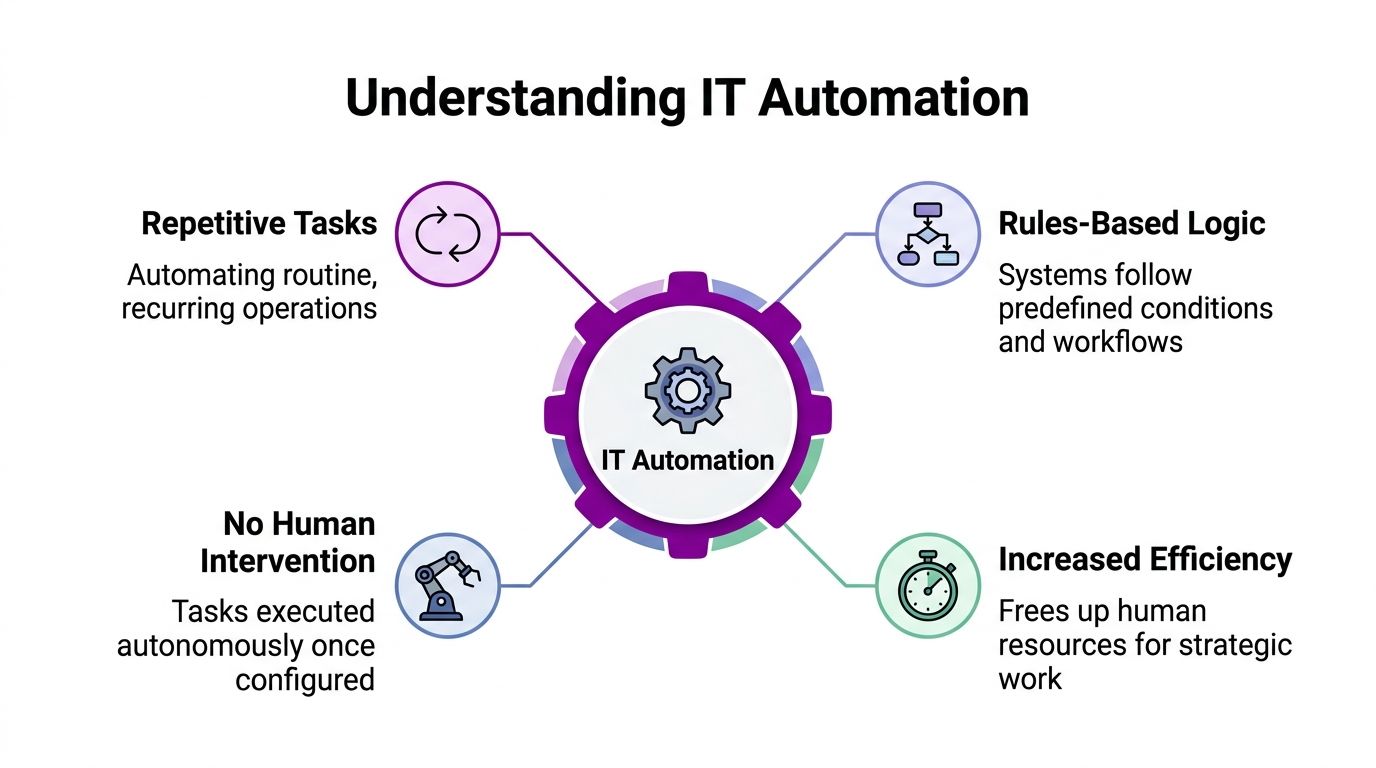
At its simplest, automation in IT means getting systems to carry out repeatable, rules-based tasks without someone manually doing them each time.
Think of it as a digital assistant. You define the trigger, the steps, the conditions, and the outcome. After that, the process runs the same way every time unless you change it.
The plain-English definition
A good automation has four traits:
- It handles repetition: The task happens often enough that manual effort is wasteful.
- It follows rules: The process can be described as clear steps or conditions.
- It runs consistently: The same input should produce the same output.
- It frees up people: Staff stop spending time on routine handling and focus on exceptions or higher-value work.
That could be as simple as saving email attachments into the right SharePoint folder. It could also be more involved, such as creating a user account, assigning licences, notifying managers, and scheduling follow-up tasks when a new starter joins.
RPA, workflow automation, and AI
These terms often get blurred together, but they aren’t identical.
| Type | What it does | Typical use |
|---|---|---|
| RPA | Mimics user actions in an interface | Clicking through older systems that don’t integrate neatly |
| Workflow automation | Moves data and actions between systems using built-in connectors or APIs | Approvals, alerts, record creation, file handling |
| AI-enabled automation | Adds interpretation or decision support | Sorting requests, extracting meaning from documents, drafting responses |
RPA is helpful when you're stuck with legacy applications and no clean integration path. It acts more like a person following on-screen steps.
Workflow automation is usually the better long-term option in the Microsoft ecosystem. It connects tools like Outlook, Teams, SharePoint, Forms, Dynamics 365, and Excel in a more structured way. If you want a practical breakdown of how these flows work in business settings, this guide on https://www.f1group.com/what-is-workflow-automation/ gives a useful starting point.
AI-enabled automation sits on top of that foundation. It helps when the task isn't fully black and white. For example, AI can classify incoming emails, extract fields from a PDF, or help route a request based on meaning rather than a fixed keyword. For a broader view of how this is evolving, Ekipa AI's overview of AI Automation is a sensible reference.
Automation works best when the process is already understood. It won't rescue a messy process. It will usually expose how messy it is.
What automation is not
It isn't a magic button. It doesn't remove the need for process ownership. It doesn't mean every step should be automated.
Some tasks still need judgement, especially where money, access, compliance, or customer experience are involved. Good automation removes repetitive handling. It doesn't remove accountability.
The True Business Benefits Beyond Simple Efficiency
A Leicester business does not usually feel the cost of manual work in one dramatic moment. It shows up in smaller failures. A customer waits because an approval sat in the wrong inbox. Payroll corrections take half a day because data was copied between spreadsheets. An account stays active longer than it should because a leaver process depended on someone remembering the final step.
Those are business control problems, not just productivity issues.

The firms that get the strongest results from automation usually improve three things at once. They reduce avoidable admin, standardise how work moves through the business, and give managers a clearer view of current operations. In Microsoft 365, that often means replacing email chains and side spreadsheets with structured processes in Forms, SharePoint, Teams, and Power Automate. A practical example is this guide to using Power Automate for everyday business workflows.
Better data quality and fewer avoidable mistakes
Manual handling creates small errors that spread quickly. A customer record is entered twice under slightly different names. A purchase request misses a cost code. A document is saved in the wrong folder and disappears until someone asks for it during an audit.
Automation reduces those gaps by making key steps repeatable and visible. Data is captured once, validated early, and sent to the right place in the same format each time. For East Midlands SMBs, that matters because smaller teams often do not have spare capacity to keep fixing preventable errors.
A simple example is a new starter process. If HR enters the details once through a form and the workflow notifies IT, payroll, and the line manager automatically, the business gets a cleaner handover with fewer missed tasks.
Stronger security through repeatable processes
Security improves when access, approvals, and record handling stop depending on memory.
Well-designed automation can route permissions through the right approver, create an audit trail, alert the right people when something falls outside policy, and make joiners and leavers follow the same process every time. In the Microsoft ecosystem, that can sit alongside Entra ID, Teams approvals, SharePoint permissions, and retention policies rather than working around them.
That is a real trade-off worth stating clearly. The speed benefit only lasts if the process is controlled properly. Poorly designed automation can spread mistakes faster than a person can. Good governance prevents that, and it is one reason mature SMBs treat automation as an operational discipline rather than a quick fix.
Better use of skilled staff
Repetitive admin drains capable people. It also hides the cost of experienced staff spending hours on tasks that add very little value.
A service desk analyst should be solving recurring issues, not processing the same password-related request all week. A finance administrator should be reviewing exceptions and cash risk, not copying invoice data between systems. Automation shifts routine handling away from key staff so they can focus on work that needs judgement.
That usually improves morale, but the bigger benefit is managerial. The business gets more value from the people it already pays for.
Good automation makes skilled staff more useful because their time goes on decisions, exceptions, and service quality.
A stronger base for growth
Growth puts pressure on weak processes first. More customers, more transactions, and more employees usually mean more chasing, more rekeying, and more room for inconsistency if the business is still relying on manual coordination.
Automation gives growing firms a more stable operating model. Service delivery becomes easier to predict. Management reporting becomes cleaner because data is captured through the process instead of reconstructed afterwards. Teams can absorb change without every increase in volume requiring another layer of admin.
For many SMBs across Leicester and the wider East Midlands, that is where the substantial return sits. Time savings matter, but the bigger gain is a business that is easier to control, easier to scale, and less dependent on individual workarounds.
Your Microsoft Automation Toolkit Explained
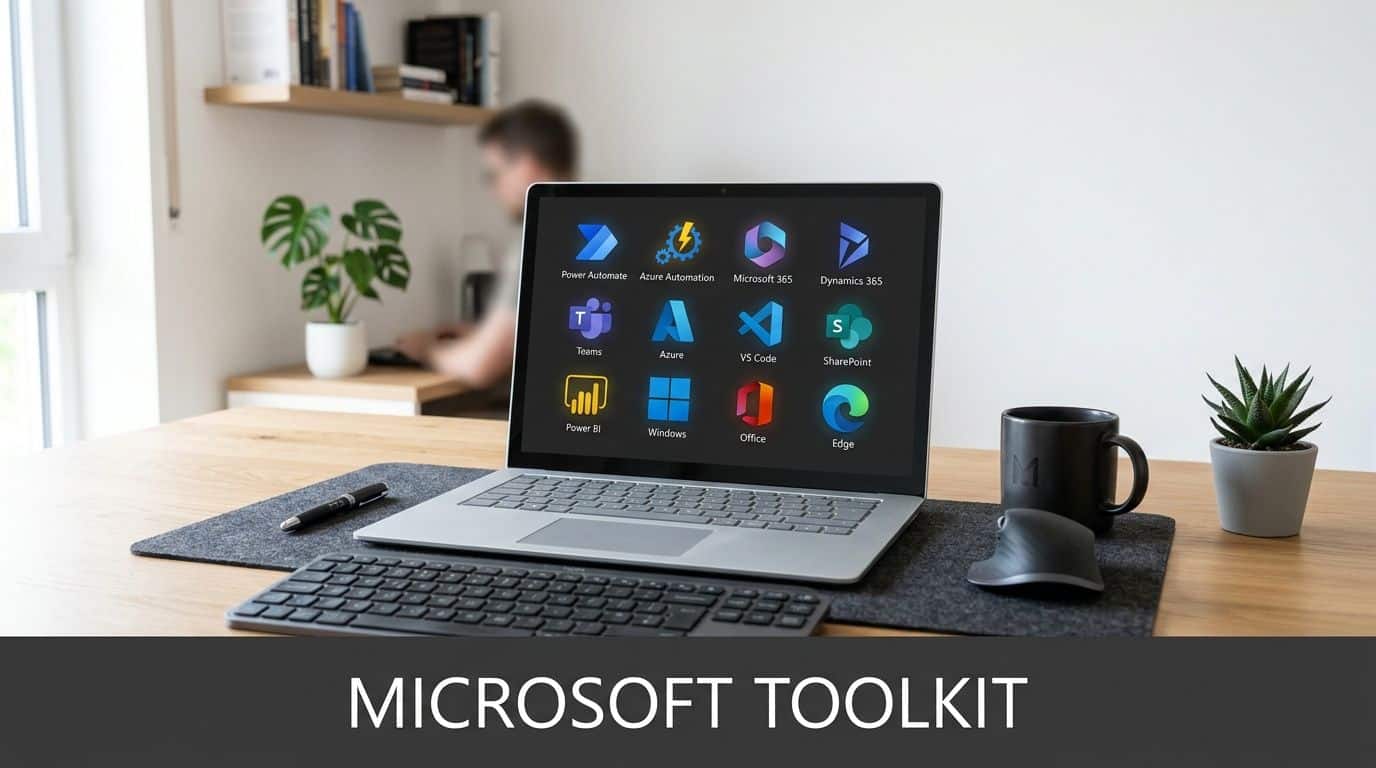
For most East Midlands SMBs, the Microsoft stack already contains the building blocks for practical automation. The value isn't in buying every tool. It's in matching the right tool to the right job.
Power Automate for everyday business workflows
Power Automate is usually the first place to start. It connects Microsoft 365 applications and many third-party platforms, so you can automate routine actions without building a full application.
Common examples include:
- Email to SharePoint workflows: Save attachments from a specific mailbox into a defined library, then notify the right team in Teams.
- Approval processes: Route purchase requests, policy acknowledgements, holiday forms, or document sign-offs to the correct manager.
- Lead handling: Take a Microsoft Form or website enquiry, create a record, and trigger follow-up activity.
- New starter tasks: Notify IT, HR, facilities, and the line manager with the same checklist every time.
For businesses comparing options, this practical guide to https://www.f1group.com/how-to-use-power-automate/ shows the sort of workflow patterns that are commonly implemented.
Azure Automation for infrastructure and operations
Where Power Automate focuses on business workflows, Azure Automation is more about systems management.
It's useful for jobs like:
| Tool area | Typical task | Why it matters |
|---|---|---|
| Azure Automation | Schedule routine maintenance jobs | Reduces manual admin in cloud operations |
| Update management | Standardise patching activity | Supports a more controlled estate |
| Runbooks | Execute repeatable operational actions | Helps the team handle common tasks consistently |
Automation in IT then becomes more than forms and approvals. It reaches into server management, cloud housekeeping, and repeatable operational controls.
Dynamics 365 and process-led customer operations
If you’re using Dynamics 365, automation can tighten up sales, service, and admin processes.
A prospect fills in a form. The system creates the contact, assigns ownership, schedules a task, and logs the interaction. A customer service ticket reaches a certain status. The system updates the record, alerts the right queue, and prompts the next action. None of that is dramatic. It’s well-organised.
Businesses using Dynamics 365 often get the most value when automation is applied to handovers between departments. That’s where delays, duplication, and missed actions usually happen.
Copilot and AI Builder for more flexible tasks
Some processes don’t fit a simple yes-or-no rule set. That’s where Copilot and AI Builder come into play.
They can help with tasks such as:
- Reading document content
- Extracting data from forms or invoices
- Classifying requests
- Drafting summaries or responses for review
The important point is that these tools are most useful when placed inside a controlled process. AI on its own can feel clever but vague. AI inside a clear workflow is much more valuable.
A short demonstration helps make that clearer:
Power BI and reporting automation
Reporting is another area where businesses lose time without realising it.
Teams export data, tidy spreadsheets, update charts, and circulate versions by email. With the right setup, Power BI can refresh data on schedule, surface the latest figures in a dashboard, and reduce the amount of report production done by hand.
If a report takes human effort every week just to exist, the process around that report usually needs attention.
Choosing the right starting point
Not every problem needs Azure runbooks or AI document processing. Most firms get early traction from straightforward workflow fixes inside Microsoft 365.
In practice, that means starting with repetitive friction, not glamorous ideas. One option is to bring in a partner that works across Microsoft 365, Azure, Dynamics 365, Power Platform, and cyber security. F1Group provides that type of support across the East Midlands for businesses that want implementation and operational oversight from the same team.
A Practical Roadmap for Your First Automation Project

A Leicester office manager hires two starters on Monday. HR needs documents issued, IT needs Microsoft 365 accounts created, managers need checklists, and payroll needs the right details before cut-off. In a lot of SMBs, that still happens through email chains, spreadsheets, and a few people remembering what comes next. That is a good first automation project because the process is common, visible, and easy to measure.
The first project should prove that automation can remove friction without creating new risk. In the Microsoft ecosystem, that usually means choosing a process that fits tools your team already uses, such as SharePoint, Teams, Forms, Outlook, and Power Automate.
For East Midlands businesses, the practical constraint is rarely ambition. It is capacity. Internal IT teams in Leicester, Nottingham, and Derby are often busy keeping core systems stable, so the best pilot is one that can be built, tested, and supported without dragging on for months.
Step one: choose a process with low risk and clear repetition
Good candidates share a few traits. They happen often, follow a defined path, and cause regular irritation when handled manually.
Typical first projects include:
- New starter and leaver tasks across Microsoft 365
- Document approvals using SharePoint and Power Automate
- Form-to-record processes for HR, service, or sales admin
- Manual reminders and notifications sent from shared inboxes
- Scheduled report delivery from Power BI or a central dataset
Avoid starting with a process that has constant exceptions, disputed ownership, or poor source data. Automation makes a weak process run faster. It does not fix the weakness by itself.
Step two: agree what success looks like before building anything
A pilot needs a business target, not just a technical build.
Set a small number of measures that matter to the people using the process. That might be reducing onboarding time from two days to two hours, cutting missed approval steps, or giving managers a clear audit trail in SharePoint rather than hunting through inboxes. For smaller firms, one of the most useful outcomes is reducing reliance on the person who “just knows how it works”.
Write down the current process in plain English. Note who starts it, what information is needed, where it stalls, and what usually goes wrong.
If that description is unclear, stop there and tidy the process first.
Step three: build around real conditions, not ideal ones
This is the stage where many first projects drift. A flow can look fine in a demo and still fail in live use because someone uploads the wrong file type, misses a field, or approves from a mobile device with limited context.
Build with those realities in mind:
| Build area | What to check |
|---|---|
| Trigger | Does the process start from the right event, form submission, file upload, or status change? |
| Data quality | What happens if required information is missing, duplicated, or entered in the wrong format? |
| Approvals | Are approval steps assigned to named roles, with cover for absence and delay? |
| Failure handling | Who gets alerted if the flow stops, and what is the fallback process? |
| Ownership | Which person or team maintains the automation after go-live? |
Testing should involve the people who perform the work. They usually spot the awkward exceptions far faster than the project team.
Step four: keep the pilot small, then standardise what worked
A first automation project does not need to cover every variation. It needs to solve one defined problem well enough that staff trust it and management can see the result.
Once the pilot is live, review the outcome after a few weeks. Check whether turnaround time improved, whether users bypassed the process, and whether support calls increased or dropped. In Microsoft 365 environments, we often find that one successful workflow exposes two or three related manual tasks that can be cleaned up next with very little extra effort.
That is also the right point to set a few rules before automation spreads further. Name flows consistently. document ownership. Keep a record of connectors, service accounts, and approval logic. If your team is building internal capability, a working knowledge of information security principles helps, and structured study around CISSP certification can be a useful reference for the governance side.
For East Midlands SMBs, that measured approach usually delivers better ROI than chasing a bigger, flashier use case first. It gets one process under control, proves the value in familiar Microsoft tools, and gives the business a roadmap it can support properly.
Essential Governance and Security for IT Automation
A Leicester firm automates invoice approvals in Power Automate. It works well for two months, then a manager leaves, a mailbox permission changes, and approvals stop without anyone noticing until suppliers start chasing payment. The problem is not the workflow itself. The problem is ownership, access, and monitoring.
That is why governance and security need to be built into automation from the start, especially for SMBs using Microsoft 365, Power Platform, and Azure tools across several departments.
Set clear control before more flows appear
In practice, the main risk for growing businesses is not a cyber attack caused by automation. It is uncontrolled automation. One team builds a useful flow, another copies it, and a third edits it to suit a slightly different process. After a few months, nobody is fully sure which version is live, which connector it uses, or who can change it.
A workable governance model should define:
- Who can create flows, apps, or runbooks
- Who approves production changes
- Which service accounts are allowed
- Where credentials, connectors, and secrets are stored
- Who owns each automation from a business point of view
For Microsoft environments, that usually means separating makers from approvers, using named owners, and applying sensible Power Platform environment controls rather than letting everything sit in the default environment.
Access control needs to match the process risk
An automated holiday request and an automated supplier payment run should not be governed in the same way.
Higher-risk processes need tighter permissions, stronger approval rules, and better audit records. In Microsoft 365, that can mean role-based access, conditional access policies, multi-factor authentication, and service accounts that are documented and reviewed. The aim is straightforward. Limit who can change business-critical logic, and make every production change traceable.
If an internal team is taking on more of this responsibility, a grounding in security principles helps. For staff building that capability, structured study around CISSP certification can be a useful reference for governance and risk thinking.
Design for failure, not just for success
Automations fail for ordinary reasons. A SharePoint field gets renamed. An API limit is reached. A Teams approval goes to the wrong person. A licence changes. These are routine operational issues, but without controls they turn into missed orders, delayed responses, or compliance gaps.
Every live automation should have a few basics in place:
- Alerts so someone knows when a process fails
- Logging so support can see what happened
- Retry rules for temporary faults
- A manual fallback for critical tasks
- A review point after changes to upstream systems
This is one area where businesses often underestimate support effort. Building the flow is usually the easy part. Keeping it reliable through staff changes, Microsoft updates, and process tweaks is where discipline matters.
Stop shadow IT from becoming a support burden
Low-code tools are useful because business teams can improve their own processes. They also make it easy to create unsupported workarounds. We see this regularly in East Midlands firms where one department has built something helpful, but IT only hears about it when it breaks.
A central register of live automations solves much of this. It does not need to be complicated. A SharePoint list or a simple documented register can record the owner, purpose, data used, connectors, last review date, and support contact. That gives the business a way to manage change sensibly and ties automation back to broader process improvement work, rather than treating each flow as a one-off fix.
Good governance makes automation easier to trust
Well-run controls do not slow useful automation down. They make it safer to expand.
When staff know a process is documented, monitored, and owned, they use it properly. Management gets fewer surprises. IT gets fewer rescue jobs. For SMBs across Leicester and the wider East Midlands, that is usually the difference between a handful of helpful automations and a Microsoft automation estate the business can rely on.
Calculating ROI and Seeing It in Action in the East Midlands
You don't need a complicated finance model to judge whether automation is worth doing. You need a sensible way to compare effort, cost, risk, and operational impact.
For most SMBs, ROI starts with three questions. What manual time are we removing? What mistakes or delays are we preventing? What does that free our people to do instead?
A good way to frame it is alongside your broader work on https://www.f1group.com/streamlining-business-processes/ because automation usually pays back best when it's tied to a process improvement, not treated as a stand-alone tech project.
A practical ROI formula
You can assess a candidate process using this simple structure:
| ROI factor | What to estimate |
|---|---|
| Current effort | How often the task happens and how much staff time it consumes |
| Error cost | Rework, missed actions, duplicate entry, customer delays |
| Implementation cost | Configuration, licences if needed, testing, documentation, training |
| Ongoing support | Monitoring, minor changes, ownership time |
| Business benefit | Faster turnaround, stronger compliance, cleaner reporting, better service |
Some benefits will be soft rather than neatly financial. That's fine. The important thing is to be honest. If the process only happens occasionally, don't force the case. If it causes regular friction across several teams, the value is usually clearer than the timesheet alone suggests.
Two East Midlands style scenarios
Consider a logistics business in Lincoln handling proof-of-delivery paperwork. Drivers submit documents, the admin team checks them, files them, and updates status records manually. A Power Automate workflow could capture the submission, store it in the right SharePoint location, notify the operations team, and update the related record. The time saving is only one part of the gain. The bigger benefit may be faster status visibility and fewer missing documents during customer queries.
Now take a professional services firm in Nottingham onboarding new clients. The current process might involve forms, welcome emails, CRM setup, shared folder creation, and compliance checks done by several people. Automating the handoffs can reduce missed steps and give management a clearer audit trail. The result isn't just less admin. It's a smoother first impression for the client and less dependence on one experienced administrator remembering the sequence.
What tends to produce the strongest return
In practice, the better ROI cases often share the same pattern:
- The process crosses departments
- The same data is entered more than once
- Delays are visible to staff or customers
- Errors create rework or compliance concerns
- The workflow happens frequently enough to matter
Start by costing the current mess, not the future toolset. Businesses often underestimate how expensive repetitive manual handling already is.
Avoid weak ROI assumptions
There are a few traps to avoid.
Don't assume every saved minute turns directly into cash. Don't count a benefit twice across multiple departments. Don't ignore user adoption, support, or rework during rollout. And don't measure success only by labour saved if the gain is better control or fewer missed actions.
A grounded ROI case is usually persuasive enough on its own. It doesn't need inflated numbers. It needs a clear before-and-after picture that leadership can recognise from daily operations.
Your Next Steps Towards a More Automated Business
The businesses that get the best results from automation don't start with the most advanced technology. They start with one process that's repetitive, frustrating, and worth fixing.
For many organisations in Leicester, that means looking closely at onboarding, approvals, reporting, customer record handling, or routine Microsoft 365 administration. Those are often the places where manual effort keeps draining time without anyone formally challenging it.
The sensible route is straightforward:
- identify one process with obvious repetition
- map the current steps
- decide what success looks like
- build with governance in place
- review the result before expanding further
Automation in IT is at its most useful when it's tied to real business outcomes. Cleaner operations. Better visibility. More consistent service. Fewer avoidable errors. Less dependence on memory and heroics.
If you're unsure where the best starting point is, that's normal. Most firms don't need more theory. They need a practical view of what should be automated, what should stay human-led, and how Microsoft tools can support both.
Ready to make your systems work harder for your business? F1Group helps organisations across the East Midlands plan, implement, and support practical Microsoft-based automation. Phone 0845 855 0000 today or Send us a message at https://www.f1group.com/contact/