
Your databases rarely fail all at once. What usually happens is slower reporting on a Monday morning, an integration that starts timing out, a backup alert nobody is fully confident about, or a quiet worry that too many people can access data they shouldn’t. For many SMEs across the East Midlands, that’s often the practical beginning.
The business keeps moving, but the systems underneath it become harder to trust. Finance wants accurate reports. Operations needs live data. Sales expects CRM records to sync properly. Your IT team is already juggling Microsoft 365, cyber security, devices, user support, and cloud projects. The database becomes the thing everyone depends on and nobody has enough time to manage properly.
That’s where database management services become useful. Not as a buzzword, and not as generic outsourced IT, but as a practical way to keep the systems holding your data stable, secure, recoverable, and ready to grow.
Why Your Business Can No Longer Ignore Its Databases

Most businesses don’t think about their database until something starts hurting. Reports take too long. An application freezes during busy periods. A supplier integration breaks. Someone asks a simple question about who has access to personal data, and the answer isn’t immediately clear.
At that point, the database stops being a technical back-office system. It becomes a business risk. If the data layer is unreliable, every team above it feels the impact. That includes finance, customer service, operations, and leadership.
The pressure is higher in the UK because governance isn’t optional. The Data Protection Act 2018 and UK GDPR made database governance more than an IT efficiency issue. It became a legal and operational requirement tied to access, retention, integrity, and auditability, as outlined in this explanation of why database management matters.
What that means in practice
For an SME, this usually changes the conversation in three ways:
- Access must be controlled: Shared admin accounts and broad permissions might feel convenient, but they create avoidable risk.
- Recovery must be provable: Saying backups exist isn’t enough if nobody has tested whether a clean restore works.
- Changes must be visible: Schema changes, patching, failed jobs, and unusual activity need tracking, not guesswork.
A lot of firms also discover that database decisions affect wider compliance and governance work. If you’re reviewing who owns data, where it sits, and how it’s protected, database operations should be part of that work, not separate from it. That’s why many organisations pair database support with broader data governance consulting.
Practical rule: If the database is central to reporting, customer records, finance, stock, or service delivery, it already deserves planned management rather than occasional attention.
What Are Database Management Services?
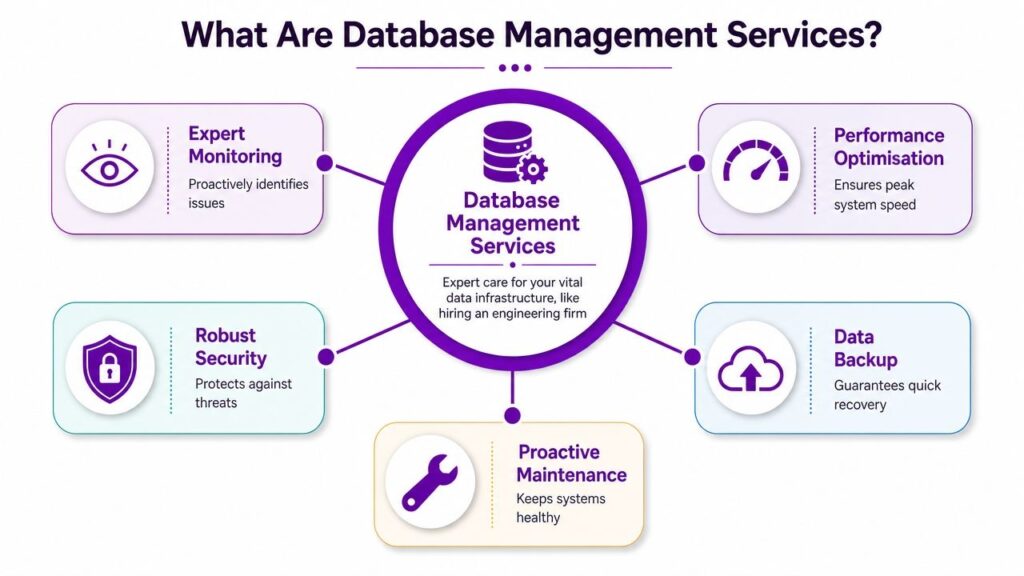
Think of database management services like using a specialist garage to maintain a fleet of vehicles your business relies on every day. Your team still decides where the business is going. The specialist makes sure the engines are healthy, the warning lights are acted on, the servicing is done properly, and breakdowns are less likely.
That’s the difference between ordinary IT support and proper database management services. General support can reset passwords, troubleshoot endpoints, and keep day-to-day systems running. Database management focuses on the data platform itself. That means SQL Server, Azure SQL Database, Azure SQL Managed Instance, MySQL, PostgreSQL, or another platform your applications depend on.
The core purpose
A managed database service usually aims to protect three things:
| Focus | What it means for the business |
|---|---|
| Availability | Users can access systems when they need them |
| Performance | Reports, integrations, and applications respond properly |
| Security and integrity | Data stays protected, consistent, and recoverable |
Those outcomes sound simple, but they depend on specialist work happening in the background. That includes monitoring failed jobs, checking storage growth, reviewing permissions, planning maintenance windows, validating backups, and tuning slow queries.
What a provider actually does
Some providers handle only reactive support. That model doesn’t work well for business-critical systems. A useful service should be proactive. It should identify risks before users raise a ticket.
That often includes:
- Monitoring: Watching performance counters, job failures, blocking, deadlocks, storage pressure, and replication health.
- Maintenance: Applying patches, checking index and statistics health where appropriate, reviewing configuration drift, and keeping environments tidy.
- Recovery planning: Making sure there’s a sensible backup approach and a tested way back after failure.
- Security administration: Reviewing privileged access, service accounts, audit settings, and encryption options.
- Capacity planning: Spotting when the current platform is nearing its limits before it becomes an outage.
A managed database service should reduce uncertainty. If you still don’t know whether the system is healthy, secure, and recoverable, you’re paying for noise rather than support.
The model matters too. Public sector buyers often need stronger governance, procurement discipline, and auditability than private firms. If that’s relevant to your organisation, this overview of public sector database services gives useful context on how support expectations differ.
Key Components of a Managed Database Service

A strong database service isn’t one thing. It’s a set of operating disciplines that work together. When one is missing, problems tend to show up elsewhere. Good performance with poor recovery is still fragile. Strong backups with weak access control still leave risk on the table.
Proactive monitoring and alerting
This is the part many firms think they already have. Often they don’t. They have alerts, but not triage. They have dashboards, but not ownership.
Proper monitoring should answer practical questions quickly:
- Is the database available
- Are overnight jobs completing
- Are response times degrading
- Is storage or compute under pressure
- Have recent changes introduced instability
Monitoring matters because users usually see symptoms, not causes. They report that “the system is slow”. Someone then spends hours checking the wrong layer. A database specialist narrows the issue faster by looking at wait patterns, failed jobs, locking, blocking, resource saturation, and recent changes.
Backup and disaster recovery
Backups are where weak services tend to expose themselves. Many providers say backups are configured. Fewer can show tested recovery procedures that work under pressure.
The UK’s National Cyber Security Centre recommends immutable or offline backups and regular restoration testing as a defence against ransomware. Backup copies that remain reachable from production can be encrypted or deleted during an attack, which is why verified recoverability matters more than backup frequency.
What works in practice is straightforward:
- Isolated backup storage: Copies shouldn’t sit in the same trust boundary as production without additional protection.
- Clear recovery objectives: The business needs to know how much data loss is tolerable and how quickly service must return.
- Restore testing: A backup isn’t proven until someone restores it and confirms the application works.
Reality check: The first time you test a restore should never be during a live incident.
Performance tuning
Performance work isn’t just about making a report run faster. It’s about protecting user confidence and business flow. If stock systems lag, the warehouse feels it. If finance reports stall, close processes slip. If CRM queries drag, sales teams create workarounds.
A useful provider won’t jump straight to adding more compute. They’ll first look at query design, indexing, maintenance routines, workload patterns, and whether the application is asking the database to do something inefficient.
Typical improvements come from disciplined basics:
| Area | What a provider should review |
|---|---|
| Queries | Expensive joins, poor filtering, parameter issues, repeated scans |
| Indexes | Missing, duplicated, fragmented, or badly chosen indexes |
| Workload timing | Batch jobs clashing with user activity |
| Configuration | Memory, tempdb, storage, and instance settings where relevant |
Security management and patching
Database security often fails in small, familiar ways. Legacy service accounts keep broad permissions. Former suppliers still have a route in. Encryption is partly enabled but not consistently applied. Audit settings exist but nobody checks them.
That's why security work in database management services should include access reviews, privileged account control, patch planning, and evidence that critical settings are in place. This isn't glamorous work, but it prevents the kind of avoidable exposure that creates major clean-up later.
Scalability and capacity planning
Growth rarely arrives in a tidy, predictable way. A new reporting requirement, an acquisition, a Dynamics 365 rollout, or a customer portal can all change demand on the data layer.
Scalability planning means looking ahead before users feel the strain. Sometimes the answer is more compute. Sometimes it's redesigning an integration, archiving stale data, splitting workloads, or moving to a better-fit cloud model. The point is to make capacity a planned decision, not an emergency purchase.
In-House DBA vs Managed Services A Comparison
The decision usually isn't whether one model is good and the other is bad. It's which responsibilities should stay with your internal team, and which are safer or more efficient to hand over.
That question matters more now because businesses often struggle to hire and retain specialist database skills. UK labour-market demand for database-adjacent digital roles remains strong, while skills shortages continue to shape hiring decisions, as discussed in this piece on managed services and in-house DBA trade-offs.
Where each model fits
An in-house DBA can be excellent when the environment is large, heavily customised, and tightly tied to internal business processes. They often build strong knowledge of application behaviour, user expectations, and the history behind awkward design decisions.
Managed services make sense when you need broader cover, out-of-hours support, cloud migration help, or access to multiple skills without building a larger internal team. For many SMEs, the best answer is hybrid. Keep ownership of data policy, architecture decisions, and business priorities internally. Outsource monitoring, patching, backup validation, and specialist troubleshooting.
| Factor | In-House DBA | Managed Service |
|---|---|---|
| Coverage | Usually limited by working hours, leave, and single-person capacity | Wider team coverage and shared responsibility |
| Knowledge | Deep familiarity with your environment | Broader exposure across platforms and issues |
| Resilience | Key-person dependency can be high | Less reliance on one individual |
| Control | Direct internal oversight | Requires clear governance and reporting |
| Project support | May be stretched between BAU and change work | Can absorb routine operations while internal teams focus on projects |
| Best fit | Complex internal estates with steady demand for a dedicated specialist | SMEs needing structured support without hiring a full DBA team |
What often goes wrong
The weak version of in-house support is one capable person doing everything with no cover. Holidays become a risk. Documentation slips. Important knowledge lives in one head.
The weak version of managed support is a ticket-driven contract where nobody learns your systems properly. You get generic responses, delayed escalation, and limited ownership.
The sensible test is simple. If a serious issue happens at 07:30 on a weekday or late on a Sunday, who actually knows what to do, and how quickly can they act?
Cloud Database Services and the Azure Advantage

Cloud databases have changed the conversation for UK businesses. The old model was to buy server hardware, plan around peak demand, and carry the operational burden internally. The newer model is to choose where you want control, where you want automation, and how tightly the database should integrate with the rest of your Microsoft estate.
That shift didn’t happen by accident. The UK Government’s cloud strategy in 2013 formalised a cloud-first principle for public bodies, which helped accelerate demand for managed database environments. In the wider market, the global cloud-based data management services segment was estimated at USD 8,798.3 million in 2024 and projected to reach USD 36,930.4 million by 2030, according to Grand View Research’s market outlook.
Why Azure is a practical fit for many SMEs
For businesses already using Microsoft 365, Dynamics 365, Power BI, or Azure infrastructure, Azure database services can reduce friction. Identity integrates more cleanly. Monitoring can sit closer to the rest of your cloud operations. Procurement and support are simpler than stitching together multiple platforms.
Common Azure options include:
- Azure SQL Database: Useful when you want a managed relational service with less infrastructure overhead.
- Azure SQL Managed Instance: Useful when you need stronger SQL Server compatibility while still moving away from full self-management.
- SQL Server on Azure Virtual Machines: Useful when application requirements demand more control over the operating environment.
The right choice depends on what your applications need. Some systems benefit from the managed model. Others still need VM-level control because of feature dependencies, legacy integrations, or vendor constraints.
The trade-off most firms need to understand
Cloud doesn’t remove responsibility. It changes it. You may reduce hardware management and some low-level administration, but you still need ownership of performance, permissions, recovery planning, cost governance, and change control.
That’s why many SMEs use a partner for managed Azure services. The value isn’t just hosting a database in Azure. It’s making sure the environment is sized correctly, monitored properly, secured sensibly, and aligned with the rest of the business platform.
This short overview gives a useful visual explanation of the cloud model in practice:
Where cloud works well and where it doesn’t
Cloud database services work well when your business needs flexibility, easier scaling, better integration with modern Microsoft services, and less dependence on on-premises hardware.
They work less well when nobody is watching cost drift, old applications haven’t been tested properly, or the team assumes a managed platform will fix poor query design. Azure can give you a better operating model, but it won’t correct weak ownership on its own.
How to Choose the Right Database Partner
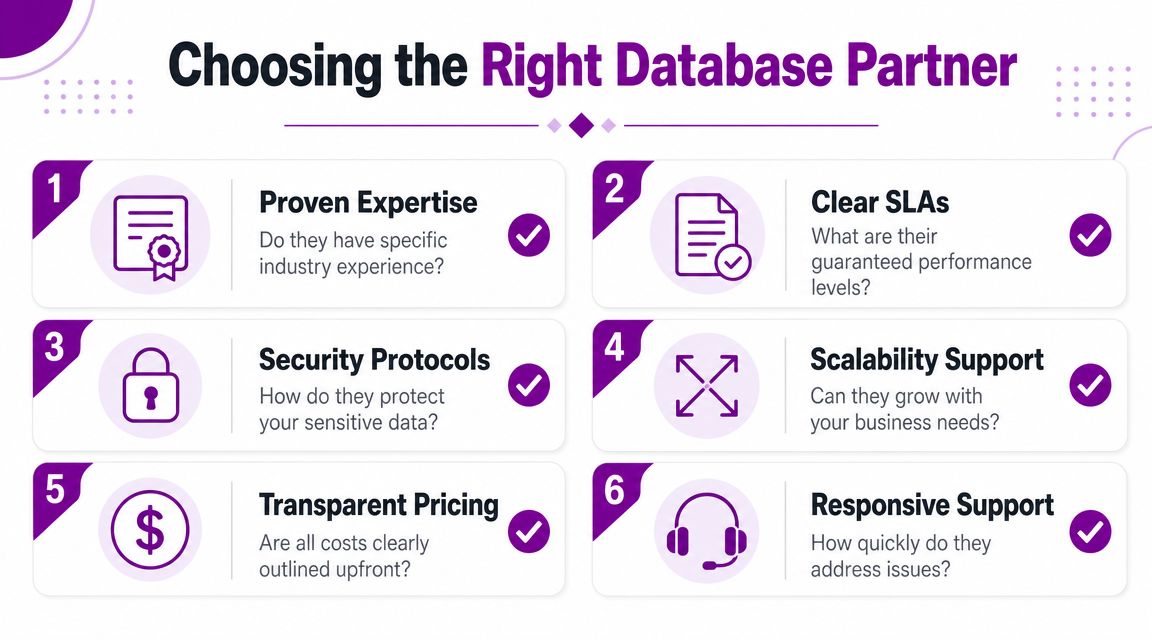
Choosing a database partner is less about glossy service descriptions and more about evidence. You need to know how they operate when systems are under strain, when compliance questions appear, and when a restore has to work first time.
UK GDPR and the Data Protection Act 2018 require controllers to implement appropriate technical and organisational measures. In database terms, that pushes teams towards encryption, least-privilege access, and audited recovery procedures, which is why a provider’s ability to demonstrate control matters as much as speed, as explained in this guide to database management service controls.
Questions worth asking before you sign
Don’t stop at “do you support SQL Server” or “what’s the monthly fee”. Ask questions that reveal how the service operates.
- Who does the work: Are named engineers involved, or does everything go into a pooled helpdesk queue?
- How is access controlled: Ask how privileged access is granted, reviewed, and removed.
- How are restores tested: A serious provider should be able to describe restore validation, not just backup scheduling.
- What happens outside office hours: Clarify escalation, ownership, and what triggers proactive action.
- How is change handled: You want proper maintenance planning, rollback thinking, and communication around database changes.
- Can they support your Microsoft stack: If you use Azure, Dynamics 365, or Power BI, the provider should understand how database decisions affect those systems too.
Signs of a sound operating model
A dependable partner usually shows the same behaviours:
| Checkpoint | What good looks like |
|---|---|
| Security posture | Clear answers on encryption, access control, and auditability |
| Support model | Defined response paths, ownership, and escalation |
| Technical fit | Experience with your platform, workloads, and integrations |
| Reporting | Useful service reviews, not just ticket counts |
| Compliance mindset | Evidence of process, not vague reassurances |
One practical option for Microsoft-focused firms is working with an Azure managed service provider that also understands the wider business stack around the database. That matters when an issue crosses platform boundaries and isn't neatly confined to one server or one service.
Ask every provider the same awkward question: “If our restore fails, or performance collapses after a change, what would you do in the first hour?” The quality of the answer tells you a lot.
The F1Group Advantage Local East Midlands Expertise
For East Midlands businesses, database management often sits inside a wider Microsoft environment. The database supports Dynamics 365, feeds Power BI, connects to Azure services, and underpins line-of-business applications that staff rely on every day. Support works better when the provider understands that whole picture rather than treating the database in isolation.
Local expertise also changes the working relationship. If you're based in Lincoln, Nottingham, Leicester, Newark, Scunthorpe, or Grimsby, it helps to deal with a team that understands regional organisations, common operating pressures, and when remote support is enough versus when on-site help is the sensible option.
F1Group is one example of that model. Since 1995, it has supported organisations across the East Midlands with Microsoft-focused services, including Azure, Microsoft 365, Dynamics 365, cyber security, and data management. For database-related work, that broader capability matters because many incidents don't stay neatly inside one technical boundary.
The strongest database support usually isn't flashy. It's disciplined. Access is reviewed. Backups are tested. Performance issues are investigated methodically. Cloud decisions are tied to business need, not fashion. That's what keeps systems dependable when the business is busy and expectations are rising.
If your database estate feels like it's held together by goodwill, inherited settings, and limited time, it's probably time to review the operating model.
If you need practical advice on database management services, cloud database support, or Azure-aligned data platforms, speak to F1Group. Phone 0845 855 0000 today or send us a message.