
If you’re leading a charity, this probably feels familiar. Staff are working around slow laptops, shared files live in too many places, somebody still relies on an old spreadsheet that only one person understands, and every new security warning lands on the same small group of already stretched people.
That isn’t just an IT nuisance. It affects fundraising, service delivery, safeguarding, reporting, and trustee confidence. Good IT support for charities starts when leaders stop treating technology as a repair function and start treating it as part of operational leadership.
Why Strategic IT Support is Mission-Critical for Charities

A charity can survive a temperamental printer. It can’t function well when email access is unreliable, beneficiary records are poorly protected, or staff waste hours chasing versions of the same document. In practice, strategic IT support is about removing daily friction while protecting the organisation’s ability to operate.
The UK charity sector is large enough that this is plainly not a niche issue. The Charity Commission’s register covers about 170,000 charities in England and Wales with a combined annual income of around £88 billion, and the National Cyber Security Centre has warned that charities face disproportionate cyber risk because they often hold sensitive data while working with constrained budgets and smaller IT teams, as noted in this UK charity IT resilience overview. That combination of scale, data sensitivity and limited internal resource is exactly why foundational controls matter.
What strategic support changes in real terms
When IT is handled well, staff can work from anywhere without inventing insecure workarounds. Trustees can ask sensible governance questions and get clear answers. New starters get access on day one, leavers are removed promptly, files are backed up properly, and Microsoft 365 is governed instead of left to drift.
That sounds basic, but basic done consistently is what keeps charities moving.
A lot of leaders first go looking for help when something breaks. The better time is earlier, when you can still choose your priorities rather than react to someone else’s outage, failed login, or security scare. That’s where a proper IT strategy for organisations earns its place.
Strategic IT support isn’t about buying more technology. It’s about making sure the systems you already depend on are secure, supportable and aligned to how your charity actually works.
There’s a useful parallel in faith-based organisations too. If you’re comparing operational needs across the wider third sector, this piece on technology for churches is worth reading because many of the same pressures apply: small teams, mixed digital maturity, sensitive data, and a strong need for dependable systems without corporate-level budgets.
Assessing Your Charity’s Current IT Health
Before speaking to any provider, get clear on your current position. Most charities don’t need a technical deep dive on day one. They need an honest picture of what they have, what’s causing friction, and where the biggest risks sit.
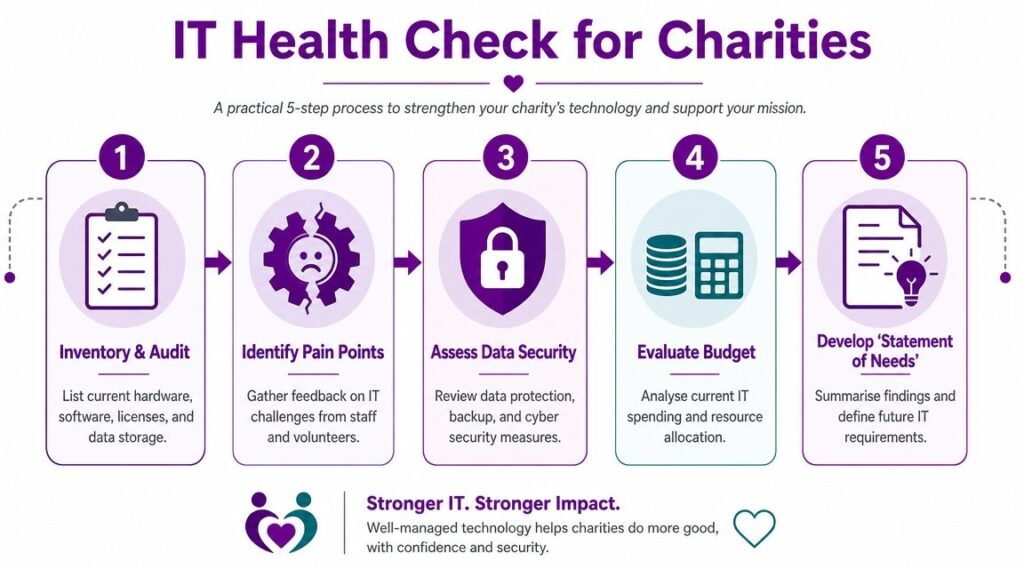
A sound starting point is a baseline audit. Charity digital guidance recommends inventorying every application, its age, supplier support status, roadmap and business impact so unsupported systems and consolidation opportunities are visible before any migration or outsourcing decision is made, as set out in this charity digital strategy guide.
Start with a statement of need
Don’t begin with products. Begin with operations.
Write down the activities your charity must perform reliably each week. That usually includes fundraising, finance, case or service delivery, volunteer coordination, communications, reporting, and board administration. Then map each one to the systems people use.
A simple internal review should cover:
- Core devices. Which laptops, desktops and mobiles are in daily use, and which ones are causing complaints or compatibility problems.
- Business applications. Email, shared files, finance software, donor tools, CRM, case management, booking systems, and any specialist platform your team relies on.
- Access and identity. Who has access to what, how new users are created, and whether old accounts are fully removed.
- Data locations. Where key information lives. Staff desktops, shared drives, SharePoint, OneDrive, third-party platforms, paper files, or all of the above.
- Support arrangements. Who fixes issues now, how quickly that happens, and where requests get stuck.
This isn’t glamorous work. It is necessary work.
Look for operational pain, not just technical faults
The best self-audits don’t ask only, “What have we bought?” They ask, “Where are we losing time, creating risk, or making life harder for staff and volunteers?”
That often reveals patterns such as:
- Duplicate systems that do the same job badly.
- Shadow processes where staff create their own spreadsheets because the main system doesn’t fit.
- Poor joiner and leaver controls, especially around shared mailboxes and file access.
- Unclear ownership where no one can say who approves software, licences or supplier renewals.
- Weak recovery arrangements where backup exists in theory but no one has tested whether it would help in practice.
Practical rule: If a process is vital to your mission, at least two people should understand how the supporting system works and who to call when it fails.
A formal review from a specialist can go deeper, particularly around security posture and Microsoft 365 configuration. If you want that external perspective, a structured computer security audit can help identify gaps that internal teams often miss because they’ve learned to live with them.
Finish with one usable document
The output should be short and specific. Not a large report that nobody reads.
Include these headings:
| Item | What to record |
|---|---|
| Key systems | What the system is and who uses it |
| Business dependency | What stops if it fails |
| Current issue | Slow, insecure, unsupported, duplicated, hard to use |
| Risk level | Low, medium, high based on operational impact |
| Next decision | Keep, replace, secure, consolidate, or review |
If you can produce that document, you’ve already made the next conversation with any IT provider much more useful.
Understanding Your Modern IT Support Options
Not all support models solve the same problem. Some fix faults after the fact. Others reduce the number of faults, improve security, and help the organisation make better technology decisions over time.

Break-fix, internal support, and managed services
Break-fix support is the old model. Something stops working, you call someone, and you pay to get it repaired. That can suit very small organisations with minimal digital dependence, but most charities have moved beyond that. If your teams rely on Microsoft 365, cloud file access, donor systems, remote working, and secure identity controls, break-fix leaves too much unmanaged between incidents.
In-house support can work well if the charity has enough scale, stable budgets, and leadership appetite to retain technical staff. The challenge is breadth. One internal person might be capable and committed but still can’t be a specialist in cyber security, Microsoft 365 governance, licensing, backups, endpoint management, user support, and strategy all at once.
Managed IT services usually offer the best balance for small and mid-sized charities. The provider monitors systems, handles routine support, applies updates, oversees security tools, and advises on priorities. A good managed provider doesn’t just respond to tickets. They reduce avoidable risk and create consistency.
If you’re weighing that model, this overview of what a managed service provider does gives a useful frame for the difference between reactive support and managed support.
Why Microsoft expertise matters
For many UK charities, the practical centre of modern IT is Microsoft. Email in Exchange Online, file sharing in SharePoint and OneDrive, meetings in Teams, device controls through Intune, security policies in Microsoft 365, and identity protection in Azure-based services. If your provider doesn’t understand that stack properly, you end up paying for licences without using them well.
The wider shift matters here. Charity operations moved strongly towards cloud-based working after 2010 as nonprofit licensing and remote collaboration tools expanded, enabling organisations to reduce on-premises infrastructure and support hybrid working, as described in this cloud support perspective for charities.
That means support today is less about server rooms and more about governance, identity, access, device control, and collaboration.
The governance gap trustees can’t ignore
There’s also a leadership issue. In the UK, only 22% of charities reported having a formal cyber incident response plan and only 37% had completed cyber training for trustees, according to this charity cyber governance summary. Those figures matter because trustees are expected to exercise oversight, instead of hoping the risk sits somewhere in IT.
A strong provider helps close that gap by giving the board practical answers to questions like:
- What would happen if a staff account were compromised
- How are backups managed and restored
- Who has administrator access
- What’s the process for a suspected incident
- Which Microsoft 365 controls are active and which aren’t
A provider who can’t explain cyber risk in plain English to trustees probably won’t manage it well enough for frontline teams either.
How to Choose the Right IT Support Partner
Price matters, but it shouldn’t be the first filter. Cheap support is expensive when the provider is slow, unclear, or technically out of date. For charities, the right partner understands constrained budgets while still being firm about what can’t be compromised.
Look for fit before features
A provider doesn’t need to work exclusively with charities to be useful. They do need to understand the way charities operate. That includes committee decision-making, grant-funded projects, mixed staff and volunteer environments, legacy systems that can’t disappear overnight, and the need to justify spend carefully.
The strongest partners usually show that fit in how they ask questions. They want to know how services are delivered, which systems are business-critical, where sensitive data sits, who signs off change, and what your staff struggle with most. A weak provider jumps straight to tools and monthly pricing.
There’s a practical lesson in adjacent sectors too. If you’re looking at how mission-led organisations assess suppliers, this guide for ministries evaluating tech is useful because it pushes the same core point: choose on suitability, clarity, and operational understanding, not just headline promises.
Test their cloud capability properly
Modern charity support lives in cloud platforms. If the provider is vague about Microsoft 365 tenant management, SharePoint permissions, Teams governance, endpoint protection, conditional access, backup scope, or licence optimisation, that should concern you.
You’re not just buying a helpdesk. You’re choosing someone who will shape how your organisation works every day.
Ask for plain-English explanations of how they handle:
- Microsoft 365 administration
- User onboarding and offboarding
- Multi-factor authentication
- Device setup and compliance
- Backup and recovery
- Security monitoring
- Documentation and asset records
- Escalation when something serious happens
Judge their behaviour during the sales process
The sales stage often tells you more than the proposal.
Do they answer directly? Do they explain trade-offs? Do they acknowledge when a legacy application may need a temporary workaround rather than pretending every issue has a neat answer? The providers worth trusting tend to be calm, specific, and willing to challenge weak assumptions.
The wrong provider says yes to everything. The right one explains what should happen now, what can wait, and what isn’t safe to postpone.
Key questions to ask prospective IT support providers
| Category | Question to Ask |
|---|---|
| Sector understanding | Which types of charities or mission-led organisations do you currently support, and what do you see as their common IT pressures? |
| Discovery process | How do you assess our existing systems before recommending changes? |
| Microsoft capability | How do you manage Microsoft 365 security, permissions, licences, and governance for clients like us? |
| Cyber security | What controls do you regard as non-negotiable for a charity holding sensitive data? |
| Onboarding | What does your transition process look like in the first weeks and months? |
| Support model | What happens when a staff member logs a routine issue, and what changes when the issue is urgent? |
| Escalation | How do serious incidents get escalated, and who on our side would be contacted? |
| Documentation | Do you maintain an up-to-date record of our users, devices, systems, licences, and key settings? |
| Reporting | What regular reports do we receive, and are they understandable to senior leadership and trustees? |
| Strategic input | Do you offer scheduled review meetings that cover risk, roadmap, and upcoming decisions, not just ticket volumes? |
| Commercial clarity | What work is included in the monthly fee, and what is treated as out of scope? |
| Exit planning | If we leave, how do you hand back documentation, systems access, and supplier knowledge? |
Watch for three warning signs
Some red flags appear quickly.
- Everything sounds easy. Real environments are messy. A provider who pretends otherwise may be hiding a weak delivery process.
- No interest in governance. If they talk only about fixing devices and never about access, data protection, backups, or board assurance, they’re too narrow.
- Poor commercial transparency. If support, projects, licensing, and security services blur together in unclear language, you’ll struggle later.
A good partner gives you confidence before the contract starts, not explanations after something goes wrong.
Decoding Contracts Pricing and Service Level Agreements

Many charities often become hesitant at this stage, and understandably so. Contracts are often written from the supplier’s perspective. Your job is to turn them back into an operational document that protects your charity.
How pricing is usually structured
Most support contracts use one of three models.
- Per-user pricing. Useful when staff need a consistent support experience across multiple devices and Microsoft 365 services.
- Per-device pricing. Sometimes suitable where usage is fixed and device counts matter more than user accounts.
- Tiered packages. Common where providers bundle remote support, monitoring, security tools, and strategic review into service levels.
None of these is automatically right. The better model depends on how your teams work. A dispersed charity with flexible staff, volunteers, and shared service delivery may find per-user support simpler. A site-based operation with fixed desktops may prefer a different structure.
If your charity is also comparing wider software and operational tooling, not just support, this overview of evaluating church software options is a helpful reminder to compare real fit, implementation impact, and support burden, not just feature lists.
What to read carefully in the SLA
A Service Level Agreement, or SLA, sets expectations for support. Many leaders look only at the top line. They shouldn’t.
Read these points closely:
| Contract area | What to check |
|---|---|
| Response time | How quickly the provider acknowledges an issue |
| Resolution time | How quickly they aim to fix it or provide a workable path forward |
| Severity levels | Who decides whether something is critical, high, or routine |
| Support hours | Whether cover is limited to standard working hours or includes evenings and weekends |
| On-site visits | Whether site attendance is included or charged separately |
| Project work | Whether migrations, tenant tidy-ups, or major changes sit outside the monthly fee |
| Security scope | Which protections are managed as part of the contract and which require additional services |
| Review meetings | Whether strategic reviews are included or only technical support calls |
Response time and resolution time are not the same thing. Fast acknowledgement is useful, but it doesn’t mean the issue will be fixed promptly. Charities often discover that distinction only after a serious problem.
Watch carefully: If the SLA promises quick responses but says little about ownership, escalation, or restoration of service, the provider may be optimising for appearances rather than outcomes.
Common contract traps
Auto-renew terms, vague out-of-scope clauses, and unclear licence responsibilities cause more friction than the monthly fee itself.
Read the small print for:
- Long notice periods that make exit difficult
- Automatic renewals that roll forward before performance is properly reviewed
- Ambiguous project language where routine improvement work suddenly becomes billable
- Supplier-controlled admin access that leaves the charity dependent
- No handover obligations if the relationship ends
A fair contract isn’t just affordable. It’s understandable, transparent, and operationally workable. If you can’t explain the support model to your finance lead and trustees in plain English, ask for the wording to be rewritten.
Onboarding Your Team and Building a Successful Partnership
The contract isn’t the finish line. It’s the point where the core work starts. A poor onboarding period can damage confidence for months, even if the provider is technically competent.
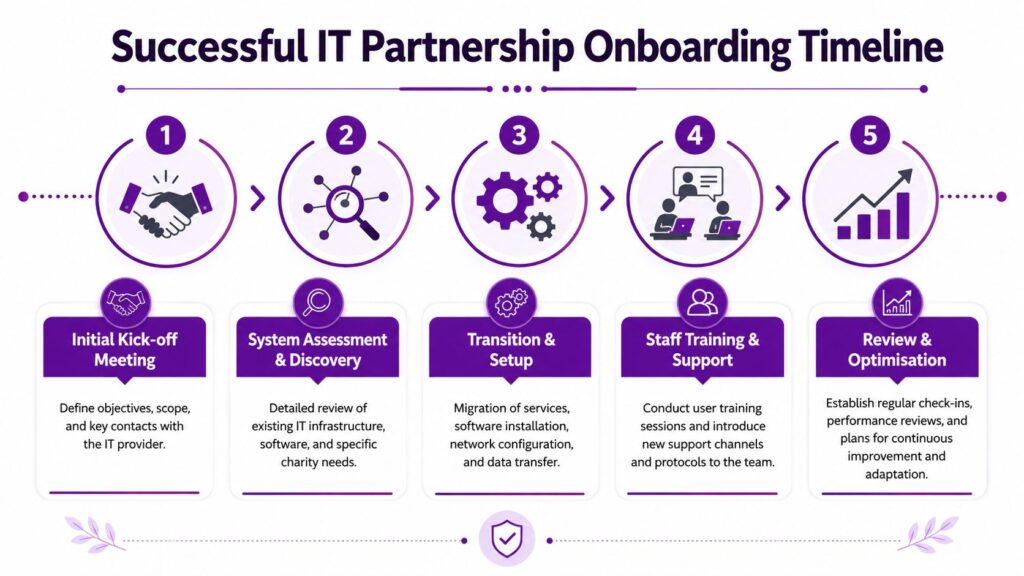
Start with control, not disruption
Good onboarding protects day-to-day operations while improving them. That usually means agreeing key contacts, confirming administrative access, reviewing current licences, documenting critical systems, and setting support routes before major changes begin.
Avoid the temptation to “sort everything at once”. UK charity digital guidance recommends small 2 to 4 week pilots before wider rollouts because short, bounded projects reduce transformation risk and allow teams to validate value quickly, as explained in this charity digital transformation article.
That advice is practical. A pilot with one team, one site, or one process gives you evidence without exposing the whole organisation to unnecessary disruption.
Train people in the flow of work
Staff don’t need long technical lectures. They need short, relevant guidance tied to what they do each day.
Focus training on:
- How to get help. Show exactly where to log issues and what information to include.
- How to work securely. Access, password practice, multi-factor prompts, file sharing, and handling sensitive information.
- What has changed. New Teams structure, SharePoint permissions, device setup, or login process.
- What not to do anymore. Old shared drives, personal storage, reused accounts, or unmanaged spreadsheets.
A new support relationship settles faster when managers reinforce these changes locally. If leaders ignore the new process, staff will too.
Keep the relationship active
The healthiest support arrangements don’t run on silence. They run on rhythm.
Set a regular cadence for operational and strategic review. That might include service feedback, recurring incidents, licence changes, security concerns, upcoming projects, and any pressure points in fundraising or service delivery that technology should support better.
A support partner should learn how your charity works over time. If every conversation starts from zero, the relationship is still transactional.
When onboarding is handled well, IT support for charities stops feeling like an external utility and starts working like part of the organisation’s operating model.
If your charity needs dependable, Microsoft-focused support that improves security, reduces day-to-day friction, and gives leadership clearer control over risk, speak to F1Group. We help organisations across the East Midlands work more efficiently and securely with practical, hands-on support. Phone 0845 855 0000 today or send us a message.