
A lot of East Midlands businesses are in the same position right now. Microsoft 365 is in place, Azure is on the roadmap, security worries are rising, and someone in the leadership team keeps asking about Copilot. Meanwhile, the internal IT team is busy resetting passwords, chasing printers, and firefighting issues that should have been solved months ago.
That’s where it support consulting matters. Not as a buzzword, and not as a dressed-up helpdesk. It’s the discipline of making technology decisions that support the business properly, with the right architecture, the right controls, and the right sequence of change.
For firms in Nottingham, Leicester, Lincoln, Grimsby, Newark and the wider region, the challenge usually isn’t a lack of tools. It’s a lack of joined-up planning. Most organisations already own powerful Microsoft capabilities. The gap sits in design, governance, implementation, and follow-through.
Navigating Modern IT Challenges in the East Midlands
A growing business in the East Midlands often reaches the same turning point. Systems that were good enough at twenty users start creaking at fifty. Shared folders become a mess. Remote access works, but only just. Security settings are inconsistent. Reporting takes too long. Nobody is fully sure whether the current setup would stand up to a serious cyber incident.
That pressure is showing up in the wider market. The UK IT consulting market is valued at approximately £17.5 billion and is projected to grow to £25.8 billion by 2028, while the East Midlands Chamber notes a 15% rise in IT support outsourcing contracts since 2020 as organisations seek expert guidance for digital initiatives.
Why internal teams get stretched
Internal IT teams usually know the business well. That’s valuable. But they’re often forced into a reactive mode.
A typical week gets consumed by:
- Support queues: Users need access, fixes, device swaps, and account changes.
- Security administration: Policies need tightening, exceptions need checking, and alerts need reviewing.
- Project drift: Azure migration, Dynamics 365 rollout, or Power Platform governance keeps slipping because day-to-day support comes first.
- Decision bottlenecks: The business wants answers on cloud, AI, compliance, and cost. The team doesn’t have spare capacity to evaluate options properly.
The result is familiar. Important work stays half-done. Short-term fixes become permanent. Technology becomes something the business works around rather than something it relies on confidently.
What good consulting changes
Good consulting changes the conversation from “what’s broken?” to “what are we trying to achieve, and what has to change to get there?”
That usually means looking at:
- the current Microsoft 365 tenant and how it’s configured
- Azure design, spend control, and identity security
- Dynamics 365 fit for process-heavy departments
- Power Apps and Power Automate opportunities that remove manual work
- governance around data, access, and AI usage
Practical rule: If your team is spending most of its time maintaining yesterday’s decisions, you need outside expertise to design tomorrow’s environment.
The point isn’t to replace your internal people. It’s to give them a workable plan, specialist delivery support, and a clearer operating model. In regional businesses, that often makes the difference between patchy digital change and technology that supports growth.
What IT Support Consulting Actually Involves
People often hear “consulting” and think of slide decks, vague recommendations, and expensive jargon. Proper it support consulting is much more practical than that.

The easiest way to explain it is this. A consultant is the architect. A support team is the facilities manager. Both matter, but they do different jobs.
The architect decides how the building should work, how it will scale, what materials are appropriate, where the risks sit, and what will break if shortcuts are taken. The facilities manager keeps the building operating day to day.
The work behind the label
Consulting usually starts with assessment. Not generic advice. Real assessment.
That can include:
- Technical review: Microsoft 365, Azure, identity, endpoint setup, security tooling, backup, and integration points.
- Operational review: How support is handled, where recurring issues come from, and where internal effort is wasted.
- Business alignment: What the organisation is trying to improve, whether that’s collaboration, customer service, reporting, security, or cost control.
From there, the consultant should produce a plan that is specific enough to act on. That might mean a migration design, a security remediation roadmap, a Dynamics 365 implementation plan, or governance for Power Platform and Copilot.
Where consulting fits best
Consulting is strongest when there’s a meaningful change to deliver.
Common examples include:
-
Microsoft 365 redesign
Teams often inherit a tenant that grew without standards. Permissions sprawl, old SharePoint structures linger, and security settings are inconsistent. -
Azure migration or cleanup
Some firms need to leave ageing on-premise infrastructure behind. Others already use Azure but need better design, cost control, and resilience. -
Business application work
Dynamics 365, Power Apps, and workflow automation projects need process understanding as much as technical skill. -
Security hardening
Entra ID, Conditional Access, Defender, data loss prevention, compliance controls, and managed response all need deliberate planning.
For organisations preparing for cloud change, this overview of Cloud Migration Consulting Services is useful because it frames migration as a business and governance exercise, not just a server move.
A consultant should leave you with better decisions, cleaner architecture, and fewer hidden risks. If all you receive is generic advice, that isn’t consulting. It’s commentary.
What it isn’t
It isn’t a substitute for every ongoing support function. It isn’t a body-shopping exercise. And it shouldn’t create dependence through opacity.
The best consulting engagement gives your business clarity. It sets direction, handles specialist delivery where needed, and leaves the environment easier to manage than before.
Core Consulting Services for Microsoft Environments
Microsoft estates are where consulting either becomes valuable very quickly or becomes very expensive very quickly. The difference usually comes down to design quality, security depth, and whether the tools are configured for the way your business works.
For smaller and mid-sized firms, a Microsoft project often starts as one problem and then uncovers three more. A Microsoft 365 migration reveals identity issues. A Dynamics 365 deployment exposes weak process ownership. A Copilot pilot shows that data governance isn’t mature enough yet.
Microsoft 365 and identity done properly
A straightforward tenant migration rarely stays straightforward. Mailboxes move. Files move. Permissions need review. Devices need reconfiguration. Legacy line-of-business systems need checking. Then there’s identity.
Expert consulting for Microsoft 365 deployments can lead to a 38% reduction in downtime for SMBs, and certified consultants have achieved 99.7% SLA compliance by implementing strong security policies through Microsoft Entra ID, according to this reference on Azure consulting services.
That matters because poor identity design causes problems everywhere else. Conditional Access, multifactor authentication, device trust, external access, and admin separation all sit on top of it.
A good consultant won’t just migrate users. They’ll challenge:
- which accounts need privileged access
- where legacy authentication is still hanging around
- whether external sharing is controlled
- how departmental data should be segmented
- what recovery path exists if access breaks
Azure and infrastructure choices
Azure gives businesses flexibility, but flexibility without discipline usually leads to confusion. It’s common to see environments that technically work but are awkward to manage, over-permissioned, or more expensive than they need to be.
In practice, consulting here means making clear calls on:
- landing zone design
- identity integration
- backup and resilience
- virtual desktop or application access patterns
- cost visibility
- governance around who can provision what
One provider in this space is F1Group, which supports East Midlands organisations with Microsoft 365, Azure, Dynamics 365, Power Platform and related project work where firms need both strategic input and hands-on delivery.
Dynamics 365, Power Platform and Copilot
Business impact becomes visible here. A sales team wants cleaner pipeline data. Customer service needs case handling that isn’t trapped in inboxes. HR wants better onboarding workflows. Finance needs reporting that doesn’t rely on manually stitched spreadsheets.
That’s the right territory for Dynamics 365, Power Apps, Power Automate, and Power BI. But these tools only help when the consultant starts with process, not licences.
Working principle: If you automate a bad process, you just get a faster bad process.
A practical Microsoft roadmap often looks like this:
- Dynamics 365 Sales: Build cleaner opportunity stages, activity tracking, and reporting discipline.
- Dynamics 365 Customer Service: Standardise ticket handling, ownership, and response processes.
- Power Apps: Replace spreadsheets or email-led workflows with role-based applications.
- Power Automate: Remove repetitive approval steps and notification chains.
- Power BI: Give managers one version of the numbers instead of conflicting reports.
- Copilot: Introduce it where permissions, data quality, and use cases are already mature.
The firms that get value from Copilot aren’t the ones who switch it on first. They’re the ones who clean up data access, define acceptable usage, and train staff around realistic outcomes.
What works and what fails
What works is phased delivery. Identity first. Security baseline next. Data structure after that. Automation and AI when the foundations are ready.
What fails is the opposite. Rushing to AI while SharePoint permissions are a mess. Buying Dynamics 365 without agreeing process ownership. Building Power Apps with no governance, then discovering nobody knows which data can be used where.
That’s why Microsoft-focused consulting has to be equal parts technical and operational. Tools are the easy part. Controlled adoption is the primary job.
Consulting Versus Managed Services A Clear Comparison
Businesses often ask the wrong question here. They ask whether they need consulting or managed services. In many cases, the better question is which problem they’re trying to solve first.
If you need a strategy, a migration plan, a security review, a new Microsoft architecture, or a business systems project, you need consulting. If you need day-to-day support, monitoring, maintenance, and a predictable operational service, you need managed services.
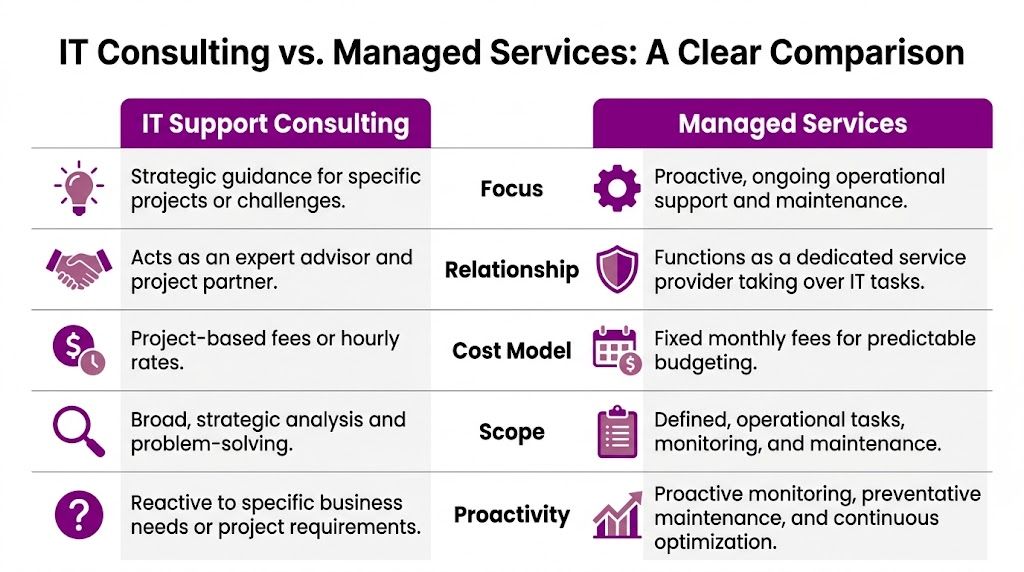
The strategic difference
Consulting is usually finite. It has a defined outcome.
Managed services are ongoing. They exist to keep the environment stable, supported, monitored, and maintained over time.
That distinction affects cost, internal ownership, and expectations. If a leadership team hires a managed provider when what they really need is architecture and project direction, they often end up disappointed. The reverse is also true. A consultant can improve the design, but they won’t replace the need for dependable day-to-day service.
IT Consulting vs. Managed Services at a Glance
| Criterion | IT Support Consulting | Managed IT Services |
|---|---|---|
| Focus | Strategic guidance for specific projects or challenges | Ongoing operational support and maintenance |
| Relationship | Expert adviser and project partner | Dedicated service provider handling routine IT tasks |
| Cost model | Project-based fees or time-based engagement | Fixed monthly fee |
| Scope | Analysis, planning, implementation, specialist problem-solving | Helpdesk, monitoring, patching, maintenance, support |
| Proactivity | Triggered by business need or project requirement | Continuous monitoring and preventative work |
The outsourcing trade-off
There is a real risk in treating all outsourced support as equal. While outsourcing IT can save costs, UK reports indicate that 68% of SMEs experienced a cybersecurity incident in 2024-2025, with cloud issue resolution times 20-30% longer when handled by non-specialist outsourced support, according to this discussion of IT help desk outsourcing trade-offs.
That pattern shows up when providers can handle commodity support but struggle with Microsoft-heavy environments. A password reset is one thing. Untangling Entra ID policy conflicts, SharePoint permission inheritance, Azure role design, or Power Platform governance is another.
Why co-managed often works better
For many mid-sized firms, a co-managed model is the most sensible option. Your internal team keeps business context and control. The external partner supplies depth where the workload or technical demand is too high.
That might mean:
- Internal IT owns users and priorities
- External specialists handle escalations and project work
- Shared responsibility exists for security and Microsoft platform design
- On-site support remains available when remote work isn’t enough
If you’re weighing that route, this overview of managed IT services shows how an ongoing support model differs from project-led consulting.
Choose consulting when you need change. Choose managed services when you need continuity. Choose co-managed support when you need both and don’t want to lose internal control.
The mistake is assuming one model solves every problem. It doesn’t. The right model depends on whether your immediate risk is poor design, poor support coverage, or both.
Calculating the Business Case and ROI
A proper consulting engagement has to justify itself in business terms. If the return can’t be explained in downtime avoided, risk reduced, staff time recovered, or better decisions made, the engagement isn’t defined well enough.
The easiest mistake is to look only at the consulting fee. The better view is to look at what the business keeps paying for when technology is left badly designed.
Where return actually comes from
Return usually appears in four places.
First, there’s operational efficiency. Manual work gets removed. Staff stop rekeying data between systems. Approval chains stop living in inboxes. Reporting becomes quicker and more dependable.
Second, there’s stability. Better design means fewer recurring incidents, less user disruption, and less lost time across departments.
Third, there’s risk reduction. Security controls improve, identity becomes cleaner, and incident handling becomes faster and more structured.
Fourth, there’s decision quality. Managers get better data. Teams trust the systems more. Projects stop being driven by guesswork.
Copilot, hybrid cloud and the skills gap
This is particularly relevant now. A Q1 2026 report from the UK Digital Economy Council shows that Microsoft adoption surged 28% in UK SMEs, but only 12% of East Midlands organisations effectively use tools like Copilot due to a regional skills gap. The same report notes a 40% ROI uplift in well-managed hybrid cloud transformations, referenced here in this discussion of outsourced IT support services.
Those figures matter because they expose a common gap. Businesses are buying into the Microsoft stack, but many aren’t turning that investment into operational value. The licence is not the return. The operating model is.
A practical way to assess value
You don’t need complicated finance models to assess likely ROI. Start with a simple review:
- Time loss: Where do staff repeat tasks, wait for approvals, or work around system limitations?
- Support drag: Which recurring incidents consume disproportionate IT time?
- Security exposure: Which weaknesses could trigger business interruption or recovery cost?
- Project delay: Which improvements have been postponed because nobody has the capacity or specialist depth to lead them?
Then compare that against the consulting outcome. If a project gives you stronger governance, fewer escalations, cleaner reporting, and a more secure Microsoft estate, that isn’t soft value. It changes cost, productivity, and resilience.
The strongest ROI usually comes from removing friction that people had already accepted as normal.
What strong business cases have in common
The best business cases are narrow and grounded. They don’t promise abstract transformation. They define what will improve, how it will be measured, and what dependencies have to be addressed first.
A solid example might include:
- cleaning up Entra ID and access policies before a broader cloud rollout
- redesigning document management in Microsoft 365 before introducing Copilot
- implementing Power Automate only for high-friction processes with clear owners
- improving reporting through Power BI where management decisions are currently delayed
That approach is more credible than trying to overhaul everything at once. In practice, return compounds when the early work fixes the foundations for later change.
Key Security and Risk Management Considerations
Security work is where weak IT decisions become expensive very quickly. In most businesses, the danger isn’t only the attack itself. It’s the disruption that follows. Users can’t work, systems become unavailable, leaders make rushed decisions, and the business discovers too late which controls were never properly configured.
According to the UK government’s 2024 Cyber Security Breaches Survey, 43% of UK organisations experienced a cyber attack, with average costs reaching £20,900 for mid-sized businesses. IT consultants specialising in managed detection and response can reduce incident response times by up to 60%.
Security consulting starts before the incident
Reactive security is expensive security. If the first proper review of your Microsoft estate happens after suspicious sign-ins, ransomware, or data exposure, you’re already on the back foot.
Good consulting work usually starts with a realistic audit of:
- identity and privileged access
- Conditional Access policies
- device posture and endpoint control
- email protection and collaboration risk
- Azure configuration and role assignment
- backup and recovery readiness
- compliance obligations around personal and sensitive data
This is also the point where many businesses realise they’ve enabled Microsoft features without fully governing them. That’s especially common with external sharing, old admin accounts, and Power Platform sprawl.
What a stronger Microsoft security posture looks like
In practical terms, stronger security means the environment is harder to misuse, easier to monitor, and easier to recover.
That often involves:
- Entra ID policy hardening: Reduce risky sign-ins and tighten access routes.
- Defender alignment: Ensure endpoint, identity, and email protection are configured with intent.
- Role separation: Keep admin permissions narrow and reviewed.
- Data controls: Apply governance around SharePoint, Teams, Exchange, and Power Platform.
- Response planning: Know who acts, how decisions are made, and what gets isolated first.
For teams reviewing their operating model, these actionable incident management best practices are useful because they focus on response discipline, ownership, and escalation clarity rather than just tools.
Governance matters as much as tooling
A lot of firms assume buying more security products equals better protection. It doesn’t.
Security improves when the business can answer basic questions clearly:
- Who has access to what, and why?
- Which alerts matter?
- How quickly can the team isolate a problem?
- What would recovery look like if key systems went down?
- Which Microsoft controls are configured, and which are licensed?
This short video gives a useful overview of the wider cyber risk environment and why structured preparation matters.
If your organisation needs dedicated support around that work, these cybersecurity consultancy services cover the kind of planning, hardening, and remediation that sits around the Microsoft stack.
Security maturity isn’t about having the most tools. It’s about knowing your environment, reducing avoidable exposure, and responding fast when something goes wrong.
For charities, PLCs, and regulated organisations, that discipline is not optional. It’s part of business continuity.
Your Checklist for Choosing an East Midlands Provider
Choosing a consulting partner is easier when you stop listening for polished sales language and start checking for operational substance. The right provider should understand Microsoft in depth, but they should also understand how regional businesses work.
A firm supporting Nottingham, Leicester, Lincoln, Scunthorpe, Grimsby or Newark should be able to handle both strategic conversations and real-world delivery. That includes awkward migrations, user adoption issues, on-site requirements, and the moments when a project goes off the neat plan.
The shortlist test
Use this checklist before you engage anyone.
- Microsoft depth: Ask which parts of the Microsoft stack they actively deliver. Microsoft 365 alone isn’t enough. You want confidence across Azure, Entra ID, Dynamics 365, Power Platform, security, and modern workplace controls.
- Regional delivery ability: Local presence still matters. Some work can be done remotely, but not every issue should be. On-site support can be critical during cutovers, office moves, hardware refreshes, or sensitive user rollouts.
- Clear methodology: A credible provider should explain how they assess, design, implement, test, and hand over. If the process is vague, the delivery usually is too.
- Security posture of the provider: Ask whether engineers are DBS-checked, how access is controlled, and how client environments are separated and governed.
- Ownership mindset: You want a partner who takes issues through to resolution, not one that stops at advice.
Questions worth asking in the first meeting
These questions usually tell you more than a brochure will:
- What Microsoft projects have you delivered for organisations similar to ours?
- How do you handle identity and security before migration or automation work starts?
- What happens when a project uncovers bigger issues than the original scope?
- How do you support in-house IT teams rather than bypassing them?
- What does success look like after go-live?
A strong provider talks about business processes, risk, adoption, and governance early. A weak one jumps straight to products.
Look beyond the proposal
Price matters, but a low quote often hides one of three problems. The scope is too shallow. The assumptions are unrealistic. Or the provider expects your team to carry more of the risk than you realised.
A more useful indicator is whether the proposal reflects your environment accurately. Does it mention your actual business priorities? Does it account for training, governance, permissions, and handover? Does it show understanding of the pressures on your internal team?
If you want to review what broader day-to-day support can look like alongside consulting, this page on IT support services is a useful reference point.
The right partner should make your environment simpler, safer, and easier to run. If they make it sound mysterious, keep looking.
Frequently Asked Questions and Next Steps
How is IT support consulting usually priced
Consulting is normally priced either as a defined project or as a time-based engagement. Fixed-price work suits clear outcomes such as a security review, migration plan, or tenant remediation. Time-based work suits evolving projects where discovery may affect scope.
What matters most isn’t the pricing model. It’s whether the scope, assumptions, and responsibilities are clear.
How long does a consulting engagement take
That depends on the problem being solved. A focused technical review may take days or weeks. A wider programme involving Microsoft 365, Azure, identity, process redesign, and user adoption can run for months.
The useful question to ask is not “how long in total?” but “what are the key decision points, dependencies, and handover stages?”
What should happen in the first meeting
The first meeting should be commercially grounded. You should spend more time discussing pain points, business priorities, internal constraints, and risk than talking about products.
A competent consultant will want to understand what’s currently slowing the business down, what has already been tried, and where the leadership team needs confidence before committing to change.
What should you do next
If your Microsoft environment feels harder to manage than it should, that’s usually a sign that support and strategy have drifted apart. It’s worth reviewing the estate before the next project begins, not halfway through it.
The businesses that get the best results usually act before small inefficiencies become structural problems.
If you need practical guidance on Microsoft 365, Azure, Dynamics 365, Power Platform, Copilot, cyber security, or a co-managed support model, contact F1Group. Phone 0845 855 0000 today or Send us a message at https://www.f1group.com/contact/