
You probably already have automation in your business. It just doesn’t feel like automation. It feels like staff forwarding emails, copying data between spreadsheets, chasing managers for approval, saving attachments into the right folder, and fixing the same avoidable mistakes every week.
That is usually when businesses start asking what Power Automate is used for in practical terms, and whether it can help a small or mid-sized organisation in the East Midlands without a large in-house development team.
The short answer is this. Power Automate is used to take repeatable tasks that people are doing manually across Microsoft 365, Dynamics 365, Azure and other business systems, then run them automatically based on rules. Used well, it removes delay, reduces avoidable admin, and gives people a cleaner process to work with. Used badly, it creates a mess of fragile flows no one owns.
That distinction matters. There’s a lot of marketing around low-code automation. The practical reality is more grounded. Some processes are perfect for Power Automate. Some need redesign before they should ever be automated. Some are better handled with broader platform work. The value comes from knowing the difference.
Beyond the Buzzwords What Is Power Automate Really
A director usually notices the same pattern long before anyone calls it process automation. Finance is waiting on approvals buried in inboxes. HR is repeating onboarding steps by hand. Operations staff are updating the same information in more than one place because the systems don’t talk to each other properly.
That’s the true starting point for Power Automate. Not innovation theatre. Not a dashboard full of arrows. Just repeated business tasks that consume time, create bottlenecks, and distract good people from work that requires judgement.
The business problem it solves
At its most useful, Power Automate acts like a digital staff member for routine process work. It notices an event, follows a rule, updates the right systems, and notifies the right people. That could be an invoice arriving in a shared mailbox, a form submission from Microsoft Forms, a record change in Dynamics 365, or a file added to SharePoint.
For a non-technical director, the important point is that it’s not primarily a coding tool. It’s a way of standardising how work moves through the business.
That matters because manual work is rarely just about time. It also causes inconsistency. One manager approves by email, another by Teams, another forgets entirely. One team stores files correctly, another doesn’t. Automation doesn’t make a bad process clever, but it does make a sound process repeatable.
Practical rule: If a task follows the same steps most of the time, Power Automate is probably worth considering. If every case is different, it probably isn’t.
Why this matters for smaller UK organisations
Many East Midlands firms don’t have spare technical capacity. They’ve got capable staff, but not a dedicated automation team. That’s why the practical appeal of Microsoft’s low-code stack is obvious. It sits close to tools people already use.
If you want broader context on where workflow tools fit in the market, this expert guide to workload automation is useful because it frames automation as an operational discipline rather than just a product feature.
Power Automate is best understood in exactly that way. It’s not magic. It’s structured task handling for the parts of your business that are too repetitive to remain manual and too important to leave inconsistent.
How Power Automate Works The Digital Postman Analogy
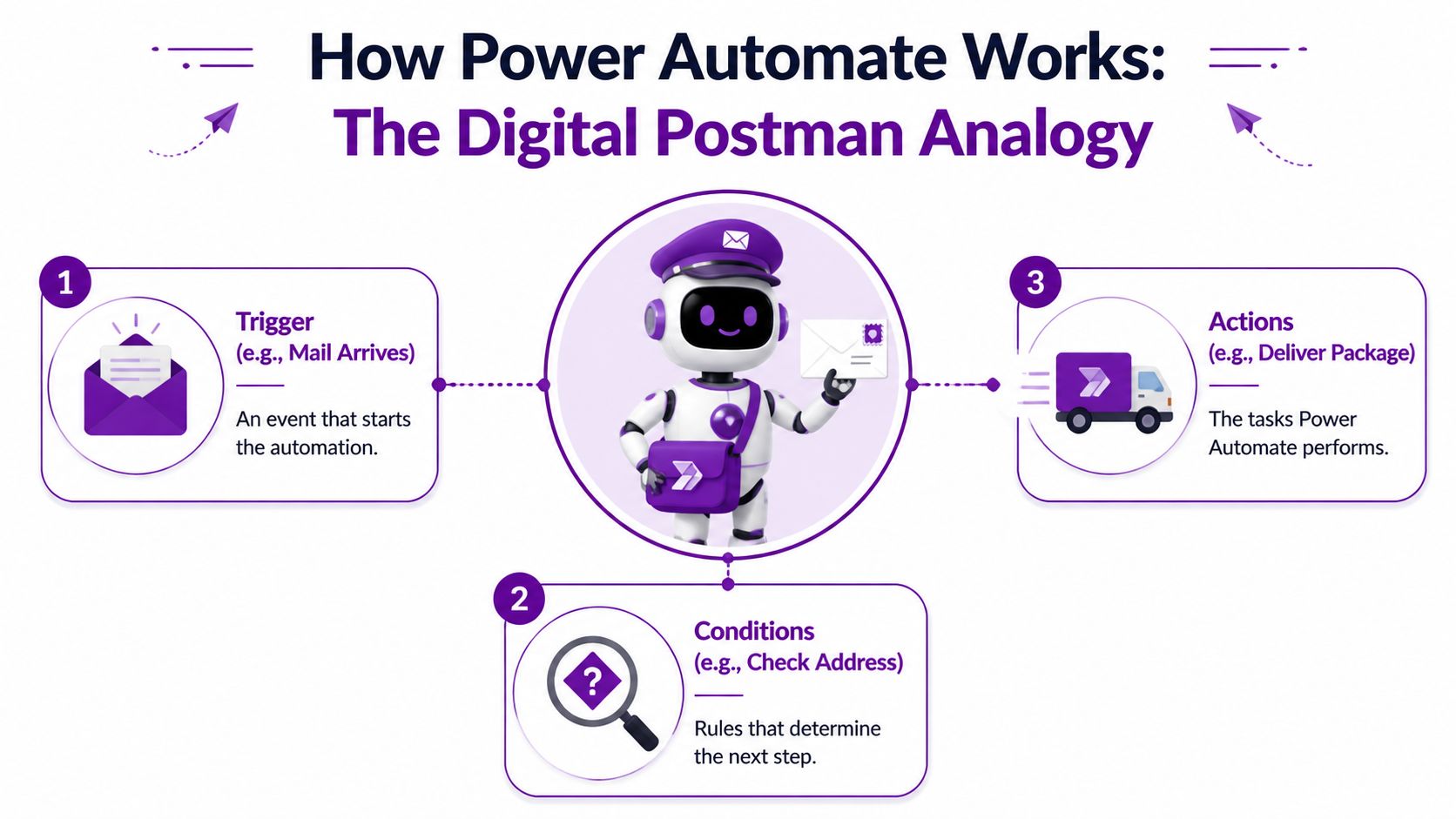
A simple way to explain Power Automate to a director is this. An event happens, a rule is checked, and the right task is carried out without someone chasing it manually.
That matters in a typical East Midlands business. A customer email lands in a shared inbox at 8:12am. By 9:30am, three people have forwarded it, no one is sure who owns it, and the attachment is sitting in two inboxes and nowhere central. Power Automate reduces that kind of drift by handling the handoff the same way every time.
Trigger action connector
Every flow is built from a few core parts. Once those are clear, the platform becomes much easier to assess.
| Part | What it means in plain English | Example |
|---|---|---|
| Trigger | The event that starts the process | A new email arrives in Outlook |
| Action | The task Power Automate carries out | Save the attachment to SharePoint |
| Connector | The link to the app or service involved | Outlook, SharePoint, Teams, Dynamics 365 |
Conditions sit between those steps when a process needs judgement based on rules. If an invoice is above a threshold, send it to a senior approver. If a supplier is already approved, route it through the standard path. If key information is missing, stop the process and notify the owner.
That is why the postman comparison is useful. Power Automate does not just pass information from A to B. It follows delivery rules that you define.
In practice, the platform enables smaller firms to get value quickly. The platform is not asking a 50-person manufacturer in Derby or a professional services firm in Nottingham to build a full software integration from scratch. It lets them connect the systems they already use and remove the repetitive handling in between. For directors trying to improve output without hiring more admin staff, that is usually the first clear return.
The three types most businesses actually use
Most organisations do not need every part of the Microsoft automation stack. They usually start with one of three types.
Cloud flows
Cloud flows handle app-to-app automation. They are the quickest to put in place and the most common in Microsoft 365 environments.
A cloud flow might monitor a shared mailbox, save an attachment to SharePoint, create a task in Planner, and post an update in Teams. The process runs the same way whether the usual administrator is off sick or the department is under pressure.
Desktop flows
Desktop flows are Microsoft’s robotic process automation option. They copy the steps a person would take on screen, which is useful when an older system has no modern connector or API.
This can be a sensible short-term fix, but it comes with a trade-off. Desktop automation is more fragile than cloud automation because screen layouts, pop-ups, and login changes can break the process. We usually recommend it where the manual effort is high and replacing the old system is not realistic yet.
Business process flows
Business process flows guide people through a set sequence inside an application, often in Dynamics 365. They are less about background automation and more about making sure staff follow the right order.
That is useful where consistency affects compliance, customer experience, or reporting quality. Sales qualification, service case handling, and onboarding are common examples. If you want to see what that looks like in day-to-day operations, these business process automation examples for UK organisations show the kind of workflows that tend to produce measurable savings.
A good automation removes admin and leaves ownership clear. If managers cannot explain what a flow does, approve it, and support it, the design needs work.
Why adoption has been strong
Adoption has grown because the starting point is practical. Many UK businesses already run Outlook, Teams, SharePoint, Excel, and Dynamics. Power Automate sits close to those tools, so the first automation often solves a live operational problem without a long software project.
That does not mean every workflow should be automated. It means the barrier to testing a sensible use case is low, which is important for firms dealing with skills gaps, limited internal IT capacity, and understandable security concerns. The primary work is choosing processes carefully, setting permissions properly, and making sure someone owns the flow after go-live.
Practical Automation Examples for Every Department
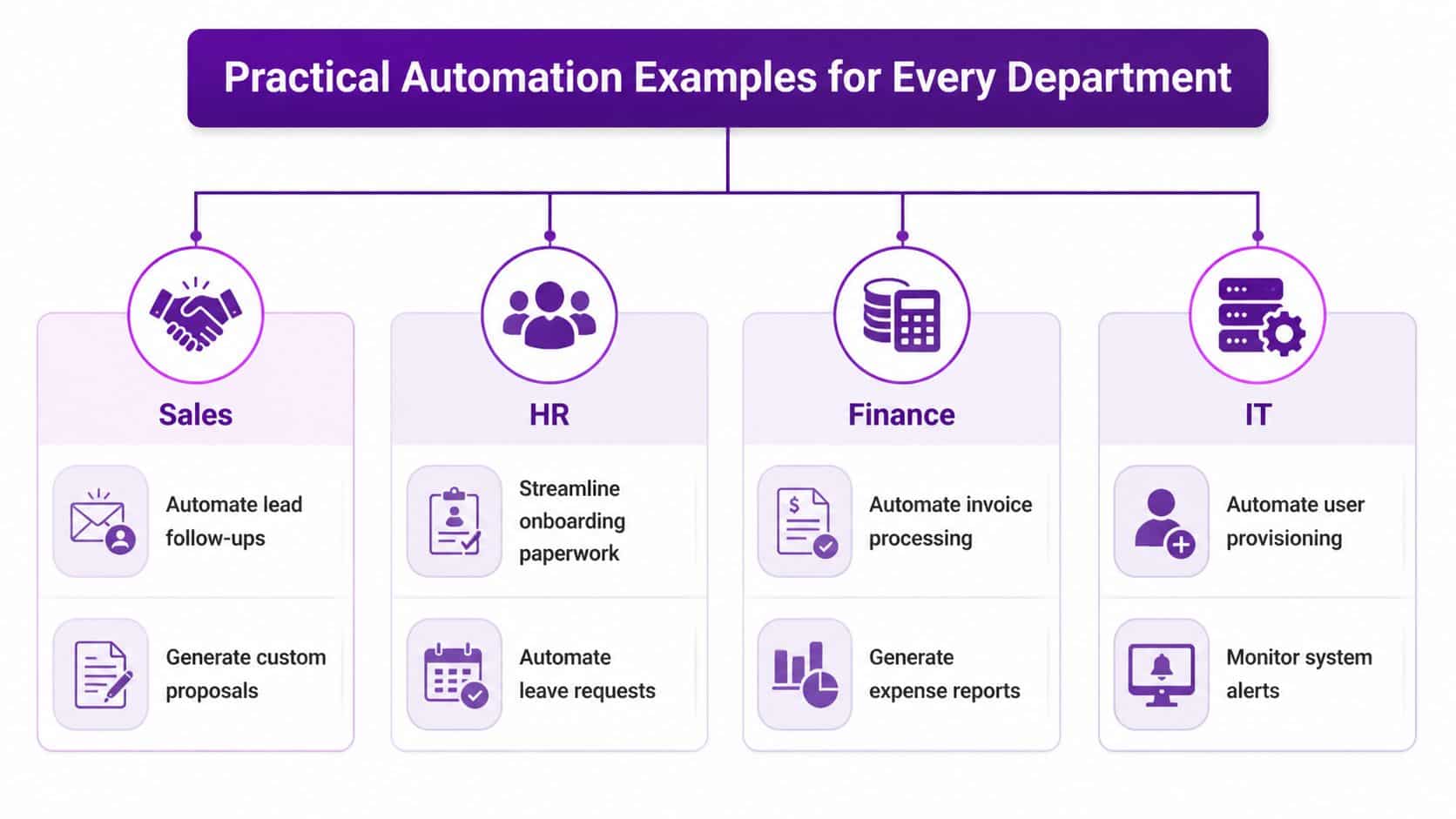
A managing director in Leicester does not need another diagram of "digital transformation". They need fewer delays in onboarding, cleaner approvals, faster customer follow-up, and less risk when key staff are off. That is where Power Automate proves its value. It takes repeatable admin work that already happens across the business and runs it in a consistent, visible way.
Different departments feel the pain in different places. HR gets stuck in handoffs. Finance loses time chasing approvals. Sales relies too heavily on memory and inbox habits. Operations and IT carry too much manual coordination. For East Midlands firms without a large internal IT team, that matters. The right flow can remove hours of admin each week without forcing a major systems project.
HR and people operations
HR teams often run important processes through email, spreadsheets, and goodwill. That works until volume rises or a manager forgets a step.
Onboarding is a strong example. A new starter is approved, then HR needs IT to set up accounts, the manager needs a checklist, policies need to go out, and induction tasks need booking. Power Automate handles that sequence well because the rules are usually clear even if the people involved vary.
A practical onboarding flow might:
- Capture the trigger: A new employee record is approved in HR or a Microsoft Form is submitted
- Create the handoff: Notify IT to provision access and assign setup tasks
- Coordinate documents: Send the right policies and collect confirmations
- Schedule activity: Create calendar items or induction reminders
- Keep managers informed: Post status updates into Teams
The benefit is not only speed. It is consistency. New starters get a better first impression, and HR gets a clearer record of what was sent, completed, or missed.
Finance and approvals
Finance teams usually see value quickly because so much of their work follows defined rules. Invoice routing, purchase approvals, and expense claims are common starting points.
A typical flow looks like this:
- An invoice arrives in a shared mailbox or document library.
- The document is stored in the right SharePoint location.
- Approval is routed to the correct budget owner.
- Finance is notified once a decision is made.
- Exceptions are flagged if data is missing or the amount requires extra review.
That gives finance teams a proper audit trail and reduces the usual chasing. It also exposes where the delay sits. In many businesses, the issue is not the accounts team. It is managers sitting on approvals for three days because the process lives in email.
There is a trade-off. If approval rules differ wildly between departments, the flow becomes awkward and brittle. Standardise the process first, then automate it.
Sales and customer handling
Sales teams lose opportunities in small gaps. An enquiry comes in on Friday afternoon, sits in a mailbox, gets forwarded on Monday, and no one is sure who owns the next action.
Power Automate helps tighten those handoffs without turning sales into a script.
Examples include:
- Lead capture: Create or update a record in Dynamics 365 when a form is submitted
- Follow-up alerts: Notify the right salesperson in Teams when a new enquiry arrives
- Proposal handling: Trigger document generation steps after an opportunity reaches the right stage
- Internal coordination: Alert operations or finance when a deal moves towards handover
The best sales automations protect response time and ownership. They do not add steps for the sake of it. If a salesperson still has to check three places to see what happened, the design needs work.
For teams that want more practical use cases, these examples of business process automation show where workflow changes tend to save time across different functions.
Automate the handoffs first. Sales processes usually fail between stages, not during the customer conversation itself.
Operations and service delivery
Operations teams often depend on experienced staff knowing how things get done. That knowledge is useful, but it is also fragile. If one person is away, service quality can dip quickly.
Power Automate turns informal routines into defined workflows. A request can be logged from a mailbox or form, routed by service type or location, added to a tracker, and escalated if it sits too long. That is especially useful for organisations with multiple sites across the region, where work can stall because no one is sure who should pick it up.
For regulated organisations, charities, and service businesses, visibility matters as much as speed. A flow creates a record of who handled the task and when, which is far easier to review than piecing together inbox history later.
IT and internal administration
Internal IT teams often spot the first good use cases because repetitive requests are everywhere. Access changes, starter and leaver tasks, shared mailbox sorting, equipment forms, and system alerts all lend themselves to structured automation.
Some good uses include:
| IT task | Manual problem | Better automated approach |
|---|---|---|
| Access requests | Email chains and unclear approvals | Form submission with approval routing |
| Starter and leaver tasks | Missed steps across teams | Triggered checklist and notifications |
| Shared mailbox processing | Staff sorting messages by hand | Rule-based routing and tagging |
| System alerts | Important notices lost in noise | Filtered alerts to Teams or email |
IT also needs to be disciplined. A flow built quickly to solve a local problem can become a business dependency within weeks. If nobody owns it, tests it, or documents it, the time saved at the start can be lost later in support and troubleshooting.
The department-level automations that deliver the best ROI are usually simple. They remove friction from work people already understand, they cut rekeying and chasing, and they keep responsibility clear.
Unlocking Synergy with Microsoft 365 Azure and Dynamics
Power Automate becomes far more valuable when it’s treated as the connective layer across the Microsoft estate rather than a standalone tool.
Many organisations already pay for Microsoft 365, use SharePoint for documents, rely on Teams for communication, and store operational data in Dynamics 365 or Azure-based services. Without automation, those tools can still leave staff doing the joining-up work themselves. They move information from one system to another because the platform isn’t doing it for them.

Microsoft 365 becomes more useful when the apps talk
Inside Microsoft 365, a lot of strong use cases are straightforward.
A SharePoint list can trigger a Teams message when a project status changes. An Outlook email can start a document review process. A Microsoft Form can feed a structured approval journey instead of leaving someone to triage responses manually.
Those examples aren’t exciting in a marketing sense. They are useful in a business sense. They reduce the time between an event occurring and the right person acting on it.
A common misconception is that Microsoft 365 already “includes workflow” in a meaningful operational way. It includes the ingredients. Power Automate is what turns those ingredients into an actual process.
Dynamics 365 stops being a data store and starts driving action
Dynamics 365 often holds valuable commercial and operational information, but that information only matters if the next step happens.
If an opportunity is updated, someone may need to be notified. If a case reaches a certain status, another team may need to respond. If a new employee record is approved in HR, downstream actions may need to begin immediately.
That’s where Power Automate earns its place. It turns data changes into business actions.
For readers weighing where this sits in the broader Microsoft stack, this overview of what Power Platform is is a useful reference because it shows how Power Automate fits alongside Power Apps, Power BI and the rest of the platform.
Azure handles the heavier technical steps
Not every process lives entirely in Microsoft 365 or Dynamics 365. Sometimes a workflow needs to call an Azure service, handle data processing, or trigger something more technical than a standard approval route.
That’s where the platform approach matters. Power Automate can orchestrate the process while Azure handles specialist compute or integration tasks in the background.
A simple pattern might look like this:
- A business event happens: A file lands in SharePoint or a record changes in Dynamics 365
- Power Automate orchestrates: It checks logic, routes approvals, or prepares the handoff
- Azure performs deeper processing: Validation, transformation, or another technical operation happens in the background
- The result returns to users: Teams, email, SharePoint, or Dynamics 365 gets updated automatically
Used this way, Power Automate doesn’t replace Azure. It bridges business activity and technical execution.
A short demonstration helps make that integration picture clearer:
The strongest Microsoft estates aren’t the ones with the most tools. They’re the ones where the tools hand work to each other cleanly.
That’s the practical reason Power Automate matters. It helps existing Microsoft investments behave like one operational system instead of several disconnected products.
Is Power Automate Worth The Investment A UK Cost Analysis
Most directors don’t need another software product. They need a business case.
With Power Automate, that business case shouldn’t start and end with licence cost. The better question is whether the process you’re automating is frequent enough, frustrating enough, and important enough to justify building it properly.
The cost side is only one part of the decision
There are usually two commercial realities to weigh up.
First, some automations can be built using capabilities already available within the Microsoft estate, especially where the process stays inside common Microsoft 365 services. Second, more advanced scenarios can require premium licensing, particularly where you need specialist connectors, attended or unattended RPA, or more advanced platform features.
The mistake is to focus only on the monthly licence figure. If a process wastes staff time every day, creates repeated errors, and slows customer response, the licence cost is often the least important part of the calculation.
What ROI actually looks like
The strongest return usually comes from a combination of operational gains:
| ROI area | What improves |
|---|---|
| Labour efficiency | Staff spend less time on repetitive admin |
| Error reduction | Fewer manual copy-and-paste mistakes |
| Cycle time | Approvals and handoffs move faster |
| Compliance | The process is more consistent and easier to review |
| Staff experience | Teams spend less time chasing routine tasks |
In the UK, Power Automate’s process mining capabilities have driven a 40% average increase in operational efficiency for mid-sized East Midlands businesses, and 58% of Nottingham and Newark firms reported ROI within 6 months of deployment, according to Rishabh Software’s Power Automate use case analysis. The same source notes that using RPA on legacy systems can equate to £15,000 annually per team in manual labour savings for mid-sized businesses.
Those numbers are useful because they move the conversation away from vague promises. They also highlight an important point. ROI tends to appear fastest where teams are still relying on high-volume manual handling.
Where investment goes wrong
Automation investment disappoints when organisations pick the wrong target.
Poor candidates include:
- Unstable processes: If the rules change every week, the flow won’t stay reliable
- Badly owned processes: If no one owns the outcome, no one fixes issues
- Overcomplicated first projects: Trying to automate a messy end-to-end operation on day one usually stalls
- Tool-first decisions: Buying licences before agreeing the use case often leads nowhere
A better approach is to start with a process that already exists, is clearly understood, and creates visible friction. Approval routing, onboarding coordination, shared mailbox handling, and routine notifications are often better early wins than grand transformation programmes.
A practical way to judge value
A director can usually test whether a process is worth automating with four questions:
- Does this happen often enough to matter?
- Are people following the same basic steps each time?
- Does delay or inconsistency create real cost or risk?
- Would staff notice quickly if this became automatic?
If the answer is yes to all four, there’s probably a sound business case. If the answer is vague, the process probably needs redesign before automation.
The financial value of Power Automate is real. The disciplined selection of the right process is what determines whether you see it.
Avoiding Common Pitfalls Secure Power Automate Deployment
The easiest way to misunderstand Power Automate is to assume that because it’s easy to start with, it’s easy to govern at scale.
It isn’t.
The platform can absolutely deliver value, but a casual approach creates the exact problems directors want to avoid. Sensitive data can move through the wrong connectors. Flows can be built by individuals with no handover plan. Critical processes can depend on one person’s account. A useful tool can turn into unmanaged operational sprawl very quickly.

Low code doesn’t remove risk
A common assumption is that low-code means low-risk. In practice, low-code often means more people can build automations, which increases the need for guardrails.
Security and governance risks are often underplayed. Microsoft’s 2025 UK Cyber Security Report highlights a 40% rise in automation-related breaches in the Midlands, with Power Automate flows bypassing DLP policies in 35% of incidents. A 2025 UK government report also indicates only 28% of Midlands SMBs have implemented workflow automation, with 62% citing skills gaps as a primary barrier, as summarised in Vectra AI’s discussion of Power Automate security considerations.
Those figures should change the tone of the conversation. The question isn’t just whether staff can build a flow. It’s whether the business can control, support and secure the flows that matter.
What good governance looks like
Good governance in Power Automate is usually quite ordinary. That’s the point. It puts structure around who can build what, where it lives, and how it reaches production.
The basics include:
- Environment separation: Keep development, testing, and live processes apart
- DLP policy control: Define which connectors can be used together
- Named ownership: Every production flow needs a clear owner
- Documentation: Someone should be able to understand the purpose and dependencies
- Change discipline: Updates should be tested before they affect live operations
This is especially important in regulated settings, charities handling sensitive information, and mid-sized businesses where a single broken process can create immediate disruption.
Secure automation isn’t about blocking useful ideas. It’s about making sure a helpful flow doesn’t become a hidden business risk.
What usually fails in practice
The weak points are predictable.
One is the “citizen developer free-for-all”, where enthusiastic staff build useful automations in isolation. Some of these will be clever. The problem appears later when they break, the creator leaves, or no one can explain what data is moving where.
Another is poor process design. If the underlying workflow is muddled, Power Automate won’t rescue it. It will just reproduce the confusion more consistently.
A third is lack of monitoring. Directors sometimes assume a flow, once deployed, is finished. It isn’t. Connectors change, permissions change, source systems change, and business rules change.
The sensible operating model
For most small and mid-sized organisations, the sensible model is controlled enablement.
That means business teams can still propose and shape automations, but IT or a trusted partner provides governance, environment strategy, security policy, and support discipline. That balance matters in regions where skills shortages are a real issue and internal teams are already stretched.
Power Automate is powerful because it’s accessible. That same accessibility is what makes proper oversight absolutely essential.
How to Start Your Automation Journey Today
The best first step isn’t a platform workshop or a long transformation plan. It’s choosing one process that everyone already agrees is clunky.
That might be an approval route, a mailbox triage routine, a new starter checklist, or a recurring document handling task. If staff complain about it regularly, there’s usually a reason. Friction is a good place to start.
Start with one process that’s boring and repeatable
The right first automation is usually not the most strategic process in the business. It’s the one that is safe to improve, easy to understand, and painful enough that people welcome the change.
A good starting process tends to have these qualities:
- High repetition: It happens often
- Clear rules: The steps are mostly consistent
- Low ambiguity: Staff don’t need much judgement to complete it
- Visible outcome: People notice the benefit quickly
That approach builds confidence. It also exposes governance needs early, before the organisation depends on a large automation estate.
Use what already exists before designing from scratch
Power Automate includes templates and common patterns that help teams visualise what’s possible. That’s useful even if you don’t deploy a template as-is. It helps non-technical stakeholders see how a manual process could be structured.
If you want a practical starting point, this guide on how to use Power Automate gives a helpful overview of the basics and the kinds of workflows businesses commonly build first.
The key is not to confuse “easy to create” with “ready for production”. Early experimentation is helpful. Production automation still needs ownership, access control, and sensible design.
Ask the right questions internally
Before anyone builds anything, get the business process owners in one room and ask:
- Where do we lose time every week on routine admin?
- Which approvals are slow because the handoff is poor?
- Where are staff rekeying the same information into multiple systems?
- Which tasks rely too heavily on one person remembering what to do next?
Those questions usually surface the best automation candidates faster than any technical demo.
Start small, but don’t start casually. Even a simple flow should have an owner, a purpose, and a clear reason to exist.
Keep the focus on outcomes
The aim isn’t to say your business is “using automation”. The aim is to remove avoidable admin, speed up routine decisions, and make key processes more reliable.
That’s where Power Automate is strongest for East Midlands organisations. It gives smaller businesses access to useful automation without requiring a large development function. But its greatest value lies in treating it as an operational tool, not a novelty.
If you approach it that way, the first automation won’t be the last. It will be the point where people stop asking what Power Automate is used for and start asking what should be improved next.
If you're looking for practical help with Power Automate, Microsoft 365, Azure, Dynamics 365, or secure business automation across the East Midlands, speak to F1Group. We help organisations turn manual processes into dependable, well-governed workflows that deliver real business value. Phone 0845 855 0000 today or Send us a message.