
Most East Midlands businesses don’t start with a blank slate. They start with a busy IT manager, a handful of Microsoft 365 admin portals, a growing Azure footprint, and a nagging sense that security is happening in too many places at once.
That’s usually what managing security operations looks like at the beginning. Alerts come from email, endpoints, identity, cloud apps, and users. Someone checks them between project work, support tickets, and supplier calls. Nothing feels fully broken, but nothing feels fully under control either.
That’s a problem because security operations isn’t a one-off hardening exercise. It’s an ongoing function that helps you prevent, detect, analyse, and respond to incidents in a way that’s repeatable, measured, and tied to business risk. For a growing business, that matters far more than having a long list of tools.
What Is Security Operations for a Growing Business
For a smaller or mid-sized organisation, security operations is the practical discipline of deciding what matters, watching for problems, and responding consistently when something goes wrong. It isn’t the same as buying antivirus, turning on multi-factor authentication, or running an annual pen test. Those all help, but on their own they don’t create an operating model.

The UK’s National Cyber Security Centre treats incident management as a core part of modern security operations, built around a lifecycle of preparation, detection, response, and recovery, with the UK Incident Management Capability Standard available for organisations that want a recognised benchmark via Palo Alto Networks’ overview of security operations. That framing is useful because it moves security away from ad hoc firefighting and into something your business can rehearse and improve.
What it looks like in real life
In a growing business, managing security operations usually means:
- Knowing your critical systems so the team can tell the difference between noise and a real threat.
- Watching the right signals across identity, email, devices, and cloud services.
- Deciding who does what when an alert needs investigation.
- Recovering in a controlled way without improvising every step under pressure.
A lot of SMBs are already doing fragments of this. They just haven’t turned those fragments into a deliberate process.
Security operations starts working when the team can answer three questions quickly. What happened, what does it affect, and who owns the next action.
Why ad hoc security stops working
The bigger your Microsoft estate gets, the less effective informal security becomes. One person’s inbox rules issue might be account compromise. A device alert might be tied to an impossible travel sign-in. A suspicious SharePoint download might be part of a wider identity problem.
Email is a good example. Many firms still treat email security as spam filtering plus user caution, but strong sender validation and anti-spoofing controls reduce unnecessary investigation work before it ever reaches the helpdesk. If your team wants a plain-English refresher on that area, Email Authentication Explained is a useful supporting read.
Laying Your SecOps Foundation Without a Big Budget
At 8:45 on a Monday, a finance user reports a strange Microsoft 365 sign-in prompt, a director cannot access email on their phone, and IT has three other tickets waiting. In a lot of East Midlands businesses, that is the moment security operations begins. Not with a SOC room or a new platform, but with someone deciding whether these events connect, what matters first, and who is responsible for the next step.
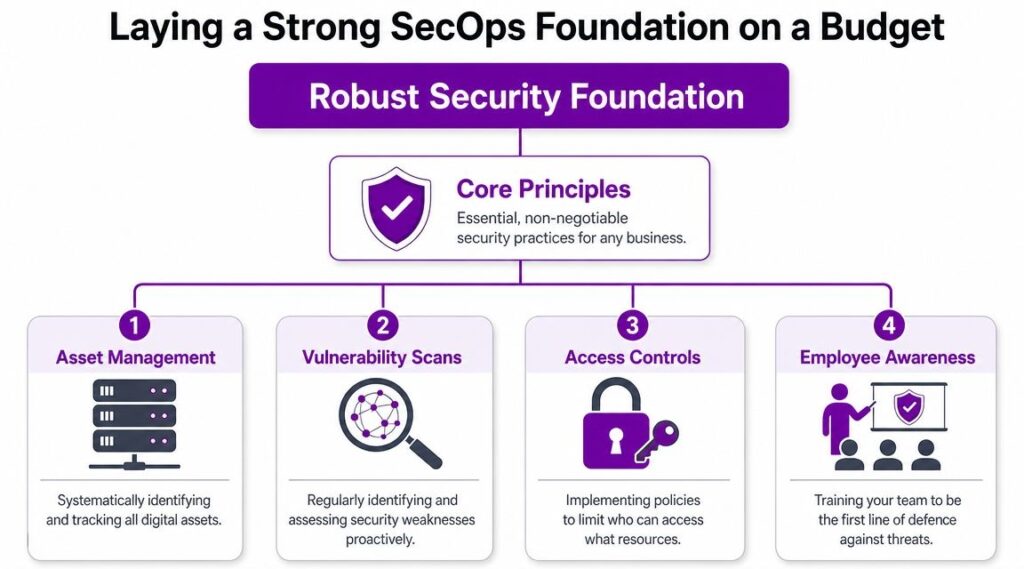
For SMBs already invested in Microsoft 365 and Azure, the starting point is usually simpler than expected. Build a clear baseline around your key assets, your likely attack paths, and the people who will respond. That gives your existing Microsoft tools something useful to work against. Without it, alerting becomes noise, investigations drift, and busy IT staff spend time on the wrong issues.
A practical UK-aligned approach starts with a risk and asset baseline. The aim is not paperwork for its own sake. The aim is to identify which systems, identities, and data stores would cause real disruption if they were misused, encrypted, or exposed, then shape monitoring and response around them.
Start with ownership, not a committee
Security operations fails early when everyone is involved but nobody is accountable.
In a growing business, one named person should own the day-to-day outcome, even if security is only part of their role. That may be an IT manager, infrastructure lead, or senior technical contact. What matters is clarity. They review open risks, check the status of serious alerts, and make sure actions are not left sitting between helpdesk, infrastructure, and management.
Set four responsibilities early:
- Operational owner who reviews alerts, risks, and open actions.
- Technical resolver who can change settings across Microsoft 365, Azure, endpoints, and networking.
- Business decision-maker who can approve downtime, containment, or escalation.
- External support contact for incidents that need specialist investigation or out-of-hours help.
That structure is light, but it works. Smaller firms rarely need a large security function at this stage. They need named decision points.
Build an asset list your team will use
Do not wait for a perfect CMDB. Start with a shortlist that helps your team make faster decisions during an incident.
For Microsoft-centric environments, that usually includes:
- Business-critical services such as Microsoft 365, Azure-hosted applications, finance systems, CRM platforms, remote access, and core file storage
- Privileged and sensitive identities including global admins, finance approvers, directors, service accounts, and break-glass accounts
- Key data locations such as SharePoint, OneDrive, Teams, line-of-business applications, and Azure storage
- Priority devices including laptops used by privileged users, shared devices, and systems handling regulated or commercially sensitive data
Then rank each item by business impact. If this account is compromised, what happens? If this service is unavailable for a day, what stops? That simple exercise helps a small IT team decide which alerts deserve immediate attention and which can wait for review.
Run a risk review tied to real events
A useful risk review is specific enough to support action.
For a business already using Microsoft tools, the common scenarios are usually familiar. Credential phishing against Microsoft 365 users. Privilege misuse caused by weak admin separation. Malware on remote laptops. Suspicious Entra ID sign-ins. Data exposure through oversharing in Teams, OneDrive, or SharePoint.
Write risks in a way that links the threat to a named system and a business consequence. For example, “phishing against finance users could lead to invoice fraud and mailbox compromise” is far more useful than “email risk remains high.” One tells your team what to watch. The other becomes a line in a register that nobody uses.
Use process before buying more products
Many SMBs overspend by adding another dashboard without first agreeing who checks alerts each morning, who can isolate a device, or who speaks to senior management if a mailbox is taken over.
A short weekly review often does more good than another licence. Look at serious alerts, unresolved actions, changes to privileged access, and any repeat themes from user reports. If you already have Microsoft 365 Business Premium or a wider Microsoft security stack, there is often more value in configuring it properly than replacing it.
Staff reporting matters as well. Users will spot strange sign-in prompts, suspicious emails, and unusual file activity before the toolset tells the full story in some cases. That only helps if people know what to report, where to send it, and what happens next. Security awareness and training should reflect the incidents your business is seeing, not generic annual content that has no connection to your Microsoft estate.
The trade-off is straightforward. A lean foundation takes some discipline from an already busy IT team, but it costs far less than trying to run security operations through disconnected tools, unclear ownership, and improvised response.
Choosing Your Security Operations Centre Model
It is 08:40 on a Monday. A finance user reports a strange sign-in prompt, Defender has raised an alert on a laptop, and your IT lead is already tied up with a server issue. At that point, the question is not whether security operations matter. The question is who sees the alert first, who investigates it properly, and who has authority to act.
For a growing East Midlands business, the SOC model needs to match staffing reality, not an idealised security chart. A formal operating model helps because it gives you defined ownership for monitoring, triage, escalation, and response. Without that, incidents sit in queues, bounce between IT and management, or get missed outside office hours.
The three common models
An in-house SOC keeps monitoring and response with your own team. It offers the most direct control, and it can work well where there is enough internal depth to cover analysis, incident handling, tuning, and holiday or sickness gaps. For most SMBs, that is the sticking point. A capable IT team is not the same thing as a team with time to run security operations every day.
A co-managed SOC shares the workload between internal IT and an external security partner. Your internal team keeps hold of business context, change control, and decisions that affect operations. The external side handles the repeatable work that often gets dropped first. Monitoring, first-line triage, escalation, and out-of-hours cover. For many firms already using Microsoft 365 and Azure, this is the model that balances control with realism.
An MSSP or outsourced SOC places most of the operational work with a provider. This can be a sensible option where the internal team is very small or security work is already largely reactive. The trade-off is context. If the provider does not understand your users, your critical systems, your Microsoft configuration, and your tolerance for disruption, they can either escalate too much or act too cautiously.
SOC model comparison for UK SMBs
| Criterion | In-House SOC | Co-Managed SOC | MSSP (Outsourced) |
|---|---|---|---|
| Control | Highest direct control | Shared control | Lower direct control |
| Internal effort | Highest | Moderate | Lowest day-to-day |
| Speed to maturity | Slower | Faster than in-house | Often fastest |
| Business context | Strong | Strong if responsibilities are clear | Depends on onboarding quality |
| Specialist depth | Limited by internal team | Broader access to expertise | Usually broader than SMB internal teams |
| Scalability | Harder as alert load grows | More flexible | Flexible if service scope is well defined |
| Best fit | Larger internal IT/security teams | Mid-market and growing SMBs | Smaller teams needing coverage and consistency |
The mistake I see most often is choosing the model that looks cheapest on paper, then expecting it to deliver around-the-clock security discipline. If one systems administrator, one support manager, and a project engineer are sharing security duties, the in-house route usually becomes best effort rather than a true operational function.
A co-managed model is often the practical answer because it separates technical noise from business decisions. Internal staff do not need to carry every alert, but they still decide what matters most to the business, when to isolate a device, how to handle executive accounts, and what level of disruption is acceptable during containment. If you are assessing that option, managed security service support for Microsoft environments is one route to compare against your internal capacity.
What usually works and what usually breaks down
Clear ownership works. Vague shared responsibility does not.
The strongest SMB setups define a few things early. Who watches the queue first. Who confirms whether an alert is a real incident. Who can disable an account or isolate a machine. Who contacts management. Who records lessons learned after the event. Those decisions matter more than whether the service is labelled SOC, MDR, or managed detection.
Problems start when the model depends on goodwill and spare time. Alerts get reviewed late. Tuning never gets done. Out-of-hours incidents wait until morning. The Microsoft stack then gets blamed for noise, when the actual issue is that nobody owns the process consistently enough to make the tools useful.
Questions to ask before you decide
Use these questions to test whether your chosen model will stand up under pressure:
- Who investigates first when your internal team is in meetings, on leave, or dealing with an outage?
- Who is allowed to contain an incident by disabling an account, blocking a sign-in, or isolating a device?
- Who owns alert tuning and rule changes when Microsoft security tools produce useful detections mixed with false positives?
- Who provides coverage outside normal hours if a high-risk alert lands overnight or at the weekend?
- Who runs the post-incident review and turns the outcome into better controls, clearer approvals, or faster response steps?
If those answers are unclear, the model is still theoretical. A workable SOC model gives a small team structure, coverage, and decision paths they can maintain.
Building Your SecOps Toolset with Microsoft 365 and Azure
A lot of UK SMBs already own more security capability than they realise. The problem isn’t always missing tooling. It’s fragmented tooling, partial configuration, and no clear plan for how the signals fit together.
That matters because the operational burden of tool sprawl is a real issue for UK organisations. The UK Government’s Cyber Security Breaches Survey 2025 reports that 43% of businesses and 30% of charities experienced a cyber security breach or attack in the previous 12 months, the median cost of the most disruptive breach was £10,830 for medium and large businesses and £1,600 for micro and small businesses, and only 31% of businesses and 24% of charities had an incident response plan in place, as summarised in Blackpoint Cyber’s discussion of unified security posture. For SMBs already using Microsoft 365 and Azure, simplification is often the smarter move than adding another disconnected product.
Why a Microsoft-native approach makes sense
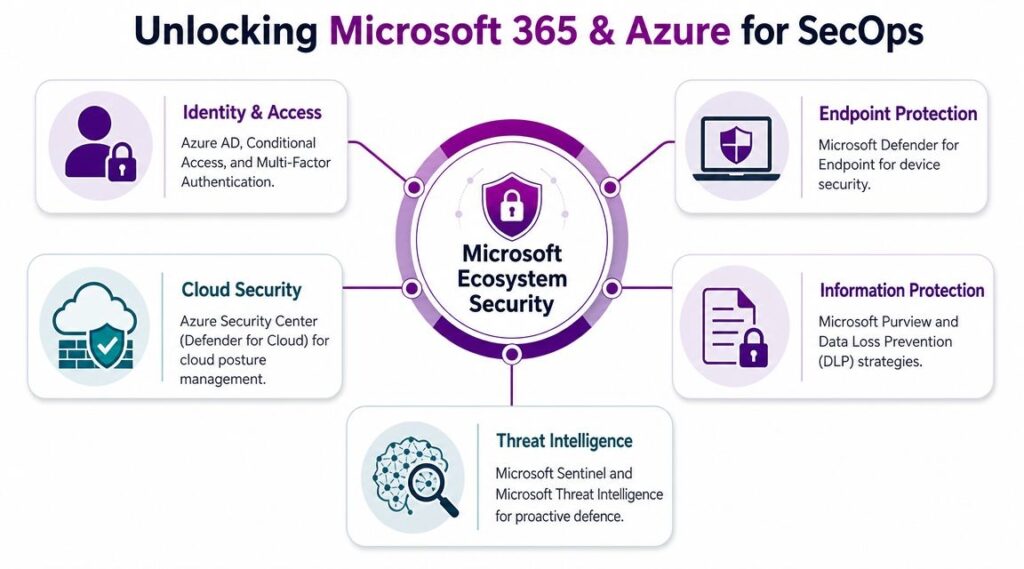
If your users, identities, devices, email, and collaboration data already sit in Microsoft services, keeping your core security operations close to that ecosystem reduces friction.
A practical Microsoft-native stack often includes:
- Microsoft Entra ID for identity controls, risky sign-in visibility, and Conditional Access
- Microsoft Defender for Endpoint for device telemetry, investigation, and isolation actions
- Microsoft Defender for Office 365 for phishing, malicious links, and email investigation
- Defender for Cloud for Azure posture and workload-related alerts
- Microsoft Purview for data protection, retention, and information governance
- Microsoft Sentinel as the central layer for log aggregation, correlation, analytics, and automation
That combination won’t solve every problem by itself, but it gives a smaller team a sensible operational centre.
What a unified view actually changes
When these controls are connected properly, one incident stops looking like five unrelated warnings.
A suspicious mailbox rule, a risky sign-in, an endpoint alert, and unusual SharePoint activity can be reviewed as part of the same investigation rather than by separate admins in separate portals. That’s where a SIEM and automation layer such as Sentinel earns its keep. It helps the team correlate identity, endpoint, email, and cloud signals into one case with one timeline.
Avoid these common mistakes
The most common errors aren’t technical edge cases. They’re operational shortcuts.
- Buying extra tools too early before the Microsoft controls are configured and understood
- Leaving identity out of the centre even though account compromise drives many incidents
- Ignoring integration quality so alerts land in multiple places with no ownership
- Treating Sentinel as a log bucket instead of an investigation and response platform
If your team has to swivel between portals to understand one incident, the toolset isn’t supporting operations. It’s adding drag.
For businesses trying to make better use of existing licensing and configuration, Microsoft 365 security best practices can help frame where to harden first before expanding into more advanced detection and automation.
Creating Incident Response Playbooks That Actually Work
Tools matter, but incident response succeeds or fails on clarity. When an alert fires, the team needs a short, dependable process they can follow under pressure. That’s what a playbook does.
Early in the process, it helps to look at a visual workflow before writing your own detailed version.
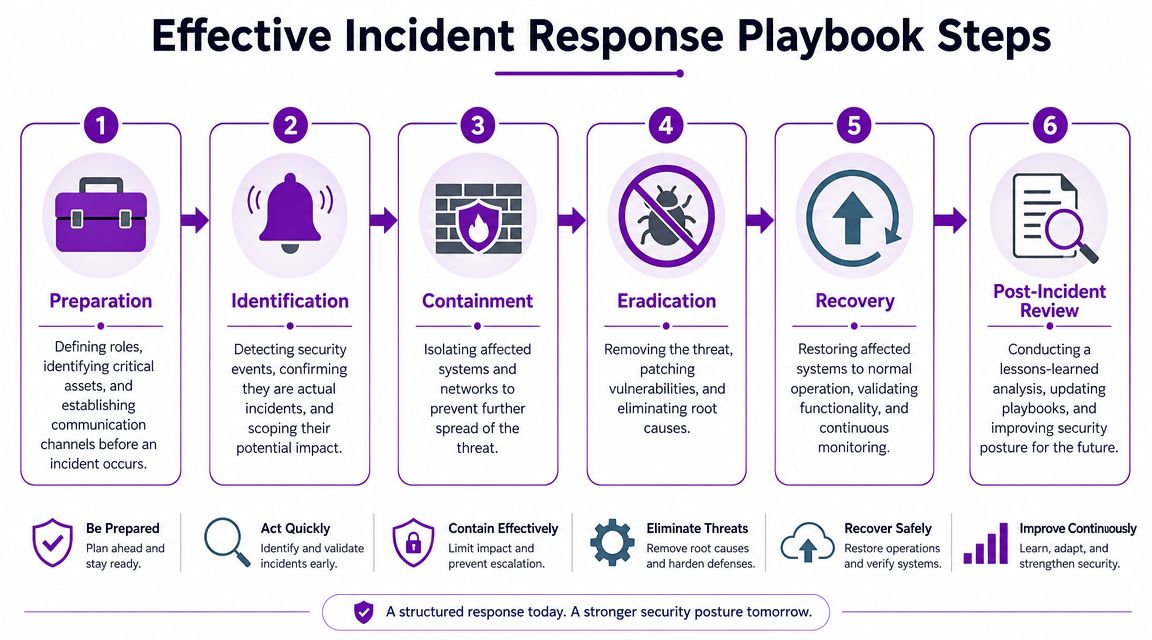
For UK organisations, scaling security operations without increasing manual work depends on standardised playbooks and regular testing. NCSC-aligned guidance supports this because many response failures come from process breakdowns, and in Microsoft-centric environments it’s especially important to correlate identity, endpoint, and cloud data and then feed lessons learned back into revised runbooks, as described in Info-Tech’s guidance on developing a security operations strategy.
A phishing-led account compromise example
Take a familiar scenario. A user reports a suspicious Microsoft 365 sign-in prompt after clicking a fake email. Shortly afterwards, the team sees unusual mailbox activity and a sign-in from an unexpected location.
A usable playbook might run like this:
Identify the incident
Confirm whether the alert is linked to a real user, real sign-in activity, and any signs of mailbox or account misuse.Contain quickly
Disable or reset the account, revoke active sessions, block malicious senders or URLs where appropriate, and assess whether the device needs isolation.Scope the impact
Check mailbox rules, sent items, recent sign-ins, privileged group membership, OneDrive access, and any unusual activity in Teams or SharePoint.Eradicate the cause
Remove malicious rules, force credential reset, review MFA state, and fix any policy gap that made the compromise easier.Recover safely
Restore normal access once confidence is back, monitor closely, and brief the user on what happened.Review and improve
Update the playbook if the team found delays, missing permissions, or poor escalation steps.
Keep playbooks short enough to use
Many incident documents fail because they read like policy manuals. A good operational playbook is concise. It should be practical for a pressured IT team.
Include:
- Trigger conditions so people know when the playbook applies
- Named owners for technical action and business escalation
- Immediate containment actions that don’t require debate
- Evidence checklist for logs, accounts, devices, and affected services
- Exit criteria for when the incident can move to recovery
If you also need to align security operations with audit expectations, especially where formal control evidence matters, guidance on documenting your SOC 2 IRP is helpful for translating response steps into something reviewable and repeatable.
A short explainer can also help teams visualise the sequence before they formalise it:
Test the playbook before you need it
Run tabletop exercises. Use realistic Microsoft-based scenarios. Ask who can disable the account, who can approve device isolation, who speaks to management, and who documents decisions.
That’s where weak assumptions show up. It’s much better to discover them in a meeting room than during a live incident.
Measuring Success and Improving Your Security Maturity
Security operations only becomes sustainable when you can tell whether it’s improving. Without measurement, teams fall back on easy but misleading indicators such as alert count, open tickets, or how busy the dashboard looks.
In the UK, continuous monitoring is justified by the threat environment itself. The Cyber Security Breaches Survey 2024 found that 50% of UK businesses and 32% of UK charities reported some form of cyber security breach or attack in the previous 12 months, with phishing the most common attack type, and estimated around 7.78 million cyber crimes against businesses and 2.94 million against charities in that period, as summarised in managed security services statistics referencing the UK survey. That’s why managing security operations has to work as a daily discipline, not an occasional review.
Track outcomes that influence risk
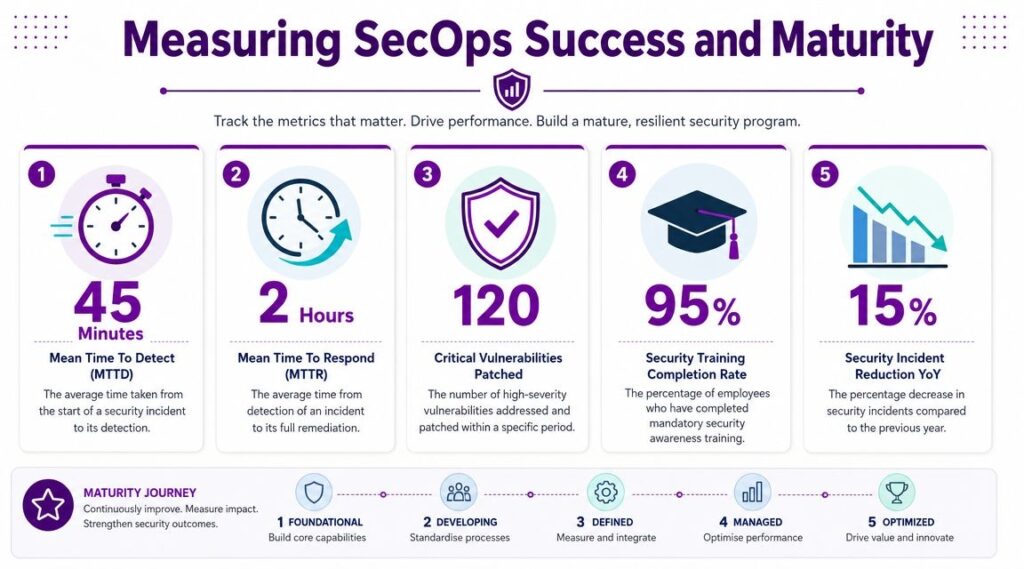
For an SMB, the most useful metrics are the ones that show whether the team is getting faster, clearer, and more consistent.
Focus on:
- Mean time to detect so you know how quickly genuine issues are identified
- Mean time to respond so you can see whether containment and remediation are improving
- Escalation success rate to test whether incidents reach the right people without delay
- Coverage of high-priority assets so critical systems don’t sit outside monitoring
- Recovery confidence based on whether key procedures have been tested and validated
These metrics are useful because they link operations to business resilience. They also force the team to define start and stop points for incidents, which improves discipline on its own.
Don’t let metrics become theatre
A metric is only helpful if the team can act on it.
If your mean time to respond is poor, ask why. Was it because the alert arrived late, the analyst couldn’t tell whether it mattered, or the responder lacked permission to take action? Each cause points to a different fix.
A simple review table helps:
| Review area | Question to ask | Likely improvement |
|---|---|---|
| Detection | Did we spot it early enough to limit impact? | Improve alert tuning or add missing telemetry |
| Triage | Did the first reviewer know what to do? | Simplify workflows and assign ownership |
| Containment | Could we act immediately? | Pre-authorise key response steps |
| Recovery | Did we restore safely and completely? | Test recovery procedures on critical systems |
| Learning | Did anything change afterwards? | Update playbooks and controls |
Measure what reduces uncertainty. If a metric doesn't change a decision, it's reporting noise.
A practical maturity path for smaller teams
You don't need a formal SOC room or a large cyber team to build maturity. You need a sequence that the business can sustain.
A sensible path looks like this:
First stabilise the basics
Get visibility over key assets, privileged identities, endpoint status, and email threats. Define your incident contacts. Create two or three playbooks for the incidents you're most likely to face.
Then tighten the operating rhythm
Set a weekly operational review. Look at incidents, near misses, risky changes, and overdue actions. Run regular access reviews for privileged roles and shared accounts.
Then test your assumptions
Tabletop exercises are one of the cheapest ways to improve. So are targeted phishing simulations, provided the point is learning rather than embarrassment. If your business is heavily cloud-dependent, guidance on mastering cloud security risk assessment can help frame how to review exposure in a more structured way.
Finally reduce manual effort
Once the process is stable, automate repetitive triage and enrichment. That might mean automatic tagging, routing, user notification, or conditional containment steps within your Microsoft security stack.
What good looks like over time
Maturity doesn't mean zero incidents. It means the team is less surprised by them.
You know which assets matter most. Alerts are tied to business context. Response actions are documented. Recovery steps are tested. Reviews produce changes instead of just meeting notes.
That's the core goal. Start with the Microsoft capabilities you already have, keep the scope grounded in your operational reality, and build a security function your business can run.
If you want help building a practical Microsoft-focused security operations capability, F1Group can support East Midlands organisations with a structured, realistic approach to detection, response, and ongoing improvement. Phone 0845 855 0000 today or Send us a message.