
A lot of business owners meet quality assurance only after something has already gone wrong.
A new Microsoft 365 process goes live. A Power BI report lands in the board pack. A Dynamics 365 field mapping looks fine in testing, then starts creating duplicate records, blank values, or inconsistent customer histories. Staff lose confidence quickly. Managers stop trusting the numbers. Someone exports everything to Excel “just to be safe”, and the whole point of the new system starts to unravel.
That's usually when people ask, what is quality assurance, and whether they need it.
The short answer is yes. But not in the heavyweight, corporate, paperwork-for-the-sake-of-it sense that many people imagine. For a small or mid-sized organisation, quality assurance is the discipline of making sure work is designed properly, checked at the right points, and improved before errors become expensive.
The Hidden Costs of Poor Quality in Business
Most firms don't struggle because they lack effort. They struggle because the process allows preventable mistakes through.
A common pattern looks like this. A business rolls out a new workflow for onboarding customers, perhaps through Microsoft Forms, SharePoint, and Power Automate. It works well enough in a demo. Then real users get involved. Required fields are skipped, naming conventions drift, approval steps get bypassed, and reporting breaks because nobody agreed what “complete” means.

The immediate cost is obvious. Teams waste time fixing records, re-running reports, answering complaints, and checking whether the system can be trusted. The longer-term cost is usually worse. Staff start building workarounds. Departments keep their own versions of the truth. New projects inherit old mess.
What poor quality looks like in an SMB
In a service-led business, the “product” often isn't a physical item. It might be:
- An internal IT service such as user onboarding, device setup, or document approval
- A cloud rollout such as Microsoft 365 migration, Teams governance, or Azure resource setup
- A business process such as sales handover, case management, or finance reporting
- A data flow between Dynamics 365, Excel, SharePoint, and Power BI
That matters because generic explanations of QA often lean on manufacturing examples. They rarely answer the practical SMB question of what QA looks like when the output is an internal service or a Microsoft 365 rollout. That gap matters in the UK because SMEs account for 99.9% of the UK business population, as noted in ISO's overview of quality assurance for smaller organisations.
Practical rule: If your team regularly says “we'll fix it after go-live”, you don't have a quality process. You have a rework process.
The shift from fixing to preventing
Quality assurance is the answer to that pattern. It changes the question from “How do we catch mistakes?” to “How do we stop them being created in the first place?”
That sounds simple, but it changes how projects are run. Instead of relying on one final check, you define standards early, document how work should happen, agree ownership, and put checks at the points where errors normally enter the system.
In practice, that means better forms, better field rules, clearer approvals, cleaner documentation, and regular review. It means treating quality as part of delivery, not something bolted on at the end.
For smaller organisations, that's good news. QA doesn't have to mean a separate department. It means building enough structure into the way you already work so the business can rely on the result.
Quality Assurance vs Quality Control Explained
The easiest way to explain the difference is to use a house.
Quality assurance is the blueprint, the building regulations, the site plan, the material standards, and the process the trades follow from day one. Quality control is the inspection that checks whether the finished wall is straight, whether the wiring works, and whether the roof leaks. Testing is one of the practical inspection activities inside that later stage.
If the blueprint is wrong, the inspection might spot some issues. It won't stop the project being harder, slower, and more expensive than it needed to be.
The core difference
The modern idea of QA came from the move away from simple end-stage inspection and towards statistical process control. Walter A. Shewhart's work in the 1920s laid the foundation, and the first ISO 9000 standards in 1987 formalised documented, auditable systems for British organisations that focused on preventing defects rather than merely catching them, as described in the historical record of statistical quality control and standardisation.
Quality assurance is process-oriented. Quality control is product-oriented.
That distinction matters in IT and data projects. QA asks whether the process for creating, changing, validating, and reporting information is sound. QC asks whether the output passes the required checks. Testing asks whether a specific feature, report, or workflow behaves as expected.
QA vs QC vs Testing at a Glance
| Aspect | Quality Assurance (QA) | Quality Control (QC) | Testing |
|---|---|---|---|
| Primary focus | The process used to produce the outcome | The finished output | Specific behaviour, function, or requirement |
| Timing | Built in from the start | Usually applied during or after production | Often performed before release, during change, and after fixes |
| Main goal | Prevent defects | Detect defects | Verify whether something works as intended |
| Typical question | “Are we doing this the right way?” | “Does the result meet the standard?” | “Does this feature, workflow, or report behave correctly?” |
| Example in Microsoft 365 | Defining naming rules, approval routes, permissions, and document templates | Checking whether a document library contains correct metadata | Testing whether a Power Automate flow triggers, routes, and logs correctly |
| Ownership | Management, delivery leads, process owners, technical teams | Reviewers, analysts, service owners | Developers, analysts, testers, or key users |
| Best use | Reducing avoidable problems before they spread | Catching issues before users see them | Confirming a specific change works in practice |
Why firms confuse them
Many organisations say they do QA when they really mean they test things before launch.
Testing is necessary. It just isn’t enough on its own. If nobody agreed the business rule, field definition, ownership model, or approval path, you can test all day and still release something that causes confusion.
A good way to remember it is this:
- QA designs confidence into the process
- QC checks the output
- Testing proves particular things work or fail
That’s why the strongest teams don’t treat QA as a final gate. They use it to shape the work before the work becomes expensive.
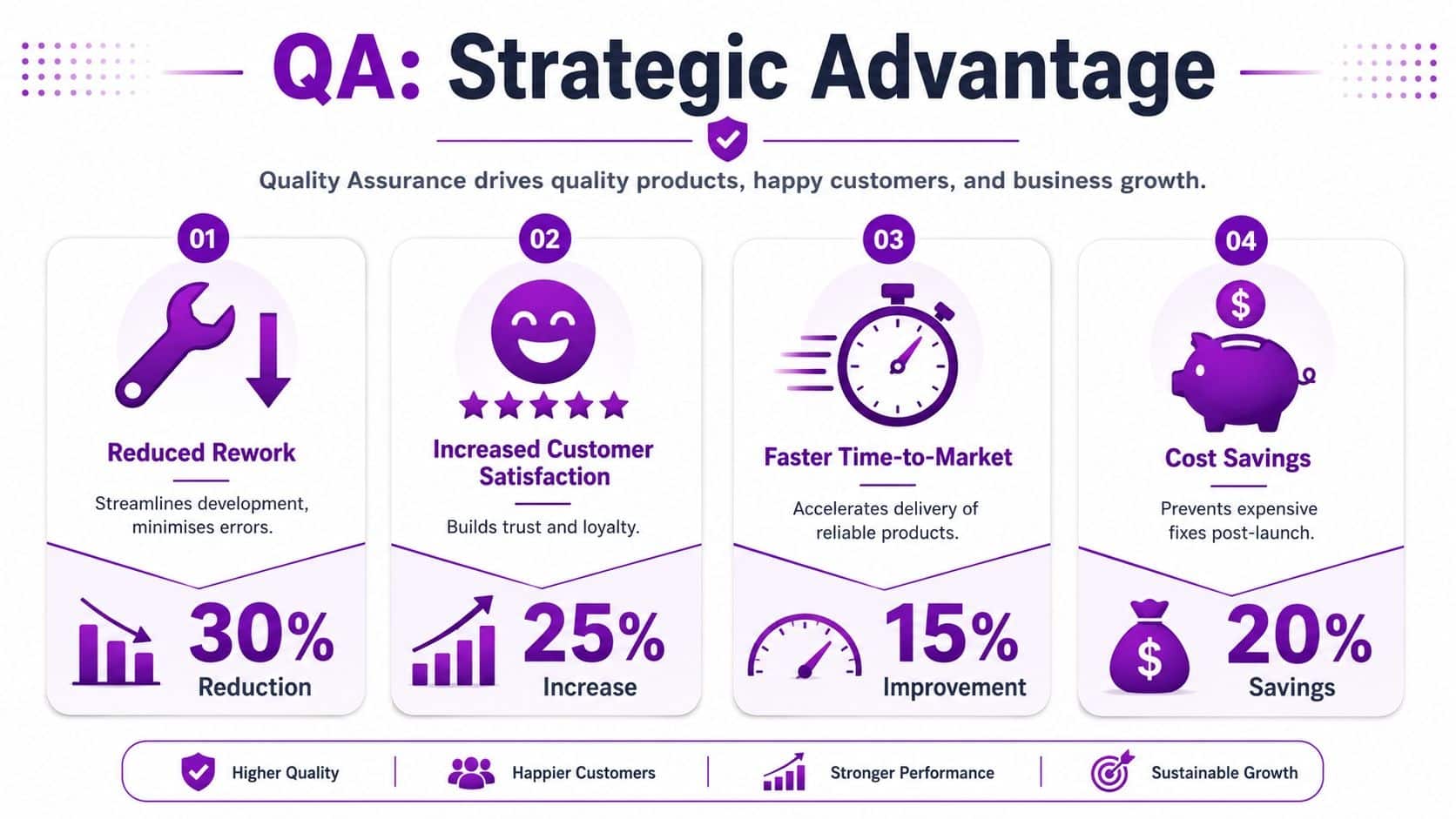
Why QA Is a Strategic Advantage Not an Overhead
Business owners often hear “quality assurance” and think paperwork, delay, and cost. In reality, poor quality is usually what creates delay and cost.
When teams work without agreed standards, they spend more time clarifying, correcting, re-entering, and apologising. That’s true whether the task is building a SharePoint intranet, migrating files into Microsoft 365, or connecting Dynamics 365 data to Power BI. The technical issue is rarely the whole problem. The main problem is that the business process wasn’t defined tightly enough to survive everyday use.
Better data means better decisions
QA shifts to a strategic rather than administrative focus. In data-heavy environments, quality assurance improves the way data is created, transformed, and monitored. Effective QA frameworks use control points such as data profiling, validation rules, cleansing, and continuous monitoring across dimensions including accuracy, completeness, timeliness, consistency, uniqueness, and integrity, as explained in this practical guide to data quality assurance and quality control.
If you rely on a Power BI dashboard to manage sales, service levels, stock, or finance, those quality dimensions aren’t abstract. They determine whether leaders can trust the report in front of them.
Why the financial risk is real
Poor data quality isn’t a minor inconvenience. The UK Department for Science, Innovation and Technology estimated that poor data quality costs businesses around £129 billion per year, a figure highlighted in Monte Carlo’s discussion of data quality assurance.
That number matters because it reframes QA. This isn’t about making a project feel tidy. It’s about reducing operational drag, avoiding bad decisions, and maintaining evidence that your processes are under control.
Good QA saves money in unglamorous places. Fewer duplicate records. Fewer broken automations. Fewer reports that need explaining twice.
Where SMBs see the gain
For smaller organisations, the benefit usually shows up in three places first:
-
Operational consistency
Staff follow the same process, use the same fields, and work from the same definitions. -
Fewer manual corrections
Data issues get blocked earlier, before they spread through reports, workflows, and customer communications. -
More confidence in change
Teams are far more willing to adopt Azure, Dynamics 365, Power Platform, or Copilot-enabled processes when the underlying controls are clear.
That’s why QA should sit alongside security, support, and governance in business planning. It protects the value of the systems you already pay for.
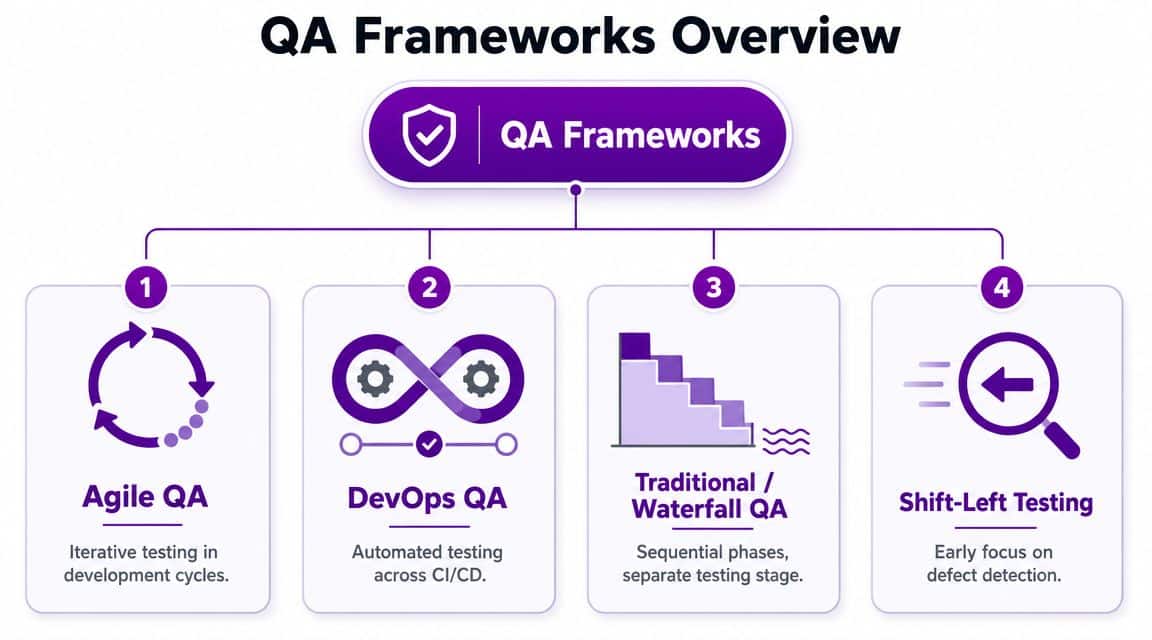
Common QA Frameworks for Modern IT Projects
A framework sounds formal, but in practice it’s just a reliable way of making sure the important things don’t get missed.
Most SMBs don’t need to implement a heavyweight quality model word for word. What they do need is a sensible structure for planning, documenting, reviewing, and improving work. The best approach is usually to borrow the parts that fit the project.
ISO thinking for consistency
ISO-style quality management is useful because it forces a basic discipline. Define the process. Document the standard. Check whether people are following it. Correct what drifts.
For an SMB, that might mean a project scope document, a clear sign-off path, standard templates for requirements, and named owners for data fields or approvals. It’s less about certification and more about avoiding “I thought someone else was doing that”.
ITIL thinking for services
If your business depends on internal IT services, ITIL-style thinking is often more relevant than manufacturing examples. It asks practical questions.
- What service are you providing
- Who owns it
- How do users request it
- What does good service look like
- How are issues logged, reviewed, and improved
That works well for managed desktops, Microsoft 365 administration, onboarding, and support transitions. If a user requests access to Teams, SharePoint, or a line-of-business app, QA means the request path, approval, fulfilment, and audit trail all make sense.
Agile and shift-left thinking for change
Agile quality principles suit cloud and application projects because they push feedback earlier. Instead of waiting until the end, teams review requirements, edge cases, and user expectations throughout the work.
A useful related principle is shift-left testing. In plain English, you move quality checks closer to the start. You validate assumptions before build, not after rollout. You define data rules before import, not after duplicates appear. You review process logic before a flow is published.
For businesses managing app changes, release cycles, or bespoke systems, application lifecycle management becomes part of QA because it connects change control, testing, approval, and support into one operating model.
Decision test: Choose the framework language your team will actually use. A simpler framework followed properly beats a perfect framework ignored by everyone.
What these frameworks have in common
Whatever label you use, effective QA frameworks rely on control points. In modern IT projects those often include:
- Data profiling to understand what is entering a system
- Validation rules to stop bad or incomplete entries
- Continuous monitoring to spot drift before it turns into a business problem
- Corrective action when the process stops producing reliable outputs
That’s the value of a framework. It turns quality from a vague aspiration into something your team can operate day to day.
Practical QA Steps Using Microsoft 365 and Azure
Most SMBs don’t need a dedicated QA department to improve quality. They need a few sensible controls embedded into tools they already use.
The Microsoft ecosystem is well suited to this because Microsoft 365, Power Platform, Dynamics 365, and Azure all support standardisation, approvals, automation, and reporting. The key is to use those tools deliberately rather than assuming technology on its own will create order.

Start with the business rule not the tool
A common mistake is jumping straight into configuration. Someone builds a form, a list, or a workflow before the business has agreed what “good” looks like.
Start with a short set of quality rules for each important process. If you’re managing customer data in Dynamics 365, decide which fields are mandatory, what naming standard applies, who can edit key records, and what should happen when information is incomplete or contradictory. If you’re rolling out document management in SharePoint, agree metadata, folder structure, retention expectations, and version control.
A simple quality baseline should answer:
- What must always be captured
- What format should it follow
- Who owns the data or step
- What happens when something fails validation
- How will the business review quality over time
Use Microsoft 365 to document and govern
SharePoint and Teams are often enough to create a lightweight QA operating model.
-
Process documentation in SharePoint
Store approved process notes, change logs, forms, and working standards in one place. -
Teams for operational review
Run regular service or project reviews in a dedicated Team so issues, decisions, and ownership stay visible. -
Planner for checklists
Build pre-go-live and post-change checklists so tasks such as permissions review, user acceptance, backup confirmation, and communication don’t rely on memory.
This part isn’t glamorous, but it’s where smaller firms usually gain the most ground. When standards are visible and current, fewer decisions get reinvented.
Build validation into the flow of work
Power Automate is one of the most practical QA tools available to SMBs because it can enforce checks without adding expensive software. You can use it to route approvals, flag missing information, prevent incomplete submissions moving forward, or alert owners when data falls outside expected rules. If you want practical examples, this guide on how to use Power Automate shows the sort of business workflows that lend themselves well to automation.
What works well is small, targeted validation. Check for missing fields. Confirm required approvals. Enforce date logic. Trigger review when a high-risk value changes.
What doesn’t work is trying to automate a broken process. If the rule itself is unclear, automation just makes the confusion faster.
Here’s a useful walkthrough before putting those ideas into practice:
Monitor quality in Power BI and Azure
Once the process is defined and the checks are in place, you need a way to see whether quality is holding.
Power BI is ideal for this. Not because every SMB needs a huge dashboard, but because a small set of visible indicators keeps quality from becoming guesswork. Track exceptions, incomplete records, overdue approvals, duplicate entries, or service requests that bypass the intended process.
Azure adds another layer for businesses running cloud services, integrations, or custom applications. Logging, alerts, policy controls, and review workflows help teams spot failures early and maintain a record of what happened.
A quality dashboard should answer one question first. “Where is the process drifting?” If it tries to answer everything, nobody uses it.
A sensible Monday morning plan
If you want to start without overcomplicating it, do this:
-
Pick one process
Choose something business-critical such as customer onboarding, sales reporting, or document approval. -
Write down the failure points
Ask staff where records go wrong, where handovers fail, and where people stop trusting the output. -
Set three to five quality rules
Keep them specific and enforceable. -
Use existing Microsoft tools
SharePoint for documentation, Teams for ownership, Planner for checklists, Power Automate for validation, and Power BI for monitoring. -
Review monthly
Look for repeat exceptions and fix the process, not just the symptom.
That’s how quality assurance becomes practical. Not as a grand transformation programme, but as a series of controlled improvements that make the business easier to run.
Build Quality Into Your Business with Expert Support
Quality assurance isn’t only for large manufacturers or software houses with dedicated testing teams. It applies to any organisation that depends on systems, data, and repeatable processes. For most East Midlands businesses, that means QA already matters whether it has been named or not.
The fundamental question isn’t whether quality issues exist. It’s whether the business is dealing with them upstream or paying for them downstream. Good QA creates clarity. People know the process, understand the standards, and catch problems before they spread into reports, customer interactions, and day-to-day operations.
For firms working with Microsoft 365, Azure, Dynamics 365, and Power Platform, the opportunity is straightforward. The tools already support better quality. What’s often missing is the design discipline to use them well, plus the practical experience to keep the controls proportionate for a smaller business.
If you need outside support, a specialist partner can help turn broad QA principles into working processes, sensible governance, and reliable delivery. That’s especially useful when internal teams are busy keeping the lights on and don’t have time to redesign workflows properly. Businesses looking for broader operational support should also review what a strong managed IT services firm can contribute to long-term resilience and service quality.
If you’d like help building practical quality assurance into your Microsoft environment, F1Group can help. We work with organisations across the East Midlands to improve process control, data reliability, and day-to-day service delivery. Phone 0845 855 0000 today or send us a message.