
If you're running an East Midlands business, this probably feels familiar. The inbox fills up before 9am. A few customers are chasing delivery updates. Someone wants to change an order. Another needs a copy invoice. Two more have genuine problems that need a person who understands the account history. Meanwhile, your team is switching between Outlook, phones, a shared mailbox, spreadsheets, and whatever notes sit inside your CRM.
That's where customer service starts to drag. Not because your people aren't good enough, but because good people get buried in repeat work. The expensive part isn't only the time spent answering the same questions. It's the delay created for the customers who need thoughtful support.
For many small and mid-sized firms, the problem isn't volume on its own. It's inconsistency. One person knows how to handle returns properly. Another remembers the right escalation path for a contract customer. Someone else manually copies customer details into a ticket. If one of them is off, service slows down.
Customer service automation helps when it's applied to those frictions first. Not with a flashy bot bolted on top, but with practical workflow design, better routing, and Microsoft tools that fit how your business already works.
Struggling to Keep Up with Customer Demands
A typical support day in an SMB rarely looks dramatic from the outside. It just looks busy. Emails arrive steadily. Calls interrupt the team every few minutes. A sales colleague forwards a complaint because they couldn't find the right contact. A warehouse issue turns into three separate customer chases. By the afternoon, everyone feels occupied, but the queue still hasn't moved enough.
That's the point where service quality starts to slip.
Most businesses don't struggle because every issue is complex. They struggle because too many routine jobs consume the same attention as the important ones. “Where is my order?” sits alongside “Our account access is broken”. A request for opening hours lands in the same place as a commercial dispute. Without a sensible triage process, everything becomes urgent and nothing is handled particularly well.
What the team usually feels first
The first signs are operational, not technical:
- Response delays because staff are reading and re-reading messages before deciding where they belong.
- Repeated work because the same details are entered into more than one system.
- Patchy ownership because queries move between departments without a clear handoff.
- Customer frustration because simple questions take too long and serious issues don't reach the right person quickly.
In businesses already using a CRM, these pain points often sit next to an underused opportunity. A proper customer relationship management approach can hold customer history, case context, priorities, and service activity in one place. But if the process around it is manual, the CRM becomes a record of the problem rather than part of the solution.
Customers rarely complain about your internal systems. They complain about waiting, repeating themselves, and not knowing what happens next.
That's why automation matters. It gives smaller teams a way to handle routine demand consistently, protect human time for complex issues, and build a support operation that doesn't depend on memory, workarounds, or whoever happens to be online first.
What Is Customer Service Automation and Why Is It Crucial Now
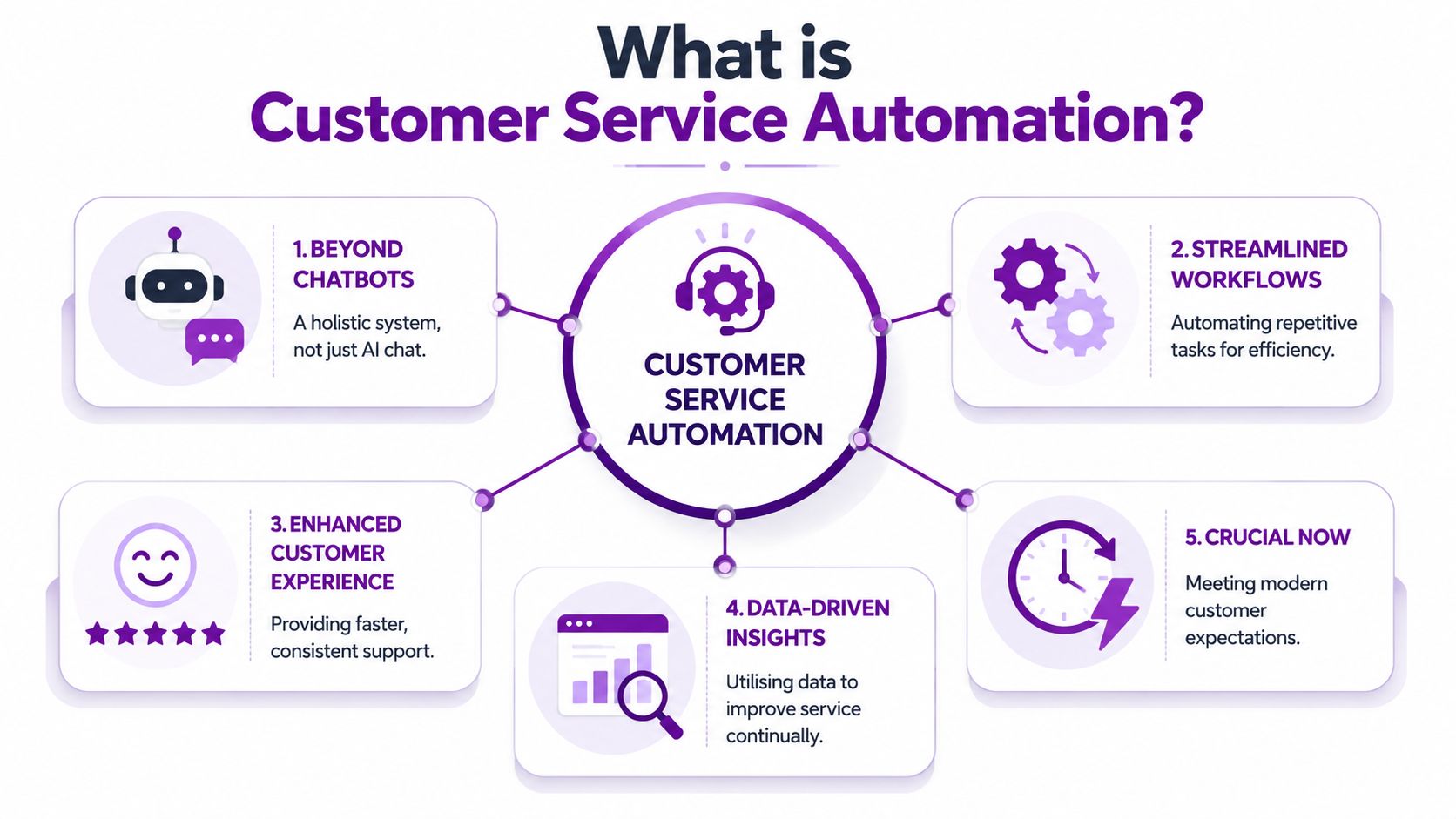
Customer service automation is the use of software, rules, and AI to handle parts of support work without relying on a person to do every step manually. That can mean answering common queries, creating and classifying tickets, routing requests to the right team, suggesting responses, surfacing knowledge articles, or triggering updates across Microsoft systems.
It's broader than a chatbot. A chatbot is only one interface.
Think of it as a digital front-of-house
A practical way to understand customer service automation is to think of it as a digital front-of-house team.
It does the first sort. It greets, identifies, checks context, answers straightforward questions where possible, and passes the right issue to the right person with enough background to avoid starting from scratch. In Microsoft terms, that often means combining Dynamics 365 Customer Service, Power Automate, knowledge content, Microsoft 365 data, and Copilot-style assistance.
The important point is that good automation reduces friction at the start of the journey. It doesn't try to replace judgement where judgement is needed.
Why now rather than later
This has moved beyond early experimentation. In the UK, the Office for National Statistics reported that 18% of UK businesses used at least one form of AI in 2024, up from 15% in 2023. The same ONS release showed 41% of businesses with 250+ employees used AI, compared with 17% of medium-sized firms and 11% of small firms, as summarised in these UK customer service statistics.
For an East Midlands SMB, that matters for a simple reason. Even if your direct competitors aren't all talking about AI, many businesses are already improving response speed, routing, self-service, and agent support behind the scenes. Customers won't call it automation. They'll just notice who is easier to deal with.
What it usually includes in real deployments
A sensible setup often covers:
- Automated intake that turns emails, forms, or chats into structured cases.
- Classification rules that identify intent, urgency, account type, or product area.
- Routing logic that sends work to the right queue or person.
- Self-service content that answers common questions without creating a ticket.
- Agent-assist tools that suggest summaries, drafts, or next actions.
If you're comparing approaches, it helps to look at firms that focus on Ekipa AI automation expertise because they illustrate a wider point. The useful work often happens in process automation and integration, not just in the visible chatbot layer.
A lot of SMBs already have the ingredients. What they need is a better workflow design and a clearer idea of workflow automation in business operations.
The Real Business Benefits and How to Measure Them
The biggest mistake businesses make with customer service automation is measuring the wrong thing. They focus on whether the bot answered something, or whether fewer emails landed in a shared inbox. Neither tells you whether total work went down.
If customers still need to call after using self-service, or if agents spend extra time fixing badly classified tickets, you haven't removed work. You've moved it.
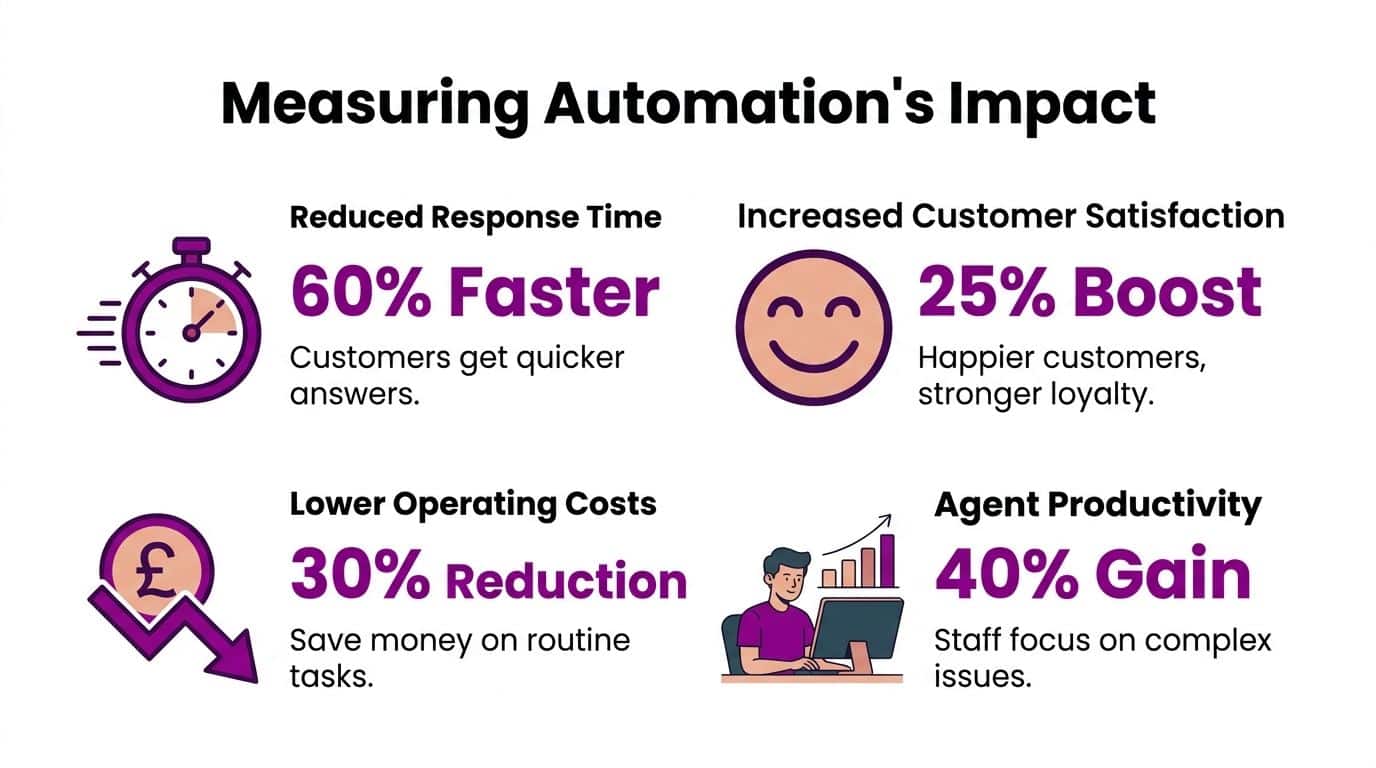
A useful starting point is this. The ONS reported that 46% of UK businesses were using AI in some form in late 2024, up from 33% in late 2023, as referenced in this analysis of customer service automation and measurement. Adoption is moving quickly, but that doesn't mean businesses are measuring maturity well. UK government guidance also frames AI as most useful when tied to specific productivity problems rather than used generically.
Measure outcomes, not activity
Three questions matter more than “Did we launch automation?”:
- Did simple work disappear from the human queue?
- Did resolution get faster without increasing rework?
- Did customers reach the right person with less effort?
That's why KPI-led design beats a chatbot-first approach.
Here are the measures worth watching in a Microsoft-based environment:
| KPI | What it tells you | What to watch for |
|---|---|---|
| Containment rate | How many simple queries were handled without human intervention | High containment is useless if customers come back through another channel |
| First contact resolution | Whether the issue was solved the first time | Falling FCR often signals poor routing or weak knowledge content |
| Escalation rate | How often automated journeys need human takeover | Some escalation is healthy. Zero often means customers are trapped |
| Average handling time | How long agents spend once they receive the case | Should fall when routing and summaries improve |
| Repeat contact volume | Whether customers are having to ask again | A key indicator of hidden workload |
| Backlog age | How long unresolved work sits in queues | Useful for spotting where automation isn’t helping enough |
Start with the right ticket types
Not every service request should be automated first. Begin where the pattern is stable and the answer path is clear.
Good first candidates usually include:
- Status questions such as order progress, appointment timing, or account checks.
- Repeat admin tasks like password reset requests, address changes, or document resends.
- Basic triage for product line, urgency, location, or contract type.
- Knowledge-led enquiries where a clear article or guided flow solves the problem.
Poor first candidates are complaints with emotional nuance, complex billing disputes, safeguarding concerns, or anything where a human needs to interpret policy carefully.
Practical rule: If your team still argues internally about the right answer, don't automate that query first.
For contact-heavy teams, it can also help to review specialist thinking around AI strategies for call centers. Not because every SMB needs a formal call centre, but because the same principles apply. Triage quality, agent handoff, and queue discipline determine whether automation improves service or just hides weak process design.
Later in the rollout, Power BI becomes useful for spotting bottlenecks across queues, channels, and agent groups. That's where business intelligence in the cloud starts to matter. It lets managers see whether the automation layer is reducing demand properly or redistributing it into other parts of the operation.
Before looking at dashboards, it's worth seeing a broad overview of how automation affects service teams:
Core Components and Practical Use Cases for SMBs
Customer service automation works best when you treat it as a set of building blocks, not a single product. SMBs usually get better results by combining a few tightly chosen components than by trying to deploy every possible feature at once.

One reason this matters is channel shift. Gartner reports that by 2027 chatbots will become a primary customer service channel for roughly 25% of organisations, as discussed in this customer service automation overview. That projection doesn't mean every business should push customers into a bot. It means automation is becoming a front-line support layer, so the design has to be right.
Self-service that actually contains demand
Self-service is often the fastest win. In Microsoft environments, that might mean a knowledge base connected to Dynamics 365 Customer Service, surfaced through a website, portal, or chat entry point.
Used well, it handles stable, factual questions:
- opening hours
- returns steps
- warranty checks
- invoice copy requests
- “how do I” product guidance
Used badly, it becomes a dumping ground for badly written articles no one can find.
The test is simple. Can a customer solve the issue without phoning after reading the article? If not, the content or journey needs work.
Intelligent routing instead of manual sorting
A surprising amount of service delay comes from the first ten minutes after a message arrives. Someone has to read it, work out what it is, decide who should own it, and often ask a follow-up question because the original message lacked context.
Routing automation fixes that by looking at signals such as topic, account type, urgency, product, or service entitlement. In Dynamics 365, this can feed the right queue, case priority, or assignment rule.
A few common examples:
| Business type | Practical routing use case |
|---|---|
| Manufacturer | Spare parts requests go to operations support, faults go to technical support |
| Professional services firm | Existing client issues route differently from new enquiry traffic |
| Charity or membership organisation | Sensitive beneficiary queries bypass generic admin queues |
| Multi-site business | Requests route by branch, postcode, or contract region |
Chat and virtual agents with a human fallback
Bots are useful when they identify intent well and hand over cleanly. They are not useful when they force every customer through the same scripted loop.
The strongest use cases are narrow and repetitive. “Track my order”, “book a callback”, “raise a service ticket”, “send me the setup guide”, and “what's the status of my case” are all sensible candidates. In Power Platform terms, this often means a virtual agent experience linked to case creation, Dataverse records, and knowledge content.
The bot's job is to shorten the path to resolution. If it lengthens the path, remove or redesign it.
Agent-assist and workflow orchestration
Some of the best automation is invisible to the customer. Power Automate can create cases from email, enrich them with account information, alert the right queue, trigger acknowledgements, and log activity automatically. Copilot-style support can help agents summarise interactions, draft responses, and avoid missing relevant case history.
That combination matters because modern systems work best when they bring together NLP-based intent detection, workflow orchestration, and CRM integration, rather than relying on standalone chatbots. It also needs measuring through KPIs such as containment rate, first contact resolution, and escalation rate so you can tell whether demand is being deflected properly or just coming back around in another form.
Your Implementation Roadmap with Microsoft Technology
Most East Midlands SMBs don't need a giant transformation project to get value from customer service automation. They need a phased rollout that starts with process discipline, uses the Microsoft tools they already own or can sensibly add, and avoids building fragile workarounds.
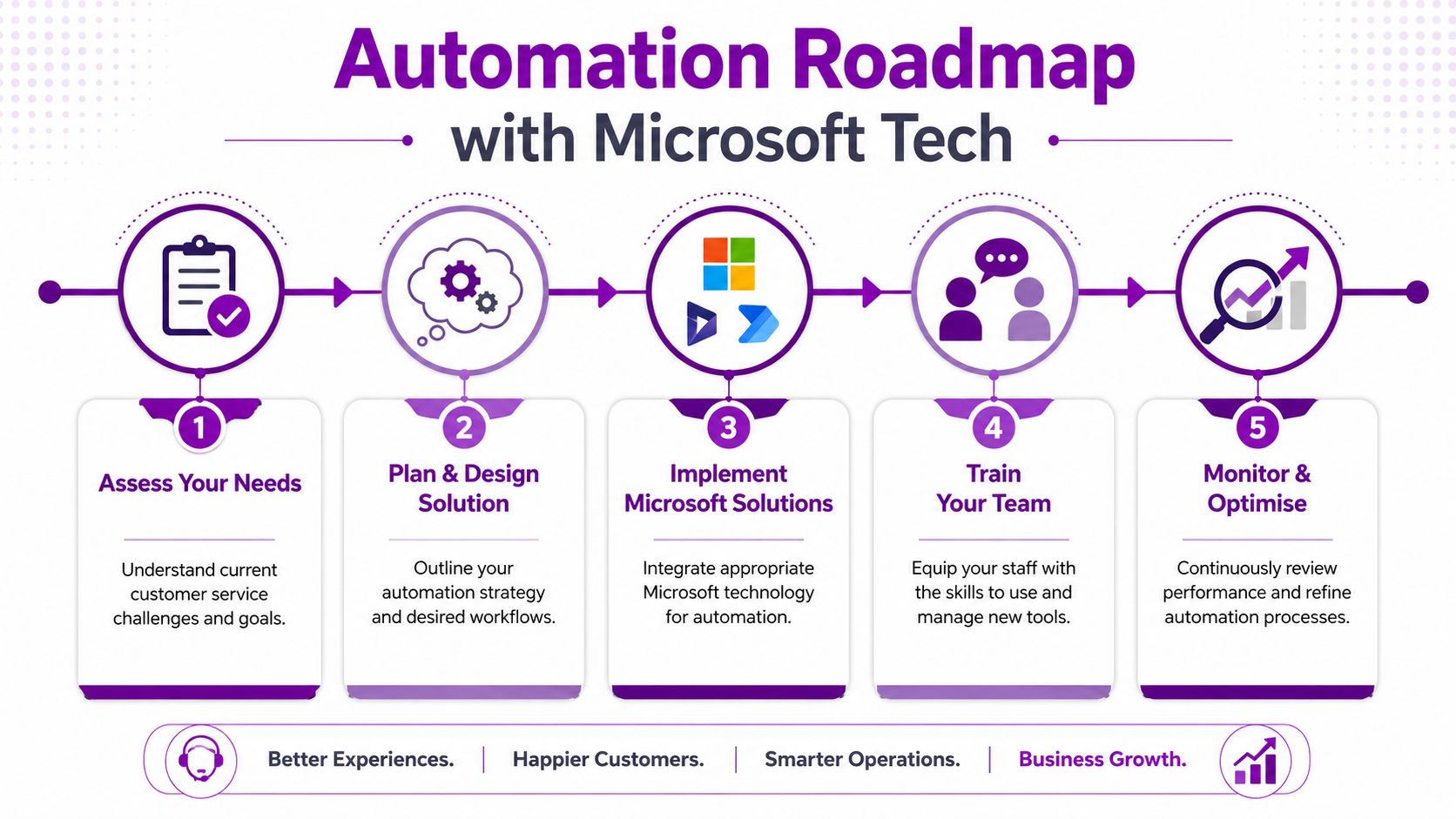
Phase one, get the service foundation right
If your support team is still working from shared inboxes and disconnected spreadsheets, start by creating one reliable service record. For Microsoft-centric businesses, that usually points to Dynamics 365 Customer Service or a structured Dataverse-backed service app built in the Power Platform.
The core requirement is straightforward. Every customer issue should have:
- a clear owner
- a status
- a priority
- a category
- a full interaction history
- a visible escalation path
Without that, automation only accelerates disorder.
For some firms, this first stage also means cleaning up Microsoft 365 usage. Shared mailboxes, Teams channels, forms, and customer records often overlap in messy ways. Before adding AI, decide where the source of truth sits.
Phase two, automate the boring but important work
Once the case structure exists, quick wins usually come from Power Automate.
That can include:
- turning inbound emails into cases
- acknowledging receipt automatically
- assigning tickets by keyword, customer account, or form selection
- notifying internal teams in Teams
- creating approval steps for refunds or exceptions
- sending customers status updates when a case moves stage
This is the phase where many SMBs first see the value. You don't need advanced AI to remove copying, chasing, forwarding, and manual triage.
A common example is an accounts or service mailbox that receives mixed traffic. Power Automate can pull structured information from forms or standardised messages, create a case, classify it, and route it into the correct queue. Staff then start the conversation with context already attached.
Phase three, add self-service and virtual agents carefully
Only after the workflow is stable does it make sense to introduce a customer-facing bot or guided self-service layer. In Microsoft terms, that might involve a virtual agent experience, a customer portal, or a website chat flow connected to your case and knowledge systems.
Keep the first release narrow. Pick a handful of high-volume, low-risk intents. Build a clean handoff into Dynamics 365 when confidence is low or the customer asks for a person.
A good rule here is to design for containment and escalation at the same time. The customer should never wonder how to reach a human.
Phase four, use Copilot to help agents, not replace them
The next layer is Copilot-style assistance inside the support process. This is often where Microsoft's ecosystem becomes especially practical for SMBs. Instead of trying to automate every conversation end to end, you can improve the human side of service.
Useful applications include:
- summarising long email chains
- drafting replies based on knowledge content
- pulling out case history before a callback
- suggesting next actions
- helping agents search internal guidance more quickly
This works best for teams that already have decent knowledge and case data. Copilot can accelerate weak process, but it won't correct weak process on its own.
Phase five, optimise with reporting and review
Once tickets, workflows, and service journeys are instrumented, Power BI becomes the management layer. At this stage, review:
| Area | Questions to ask |
|---|---|
| Demand | Which categories create the most repeat work? |
| Routing | Are the right tickets reaching the right people first time? |
| Knowledge | Which articles solve problems and which trigger more contact? |
| Escalation | Where do automated journeys fail or frustrate customers? |
| People | Which tasks still consume skilled staff time unnecessarily? |
Build the business case around reduced friction, cleaner handoffs, and better use of skilled people. Cost reduction may follow, but it shouldn't be the only design principle.
What a realistic rollout looks like
For most SMBs, the practical sequence is:
- Map demand and identify the top repetitive case types.
- Standardise case handling in Dynamics 365 or Dataverse.
- Automate intake and routing with Power Automate.
- Publish focused self-service content for routine issues.
- Introduce virtual agent flows for clear, repetitive intents.
- Add Copilot support for internal productivity.
- Review KPIs monthly and tune the service model.
That sequence is realistic because each stage creates value without forcing a risky all-at-once deployment. It also lets you govern costs properly. In practice, the biggest cost driver isn't always licensing. It's the time spent fixing poor process design after the fact.
Navigating Security Governance and Change Management
Customer service automation fails for two predictable reasons. Either the data handling is weak, or the team never fully adopts the new process. Technology gets most of the attention, but these two points decide whether the rollout sticks.
Governance has to be designed in from the start
In the UK, automation choices need to reflect compliance obligations, not just convenience. The ICO treats chatbots, automated triage, and AI-assisted customer handling as forms of personal-data processing that must satisfy UK GDPR principles such as data minimisation, purpose limitation, and appropriate retention controls, as outlined in this discussion of customer support automation governance.
That has direct design consequences in Microsoft environments. If you're routing customer emails into Dynamics 365, analysing sentiment, storing transcripts, or feeding content into AI-assisted workflows, you need to define:
- What data enters the automation layer
- Who can view transcripts and case notes
- How long records are retained
- What gets masked or restricted
- Whether audit logs exist for actions and access
- How model training data is separated or controlled
For SMEs, the benchmark shouldn't be “Is it quick?” It should be “Is it governed properly?” Routing only the minimum necessary context, controlling role-based access, and preserving an auditable path through the process matter more than a slick demo.
The handoff to humans can't be vague
Automation creates risk when customers get stuck in an opaque decision path. That's especially true in complaints, vulnerable customer scenarios, or cases involving sensitive account detail.
A safe service design includes:
- Clear escalation points so a person can take over when needed
- Visible ownership once the issue leaves the automated layer
- Traceability so staff can see what the customer was told and why
- Reversible decisions where automated actions could otherwise lock the customer into the wrong outcome
If those controls are missing, the service may become harder to trust even if it appears more efficient.
Governance isn't a brake on automation. It's what makes automation safe enough to scale.
Staff need a role shift, not just system training
The people side is often mishandled. Teams hear “automation” and assume the business wants fewer conversations or fewer staff. That creates understandable resistance.
A better message is more honest. Automation should remove repetitive administration and poor-quality triage so agents can focus on exceptions, judgement, relationships, and more complex service recovery.
That means change management should cover more than button training. Staff need to know:
| Change area | What the team needs |
|---|---|
| New workflows | What happens automatically and what still needs human action |
| Escalation rules | When to override, intervene, or reclassify |
| Knowledge quality | How to improve articles and scripted responses |
| AI assistance | When to use suggested drafts and when not to trust them blindly |
| Customer communication | How to explain handoffs and next steps clearly |
If you get this right, service teams usually become more effective and less fatigued. If you get it wrong, they work around the system and recreate manual habits inside a more expensive platform.
Choosing the Right IT Partner A Checklist for East Midlands SMBs
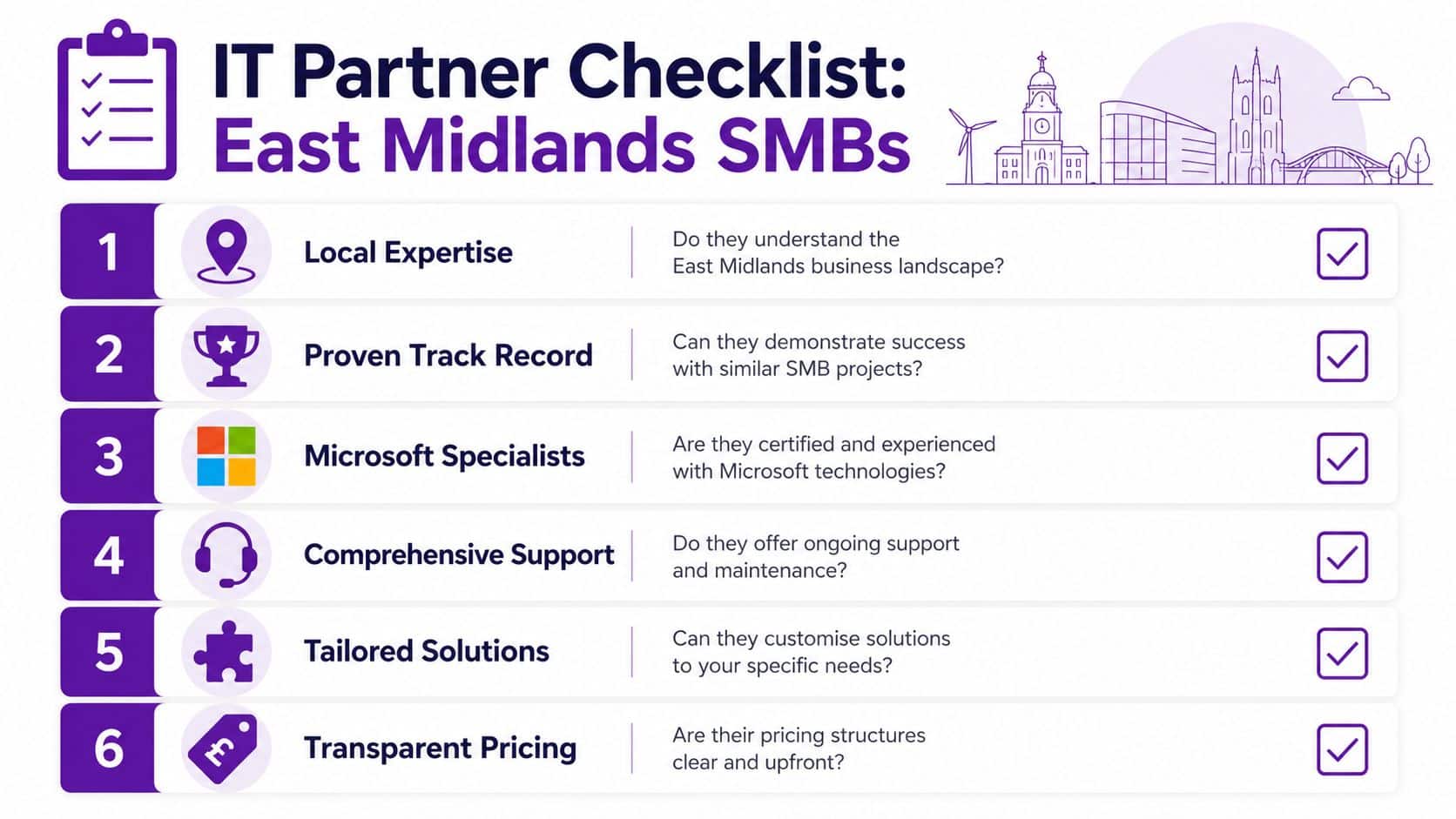
Choosing a partner for customer service automation isn't the same as buying software. You're choosing who will shape your workflows, data handling, customer journeys, reporting, and support model. For East Midlands SMBs, that decision needs to be grounded in practical delivery, not presentation slides.
One issue many firms overlook is accessibility and trust. As noted in this article on customer service automation and accessibility, people with disabilities are more likely to rely on telephone and human-assisted routes when digital journeys are difficult, and UK regulation is pushing firms towards clearer complaint handling and escalation. More automation can create more friction if human access gets harder.
That means the right partner should help you build a hybrid service, not force every customer into the same channel.
The questions worth asking
Use this checklist when comparing providers.
-
Do they understand Microsoft properly
Ask whether they can design around Dynamics 365, Power Automate, Power BI, Microsoft 365, Dataverse, and Copilot rather than treating them as separate tools. -
Can they work with your current service reality
A good partner should be comfortable with messy shared inboxes, partial CRM usage, legacy forms, and manual handoffs. Most SMBs aren't starting from a clean slate. -
Will they design for human escalation
This matters more than bot sophistication. Customers must be able to reach a person without repeating everything from the beginning. -
How do they handle UK GDPR and auditability
Ask specifically about transcript handling, retention controls, role-based access, and what data enters AI-assisted workflows. -
Can they support East Midlands businesses on the ground
For many firms, local support still matters. Site visits, stakeholder workshops, and service adoption work are easier when the provider understands the region and can be present when needed. -
Will they help define KPIs before rollout
If the provider talks only about features, that's a warning sign. You need clarity on containment, escalation, repeat contacts, backlog, and case resolution quality.
What good partner behaviour looks like
A capable partner usually does three things well.
First, they challenge scope. They won't recommend automating everything at once.
Second, they care about process detail. They ask how cases arrive, who owns them, what gets duplicated, and where customers drop out.
Third, they plan for after go-live. Customer service automation needs tuning. Knowledge content changes. Routing rules need adjustment. Teams need support as the model matures.
The best automation partner doesn't try to make support look futuristic. They make it work reliably for your customers and your staff.
For East Midlands SMBs, that's the key filter. You need a partner that understands Microsoft technology, local delivery, governance, and the practical difference between a good service journey and a frustrating one.
If you're looking for an experienced Microsoft-focused IT partner to help you plan and implement customer service automation, F1Group supports organisations across the East Midlands with Dynamics 365, Power Platform, Microsoft 365, Copilot, cyber security, and managed IT services. To discuss your options, Phone 0845 855 0000 today or Send us a message.