
A lot of East Midlands businesses are in the same position. Someone in accounts forwards a strange email. A member of staff says their Microsoft 365 password stopped working and then started working again. A laptop begins running slowly after a file was opened. Nobody knows yet whether it's a minor nuisance or the start of something serious.
That moment is where cyber incident response matters.
For most SMEs, the problem isn't a complete lack of security tools. It's the gap between having Microsoft 365, Azure and basic protections in place, and knowing exactly who does what when something goes wrong. Good cyber incident response closes that gap. It turns panic into a sequence of decisions.
What Is Cyber Incident Response and Why It Matters Now
Cyber incident response is the planned process for spotting, containing, fixing and learning from a cyber security incident. In plain business terms, it's how you keep a suspicious email, compromised account or infected device from turning into days of disruption, lost data and awkward calls to customers.
For an SME, that process needs to be practical. It can't depend on a full internal security operations centre, because most businesses don't have one. It needs to work with the people and tools you already have, especially if you're running on Microsoft 365 and Azure.
It's a business continuity issue, not just an IT issue
If a user account is compromised, the technical problem is only one part of it. You may also need to decide:
- Who can approve urgent account lockouts
- Whether customer data could be affected
- What staff should be told immediately
- Whether systems need to be taken offline
- How evidence will be preserved for later review
That's why cyber incident response sits alongside operations, leadership and compliance. It isn't just “the IT team fixing a computer”.
The numbers make that clear. The Cyber Security Breaches Survey 2024 summary discussed here found that 50% of UK businesses experienced a cyber security breach or attack in the last year, and for medium and large businesses, the average cost of the most disruptive breach was £1,205. That's not an abstract enterprise-only problem. It's routine enough that every SME should assume an incident will need handling at some point.
Practical rule: If your team uses email, cloud files, mobile devices and shared logins, you already need an incident response process.
What good response looks like in a smaller business
A workable SME response plan usually does four things well:
- It defines the trigger points. Staff know what to report and where.
- It assigns decisions. Someone can authorise account suspension, device isolation and external reporting.
- It uses existing tools properly. Alerts, audit logs and access controls in Microsoft platforms are configured before an incident.
- It shortens confusion. People don't waste the first hour debating what to do.
If you want the broader context around protecting systems, data and users, it helps to start with a clear understanding of information security fundamentals for businesses.
Understanding Your Legal and Regulatory Duties in the UK
During an incident, business owners often ask the wrong question first. They ask, “Has this definitely become a reportable breach?” The better first question is, “What do we know, what are we preserving, and who is making the reporting decision?”
UK incident handling is shaped by time pressure. Under this explanation of UK incident reporting requirements, organisations must notify the competent authority without undue delay and in any event within 72 hours of becoming aware of an incident if it has a significant impact. That single rule is why your response plan must already define escalation paths and ownership.
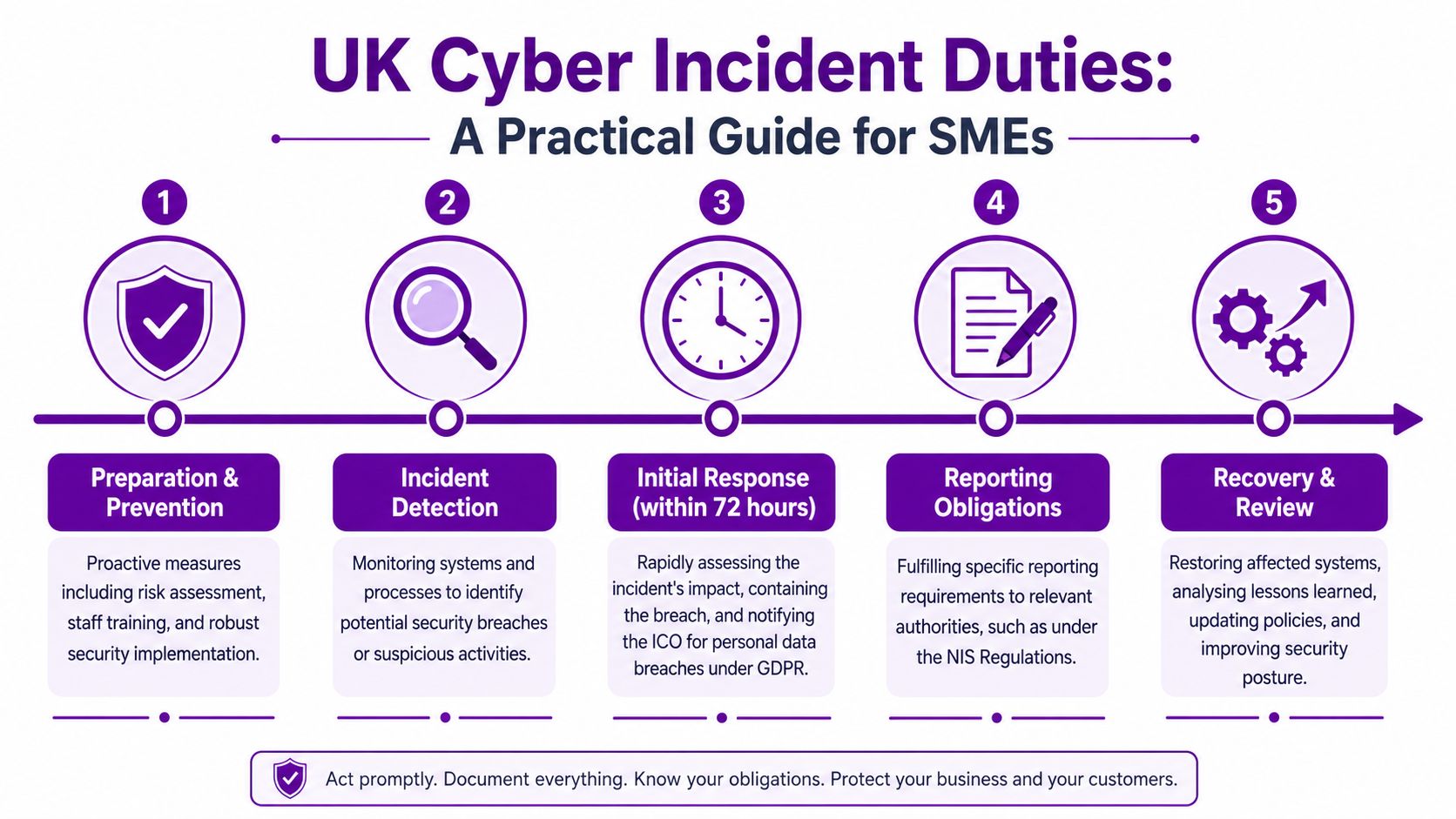
When the 72-hour clock becomes important
For many SMEs, the most relevant issue is personal data. If an incident risks people's rights and freedoms, the ICO may need to be notified within that timeframe. In practice, that means you can't wait until every technical detail is perfect before acting. You need enough structure to assess impact quickly.
That's one reason GDPR compliance for SMEs can't sit in a folder separate from IT operations. Your cyber incident response process and your data protection obligations have to meet in the same place.
What directors and managers should insist on during an incident
When an event is unfolding, these are the records that matter:
- A timeline of discovery. Note when the issue was first spotted, who raised it and what was observed.
- Actions taken. Record account lockouts, password resets, mailbox restrictions, device isolation and communication steps.
- Evidence preserved. Keep relevant logs, alerts, emails and screenshots where appropriate.
- Decision-making notes. If you decide a breach isn't notifiable, document why.
A rushed verbal decision with no written record is difficult to defend later.
The difference between generic good practice and a legal duty
There's a lot of incident response advice online that blends standards, frameworks and legal requirements together. For an SME, that creates confusion.
Keep the distinction simple:
| Area | What it means in practice |
|---|---|
| Good operational practice | Having a written plan, trained staff, alert monitoring and recovery procedures |
| Data protection duty | Assessing whether personal data is involved and whether notification thresholds are met |
| Sector-specific obligations | Additional reporting or contractual duties in regulated sectors or public sector supply chains |
| NIS-related duties | More formal reporting expectations for organisations covered by those regulations |
What usually goes wrong
Most reporting failures don't happen because a business ignored the law. They happen because the first day of the incident was disorganised.
Common problems include:
- Nobody knows who owns the decision.
- Technical staff start fixing things before evidence is captured.
- Leadership hears about the issue too late.
- The business discovers too late that customer or staff data may be involved.
If your plan solves those four problems, you're already in much better shape than most.
Building Your SME Incident Response Team
An SME doesn't need a large formal incident response department. It needs a small set of clearly assigned roles. One person may cover more than one role, but each responsibility still needs an owner.
The mistake I see most often is assuming “the IT person” can handle everything. During a live incident, technical work, decision-making, communication and legal judgement all compete for attention. If they all sit with one person, delays follow.
The roles that actually matter
Think in terms of functions, not job titles.
| Role | Typical Person | Key Responsibilities |
|---|---|---|
| Incident Lead | Managing Director, Operations Director, senior manager | Decides priorities, approves disruptive actions, keeps leadership aligned |
| Technical Lead | Internal IT manager, senior engineer, external IT partner | Investigates, contains, coordinates Microsoft security actions, preserves evidence |
| Communications Lead | Office manager, HR lead, senior administrator | Handles staff messaging, customer updates, supplier communications |
| Data Protection Lead | DPO, senior manager, compliance contact | Assesses personal data impact, supports ICO-related decisions, keeps records |
| Business System Owner | Department lead | Confirms what “normal” looks like, helps judge operational impact on key systems |
One person can wear two hats, but not five
In a smaller business, the Operations Director may also be the Incident Lead and Communications Lead. That's realistic. What doesn't work is leaving every decision until the moment of crisis.
A good team design answers these questions in advance:
- Who can suspend a user account immediately
- Who approves shutting down access to a critical service
- Who speaks to staff
- Who checks whether personal data may be involved
- Who contacts external technical support
Senior consultant's view: The best SME plans are usually short. A two-page role sheet that people will use beats a twenty-page document nobody opens.
Where an external partner fits
An outside specialist can make the difference between a contained incident and a messy one. An external team can provide technical depth, independent judgement and out-of-hours response capacity that most SMEs can't justify internally.
If you need support structuring those responsibilities, specialist IT security expertise can be brought in as part of the response team rather than treated as a separate afterthought.
The point isn't to make the structure complicated. It's to make sure the right decisions don't wait for the wrong person.
Your Incident Response Playbook for Microsoft 365
Most incident response frameworks sound sensible until you try to use them in a real SME. “Contain the threat” is fine as a theory. Under pressure, what staff need to know is whether that means disabling sign-in, isolating a device, blocking external forwarding, reviewing inbox rules or pulling audit records.
That's why a Microsoft 365 playbook needs to translate each phase into actions people can perform.
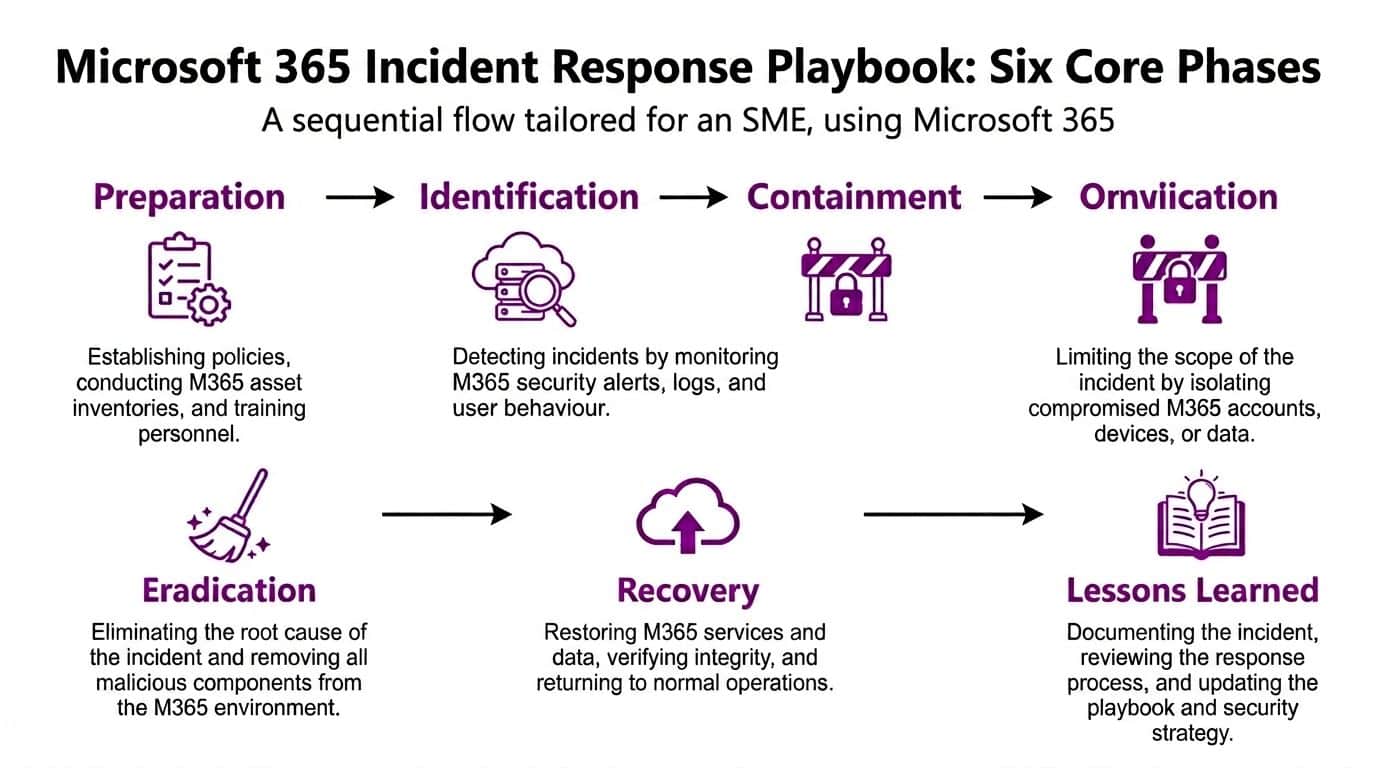
A written plan matters more than many business owners realise. This incident response planning analysis states that only 15% of UK businesses have a formal written incident response plan, and that organisations with documented plans reduce mean time to detect and mean time to respond by an average of 30 to 50% compared with those without. That improvement makes sense in practice. Clear playbooks cut out hesitation.
Preparation
Preparation is where affordable incident response is won or lost. If your Microsoft tenant isn't configured to generate useful alerts, retain the right logs and enforce strong access controls, the rest of the response becomes guesswork.
For an SME, preparation usually includes:
- Defining critical assets. Identify your key mailboxes, finance users, shared document locations, line-of-business applications and privileged accounts.
- Turning on visibility. Ensure Microsoft 365 audit logging and relevant Defender alerts are enabled and reviewed.
- Restricting privilege. Keep administrator access limited, controlled and documented.
- Creating simple call trees. Staff need one route for urgent reporting.
A practical preparation step is mapping your top incident types. In many SMEs, those are likely to be compromised accounts, phishing, suspicious mailbox behaviour, malware on an endpoint and unauthorised file access.
Detection and analysis
This phase answers two questions. Is this a real incident, and how bad is it?
Useful Microsoft-based indicators include unusual sign-in behaviour, impossible travel alerts, suspicious inbox rules, mass file activity, malware detections, unusual privilege changes and reports from users who clicked something they shouldn't have.
The first hour matters. Don't chase every theory at once. Triage with a short checklist:
- What happened
- Which user, device or service is involved
- Is the threat still active
- Could data be leaving the environment
- What evidence must be preserved before changes are made
Here's a practical explainer worth watching before you build your own runbook:
Containment
Containment is where SMEs often hesitate because nobody wants to interrupt a member of staff or stop a service. That hesitation is expensive.
In Microsoft environments, containment often means actions such as:
- Suspend sign-in for a compromised account in Entra ID
- Revoke active sessions so an attacker loses current access
- Isolate a device in Microsoft Defender for Endpoint
- Block malicious sender patterns in Defender for Office 365
- Restrict sharing or access to affected SharePoint or OneDrive data
Some of these actions are disruptive. That's exactly why the approval path must be agreed before an incident.
If you wait for complete certainty before containment, you usually give the attacker more time than you give your own team.
Eradication
Containment stops the spread. Eradication removes the cause.
In a Microsoft 365 context, eradication may include removing malicious inbox rules, resetting credentials, reviewing MFA settings, removing unauthorised app consents, deleting malicious files, patching the affected endpoint and checking for persistence mechanisms in cloud or device settings.
This is also the stage where many teams discover the original issue wasn't the whole story. A mailbox compromise may have led to internal phishing. A stolen password may have exposed a second account with privileged access. Eradication needs that wider check.
Recovery
Recovery isn't just restoring access. It's restoring access safely.
Bring users and systems back in a controlled sequence:
| Recovery task | What “done” should mean |
|---|---|
| User account restored | Password reset complete, sessions revoked, MFA confirmed, suspicious rules removed |
| Device returned to service | Device scanned, cleaned or rebuilt, patches applied, user validated |
| Shared data reopened | Permissions reviewed, integrity checked, unusual sharing removed |
| Business process resumed | Department confirms normal operation, not just IT connectivity |
A common mistake is reopening everything the moment the visible problem disappears. A better approach is phased recovery with extra monitoring on the affected account, device or data set.
Post-incident review
This phase is where a modest incident becomes useful rather than just painful.
The review should answer:
- What was the initial access route
- How quickly was it detected
- Which controls worked
- Where did approval or communication slow down
- What change would have prevented or limited it
For businesses already invested in Microsoft cloud services, this is often where automation starts to make sense. A partner such as F1Group can help turn recurring manual actions into repeatable workflows across Microsoft 365, Azure, Defender and Sentinel, especially where SMEs need structure rather than a fully staffed in-house security function.
The best playbooks are living documents. If an incident exposed a gap, update the playbook while the lessons are still fresh.
Using Microsoft Security Tools for Effective Response
A lot of SMEs already own more security capability than they realise. The issue is that the tools sit in separate consoles, alerts go unread, and nobody has connected them into a response process.
That matters because, as noted in the prompt context, 79% of UK organisations reported using Microsoft 365, yet 61% of SMEs still lack a formal incident response plan, despite M365 mailboxes being a primary target. The gap isn't always tooling. It's operational use.
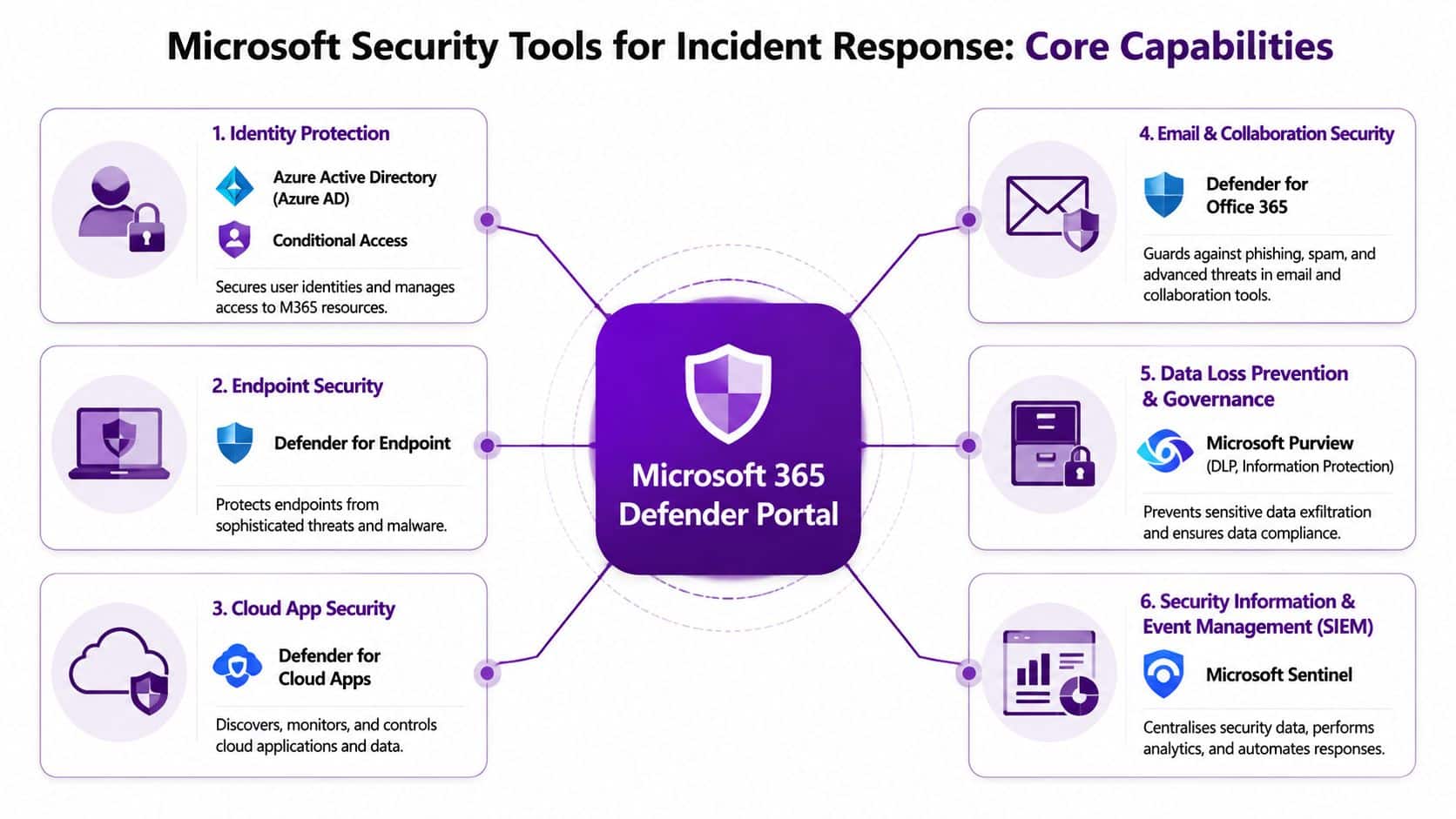
Think in roles, not product names
The Microsoft stack becomes easier to understand when you map each tool to a response job.
| Tool area | Plain-English role in an incident |
|---|---|
| Microsoft Defender for Office 365 | Spots and blocks suspicious email, links and attachments |
| Microsoft Defender for Endpoint | Detects and isolates compromised laptops and desktops |
| Entra ID and Conditional Access | Controls sign-in, session revocation and access restrictions |
| Microsoft Purview | Helps investigate data handling and reduce unauthorised data movement |
| Microsoft Sentinel | Brings alerts and logs together for correlation, investigation and automation |
How they work together in a real phishing incident
Take a common scenario. A user receives a convincing email, enters credentials on a fake page, and an attacker signs into Microsoft 365.
Here's what good tooling should enable:
- Defender for Office 365 flags the original message or similar campaign activity.
- Entra ID shows suspicious sign-in behaviour.
- Defender portals reveal whether follow-on activity took place, such as mailbox manipulation or internal message forwarding.
- Sentinel correlates the signals so the response team sees one joined-up incident rather than separate warnings.
- Purview and audit logs help establish whether sensitive information was accessed or moved.
That joined-up visibility is the difference between “we reset the password” and “we know what happened, what changed, what was touched and what still needs checking”.
What works for SMEs and what doesn't
What works:
- A small number of high-confidence alerts routed to people who will act
- Conditional Access policies that make compromised credentials less useful
- Mailbox and audit visibility that lets you investigate without guessing
- Device isolation capability for situations where a machine can't stay online safely
What usually doesn't work:
- Buying extra tools without configuring the basics
- Relying on default settings and assuming they fit your risk
- Sending all alerts to a shared inbox nobody owns
- Treating Microsoft licensing as the same thing as incident readiness
Buying a security feature and operationalising it are two different jobs.
The command centre idea
For businesses growing beyond ad hoc response, Microsoft Sentinel is often the point where security operations start to become manageable. It acts as a central view across logs, identities, cloud apps, endpoints and alerting.
That doesn't mean every SME needs a fully built-out SIEM from day one. In many cases, a staged approach is more sensible. Start with the incidents you're most likely to face, connect the most useful data sources, tune noisy alerts and automate a small number of repeat actions.
That's a better route than deploying everything at once and drowning in noise.
Testing Your Plan with a Tabletop Exercise
A tabletop exercise sounds formal, but for most SMEs it's a structured discussion around a realistic incident. No special lab. No complicated simulation. Just the right people in a room, walking through what they'd do.
That simple exercise is often where businesses discover the weak points. Not technical weaknesses first, but practical ones. Who has authority to disable an executive account? Who tells staff not to use email? Who decides whether customer notification is needed? Those gaps are much cheaper to find in a meeting than during a live breach.

A straightforward scenario to use
Try this one.
A key supplier contacts you and says they've suffered a cyber incident. They believe email correspondence with your organisation may have been accessed. On the same morning, one of your users reports a strange Microsoft 365 login prompt and a finance team member notices an unexpected mailbox rule.
That scenario is useful because it tests more than one thing at once. It raises supplier risk, account compromise, internal communication and possible data exposure.
Questions to put to the team
Use open discussion, but keep it disciplined. Ask:
- Who declares this an incident
- Who leads the response in the first hour
- What Microsoft accounts or devices would be checked first
- Would any account be suspended immediately
- How would staff be told what to do
- What evidence would be preserved
- At what point would legal or data protection advice be needed
- Who would speak to the supplier and any affected customers
What a good exercise should produce
A useful tabletop exercise ends with practical fixes, such as:
- A missing contact list gets created
- An unclear approval path gets assigned
- A logging gap gets corrected in Microsoft 365 or Azure
- A vague playbook step gets rewritten into a concrete action
“If the team can't explain the first hour clearly, the plan isn't ready.”
That's why regular discussion matters. It helps people build decision-making muscle before pressure arrives.
Your Next Steps and When to Call for Help
Cyber incident response doesn't need to look like an enterprise programme to be effective. For an SME, it needs to be clear, tested and tied to the Microsoft tools you already use. That's achievable.
The NCSC-aligned guidance referenced here recommends that organisations prepare and regularly test an incident response plan with clear roles, escalation paths and communication protocols, and keep it updated at least annually. That's sensible advice because incidents don't fail on theory. They fail on timing, ownership and confusion.
Call for expert help immediately if you see any of these signs
- Ransomware indicators such as inaccessible files, mass encryption behaviour or ransom messages
- Confirmed account compromise involving senior staff, finance users or administrators
- Evidence of data theft or unusual access to sensitive files and mailboxes
- Multiple affected systems suggesting the problem isn't isolated
- Unclear regulatory impact where personal data may be involved
- Loss of visibility because logs, devices or accounts can't be trusted
If you're unsure, that's often the point to escalate rather than wait. Fast judgement matters as much as fast tooling.
F1Group helps organisations across the East Midlands put practical cyber incident response in place, from writing a workable plan and configuring Microsoft 365 security controls to supporting live incidents and post-incident reviews. If you want help turning policy into something your team can use, Phone 0845 855 0000 today or Send us a message.