
Is your business GDPR compliant?
Years after its introduction, the GDPR remains a cornerstone of data protection in the UK. For small and mid-sized businesses, compliance isn't just about avoiding fines. It's about protecting trust, preserving commercial credibility, and making sure daily operations can stand up to scrutiny when something goes wrong.
Many SMEs assume they're covered because they use Microsoft 365, have multi-factor authentication switched on, and published a privacy notice years ago. That isn't enough. Personal data now sits across Exchange Online, Teams chats, SharePoint libraries, OneDrive folders, Dynamics 365 records, Azure storage, backups, mobile devices, and third-party integrations. A compliance gap usually appears in the hand-offs between those systems, not in the brochure description of the platform.
That matters more than ever. Data breach notifications in the UK and EEA reached an average of 443 per day by early 2026, a 22% rise reported by DLA Piper, as discussed in this UK GDPR compliance checklist and strategic data governance analysis. If your team can't show what data you hold, why you hold it, where it sits, and how you respond to access requests or incidents, you're exposed.
This practical 10-step GDPR compliance checklist is written for UK SMEs working in Microsoft 365 and Azure every day. It focuses on what works, what commonly breaks, and how to make compliance operational rather than theoretical. If your teams also handle customer calls, it's worth reviewing how to improve agent training with call recording without creating a hidden data protection problem.
1. Establish a Data Protection Impact Assessment Process
A DPIA process is where sensible GDPR programmes start. If you only produce one when someone in leadership gets nervous about a new project, you're already behind. High-risk processing needs structured review before deployment, not after a complaint, a breach, or an awkward customer question.
For Microsoft-led estates, that often means assessing new uses of Azure services, Dynamics 365 modules, Teams voice recording, HR systems in SharePoint, or Power Platform apps handling sensitive information. Healthcare providers rolling out patient systems, financial firms building customer workloads in Azure, and charities moving donor records to the cloud all need the same discipline. They must document how the processing works, where the risk sits, and what controls reduce that risk.

What a usable DPIA looks like
A workable DPIA isn't a generic template with half the fields skipped. UK GDPR compliance requires DPIAs to cover five technical elements: an overview of processing activities, purpose and legal basis, necessity and proportionality, risks to data subjects' rights, and documented mitigation measures, as set out in this UK GDPR checklist guidance on DPIAs and breach response.
For SMEs on Microsoft 365 and Azure, the practical controls usually include:
- Access design: Restrict access with role-based permissions in Entra ID, SharePoint, Teams and business apps.
- Encryption controls: Confirm encryption at rest and in transit for cloud data stores and mobile access paths.
- Operational review: Revisit the DPIA after system changes, major workflow changes, or new integrations.
Practical rule: Start with the processing activity your staff would struggle to explain under pressure. That's usually where your weakest documentation sits.
The mistake I see most often is treating the DPIA as legal paperwork owned by compliance alone. It works better when IT, operations, and the business owner sit in the same session and map what happens in practice, not what the policy says should happen.
2. Implement Comprehensive Data Inventory and Mapping
Most SMEs underestimate how widely personal data spreads once Microsoft 365 adoption matures. Customer records start in Dynamics 365, move into Outlook, land in Excel exports, get attached in Teams, copied into SharePoint, synchronised locally, then backed up elsewhere. If you can't map that journey, you can't manage rights requests, retention, or processor risk properly.
A proper inventory should cover live systems, shared mailboxes, archived data, legacy folders, spreadsheets, mobile access, and third-party services connected to Microsoft 365 or Azure. Manufacturing firms often find customer and supplier details split across old finance systems and modern cloud tools. Charities usually discover donor and beneficiary data sitting in spreadsheets that never made it into the official CRM. Professional services firms often learn that email contains more regulated client data than their case management platform.
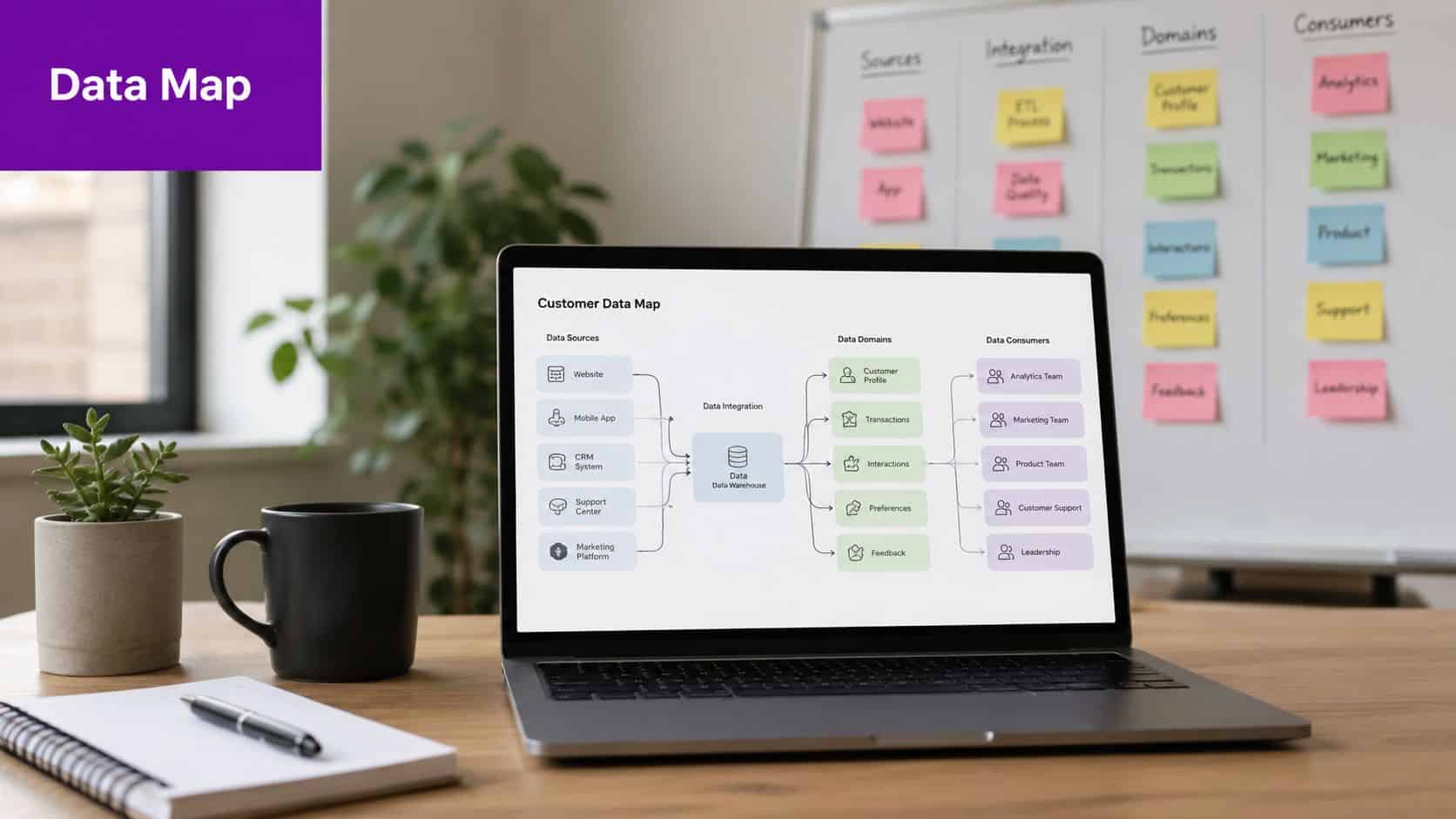
Where Microsoft estates usually hide data
The inventory has to reflect reality, not architecture diagrams. In practice, that means checking:
- Exchange Online: Mailboxes, shared mailboxes, journaling, attachments, and mailbox delegates.
- SharePoint and OneDrive: Department libraries, personal storage, version history, and external sharing.
- Teams and Power Platform: Chat content, meeting files, forms, Power Apps inputs, and automated flows.
- Azure workloads: Storage accounts, databases, logs, app services, and test environments.
If your teams rely heavily on email, review these secure email PII handling strategies. Email remains one of the easiest ways for personal data to bypass every neatly documented workflow.
Good mapping is maintained, not finished. Quarterly review is sensible, especially when new departments adopt Copilot, Power BI, Power Apps, or new SaaS tools that sync with Microsoft identities.
3. Create and Maintain a Record of Processing Activities
Your Record of Processing Activities is the backbone of a defensible GDPR position. If someone asks what personal data you process and why, the RoPA is where the answer should live. If it doesn't exist, or if it only covers your main line-of-business system, your accountability story falls apart quickly.
Under Article 30, organisations must maintain a RoPA that details the types of personal data processed, the purposes for processing, retention periods, categories of data subjects, and the technical and organisational security measures in place, as summarised in this GDPR compliance guide covering Article 30 requirements. That includes obvious data such as names and financial details, but also less obvious processing in logs, alerts, tickets, recordings, and collaboration platforms.
What belongs in the RoPA
For UK SMEs using Microsoft tools, the RoPA should cover processing across Teams, SharePoint, Exchange Online, Dynamics 365, Azure-hosted applications, and any linked third-party services. An insurance broker might separate underwriting, claims handling, marketing, and regulatory reporting into distinct processing activities. An IT services provider should record client contact data, support tickets, audit logs, and security telemetry where that can identify individuals.
Use a structure people can maintain. A spreadsheet is acceptable if ownership is clear and updates are controlled. Specialist software helps, but it doesn't rescue a team that hasn't agreed what counts as a processing activity.
A weak RoPA usually tells me the organisation doesn't yet know where compliance ownership sits.
One practical approach is to assign each department head responsibility for the business description, then have IT and compliance complete the systems, legal basis, retention, and security fields. That gets you something grounded in real operations rather than a top-down document no one recognises.
4. Designate a Data Protection Officer or Assign Clear Responsibility
Who makes the call when a subject access request lands at 4:30pm, a supplier wants to connect to Microsoft 365 data, or a potential breach appears in a Teams chat export? In many SMEs, that answer is still unclear. That is where GDPR control starts to slip.
A formal Data Protection Officer is only required in specific cases under UK GDPR, such as public authorities or organisations whose core activities involve large-scale monitoring or large-scale processing of special category data. Many UK SMEs using Microsoft 365 and Azure will not meet that threshold. They still need a named owner for data protection, with enough authority to make decisions across IT, operations, HR, and leadership.
For Microsoft-based environments, this matters in day-to-day administration. Someone needs to decide how retention settings are applied in Microsoft Purview, who reviews new Azure services before they go live, how DSAR searches are handled across Exchange Online, Teams, and SharePoint, and when legal advice is needed. If nobody owns those decisions, the business relies on informal judgment, and that usually fails under time pressure.
What good ownership looks like
Start with a named person and a written remit. Title matters less than authority. In practice, I usually see this work best when the role sits with an IT Director, Head of Compliance, Operations Director, or an external adviser backed by a senior internal sponsor.
The role should include:
- Clear accountability: A written appointment or role profile that sets out decision rights and reporting lines.
- Access to the right systems and people: The owner must be able to work with Microsoft 365 administrators, Azure teams, HR, finance, and department heads.
- Escalation rules: Staff need to know when issues stay operational and when they go to leadership, legal counsel, or an external specialist.
- Time and budget: Privacy ownership fails when it is treated as a spare-hours task.
- Platform awareness: The responsible person should understand how your Microsoft estate handles personal data, including Purview, Entra ID, Intune, Teams, SharePoint, and any Azure-hosted applications.
There is a trade-off here. Assigning the role to your IT lead gives you direct access to systems, logs, and configuration decisions, but it can create blind spots if that person also approves the same processing changes they are meant to challenge. Assigning it to compliance or operations can improve independence, but those teams often need stronger technical support to assess Microsoft controls properly. For many SMEs, the practical answer is shared working responsibility with one named owner.
A mid-sized manufacturer might appoint the IT Director as privacy lead, with monthly review input from HR and operations. A charity handling beneficiary data may need tighter oversight because volunteers, case workers, and fundraising teams often process personal data across different Microsoft 365 workloads. Where internal capability is thin, external support from a specialist such as F1Group can help translate GDPR duties into actual Microsoft 365 and Azure decisions, rather than leaving ownership as a job title on paper.
5. Develop and Document Data Processing Agreements
A surprising number of businesses believe using a major cloud provider solves the processor contract issue. It doesn't. Your responsibilities as controller remain, and every processor handling personal data on your behalf needs suitable contractual terms.
That includes Microsoft 365, Azure-connected SaaS tools, payroll platforms, HR systems, email marketing tools, outsourced IT support, document signing services, telephony platforms, and specialist vertical software. Manufacturing firms often miss payroll and production support vendors. Charities often miss fundraising platforms and volunteer tools. Professional services firms often miss niche practice systems because procurement never flagged them as data processors.
What to check in each agreement
A usable DPA should match the actual service, not just sit in a contract folder. Review whether it addresses processing scope, security obligations, sub-processors, assistance with data subject rights, breach notification, deletion or return of data, and audit or assurance expectations.
For Microsoft-based environments, confirm that your use of Microsoft services is covered under the relevant service terms and that your own RoPA identifies Microsoft and any linked processors properly. Also check whether third-party applications pull data from Microsoft 365 through Graph API, mailbox integrations, or SharePoint connectors. Those tools often expand the processor chain in ways the business hasn't documented.
What works is a processor register tied to procurement and change control. What doesn't work is reviewing contracts only when finance renewals land.
6. Establish Data Subject Rights Request Procedures
What happens if a customer, employee, or applicant emails your business today and asks for a copy of their personal data?
For many UK SMEs, the problem is not legal intent. It is operational control. Requests arrive through shared inboxes, HR mailboxes, support queues, LinkedIn messages, and account manager email threads. They do not arrive neatly labelled as a DSAR, and they do not wait for the person who usually handles compliance to come back from leave. Under UK GDPR, you need a process that can recognise a valid request, verify identity, collect the right data, and issue a clear response within the statutory timeframe.
For Microsoft 365 and Azure estates, that process should be built around the tools your team already uses. Log the request in your service desk or compliance queue the day it arrives. Assign a named owner. Use Microsoft Purview Content Search or eDiscovery to search Exchange Online, SharePoint, OneDrive, and Teams data in a repeatable way. If the business still relies on manual Outlook searches and local folder trawling, responses will be slow, inconsistent, and hard to defend.
The trade-off is usually speed versus over-collection. Broad searches pull in duplicates, internal commentary, and third-party personal data that may need review or redaction. Narrow searches reduce review effort but increase the chance that relevant data is missed. The right answer is a documented search method, scoped by system, date range, custodian, and data type.
What a workable procedure should include
A usable DSAR procedure for a Microsoft-based SME should cover:
- Intake and recognition: Frontline staff in HR, sales, reception, and customer service need plain guidance on what counts as a request.
- Identity checks: Confirm the requester is who they say they are before releasing data.
- Case logging: Record receipt date, deadline, owner, systems searched, decisions made, and response date.
- Search steps: Define how to search Microsoft 365 data, line-of-business systems, and any Azure-hosted applications.
- Review and redaction: Remove material that should not be disclosed, including other people's data where appropriate.
- Response templates: Keep wording consistent for access, rectification, erasure, restriction, and objection requests.
- Escalation rules: Route complex cases, employee disputes, or excessive requests to legal or senior compliance review.
Common examples are predictable. Recruitment teams hold CVs, interview notes, email chains, and assessment feedback. Customer service teams hold account history, tickets, call notes, and attachments. Finance may still need to keep some records even where someone asks for erasure. That is where weak procedures usually break down. Staff understand the request in principle but cannot judge what must be disclosed, what can be withheld, and what must be retained for tax, employment, or legal reasons.
This area often overlaps with employee data, especially in HR investigations, sickness records, monitoring, and manager notes. For a useful external perspective, see this guide for SMB leaders on employee privacy.
Keep the workflow simple enough to run under pressure. I usually recommend a short playbook, a standard triage form, and a tested search checklist for Microsoft 365. If your team already has an incident process, align DSAR escalation and evidence handling with your incident response planning process. F1Group often helps clients turn this from a policy document into a repeatable admin process that operations, HR, and IT can run.
7. Implement Data Breach Notification and Response Procedures
A breach procedure only matters if people can use it under stress. That's where many GDPR policies fail. They read well in a document review and fall apart the moment a mailbox compromise, ransomware event, misdirected email, or exposed SharePoint link appears on a Friday afternoon.
Under Article 33, organisations face a strict 72-hour breach notification window, and UK guidance expects timely assessment, documentation, and response, as outlined earlier in the DPIA guidance. For medium UK businesses, that pace demands practical logging, evidence capture, escalation rules, and technical visibility. It isn't enough to say the IT team will investigate.

What response looks like in Microsoft 365 and Azure
If you use Microsoft tools, your breach playbook should include audit logs, sign-in logs, Defender alerts, mailbox tracing, Azure activity logs, and preservation steps for evidence. A compromised account in Exchange Online can be both a cyber incident and a personal data breach. Your team has to assess both angles quickly.
Build your response process around:
- Detection: Alerting and logging across Microsoft 365 and Azure.
- Containment: Account lockout, token revocation, access review, link removal, or workload isolation.
- Assessment: Identify whose data was involved, what happened, and whether rights and freedoms are at risk.
- Notification: Prepare regulator and affected-individual communications if required.
- Review: Record root cause, corrective actions, and control gaps.
F1Group has published practical guidance on incident response planning for business IT teams, and it fits well with GDPR obligations when you need a structured operational model. For people managers and leaders, this guide for SMB leaders on employee privacy is also useful because internal incidents often involve staff data, not just customer data.
8. Apply Privacy by Design and Default Principles
Privacy by design sounds abstract until you compare two projects. One collects only the fields it needs, restricts access from day one, applies retention automatically, and documents its decisions. The other launches quickly, stores everything, grants broad access "for convenience", and promises to tighten controls later. The second project creates most of the remediation work I get asked to fix.
For Microsoft 365 and Azure estates, privacy by design should influence tenant settings, data classification, sharing defaults, app registration controls, conditional access, storage architecture, and how new workloads are approved. SaaS teams building customer systems in Azure, charities rebuilding volunteer processes, and manufacturers deploying analytics platforms all face the same question. Will privacy controls be designed in, or bolted on?
Practical Microsoft controls that support default privacy
Use the platform features you already license before buying more tools. Microsoft Purview, sensitivity labels, retention controls, data loss prevention, access reviews, Defender capabilities, and Azure policy controls can all support privacy by default when configured properly.
Useful habits include:
- Data minimisation: Remove unnecessary fields from forms, lists, and Power Apps.
- Restricted sharing: Limit anonymous and external sharing unless there's a business case.
- Role-based access: Give departments access to what they need, not to everything in the site collection.
- Default protection: Label and protect sensitive files automatically where the business case supports it.
If you're tightening controls in Microsoft 365, F1Group's guidance on data loss prevention policies for Microsoft environments is a sensible companion to a privacy by design review. The trade-off is straightforward. Stronger defaults can create some user friction, but weak defaults create investigations, exceptions, and repeated clean-up.
9. Establish Data Retention and Deletion Policies
Retention is where legal, operational, and technical teams usually disagree. One side wants to keep everything "just in case". Another wants aggressive deletion. GDPR requires a more disciplined approach. Keep personal data only as long as necessary for the purpose you defined, while still meeting legal, audit, tax, and dispute obligations.
This is also where your RoPA and lawful basis decisions either support the policy or expose contradictions. If your privacy notice says one thing, your mailbox archives do another, and your SharePoint libraries do something else entirely, you don't have a policy. You have drift.
Turn storage limitation into system rules
Retention policies work best when they are attached to actual systems, not left as a PDF on the intranet. In Microsoft 365, that often means using Purview Data Lifecycle Management, retention labels, retention policies, and disposal reviews where appropriate. In Azure and line-of-business systems, it may mean database rules, scripted deletion, archive design, or manual control points.
A practical SME retention schedule should include:
- Category: What data you hold, such as HR files, customer records, support tickets, CCTV, or marketing contacts.
- Purpose: Why you hold it and which business process depends on it.
- Retention period: The documented time limit or trigger for review.
- Deletion method: How it is removed or anonymised across live systems, exports, and backups.
- Exceptions: Litigation holds, financial obligations, safeguarding, or sector-specific requirements.
Don't overlook departed staff accounts, Teams chat history, and old project sites. They often contain years of personal data with no active owner. Deletion needs governance, but indefinite storage is usually harder to defend than a documented, sensible retention rule.
10. Conduct Regular GDPR Training, Compliance Audits, and Governance Reviews
A GDPR compliance checklist isn't durable unless staff understand it and leadership reviews whether it still reflects reality. Policies don't fail on paper. People fail to follow them, systems drift, permissions expand, and nobody notices until a request, complaint, or incident exposes the gap.
The European GDPR assessment tools market is projected to reach USD 1181 million by 2034, growing at a CAGR of 18.83% from 2026 to 2034, according to this forecast on GDPR assessment tools adoption. That projection reflects a wider shift towards automated compliance tooling, but software alone won't fix weak governance. Training, audit discipline, and management review still do the heavy lifting.
Audit what people actually do
Role-based training works better than annual generic slides. HR needs guidance on employee records and access requests. Sales teams need rules for contact data and marketing lists. IT needs to understand logs, retention, DLP, breach handling, and access governance across Microsoft 365 and Azure.
Governance reviews should test:
- Policy accuracy: Do your documents match live systems and current practices?
- Control effectiveness: Are access controls, retention rules, and alerting configured as intended?
- Staff readiness: Can teams recognise DSARs, report incidents, and escalate correctly?
- Management oversight: Are actions tracked, funded, and reviewed at senior level?
For Microsoft-focused organisations, periodic technical checks matter just as much as policy reviews. F1Group's article on security awareness and training is a practical reference for building a training rhythm that supports the wider compliance programme.
Training should answer one question for each role. What do I do differently tomorrow?
GDPR Compliance: 10-Point Comparison
| Item | Implementation complexity | Resource requirements | Expected outcomes | Ideal use cases | Key advantages |
|---|---|---|---|---|---|
| Establish a Data Protection Impact Assessment (DPIA) Process | Medium–High, cross‑departmental analysis and legal input | Privacy/legal expertise, time, documentation, possible consultancy | Identifies risks and mitigation plans; audit trail for regulators | New high‑risk projects, cloud migrations, large‑scale processing | Detects compliance gaps early; demonstrates accountability |
| Implement Comprehensive Data Inventory and Mapping | High, discovery across legacy, cloud, and third‑party systems | Automated discovery tools, IT time, stakeholder interviews, ongoing maintenance | Full visibility of data flows; faster DSARs and governance | M&A, legacy system consolidation, AI/Copilot readiness | Enables DSARs, uncovers shadow IT, supports analytics |
| Create and Maintain a Records of Processing Activities (ROPA) | Medium, detailed, continuous documentation | Compliance team or DPO, templates or register system, regular updates | Centralised register of processing; audit‑ready evidence | Organisations with regular personal data processing, regulated sectors | Proves GDPR compliance; simplifies breach assessments |
| Designate a Data Protection Officer (DPO) or Assign Clear Responsibility | Low–Medium, role assignment plus authority allocation | Qualified internal or external DPO, training, budget | Clear accountability and single contact for data protection matters | All organisations (mandatory for some); where expertise is lacking | Centralised oversight; faster regulatory liaison; expert guidance |
| Develop and Document Data Processing Agreements (DPAs) | Medium, contractual negotiation and review | Legal review, contract management, vendor engagement | Enforceable vendor obligations and security commitments | Use of cloud, SaaS, or outsourced processors | Legally binds processors; reduces vendor liability; supports transfers |
| Establish Data Subject Rights Request Procedures | Medium–High, verification, retrieval, multi‑system responses | Ticketing/eDiscovery tools, trained staff, defined workflows | Timely, auditable DSAR responses; reduced regulatory risk | Customer‑facing, HR‑heavy, healthcare, finance organisations | Ensures legal deadlines; builds trust; standardises responses |
| Implement Data Breach Notification and Response Procedures | High, detection, forensics, cross‑team coordination | Monitoring/logging, incident response team, legal & comms, forensic support | Rapid containment, compliant notifications, documented incidents | Organisations holding large volumes of personal data or critical services | Minimises damage; maintains regulator transparency; preserves trust |
| Apply Privacy by Design and Default Principles | High, embeds privacy into architecture and processes | Security architects, secure SDLC, testing, ongoing monitoring | Built‑in protections, fewer retrofits, stronger privacy posture | New systems development, cloud‑native projects, product design | Prevents breaches early; cost‑efficient long‑term; privacy‑first reputation |
| Establish Data Retention and Deletion Policies | Medium, policy definition and technical enforcement | Legal advice, retention tooling, automated deletion workflows, audits | Reduced data exposure, lower storage costs, retention compliance | Regulated industries, organisations with large archives | Limits liability; enforces data minimisation; saves storage costs |
| Conduct Regular GDPR Training, Compliance Audits, and Governance Reviews | Medium, ongoing program with periodic audits | Training providers, audit resources, time for staff, budget for external audits | Improved staff awareness, identified gaps, continuous compliance improvement | All organisations; those seeking formal compliance assurance | Reduces human error risk; demonstrates commitment; provides remediation roadmap |
Your Next Steps Towards GDPR Compliance
How confident are you that your GDPR controls still match the way your business uses Microsoft 365 and Azure today?
For UK SMEs, compliance usually weakens in ordinary ways. A team adds a new SaaS integration, SharePoint permissions drift, retention labels are left half-configured, or DSAR handling depends on one person who is away when a request arrives. The policy may still look fine on paper. The operational reality is often different.
A workable GDPR position comes from matching documentation, ownership, and Microsoft configuration to the data flows you run every day. That means checking whether Purview, Entra ID, Exchange, SharePoint, Teams, endpoint controls, and Azure logging are set up to support your policies, not inadvertently conflict with them. It also means accepting the trade-offs. Stricter sharing controls can slow collaboration if they are rolled out badly. Longer retention can help with accountability while increasing exposure and storage overhead. Automation improves consistency, but someone still needs to review exceptions and keep the rules current.
For East Midlands businesses, that Microsoft focus matters. Many GDPR checklists stay too generic to be useful once you get into tenant settings, access reviews, audit trails, deletion rules, and supplier access. A checklist for a UK SME should tell you what to document, which controls to test, and where to look inside Microsoft 365 and Azure when something does not line up.
If your current checklist has not kept pace with cloud changes, role changes, or new business systems, it is time to review it properly.
F1Group works with East Midlands organisations using Microsoft 365, Azure, Dynamics 365, Power Platform, cyber security tools, and managed IT services. That makes them a practical option for SMEs that need help turning GDPR requirements into usable controls, realistic processes, and a compliance roadmap that fits the systems already in place.
F1Group helps organisations across the East Midlands strengthen GDPR compliance with practical Microsoft-focused support. If you need help reviewing your Microsoft 365 and Azure configuration, tightening data handling processes, or building a workable compliance roadmap, phone 0845 855 0000 today.