
Right now, your IT team’s requests are probably scattered across email, Teams chats, voicemails, and half-finished follow-ups. Someone swears they already told support about the laptop issue, another person can’t remember whether the printer fault was assigned, and the only record of a password reset is buried in a mailbox no one checks properly. That’s not service management, it’s hope dressed up as process.
A proper ticketing system replaces that drift with structure. Every request gets a unique ID, a timestamp, a status, and an owner, so work can be prioritised, escalated, and closed with traceability rather than guesswork. That’s the same operational logic the UK helped pioneer early, from pre-paid “checks” at Theatre Royal, Covent Garden in 1755 to the first bona fide ticketing agency in London in 1786, which sold tickets for performances at the Royal Opera House and marked a shift towards structured, intermediary-based ticketing and controlled throughput, a pattern that still matters in modern service desks and event operations (UK ticketing history).
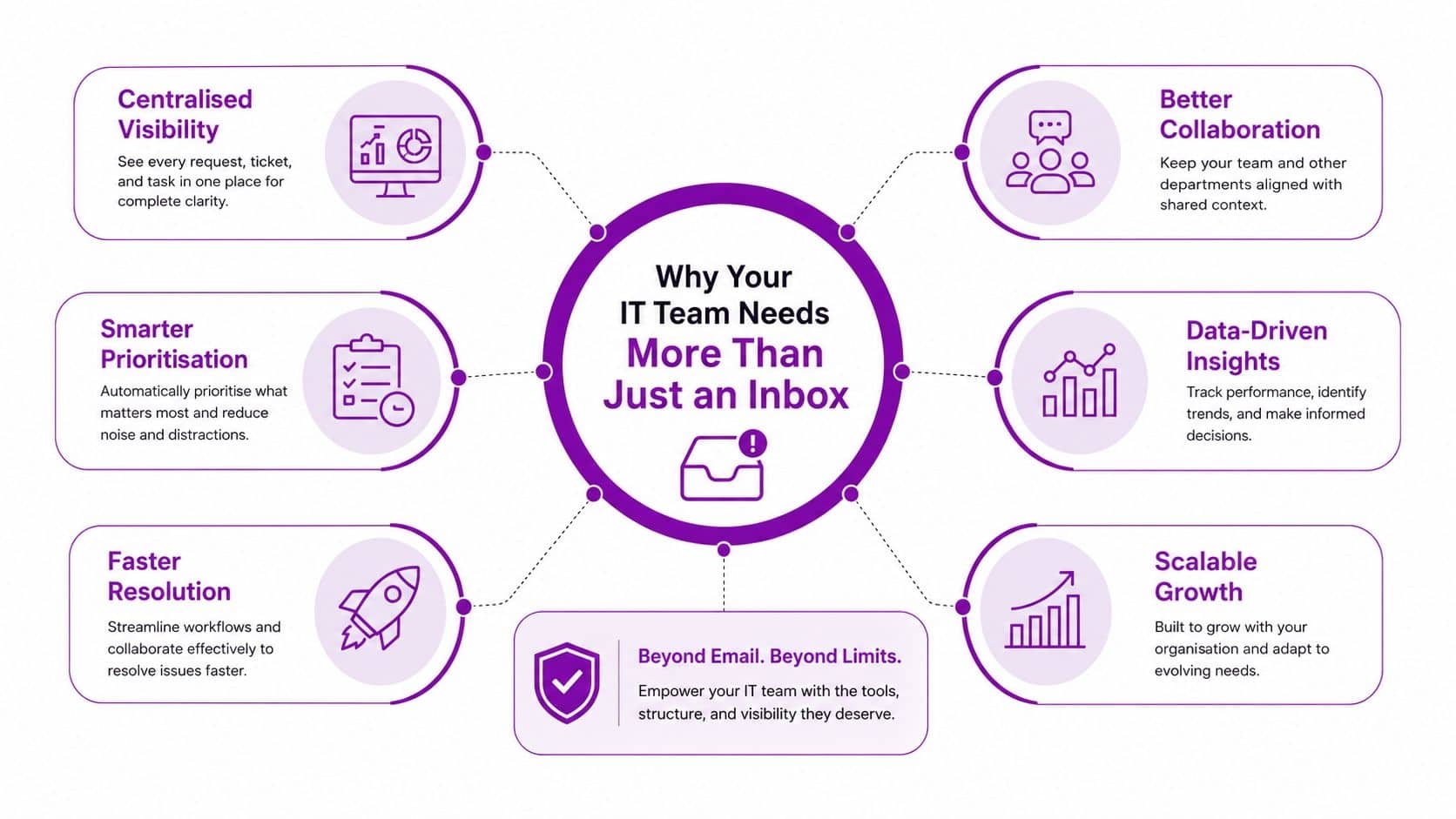
A useful way to think about it is simple. Email stores messages. A ticketing platform manages work. If you want a practical starting point on automate ticket triage with AI, that’s worth reading before you try to force automation into a process that hasn’t been defined properly yet.
Why Your IT Team Needs More Than Just an Inbox
A shared inbox feels manageable until it doesn’t. One colleague forwards an issue, another replies in a different thread, and by lunchtime nobody can tell whether the printer problem is fixed, assigned, or forgotten. That’s usually the moment an East Midlands IT team realises that message storage isn’t the same thing as service delivery.
From scattered messages to traceable work
A ticketing system turns a request from email, phone, chat, web form, or social channel into a discrete record with an owner, a status, and a history. The important part isn’t just capture, it’s continuity, because each update stays attached to the same case rather than disappearing into a thread somebody replies to late on a Friday. That gives managers a real queue, not a pile of correspondence.
The difference shows up fast in busy environments. A user reports VPN problems in Teams, the help desk logs a ticket, the system assigns it to the right engineer, and the request either moves forward or escalates with a clear trail. That’s very different from three people “having a look” and nobody closing the loop.
Practical rule: if a request can be discussed in three different places, it should live in one ticket.
That same logic is visible in the UK’s ticketing history. The move from ad hoc admission to pre-paid, centralised ticketing laid the groundwork for managed inventory, traceable issuance, and controlled throughput, which is why the model still maps cleanly to service desks, IT support, and event operations (UK ticketing history).
Why traceability matters in day-to-day support
A good ticket doesn’t just log the issue. It records the priority, the status changes, the timestamps, and the assignment path, so you can see where work stalled and who touched it. That matters when a finance user says the issue was “reported ages ago” and you need the exact sequence rather than a vague recollection.
It also stops support becoming a memory contest. If a ticket is reopened, reassigned, or escalated, the full context is still there. For East Midlands SMBs, that’s often the difference between a repeatable service model and a support function that depends on one person remembering everything.
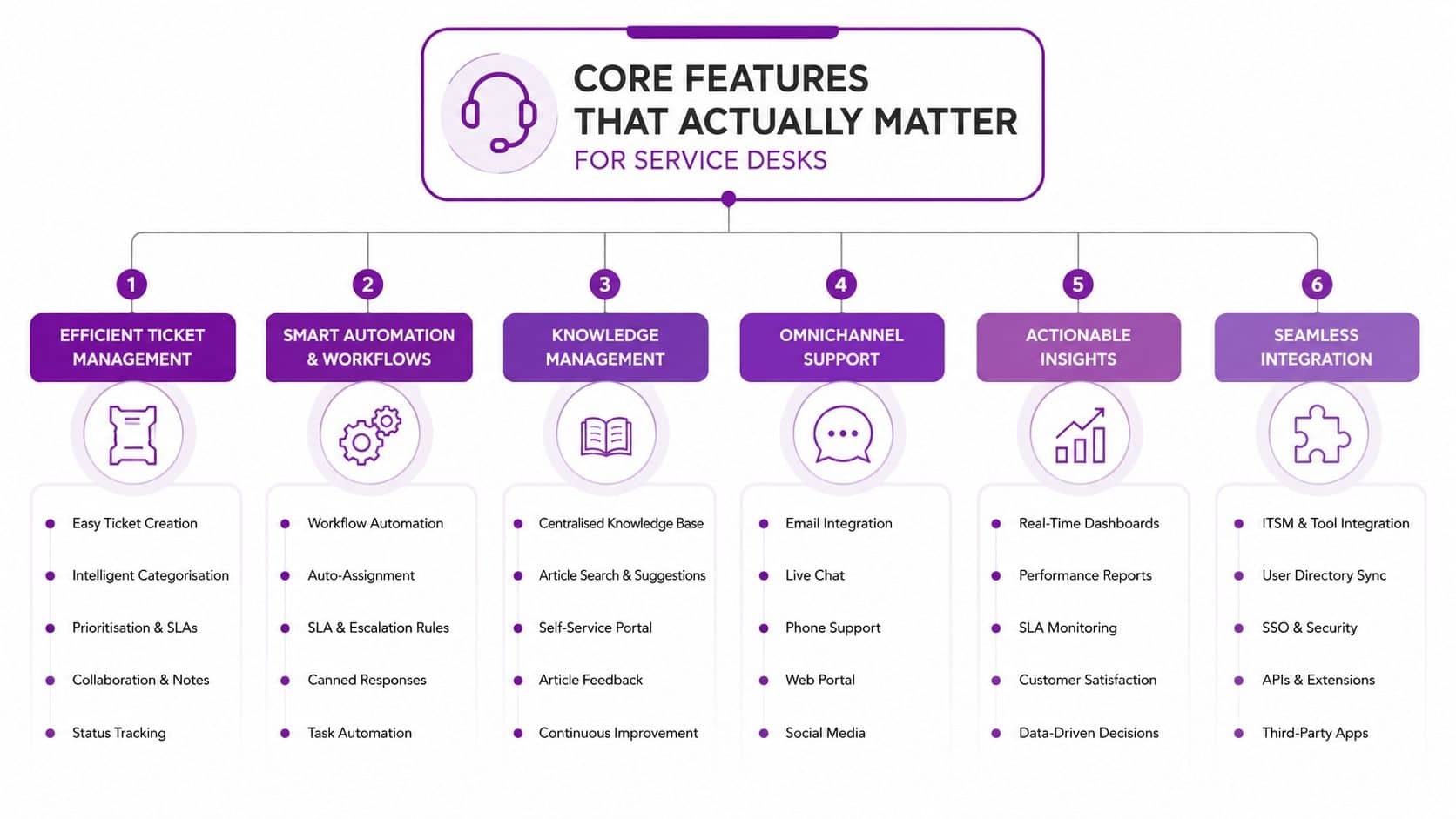
Core Features That Actually Matter for Service Desks
The best service desk tools aren’t the ones with the longest feature pages. They’re the ones that help a Microsoft-focused business reduce noise, route work cleanly, and surface the facts needed to improve service. In practice, that means a few features do most of the heavy lifting, while the rest are often just packaging.
Capture everything in one queue
For Microsoft-centric teams, omnichannel capture should mean more than just email-to-ticket. Requests should flow from Microsoft Teams, web forms, and mailbox rules into the same queue so support doesn’t have to reconcile duplicates. If someone messages the service desk in Teams and also sends an email, the system should bind those interactions to one record, not create two half-threads.
That’s where routing discipline matters. Category, impact, and priority should steer the ticket to the right queue immediately, rather than depending on somebody manually triaging everything after lunch. In a small finance team, that can mean an access request goes to identity support while a hardware fault is routed to the onsite engineer without delay.
Automate the admin without automating the thinking
SLA tracking is the feature that separates a serious service desk from a glorified inbox. If a password reset, onboarding task, or access issue sits untouched, the system should escalate it based on rules the business understands. That gives managers a live view of risk rather than a monthly argument about what probably happened.
Knowledge base integration matters for the same reason. If users can resolve simple requests themselves, the ticket queue stays focused on work that needs human attention. A good portal can deflect routine queries, but only if the articles are current, searchable, and written around the way staff ask for help.
For Microsoft-heavy organisations, Dynamics 365 Customer Service or Power Platform-based workflow design can fit neatly into the wider support estate. If you’re comparing the service desk model with outsourced delivery, the operational trade-offs are worth reading in this outsourced service desk overview.
Use reporting to change behaviour, not just count tickets
Dashboards should show what needs fixing, not just how busy the team looks. The useful measures are the ones that reveal patterns in routing, backlog, and stuck work, so you can tell whether a new intake process is reducing friction or just moving it somewhere else. That’s also where AI-assisted triage is becoming more relevant, because it can help classify and prioritise requests faster, but only when the underlying categories and knowledge base are already sensible.
A service desk improves when the data changes decisions. If the dashboard just repeats ticket counts, the organisation hasn’t learned anything.
For teams using Microsoft 365, the best setups usually combine ticket capture, workflow automation, and reporting in one place rather than stitching together five tools and hoping they agree. If you’re evaluating an outsourced model alongside software choice, look at how the platform behaves inside your current operating model, not just on a feature checklist.
Cloud vs On-Premises and Microsoft-Native Options
The right deployment model depends on how much control you need, what you already own, and how much support overhead you want to carry. East Midlands businesses often start with the idea that cloud is always simpler, but that isn’t the whole story. Cloud can reduce internal maintenance, while on-premises can give tighter control over data location and customisation.
| Deployment Type | Best For | Typical Cost Range | Key Trade-offs |
|---|---|---|---|
| Cloud-hosted | Smaller teams, fast rollout, lighter admin | Usually subscription-based | Easier to update and scale, but less infrastructure control |
| On-premises | Organisations with stricter governance or bespoke process needs | Usually higher upfront and operational effort | More control and customisation, but more internal maintenance |
| Hybrid | Businesses with mixed compliance, legacy, or integration needs | Varies by scope | Flexible, but needs clearer ownership and integration discipline |
Microsoft-native options can be a good fit if your environment already lives in Microsoft 365, Azure, Teams, and SharePoint. A Power Platform build can work well when you need process-specific routing, internal forms, and tighter workflow control. Dynamics 365 Customer Service is more suitable when you want a broader customer service model, especially if there's already a Microsoft-first operating pattern in the business.
Third-party platforms still make sense when they offer stronger service desk depth, better reporting, or more mature ticket workflows than a custom build. That's where practical comparison matters, especially if you're also thinking about telephony and how support requests arrive in the first place. A useful reference point is compare Teams Phone and PBX, because call handling often affects ticket creation as much as the software itself.
The biggest mistake I see is buying a platform before deciding how much standardisation the business can live with. A team that needs simple ticket logging and basic routing can stay lean. A team that needs layered approvals, traceability, and better reporting usually needs a more structured platform and a clearer admin model.
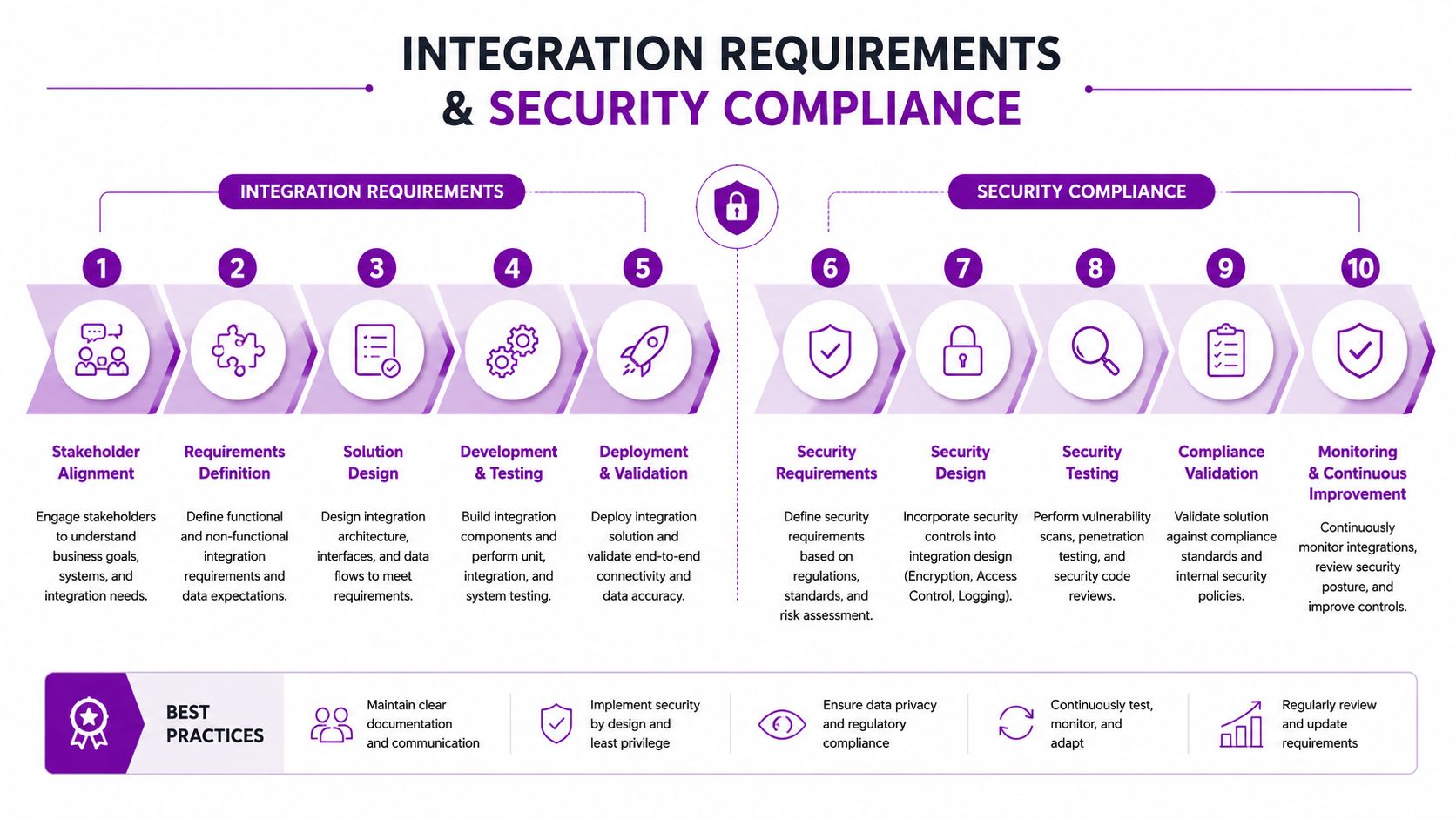
Integration Requirements and Security Compliance
A ticketing platform shouldn't sit apart from the rest of your Microsoft environment. If it can't connect cleanly to Exchange, Teams, SharePoint, Azure Active Directory, Power BI, and Power Automate, you'll end up rebuilding the same workflows by hand. That creates silos, adds admin work, and makes reporting less trustworthy.
Fit the ticketing platform into the Microsoft stack
In a Microsoft 365 environment, the ticket record usually needs to pull identity data, notify users through familiar channels, and push summaries into reporting. Power Automate can handle repetitive hand-offs, while Power BI can turn ticket histories into service trends that managers can use. SharePoint often becomes the document layer, especially for attachments, procedures, and knowledge articles.
If you're dealing with a public-sector client or any organisation handling personal data, the design has to be tighter. UK guidance from the National Cyber Security Centre stresses least privilege, strong authentication, and secure configuration, and those principles matter because ticket systems often contain identity data, internal notes, and attachment payloads that become valuable if access controls are weak (NCSC-aligned ticketing security considerations).
Security needs to be operational, not theoretical
Role-based access control should decide who can see, edit, assign, export, or close tickets. Audit logging should show who changed what and when, while MFA should protect privileged actions rather than being treated as a box-ticking exercise. If an engineer account is compromised, the attacker shouldn't be able to browse every open case and download all attachments without friction.
Sensitive ticket data is rarely just a support issue. It's often an identity issue, a compliance issue, and a reputation issue at the same time.
That's especially important for SMEs using Microsoft 365 or Azure operations support, because one compromised support account can expose a full ticket history and customer metadata across active cases. The right integration model reduces that risk by keeping authentication centralised, permissions narrow, and reporting controlled.
For businesses that need integration work done properly, a systems integration partner can help define the boundaries before tickets, automations, and identity controls get tangled. The internal option worth reviewing is systems integration services, because ticketing only works well when it's part of the wider data flow.
Measuring Real ROI Beyond Ticket Counts
A ticketing system doesn't automatically improve service outcomes. Sometimes it does the opposite. If you move requests from inboxes into a new queue without changing categorisation, ownership, or reporting, you've just relocated the admin burden and given it a dashboard.
The metrics that actually matter
Proof of effectiveness sits in queue reduction, first-contact resolution, backlog ageing, and status-duration reporting. Those measures show whether tickets are moving, where they're stalling, and whether the team is solving issues cleanly or just reopening them later. One study highlighted that a common weakness in ticketing setups is missing duration data for statuses such as “In process” and “Waiting on someone else”, which makes internal planning and client reporting harder (ticketing metrics and reporting gap).
That gap is very familiar in Microsoft-centric SMBs. Teams may have useful telemetry in Microsoft 365, Power Platform, and other service tools, but the problem is usually turning raw records into operational insight. More tickets don't help if nobody can see where the delays are.
What ROI looks like in a smaller team
For East Midlands businesses, the early gain is usually less about dramatic transformation and more about predictability. A service desk that can show which issues are recurring, which statuses are clogging up, and which categories are creating unnecessary rework gives management a basis for change. That's especially valuable when you're trying to decide whether the system is reducing friction or just moving it around.
A sensible rollout should define the KPI baseline before go-live, then compare against it once users have settled into the new process. In practical terms, that means tracking response time, resolution time, ticket ageing, and the share of work that bypasses manual triage. The ROI only becomes visible when the business can compare the old way with the new one in the same reporting frame.
If you're looking at ticket automation for small business, use it as a reminder that automation should remove repetitive admin, not hide a weak workflow behind a quicker button press. That distinction matters more than any product demo.
The right question isn't “how many tickets did we log?” It's “what got resolved faster, what got stuck less often, and what stopped happening altogether?”
Implementation Roadmap and Selection Criteria
Start with the process, not the platform. Before you look at demos, pin down the current pain points, team size, Microsoft investment, compliance needs, and where you expect the business to be in a year or two. A support desk for a 20-person team with light request volume needs a very different design from one serving multiple departments, external clients, or public-sector contracts.
Choose with your real environment in mind
Vendors should be judged on Microsoft integration depth, support responsiveness, UK data centre location, and whether they can handle your reporting and permission model without workarounds. If they talk only about features and not about implementation, migration, training, and administration, that's a warning sign. A good fit should be able to explain how the ticketing system works inside your existing Microsoft stack, not just beside it.
The other selection question is automation maturity. AI can help with routing and summarisation, but only when the request structure is already clean enough for the model to work on. If the business still hasn't agreed on categories, ownership, and escalation rules, AI will mostly speed up confusion.
Roll out in phases, not all at once
A sensible implementation path usually starts with a pilot, then moves through data migration, process redesign, user training, and phased rollout. That gives the team time to check whether the forms, queues, and notifications match reality instead of assumptions. It also gives support staff a chance to see which requests need deflection and which still need human handling.
Rule of thumb: if the process can't be explained clearly on one page, the automation is probably too ambitious for the first release.
For East Midlands SMBs, the most common mistake is overbuilding the first version. Keep the intake simple, make ownership obvious, and only add workflow complexity where the business can prove it saves time or reduces mistakes. That's how you separate simple ticket deflection from genuine case resolution.
Getting Local Support and Taking Next Steps
Local support matters because ticketing isn't just software deployment, it's process ownership. An East Midlands partner who knows the business environment can assess current workflows, identify gaps, and build a service model that fits how your team works across Lincoln, Nottingham, Leicester, Scunthorpe, Grimsby, and Newark. That's much more useful than a remote-only install with no follow-through.
F1Group provides Microsoft-focused managed IT support, systems integration, and helpdesk ticketing system services for organisations that need practical ownership rather than platform handover. Vendor-certified, DBS-checked teams can support remote and on-site work, which is important when the issue is less about the tool and more about how the business uses it.
A sensible next step is a current-state review, followed by a gap analysis and a short list of recommendations tied to your Microsoft stack, compliance needs, and service goals. If you're ready to compare options properly, ask for a scoped assessment and a proof-of-concept that shows how tickets, reporting, and automation will work in your environment.
If you want a ticketing system that fits your Microsoft environment instead of fighting it, talk to F1Group about your current support process, reporting gaps, and integration needs. Visit F1Group to arrange a practical assessment and get a plan that turns ticket data into better service outcomes, not just more admin. Call 0845 855 0000 today and send us a message at https://www.f1group.com/contact/