
A nurse is halfway through a medication round when the tablet stops loading. The Wi-Fi has dropped in one wing, the electronic care record won't open, and the handover notes are sitting in a system nobody can reach. Staff can revert to paper, but that creates another task later, another opportunity for an omission, and another interruption to an already pressured shift.
That situation is familiar across residential care. IT support for care homes isn't an office helpdesk with different branding. It has to protect continuity of care, support staff working around the clock, and keep essential systems usable in occupied buildings. The difficult work is moving from disconnected legacy equipment to a dependable digital environment without making residents and carers carry the risk of the change.
Why IT Support Matters in a Modern Care Home
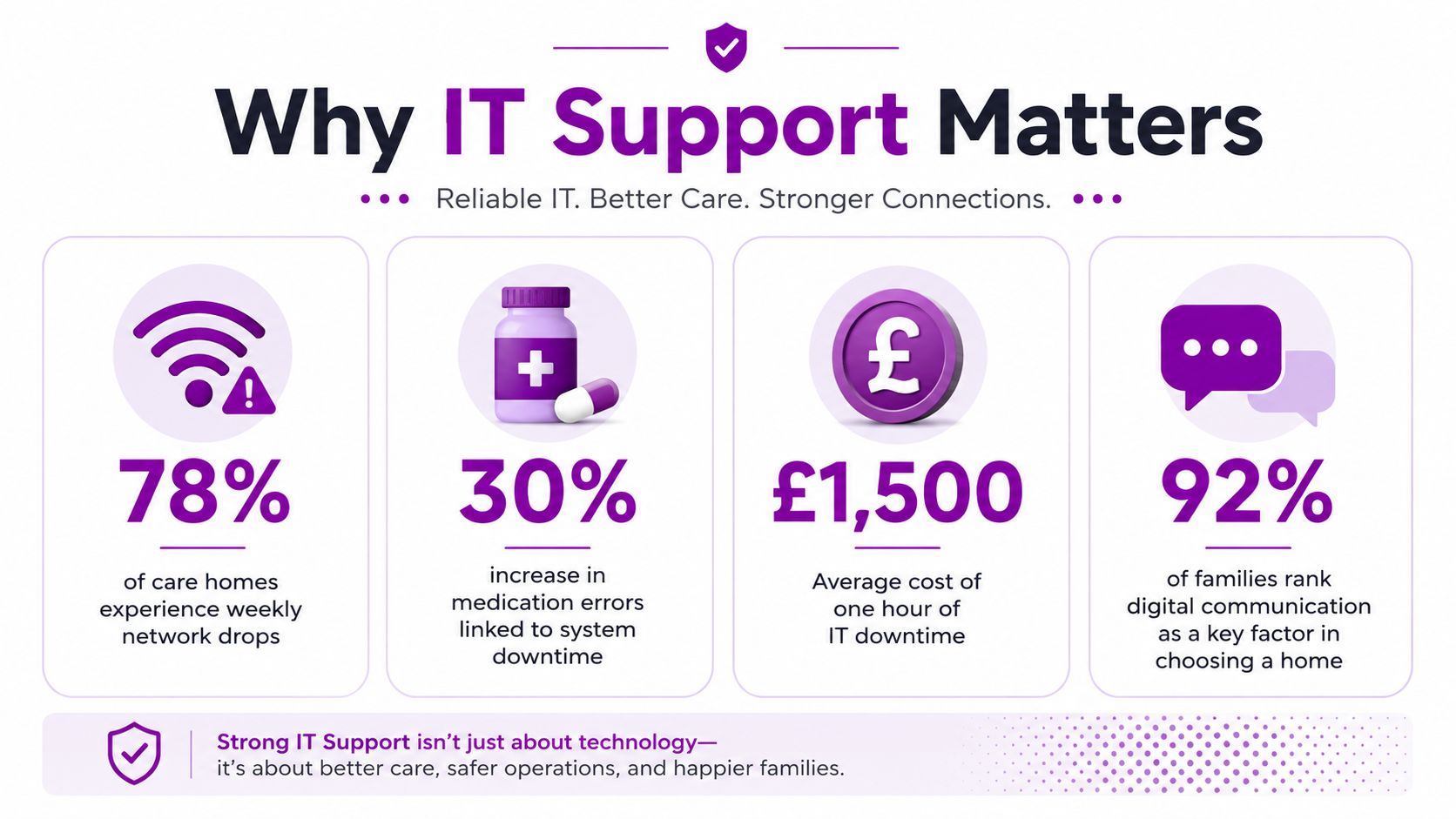
A failed printer is inconvenient. A failed network during a medication round can affect the way staff check instructions, record administration, and communicate a change in a resident's condition. If the system remains unavailable, carers may write notes by hand, pass information verbally, and rely on memory until the service is restored. Those workarounds can be necessary, but they need a controlled recovery process afterwards.
The problem is rarely one device. It is usually a chain of dependencies, including Wi-Fi coverage, identity management, tablets, care-record software, medication systems, telecare equipment, email, printing, and internet connectivity. When each supplier treats its own component as someone else's concern, the registered manager becomes the accidental systems integrator.
Downtime becomes a care issue
The Department of Health and Social Care reports that digital social care record adoption in England rose from 41% of CQC-registered provider locations in December 2021 to 77% by March 2025, with an estimate of 83.7% by March 2026, covering about 92% of people receiving regulated adult social care. The same survey found that 27% of providers used no care technologies at all, so the sector contains homes at very different stages of maturity. Government findings from the 2025 adult social care provider technology survey explain why digital records are now a core foundation for handovers, medication support, and continuity.
A home may also support people moving between hospital and residential care, or coordinating care after discharge. Resources on home care after hospital discharge can help teams think about the wider information flow, but the practical requirement remains the same: the right person must be able to access accurate information at the point of care.
Practical rule: Treat the network, devices, and care applications as part of the care environment, not as separate back-office equipment.
Good support changes the response when something fails. Staff know who to contact, the supplier can see the wider dependency map, and an engineer can attend when a remote fix won't solve a physical fault. That is why care-home technology deserves the same operational attention as staffing, training, and facilities management.
Core IT Services Every Care Home Relies On
A night shift should not lose access to care notes because Wi-Fi fails at the end of a corridor. Technology should reduce uncertainty for staff, not create another source of it. Each service needs to support handovers, personal care, medication rounds, inspections, and overnight work without adding avoidable steps.
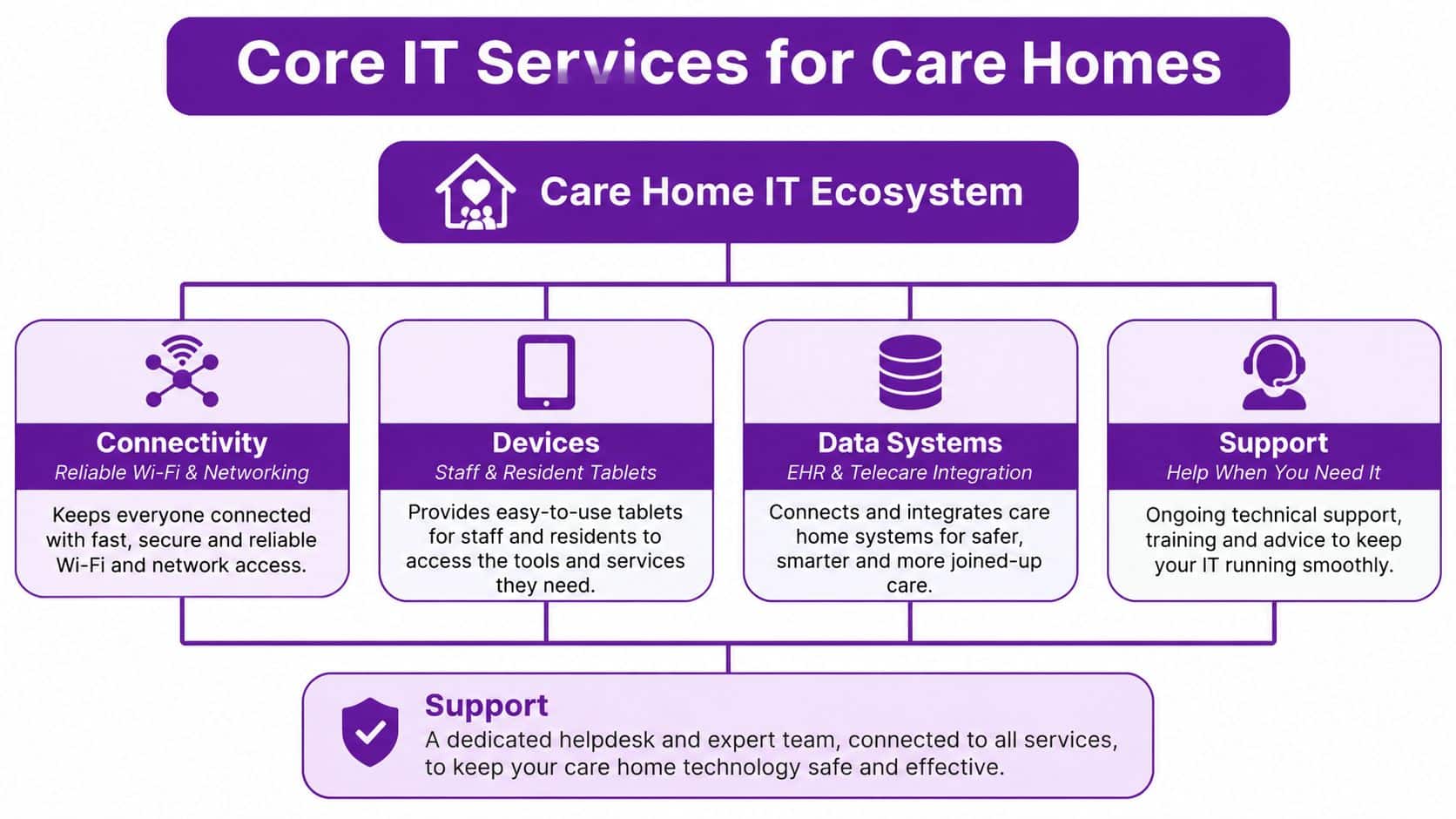
Connectivity and devices
Start with the physical network. Wi-Fi should reach bedrooms, communal areas, offices, treatment spaces, and external areas where staff use mobile devices. A signal that works in reception but drops elsewhere is a care risk and a support problem. Engineers should survey coverage, separate staff and guest access, document network equipment, and monitor weak spots that recur.
Devices must match the task. Shared tablets can suit care notes, while reception and finance teams may need managed desktops. Central management should apply updates, enforce screen locks, remove access when staff leave, and maintain an equipment record. An unmanaged laptop may appear inexpensive, but it can create security, reliability, and support work later.
Records and integrations
Electronic care records should fit the home's workflow. Staff should not re-enter the same information across separate systems unless there is a clear clinical or operational reason. Care planning, medication administration, rostering, incident reporting, assessments, and telecare alerts may all need to exchange information.
Before changing systems, map the handoffs. The support partner does not need to replace every application, but it must know which supplier owns each component, what data moves between them, and how staff work if one service becomes unavailable. That dependency map is often more useful than a long product list.
Cloud and security
Microsoft 365 can provide managed email, Teams communication, SharePoint documents, and controlled collaboration. Azure may support identity, applications, or hosted services. Cloud services still require active management of access, retention, recovery, supplier contracts, and staff permissions.
Backups should sit apart from the production environment and be tested by restoring data, not just by checking a successful job report. The recovery arrangement should identify the systems staff need first, paper fallbacks, decision-makers, and the order for bringing services back.
The security baseline includes multi-factor authentication, role-based access, encryption, firewalls, endpoint antivirus, regular patching, and an offline incident response plan. These controls protect sensitive resident and health information and help the home keep operating when digital services are disrupted. NHS cyber guidance for health and adult social care also treats resilience as part of service continuity.
Compliance and Regulatory Requirements for Care Home IT
Compliance isn't achieved by keeping a policy in a folder. A care home needs evidence that people can access only the information required for their role, that the organisation knows where sensitive data is held, and that staff can continue safely when a system is unavailable.
GDPR in daily operations
The UK GDPR affects resident records, family communications, staff files, CCTV, care assessments, and supplier access. In practical terms, the home should maintain a data map, define lawful processing, control permissions, manage retention, record data-sharing decisions, and investigate suspected breaches. A data protection lead or officer should have enough authority to challenge unsafe practices, not just sign documents.
Audit trails matter. If several people can edit a care record using one shared account, the home loses accountability and makes investigation harder. Individual accounts, strong authentication, leaver processes, and periodic access reviews provide a much clearer control environment. F1Group's GDPR compliance checklist offers a practical starting point for reviewing these areas.
CQC evidence and continuity
CQC expectations around safe and well-led care reach into technology. Leaders should be able to show how they identify technology risks, train staff, manage incidents, protect records, and maintain care during an outage. A plan that says “contact IT” isn't enough if staff don't know the telephone number, the paper process, the escalation route, or who authorises a return to normal systems.
The NHS requires organisations with access to NHS patient data and systems to complete the Data Security and Protection Toolkit, an online self-assessment tool. NHS information governance guidance explains the toolkit's role and notes that NHS cyber teams monitor threats continuously while providing advice, assessments, and training to NHS and care organisations.
Evidence beats assurance
The adult social care cyber strategy says the NHS will use Cyber Assessment Framework profiles through the DSPT to set minimum expectations for different types of health and adult social care organisations. The cyber security strategy for health and social care in England also makes clear that expectations will change as threats change.
Keep evidence where an inspector or incident team can find it:
- Access reviews: Record who has access, why they need it, and when permissions were checked.
- Recovery tests: Document restoration tests, failures, lessons, and corrective actions.
- Training records: Track induction, refresher training, phishing awareness, and attendance.
- Incident records: Keep a timeline, decisions, notifications, and follow-up actions.
Choosing the Right Service Model for Your Home
There isn't one correct IT contract for every home. The right model depends on internal capability, building layout, risk tolerance, budget, and whether someone can make an informed decision during an overnight incident.
| Model | Best For | Typical Response | Care Home Fit |
|---|---|---|---|
| Fully managed | Homes without an internal IT team | Helpdesk-led, with proactive monitoring | Strong fit where one partner must own the whole environment |
| Co-managed | Homes with an IT lead or capable administrator | Shared queue and agreed escalation | Useful when internal staff need specialist depth |
| Break-fix | Organisations accepting reactive risk | Contact after a fault occurs | Poor fit for essential care systems and recurring failures |
| Project-led | Migrations, upgrades, and new sites | Scheduled delivery with defined milestones | Valuable for change, but it needs ongoing support afterwards |
Break-fix often appears cheaper because the home pays when something goes wrong. It doesn't cover the time spent diagnosing repeat faults, the disruption caused by an outage, or the management burden placed on senior staff. It also encourages reactive decisions, such as replacing a failed switch without investigating why the network keeps failing.
Fully managed support offers clearer ownership, but the contract must define what is included. Co-managed support can work well when an internal administrator understands the home's applications, provided the service desk knows where its responsibility starts and ends.
Remote support versus physical attendance
Remote support is effective for account changes, application errors, device configuration, monitoring alerts, and many Microsoft 365 issues. It becomes less useful when a switch, access point, tablet, printer, cabling run, or power supply has failed. Care homes also operate in secure, occupied buildings, so an engineer needs appropriate conduct, identification, safeguarding awareness, and site procedures.
A hybrid model is usually the sensible compromise. Remote first-line support keeps routine incidents moving, while a named local engineer can attend when hands-on work is necessary.
Read the SLA carefully
An SLA should distinguish between response time, target resolution, availability, and on-site attendance. “24/7 support” may mean a voicemail service, a monitored helpdesk, or a staffed team with escalation authority. Ask which one applies.
A care home shouldn't judge support by the speed of an email reply alone. It should judge whether the provider can restore safe working and communicate clearly during a difficult shift.
A Realistic Migration and Adoption Roadmap
A migration succeeds when staff can keep providing care during the change. In a 24/7 home, that means protecting routines, scheduling disruption carefully, and documenting what happens if a supplier, device, or connection fails.
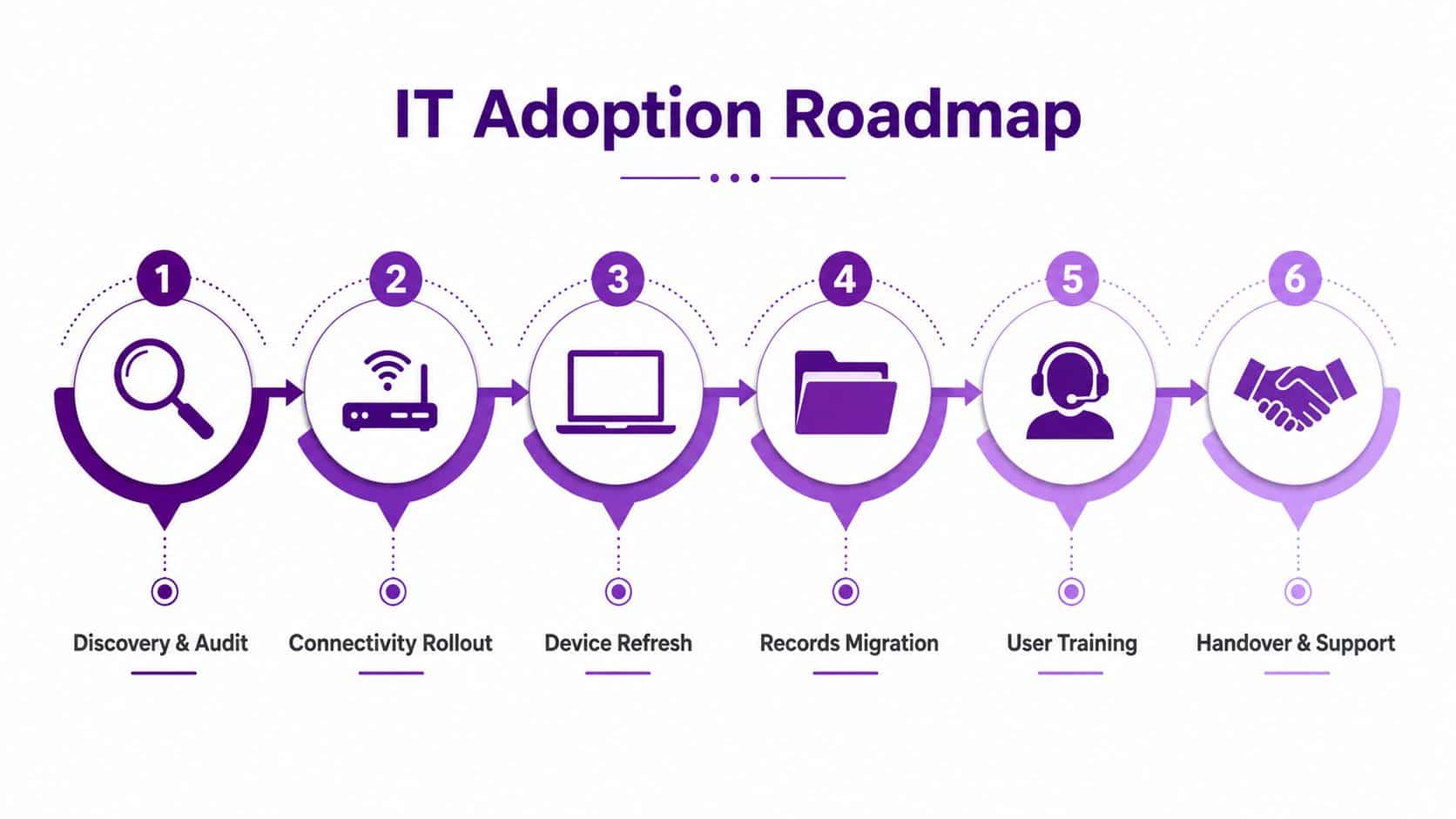
Start with discovery
Build an inventory of routers, switches, access points, computers, tablets, printers, applications, contracts, accounts, suppliers, and critical workflows. Walk the building with care staff, not just a network diagram. A tablet that loses connection in one corridor may never appear in an office-based audit.
Classify each system as essential, important, or replaceable. Record dependencies, such as a medication system needing a particular connection or a care-record application relying on identity services. This becomes the migration control document and gives the support partner a clear starting point.
Fix the foundations first
Improve connectivity before introducing digital care plans. Test coverage and equipment in bedrooms, communal areas, and other representative locations. Expand in manageable stages rather than rolling out a new application across the whole home at once.
The government's digital plan says care providers should have high-speed connections, stronger workforce digital skills, and better cyber resilience. It also targeted fibre upgrades for at least 1,000 care homes affected by poor connections and set an ambition of 80% adoption of digital social care records. The plan for digital health and social care provides the wider direction. Each home still needs a sequence based on its buildings, staffing, systems, and budget.
Move in controlled phases
Refresh devices next. Remove unsupported equipment and standardise models where that simplifies support. Migrate records with supplier guidance, validate resident information, and retain an agreed read-only or paper fallback during cutover. Avoid the busiest part of the day for disruptive work.
Train people in short, role-specific sessions. Carers need to record care and report faults. Managers need to understand permissions, dashboards, reporting, and escalation. Give super-users protected time to help colleagues, rather than asking them to teach while completing a full shift.
Finish with a live handover to support. Disaster recovery guidance only helps when staff know their actions, documentation is current, and restoration has been rehearsed. Keep the plan usable at night and during weekends, when a remote fix may not be enough and an on-site response can determine whether care routines continue safely.
Cyber Security Beyond the Basics
Basic controls are essential, but they don't prove that a care home can operate through an attack. The government's 2025 adult social care report found that 33% of providers had experienced a cyber incident or unsuccessful attack in the previous three years, with an average cost of £2,575 over that period and £9,528 among providers that reported an incident. The government report summary also found that 79% used at least some established methods to identify cyber threats, while 17% used none and 4% did not know.
Those figures point to a maturity gap, not a reason to buy another product without a plan. A firewall and cloud backup won't tell staff what to do when accounts are compromised, files are encrypted, or a supplier's service is unavailable.
Build resilience around real behaviour
Phishing deserves particular attention. Separate research reported that phishing accounted for 75% of cyber incidents experienced by care providers in the relevant survey period, while the same research recorded the average cost for affected providers as £9,528 over three years. The Homecare Association's report summary supports a training approach that reflects staff turnover, shared pressures, and the reality of 24/7 work.
A resilient programme should include:
- Offline recovery: Keep incident instructions and essential contacts on paper, with backups protected from a compromised network.
- Supplier assurance: Check how care-application, payroll, telecare, and connectivity suppliers handle access, incidents, recovery, and subcontractors.
- Practice drills: Test an account takeover, a ransomware scenario, and a prolonged connectivity failure. Record what staff couldn't find or decide.
- Access discipline: Use MFA, role-based permissions, prompt leaver removal, and separate administrator accounts.
- Monitoring and escalation: Establish who reviews alerts, who contacts the provider, and who makes operational decisions overnight.
Ask for proof, not a checklist
Request evidence of recent incident exercises, restoration results, patch reporting, supplier reviews, and escalation logs. A provider that only presents a product list may secure systems, but it may not be able to recover the home under pressure.
The 2025 government survey also found that 82% of providers had a formal cyber-security policy and 80% had a business continuity plan that included cyber security, while around 17% used no measures to identify threats. The sector reporting on those findings shows why documented policies need testing and ownership.
How to Choose an IT Partner You Can Trust
A generalist IT company may understand laptops and email but struggle with an occupied care setting. Ask whether engineers are DBS-checked, whether they understand safeguarding and confidentiality, and whether they can work calmly around residents, visitors, medication rounds, and restricted areas.
Look for relevant technical capability, including Microsoft certifications, Cyber Essentials knowledge, identity management, backup recovery, network design, and the applications your home already uses. Vendor certification isn't a guarantee of good service, but it gives you a way to test whether the provider understands the platforms it proposes to manage.
Questions that expose the service quality
Ask for direct answers rather than polished statements:
- Who answers at three in the morning when the care-record system is unavailable?
- How quickly can an engineer physically reach the home in the East Midlands?
- Which incidents are included in the monthly service, and which attract extra charges?
- Who owns communication with software, telecare, broadband, and hardware suppliers?
- How are privileged accounts controlled and reviewed?
- Where are backups held, and when was a full restoration last tested?
- What happens if the relationship ends?
- Will the provider sign an appropriate data processing agreement?
For a wider view of the tools that connect carers, managers, families, and external professionals, this overview of care coordination platform features is useful. It also highlights why the integration question matters. A platform may be capable, but the home still needs dependable identity, connectivity, permissions, and support around it.
Local presence has operational value
Remote resolution is efficient, but some failures need hands-on attention. A partner serving Lincoln, Nottingham, Leicester, Scunthorpe, Grimsby, and Newark can offer a more practical escalation path than a provider with no local engineering capacity. F1Group provides managed IT services for healthcare, including Microsoft-focused support and local remote or on-site assistance.
Your Next Steps and Quick-Reference Checklist
A care home doesn't need to transform every system at once. It needs a controlled sequence that reduces immediate risk and gives staff confidence.
Priorities for the next 30 to 90 days
- Map the environment: List every critical application, device, supplier, account, dependency, and paper fallback.
- Test connectivity: Walk every resident and staff area, record weak coverage, and confirm that essential devices work where care happens.
- Review digital records: Check permissions, audit trails, data quality, supplier escalation, and the process for working offline.
- Strengthen access: Enable MFA, remove leavers promptly, separate administrator accounts, and review role-based access.
- Test recovery: Restore selected files or systems, document the result, and update the offline incident plan.
- Train realistically: Give carers, managers, and senior staff role-specific guidance, including phishing awareness and outage procedures.
- Confirm support cover: Check response, resolution, on-site attendance, overnight escalation, supplier ownership, and contract exclusions.
- Schedule improvement: Turn the audit into a prioritised roadmap with owners, dates, and evidence of completion.
The best IT support for care homes combines technical competence with practical presence. Your partner should understand that a quiet network, accessible care record, and well-rehearsed fallback process all protect the same outcome, safe and continuous care.
For a custom review of your home's connectivity, devices, care systems, cyber controls, and support arrangements, phone 0845 855 0000 today to speak with F1Group, or send us a message with a brief outline of the challenges you're facing.
F1Group provides managed, remote, and on-site IT support for care organisations across the East Midlands, with Microsoft 365, Azure, cyber security, backup, and infrastructure expertise. Visit F1Group to discuss a practical support model that keeps your home connected, secure, and ready to respond when systems fail.