
A council IT manager in the East Midlands can start Monday with three unrelated problems that are symptoms of one architecture. The SOC has raised a cyber alert, the housing benefits system timed out over the weekend, and a Cabinet member wants to know why residents still can't track a bin collection in real time. Each service has its own supplier, data model, login, support route and upgrade cycle, yet residents experience one council.
That tension defines the market for software for local government in 2026. Councils must protect statutory services, modernise ageing back-office platforms, meet rising digital expectations and give staff tools that feel as usable as Microsoft 365. They also need to spend carefully. The Local Government Association describes local government as a major part of the UK public sector, with £121 billion in annual spend and a workforce of 1.18 million (Local Government Association).
The wrong response is to buy an AI feature because it demos well. The right response is to decide which foundations must change first, then add automation where the data, identity and governance can support it. Legacy modernisation and AI aren't opposing strategies, but they must be sequenced properly.
What Council IT Teams Face Today
A council IT manager rarely chooses between a clean transformation programme and business as usual. The working day combines urgent incidents, political priorities, statutory reporting, procurement rules and services that cannot pause while platforms are replaced.
Residents compare council services with digital experiences elsewhere. They expect clear forms, immediate confirmation, accessible content and progress updates without calling a contact centre. Staff expect secure collaboration, search and document handling that work naturally with Microsoft 365. Finance teams need evidence that each licence, integration and support contract creates practical value.
The answer is not a larger software estate. Councils need a governed architecture that connects existing services through Microsoft 365, Azure, Dynamics 365 and the Power Platform, while replacing legacy systems where they restrict service delivery or reliable data.
Why the estate becomes the problem
Local government operates across housing, social care, revenues and benefits, planning, waste, regulatory services and customer contact. That breadth explains why council software has focused on back-office systems, integration and data sharing rather than isolated departmental tools.
The procurement market reflects that scale. More than 5,700 local-authority contracts published since 2020 represent over £30.5 billion in public-sector investment across IT services and software, according to Local Government Association analysis (Local Government Association). Software packages and information systems accounted for £15.8 billion across 3,873 projects, while IT services accounted for £14.7 billion across 1,888 projects. A licence-only business case therefore misses the cost and effort of implementation, integration, migration and support.
Practical rule: Treat every software purchase as an operating-model decision, not a procurement exercise.
AI does not remove the foundations problem
Council leaders are asking about Copilot, intelligent search, automated triage and generative assistance. The Local Government Association found that 95% of English council respondents were using or exploring AI in 2025, while funding, staff capability and staff capacity remained major barriers (Local Government Association digital transformation programme).
AI has a place in local government, but it cannot repair unreliable records or uncontrolled access. Before approving a pilot, the council should identify the source system, data owner, access rules, audit trail and human decision point. Azure can provide the integration and data services, while Microsoft 365, Dynamics 365 and Power Platform can support controlled staff workflows. Those tools work only when the underlying information is fit for use.
A 2026 study of 208 councils found that digital and data maturity varied significantly, with many councils still building the basics (MHCLG Digital). East Midlands councils should modernise systems holding critical data, expose reliable interfaces and then add AI to governed workflows. That sequence delivers more value than a disconnected demonstration and gives staff a platform they can trust.
Core Categories of Software for Local Government
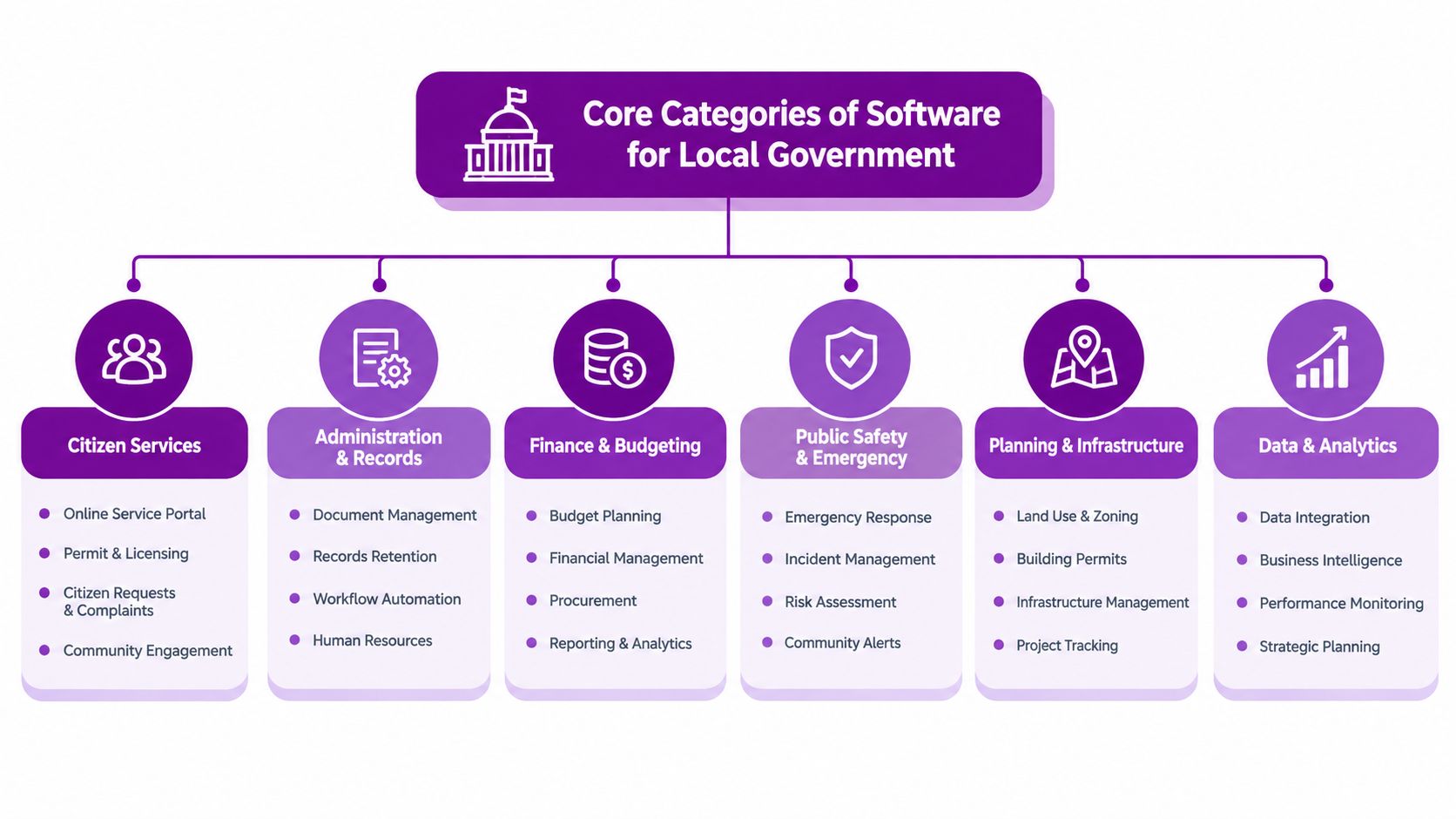
Start with services, not product brochures. A council's software estate should help a resident report a missed collection, help a social worker manage a case, help a planning officer make a decision and help finance staff reconcile the result. The categories below describe the capabilities behind those journeys.
Service and case management
Case management and CRM platforms support adult social care, children's services, environmental health and customer contact. They need configurable workflows, correspondence, task allocation, document association, safeguarding controls and a complete history of interactions. A generic CRM isn't enough if it can't respect statutory processes, restricted records and service-specific retention rules.
Revenues and benefits platforms handle council tax, business rates, housing benefit and related transactions. Academy and Northgate-class systems are familiar examples in this part of the market. Housing management software covers tenancy records, allocations, rent accounting, repairs and landlord communications. These platforms are usually operational systems of record, so replacing them demands careful migration and reconciliation.
Regulatory and operational systems
Planning and building control tools manage applications, consultations, conditions, inspections and decisions. Regulatory services may cover licensing, food safety, trading standards and environmental enforcement. Waste and fleet platforms support routes, vehicles, jobs, schedules and operational performance.
Document and records management sits across these services. SharePoint can provide a controlled collaboration layer, but it shouldn't be treated as a universal replacement for a statutory case system without checking retention, permissions, metadata and audit requirements.
Corporate and citizen-facing layers
Finance and ERP systems connect budgets, purchasing, payments and reporting. HR and payroll platforms manage the employee lifecycle. Microsoft 365 provides collaboration, email, meetings and document work, while web forms, payments, MyAccount portals, telephony and CRM provide the resident-facing layer.
Power BI supports operational and statutory dashboards. Copilot can assist with search, drafting and summarisation where information access is properly governed. Most councils run 40 to 80 separate applications, so the hard problem isn't finding another tool. It's making the existing tools work as one service, with consistent identity, data exchange and accountability.
Procurement, Pricing and Evaluation Criteria in the UK
A sound procurement begins before a supplier demonstration. Define the service problem, identify the current system dependencies and decide whether the requirement is a core platform, a specialist capability or an integration project. Then confirm the procurement route under the council's rules and the applicable UK public-sector framework.
Councils may use the Public Contracts Regulations 2015, including the light-touch regime where applicable, the Digital Marketplace and G-Cloud frameworks, or Crown Commercial Service agreements such as Technology Products and Associated Services. Procurement teams should verify current thresholds, framework scope and the status of G-Cloud 14 before issuing a competition. A government RFP database can help suppliers and market-watchers identify relevant public-sector opportunities, but it doesn't replace the council's own compliance checks.
The commercial model needs equal scrutiny. One Digital Marketplace pricing document lists annual subscriptions for a small authority at £34,965 for Essentials, £60,286 for Professional and £116,460 for Enterprise, excluding implementation and project management fees (Digital Marketplace pricing document). Another uses population bands, defining small authorities as under 150,000 people and showing Enterprise pricing ranging from £50,288 to £76,408, with annual pricing again excluding implementation and project management (Digital Marketplace pricing document).
A 250,000-population council should therefore expect a different commercial conversation from a 50,000-population council. Don't compare headline licences without migration, integration, training, support, upgrades, exit assistance and internal resource.
Typical UK Council Software Procurement Criteria
| Criterion | Typical Weighting | What Councils Assess |
|---|---|---|
| Technical fit | 60% | Functional coverage, integration, security, accessibility and architecture |
| Price | 30% | Licence, implementation, support, migration and total cost of ownership |
| Social value | 10% | Measurable local, economic, environmental and community outcomes |
The weighting above is a practical evaluation model, not a statutory formula. Apply quality questions, reference sites, implementation evidence and security documentation as gate criteria. Councils should also connect social value commitments to measurable delivery rather than accepting broad promises. For wider guidance on related commercial work, see procurement of consultancy services.
Build Versus Buy and the AI Readiness Gap
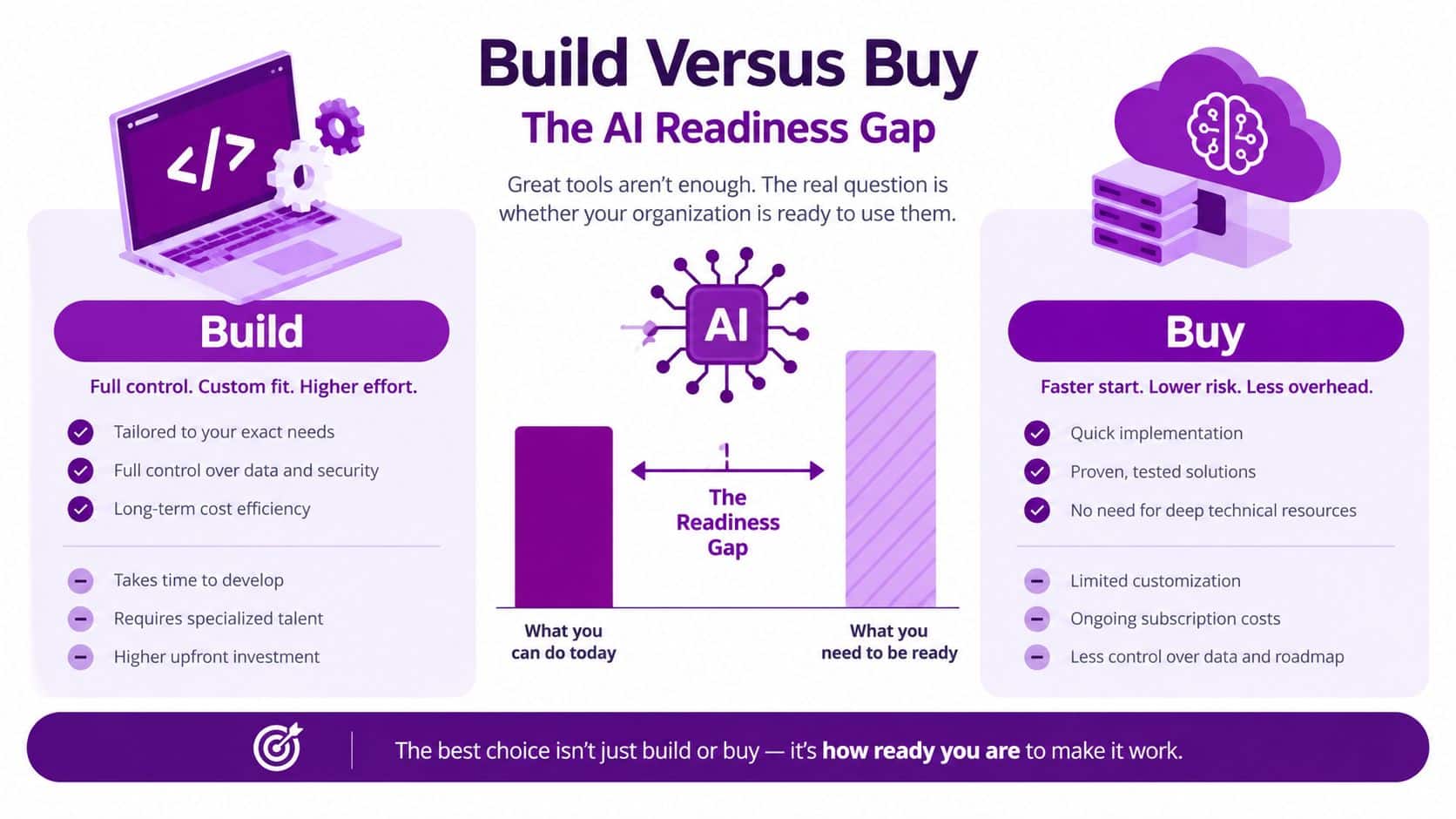
The build-versus-buy decision is often framed too narrowly. In practice, councils choose between configuring a vendor platform, buying a specialist point solution, extending Microsoft technology with Power Apps and Azure, or developing a custom application. The best option depends on the service's criticality, data sensitivity, integration burden and the council's ability to maintain the result.
A point solution may solve one team's immediate need quickly. It can also create another identity store, another contract, another data export and another support relationship. Buying an established platform usually reduces initial delivery risk, but licence creep and integration debt can become permanent costs.
Building with Power Apps and Azure gives a council control over a focused workflow. It becomes risky when departments create low-code applications without common data models, environment controls, ownership and release discipline. A small app can become an unsupported business system after its original maker moves role.
Use the platform test before the AI test
Shared platforms such as Dynamics 365 can provide a middle path. They support configurable service processes while aligning identity, data and integration with the wider Microsoft estate. That only works if the supplier can explain its public-sector roadmap, upgrade approach and responsibility for configuration.
The AI readiness gap is a governance problem before it's a feature problem. Before commissioning a Copilot or generative AI pilot, check whether the council can support:
- Identity: Microsoft Entra ID with role-based access and joiner, mover and leaver controls.
- Information protection: Sensitivity labelling and Microsoft Purview policies that match the sensitivity of council records.
- Auditability: Unified audit logging with appropriate feeds into Sentinel or another SIEM.
- Data quality: Clear ownership, consistent definitions, retention schedules and reliable interfaces.
- Adoption: Frontline users who understand what the tool does, what it doesn't do and when human review is mandatory.
The cheapest AI pilot is the one you don't launch until the data and access controls are ready.
Point solutions should pass the same test. If a tool strengthens the council's Microsoft architecture, it may be justified. If it fragments identity, duplicates records or bypasses audit controls, the apparent shortcut will cost more later. Councils considering bespoke extensions can review custom software development alongside the governance requirements above.
Security, Compliance and Accessibility Requirements
Security and accessibility should score during evaluation, not appear as conditions buried in a contract. A council remains accountable for the service it provides, even when a supplier hosts the application, processes the data and manages the upgrade.
Cyber Essentials and Cyber Essentials Plus provide a practical baseline. Legacy PSN expectations have largely moved into the GovAssure cyber-security framework for central government, and local councils should still ask suppliers to demonstrate a security posture that can withstand public-sector scrutiny. Don't accept a certificate as the whole answer. Request architecture diagrams, penetration-test summaries, incident procedures, vulnerability management evidence and clear responsibilities under the shared operating model.
Check the control environment
GDPR and the UK Data Protection Act affect lawful basis, data protection impact assessments, retention and deletion. A supplier should explain where data is stored, who can access it, how administrators are monitored and what happens when the contract ends.
At minimum, test for:
- Encryption: Data protected at rest and in transit, with documented key-management responsibilities.
- Identity: Single sign-on through Microsoft Entra ID, conditional access support and role separation.
- Logging: Administrative and user activity logs that can feed Sentinel or the council's SIEM.
- Assurance: Completed Cyber Governance and Information Assurance documentation, with remediation ownership.
- Resilience: Tested backup, recovery, continuity and incident communications.
Accessibility applies to more than the public website. Case screens, internal forms, resident portals, letters and PDFs can all block users if the supplier hasn't designed for assistive technology. Assess the service against the Public Sector Bodies (Websites and Mobile Applications) Accessibility Regulations 2018 and WCAG 2.2 AA. Ask for a VPAT or ACR, keyboard-only navigation, captions for recorded content and a clear route for alternative formats.
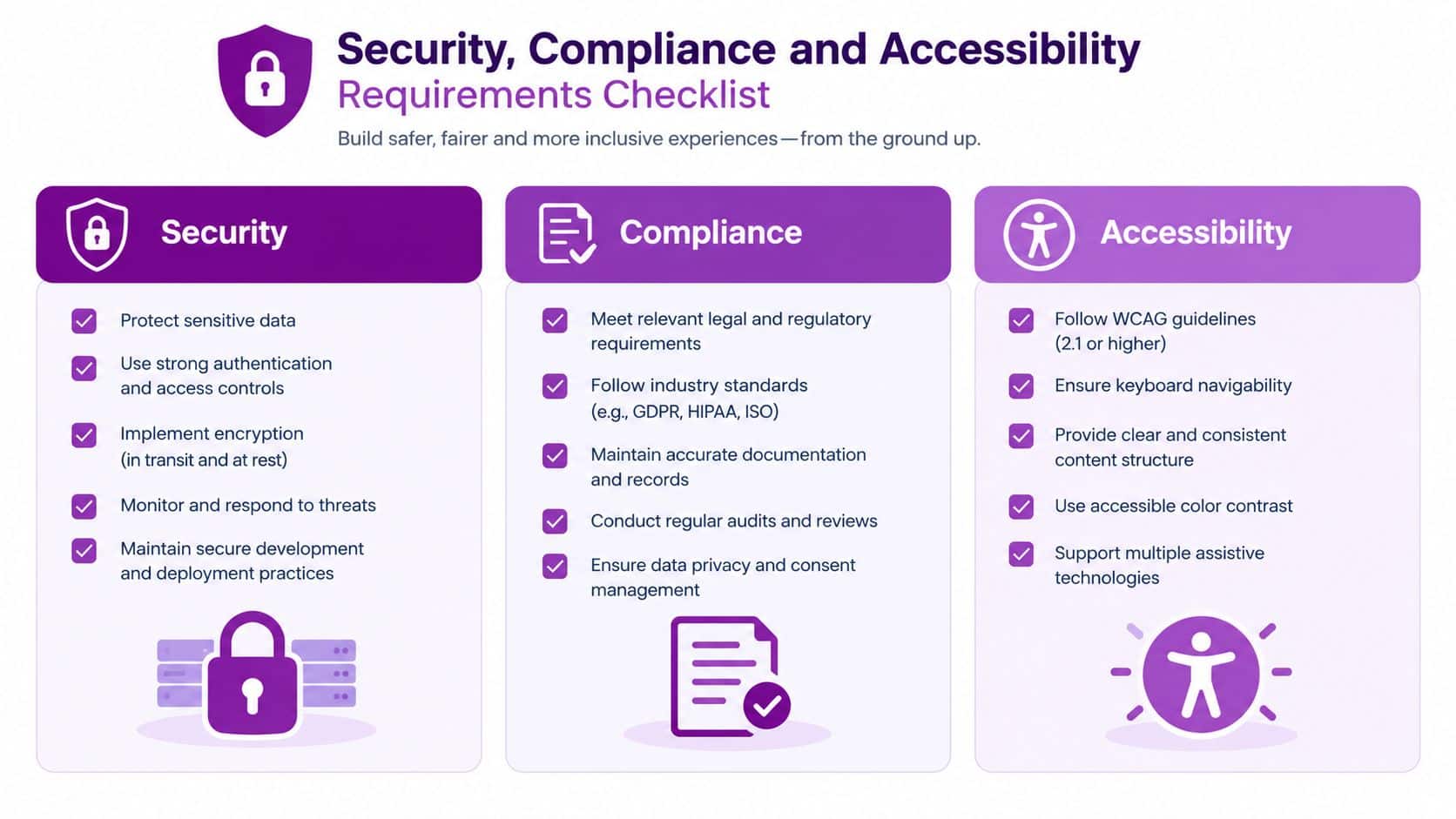
Accessibility is a service requirement. If staff and residents can't complete the journey, the software hasn't met its purpose.
Integrating Software with Microsoft 365, Azure and Dynamics
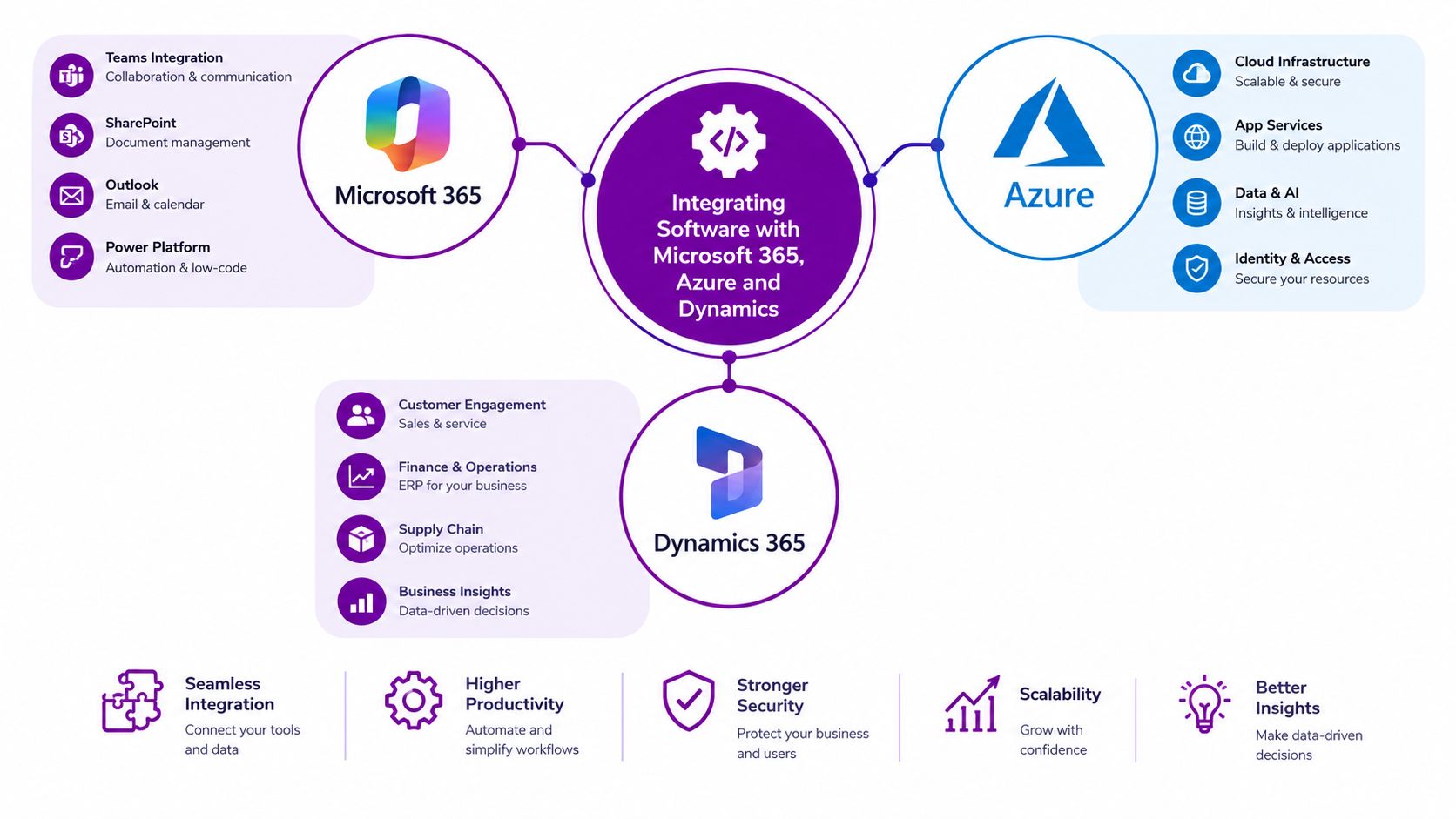
Microsoft 365, Azure, Dynamics 365 and the Power Platform can form a practical integration backbone for councils that want to reduce brittle point-to-point connections. The value isn't the brand stack by itself. It's the shared identity, common governance and reusable integration patterns around it.
Microsoft Teams can surface Dynamics 365 case records, planning applications or housing repairs inside a working channel. Staff can discuss a case where they already collaborate instead of copying information into a separate conversation. SharePoint and OneDrive provide document storage, while sensitivity labels help protect information as it moves between departments. Exchange Online and Microsoft Graph expose identity, calendars and contacts for controlled automation.
Give each platform a clear job
Azure provides the hosting, identity and integration services. App Services and Functions can host APIs, Logic Apps can orchestrate workflows between legacy systems, and Service Bus or Event Grid can handle event-driven exchanges. This is preferable to a collection of unsupported scripts that depend on one person's knowledge.
Dynamics 365 can support CRM-style work for revenues, benefits, environmental health and adult social care contact records. It shouldn't automatically replace every specialist system. Keep statutory or operational systems where they provide necessary depth, then connect them through governed interfaces.
The Power Platform extends that backbone:
- Power Apps: Build focused forms against Dataverse where a full replacement isn't justified.
- Power Automate: Replace fragile manual scripts with monitored, permission-aware workflows.
- Power BI: Create shared operational and statutory performance views from governed data.
- Copilot: Add summarisation, search and drafting assistance only where permissions and review controls are clear.
The intended outcome is straightforward, one identity, one audit trail and less duplicate entry. Councils should document ownership for every connector, flow, environment and dataset. Practical software systems integration support can help when legacy suppliers expose inconsistent interfaces or incomplete documentation.
Implementation and Change Management Roadmap
A council shouldn't attempt a single estate-wide switch. A phased programme gives IT and service leaders enough control to learn, correct and demonstrate value before expanding.
Five phases for a controlled rollout
- Discovery: Run a four to six-week discovery sprint. Audit systems, interfaces, data owners, service workflows, accessibility issues and measurable outcomes. Map stakeholders and identify the operational processes nobody documented.
- Pilot: Use a six to ten-week pilot in one service, such as housing or revenues. Validate Microsoft 365 integration, permissions, reporting, migration assumptions and frontline usability. Record adoption barriers rather than treating them as user resistance.
- Rollout: Expand by directorate over three to nine months. Use release gates, communications, role-based training and hyper-care support. Keep the legacy system available only where the transition plan requires it.
- Optimisation: Review workflow performance, data quality, support tickets and user feedback. Remove duplicate steps and retire unused tools instead of adding more features.
- Continuous improvement: Move into a 12-month improvement cycle with benefits reviews, roadmap decisions, security reassessment and service-owner accountability.
Change management must run through every phase. Name frontline champions, publish a regular communications cadence and provide feedback loops that reach service managers as well as the project board.
A technically successful go-live still fails if officers return to spreadsheets, email and unofficial workarounds.
The most common mistake is to train users at the end. Training should follow real tasks, use council records safely and explain how the new process affects accountability. Benefits realisation should measure whether the service operates differently, not only whether the supplier delivered the configured modules.
Choosing a Vendor and Starting the Conversation
Choose a partner that can work across service operations, Microsoft architecture and public-sector governance. A supplier that only configures a product may leave the council with unresolved identity, integration and adoption problems.
Use this checklist during evaluation:
- Microsoft capability: Look for relevant Microsoft Solutions Partner designations, experienced Dynamics 365 and Power Platform specialists, and evidence of comparable council deployments.
- People and coverage: Confirm DBS-checked engineers, UK-based support, East Midlands availability where on-site work matters, and a named escalation path.
- Security evidence: Request Cyber Essentials Plus, ISO 27001 where held, PSN-compatible architecture evidence and clear incident responsibilities.
- Accessibility delivery: Ask for practical WCAG 2.2 AA experience, accessible forms and documents, testing methods and remediation ownership.
- Commercial clarity: Require total cost of ownership, population-band pricing assumptions, implementation exclusions, renewal terms and an exit strategy.
- Change capability: Ask how the team engages frontline staff, measures adoption, handles resistance and transfers knowledge to council employees.
Don't award on a polished demonstration. Give suppliers realistic scenarios, including a failed integration, a restricted record, an accessibility issue and a user who needs an assisted-digital route. Their response will reveal more than a feature list.
F1Group provides Microsoft-focused support across the East Midlands, including Microsoft 365 and Azure, Dynamics 365, Copilot, Power Platform, cyber security, systems integration and custom application development. Start with a discovery workshop, share your current architecture map and agree success measures before discussing a product roadmap.
Call F1Group on 0845 855 0000 today to discuss legacy modernisation, Microsoft integration and secure software for local government. Send us a message to arrange a practical discovery conversation about your council's systems, data and next implementation step.