
The bill lands in your inbox just before lunch. You were expecting a routine month. Instead, Azure spend has jumped, nobody can immediately explain why, and the questions start coming from finance before your team has even opened Cost Management.
That’s a familiar position for IT managers. The problem usually isn’t Azure itself. It’s that Azure makes it very easy to deploy quickly, scale on demand, and leave behind resources, commitments, and habits that no longer match what the business uses.
For UK organisations, this has moved well beyond a technical tidy-up. Cloud estates are now mature enough that governance matters as much as migration. One useful benchmark comes from the National Audit Office, which found that 96% of surveyed public sector organisations were using cloud services in some form by 2023, showing how normal cloud usage has become and why optimisation now sits firmly in day-to-day operational control for UK teams (National Audit Office benchmark discussed here).
If you’re running a mid-sized business in the East Midlands, the good news is that an Azure bill can be brought under control. Usually without drama. Usually without ripping everything out. The work is practical. Better tagging. Cleaner billing views. Smarter VM sizing. Automated shutdowns. The right use of Reservations and Savings Plans. Then, just as importantly, a process that stops the same problems coming back next quarter.
That Sinking Feeling Your Monthly Azure Bill Arrives
The usual pattern is easy to recognise.
A team launches a few new virtual machines for a project. Someone spins up a larger SQL tier to solve a performance complaint. A development environment runs overnight because nobody got round to scheduling it. A disk stays attached to nothing after a migration. Then a few months later, the monthly bill feels detached from reality.
Azure rarely becomes expensive because of one dramatic mistake. Costs drift because decisions made for speed stay in place long after the need has changed. In most mid-sized estates, the first problem is visibility. The second is ownership. If nobody can answer which department owns a resource group, whether a service is production or test, or whether a workload is still needed, spend increases unobserved.
Cloud cost optimization works best when you treat it as an operating discipline, not a rescue exercise.
That matters even more in the UK because cloud usage is now established across organisations of every size. The public sector has had years to build cloud estates, and the private sector has followed the same broad direction. Once your estate reaches a certain level of sprawl, optimisation stops being optional. It becomes part of how IT protects budgets and keeps projects credible.
For Azure customers, the route back to control is straightforward. Start with billing hygiene. Move on to quick technical wins. Use commitments carefully for steady workloads. Then fix the design and team habits that created unnecessary spend in the first place.
Build Your Foundation with Tagging and Billing Hygiene
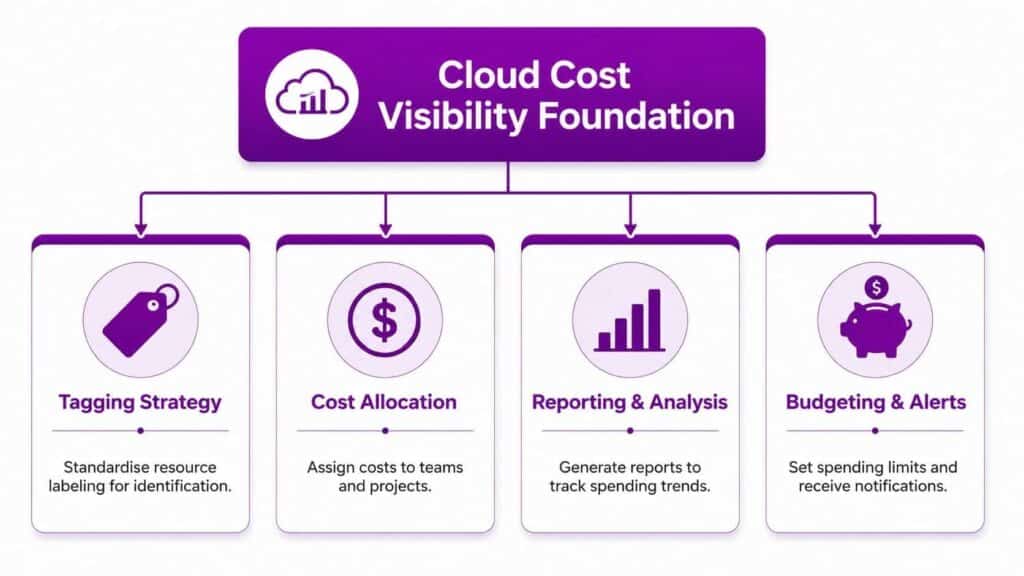
Most Azure cost problems begin with one blunt truth. You can’t optimise what you can’t attribute.
The UK public sector has had over a decade of cloud-first policy to build cloud estates, and reporting on that experience has highlighted a governance issue as much as a technical one, especially where organisations lack clear ownership, consistent tagging, and spend visibility (UK cloud governance context). Mid-sized firms run into the same issue. Azure doesn’t become unclear by accident. It becomes unclear when naming, tagging, and chargeback discipline are left to individual teams.
Start with the billing structure
Open Azure Cost Management + Billing and check the scopes you use for reporting. If your business has multiple subscriptions, separate legal entities, or several departments consuming cloud differently, the billing view must reflect that.
A practical starting point is:
- Subscriptions by function. Keep production, non-production, and specialist workloads logically separated where that makes reporting clearer.
- Management groups for policy. Use these to enforce tagging and budgeting rules above subscription level.
- Resource groups with a purpose. Don’t let them become dumping grounds for unrelated services.
If the hierarchy is messy, don’t try to redesign everything in a day. Fix the reporting logic first so finance and IT are looking at the same numbers.
Make tagging non-negotiable
Tagging isn’t admin overhead. It’s the only reliable way to answer basic questions such as who owns this, what is it for, and should it still be running.
At minimum, most organisations should standardise tags such as:
| Tag | Why it matters |
|---|---|
| Environment | Distinguishes production, test, development, and sandbox |
| Owner | Identifies the person or team accountable |
| Cost Centre | Aligns spend to finance reporting |
| Application | Groups resources supporting the same service |
| Business Unit | Helps allocate shared spend |
| Review Date | Forces periodic checks on whether a resource is still needed |
Apply tags through Azure Policy wherever possible. Manual tagging sounds fine until deployment gets busy. Then standards slip. Policy-based enforcement stops untaged or badly tagged resources being created in the first place.
A structured landing zone approach helps here. If you’re reviewing how subscriptions, policies, naming, and governance should fit together, the Azure Cloud Adoption Framework guidance from F1Group is a useful reference point.
Practical rule: If a resource has no owner and no environment tag, treat it as a governance problem before you treat it as a cost problem.
Use budgets and alerts properly
Budgets in Azure Cost Management are often configured too late, after finance has already raised the issue. Set them at subscription and resource-group level where appropriate. Then route alerts to the people who can act, not just to a shared mailbox nobody checks.
Good alerting should do two things:
- Warn early when spend is trending above expectation.
- Prompt investigation before month end, when there’s still time to shut down or resize something.
Don’t aim for perfect granularity on day one. Aim for reliable visibility. Once Azure spend is attributable, optimisation stops feeling vague and starts becoming manageable.
Secure Quick Wins with Rightsizing and Automation
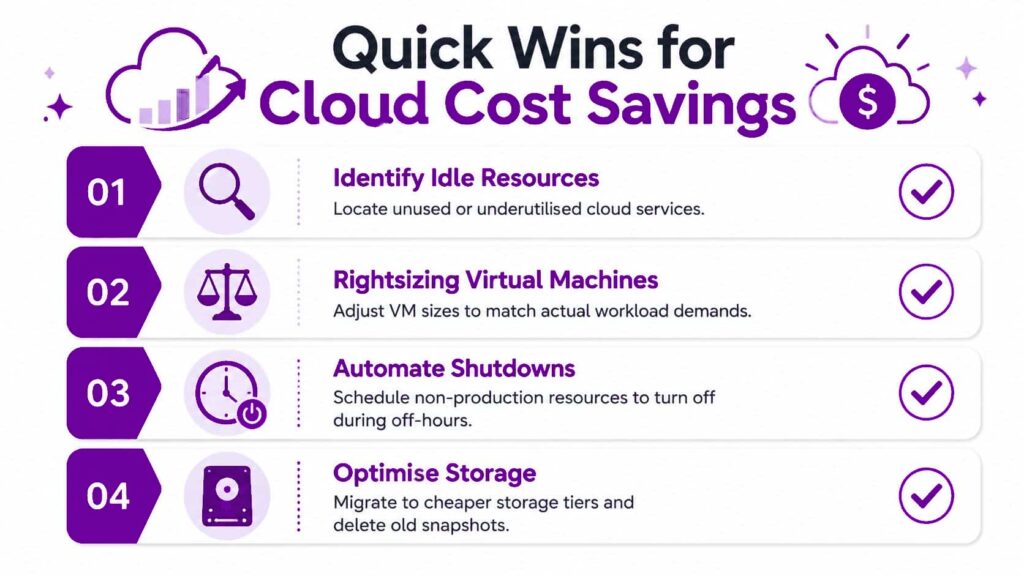
Once you can see the bill clearly, the next move is to remove waste that’s obvious, repeatable, and low-risk. By doing so, most Azure estates can improve quickly without changing architecture.
Rightsize what’s already running
Go straight to Azure Advisor and compare its cost recommendations against what your monitoring shows in Azure Monitor. Advisor is a good starting point. It isn’t a substitute for judgment.
Focus first on services that are commonly oversized:
- Virtual machines used for line-of-business apps
- Azure SQL Database or Managed Instance tiers chosen during a performance scare and never reviewed
- App Service Plans carrying more capacity than the workload needs
- Premium storage used where standard tiers would do the job
The trap is relying on average utilisation alone. A server might look underused on average but still need headroom for a specific daily batch or reporting window. Review usage patterns over time, not just a snapshot from this week.
Shut down non-production automatically
Development and test are where a lot of unnecessary Azure spend hides. Not because the workloads are wrong, but because they stay on when nobody is using them.
Use automation for:
- Dev and test VMs that only need to run during working hours
- Training or project environments that can be paused in evenings and weekends
- Short-lived proof-of-concept systems that need an expiry date
Azure gives you several ways to do this, depending on how your environment is managed. Start/stop schedules, Azure Automation, Logic Apps, and policy-driven workflows all have their place. The important thing is consistency.
If your team wants a more operational approach to this kind of repeatable task, automation in IT operations is often where the quickest discipline gains appear.
Here’s a short walkthrough worth reviewing with your team:
Remove the quiet clutter
Some Azure costs don’t look dramatic individually, which is why they linger. Across an estate, they add up.
Check for:
- Unattached managed disks left after VM changes
- Old snapshots that nobody needs for recovery
- Unused public IPs and networking components
- Forgotten load balancers from old projects
- Storage accounts holding stale export files, logs, or backups with no retention policy
A practical monthly review works better than a one-off clean-up. Give each team a simple report of resources with no recent activity, no owner tag, or no current ticket linked to them. Ask for confirmation before deleting. That keeps the process controlled and avoids accidental removals.
If a non-production workload has no schedule, assume it’s costing more than it should.
Storage is often the overlooked win
Storage decisions rarely get the same scrutiny as compute, yet they’re often easier to improve with less operational risk.
Look at:
| Area | Typical action |
|---|---|
| Blob storage | Move older data to the right access tier |
| Snapshots | Keep only those needed for policy or change windows |
| Backup retention | Align retention with real business and compliance needs |
| Diagnostic logs | Review retention and destination so logging doesn’t become permanent accumulation |
Quick wins matter because they create breathing room. They also build confidence. Once teams see that cloud cost optimization can come from straightforward operational hygiene, it becomes much easier to have the bigger conversations about commitments and architecture.
Commit and Save with Reserved Instances and Savings Plans
After the easy waste is gone, Azure cost control becomes a purchasing and forecasting exercise. At this stage, many teams either save well or make expensive assumptions.
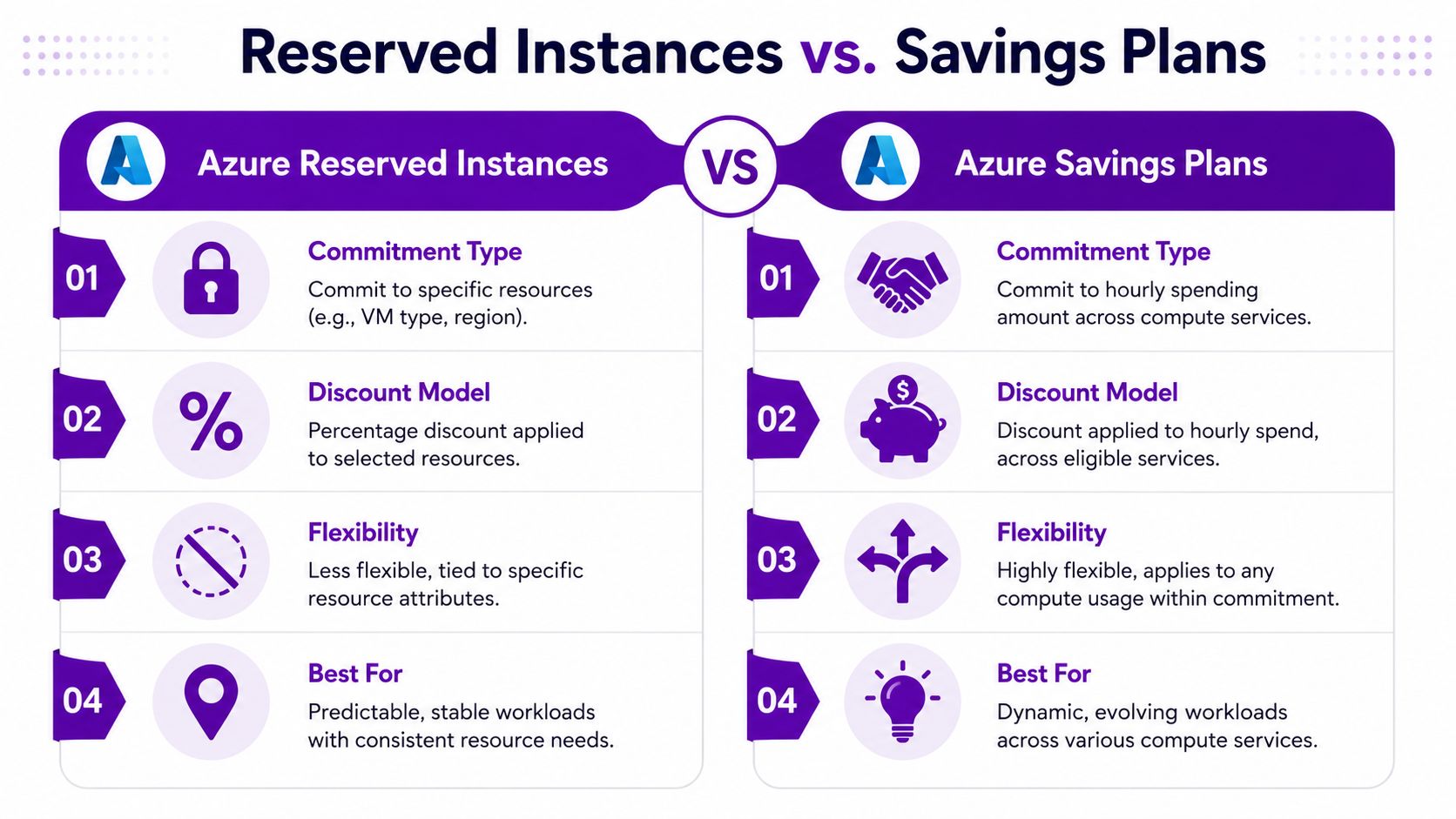
The simplest way to think about it is this. Reserved Instances reward predictability. Savings Plans reward predictable spend with more flexibility. Both can work well. Both can be mishandled if you commit before you understand your baseline.
Understand rate optimisation versus usage optimisation
A useful way to manage this is to split Azure spend into two categories:
- Rate optimisation. Are you paying the right rate for steady demand through Reservations or Savings Plans?
- Usage optimisation. Are you consuming only what you need in the first place?
That distinction matters because commitment discounts don't fix waste. They only reduce the cost of the usage you were going to keep anyway.
Guidance on cloud cost efficiency recommends aiming for at least 90% utilisation of committed spend instruments such as Savings Plans or Reserved Instances, because low utilisation erodes the discount benefit (cloud cost-efficiency practice guidance). That's the number to keep in mind before buying more commitment than your environment can realistically absorb.
When Reserved Instances make sense
Use Azure Reserved Instances where the workload is stable and unlikely to move around much.
Typical examples include:
- A production VM set that runs all day, every day
- Core infrastructure with little variation in size or region
- Predictable database or platform components with long service life
Reserved Instances usually suit estates where the infrastructure pattern is settled. They are less forgiving if your teams regularly resize, rebuild, or shift workloads between services.
When Savings Plans fit better
Azure Savings Plans for compute are usually the better choice where your workloads are still evolving but your overall compute spend is steady enough to justify commitment.
They tend to fit:
- Application estates moving between VM families
- Teams using a mix of compute services
- Organisations still modernising but with a clear baseline of regular usage
This is often the practical middle ground for mid-sized businesses. You get commitment-based savings without pinning yourself too tightly to one shape of infrastructure.
A simple decision view
| Question | Lean towards |
|---|---|
| Is the workload highly stable and specific? | Reserved Instances |
| Do you expect service mix or sizing to change? | Savings Plans |
| Are you still rightsizing aggressively? | Wait before committing heavily |
| Is usage seasonal or uncertain? | Keep more on consumption pricing |
The operational mistake is buying commitments from a single month’s usage. Use a longer view. Check whether the workload is persistent, whether projects are ending soon, and whether developers are about to replatform something to PaaS.
A broader cost review should also include purchasing strategy alongside technical changes. For businesses looking at wider operational spend, reducing IT costs across the estate is a useful lens because cloud savings often depend on governance and procurement discipline as much as engineering.
The best commitment is the one you can keep busy. An unused discount is just prepaid waste.
Optimise Your Architecture and Development Lifecycle
If your Azure bill keeps climbing even after rightsizing and clean-up, the issue is often architectural. You can only tune a workload so far if the underlying design keeps generating unnecessary cost.

Choose services that remove operational overhead
Many organisations still run workloads on Azure VMs because that’s what the team knows. Sometimes that’s the right choice. Often it isn’t.
A shift from IaaS to PaaS can reduce operational burden in several ways:
- Azure App Service instead of self-managed web servers
- Azure SQL Database instead of SQL Server on a VM where patching, backups, and maintenance are being handled manually
- Azure Functions for event-driven tasks that don’t need persistent server capacity
- Azure Container Apps where applications need modern deployment flexibility without full infrastructure management
The point isn’t that PaaS is always cheaper on paper. The point is that total cost includes admin effort, patching risk, over-provisioned capacity, and the habit of sizing for peak because changing VMs feels disruptive.
Region and data placement matter
For UK businesses, workload placement should be deliberate. Region choice affects latency, resilience planning, data handling, and cost behaviour. If teams place related services in different regions without a reason, you can create unnecessary transfer and management complexity.
Review these decisions with architects and application owners:
- Where is the application used?
- Where does the data need to live?
- Which services talk to each other frequently?
- Are you duplicating environments across regions without a business need?
Those are design questions, not just infrastructure questions.
Build cost awareness into delivery
The strongest cloud cost optimization doesn’t happen in monthly review meetings. It happens before a resource is ever deployed.
That means embedding cost controls into the development lifecycle:
- Pull request environments should expire automatically after merge or closure
- CI/CD pipelines should remove temporary infrastructure when jobs finish
- Infrastructure as Code templates should include approved SKUs and tagging defaults
- Architecture reviews should ask whether a managed service is more appropriate than a VM
The wider impact of software design decisions becomes important. Early choices about coupling, scalability, deployment patterns, and state management shape cloud spend for years. By the time the finance team sees the bill, the expensive decision may have been made months earlier in a sprint planning session.
Avoid the common architectural cost traps
Some patterns show up repeatedly:
- Lift-and-shift left untouched. The workload moved to Azure, but nothing was redesigned, so you’re paying cloud rates for on-prem habits.
- Always-on environments for convenience. Teams keep permanent test stacks because teardown and rebuild are awkward.
- Manual operational dependencies. If people are afraid to stop or resize a service, the design is creating cost lock-in.
A well-run Azure estate doesn’t just optimise deployed resources. It prevents poor-cost patterns from getting into production in the first place.
Embed a Lasting FinOps Culture in Your Organisation
Technical clean-up helps. Better purchasing helps. Neither lasts unless the organisation changes how it treats cloud spend.
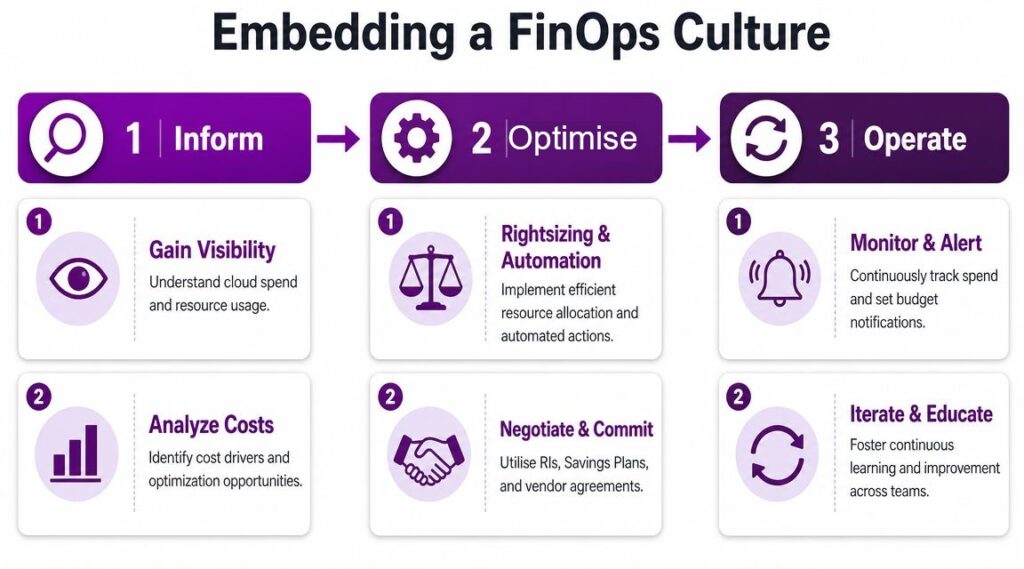
That’s where FinOps matters. Not as a buzzword, but as a practical discipline that brings engineering, operations, and finance into the same conversation. If Azure cost sits only with IT, finance sees surprises and engineers see friction. If everyone shares the same data and the same expectations, cloud cost optimization becomes part of normal operating rhythm.
Give each audience the right view
A common mistake is building one dashboard and expecting it to work for everybody.
Different stakeholders need different answers:
| Audience | What they need to see |
|---|---|
| Engineers | Which services are inefficient and which changes are actionable |
| IT managers | Budget drift, environment spend, and upcoming commitment decisions |
| Finance leaders | Forecasts, allocation by business unit, and month-end variance |
| Senior leadership | Whether cloud spend aligns with business priorities and governance |
Use Azure Cost Management for native budget and cost analysis, then layer Power BI on top if you need custom reporting. Keep the views simple enough that people can act on them quickly.
Turn cost reviews into a routine
Good FinOps isn't a special project meeting called when the bill looks bad. It's a recurring management process.
A practical cadence often includes:
- Frequent anomaly checks so unusual spikes are seen early
- Monthly reviews of trends, ownership, and optimisation actions
- Quarterly commitment reviews for Reservations and Savings Plans
- Architectural checkpoints before major delivery or migration decisions
Teams also need the right language for measurement. Some metrics track whether a process is healthy. Others express a strategic objective. If you need a clear management framing for that distinction, this guide for leaders on OKR vs KPI is helpful when you're deciding what to monitor in cloud governance and what to improve over time.
FinOps works when engineers can see cost, finance can trust the reporting, and managers can link both to action.
Include sustainability in the same conversation
Cost and sustainability are no longer separate discussions. UK guidance increasingly links cloud efficiency to lower energy use and emissions, and SECR rules mean many larger organisations must disclose energy and carbon data, which makes efficient cloud usage a board-level matter rather than a narrow IT concern (UK sustainability and reporting context).
That changes the quality of the optimisation discussion. Choosing the right storage tier, shutting down idle environments, and avoiding unnecessary compute isn't just about saving money. It also supports reporting and governance obligations that more organisations now face.
For some businesses, especially charities and mid-market firms, a formal FinOps team may be unrealistic. That's fine. What matters is ownership. Someone has to manage budgets. Someone has to review recommendations. Someone has to challenge workloads that stay oversized because changing them feels inconvenient.
One practical option is to combine in-house accountability with outside support for policy, reporting, or Azure estate reviews. F1Group provides Microsoft-focused support for organisations across the East Midlands, and that sort of partner involvement can help when internal teams need additional Azure governance capacity without building a dedicated specialist function.
Take Control of Your Cloud Spend Today
An Azure bill comes under control when you deal with it in layers. First, make spend visible. Then remove waste through rightsizing, shutdown schedules, and storage clean-up. After that, use Reservations and Savings Plans carefully for stable demand. Finally, push cost awareness upstream into architecture, delivery, and management reporting so the same issues don't keep returning.
The aim isn't to make Azure cheap at any cost. It's to make it predictable, justified, and aligned with how your business works.
| Action | Details |
|---|---|
| Contact F1Group for Expert Azure Support | Practical help with Azure governance, cost visibility, optimisation planning, and Microsoft-focused support for organisations across the East Midlands |
If your Azure spend feels unpredictable, F1Group can help you turn it into something measurable and manageable. Phone 0845 855 0000 today or send us a message to discuss Azure cost optimisation, governance, and ongoing Microsoft support.