
Your teams already know the feeling. Sales closes work in one system. Finance raises invoices in another. Operations plans stock from a spreadsheet that’s only accurate when somebody remembers to update it. Customer service gets the complaint when none of those versions match.
That disconnect usually doesn’t look dramatic at first. It looks like rekeying data, chasing approvals, phoning another department for an update, or finding out too late that a promised delivery date was based on old information. For many East Midlands firms, that’s the actual reason integration rises up the priority list. Not because “digital transformation” sounds good, but because disconnected systems slow down cash flow, frustrate staff, and make growth harder than it should be.
Dynamics 365 integration services matter because they turn separate systems into one joined-up operation. When they’re designed properly, your CRM, finance platform, warehouse process, customer service workflow, and reporting layer stop behaving like separate islands. The business gets a clearer picture of what’s happening now, not what happened last week.
Your Data Is Talking But Are You Listening
A common pattern shows up in growing businesses across Nottingham, Lincoln, Leicester and beyond. The commercial team wins new work and enters it into Dynamics 365. The finance team can’t act because the customer details haven’t reached the accounting system. Operations doesn’t see the order in time, so purchasing reacts late. Customer service is left trying to explain delays that started long before the customer ever rang.

That isn’t just an IT problem. It affects margin, service quality, forecasting, and trust between departments. When people stop trusting the data, they build workarounds. They keep their own spreadsheet. They send one more email to double-check. They create manual reports because the system report doesn’t line up with reality.
What siloed data actually costs
The direct cost is time. The bigger cost is hesitation.
A business owner usually notices the same symptoms:
- Manual duplication: Staff type the same customer, order, or supplier details into multiple systems.
- Delayed decisions: Managers wait for someone to reconcile records before acting.
- Inconsistent customer experience: Sales promises one thing, operations sees another, finance bills for something else.
- Weak reporting: Leadership gets several reports with different answers to the same question.
- Risky workarounds: Important processes end up living in inboxes and spreadsheets.
Practical rule: If your team spends part of every week checking whether two systems agree, you already have an integration problem.
The point of dynamics 365 integration services isn’t to add more software for the sake of it. It’s to create reliable movement of data between the systems you already depend on. That might mean a new customer record flows from sales into finance automatically. It might mean stock levels from a warehouse or manufacturing platform appear in the sales process when your team is quoting. It might mean service agents can see invoice status without ringing accounts.
When systems start behaving like one business
Well-run integration changes how the organisation feels day to day. People stop asking where the latest information lives. They know. The answer is in the system they’re already using, because the systems are connected behind the scenes.
That’s why this work matters. Not because integration is fashionable, but because disconnected information subtly creates avoidable friction all over the business.
What Exactly Are Dynamics 365 Integration Services
Dynamics 365 integration services aren’t one boxed product you switch on. They’re a combination of design choices, Microsoft tools, business rules, and secure connections that let Dynamics 365 exchange data with the rest of your estate.
Think of Dynamics 365 as part of the business brain. Integration services are the nervous system. They carry signals between sales, finance, operations, customer service, HR, ecommerce, reporting, and any specialist applications you still need to keep.
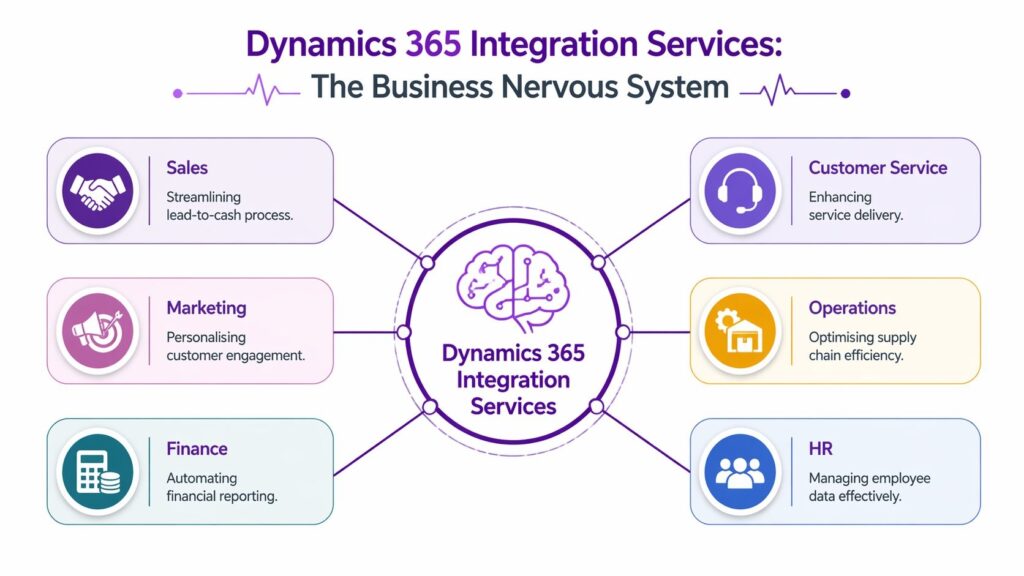
It’s about one version of the truth
Most businesses don’t start from a blank sheet. They’ve got an accounts package, perhaps a warehouse tool, maybe an old production system, an HR platform, and Microsoft 365 on top. The challenge isn’t replacing all of that overnight. The challenge is making sure those systems share the right data, in the right format, at the right time.
That’s where the idea of a single source of truth matters. It doesn’t always mean one database for everything. In practice, it means everyone can rely on a consistent version of core business information such as customers, products, pricing, orders, stock, cases, or invoices.
A simple way to think about it:
- Dynamics 365 holds business context: customer, sales, service, finance, or operational data.
- Integration moves and validates data: it applies rules so records are consistent.
- Users stay in familiar tools: the sales team, finance team, and service desk don’t need to work in the same screen to work from the same facts.
For teams trying to understand the basics of how applications communicate, this short note on Introducing API is useful background because many Dynamics integrations rely on API-based connections rather than manual file handling.
Later in the process, a video walkthrough can help make the Microsoft ecosystem feel less abstract:
What sits inside the integration layer
In practical terms, an integration service usually includes several elements:
- Connectors or APIs: These let Dynamics 365 talk to another application.
- Transformation rules: These align mismatched fields, formats, and naming conventions.
- Business logic: These rules decide what should happen when data changes.
- Scheduling or event triggers: Some updates happen instantly. Others run to a timetable.
- Monitoring and error handling: Someone needs to know when a sync fails.
The strongest integrations are usually boring in the best sense. They run quietly, pass clean data, and don’t depend on one staff member remembering a workaround.
What it is not
It isn’t a magic shortcut. Integration won’t fix duplicate records, unclear ownership of data, or a broken process you’ve moved into the cloud. If your product codes differ across three systems, the integration will expose that confusion very quickly.
That’s why the best projects start with business questions, not tools. What needs to move. Who needs it. How quickly. What happens if it fails. What must stay secure. Those answers shape the solution.
Common Integration Scenarios for UK Businesses
The fastest way to judge whether dynamics 365 integration services are relevant is to look at familiar situations. Most organisations don’t need “everything connected”. They need a handful of key processes to stop breaking between systems.

CRM and finance working from the same customer record
A typical problem appears when the sales team creates accounts and opportunities in Dynamics 365 Sales, but finance maintains the “real” customer record elsewhere. That leads to duplicate customers, credit control confusion, and invoice delays.
A sensible integration gives each system a clear role. Sales owns pipeline and contact activity. Finance owns credit terms, invoicing, and payment status. Customer data syncs between them under agreed rules, so sales can see account status and finance doesn’t have to re-enter what the commercial team already captured.
The business benefit is straightforward. Faster order-to-cash, fewer duplicate records, and less friction between departments.
Legacy manufacturing or warehouse systems feeding live decisions
Manufacturers and distributors often keep a specialist production, stock, or warehouse application because it handles operational detail that a general platform doesn’t. The problem starts when sales can’t see stock availability, lead times, or order status without sending an email to the warehouse.
That’s where integration earns its keep. Instead of replacing the operational platform immediately, Dynamics 365 can receive the key signals that matter to the customer-facing teams. Inventory position, dispatch milestones, manufacturing progress, or returns status can be surfaced where sales and service operate.
For firms with engineering stock or maintenance-heavy operations, thinking through managing spare parts inventory is useful because stock accuracy and availability often sit at the centre of a successful integration design.
Ecommerce and back-office processing without manual rekeying
Growing online businesses usually hit a point where the website generates orders faster than the back office can process them cleanly. Staff copy online orders into finance. They correct tax or product errors manually. Refunds and delivery updates take too long to appear in customer records.
A better model links the ecommerce platform to Dynamics 365 and the finance layer so order data, customer records, product updates, and fulfilment information move automatically. The office team stops acting as a human integration engine.
This tends to improve three things at once:
- Order handling: New sales appear in the right systems quickly.
- Financial reconciliation: Payments and orders are easier to match.
- Customer communication: Service teams can see what happened without chasing screenshots.
HR and operational onboarding
Another neglected scenario is employee data. A business hires someone new, then three or four teams each set them up separately. HR enters core details. IT creates accounts. Line managers request access. Payroll waits for another form. None of it joins up.
Integrating HR records with Microsoft 365, workflow tools, and operational systems creates a cleaner onboarding path. It doesn’t need to be complicated. Even a well-designed trigger from an approved starter record can reduce missed steps, late access, and duplicated admin.
If staff onboarding depends on a checklist in somebody’s drawer, there’s usually an integration opportunity hiding in plain sight.
Power Platform for the gaps between systems
Not every process belongs inside a major line-of-business application. Sometimes a team needs a simple app for approvals, field updates, inspections, or exception handling. That’s where Power Apps and Power Automate often fit well alongside Dynamics 365.
A custom process can sit in front of an old system or bridge a gap between departments without forcing a full replacement project. Used carefully, that gives smaller businesses a practical way to improve flow without committing to a large rebuild.
The trade-off is governance. Quick wins are useful, but they still need ownership, security, and a plan for support.
The Architect’s Toolkit Integration Patterns and Platforms
The right integration starts with the pattern, not the product. Businesses often ask whether they need Dataverse, Power Automate, Logic Apps, or something else. That’s the wrong first question. The first question is how the data should move.
Choosing the pattern before the platform
Some processes need real-time integration. If a customer rings your service desk and wants an order update, the answer needs to reflect what’s happening now. Sales handoffs, service status, and approval-driven workflows often fall into this category.
Other processes are better handled in batch. End-of-day finance updates, reporting extracts, and lower-priority synchronisations can be scheduled. That reduces noise, controls load, and is often easier to support.
A second decision is whether you need API-led integration or a more traditional ETL-style approach.
- API-led integration: Best when systems need to exchange live or near-live business events.
- ETL integration: Better for migration, structured imports, regular bulk loads, or reporting pipelines.
- Hybrid integration: Common in practice, where some processes are event-driven and others still move in scheduled batches.
Pick the pattern that fits the business consequence of delay. Don’t force every sync to be instant if nobody benefits from instant.
The main Microsoft tools in practical terms
Microsoft gives you several routes to build dynamics 365 integration services, and each has a place.
Dataverse is often the core data layer when you want applications in the Microsoft ecosystem to work from consistent business data. According to Microsoft’s architecture guidance in The Architect’s Toolkit Integration Patterns and Platforms, using the low-code integration capabilities of Dataverse, with its hundreds of pre-built connectors, can reduce custom development time by up to 70% for businesses integrating systems with Microsoft 365.
Power Automate is well suited to workflow-driven integration. It’s useful when a business event should trigger an action, such as creating a task, sending an approval, updating a record, or pushing data into another service.
Azure Logic Apps is the step up when workflows become more complex, integration volume grows, or you need deeper control over orchestration, resilience, and enterprise connectivity.
Azure Service Bus becomes relevant when reliability matters more than immediacy. It helps decouple systems so one application doesn’t fail just because another is briefly unavailable.
Custom APIs and connectors are still part of the picture when you’re linking to specialist industry platforms, older on-premise applications, or proprietary systems.
If you’re exploring the wider Microsoft app ecosystem, Apps365 tools offers a handy catalogue-style view of tools people often combine with Microsoft business platforms.
For businesses planning broader platform work, this guide to integrating software systems is also useful because integration decisions rarely sit in Dynamics 365 alone.
Comparing Key Dynamics 365 Integration Tools
| Tool | Best For | Skill Level | Cost Model |
|---|---|---|---|
| Dataverse | Shared business data across Microsoft applications, low-code integration, common data model alignment | Low to medium | Platform and licensing-led |
| Power Automate | Event-driven workflows, approvals, notifications, routine cross-app actions | Low to medium | Per user, per flow, or licence dependent |
| Azure Logic Apps | Complex orchestration, enterprise integrations, hybrid connections, scalable workflows | Medium to high | Consumption or Azure service usage |
| Azure Service Bus | Reliable messaging between systems, decoupling applications, asynchronous communication | Medium to high | Azure usage-based |
| Custom API integration | Specialist systems, tailored business logic, legacy application connectivity | High | Project-led development and maintenance |
| ETL tools | Bulk migration, structured data movement, reporting feeds, scheduled loads | Medium to high | Tooling, infrastructure, and support dependent |
What works and what tends to fail
What works is matching tool choice to business importance. If a process is simple, visible, and low risk, low-code often delivers value quickly. If the process is high volume, business-critical, or touches several systems, enterprise Azure services usually give you more control.
What tends to fail is using one tool for everything because the team already knows it. Power Automate can be brilliant, but it isn’t the answer to every enterprise integration problem. Equally, not every workflow needs the weight of an Azure-heavy architecture.
The strongest designs are usually modest. Clear ownership. Known failure handling. Minimal hidden complexity. Enough architecture to be safe, but not so much that the business waits months for a simple improvement.
Navigating Critical Success Factors Governance and Security
Most integration failures don’t happen because the connector was impossible to build. They happen because nobody settled the rules around data, access, and compliance before the build started.
Data mapping is not admin work
The first pillar is data mapping, which involves teams deciding which fields relate to each other, which system owns each record, what formats are acceptable, and what should happen when data conflicts.
This phase gets rushed more often than it should. People assume customer name maps to customer name, address maps to address, and so on. In reality, one system may allow free text while another uses structured fields. One may hold multiple delivery addresses. One may treat a contact as a person, another as part of an account hierarchy.
That detail matters. Poor decisions here surface later as sync failures, duplicate records, and untrustworthy reporting.
Security has to be designed in
The second pillar is security. Good integration doesn’t just move data. It controls who can access it, which systems can exchange it, and how actions are authenticated and monitored.
In practice, businesses should insist on answers to these questions:
- Who owns the connection identity: Is the integration tied to a person’s account, or a managed service identity?
- What can it access: Are permissions limited to what the process needs?
- How are failures logged: Can the team investigate a broken sync without exposing sensitive data?
- What happens when staff leave: Does access survive or break because someone’s account changed?
A secure design also reduces operational fragility. The goal isn’t only to stop unauthorised access. It’s to stop business-critical processes relying on hidden dependencies that nobody documents.
A surprising number of “system issues” are actually governance issues. The software did exactly what it was told to do.
UK GDPR concerns are slowing projects
The third pillar is UK-specific compliance. Generic integration guides often stop at technical architecture. That isn’t enough for organisations dealing with customer, employee, or operational data in the UK.
A 2025 report on Microsoft Dynamics adoption found that 68% of mid-sized UK businesses reported integration project delays specifically due to fears over UK GDPR compliance post-Brexit according to this report on integration failure points and Dynamics 365 fixes.
That figure rings true in practice. Not because integration and compliance are at odds, but because many firms don’t get clear guidance on data residency, access control, retention, auditability, and lawful handling early enough in the project.
Businesses in regulated sectors should push for documented decisions on:
- Data residency: Where data is stored and processed.
- Access control: Which roles can view or update integrated records.
- Retention: Whether copied data sits in multiple systems longer than necessary.
- Audit trail: How changes and sync events can be traced.
- Third-party involvement: Which suppliers touch the data and under what terms.
For a broader operational view, these data governance best practices are worth reviewing before an integration programme begins.
Governance decides whether the technical work sticks
A clever integration can still fail if no one owns the master record, no one approves schema changes, and no one monitors exceptions after go-live. Governance sounds slower than development, but it’s usually what keeps the development useful.
The practical test is simple. If you can’t explain who owns the data, who can access it, where it moves, and how issues are handled, you’re not ready to integrate safely.
Your Actionable Integration Project Roadmap
A solid integration project should feel structured from the start. Not over-engineered, but deliberate. Businesses get into trouble when they jump straight into connector builds before deciding what success looks like.
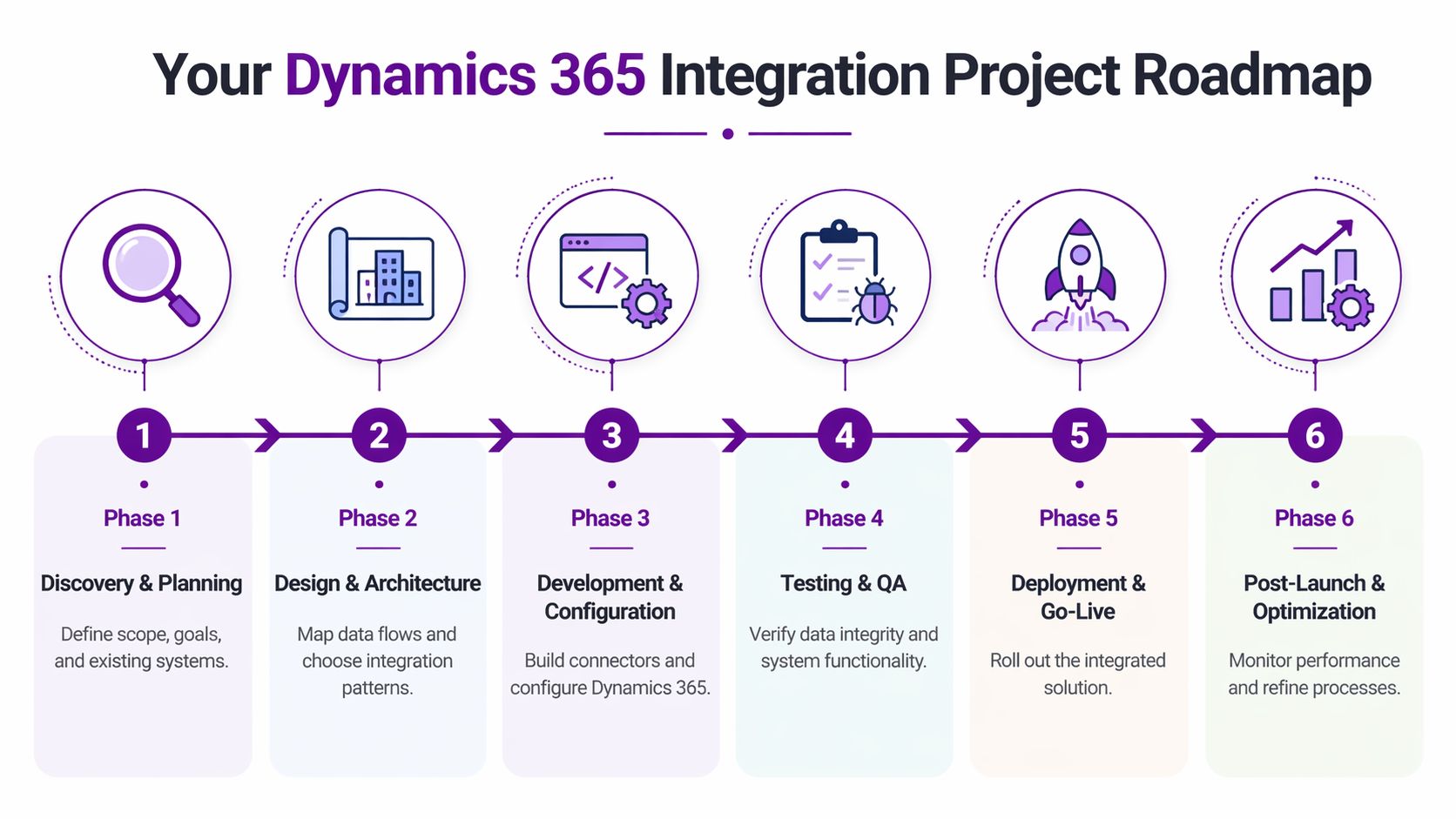
Phase one to three
-
Discovery and planning
Start with processes, systems, pain points, and ownership. Define which records need to move, how often, and why. This is also where risks around legacy applications, unsupported interfaces, and duplicate data should be surfaced. -
Design and architecture
Map entities and fields properly. Decide whether each flow should be real-time, batch, API-led, or ETL-led. Integration audits reveal that poor data mapping during the initial discovery and design phases leads to 40% higher error rates in synchronisation once the system goes live, as noted in the earlier Microsoft architecture guidance. -
Development and configuration
Build the integrations, configure Dynamics 365, set up workflows, and implement logging. Keep the design visible. Hidden logic becomes expensive support work later.
Phase four to six
-
Testing and quality assurance
Test happy paths, but also test failures. What happens when a mandatory field is empty, a service is unavailable, or duplicate data appears. User acceptance testing should involve the people who live with the process, not just the project team. -
Deployment and go-live
Plan cutover carefully. Decide what moves first, what runs in parallel, and what support looks like in the first few days. The launch should include monitoring, rollback thinking, and named owners. -
Post-launch optimisation
Go-live is where you start learning. Review error logs, tune workflows, adjust mappings, and retire manual workarounds that are no longer needed. Good integration programmes improve over time rather than freezing on day one.
Budget expectations in plain terms
Costs vary widely because scope varies widely. A simple, well-bounded integration between Dynamics 365 and one other cloud platform may start from £5,000. A broader project involving several systems, legacy considerations, testing overhead, and governance work can sit in the £25,000 to £75,000+ range.
Those figures are planning bands, not universal prices. The final cost depends on complexity, data quality, platform licensing, security requirements, and how much bespoke logic is involved.
A practical buyer should ask for clarity on:
- What is included: discovery, build, testing, documentation, training, support.
- What is excluded: third-party licences, major data cleansing, or legacy remediation.
- What changes the price: extra entities, custom rules, or on-premise connectivity.
- What support looks like after launch: incident handling, enhancements, and monitoring.
The cheapest integration is often the one that becomes expensive six months later because nobody budgeted for testing, logging, or support.
How to judge return on investment
ROI usually shows up in three places. Staff stop rekeying data. Managers get more reliable information sooner. Customers get quicker, more consistent responses.
Some returns are easy to see, such as reduced admin effort or faster invoicing. Others show up as fewer avoidable mistakes, better service continuity, and stronger confidence in reporting. Those gains matter just as much, especially when a business is scaling.
Your Expert Dynamics 365 Partner in the East Midlands
If you’re running a business in the East Midlands, the value of a local partner isn’t just geography. It’s having people who understand the practical mix of systems many regional firms are dealing with: legacy applications that still matter, Microsoft platforms that need to work harder, security expectations that can’t be brushed aside, and teams that need usable answers rather than abstract architecture diagrams.
That’s especially true with dynamics 365 integration services. The technical build is only one part of the job. You also need sensible discovery, clean mapping, governance, support after go-live, and someone who can translate business process into system design without making the project harder than it needs to be.
For organisations that want local and remote support around Microsoft business applications, Dynamics 365 partner services in the UK are one route to review. F1Group works across the East Midlands on Microsoft-focused delivery including Dynamics 365, Power Platform, Azure, cyber security, and wider systems integration.
The right partner should be comfortable advising when not to integrate as well. Sometimes a process needs simplification first. Sometimes a legacy system should be isolated rather than tightly coupled. Sometimes the best answer is a phased approach that secures the highest-value process before expanding further.
If your teams are still acting as the bridge between systems, the business is paying for that gap every day. Fixing it usually starts with a proper conversation about what needs to move, what needs to stay secure, and where the biggest operational friction sits now.
If you want practical advice on connecting Dynamics 365 to the rest of your business systems, speak to F1Group. Phone 0845 855 0000 today or Send us a message.